
You're trying to buy concert tickets, refreshing the page as seats disappear, when the message Ticketmaster "Your browsing activity has been paused" error appears. Access is blocked, the clock is ticking, and frustration sets in fast. This interruption often feels unexpected, especially when you're simply browsing or checking availability.
For many users, it raises questions about what went wrong and how long the restriction will last. Understanding this message is important because it directly affects your ability to view events, select seats, and complete purchases. This article breaks down what the warning means and how to move forward smoothly.
Table of Contents
Part 1. What "Your Browsing Activity Has Been Paused" Means
"Your Browsing Activity Has Been Paused" means Ticketmaster has temporarily restricted access to protect its platform. The system detected activity that doesn't match normal browsing patterns, so it limits further actions for a short time. During this pause, you may be unable to view events, refresh pages, or purchase tickets until access is automatically restored or verified.
Why Ticketmaster Triggers This Message
When Ticketmaster "Your browsing activity has been paused" error appears, it signals a protective response designed to manage platform traffic. Provided below are some of the common reasons that cause this error:
- Rapid Page Refreshing: Repeatedly refreshing ticket pages quickly can resemble automated tools and trigger temporary access restrictions. Such behavior often occurs during urgency, but still activates protective systems monitoring traffic volumes.
- Multiple Tabs or Devices: Opening the same event across multiple tabs or devices can confuse session tracking systems. This overlap may appear abnormal and prompt automated limits designed to prevent abuse online.
- High-Traffic Sales Periods: Major on-sales generate sudden traffic spikes that force platforms to regulate user access levels. Temporary pauses help maintain performance stability and ensure fair purchasing opportunities for all users.
- IP Address Irregularities: Shared or frequently changing IP addresses may look suspicious to automated security systems online. These signals can trigger brief pauses until normal browsing patterns return for verified users.
- Browser Extensions or VPNs: Certain extensions or VPNs interfere with scripts that verify legitimate human browsing activity sessions. When detection fails, systems may pause access to protect inventory accuracy during high demand.
Part 2. How to Fix Ticketmaster "Your Browsing Activity Has Been Paused"
Once you understand why the pause occurs, the next step is getting back to browsing and buying tickets without delays. Fortunately, this restriction is usually temporary and can often be resolved with a few simple adjustments. The following solutions focus on practical steps that help you resume normal activity and continue your ticket search smoothly:
Fix 1: Slow Down Browsing and Wait
Pausing rapid interactions helps when the Ticketmaster "Your browsing activity has been paused" error hits unexpectedly. Slower page requests signal normal behavior and reduce automated system suspicion during sessions. Waiting briefly allows temporary limits to expire without further triggering security mechanisms. This approach often restores access smoothly while protecting fair ticket availability for users.
Fix 2: Log In and Complete Any Captcha
Completing account verification helps when the Ticketmaster "Your browsing activity has been paused" error occurs mid-session. Logged-in users appear more trustworthy, allowing systems to confirm genuine human activity. Captcha checks validate requests and quickly clear automated flags blocking further access. Once verified, browsing typically resumes without repeated interruptions or unnecessary waiting periods online. Here is how you can easily log into the Ticketmaster website and see for any verifications:
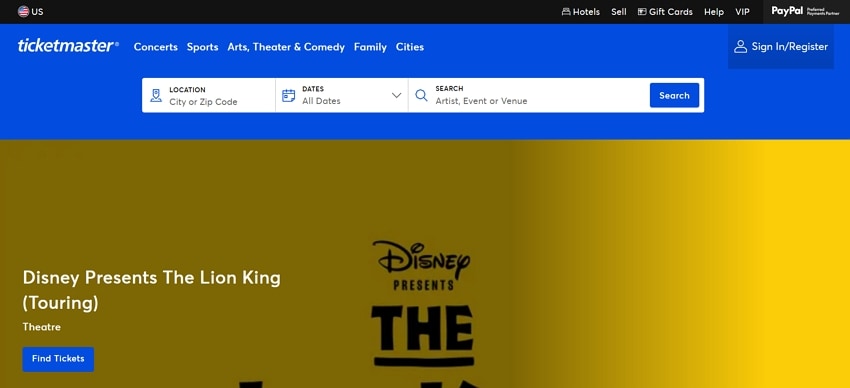
Instructions. Go to the Ticketmaster website and log in using your registered email and password. If Ticketmaster detects unusual activity, a Captcha box (like "I'm not a robot" or image verification) will appear on your screen. Once the Captcha is successfully completed, Ticketmaster will validate your session. You can now continue browsing events and completing purchases without interruptions.
Fix 3: Clear Cookies, Cache, and History
Refreshing browser data can help when Ticketmaster "Your browsing activity has been paused" issue comes repeatedly. Old cookies sometimes conflict with current sessions, creating mismatched identifiers for systems. Clearing the cache forces fresh connections that better reflect present, legitimate browsing behavior. This reset often improves stability without affecting saved accounts or payment details. To learn how to perform this fix, read the steps provided next:
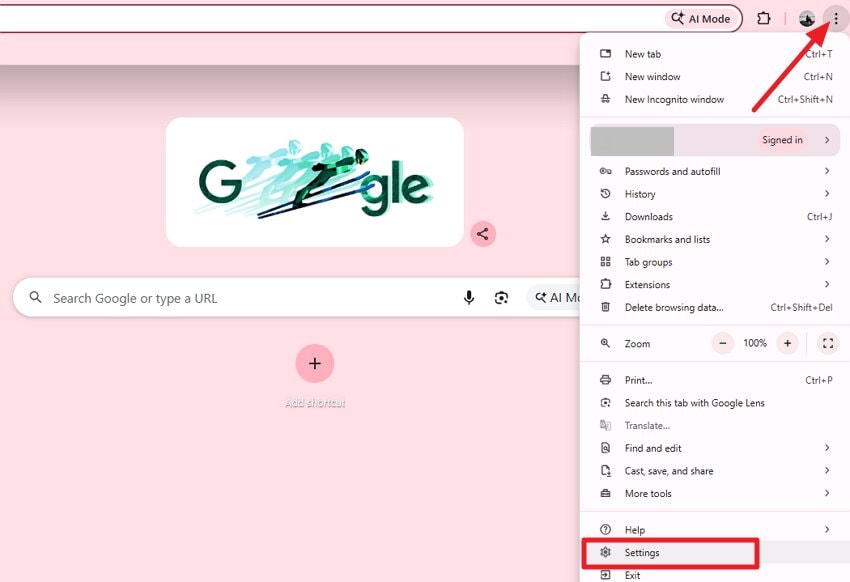
Step 1. Open Chrome and head to the top–right corner to press the "Three Dots" icon. Now, locate the "Settings" option and click on the extended list.
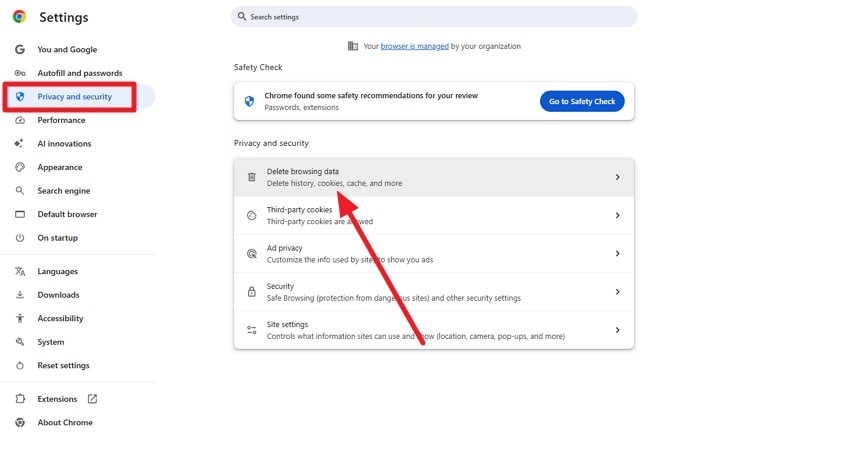
Step 2. Access the "Privacy and Security" tab and click on the "Delete Browsing Data" option.
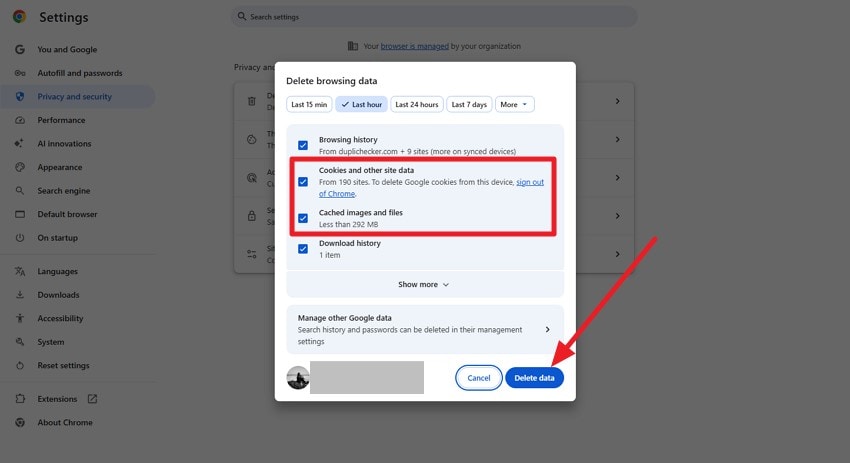
Step 3. Tick the checkboxes for cookies and cache, and press the "Delete Data" button to clear them.
Fix 4: Switch Browsers or Use Incognito Mode
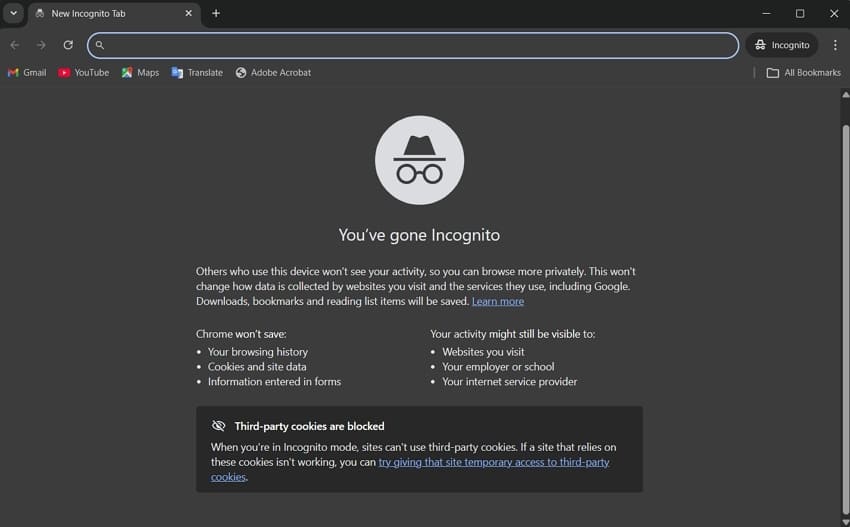
Switching browsing environments may resolve situations where Ticketmaster "Your browsing activity has been paused" error comes up. Different browsers handle scripts uniquely, sometimes avoiding conflicts seen in previous sessions. Private windows start clean sessions, reducing carryover data that triggers automated checks. Follow the steps mentioned below to learn how to enable the Incognito Mode in Chrome:
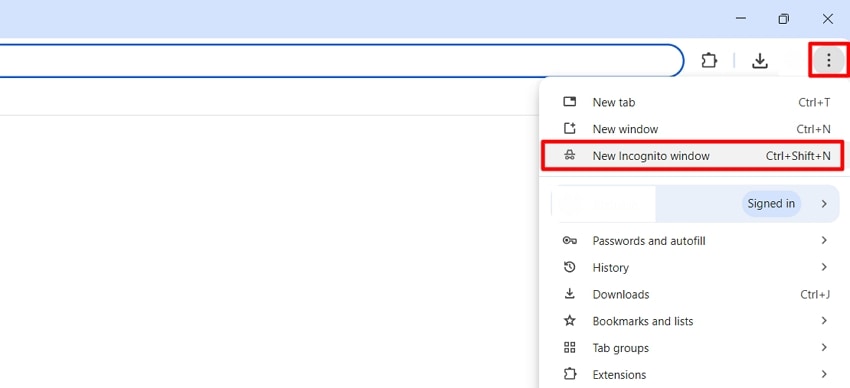
Step 1. Open Google Chrome and click the three dots to select the "New Incognito Window" option.
Step 2. Browse as usual across the new window, then close all Incognito windows to end the session and remove temporary data.
Fix 5: Disable VPN, Proxies, or Apple Private Relay
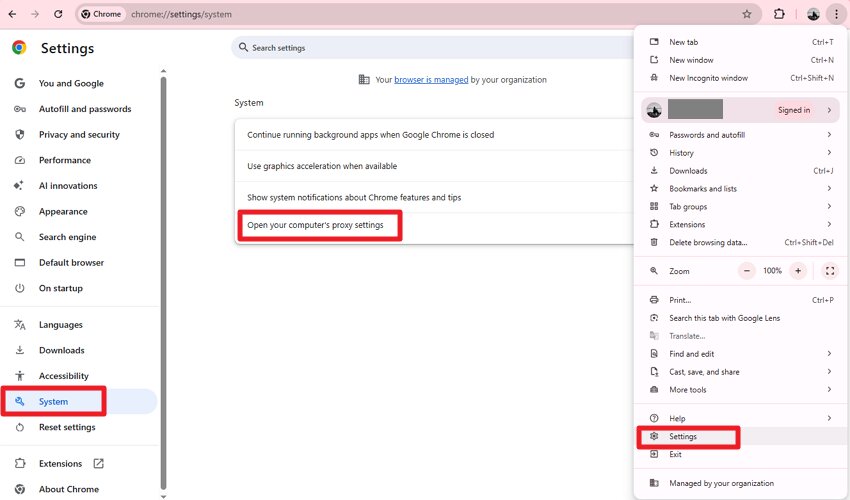
Disabling masked connections helps when Ticketmaster "Your browsing activity has been paused" appears unexpectedly. VPNs and proxies alter location signals, which platforms may flag as irregular. Private relay features can hide identifiers needed for consistent session verification processes. Turning them off temporarily often restores trust signals without compromising account security. Follow the steps provided next to learn how to disable the proxy server on your browser:
Step 1. Head to the "Settings" by clicking on the "Three Dots" icon. Now, access the "System" option and choose the "Open Your Computer's Proxy Settings" option.
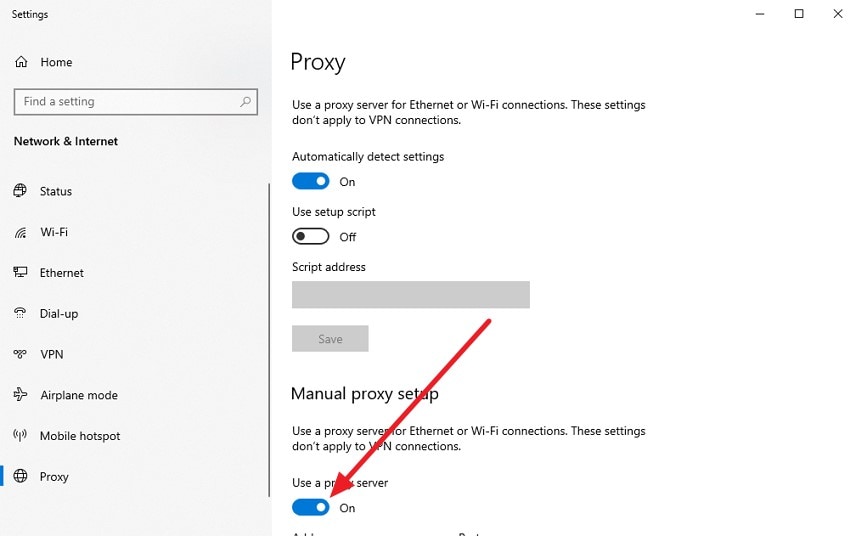
Step 2. Once the settings are accessed, turn off any proxy server by disabling the toggle.
Fix 6: Change Network or IP Address
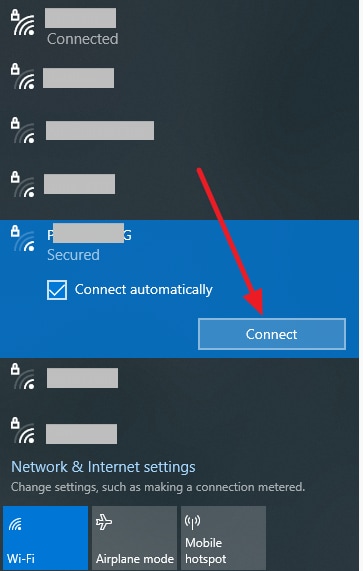
Changing your internet connection can help when Ticketmaster "Your browsing activity has been paused" error occurs. Different networks assign new IPs, reducing associations with previously limited sessions online. Mobile data or alternate Wi-Fi may appear more stable to detection systems. This shift often resolves access blocks without requiring changes to browser configurations. Here is how to change the network on your system:
Instructions. Click on the "Wi-Fi" icon located at the bottom of the taskbar and choose any other tested Wi-Fi option available by clicking on the "Connect" option. Input the password, and your IP address will be automatically changed.
Fix 7: Reinstall or Update the Ticketmaster App
Updating the application helps when Ticketmaster "Your browsing activity has been paused" issue arises frequently. Outdated app versions may contain bugs affecting session validation or traffic handling. Reinstallation refreshes permissions and files, ensuring compatibility with current security requirements standards. Keeping apps current improves reliability during busy sales and high-demand ticket releases.
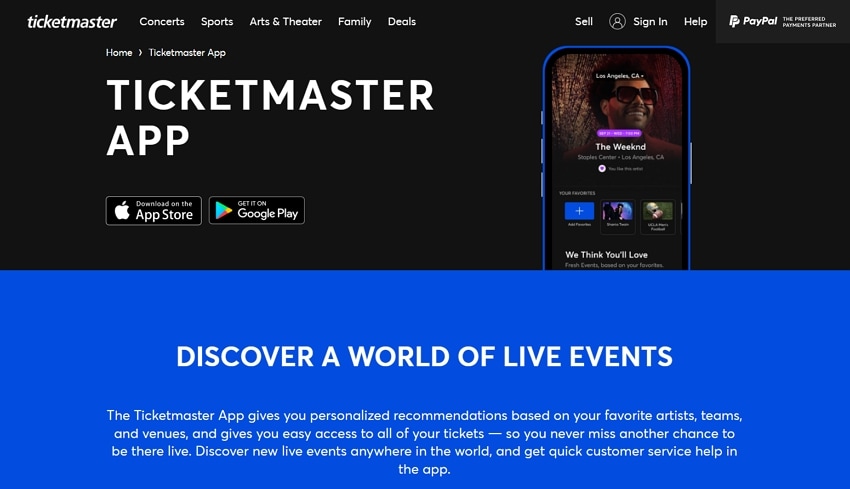
Instructions: If you are using the platform as a mobile application, simply uninstall it and head to the App Store or Play Store and click on the "Get" option to install it again. If the app is outdated, an "Update" option will appear. Tap on it to update the application and start using it.
Pro Tip: Repair and Enhance Your Concert Photos and Videos with Repairit
Concert moments are often captured quickly, making files vulnerable to corruption if apps freeze or connections drop. Repairit helps restore damaged photos and videos recorded during live events. Its advanced repair engine rebuilds broken file structures and improves playback quality. This is especially helpful when the Ticketmaster "Your browsing activity has been paused" error comes, causing interruptions that affect downloads or saved concert media files.
Beyond basic repair, Repairit enhances visual quality for sharing and archiving memories. Blurry footage, pixelated images, or unplayable clips can be corrected without re-recording. The tool ensures concert photos and videos remain clear, stable, and usable. This makes it a reliable solution for preserving live-event memories after unexpected disruptions or incomplete saves occur during busy ticketing or browsing sessions.

-
Binary-Level Data Repair Engine: The tool analyzes corrupted files at the binary level to restore missing data blocks. This is useful when files are partially written due to forced browser or app stops.
-
Interrupted Download Recovery Support: Files damaged by stalled or terminated downloads can be repaired without re-downloading. This helps when access is blocked before downloads complete.
Step-by-Step Guide to Repair Concert Photos and Videos With Repairit
As discussed, Repairit allows users to restore their images and videos in no time. To learn how to use this tool, read the steps provided below:
Step 1. Select the Appropriate Repair Option
Start by opening Repairit and choosing the "Video Repair" option from the left. Once selected, proceed to add the affected videos using the "Start" button.

Step 2. Analyze and Repair the Corrupted Files
After the files are loaded, initiate the repair process with the "Repair" button. Repairit will automatically scan the damaged content, rebuild missing data, and restore file structure.

Step 3. Review and Save the Restored Content
When the repair is finished, preview the recovered files to ensure quality and usability. If everything looks correct, save the restored photos or videos to your device using the "Save" button.

Repair Concert Photos and Videos With Repairit
 Security Verified. Over 7,302,189 people have downloaded it.
Conclusion
To wrap it up, this article provided a detailed guide on how to fix the Ticketmaster "Your browsing activity has been paused" issue and resume smooth access to events. By combining patience, browser adjustments, and session management, users can restore normal activity efficiently. For added safety, Repairit is recommended to recover any corrupted downloads, PDFs, or media files disrupted during interrupted sessions, ensuring your tickets and memories remain intact.
Frequently Asked Questions
-
1. Why does Ticketmaster say "Your Browsing Activity Has Been Paused"?
This message appears when the system detects unusual browsing behavior or multiple rapid requests. It is a temporary restriction to maintain fair ticket access for all users. -
2. How long will the pause last on Ticketmaster?
Pauses usually last a few minutes, depending on detected activity levels. Waiting calmly and avoiding repeated refreshes helps restore access faster. -
3. Can I recover corrupted tickets or PDFs from interrupted downloads?
Yes, tools like Repairit can restore damaged PDF tickets and receipts quickly. This ensures important booking documents remain readable and usable. -
4. What should I do if my concert photos or videos get corrupted during downloads?
Using Repairit can repair and enhance corrupted media files automatically. It restores file integrity and improves visual quality for sharing or archiving.




