
 TL;DR:
You can fix the Forza Horizon 6 E:0-C0 and E:0-0 save load failure errors by resolving local data corruption, removing cloud sync conflicts, and restoring Xbox server connectivity.
● Force a manual Steam Cloud sync in the game properties and delete the local FH6 cache folder located in the %localappdata% AppData/Local/Temp directory to rebuild fresh data files.
● Disable active VPNs that block Xbox Live server connections and unlink your PC from OneDrive to prevent multiple platforms from creating conflicting save versions.
● Restore system communication by running PowerShell as an administrator to remove Microsoft.GamingServices using the remove-AppxPackage command, then reinstalling it through the Microsoft Store.
Ask AI for a summary
 ChatGPT
 Perplexity
 Gemini
 Claude
 Grok
Grok
Since its release, Forza Horizon 6 has swept through the racing world. Its open world and realistic driving experience are loved by players all around the globe. Final Weapon reveals that FH6 has now hit 6 million "all players" worldwide within a few days of release. Yet, many Windows and Xbox players are suddenly hitting a frustrating save-load error. This error stops you from accessing your progress and previously saved game data.
Many players searching to fix the Forza Horizon 6 error code E:0-C0 feel stuck. Nonetheless, you can safely repair your local gaming installation using targeted methods. Thus, this technical guide outlines how to restore your missing campaign progress files.
In this article
Part 1. What is E:0-C0 / E:0-0 Error in Forza Horizon 6?
E:0-C0 and E:0-0 are save load failure errors inside Forza Horizon 6. These errors occur if your saved profile or progress is unavailable for the game. Essentially, the game refuses to start your session due to unresolved data conflicts. Many players who want to fix the Forza Horizon 6 error code E:0-0 face this daily.
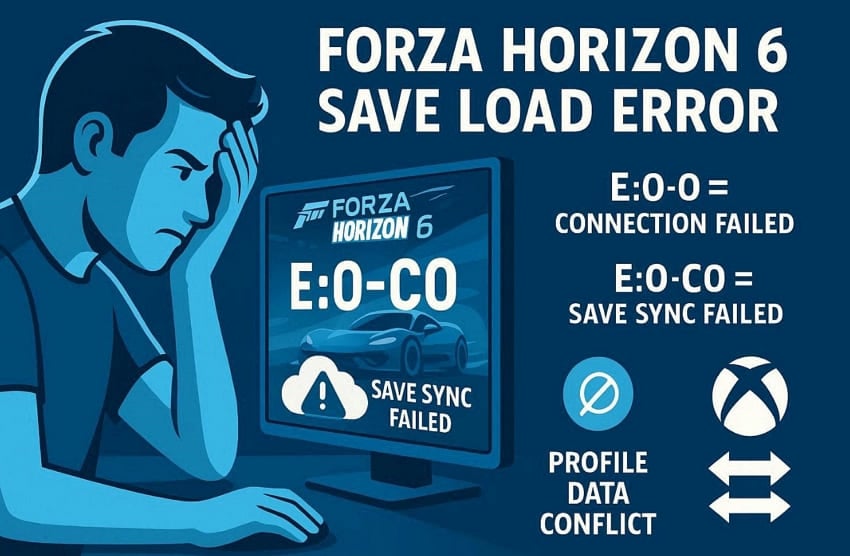
This E:0-0 code means the game failed to connect with Xbox online services. It cannot load your cloud or local profile save during the startup process. The E:0-C0 code specifically points to a save file syncing or loading failure. Missing write permissions or profile sync issues commonly trigger this error code.
Why Does This Error Happen
Various system and network issues trigger the need to fix the Forza Horizon 6 load failed save data PC. Players on Reddit also report FH6 save sync problems across PC and Xbox setups. Hence, here are the 5 most common reasons behind this frustrating error code:
- Sync Failure: The game cannot sync your save data with Xbox online cloud servers. This connection failure causes the game to refuse to load your profile on startup.
- Corrupt Cache: Leftover cached files from previous sessions block save data access. These broken cache files prevent the game from reading your stored progress.
- Missing Permissions: Windows may deny Forza Horizon 6 the write permissions it needs. The game will not be able to read or write your local save files without these permissions.
- Outdated Drivers: Incompatible graphics drivers conflict with the game's save loading system. This driver mismatch causes the game to crash during the profile verification.
- Cloud Conflict: Multiple devices saving create conflicting versions of your FH6 data. This conflict confuses the game and triggers a load failure error on startup.
Part 2. Fix "Error Occurred While Loading Save" in Forza Horizon 6
Some options exist to fix the Forza Horizon 6 E:0-C0 E:0-0 load error by applying targeted solutions. In this section, you will explore 6 proven ways to restore your saved progress:
Way 1. Sync Save Data Properly
The most common cause of this error is an unsynced save file. When a game launcher like Steam Cloud fails to sync, FH6 cannot locate your saved progress. Many FH6 players report losing hundreds of hours due to cloud save sync failures, according to Pure Xbox.
Forcing a manual Steam Cloud sync refreshes the connection between your local and cloud data. Hence, go through these steps to sync your FH6 save data:
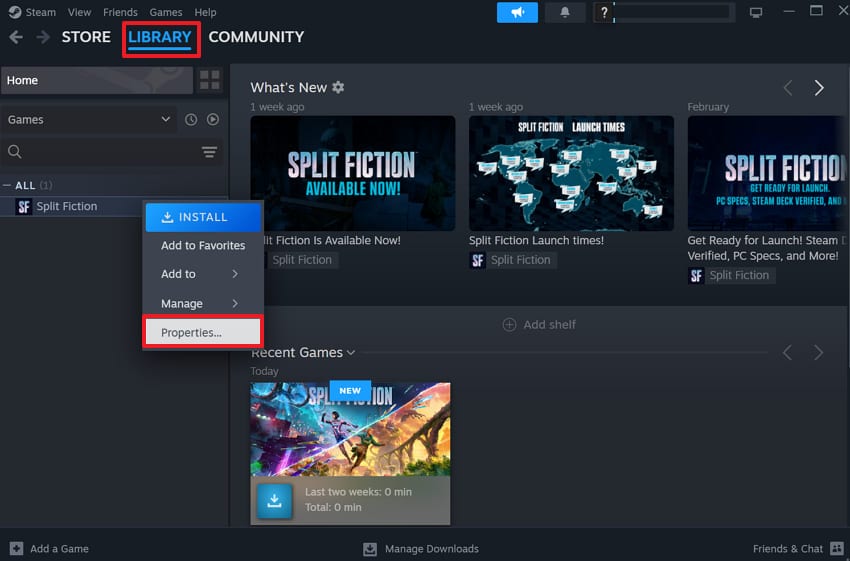
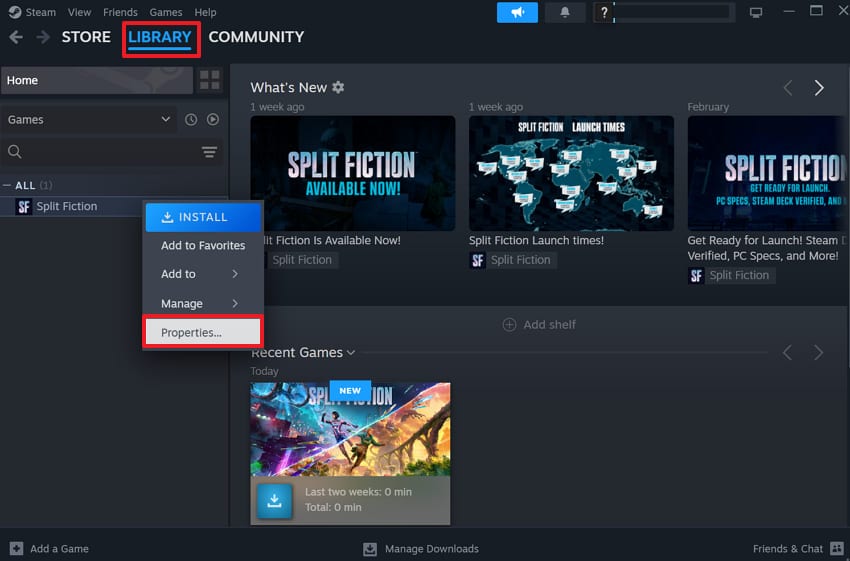
Step 1. Open your game launcher, such as "Steam," and head to the "Library" section. Locate Forza Horizon 6, then right-click its title and select "Properties."
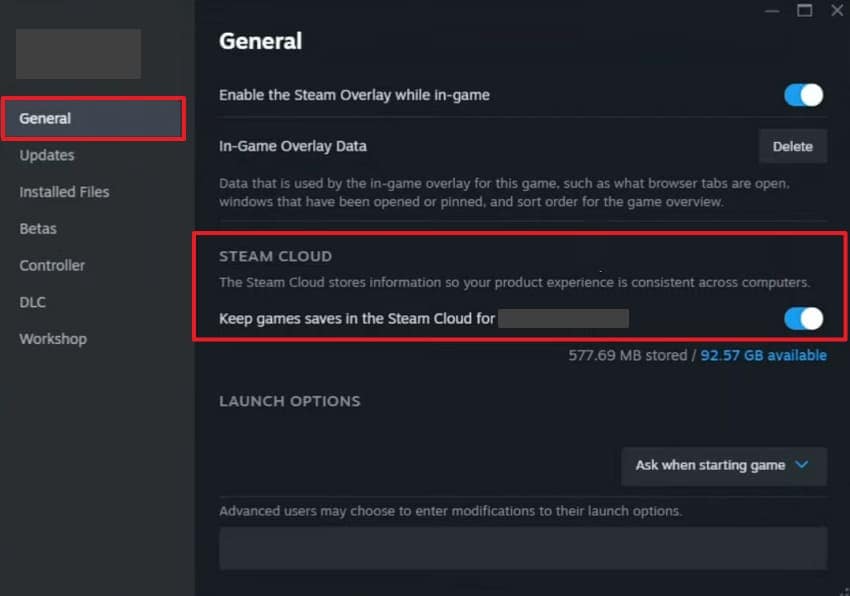
Step 2. Turn on the "Keep Game Saves in the Steam Cloud for Forza Horizon 6" toggle.
Way 2. Clear Local Save Cache
Corrupted cache files are a very common trigger behind the FH6 save error. These old files create conflicts that stop Forza Horizon 6 from loading your data. When you clear this local cache, it forces the game to rebuild fresh data files. Reddit users also recommend resetting Forza after save synchronization fails. Adhere to the steps below to fix the Forza Horizon 6 error code E:0-C0:
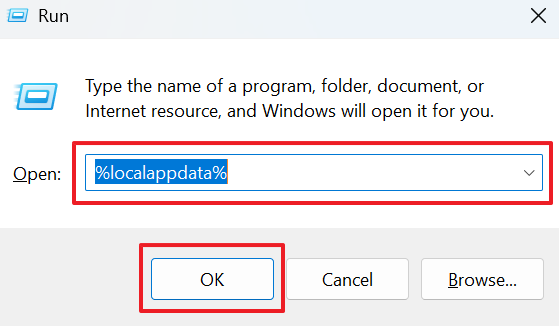
Step 1. Launch the "Run" utility to enter "%localappdata%" and click "OK" to open the directory.
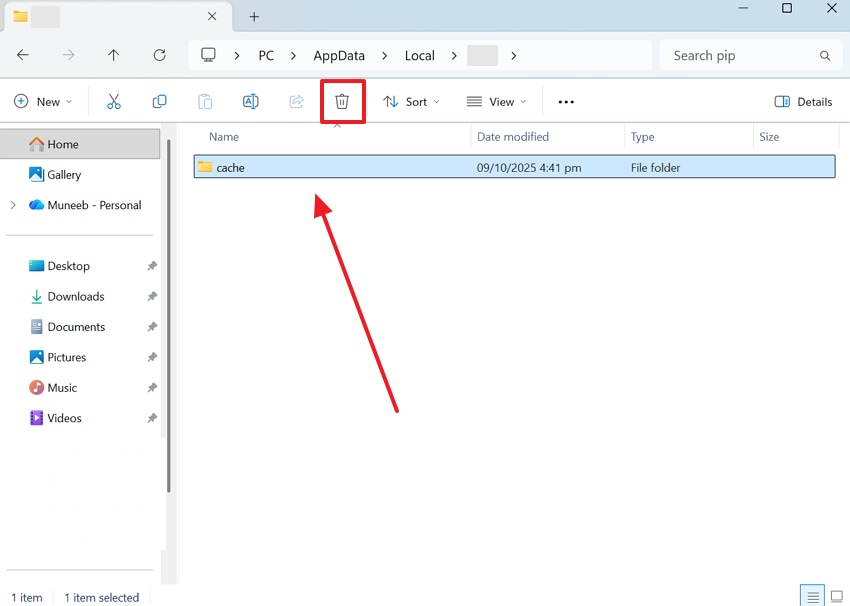
Step 2. Then, find your FH6 folder within the "AppData/Local/Temp" location. Open the folder to select all contents and click the "Delete" icon.
Way 3. Verify Forza Horizon 6 Game Files
Damaged game files also cause the save-load error in Forza Horizon 6. These corrupted files prevent the game from reading your saved profile and progress data. This is a very overlooked step when players try to fix the Forza Horizon 6 error code E:0-0. Therefore, there is a file verification tool in game launchers, such as Steam, to replace corrupt files. Hence, follow these steps to verify your FH6 game files:
Step 1. As you run the preferred game launcher like "Steam," access the "Library" section. Then, locate "Forza Horizon 6" to open "Properties" upon right-clicking it.
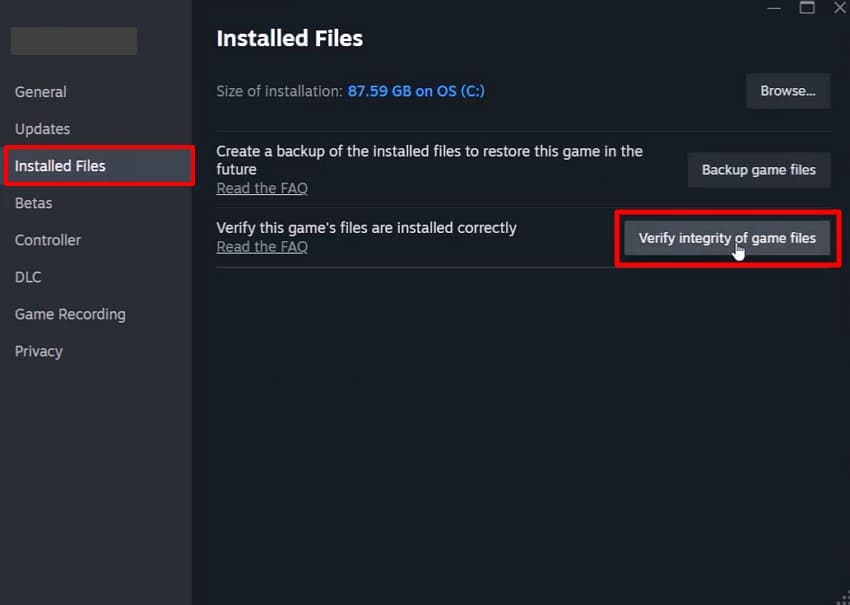
Step 2. After that, move to the "Installed Files" tab within the properties panel. Subsequently, click the "Verify Integrity of Game Files" button to scan and repair issues.
Way 4. Update Graphics Drivers
Outdated graphics drivers often create hidden conflicts that trigger save loading failures. These driver conflicts stop Forza Horizon 6 from initializing your profile on startup. That’s the reason it’s essential to update your GPU drivers to remove these conflicts. Your game client needs these vital optimizations to maintain smooth performance. Anyhow, review the following steps to update your graphics drivers on your PC:
Step 1. Upon pressing the "Start" search for "Device Manager" and opt for "Open."
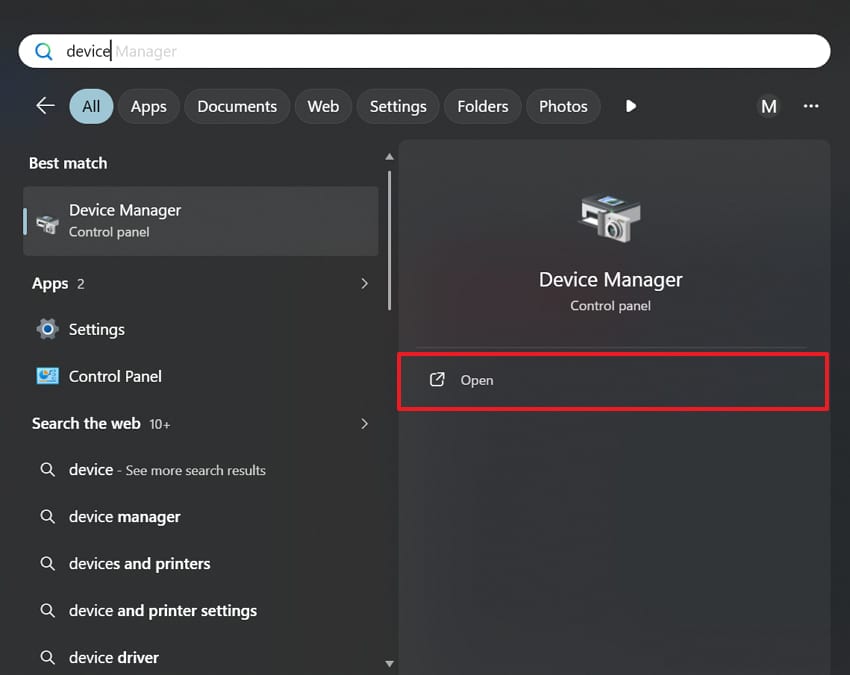
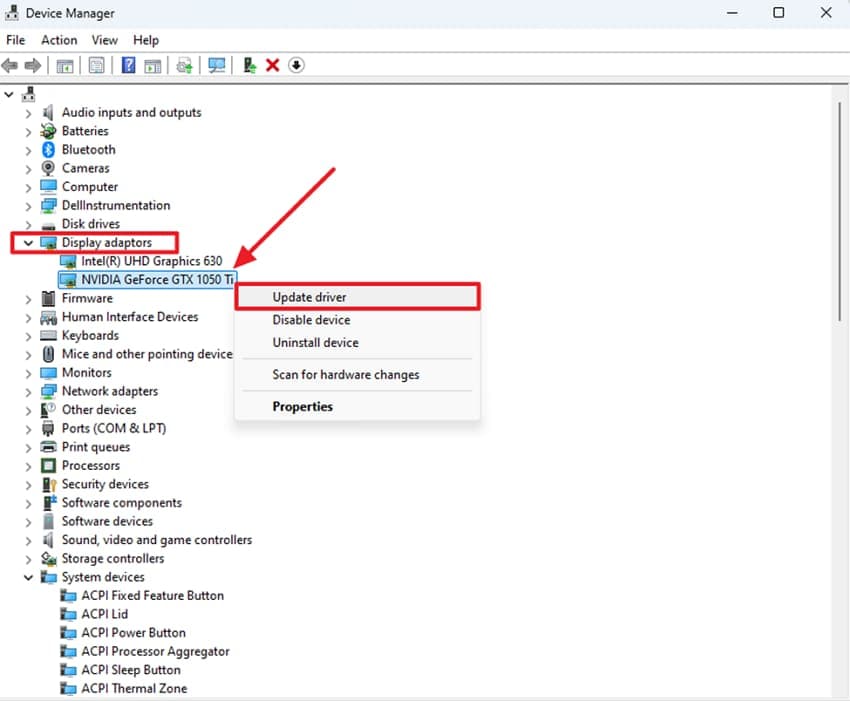
Step 2. Going ahead, opt for the "Display Adapters" section to reveal your graphics device. Right-click the graphics card entry and select the "Update Driver" option.
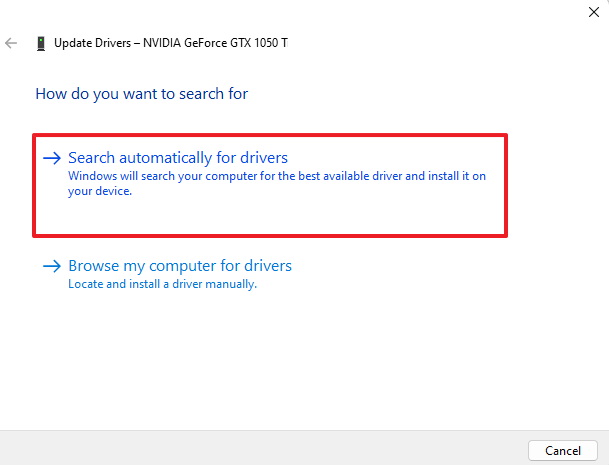
Step 3. Opt for "Search Automatically for Drivers" to let Windows find updates. As this process completes, you need to restart your device to activate the changes.
Way 5. Disable Cloud Sync Conflicts
Multiple cloud platforms saving together create serious data conflicts inside FH6. These conflicts confuse the game and prevent it from loading your correct saved profile. This is a key step for anyone trying to fix Forza Horizon 6 load failed save data on PC. As you disable cloud syncing for platforms like OneDrive, it removes conflicting data versions. Therefore, review the given steps to learn how to turn off cloud sync conflicts:
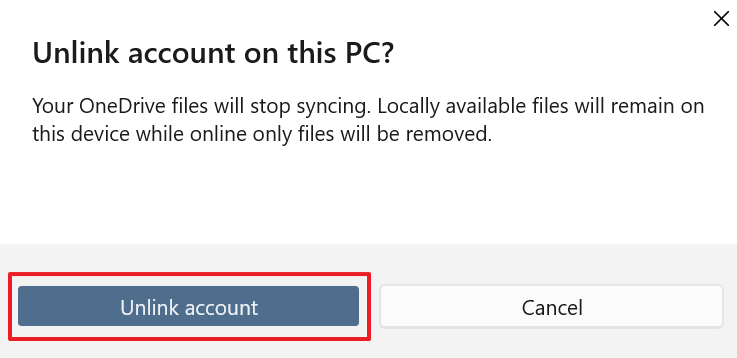
Step 1. From the "OneDrive" settings, head to the "Account" section and choose "Unlink This PC."
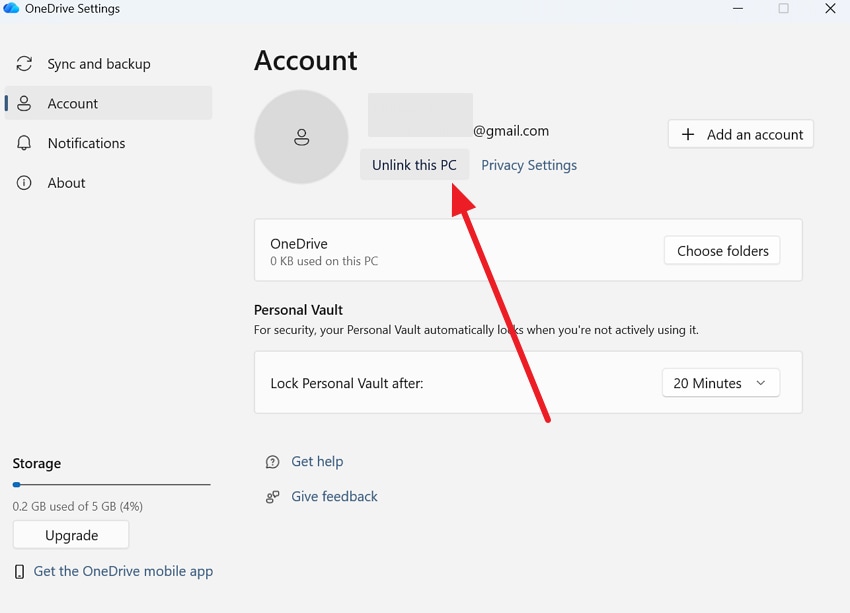
Step 2. A confirmation window will appear asking you to verify removal. At this point, click "Unlink Account" to disconnect and sign out from the device.
Way 6. Reinstall Xbox Gaming Services
Corrupt Xbox Gaming Services are another hidden cause behind the FH6 save error. These services handle all communication between Forza Horizon 6 and your system. When they become damaged, the game cannot verify your profile or load your saved data. Yet, reinstalling these services removes corruption and restores all required processes. Hence, go through the steps below to reinstall these specific services on your device:
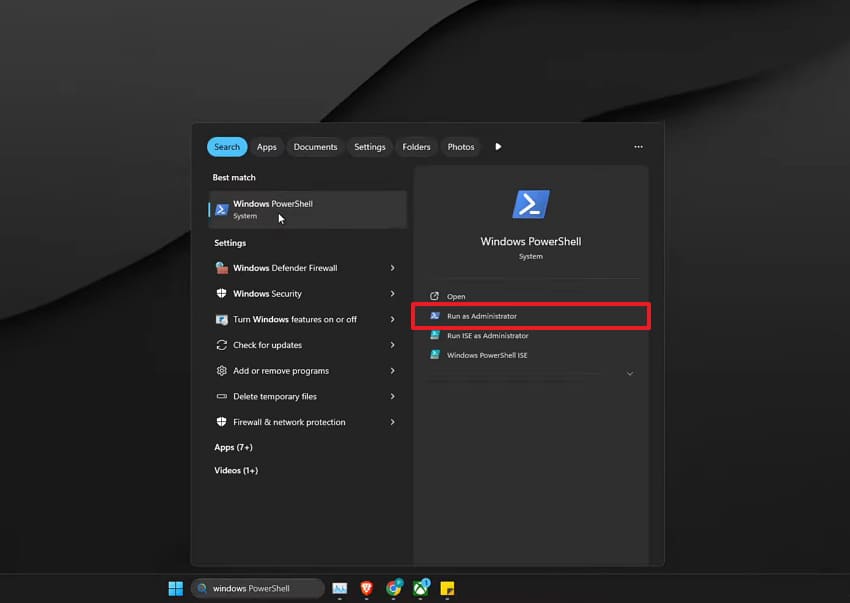
Step 1. Upon searching for "PowerShell," you need to open it via "Run as Administrator."
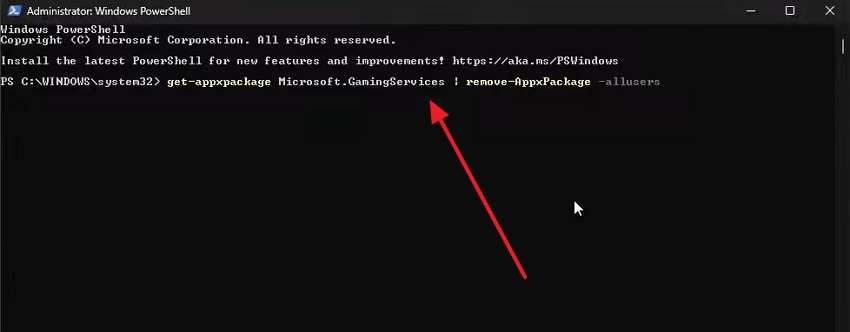
Step 2. Subsequently, execute the "get-appxpackage Microsoft.GamingServices | remove-AppxPackage -allusers" command.
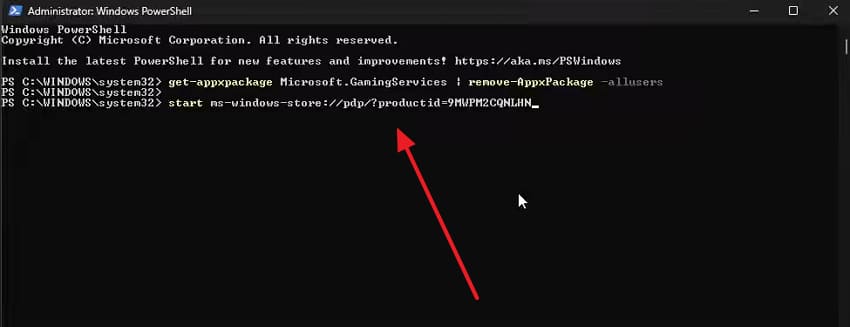
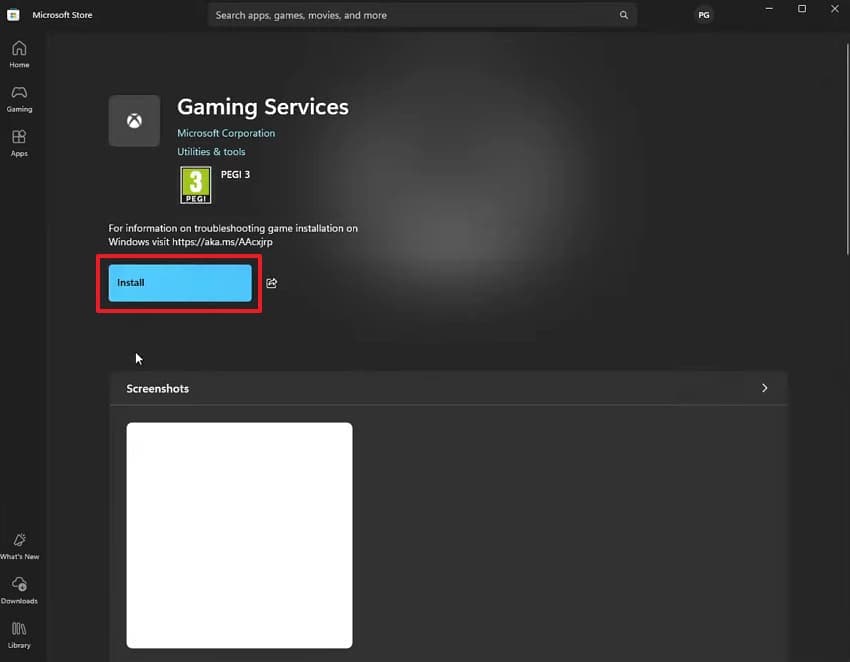
Step 3. Finally, run "start ms-windows-store://pdp/?productid=9MWPM2CQNLHN."
Step 4. As the "Microsoft Store" opens on your device, press "Install" to reinstall Gaming Services.
Pro Tip. Restore Damaged FH6 Game Videos with Repairit
FH6 save load errors mainly affect profile data and game progress. In some cases, players may also find that previously recorded gameplay videos have become damaged or unplayable. Corrupted FH6 recordings often refuse to play or show distorted visuals and black screens. To cater to this issue, gamers can use tools like Repairit to restore all damaged game recordings.
The program’s intelligent algorithm applies precise targeted fixes without altering original quality. You can also restore multiple corrupted FH6 recordings all at once via batch repair. Detailed restoration and sharpening help rebuild lost textures while improving unclear or distorted video frames. While repairing, noise reduction removes unwanted distortion to deliver much cleaner and smoother footage. Furthermore, it fixes audio sync problems and gets your audio back in sync.
Key Features
-
Advanced Format Analysis: Deeply scans every corrupted FH6 video file caused by save load errors to detect all hidden damage.
-
AI-Powered Enhancement: Uses advanced artificial intelligence to restore blurry FH6 gameplay footage damaged during sudden, unexpected save load failures.
-
Resolution Upscaling Support: Upgrades low-resolution FH6 recordings damaged by save load errors into higher quality, fully playable footage instantly.
Guide to Restore Damaged FH6 Game Videos with Repairit
The entire file recovery process requires just three straightforward operations. So, go through these exact instructions below to repair your unplayable game videos:
Step 1. Add the Damaged FH6 Recordings
Access the "Video Repair" tool from the program and click the "Start" button to begin. You will then need to import the damaged or corrupted FH6 video clips that require restoration.

Step 2. Let Program Fix Damaged FH6 Video Files
After adding the game recordings, select the "Repair" option to initiate fixing. At this point, Repairit will automatically detect issues and repair the corrupted clips.

Step 3. Export Your Repaired FH6 Game Clips
After a few moments, click "Preview" to review the repaired videos upon completing the repair. Finally, press the "Save All" button to export the fixed recordings to your device.


Conclusion
To conclude, the FH6 save load error is frustrating but fixable with the right approach. You have now discovered every proven method to fix the Forza Horizon 6 error code E:0-C0. Moreover, every method directly targets the root cause behind this problem. Apart from that, many gamers also face an issue where their recorded FH6 clips aren’t playable. Therefore, use tools such as Repairit to repair all the damaged videos.
FAQ
-
Q1. Does FH6 save error affect Xbox console players the same way?
Yes, Xbox players also encounter E:0-C0 errors during profile sync failures sometimes. Console players should clear the Xbox cache to resolve most save conflicts. Alongside that, a hard reset of your Xbox often restores normal save loading functionality. -
Q2. Will uninstalling FH6 delete my saved game progress permanently?
Uninstalling the game does not delete cloud-synced save data on Xbox servers. Your progress stays safe as long as cloud sync was active beforehand. Thus, you can reinstall the game and sign in to restore all your previous campaign progress. -
Q3. Can a VPN cause the E:0-0 error in Forza Horizon 6?
Yes, VPNs can block proper communication between FH6 and Xbox Live servers entirely. This broken connection prevents your cloud profile from loading during game startup. It is recommended to disable your VPN before launching FH6, as it often resolves the E:0-0 error. -
Q4. Can corrupted FH6 gameplay clips be repaired without losing video quality?
Tools like Repairit can fix corrupted FH6 clips while preserving original quality. Its AI-powered engine rebuilds damaged frames without degrading your recorded footage. This program can be used to batch repair multiple corrupted recordings at once.




