
 TL;DR:
To restore Forza Horizon 6 stability on Windows and prevent startup crashes, you must update dedicated GPU drivers, verify installed game files via Steam, and resolve software conflicts.
● Disable third-party overlay applications like MSI Afterburner and reset your GPU core and memory clocks to default speeds to prevent hardware stress and driver failures.
● Reinstall the latest Visual C++ Redistributable files and DirectX to restore missing or damaged legacy runtime components like D3DX and XAudio that block successful game initialization.
● Add the game folder to your antivirus exclusion list to prevent file blocking, as unexpected crashes can corrupt the file structures of MP4, MOV, and AVI gameplay recordings, requiring dedicated tools like Repairit to restore playback.
Ask AI for a summary
 ChatGPT
 Perplexity
 Gemini
 Claude
 Grok
Grok
Gamers love racing games, but crashes can spoil the whole enjoyment at the moment. Many players struggle with and need to fix "Forza Horizon 6 crashing on PC" frequently. WindowsCentral says Forza Horizon 6 surpassed 270,000 Steam downloads after launch, showing huge demand. Fortunately, simple troubleshooting steps exist that can restore stability and improve the gaming experience. In this guide, you will learn simple methods to fix crashes.
In this article
Part 1. Why is Forza Horizon 6 Crashing on PC? 5 Reasons
A report from Forza claims that Playground Games confirmed it is tracking PC crashes, load errors, and AMD framerate issues. Several hidden problems can stop the game from running smoothly on Windows devices. This section will walk you through the reasons behind the fix "Forza Horizon 6 startup crash PC":
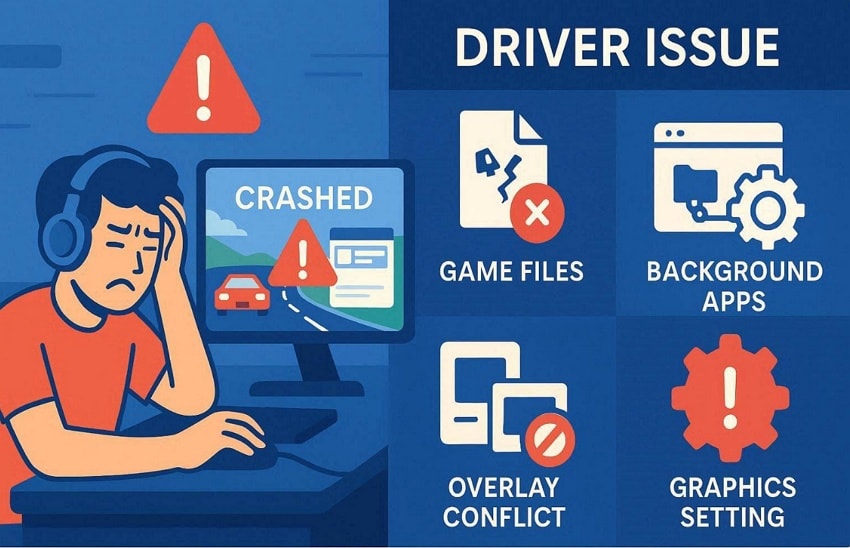
- Driver Issue: Outdated GPU drivers often cause Forza Horizon 6 to crash on PC startup. An old NVIDIA or AMD driver cannot support new game updates and features properly.
- Graphics Setting: Wrong GPU settings can prevent FH6 from opening on the system. Frame tools or graphics options may block a smooth launch on some PCs.
- Game Files: Corrupted files cause the game to crash on PC when the game launches or loads. Missing or broken files stop the game from opening properly on a Windows system.
- Background Apps: Extra running programs reduce available system resources needed for stable game performance. When the memory and CPU are busy, the game becomes unstable and stops working.
- Overlay Conflict: Overlay apps cause Forza Horizon 6 to crash on PC while starting or loading the game. Tools like MSI Afterburner and Steam overlay disturb game performance and stability.
Part 2. How to Solve Forza Horizon 6 Startup Crashes on PC?
Many players need quick solutions to fix "Forza Horizon 6 crash on desktop PC" problems. Thus, below are the troubleshooting ways that prevent crashes and improve game loading stability:
Way 1. Update Graphics Drivers
Updating graphics drivers helps fix "Forza Horizon 6 startup crash on PC" issues. An old or outdated driver causes crashes while launching or starting the game. New drivers fix bugs and improve game stability on Windows systems. Updated drivers also manage VRAM and improve DirectX support, reducing loading errors in racing scenes. Follow the guide below to learn how to update the graphics driver on Windows:
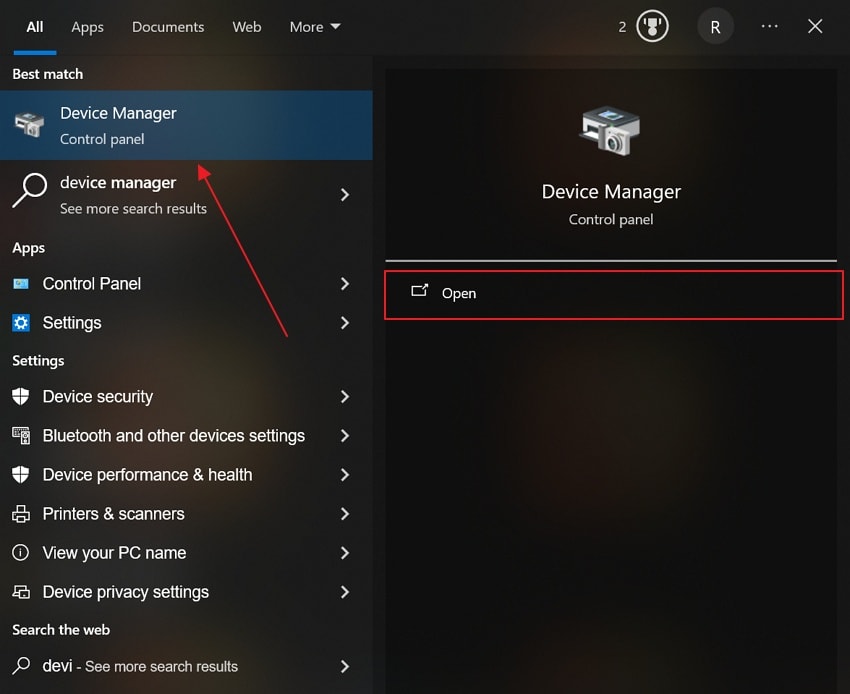
Step 1. To initiate, access the "Device Manager" on your Windows from the "Start" menu.
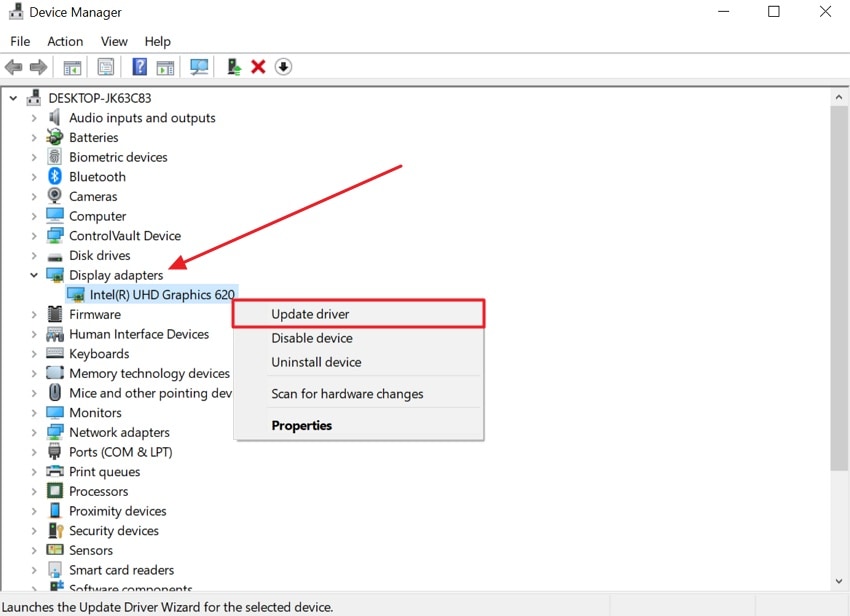
Step 2. Consequently, navigate to "Display Adapters" select the available graphics card, and right-click to opt for "Update Driver."
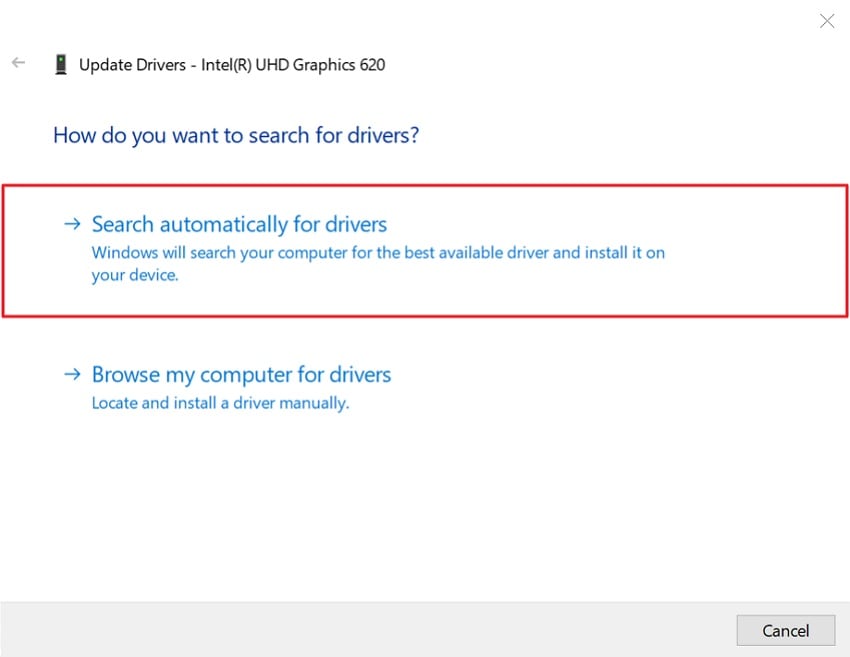
Step 3. Hit the "Search Automatically for Drivers" option to update the graphics card. The Windows system will update the available graphics driver automatically. Once the graphics card is updated, restart your PC to apply all changes.
Way 2. Verify Game Files
Sometimes, missing game data prevents Forza Horizon 6 from loading correctly. These game files may become broken after updates or unexpected system shutdowns. Thus, verifying game files checks every file against official game server versions. The process finds missing data and replaces corrupted files, which helps fix the "Forza Horizon 6 black screen on PC" issue. Adhere to the given steps to verify game files in Steam:
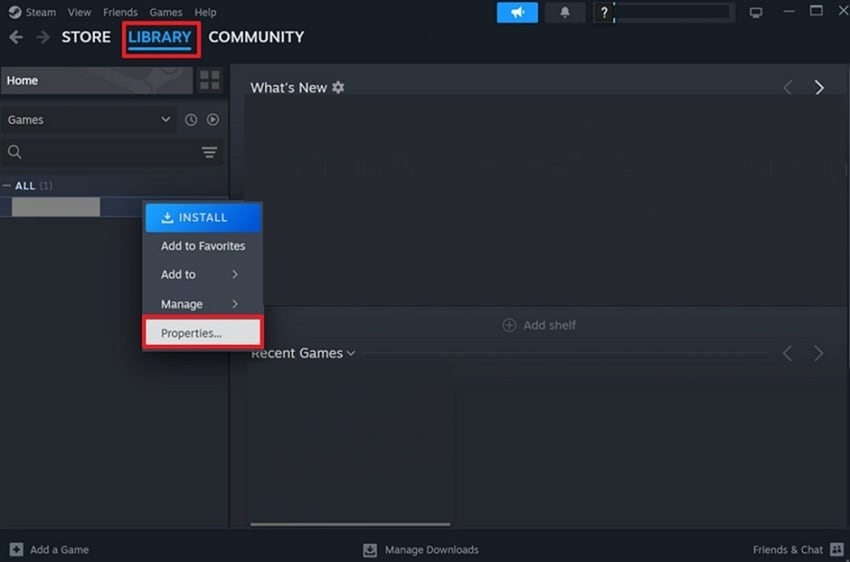
Step 1. At first, open the "Steam" and go to "Library," then search for Forza Horizon 6. Afterward, choose the "Properties" option by right-clicking on the game.
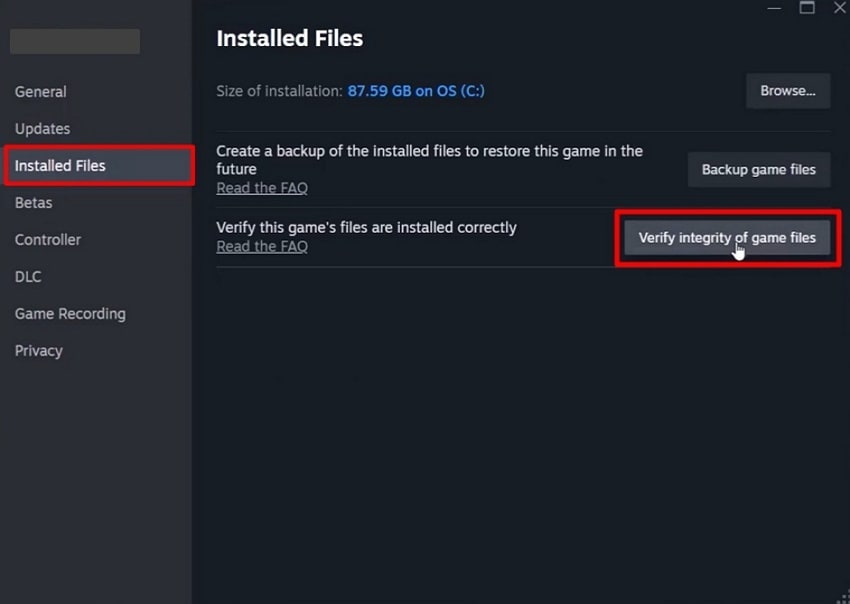
Step 2. Moving forward, go to the "Installed Files" section and opt for the "Verify Integrity of Game Files" button to verify the game files.
Way 3. Stop GPU Overclocking
Many startup and gameplay crashes are linked to unstable GPU overclock settings. Higher clock speeds place extra pressure on graphics hardware during gameplay, triggering driver failures and sudden desktop crashes. Resetting clock speeds removes stress and helps fix "Forza Horizon 6 crashing on PC." For better understanding, follow the guide below to stop GPU overclocking:
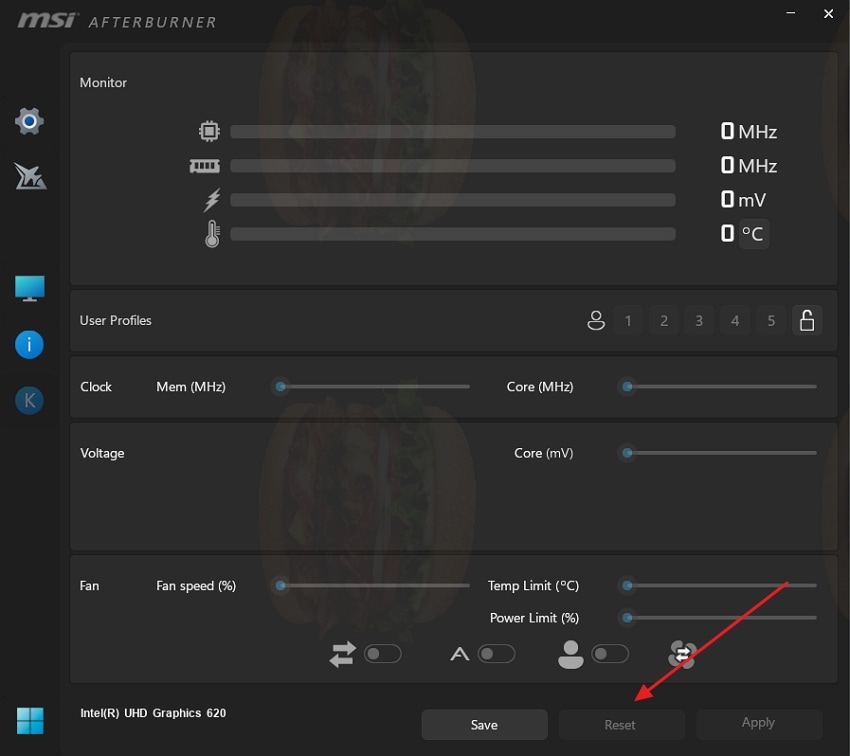
Instructions. Open the overclocking software like MSI Afterburner on your PC. Find the "GPU Core Clock" and "Memory Clock" settings and opt for the "Reset" button to restore default GPU settings.
Way 4. Reinstall DirectX and Visual C++
Another way to fix "Forza Horizon 6 black screen on PC" is to reinstall DirectX and Visual C++. These components play an important role, helping the game run correctly. When their files become damaged or missing, the game may fail to launch or crash. Microsoft says the DirectX runtime still supports legacy game components like D3DX and XAudio. Go through the given guides to reinstall Visual C++ and DirectX tools:
Reinstall DirectX
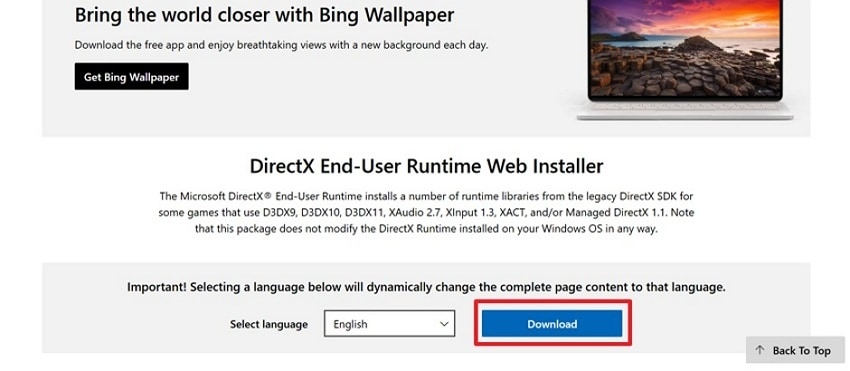
Step 1. Access the official webpage of "DirectX" and hit the "Download" button to begin downloading.
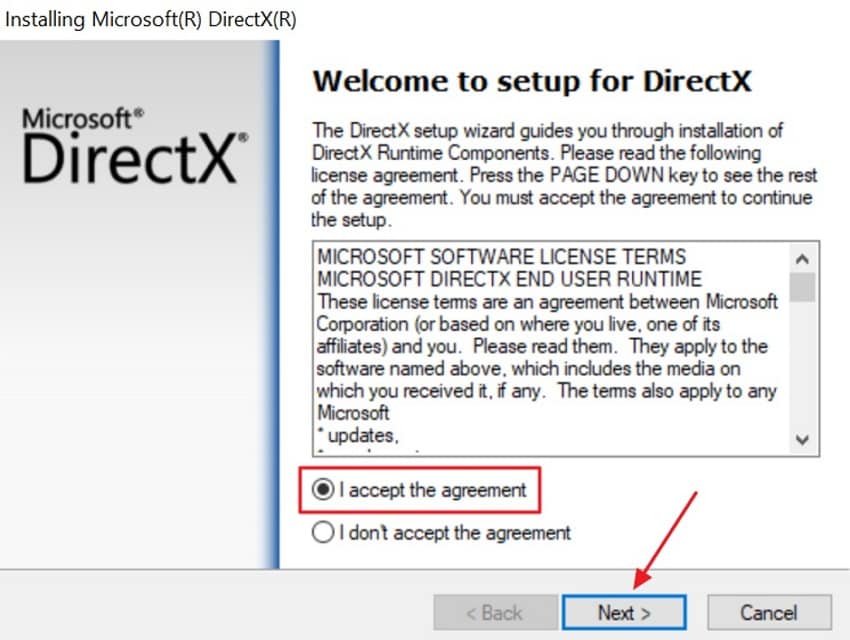
Step 2. Once it is downloaded, enable the "I Accept the Agreement" option to accept the terms and conditions, then opt for "Next."
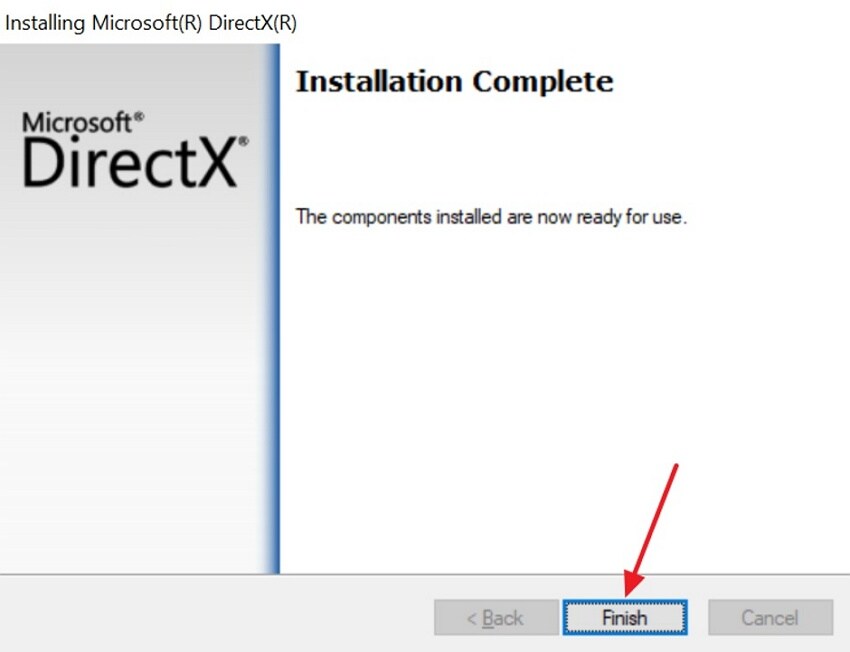
Step 3. Once the installation concludes, press "Finish" and restart your PC to apply all updates.
Reinstall the Visual C++
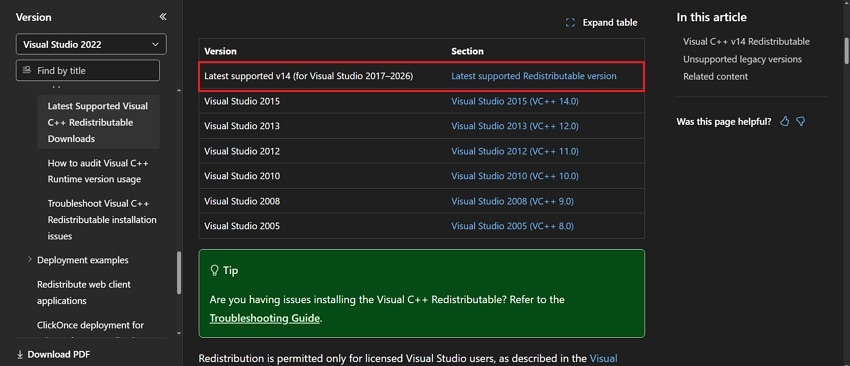
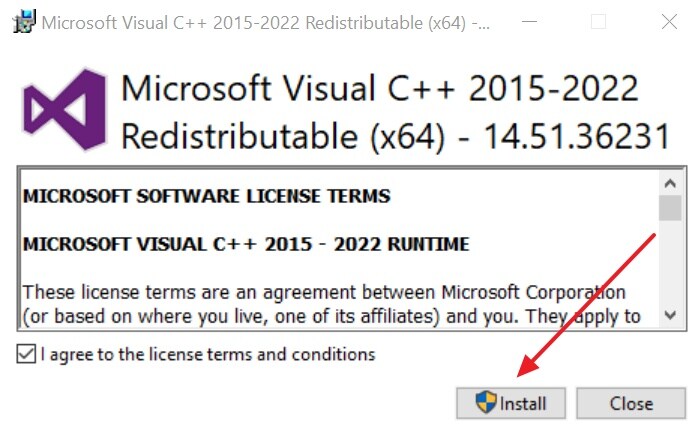
Step 1. Start by opening the official "Microsoft" website and downloading the newest Visual C++ Redistributable files.
Step 2. After downloading the package, choose "Install" and follow the prompts to finish the installation.
Way 5. Switch to Dedicated GPU
If the previous methods do not work, using a dedicated GPU can help fix "Forza Horizon 6 crashing on PC." Many players switch to powerful GPUs to improve game stability and performance. Integrated graphics often lack the power needed for demanding racing games. Modern graphics cards offer more VRAM and better overall gaming performance.
Pro Tip. Fix FH6 Corrupted Video Files Caused by Launch Problems
While trying to fix "Forza Horizon 6 not launching PC" issues, game crashes often corrupt saved video recordings. These corrupted video files refuse to open and often show errors or display nothing at all. For such situations, tools like Repairit can repair damaged FH6 video files. Its AI-powered functionality helps repair corrupted game recordings by restoring its playback without quality loss.
Moreover, it supports 30+ video formats, including MP4, MOV, and AVI. Users can even repair multiple game recordings together and save valuable editing time. During the repair process, it fixes codec-related issues that prevent gameplay videos from opening. The tool repairs uncommon or damaged gameplay video formats using matching sample files. Plus, Repairit also restores proper synchronization between gameplay video and audio tracks.
Key Features
-
File Structure Repair: Manages video file structures that hold the recordings from openings by restoring normal playback and file access.
-
Missing Frame Restoration: Recovers missing or damaged frames from gameplay recordings, making the videos smoother and improving the overall viewing experience.
-
Gameplay Scene Recovery: It recovers valuable scenes from damaged recordings by restoring important gameplay moments lost because of file corruption.
Guide to Fix Damage or Corrupt Game Recordings Without Effort
Take guidance from below to repair your unplayable game recording with Repairit:
Step 1. Import Corrupted Video Files
Open the tool and access the "Video Repair" section, then click "Start" to import corrupted gameplay videos.

Step 2. Repair the Game Recording
After importing the corrupted gameplay video, opt for "Repair" to begin the recovery process.

Step 3. Preview and Save Repaired Videos
Once your video gets repaired, preview the restored videos to check the results. After that, click the "Save" button to download the repaired video files to your computer.


Part 3. 5 Tips to Prevent Future Crashes in Forza Horizon 6
Prevention is the best way to avoid the fix "Forza Horizon 6 crash to desktop PC" issues. Below are expert tips to protect your game from future unexpected shutdown problems:
- Driver Updates: Keep graphics drivers updated for better game compatibility and stability. Additionally, the latest driver versions fix known issues and reduce unexpected game crashes.
- Graphics Settings: Always use balanced graphics settings that match your hardware performance level. Very high graphics settings can overload hardware and increase crash chances during gameplay.
- Background Apps: Close unnecessary background applications before launching Forza Horizon 6 regularly. As a result, extra programs consume system resources and may cause conflicts with the game.
- Game Maintenance: Verify game files after updates or unexpected crashes on Windows. Therefore, healthy game files help prevent loading issues and startup failure problems effectively.
- Monitor Temperatures: Keep a check on CPU and GPU temperatures while playing for long. Excess heat can damage system stability and cause unwanted crashes.
Conclusion
Game crashes can seriously affect the racing experience on Windows systems. This guide shows proven solutions to fix Forza Horizon 6 crashes on PC. IGN says PC audio optimizations improved stability in the latest update. Meanwhile, crashes can quietly corrupt your recorded gameplay clips beyond normal repair. Therefore, a tool like Repairit is ideal to recover and fix corrupted FH6 video recordings.
FAQ
-
Why does Forza Horizon 6 crash quickly after launching?
Crashes happen when system files or drivers fail to load the game properly. Corrupted startup components often prevent successful game initialization on Windows systems. Updating drivers and repairing files usually resolves this immediate crash issue. -
Does antivirus software affect Forza Horizon 6 performance?
Yes, antivirus tools can block game files and cause startup crashes. They may mistakenly detect game files as harmful and restrict access. Adding the game folder to exclusions helps improve smooth gameplay performance. -
What to do if recordings cannot be opened after a crash?
Corrupted recordings often fail to open due to a damaged file structure. Such files need modern repair tools to restore playable video data. Here, tools like Repairit can fix damaged recordings and recover lost gameplay footage successfully. -
Does the internet connection affect game startup?
Unstable internet can interrupt game verification and online authentication processes. This may cause loading delays or sudden game exit issues. A stable connection ensures a smooth login and uninterrupted game startup experience.




