
When your JPEG images open with errors, strange artifacts, or visible damage, choosing the right repair tool matters. This comparison looks at Repairit Photo Repair alongside JPEG Recovery Toolkit, a focused option for users who mainly need to fix JPEG files. We will walk through real-world differences in repair depth, workflow, ease of use, and ideal use cases so you can decide which tool fits your image problems and technical comfort level.
Both tools aim to repair corrupted photos rather than recover deleted ones. The key is understanding whether you need a broader, guided tool that supports multiple image formats, or a narrower utility that concentrates on typical JPEG-related issues.
Repair Corrupted Photos with Repairit Photo Repair
 Security Verified. Over 7,302,189 people have downloaded it.
In this article
- Repairit Photo Repair vs JPEG Recovery Toolkit: Quick Verdict
- Repairit Photo Repair vs JPEG Recovery Toolkit: Key Differences
- Repairit Photo Repair vs JPEG Recovery Toolkit: Comparison Table
- What Repairit Photo Repair and JPEG Recovery Toolkit Are Best For
- Repairit Photo Repair vs JPEG Recovery Toolkit: Features and Capabilities
- Repairit Photo Repair vs JPEG Recovery Toolkit: Supported Formats and Compatibility
- Repairit Photo Repair vs JPEG Recovery Toolkit: Workflow and Ease of Use
- Repairit Photo Repair vs JPEG Recovery Toolkit: Pricing and Trial Options
- Who Should Choose Repairit Photo Repair
- Who Should Choose JPEG Recovery Toolkit
- Pros and Cons of Repairit Photo Repair and JPEG Recovery Toolkit
- How to Repair Corrupted Photos After Choosing the Right Tool
Repairit Photo Repair vs JPEG Recovery Toolkit: Quick Verdict
Both tools can help when compressed photos will not open properly or show heavy artifacts, but they serve slightly different users.
Repairit Photo Repair is better suited to people who want a guided, wider-ranging photo repair experience. It can be helpful if your library mixes JPEGs with other formats or if the corruption looks more serious than a typical glitch.
JPEG Recovery Toolkit tends to fit users who mostly work with JPEGs and prefer a focused, lightweight utility. If your problems are straightforward, such as mild artifacts or partially distorted JPEGs, this narrower scope can be enough.
In many everyday cases, starting with a targeted JPEG tool is reasonable. When issues are more widespread, affect multiple formats, or you want clearer guidance, Repairit Photo Repair often becomes the more flexible option.
Repairit Photo Repair vs JPEG Recovery Toolkit: Key Differences
The key contrasts between these two JPEG fixers center on scope, workflow, and how much guidance you want while repairing your photos.
- Scope of repair: Repairit Photo Repair is designed to handle a wider range of damaged photo scenarios, including more severe JPEG issues and non-JPEG formats, while JPEG Recovery Toolkit keeps its focus mostly on JPEG images.
- Ease of use: Repairit Photo Repair offers a more guided, step-based interface that can reduce guesswork. JPEG Recovery Toolkit typically expects users to be comfortable with a simpler but less hand-holding layout.
- Repair depth: In many cases, Repairit is tuned for more complex corruption patterns and varied image problems. JPEG Recovery Toolkit generally works best for typical JPEG-related damage.
- Ideal users: Repairit Photo Repair often appeals to beginners, busy professionals, and creators handling photos from multiple devices. JPEG Recovery Toolkit can be more appealing for users who mainly fix JPEGs and prefer a straightforward, narrow tool.
Repairit Photo Repair vs JPEG Recovery Toolkit: Comparison Table
| Dimension | Repairit Photo Repair | JPEG Recovery Toolkit |
|---|---|---|
| Best for | Users needing a guided tool to repair a wide range of corrupted or damaged photos, including more severe issues. | Users fixing JPEG files with focused, JPEG-specific repair needs. |
| Ease of use | Friendly interface with clear prompts that suits beginners and busy users. | Straightforward for users comfortable with basic tools and manual choices. |
| Repair depth | Designed to handle a variety of corruption types and complex image issues in many cases. | Targeted JPEG repair that can work well for typical JPEG-related problems. |
| Workflow | Simple, wizard-style process from import to export with minimal manual tuning. | Simple workflow for loading and repairing JPEGs with a more focused scope. |
| Strengths | Broader format support, guided experience, and flexible repair scenarios. | Targeted repair for JPEG images with a narrow, specialized focus. |
| Weaknesses | May feel more feature-rich than necessary for very small, one-off JPEG fixes. | Narrow scope that may not cover non-JPEG images or broader repair scenarios. |
What Repairit Photo Repair and JPEG Recovery Toolkit Are Best For
Both tools target damaged JPEGs, but they make different trade-offs between breadth and specialization.
Repairit Photo Repair is typically the better match if:
- You regularly work with a mixture of JPEGs and other image formats from phones, cameras, or desktops.
- Your photos show serious corruption, such as heavy artifacts, grey blocks, or unreadable previews.
- You prefer a guided workflow that explains each step from adding damaged images through to exporting repaired versions.
JPEG Recovery Toolkit is usually a good fit if:
- Your main goal is fixing standard JPEG images that have become partially corrupted or show odd colors and patterns.
- You want a focused tool without extra options for other media types or formats.
- You are comfortable with a simpler, more manual approach as long as it targets JPEG-specific problems.
In many situations, users start with a narrower JPEG tool for quick tests and then move to a broader solution like Repairit when they encounter more complex issues or mixed-format libraries.
Repairit Photo Repair vs JPEG Recovery Toolkit: Features and Capabilities
Repairit Photo Repair and JPEG Recovery Toolkit both aim to fix damaged JPEG images, yet they balance scope and specialization differently. Repairit emphasizes broader image support and guided workflows, while JPEG Recovery Toolkit leans into targeted repair for JPEGs with a narrower scope.
At a basic level, both types of software typically allow you to:
- Scan and analyze corrupted or damaged JPEG photos before attempting to repair them.
- Repair visible issues such as artifacts, color problems, or partial corruption that affect photo quality.
- Preview and export repaired files so you can compare results and keep only the images that look acceptable.
Where they start to differ is in their advanced behavior and how much hand-holding they provide.
- Repairit Photo Repair supports more image scenarios, which can help when problems go beyond standard JPEG damage or involve different formats.
- Repairit offers a more guided repair process, which can reduce trial-and-error for non-technical users who just want their photos fixed quickly.
- JPEG Recovery Toolkit focuses on targeted repair, which may appeal to users who mainly handle JPEG-specific issues and prefer tools that stick closely to that job.
If your photos come from many sources and you are unsure how severe the damage is, Repairit Photo Repair can be more reassuring. For users with predictable JPEG-only tasks and a desire to keep things minimal, JPEG Recovery Toolkit may feel more streamlined.
Repairit Photo Repair vs JPEG Recovery Toolkit: Supported Formats and Compatibility
Format support and device compatibility are important if you work with photos from different cameras, phones, and computers.
Repairit Photo Repair typically supports a wider range of image formats and camera outputs. This can matter if you:
- Store photos as JPEGs alongside other formats in the same folder or project.
- Move images between devices and do not want to think about which formats a tool can open.
- Expect to repair more than just one type of file over time.
JPEG Recovery Toolkit, by contrast, generally focuses on JPEG-only repair. That concentrated scope can be perfectly fine for users who:
- Know that all relevant images are JPEGs.
- Prefer software that does one job rather than handling many types of files.
- Do not need to prepare for less common formats or mixed libraries.
If your workflow is centered around JPEGs from a single camera or phone, the narrow compatibility may not be a drawback. But if you often mix JPEG, PNG, or other common formats, the broader support in Repairit can save time and reduce the need for multiple tools.
Repairit Photo Repair vs JPEG Recovery Toolkit: Workflow and Ease of Use
Both tools aim for a simple workflow, but they deliver it in different ways that suit different kinds of users.
Repairit Photo Repair leans on an intuitive, step-by-step interface:
- You import corrupted photos using clear buttons or drag-and-drop.
- The tool analyzes and repairs images with minimal manual configuration.
- You preview results in the same window and save only the photos you want to keep.
This guided approach often feels comfortable for beginners, occasional users, or busy professionals who do not want to adjust many settings.
JPEG Recovery Toolkit usually offers a straightforward but more focused workflow tailored to JPEGs:
- You target the JPEG files that need fixing and run the repair.
- The interface tends to be simpler, with fewer options beyond its JPEG focus.
- Users who like compact tools may appreciate the lack of extra features.
If you value clear prompts and an interface that walks you through each phase, Repairit Photo Repair may be more reassuring. If you are comfortable with basic tools and primarily want to load and fix JPEGs quickly, JPEG Recovery Toolkit can be perfectly adequate.
Repairit Photo Repair vs JPEG Recovery Toolkit: Pricing and Trial Options
Pricing and licensing can vary over time, so it is important to check current offers on each official site.
In general, Repairit Photo Repair and JPEG Recovery Toolkit both tend to provide flexible licensing options, and in many cases you can try the software before making a purchase decision. You might see differences in:
- Whether the license is one-time or subscription-based.
- How many devices or systems you can install the software on.
- Limitations in trial versions, such as watermarks or capped export counts.
Because promotions and bundles can change, the most reliable approach is to review the latest details on the official Repairit site and the JPEG Recovery Toolkit page. Then you can balance cost with how often you expect to repair corrupted photos and how broad you need the feature set to be.
Who Should Choose Repairit Photo Repair
Repairit Photo Repair is generally a stronger choice for users who want a guided experience and anticipate a range of photo issues over time.
- Users dealing with a mix of JPEG and other photo formats that might need repair.
- People who want a guided, less technical way to fix corrupted or badly damaged photos.
- Photographers and content creators who regularly repair images from different devices.
- Anyone who expects ongoing repair needs rather than a one-time JPEG-only fix.
If you often face unpredictable image problems or work on client projects where you cannot afford trial-and-error, having a flexible tool like Repairit Photo Repair can reduce stress and keep your workflow predictable.
Who Should Choose JPEG Recovery Toolkit
JPEG Recovery Toolkit may be the better fit for users with straightforward, JPEG-only repair tasks who prefer a narrower scope.
- Users fixing JPEG files as their main or only repair task.
- People who prefer a targeted, narrow-scope JPEG repair tool with a simple workflow.
- Individuals comfortable focusing on JPEG-specific issues rather than mixed formats.
- Anyone who wants a lightweight option for occasional JPEG repair without extra features.
If you rarely work outside JPEG and mostly need to fix occasional image corruption, a focused JPEG tool can feel simpler and more in line with your day-to-day needs.
Pros and Cons of Repairit Photo Repair and JPEG Recovery Toolkit
Both tools have clear strengths and trade-offs. Understanding their pros and cons makes it easier to align them with your own photo repair habits.
Repairit Photo Repair Pros and Cons
JPEG Recovery Toolkit Pros and Cons
How to Repair Corrupted Photos After Choosing the Right Tool
After comparing Repairit Photo Repair vs JPEG Recovery Toolkit, the next step is actually fixing your damaged images. Once you have decided whether you prefer a broader, guided solution or a focused JPEG repair utility, you can start working through your corrupted files.
For users who want clear, on-screen guidance and support for different image scenarios, Repairit Photo Repair offers a practical desktop workflow that keeps the process simple while still handling a variety of problems.
Key Features
- Guided photo repair workflow with clear steps from import to export.
- Support for multiple image formats and various corruption scenarios.
- Preview of repaired photos before saving them to your device.
Step-by-step guide
- Add damaged photos
Launch Repairit Photo Repair and import the damaged or corrupted photos you want to fix. - Run the repair
Click the repair button and let the tool scan and fix the selected image files automatically. - Preview and save
Preview the repaired results and save the fixed photos to your preferred location.


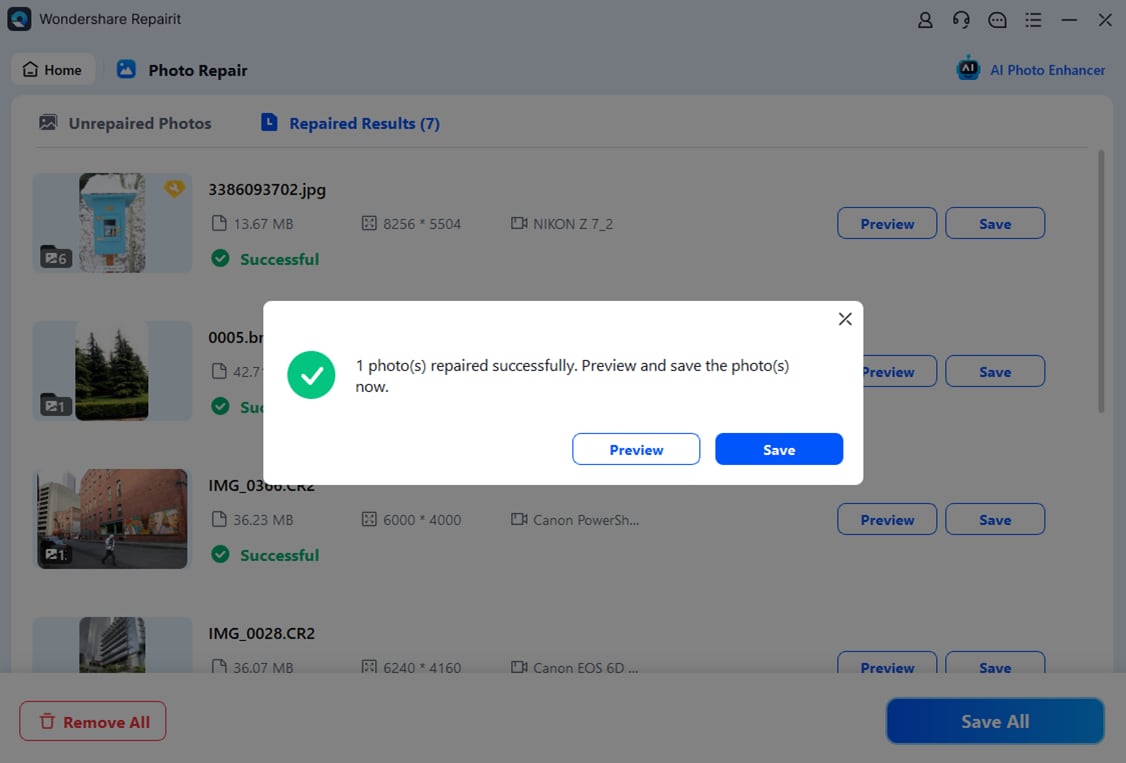
This workflow stays firmly focused on repairing existing corrupted, blurry, pixelated, or greyed-out image files, rather than recovering deleted content. You can repeat the process for batches of photos whenever new issues appear in your library.
Final Verdict
Both Repairit Photo Repair and JPEG Recovery Toolkit can help you repair corrupted JPEGs, but they take different approaches.
Repairit Photo Repair is a stronger choice if you deal with a mix of formats, more severe corruption, or you simply prefer a guided interface that walks you through each step of fixing damaged photos. Its broader scope and flexible workflow can better support ongoing or complex repair needs.
JPEG Recovery Toolkit may be enough if you mostly work with standard JPEG files and want a focused, targeted option with a simple workflow. It makes sense for occasional, straightforward JPEG repair tasks where you do not need extensive guidance or format support.
In practice, some users start with a narrow JPEG tool for quick fixes and turn to Repairit Photo Repair when they encounter tougher corruption patterns, mixed-format libraries, or the need for a more structured repair experience.
FAQ
-
1. Which is better for repairing heavily corrupted JPEG photos
Repairit Photo Repair is generally a stronger choice for heavily corrupted photos because it is built for broader repair scenarios and offers more guided help, which can be useful when the damage is not limited to simple JPEG glitches. -
2. Is JPEG Recovery Toolkit good enough for simple JPEG glitches
Yes, JPEG Recovery Toolkit may be enough if you mainly fix straightforward JPEG issues, such as minor artifacts or color problems, and prefer a narrow, focused tool without extra features. -
3. When should I choose Repairit Photo Repair over JPEG Recovery Toolkit
Choose Repairit Photo Repair if you handle mixed image formats, expect recurring repair tasks, or want clearer guidance through each repair step so you spend less time experimenting with settings.




