
Choosing between Repairit Photo Repair Online vs Stellar Online Photo Repair comes down to how damaged your photos are and how much guidance you want during repair. Both tools rely on a browser-based workflow so you can repair corrupted photos online without installing software, but they differ in how they approach formats like JPEG, PNG, HEIC, and RAW and how they behave when photos are severely damaged or unreadable.
In many real-world cases, users simply want a clear way to fix broken JPG files, damaged PNG images, or unreadable RAW or HEIC photos that will not open or show strange artifacts. This comparison focuses on what it actually feels like to upload those photos, start the online repair, and decide which tool better fits your skills, privacy comfort level, and corruption severity.
In this article
- Repairit Photo Repair Online vs Stellar Online Photo Repair: Quick Verdict
- Repairit Photo Repair Online vs Stellar Online Photo Repair: Key Differences
- Repairit Photo Repair Online vs Stellar Online Photo Repair: Comparison Table
- What Repairit Photo Repair Online and Stellar Online Photo Repair Are Best For
- Repairit Photo Repair Online vs Stellar Online Photo Repair: Photo Repair Capabilities
- Repairit Photo Repair Online vs Stellar Online Photo Repair: Supported Image Formats and Repair Scenarios
- Repairit Photo Repair Online vs Stellar Online Photo Repair: Upload Workflow and Ease of Use
- Repairit Photo Repair Online vs Stellar Online Photo Repair: Cloud Repair, Privacy, and File Handling
- Repairit Photo Repair Online vs Stellar Online Photo Repair: Repair Quality and Limitations
- Who Should Choose Repairit Photo Repair Online
- Who Should Choose Stellar Online Photo Repair
- Pros and Cons of Repairit Photo Repair Online and Stellar Online Photo Repair
- How to Repair Corrupted Photos Online After Choosing the Right Tool
Repairit Photo Repair Online vs Stellar Online Photo Repair: Quick Verdict
Repairit Photo Repair Online is more suitable when you want a guided, beginner-friendly way to repair corrupted photos online, while Stellar Online Photo Repair may be enough if you mainly handle damaged JPEG, HEIC, and RAW photos and prefer a simpler upload-and-go page.
The main difference is how much hand-holding you want as you upload, repair, and download broken or unreadable images. Repairit Photo Repair Online focuses on a clearly guided sequence, while Stellar Online Photo Repair focuses on straightforward access to upload and repair with some free usage and preview limitations.
In many real-world cases, users start with whichever service better matches their comfort level: a more structured interface for repeated corrupted photo repair attempts, or a direct layout when trying to fix the occasional damaged image from a camera or phone.
Repairit Photo Repair Online vs Stellar Online Photo Repair: Key Differences
The key difference between Repairit Photo Repair Online and Stellar Online Photo Repair is the balance between guided workflow and broad image format focus. Both aim to repair corrupted or unreadable photos online, but they prioritize different parts of the experience.
- Workflow style: Repairit Photo Repair Online emphasizes step-by-step guidance from upload to preview, which helps beginners understand what is happening. Stellar Online Photo Repair uses a simpler page that can feel faster if you already know what you are doing.
- Format emphasis: Repairit Photo Repair Online is commonly used for JPG, PNG, HEIC, RAW, and similar formats, while Stellar Online Photo Repair particularly highlights damaged JPEG, HEIC, and RAW photos from phones and digital cameras.
- Usage limits and previews: Users often notice Stellar Online Photo Repair has more obvious free usage and preview restrictions, which matters if you want to test many corrupted files. Repairit Photo Repair Online also has limits, but the comparison here centers more on workflow than on exact quotas.
- Comfort level: Repairit Photo Repair Online is a stronger choice when you want clear guidance and a browser sequence tailored to corrupted photo repair, while Stellar Online Photo Repair may be enough for users who just need an occasional fix for a few damaged images.
Repairit Photo Repair Online vs Stellar Online Photo Repair: Comparison Table
This side-by-side table shows how Repairit Photo Repair Online vs Stellar Online Photo Repair compare on core online photo repair factors. It highlights real decision points like workflow, ease of use, and how each service approaches corrupted files.
| Dimension | Repairit Photo Repair Online | Stellar Online Photo Repair |
|---|---|---|
| Best for | Users who want a guided online corrupted photo repair flow with clear steps for fixing broken or unreadable images. | Users fixing damaged JPEG, HEIC, and RAW photos who are comfortable with a straightforward online repair page. |
| Online workflow | Browser-based repair sequence designed to walk beginners through upload, repair, and download. | Upload damaged photos and repair online in a simple, direct browser-based flow. |
| Repair capability | Aims at repairing corrupted, broken, or unreadable image files in common formats for typical corruption issues. | Positioned for corrupted or damaged JPEG, HEIC, and RAW photos, with strengths around broad image format support. |
| Ease of use | Focuses on a guided experience that may feel more comfortable to non-technical users. | Simple workflow that may suit users who just want to upload and run a repair with minimal decisions. |
| Privacy and file handling | Uses a browser-based upload; users should review online service terms before uploading sensitive images. | Also relies on cloud-based or browser-side handling; users need to consider how long files may be stored. |
| Strengths | Guided corrupted photo repair flow, beginner-friendly interface, practical for repairing unreadable photos online. | Broad image format support and a simple workflow for quickly handling damaged JPEG, HEIC, and RAW photos. |
| Weaknesses | Online workflow may be limited for extremely large batches or severely broken files, depending on corruption. | Free usage limitations and preview restrictions that may slow testing multiple damaged photos. |
What Repairit Photo Repair Online and Stellar Online Photo Repair Are Best For
Repairit Photo Repair Online is best for users who need a guided way to repair corrupted photos online, while Stellar Online Photo Repair is best for users who prioritize broad format support for damaged JPEG, HEIC, and RAW photos.
In everyday use, Repairit Photo Repair Online suits people facing a folder of unreadable or glitchy images and wanting clear instructions. Stellar Online Photo Repair fits those who only need to fix an occasional broken camera photo and are comfortable with a simpler page and usage limits.
- Choose Repairit Photo Repair Online if you want a sequence that walks you from upload to preview in small, understandable steps.
- Choose Stellar Online Photo Repair if you mainly work with typical camera or phone shots and just want to upload and trigger an online repair quickly.
- Users dealing with sensitive or very large batches of photos should evaluate both tools carefully and consider how often they will repeat the process.
Repairit Photo Repair Online vs Stellar Online Photo Repair: Photo Repair Capabilities
Both Repairit Photo Repair Online and Stellar Online Photo Repair focus on corrupted photo repair rather than image enhancement or deleted image recovery, but they emphasize different aspects of the repair process.
According to the summary, both are designed for browser-based corrupted photo repair, targeting broken, damaged, or unreadable image files. They are not meant for tasks like old photo restoration, image upscaling, or editing.
Users often notice that success depends more on how badly each file is corrupted than on the tool itself, especially when key image data is missing.
- Repairit Photo Repair Online capabilities:
- Guided steps that help beginners repair corrupted photos online without advanced technical knowledge.
- May handle a range of common corruption issues in JPG, PNG, RAW, HEIC, or similar formats depending on file condition.
- Supports repairing unreadable or broken image files via a browser upload and online processing flow.
- Stellar Online Photo Repair capabilities:
- Focuses on users fixing damaged JPEG, HEIC, and RAW photos through a simple online repair page.
- Leverages broad image format support so users can attempt to repair different camera and mobile photo files.
- Works best for typical corruption cases; more severe or unreadable images may still show artifacts after repair.
Repairit Photo Repair Online vs Stellar Online Photo Repair: Supported Image Formats and Repair Scenarios
Repairit Photo Repair Online is commonly used on corrupted JPG, PNG, and sometimes RAW, HEIC, or TIFF files, while Stellar Online Photo Repair focuses heavily on damaged JPEG, HEIC, and RAW photos from phones and cameras.
In practice, this means both tools can be tried on a range of broken JPG or PNG files and corrupted RAW or HEIC photos, but users should not assume every format or camera brand is fully supported at all times.
This becomes important when your images come from different devices: you may want to run the same file through both tools to see which handles that specific format and corruption pattern better.
- Repairit Photo Repair Online is often chosen for:
- Corrupted JPG or PNG files that no longer open or show partial previews.
- Some RAW, HEIC, or TIFF images, depending on damage level and support at the time of use.
- Mixed folders where both phone photos and downloaded images have become unreadable.
- Stellar Online Photo Repair is often chosen for:
- Damaged JPEG, HEIC, or RAW photos from phones or digital cameras.
- Photos that suddenly refuse to open or display obvious corruption lines or color blocks.
- Cases where broad image format support is a priority across different camera types.
Repairit Photo Repair Online vs Stellar Online Photo Repair: Upload Workflow and Ease of Use
Repairit Photo Repair Online offers a more guided upload and repair workflow, while Stellar Online Photo Repair emphasizes a simpler, direct browser page with fewer steps.
Both use the same basic pattern: you upload your damaged images, let the service analyze them online, and then check the results. The main difference is how much explanation and structure you get along the way.
For non-technical users, a guided interface often reduces confusion when dealing with multiple unreadable files or repeating repairs on similar images.
- Repairit Photo Repair Online workflow:
- Focuses on a guided, step-by-step experience that explains what to do at each stage.
- Helps users understand where they are in the process (upload, repair, preview, download).
- Can feel more reassuring when you are unsure whether the file is fixable.
- Stellar Online Photo Repair workflow:
- Leans on a simple page with quick access to upload, scan, and preview damaged photos.
- Often means fewer clicks for users already familiar with online photo repair tools.
- Free usage and preview restrictions can affect how easily you can test multiple files in one sitting.
Repairit Photo Repair Online vs Stellar Online Photo Repair: Cloud Repair, Privacy, and File Handling
Both Repairit Photo Repair Online and Stellar Online Photo Repair rely on browser uploads, so your corrupted photos are processed through their online services and must be evaluated with privacy in mind.
This cloud-based or browser-side approach is convenient if you need quick results without installing anything, but users should be careful when uploading private or sensitive images. Real-world users often balance the speed of online repair against their own privacy comfort level.
Because exact retention and deletion details are not specified here, users should review each services terms and help pages for up-to-date information.
- Repairit Photo Repair Online:
- Uses browser-based uploads to process corrupted, damaged, or unreadable image files.
- Is convenient for quick tests on problematic JPG, PNG, or HEIC photos without installing software.
- Requires users to review service terms before uploading highly sensitive or confidential photos.
- Stellar Online Photo Repair:
- Also relies on cloud-based or browser-side handling for uploaded photos.
- May store files for a period that users should confirm via official documentation.
- Makes privacy and storage duration especially important when dealing with personal or client images.
Repairit Photo Repair Online vs Stellar Online Photo Repair: Repair Quality and Limitations
Both Repairit Photo Repair Online and Stellar Online Photo Repair can repair many common corruption issues, but neither can fix every severely damaged photo.
In many real-world cases, they can help when photos will not open or show visual glitches, yet heavily corrupted files with missing data or broken structures may only be partially repaired or remain unusable. This is a common limitation across online corrupted photo repair tools.
Understanding these limits helps you set realistic expectations before uploading an important broken image.
- Common strengths:
- Can often fix issues like photos refusing to open, showing error messages, or displaying artifacts such as lines or color shifts.
- Provide a preview stage so you can decide whether the repaired result is acceptable.
- Shared limitations:
- Severe corruption, heavily damaged metadata, or incomplete image data may prevent a usable repair.
- Files with missing headers or truncated content are particularly difficult for any online service.
- Tool-specific considerations:
- Stellar Online Photo Repair adds free usage and preview limitations, which can slow down testing many files for the best repair quality.
- Repairit Photo Repair Online may also struggle when corruption is extreme or source data is missing, even with its guided workflow.
Who Should Choose Repairit Photo Repair Online
Repairit Photo Repair Online is a stronger choice for users who want a guided, beginner-friendly way to repair corrupted, damaged, or unreadable photos online.
It is particularly helpful if you have several problematic JPG, PNG, or HEIC files and want a structured path from upload through preview. The interface is tuned for people who care more about clarity than about tweaking low-level repair settings.
- Beginners who want a guided online repair flow with clear steps for fixing corrupted photos.
- Users dealing with unreadable JPG, PNG, or HEIC photos who prefer a structured browser-based repair process.
- People comparing several corrupted files and wanting a more hand-held interface for repeated repairs.
- Users who prioritize an online tool focused on corrupted photo repair rather than image enhancement or editing.
Who Should Choose Stellar Online Photo Repair
Stellar Online Photo Repair may be enough for users who mainly handle occasional damaged JPEG, HEIC, and RAW photos and are comfortable with a simple upload-and-repair page.
Its broad image format positioning makes it appealing when you regularly work with photos from multiple cameras or phones and simply need to fix the odd corrupted file. However, free usage and preview restrictions are important to keep in mind.
- Users already familiar with Stellar tools who want a similar online experience for corrupted photo repair.
- People fixing damaged JPEG, HEIC, and RAW photos who value broad image format support.
- Users who want a straightforward upload damaged photos and repair online workflow.
- Those handling occasional corruption issues and who can work within free usage and preview restrictions.
Pros and Cons of Repairit Photo Repair Online and Stellar Online Photo Repair
Both services have clear strengths and trade-offs, and understanding these pros and cons helps you decide which online photo repair workflow matches your situation.
Repairit Photo Repair Online Pros and Cons
Stellar Online Photo Repair Pros and Cons
How to Repair Corrupted Photos Online After Choosing the Right Tool
After comparing Repairit Photo Repair Online vs Stellar Online Photo Repair, the next step is actually uploading your corrupted photos and running an online repair that matches your comfort level.
Once you have decided which service better fits your workflow, you can move from theory to action: fixing unreadable JPG, PNG, RAW, or HEIC photos that are currently blocking your work or memories. For users who want guided help and a clear sequence, Repairit Photo Repair Online offers a practical browser-based path.
The outline below focuses on how to use Repairit Photo Repair Online as a hands-on example of what an online corrupted photo repair session looks like from upload to download.
Key Features
Repairit Photo Repair Online centers on a clear upload-repair-preview-save loop designed for typical corrupted image problems.
- Browser-based corrupted photo repair with no installation required.
- Guided steps that help users understand what to do at each stage of the repair process.
- Support for repairing many common cases where JPG, PNG, or similar files will not open or display correctly.
In many real-world situations, these features are enough to diagnose whether a damaged image still has recoverable visual data or is too severely corrupted for any online repair.
Step-by-step guide
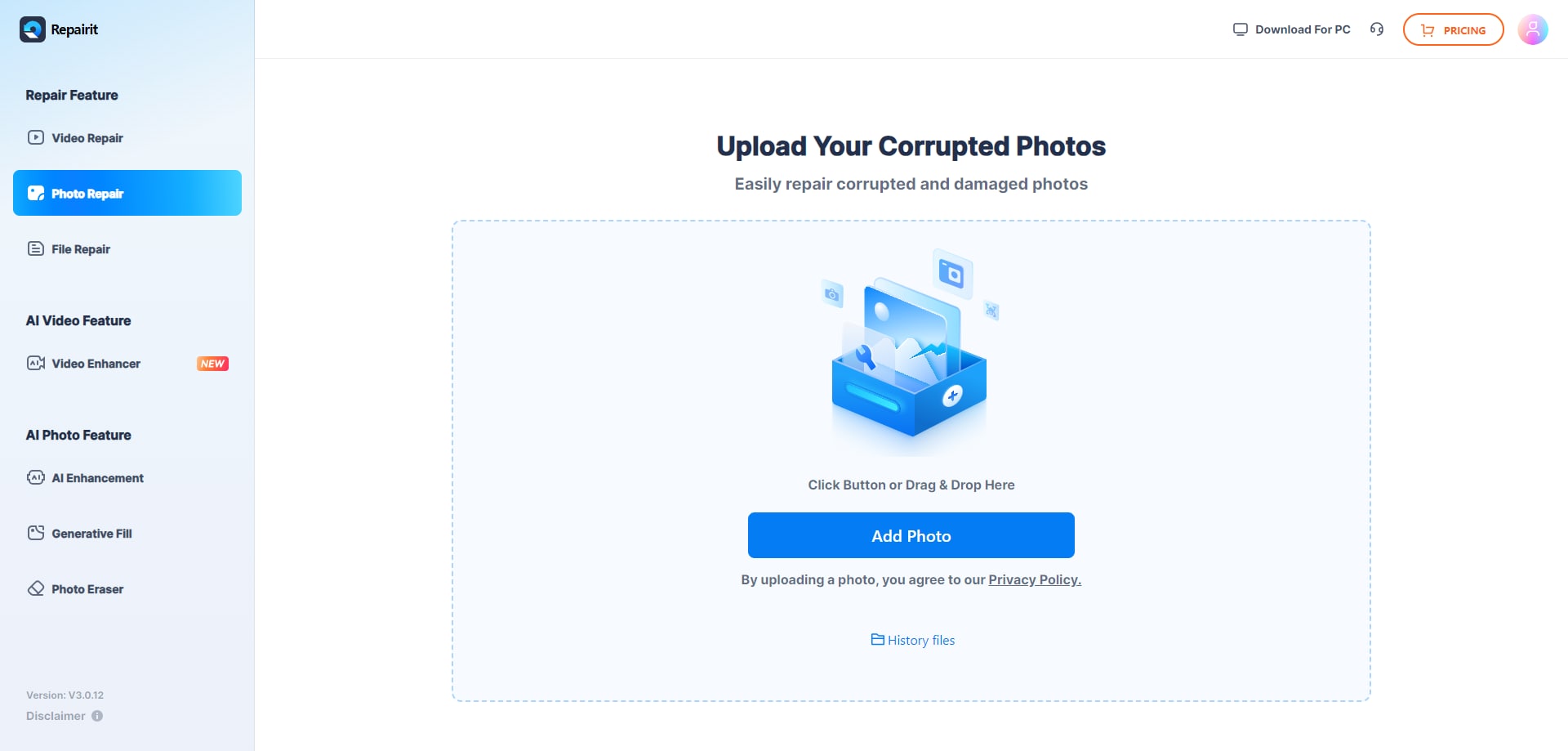
Step 1. Upload the corrupted, damaged, or unreadable photos you want to repair through Repairit Photo Repair Online.
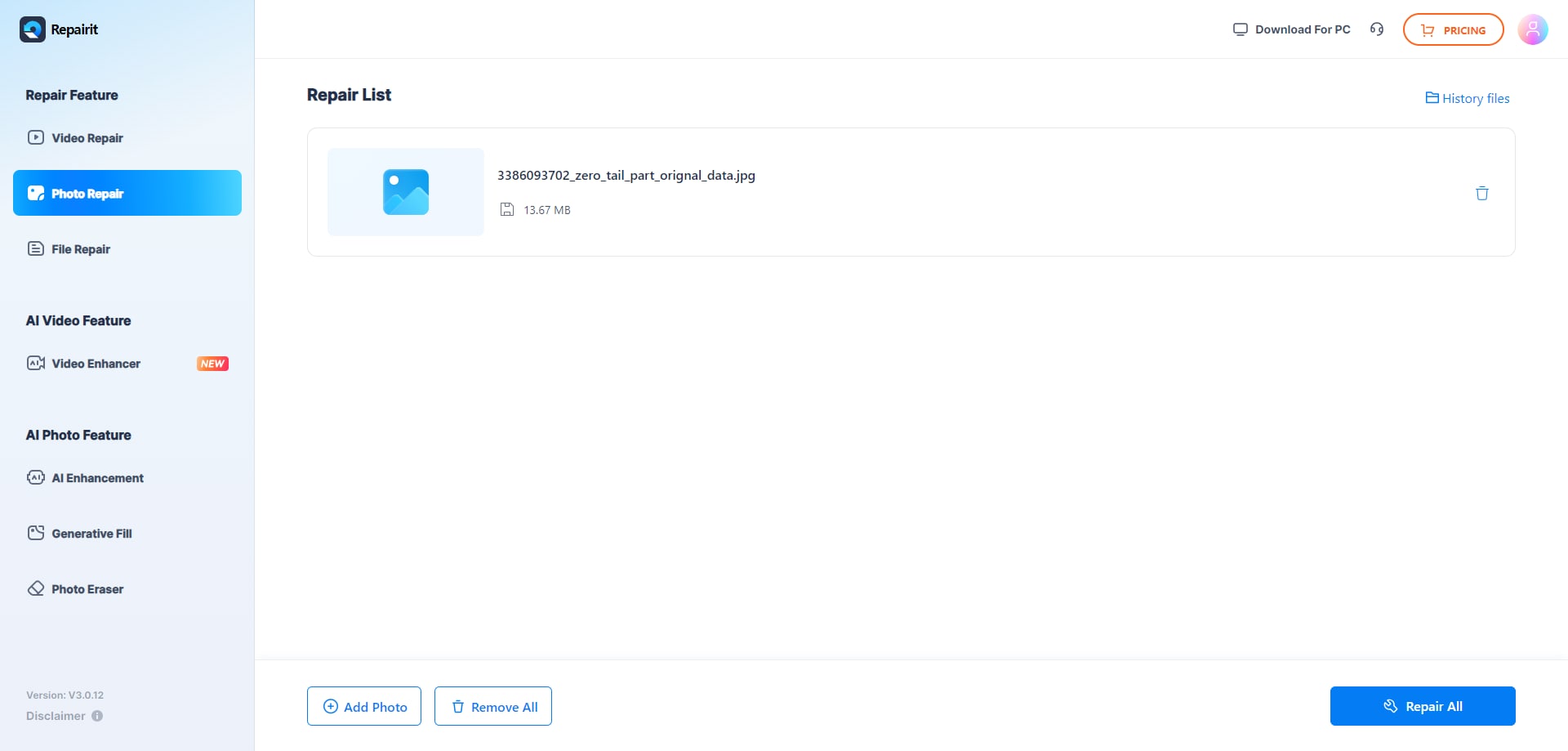
Step 2. Start the online repair process and let Repairit Photo Repair Online analyze the damaged photo files.
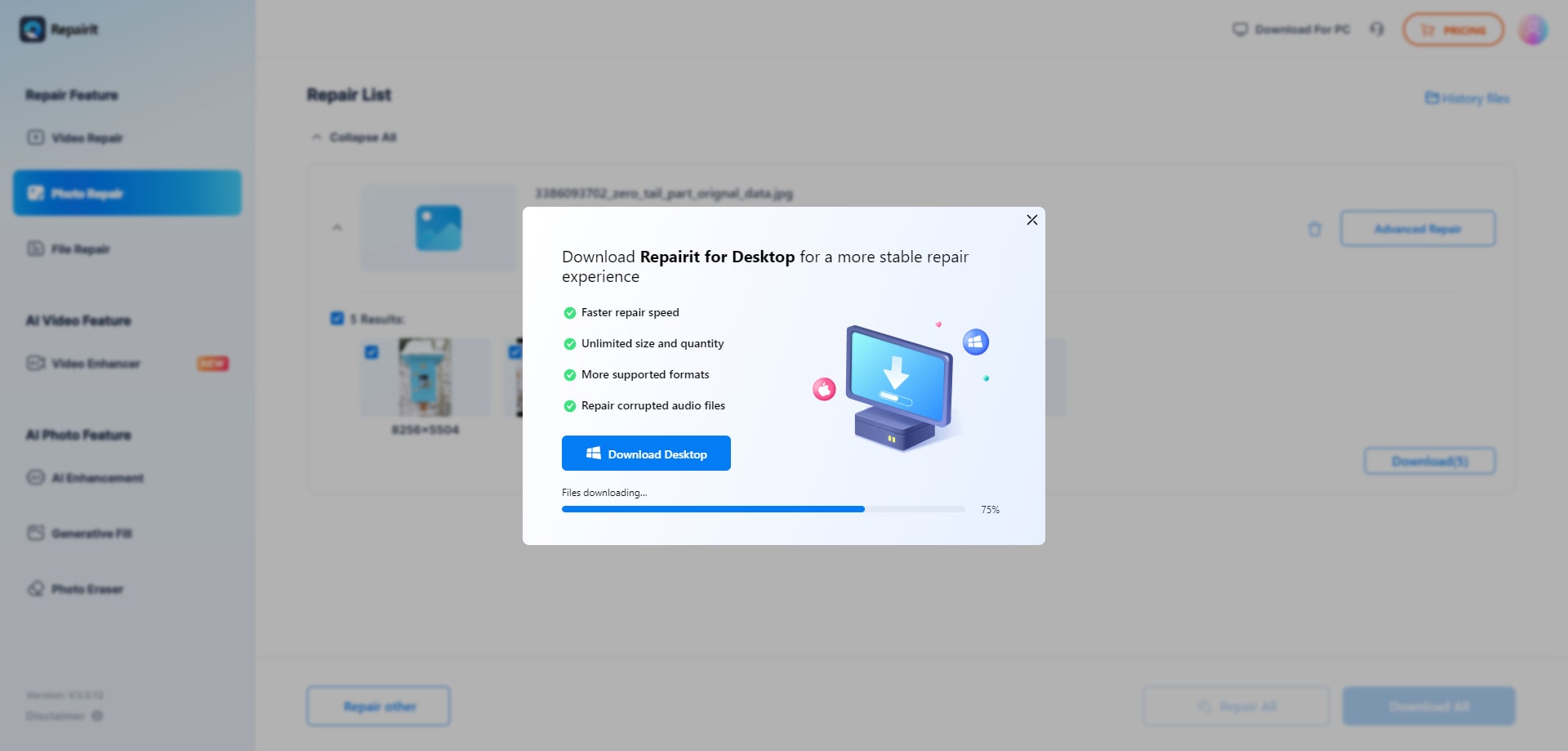
Step 3. Preview the repaired photo result when available, then save the repaired photos to your device.
Final Verdict
Repairit Photo Repair Online is more suitable when you want a guided, browser-based experience focused on corrupted photo repair, while Stellar Online Photo Repair may be enough if you mainly handle damaged JPEG, HEIC, and RAW photos within its usage limits.
In practice, many users try both services on the same corrupted image, since no single tool can fix every type of damage. If you value more guidance, clear steps, and a workflow tuned to repairing broken or unreadable photos, Repairit Photo Repair Online typically feels more approachable.
On the other hand, if your priority is broad format support around JPEG, HEIC, and RAW with a straightforward page and you are comfortable with its free usage and preview restrictions, Stellar Online Photo Repair can still be a practical option for everyday online corrupted photo repair.
Next: Repairit Photo Repair Online vs Jpg.Repair
FAQ
-
1. Is Repairit Photo Repair Online better than Stellar Online Photo Repair for corrupted photos?
Neither tool is universally better. Repairit Photo Repair Online is more suitable if you want a guided step-by-step workflow for repairing corrupted photos online, while Stellar Online Photo Repair may be enough if you mainly handle damaged JPEG, HEIC, and RAW files and prefer a simple, direct upload and repair page. -
2. Which tool handles unreadable JPG or PNG photos more easily?
For unreadable JPG or PNG photos, Repairit Photo Repair Online is often more comfortable for beginners because of its guided sequence, while Stellar Online Photo Repair can still be tried if you prefer its simpler layout. In many real-world cases, users upload the same broken file to both tools and compare which produces a cleaner, more viewable result. -
3. How do free usage and preview restrictions affect Stellar Online Photo Repair?
Stellar Online Photo Repair includes free usage and preview restrictions, so you may only test a limited number of corrupted photos or see partial previews before needing to upgrade. This matters if you want to




