
Online file repair tools help when important documents, spreadsheets, presentations, or archives become corrupted and stop opening normally. They focus on repairing existing damaged files rather than recovering deleted data.
When an important report, client presentation, or ZIP archive will not open, an online repair tool can save the day. This guide compares Repairit Online File Repair with 4DDiG Online File Repair so you can choose the better fit for repairing corrupted PDF, Word, Excel, PowerPoint, and other office documents directly in your browser.
Both tools target corrupted, damaged, or unreadable files that trigger invalid file errors, show broken file previews, or fail to load in common office applications.
In this article
- Quick Verdict: Repairit Online File Repair vs 4DDiG Online File Repair
- Key Differences and Comparison Table: Repairit Online File Repair vs 4DDiG Online File Repair
- File Types and Corruption Scenarios: Repairit Online File Repair vs 4DDiG Online File Repair
- Workflow, Ease of Use, and Upload: Repairit Online File Repair vs 4DDiG Online File Repair
- Repair Quality, Preview, and Limitations: Repairit Online File Repair vs 4DDiG Online File Repair
- Privacy, File Handling, and Browser Experience
- Supported Formats and Scenarios: Repairit Online File Repair vs 4DDiG Online File Repair
- Pros and Cons of Repairit Online File Repair and 4DDiG Online File Repair
- Who Should Choose Repairit Online File Repair or 4DDiG Online File Repair
- What the Actual Repair Process Looks Like
- Final Verdict: Repairit Online File Repair vs 4DDiG Online File Repair
Quick Verdict: Repairit Online File Repair vs 4DDiG Online File Repair
Repairit Online File Repair generally suits users who want step-based guidance, while 4DDiG Online File Repair may appeal to those who prefer a streamlined, preview-focused experience for supported formats.
Both tools aim to repair corrupted files online, such as PDFs that refuse to open, unreadable Word documents, damaged Excel sheets, PowerPoint files that fail to load, and broken ZIP archives that throw extraction errors.
Repairit Online File Repair emphasizes clarity at each step of the online file repair workflow. 4DDiG Online File Repair highlights AI-assisted repair for office and archive files with an interface designed to feel modern and straightforward.
The right choice depends on whether you prioritize detailed guidance, format focus, or a minimal number of clicks when you repair corrupted files online.
Key Differences and Comparison Table: Repairit Online File Repair vs 4DDiG Online File Repair
Repairit Online File Repair and 4DDiG Online File Repair differ mainly in guidance level, supported scenarios, and how users navigate the repair steps.
Below is a concise comparison based on typical dimensions users care about when choosing an online file repair tool for corrupted documents and archives.
| Dimension | Repairit Online File Repair | 4DDiG Online File Repair |
|---|---|---|
| Best for | Guided, step-by-step repair for varied corrupted documents and media. | Damaged office and archive files in a modern, straightforward interface. |
| Supported formats | Covers common office, image, and other formats for corrupted or unreadable files online. | Focuses on PDF, DOCX, XLSX, PPTX, ZIP, and PSD corrupted file repair. |
| Online workflow | Guided process with clear prompts from upload to repair and download. | Simple flow: upload file, repair, preview, then download if acceptable. |
| Repair capability | Aims to handle many corruption symptoms, from invalid files to unreadable documents. | AI-assisted repair for office and archive files that fail to open or show errors. |
| Ease of use | Beginner-friendly guidance for non-technical users handling important documents. | Intuitive for users familiar with web tools and quick online tasks. |
| Strengths | Guided, browser-based repair for many corruption scenarios and file categories. | Many supported formats and a clean UI for quick document fixes. |
| Limitations | Results vary with severe corruption or missing data; upload is required. | Preview restrictions and outcome limits; success depends on damage level. |
Neither tool replaces careful file handling or regular backups, but both can be useful when existing documents suddenly become unreadable.
Which Tool Repairs More File Types and Corruption Scenarios?
Both tools target corrupted, damaged, or unreadable files, but they emphasize slightly different format coverage and scenarios.
According to the provided information, both Repairit Online File Repair and 4DDiG Online File Repair focus on fixing corrupted files that will not open, show invalid file errors, or have incomplete or broken content structures.
Shared goal: They both aim to repair existing files online, not to recover deleted or lost data from storage devices.
Key capabilities overview:
- Repairit Online File Repair works with corrupted office files, presentations, and other documents directly in the browser.
- It addresses issues like files that will not open, invalid file errors, and broken formatting where possible.
- It provides a guided, step-based experience to help non-technical users complete online repairs confidently.
- 4DDiG Online File Repair uses AI-assisted document repair focused on damaged office and archive files.
- It targets corrupted PDF, DOCX, XLSX, PPTX, ZIP, and PSD files with online repair attempts.
- Its workflow aims to fix unreadable files by letting users upload, repair, and then preview recovered content.
In practice, Repairit Online File Repair may appeal if you handle a broad mix of documents and want guidance, while 4DDiG Online File Repair may suit users repeatedly working with the mentioned formats.
Repair Workflow, Ease of Use, and Upload Experience
Repairit Online File Repair and 4DDiG Online File Repair both rely on upload-and-repair workflows, but they present the steps differently.
Repairit Online File Repair emphasizes a guided, visual process where each step of uploading and repairing broken files is explained. This can make it easier for users who are not familiar with technical file repair terms.
4DDiG Online File Repair takes a streamlined approach: upload the corrupted file, start repair, preview the result, then download if the content looks usable. Many users may recognize this pattern from other web tools.
In both cases, you typically need:
- A stable internet connection for uploading and downloading files.
- Access to the browser-based interface on a compatible device.
- Corrupted files such as PDFs, Word documents, Excel workbooks, PowerPoint decks, or ZIP archives ready for testing.
Since uploads are required, users managing large or numerous files should consider their connection and time constraints before starting an online file repair session.
Repair Quality, Preview Experience, and Limitations
Repair quality for both Repairit Online File Repair and 4DDiG Online File Repair largely depends on how badly each file is damaged.
When file structures are only partially corrupted, either tool may be able to reconstruct enough content to restore readability. With severe corruption, missing data, or truncated file headers, results may be incomplete or unsuccessful.
The description notes that 4DDiG Online File Repair has preview restrictions. These may limit how deeply you can inspect repaired content before deciding whether to continue using the service for further processing or downloads.
Repairit Online File Repair also cannot fix every corrupted file. Severe corruption, damaged file structures, incomplete uploads, or unsupported formats may reduce the quality of the repair or produce only partial content.
Typical limitations users should expect include:
- Files that were never fully saved may lack critical data to rebuild.
- Heavily encrypted or proprietary formats may not be supported.
- Repeated overwrites of the same corrupted file can sometimes worsen damage.
Because of these factors, online file repair should be seen as an attempt to rescue content, not a guarantee of full restoration.
Privacy, File Handling, and Browser Experience
Both tools process your corrupted documents online, so privacy and file handling are important considerations.
For Repairit Online File Repair and 4DDiG Online File Repair, you must upload files to remote servers. This is necessary for the services to analyze file structures, attempt repairs, and generate downloadable outputs.
The cloud-based model brings convenience, but it also raises questions users should evaluate:
- How long files are stored on the provider servers, if at all.
- Whether links to repaired documents are accessible only to you.
- How logs or temporary copies are handled.
Users handling confidential PDFs, contracts, financial spreadsheets, or client presentations should review each provider current privacy statements, storage details, and terms before uploading.
As a general rule, avoid uploading highly sensitive content unless you are comfortable with the vendor documented policies and understand how to delete files when you are finished.
Supported File Formats and Common Repair Scenarios
Repairit Online File Repair and 4DDiG Online File Repair overlap on common office formats, but 4DDiG Online File Repair explicitly focuses on several specific types.
Repairit Online File Repair supports common office formats and other everyday files that may become corrupted or unreadable. Typical scenarios include broken PDF reports, damaged Word contracts, unusable Excel financial sheets, and invalid PowerPoint decks.
4DDiG Online File Repair focuses on PDF, DOCX, XLSX, PPTX, ZIP, and PSD, targeting unreadable archives, design files, and standard office documents that throw errors or will not open.
| File type | Repairit Online File Repair focus | 4DDiG Online File Repair focus | Common online repair scenarios |
|---|---|---|---|
| May repair corrupted PDF files used for reports, invoices, or manuals. | Targets corrupted PDF files specifically. | Broken PDF previews, PDFs that will not open, or invalid file errors. | |
| Word (DOC / DOCX) | Helps repair corrupted Word documents such as contracts or reports. | Explicitly supports DOCX files. | Unreadable Word documents, garbled text, or files stuck at opening. |
| Excel (XLS / XLSX) | Aims to repair corrupted Excel files like budgets or financial sheets. | Explicitly supports XLSX files. | Damaged Excel sheets, formulas missing, or files that crash on open. |
| PowerPoint (PPT / PPTX) | Focuses on corrupted presentations used for meetings or training. | Explicitly supports PPTX files. | PowerPoint files that fail to load or show slide corruption errors. |
| ZIP archives | May address broken ZIP files depending on scenario and support. | Targets ZIP archives directly. | ZIP extraction errors, incomplete archive structures, or invalid headers. |
| PSD and design files | Users should check official support for specific design formats. | Mentions PSD repair. | PSD files that will not open in design software or report damage. |
| Other office or document formats | Covers various everyday documents; check site for precise list. | Users should review official documentation. | Corrupted project documents, reports, or shared files. |
Because format support can evolve, users should confirm current compatibility on the official sites before relying on either service for unusual file types.
Pros and Cons of Repairit Online File Repair and 4DDiG Online File Repair
Both tools have advantages and trade-offs depending on your files, workflow preferences, and tolerance for preview restrictions.
Repairit Online File Repair Pros and Cons
4DDiG Online File Repair Pros and Cons
Who Should Choose Repairit Online File Repair or 4DDiG Online File Repair?
The better fit depends on your comfort level with technical steps, the file formats you handle, and how often you repair corrupted files online.
Repairit Online File Repair may fit you if:
- You want guided, step-by-step online repair for corrupted office files and presentations.
- You feel unsure about interpreting repair previews and options alone.
- Your team needs a clear, consistent browser workflow for repeated document repair tasks.
- You prioritize guidance and clarity over a minimalist single-page interface.
4DDiG Online File Repair may fit you if:
- You work mainly with PDF, DOCX, XLSX, PPTX, ZIP, or PSD files that become corrupted.
- You prefer a modern, streamlined interface with minimal steps.
- You already know which corrupted file you want to fix and need a quick repair.
- You are comfortable working within preview restrictions when judging results.
In many organizations, users may test both tools on sample corrupted files to see which online file repair workflow feels more natural before standardizing.
What the Actual Repair Process Looks Like
Most online file repair tools follow a similar pattern: upload a corrupted file, let the service analyze and attempt repair, then preview and download any recovered version.
This structure helps non-technical users fix unreadable files without deep knowledge of file formats or hex editors. It also reduces the need to install specialized desktop utilities for occasional repairs.
To illustrate how this works in practice, consider the guided workflow offered by Repairit Online File Repair. Its process represents how a browser-based tool can walk you through each stage of repairing corrupted documents and archives.
Key Features
From an online workflow standpoint, several characteristics stand out for Repairit Online File Repair.
- Guided workflow that explains each online repair step clearly.
- Designed for common corrupted office and document scenarios.
- Browser-based operation without installing heavy desktop software.
These traits may help users who rarely handle technical troubleshooting but still need to repair damaged documents under time pressure.
Step-by-step guide
The following high-level steps summarize how you might repair corrupted files online using Repairit Online File Repair.
Step 1. Upload the corrupted, damaged, or unreadable files you want to repair through Repairit Online File Repair.
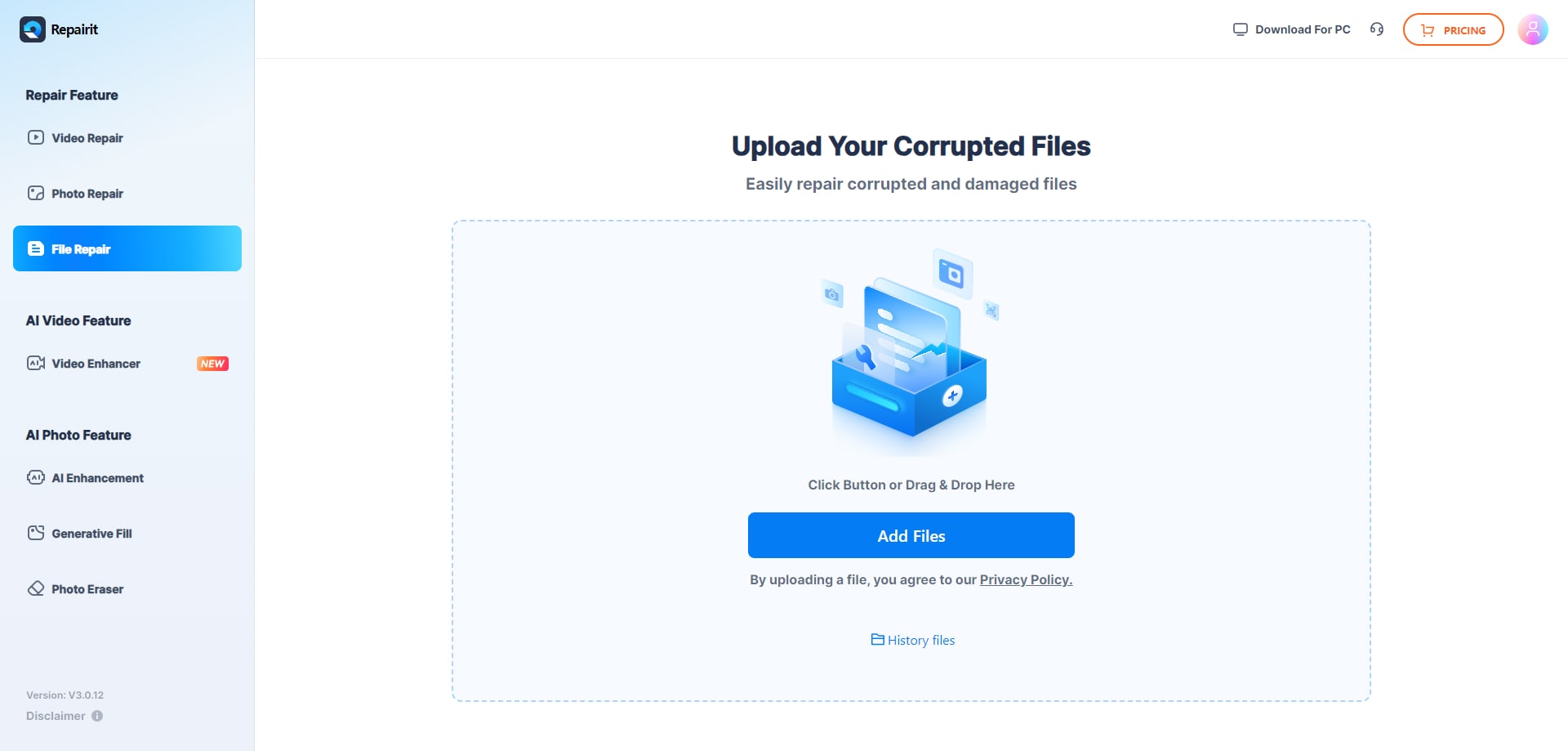
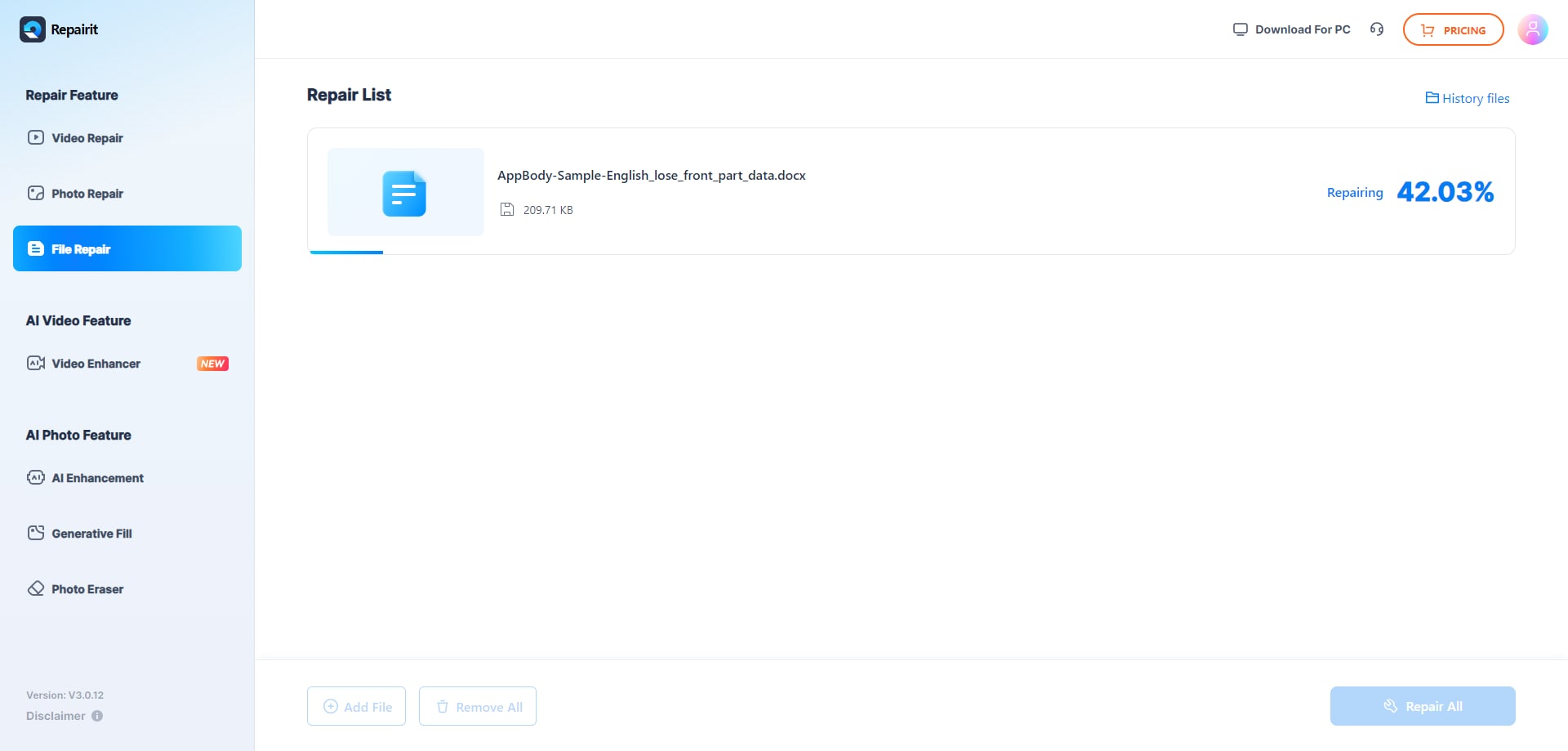
Step 2. Start the online repair process and let Repairit Online File Repair analyze the damaged files.
Step 3. Preview the repaired result when available, then save the repaired files to your device.
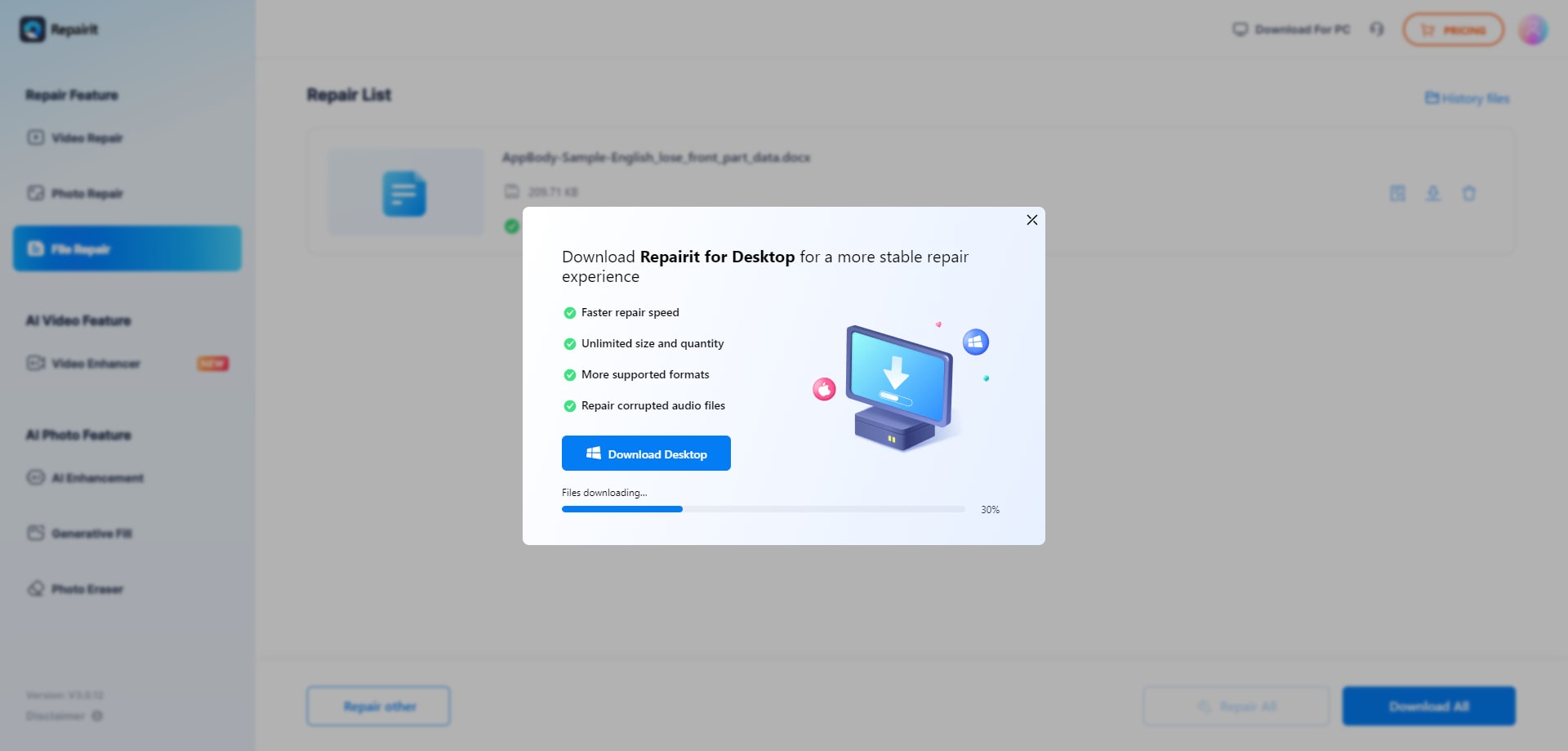
While details can vary by file type and damage level, this upload, repair, preview, and save pattern is common among online file repair tools and supports practical day-to-day document recovery needs.
Final Verdict: Repairit Online File Repair vs 4DDiG Online File Repair
Both Repairit Online File Repair and 4DDiG Online File Repair focus on repairing corrupted, damaged, or unreadable files rather than recovering deleted items or lost partitions.
4DDiG Online File Repair emphasizes AI-assisted office and archive document repair with a modern, streamlined interface and explicit support for PDF, DOCX, XLSX, PPTX, ZIP, and PSD formats.
Repairit Online File Repair focuses on a guided, user-friendly workflow that helps less technical users navigate corrupted PDF, Word, Excel, and PowerPoint repair online.
Neither tool can promise to fix every corrupted file, but each offers a structured way to attempt repairing invalid file errors, broken PDF previews, unreadable Word documents, damaged Excel sheets, and problematic ZIP archives.
Choosing between them often comes down to the mix of formats you handle, how much guidance you want during the process, and how you feel about preview restrictions before downloading repaired content.
Next: Repairit Online File Repair vs Officerecovery Online
FAQ
-
1. How do Repairit Online File Repair and 4DDiG Online File Repair differ for corrupted document repair?
Both tools repair corrupted, damaged, or unreadable files online, but emphasize different strengths. Repairit Online File Repair focuses on guided steps and clarity for a range of document types. 4DDiG Online File Repair centers on AI-assisted repair for formats like PDF, DOCX, XLSX, PPTX, ZIP, and PSD within a modern interface. -
2. When should I choose Repairit Online File Repair instead of 4DDiG Online File Repair?
Choose Repairit Online File Repair if you value step-by-step guidance, need help understanding each phase of the repair, or frequently repair varied office documents. 4DDiG Online File Repair can be suitable when you mostly handle its explicitly supported formats and want a streamlined, preview-oriented workflow. -
3. What is the difference between corrupted file repair and deleted file recovery?
Corrupted file repair focuses on fixing existing files that will not open, show errors, or appear unreadable due to damage. Deleted file recovery attempts to restore files removed from storage devices. Repairit Online File Repair and 4DDiG Online File Repair concentrate on corruption repair, not on general deleted data recovery tasks.
"




