
 TL;DR:
To resolve Forza Horizon 6 startup crashes on PC, ensure your system runs Windows 10 or 11 (Version 22H2 or later) and perform targeted software troubleshooting like verifying installation files or updating dedicated graphics drivers.
● Minimum hardware prerequisites mandate a DirectX 12 compatible GPU such as the NVIDIA GTX 1650, AMD RX 6500 XT, or Intel Arc A380 containing 4 GB VRAM, alongside 16 GB of system RAM and an SSD.
● Software-based launch barriers can be bypassed by disabling fullscreen optimizations directly in the forzahorizon6.exe properties, reinstalling missing Visual C++ libraries, or executing a repair on the Xbox Gaming Services app.
● If forced game closures result in corrupted local gameplay footage, the Wondershare Repairit application can automatically scan and rebuild the damaged video file structures without file size limitations.
Ask AI for a summary
 ChatGPT
 Perplexity
 Gemini
 Claude
 Grok
Grok
Many players have experienced frustrating startup problems while launching Forza Horizon 6 recently. The game sometimes crashes instantly or remains stuck during loading screen sequences. Various technical issues can prevent smooth gameplay performance across different computer systems.
Luckily, several practical solutions can quickly restore proper gameplay functionality without difficulties. This article will help fix "Forza Horizon 6 not launching on PC" issues using practical methods. You will also learn advanced repair methods for damaged FH6 gameplay recordings efficiently.
In this article
Part 1. Why Forza Horizon 6 Is Not Launching on PC
Several hidden problems may stop the game from launching on your computer system. This section will help you understand issues and fix Forza Horizon 6 won't launch on PC:
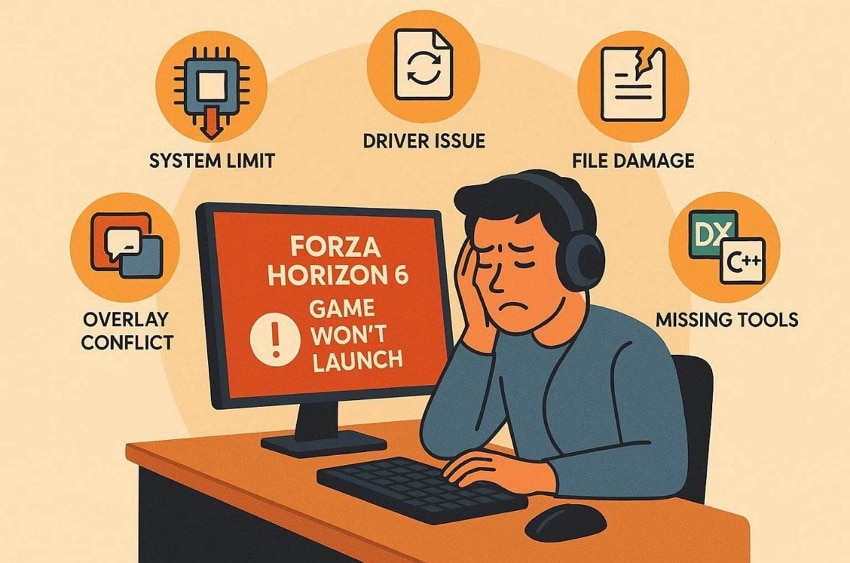
- System Limit: The game fails to start when the PC does not meet the minimum system requirements. A poor GPU or RAM may prevent Forza Horizon 6 from starting up correctly.
- Driver Issue: Outdated graphics drivers often prevent the game from opening on PC systems. Sometimes, broken or old GPU drivers cause crashes or no response after launch.
- File Damage: Damaged game files can stop Forza Horizon 6 from opening correctly. Missing or corrupted installation data results in an instant failure at startup.
- Missing Tools: The game may not open when the required Windows or Xbox components are missing. A lack of DirectX or Visual C++ often prevents the proper game startup process.
- Overlay Conflict: Background apps and overlays can stop Forza Horizon 6 from launching properly. Tools like Discord or FPS counters often interfere with smooth game startup processes.
Part 2. Check If Your PC Meets Forza Horizon 6 Requirements
At times, your game does not open because your computer is not powerful enough. To run the game smoothly, the game requires modern hardware. Checking your PC specs can help fix Forza Horizon 6 not starting on PC problems. Let us check the exact computer parts needed for smooth gameplay:
Minimum GPU Requirements
Review the table to know the minimum GPU requirement for smooth Forza Horizon 6 gameplay:
| Component | Minimum Requirement |
| GPU | NVIDIA GTX 1650 / AMD RX 6500 XT / Intel Arc A380 |
| VRAM | 4 GB Video Memory |
| DirectX Support | DirectX 12 |
| Shader Support | Shader Model 6.0 |
| GPU Type | Dedicated Graphics Card Recommended |
Recommended PC Specifications
This section shows the PC specifications needed to play Forza Horizon 6 smoothly:
| Requirement | Minimum | Recommended | Extreme | Extreme RT |
| Processor (Intel) | Intel Core i5-8400 | Intel Core i5-12400F | Intel Core i7-12700K | Intel Core i7-12700K |
| Processor (AMD) | AMD Ryzen 5 1600 | AMD Ryzen 5 5600X | AMD Ryzen 7 7700X | AMD Ryzen 7 7700X |
| RAM | 16 GB | 16 GB | 24 GB | 32 GB |
| Storage | SSD | SSD | NVMe SSD | NVMe SSD |
| Operating System | Windows 10/11 (Version 22H2 or later) | Windows 10/11 (Version 22H2 or later) | Windows 10/11 (Version 22H2 or later) | Windows 10/11 (Version 22H2 or later) |
| Graphics Preset Target | Low | High | Extreme | Extreme RT (Ray Tracing Enabled) |
| Target Resolution | 1080p | 1440p | 4K | 4K Upscaled |
| Target Frame Rate | 60 FPS | 60+ FPS | 60+ FPS | 60+ FPS |
Part 3. Fix Forza Horizon 6 Not Launching on PC in Easy Steps - 6 Ways
There are many different hardware and software problems that can block proper game launching. So, below are 6 troubleshooting methods to fix "Forza Horizon 6 not opening on PC":
Way 1: Update Graphics Drivers
Old and outdated drivers may block important DirectX features needed for game startup. Updating graphics drivers adds compatibility and helps fix "Forza Horizon 6 won't launch PC" issues. This process removes hidden problems causing launch failures, improves game support, and reduces startup errors. Adhere to the steps below to update the outdated graphics card:
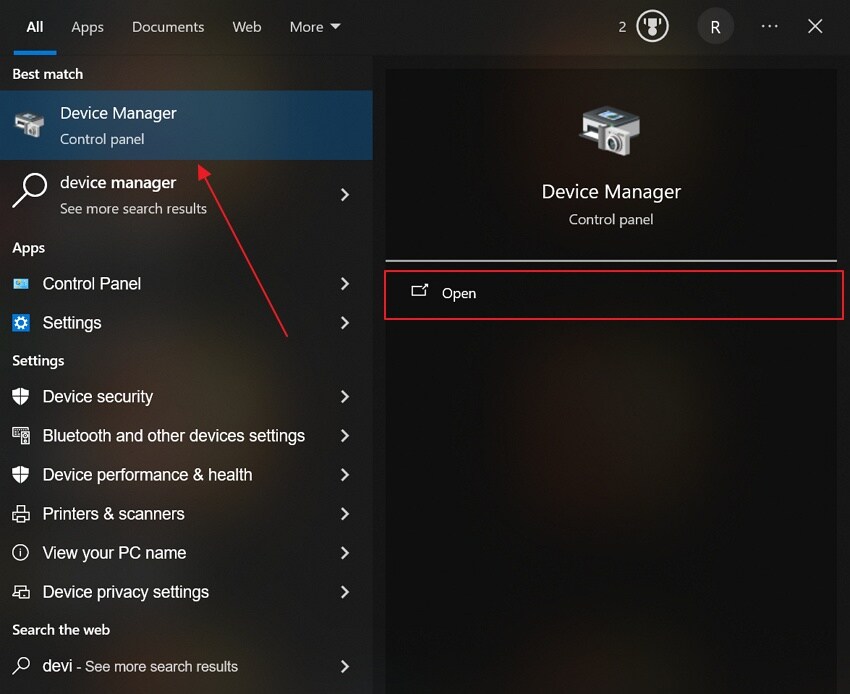
Step 1. From the "Start" menu, search for "Device Manager" and opt for "Open."
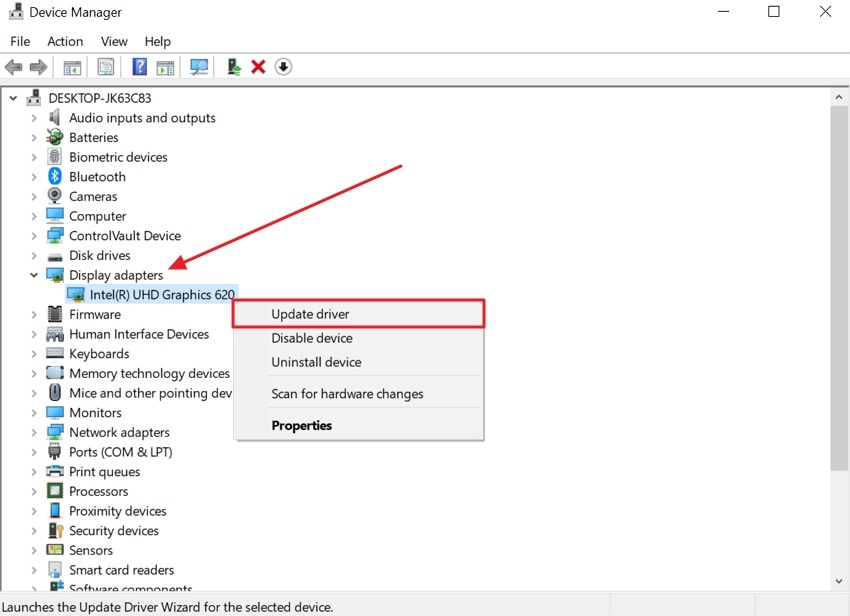
Step 2. Upon accessing it, open "Display Adapters" to see your graphics card name. Next, right-click the available graphics card and select the "Update Driver" option.
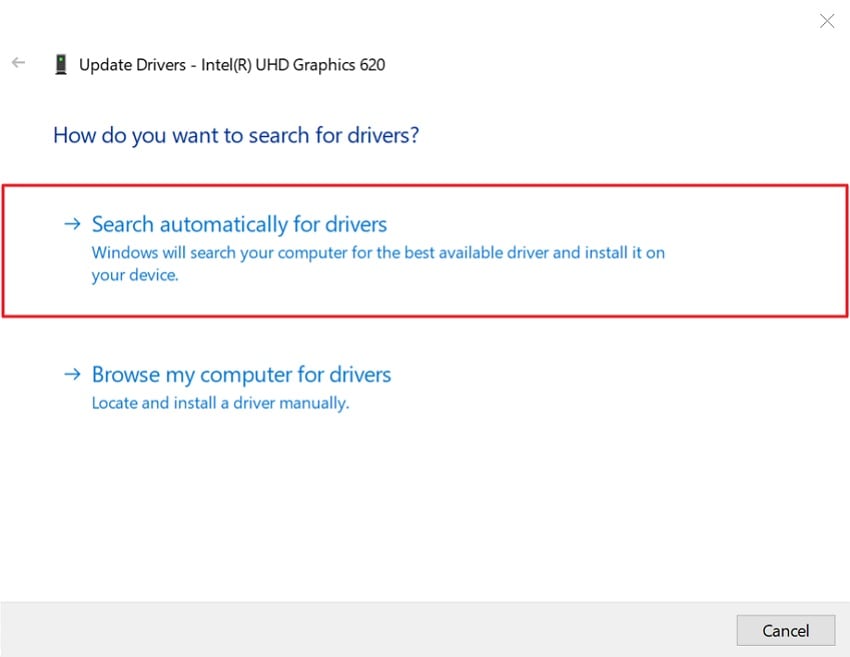
Step 3. In the next window, look for "Search Automatically for Drivers" option for updating the graphics card. Restart your computer once the driver installation is complete.
Way 2: Verify Game Files
Game file verification checks whether Forza Horizon 6 files are damaged. Sometimes, missing or broken files can stop the game from opening. Steam or Xbox compares your files with the correct game version online. If any file is corrupted, the client downloads that missing part again. Thus, follow the guide below to fix "Forza Horizon 6 not starting on PC" via this method:
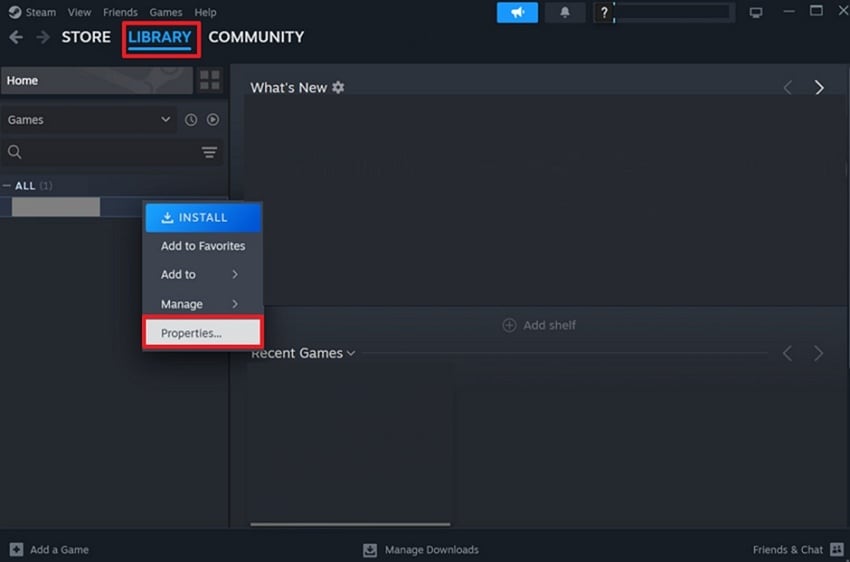
Step 1. Start by going into Steam's "Library" to search for Forza Horizon 6. Right-click on the game and look for "Properties."
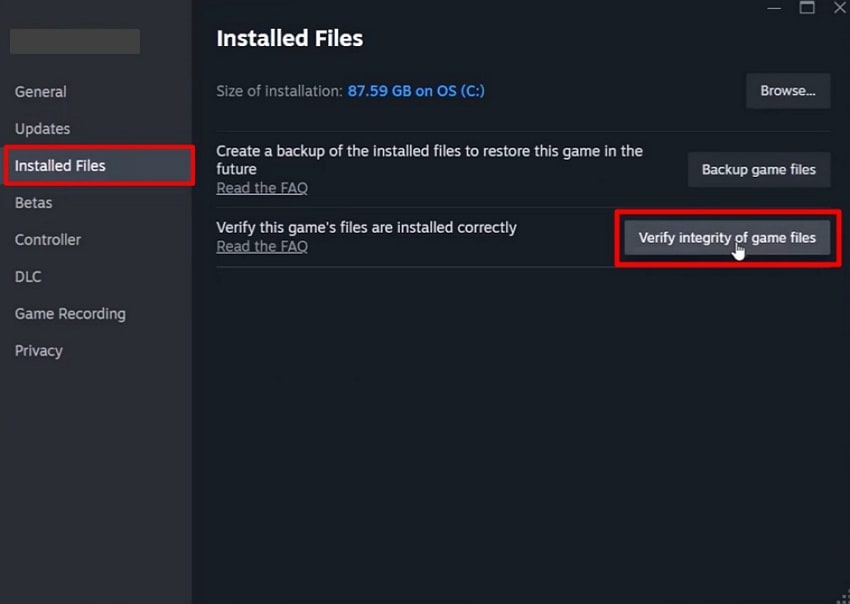
Step 2. After accessing the game properties, navigate to the "Installed Files" section and choose "Verify integrity of game files."
Way 3: Disable Fullscreen Optimizations
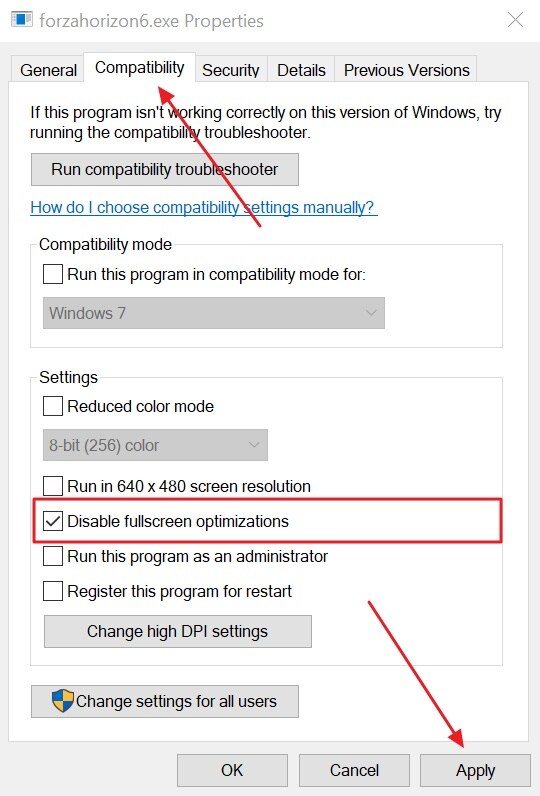
Fullscreen optimizations may also interfere with the normal Forza Horizon 6 startup. Windows can force display settings that create crashes or black screen issues. This conflict stops the game from opening or loading correctly. Disabling this feature results in a cleaner full-screen startup process and fixes "Forza Horizon 6 not starting on PC" issues. Thus, take guidance from below to disable the full-screen optimization:
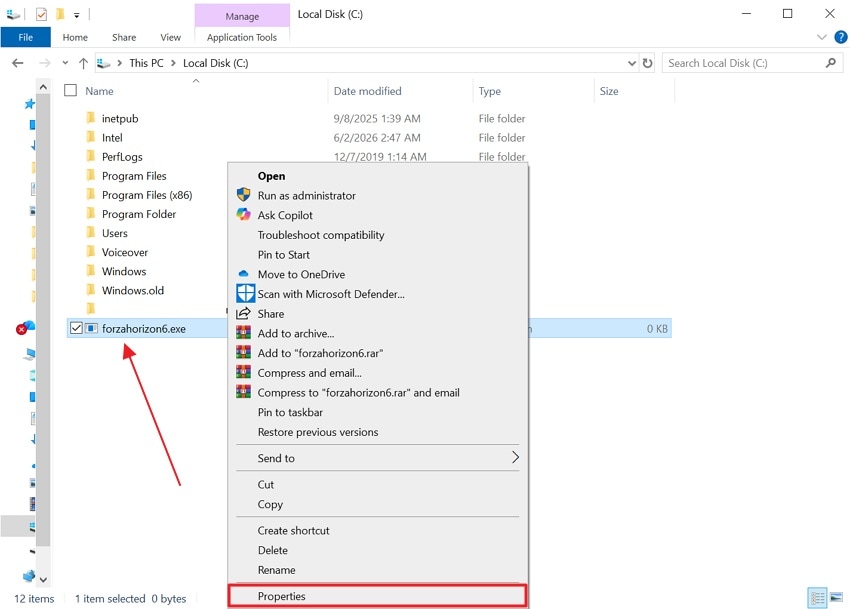
Step 1. Open the "File Explorer" and find the main game file named "forzahorizon6.exe" in the folder. After that, right-click the file and select the "Properties" option from the menu list.
Step 2. Now, go to the "Compatibility" tab, enable the "Disable fullscreen optimizations" option, then opt for "Apply." Afterward, restart your PC and launch Forza Horizon 6 again.
Way 4: Repair Xbox Gaming Services
Forza Horizon 6 not launching on PC is caused by Xbox Gaming Services errors. These services manage how the game starts and interacts with Windows. If the services are corrupted or outdated, the game may fail to launch. Repairing Xbox Gaming Services can restore missing files and resolve issues that prevent the game from opening. Go through the given steps to learn how to repair Xbox Gaming Services:
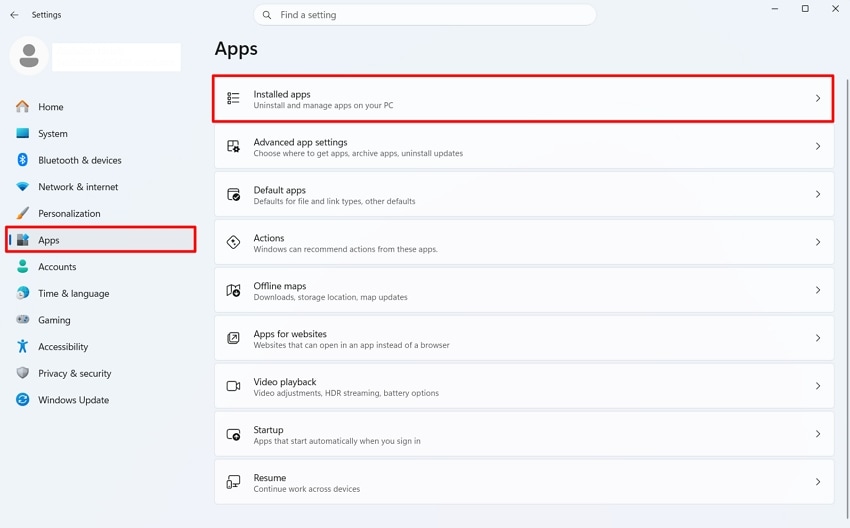
Step 1. Open "Settings" and go to "Apps," then opt for "Installed Apps."
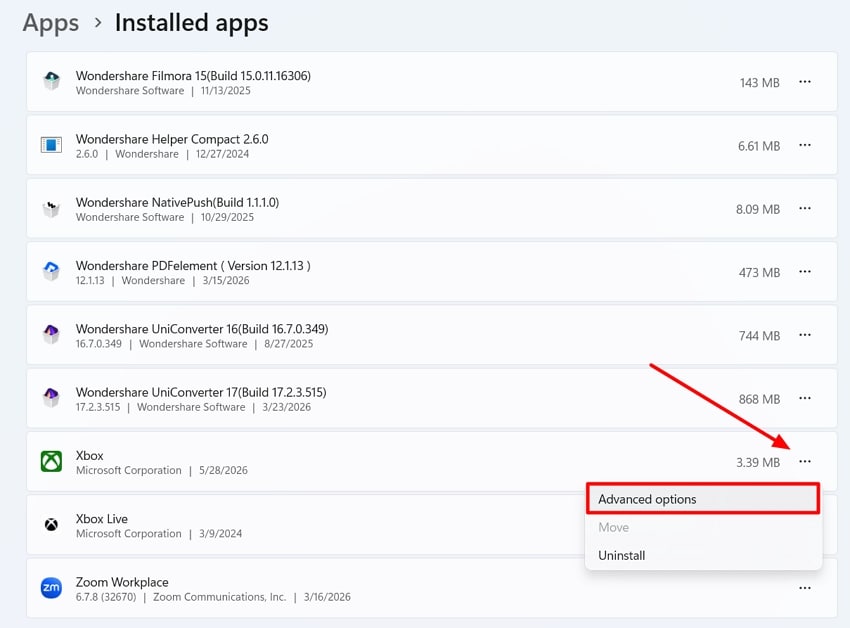
Step 2. Upon accessing it, find "Xbox" gaming services and click "Three Dots," then choose "Advanced Options."
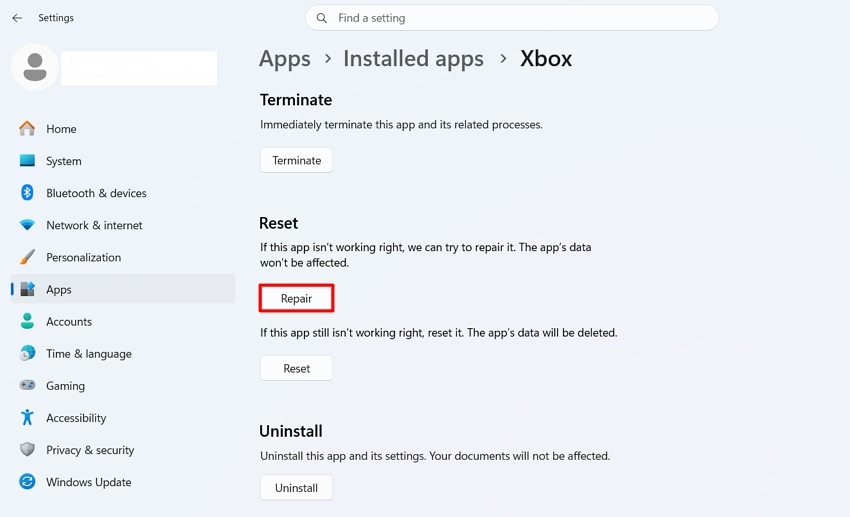
Step 3. In the following window, press the "Repair" button to fix broken game services files.
Way 5: Reinstall DirectX and Visual C++
DirectX and Visual C++ are important tools needed for game launching support. Microsoft says Visual C++ Redistributables support apps built through Visual Studio. When these runtime libraries are broken, the game cannot load graphics or system resources. Hence, reinstalling them replaces missing DLL files and helps fix "Forza Horizon 6 not opening on PC." Let's explore the given guides to reinstall both tools, DirectX and Visual C++:
Reinstall DirectX
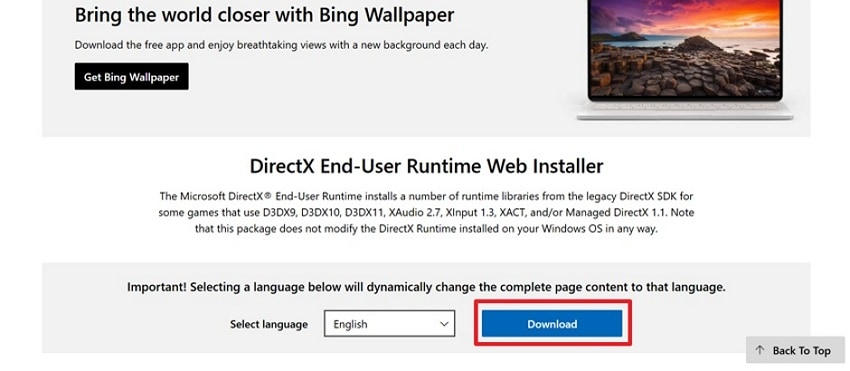
Step 1. To initiate, visit the official site of "DirectX" and opt for the "Download" button.
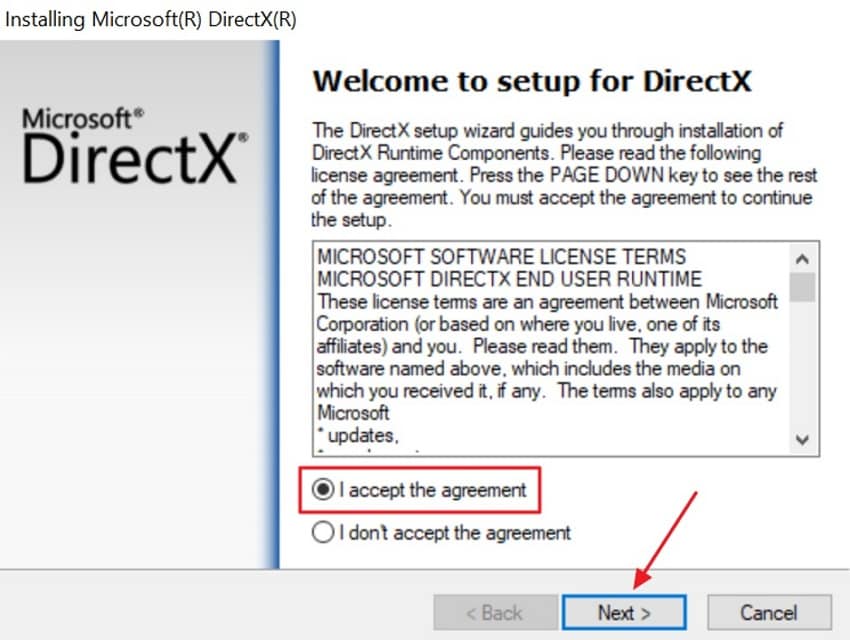
Step 2. When it is downloaded, turn on the "I Accept the Agreement" option and opt for the "Next" button.
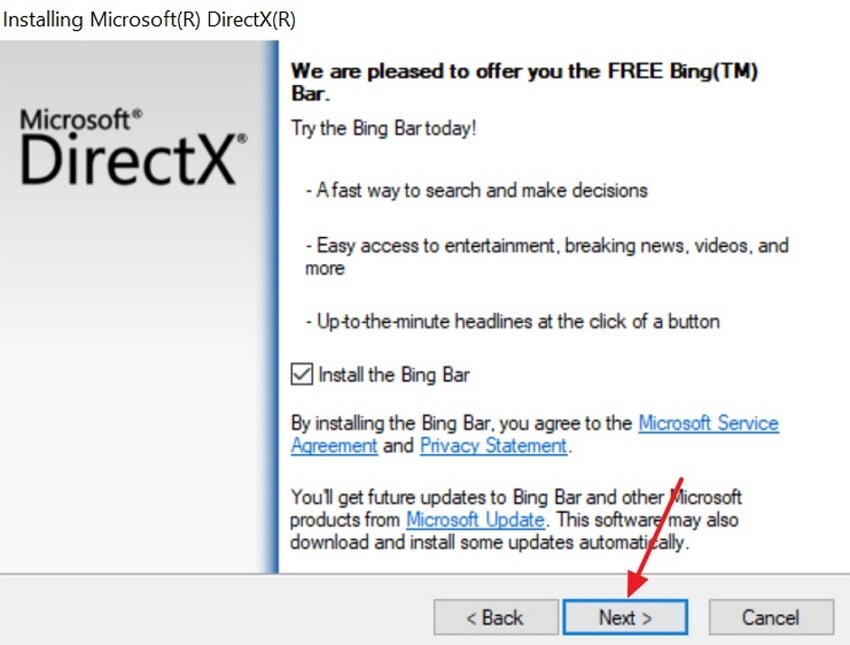
Step 3. Upon accessing it, opt for the "Next" button at the bottom.
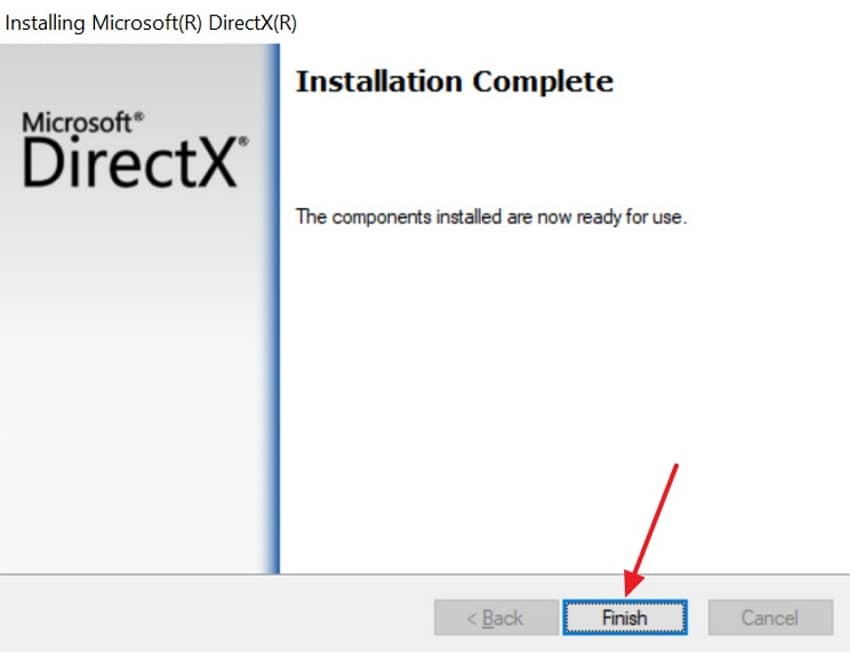
Step 4. Once it is installed, click the "Finished" button. At last, restart your computer to apply all updates and libraries.
Reinstall the latest Visual C++
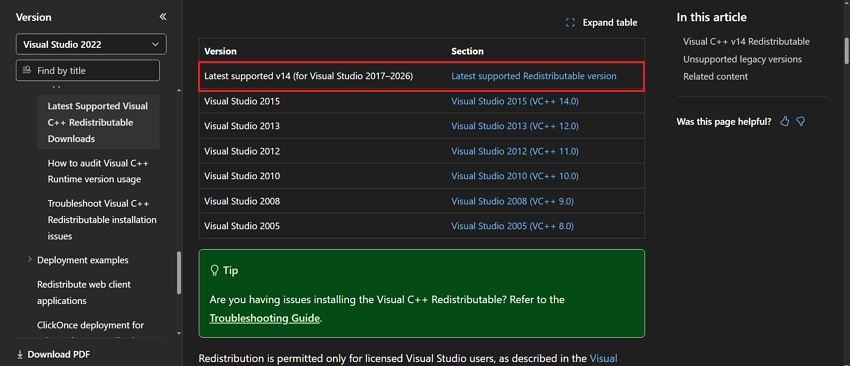
Step 1. Go to the official website of "Microsoft" and download the latest Visual C++ Redistributable packages.
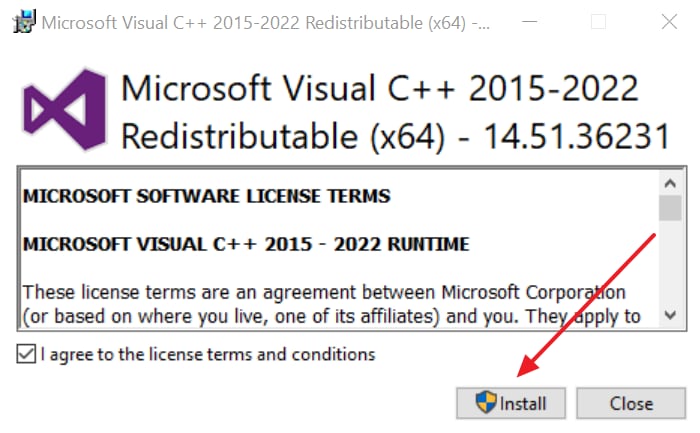
Step 2. Once the installer is downloaded, go for the "Install" button and follow the on-screen instructions.
Way 6: Switch to Dedicated GPU
When the above fixes don't work, switching to a dedicated GPU can help fix "Forza Horizon 6 not launching PC" issues. Integrated graphics are weak and cannot handle heavy game requirements properly. The game needs a powerful graphics card for smooth startup and loading. Using a dedicated GPU gives full DirectX 12 support and better performance stability. This change prevents crashes, black screens, and GPU not supported errors easily.
Advanced Fix: Recover Corrupted FH6 Video Files Using Repairit
While fixing Forza Horizon 6 not launching PC problems, sudden crashes, and force shutdowns can leave recorded gameplay files corrupted and unplayable. This is where tools like Repairit help restore these corrupted videos and ensure playback of saved gameplay footage. The tool corrects audio-video synchronization, so commentary and game sounds match the action perfectly.
During repair, it sharpens blurry frames and restores fine details in gameplay recordings. Moreover, Repairit can fix the damaged file structure to make videos playable again. While using it, users can repair multiple corrupted recordings simultaneously without limits on file size or quantity. Gamers can also rebuild broken or incomplete video data using intelligent algorithms. After repairing, users can upscale recordings to 4K resolution without artifacts or blurring.
Key Features
-
Smooth Recording Stability: Reduces frame drops, stutters, and pauses to keep gameplay recordings smooth during intense gaming scenes.
-
Advanced Format Detection: Analyzes sample videos to repair rare, damaged, or unsupported gameplay recording file formats accurately.
-
Smart AI Scanning: Uses AI technology to scan Forza Horizon 6 video frames and detect damaged parts automatically.
Detailed Guide to Repair Damage to Game Recording Using Repairit
Adhere to the given steps to repair your damaged game recordings effortlessly:
Step 1. Add Your Damaged Recorded Videos
Access the tool and select the "Video Repair" feature, then opt for "Start."

Step 2. Start the Repairing Process
After adding your damaged or corrupted game recording to the tool, press "Repair" to fix it.

Step 3. Preview and Save Repaired Videos
When the repair process completes, opt for the "Save" button to download your restored videos.

Conclusion
In conclusion, this guide explains simple ways to fix "Forza Horizon 6 not launching PC" issues. A report from Windows Central says Forza Horizon 6 gained over 172,000 Steam players during early access. Each method removes common errors that block game startup. However, sudden crashes may still damage recorded gameplay videos. In that case, tools like Repairit become important to restore damaged FH6 video files easily.
FAQ
-
Why does Forza Horizon 6 crash on startup?
Game crashes usually happen due to missing files or outdated drivers. The system cannot load graphics properly when DirectX or GPU drivers are broken. However, updating drivers and verifying files often fixes this launch problem completely. -
Can low storage cause FH6 not launching?
Low storage prevents the game from loading essential files during the startup process. Without enough space, installation becomes incomplete, and the game fails to run properly. You should keep extra SSD space available for smooth performance and loading. -
How can you repair damaged FH6 gameplay recordings?
Gameplay recordings can become corrupted after crashes, freezes, or sudden system shutdowns. Specialized video repair tools can restore broken file structure and playback quality. Tools like Repairit help recover smooth gameplay recordings without losing important recorded footage. -
Can an outdated Windows stop FH6 from launching?
Yes, older Windows versions may not support the required DirectX features properly. This causes the game to fail during initialization and the startup sequence completely. Updating Windows ensures compatibility and fixes many launch-related errors.




