
 TL;DR:
You can resolve the Forza Horizon 6 FH301 and FH205 graphics card not supported launch errors on compatible PCs by forcing the system to utilize your dedicated GPU, updating graphics drivers, or repairing background gaming services.
● The game strictly requires a DirectX 12 compatible graphics card with a minimum of 4 GB VRAM, such as an NVIDIA GeForce GTX 1650 or AMD Radeon RX 6500 XT, to bypass legitimate hardware limitations.
● If your device meets the specifications but still triggers the error, navigate to Windows Graphics Settings and assign Forza Horizon 6 to the High-Performance option to prevent it from mistakenly launching on integrated graphics.
● For persistent FH205 hardware detection failures despite correct GPU allocation, verify the integrity of your game files in Steam, run the application as an administrator, or completely uninstall and reinstall Xbox Gaming Services to clear broken component links.
Ask AI for a summary
 ChatGPT
 Perplexity
 Gemini
 Claude
 Grok
Grok
While playing Forza Horizon 6, the game may pause or refuse to launch suddenly. Users get a warning that says, "graphics card not supported," or encounter FH301 or FH205 error codes. In such situations, players might wonder whether the PC or the graphics card has gotten outdated.
Therefore, learning how to fix "the Forza Horizon 6 FH301 graphics driver, older than the minimum supported version," becomes important. This guide outlines what these errors mean, how to review system requirements, and which practical fixes work best.
In this article
Part 1. What Are FH301 and FH205 Errors in Forza Horizon 6?
When getting the "graphics card not supported" message, players might also see the FH301 and FH205 errors. This section discusses what these errors mean and why they might have occurred.
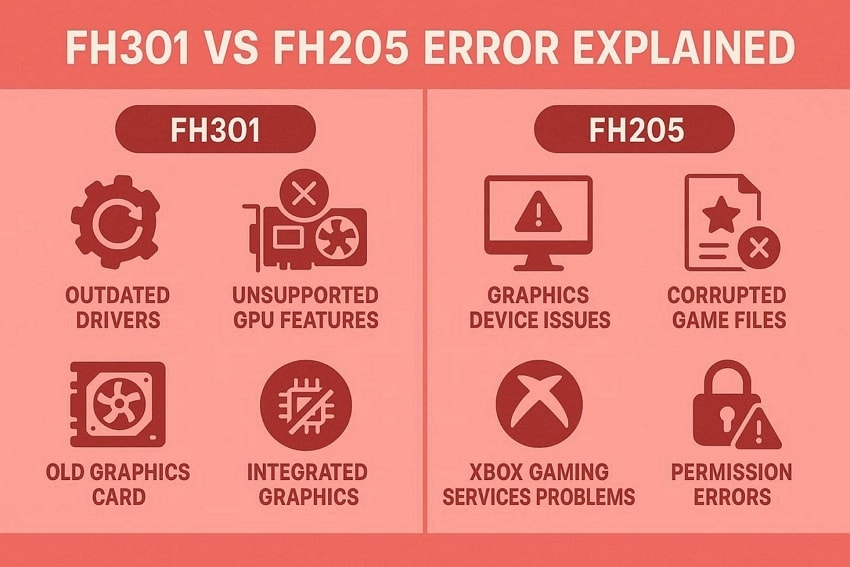
FH301 Error Explained
There are two ways to understand what the FH301 error means. The graphics driver is not up to date, or the graphics card does not support the necessary features. This error may occur on very old graphics cards, following game updates, or if graphics card drivers are outdated. Sometimes it is triggered by mistake when using integrated graphics instead of dedicated graphics.
FH205 Error Explained
The FH205 error message usually means that a graphics device or services needed for the game have a problem. Although the game may meet the GPU requirements, the FH205 error can occur if the game files are corrupted or Xbox Gaming Services is not running correctly. It can also be due to access or permission issues that prevent Forza Horizon 6 from accessing the required resources.
Part 2. Check If Your PC Meets Forza Horizon 6 Requirements
Before trying to fix "the Forza Horizon 6 FH301 FH205 graphics compatibility error," it’s better to confirm if the device meets the game’s requirements:
Minimum GPU Requirements
| Requirement | Details |
| Graphics API | DirectX 12 compatible GPU |
| Minimum VRAM | 4 GB |
| NVIDIA Example | GeForce GTX 1650 |
| AMD Example | Radeon RX 6500 XT |
| Intel Example | Intel Arc A380 |
Recommended Graphics Card Specs
Forza Horizon 6 works well with mid‑range cards with 8–12 GB VRAM. The following table displays the best GPU options users can get across different providers:
| Requirement | Details |
| NVIDIA | GeForce RTX 3060 Ti (8GB VRAM) |
| AMD | Radeon RX 6700 XT (12GB VRAM) |
| Intel | Intel Arc A580 (8GB VRAM) |
You’ll get a smoother, more stable gaming experience at 1080p-1440p quality. Systems with such stronger GPUs translate FH301 or FH205 errors to software or graphics driver issues.
Part 3. Best Ways to Fix FH301/FH205 Errors in Forza Horizon 6
It is quite possible that your PC has the required specs, but the game still doesn’t work. Players look for quick fixes to "the Forza Horizon 6 error code FH301" on PCs, but do not know where to start. For this purpose, the top 5 strategies that help in restoring Forza Horizon 6 have been detailed.
Way 1. Update GPU Drivers
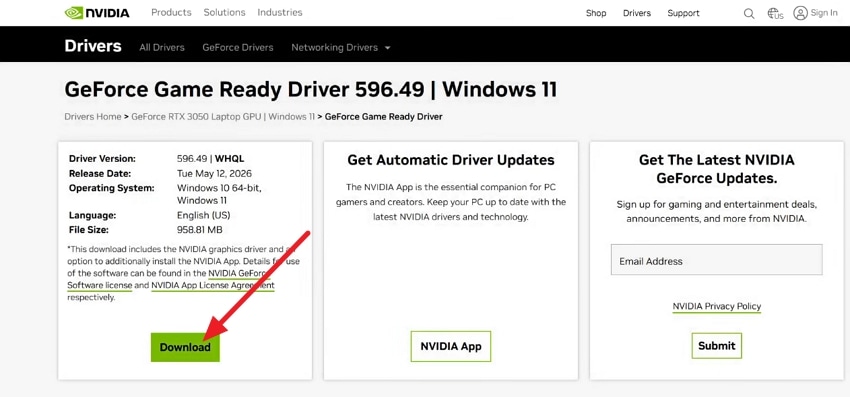
A simple technique to ensure the game works properly again is to update the graphics driver. The upgraded driver ensures proper DirectX 12 support, stability, and enables the Game Ready optimizations released specifically for FH6. As FH6 accommodates different GPUs, we’ll look into updating NVIDIA GPU drivers as follows:
Step 1. Open NVIDIA drivers’ official website and add your requirements in the provided search bar. Select "Download" button for saving the latest GeForce Game Ready drivers.
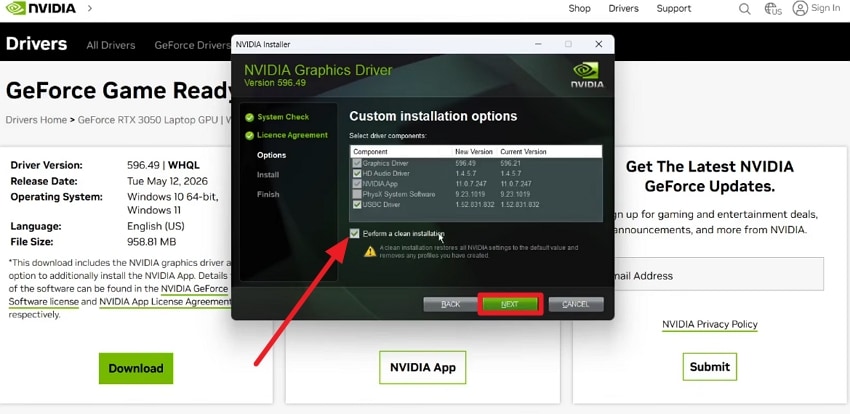
Step 2. Go through the instructions prompted by the "NVIDIA Graphics Installer" window. After choosing "Custom," go for the "Perform a Clean Installation" box and click "Next."
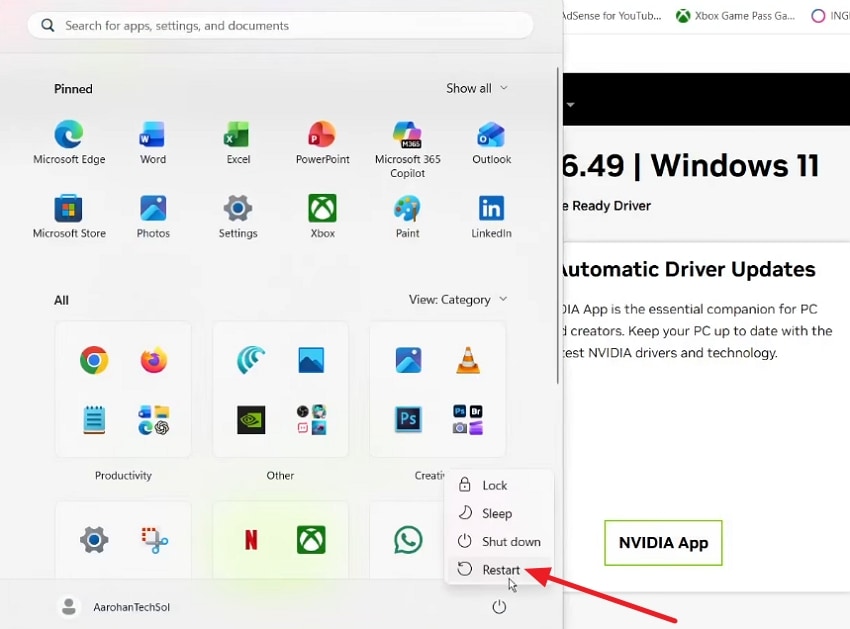
Step 3. Finally, restart the PC by clicking on the "Power" button and check if the game is working now.
Way 2. Verify Game Files
Users can fix "the Forza Horizon 6 FH301 FH205 graphics compatibility error" by confirming the condition of the game files. Sometimes errors are caused by missing or corrupted data rather than unsupported hardware. This sorts out FH205 and launch‑related FH301 cases where the game fails during graphics initialization because essential files are damaged. Review the next set of instructions to verify gaming files:
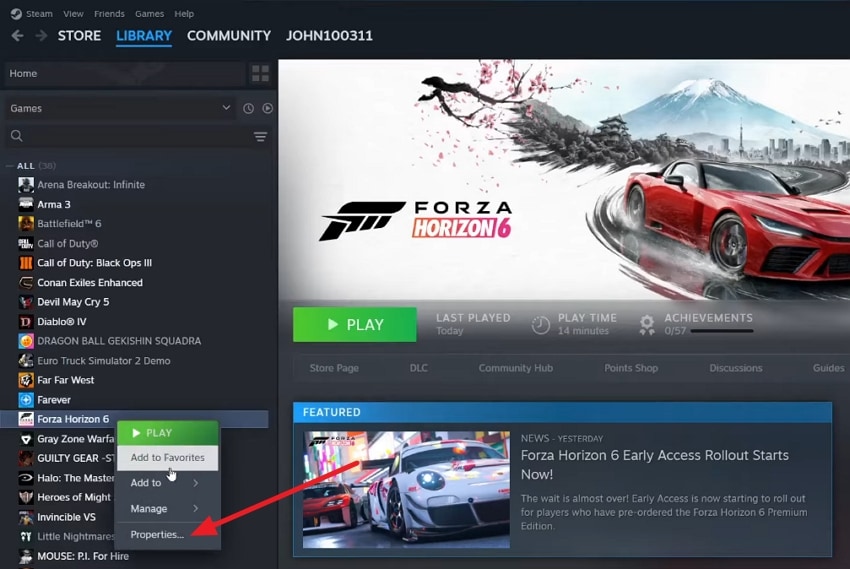
Step 1. Once you open Steam, left-click on the game from the left panel and select the "Properties" option.
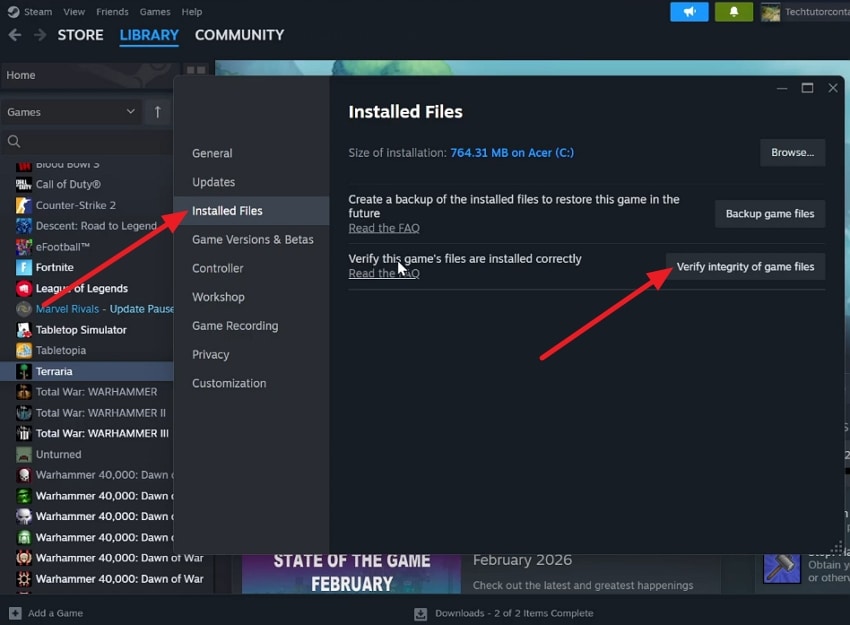
Step 2. As a window opens, look for "Installed Files" section, and choose "Verify integrity of Game Files."
Way 3. Run FH6 as Administrator
Administrators get more access and control over files as compared to standard users. In some cases, FH205 and other errors happen due to restricted permissions which can be resolved by running Forza Horizon 6 as an administrator. It enables the game and associated services to have access to the necessary system files, folders, and GPU resources that may otherwise be denied. Carefully follow the steps to play the game as an admin:
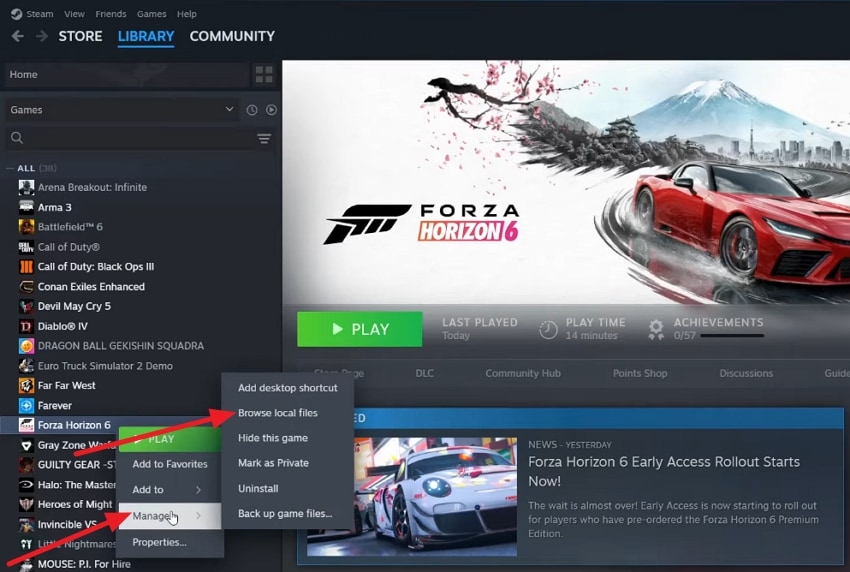
Step 1. After opening Steam’s library, right-click on the game and choose "Manage" from the available options. Look for the "Browse local files" option for opening the game folder in the file explorer.
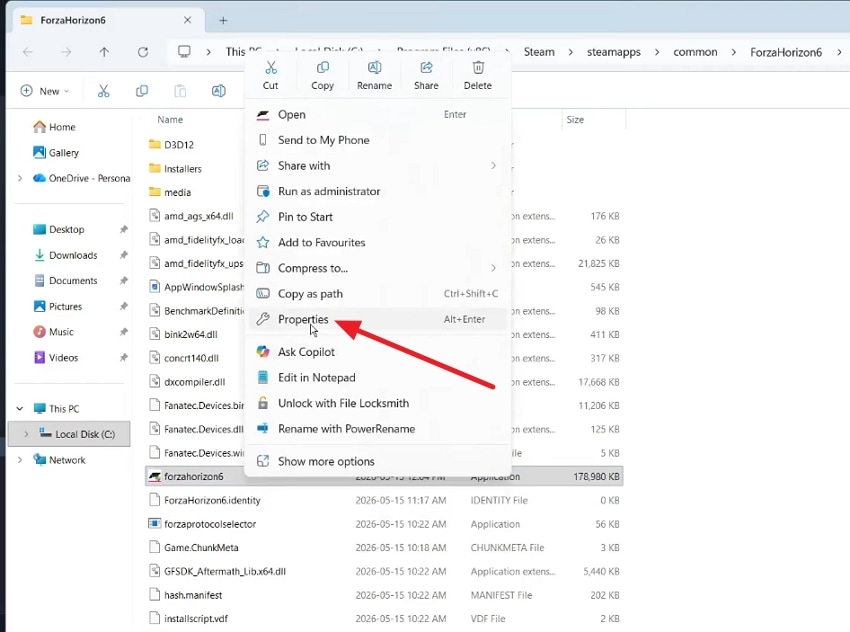
Step 2. Consequently, right-click on the game file and choose "Properties" from the drop-down.
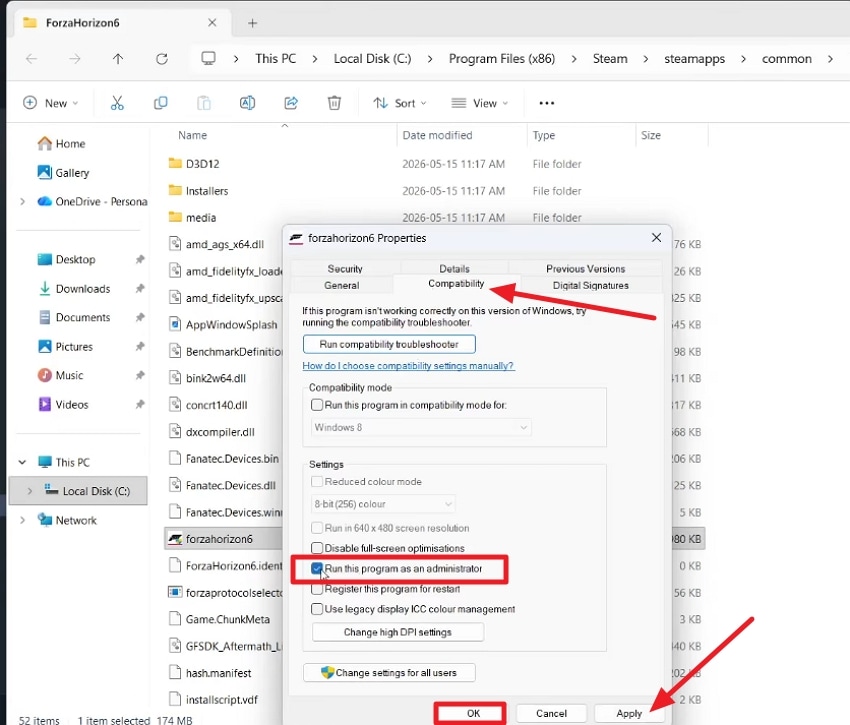
Step 3. Move into the "Compatibility" section and check the box showing the "Run this program as an administrator" option. Upon completion, select "Apply," and then click "OK" to finalize all changes.
Way 4. Switch to Dedicated GPU
On certain devices, Windows runs the game on integrated graphics instead of the powerful GPUs. This can lead to huge performance drops or compatibility issues. The integrated chip fails to meet the game’s graphics requirements and feature levels. To fix the Forza Horizon 6 error code FH205 on PC, review the steps mentioned below:
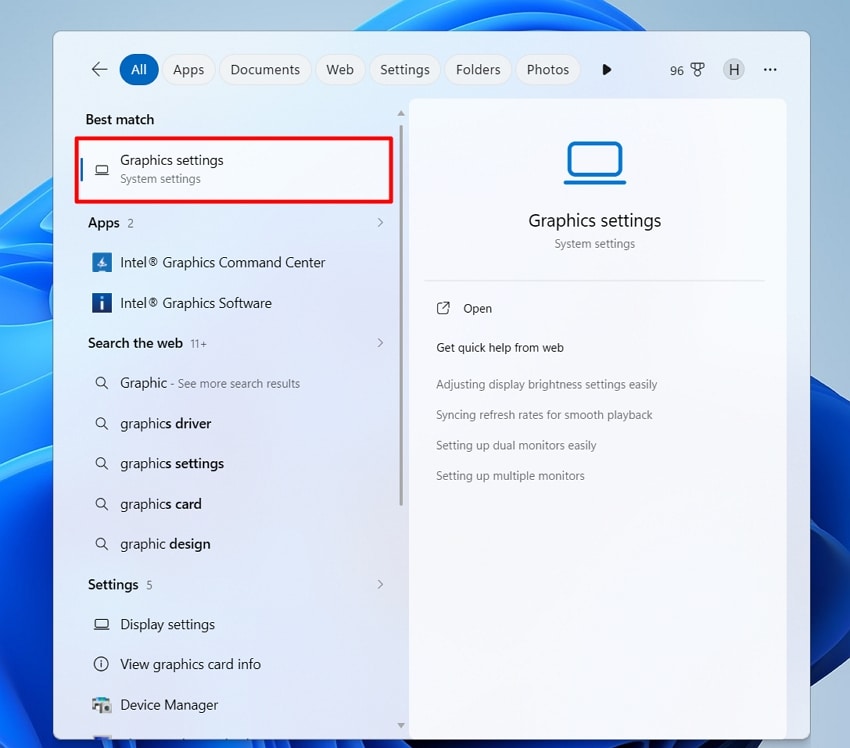
Step 1. Start off by opening the "Graphics Settings" on the PC by searching for it.
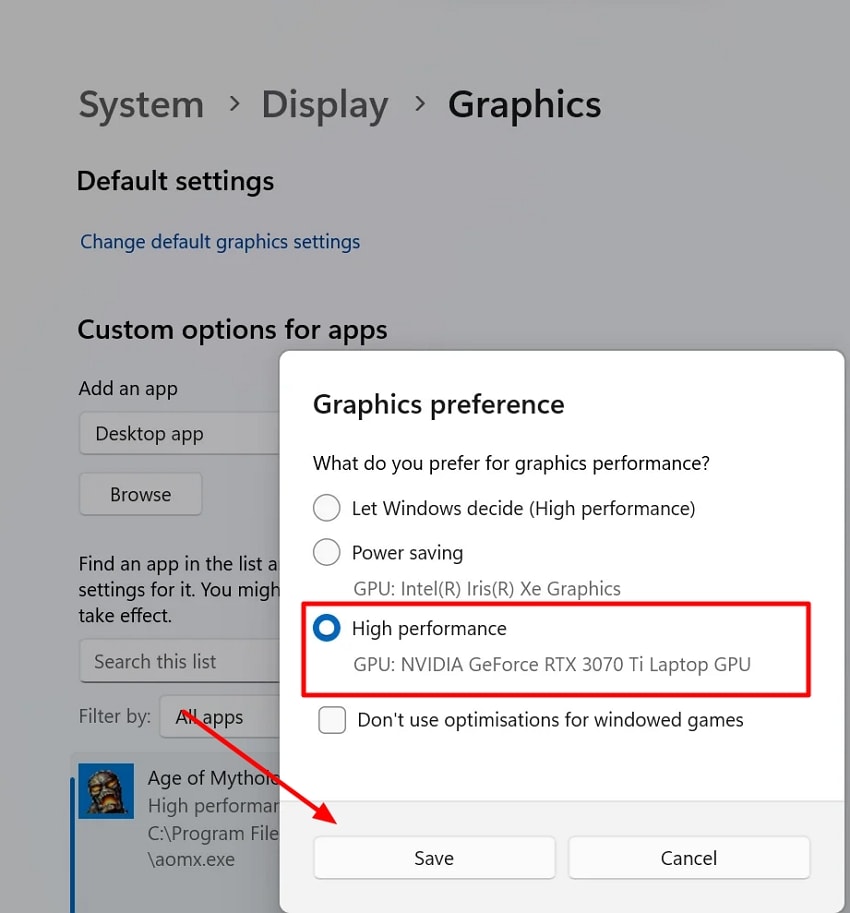
Step 2. Scroll down, locate the game, click on the file, and press the "Options" button. Here, select the "High-Performance" option and click on the "Save" button to apply the changes.
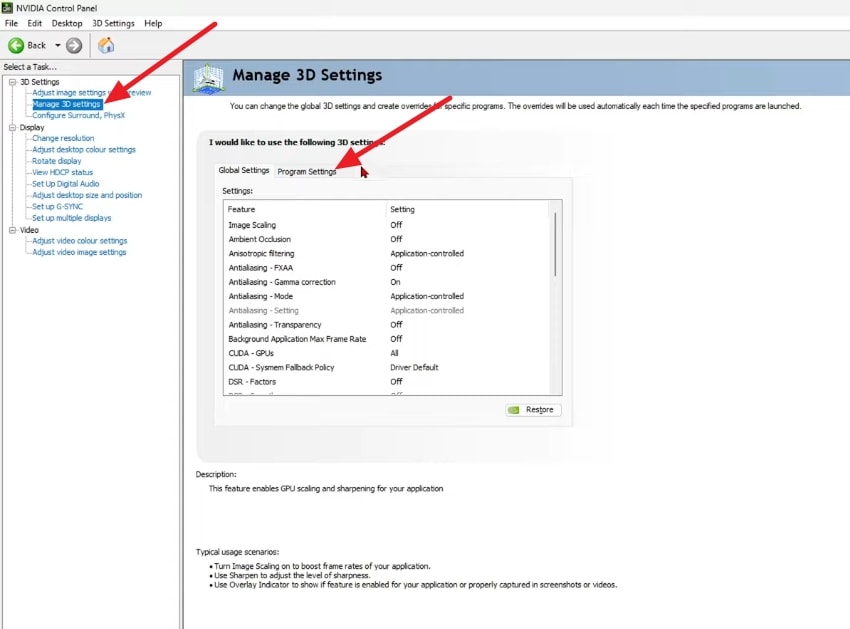
Optional: Search for "NVIDIA Control Panel" in the search bar and access "Manage 3D Settings". Afterward, choose the "Program Settings" section, find your game, and select the high‑performance NVIDIA processor as the preferred graphics processor.
Way 5: Reinstall Xbox Gaming Services
Another option for fixing the FH 301/FH 205 errors is reinstalling Xbox gaming services. This approach works best when there is a suspected broken link between Forza Horizon 6, the Xbox app, and core gaming components in Windows. The game and cloud saves remain untouched, while damaged services are replaced with fresh, working copies. Follow the steps mentioned below to reinstall Xbox gaming services:
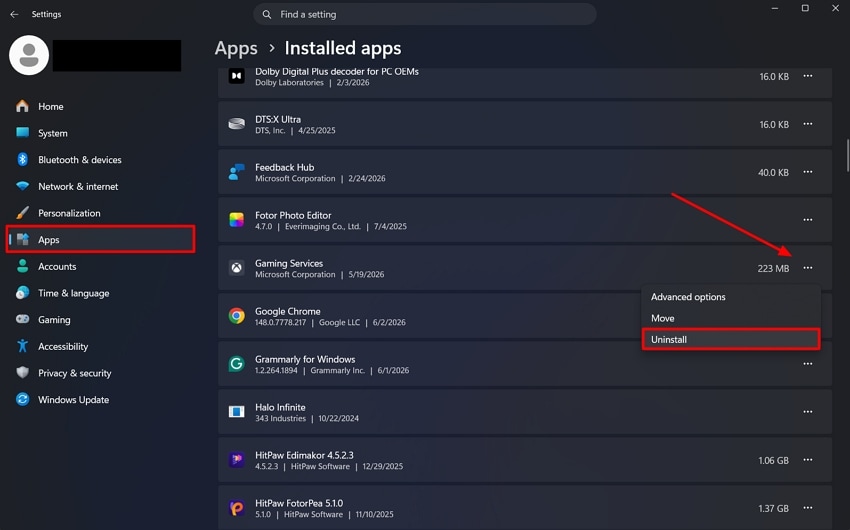
Step 1. After launching the Settings, access the "Installed Apps" option from the "Apps" section. Look for "Gaming Services" from the list and choose "Uninstall" after selecting the three dots.
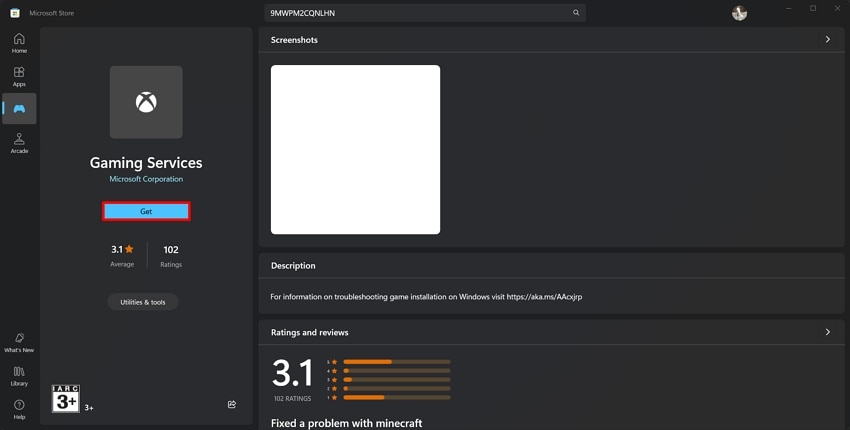
Step 2. Reinstall Gaming Services from the Microsoft Store by clicking "Get." Finally, restart your PC to ensure all changes are saved.
Pro Tip: Fix Corrupted Forza Horizon 6 Video Files with Repairit
Forza Horizon’s session can be ruined if a recording freezes or becomes corrupted after the game crashes. It gets frustrating when you lose a clean replay or drift run that you wanted to share with others. Repairit offers a practical way to restore damaged gameplay clips on both Windows and macOS. You can save your gaming legacy by fixing the important FH6 game video.
The tool quickly repairs corrupt video game files rather than forcing a re‑record with its advanced format analysis. Common formats like MP4, MOV, AVI, and MKV captured are repaired with its intelligent algorithm application. The repairing process is easy and AI-automated, which helps users in exporting repaired files within minutes.
Key Features
-
Smart Visual Enhancement: AI analyzes scenes and selectively improves key visual areas for higher overall quality.
-
Cohesive Game Footage: Repairit fills in missing frames in gameplay sessions to increase footage coherence.
-
Noise Cleanup: The tool reduces grain and visual noise, delivering cleaner game footage and screenshots.
A Comprehensive Tutorial on Repairing Gameplay Files with Repairit
If gameplay files become corrupted after fixing "Forza Horizon 6 error code FH205" on the PC, Repairit can repair them. Review the full tutorial below on how to use it for fixing corrupted video game files.
Step 1. Open Program and Add Broken Video Files
Initiate by navigating to the "Video Repair" tab after opening Repairit on the device. Import one or more corrupted files by clicking on the "+Add" option.

Step 2. Verify and Repair the File
Continuing, verify that the correct video file has been uploaded and then choose the "Repair" option.

Step 3. Preview and Save Repaired Video
Once the repairing procedure is completed, review the repaired video carefully. Click the "Save" button to download the video onto the PC.

Conclusion
To sum it up, errors like FH301 and FH205 usually trace back to graphics compatibility, outdated drivers, or broken services. The issue is typically resolved with careful checks and targeted fixes rather than new hardware. Remaining technical problems may corrupt valuable gameplay recordings. In such cases, Repairit restores damaged clips during attempts to fix "Forza Horizon 6 FH301 graphics driver older than minimum supported version."
FAQ
-
Why does Forza Horizon 6 show FH301 at launch?
The FH301 error appears when the graphics driver is outdated or missing necessary features. Another reason it can be triggered is when the installed GPU falls below the game’s minimum specifications. -
What does FH205 "graphics card not supported" actually mean?
When drivers or services prevent proper hardware detection during startup, users receive the FH205 "graphics card not supported" warning. It often indicates the GPU lacks needed DirectX 12 features or compatibility flags. -
Can corrupted Forza Horizon 6 gameplay clips be repaired after a crash?
Crashes and errors can leave highlight videos partially recorded or unreadable. Dedicated repair tools like Wondershare Repairit help restore many damaged FH6 gameplay files. -
How can system requirements be checked for Forza Horizon 6?
Open Windows settings or Device Manager to confirm the exact GPU model and VRAM. Then compare it with the official minimum and recommended requirements for the game. A quick check of system requirements usually fixes "Forza Horizon 6 error code FH205" on the PC.




