
“What's the best way to download audio from a Youtube video to listen and study online? I'm tired of using broken websites! Do you guys use any YouTube to MP3 converters which does the job without damaging the quality of the audio? Please suggest me your best go to choice. Thank you for all the help and suggestions in advance.” - InternalSet17
Saving audio from YouTube has become a common need for many everyday users. People often want music files for offline listening during travel, study, workouts, or daily routines. That is why many readers search for how to download music from YouTube as MP3 in a way that feels clear and practical.
Therefore, this guide explains the process simply without making it sound confusing or overly technical for beginners. Moreover, it breaks the process into easy parts for smoother understanding. It also highlights useful methods, key points, and common mistakes users should avoid while downloading audio.
In this article
Part 1. Why People Download Music from YouTube as MP3
Many users prefer this option because it turns video content into a simpler audio file. The reasons below explain why “how to download music from YouTube as MP3” remains useful for everyday listening:
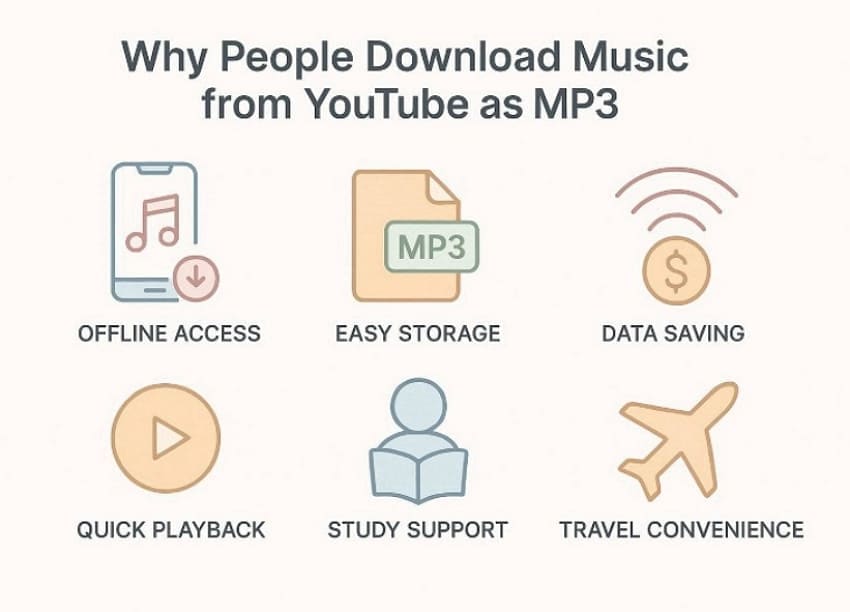
- Offline Access: MP3 files let users enjoy music without needing an internet connection. This makes listening easier during travel, flights, commutes, or weak signal areas.
- Easy Storage: Downloaded audio stays saved directly on personal devices for later use. Users can organize songs better without opening apps or searching repeatedly.
- Data Saving: Offline music playback helps reduce mobile data use during daily listening. This becomes useful for people with limited data plans or unstable networks.
- Quick Playback: MP3 files open quickly across phones, tablets, laptops, and music players. Users do not need full video loading before enjoying the audio content.
- Study Support: Many people save lectures, podcasts, or calm music for focused sessions. This helps them replay useful audio during work, revision, or quiet study.
- Travel Convenience: Saved tracks remain available even when internet access becomes unavailable outdoors. That gives users more reliable entertainment during road trips or long journeys.
Part 2. 4 Different Ways to Convert YouTube Videos to MP3
There is more than one way to handle this process, depending on the tool you prefer. The following methods show some practical ways to convert YouTube videos to MP3 more easily:
Method 1: Use a YouTube to MP3 Online Converter
This method works well for users who want quick results without installing software, so below are a few options to consider:
1. Y2Mate
A browser-based setup makes Y2Mate an easy option for quick audio conversion tasks. Users paste the YouTube link, select MP3, and begin the process directly. Moreover, no sign-up or software installation is needed before getting started. It also supports longer video conversions, which helps with extended audio content. Now, adhere to the steps below to try this online converter:
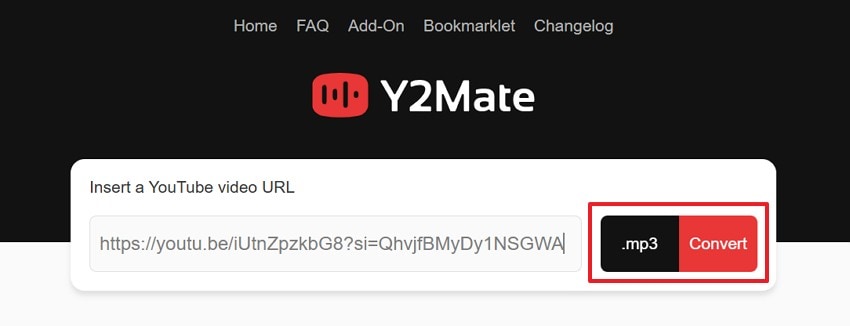
Step 1. To start, open YouTube, copy the video link, then visit Y2Mate in your browser. After that, paste the “Copied link,” then choose “.mp3” format and press “Convert.”
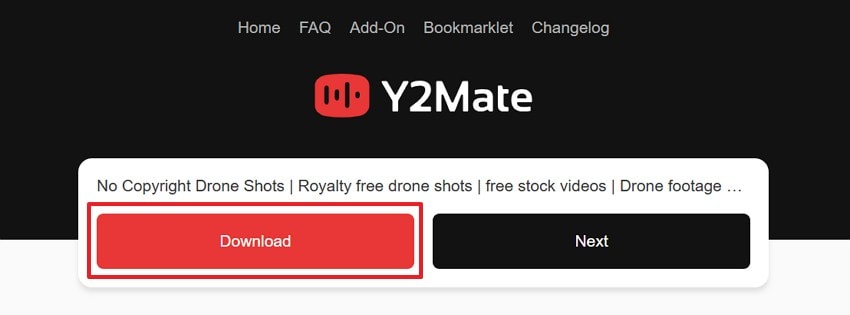
Step 2. Next, once the conversion is finished, select the “Download” button to save the converted file to your device.
2. EasyConv
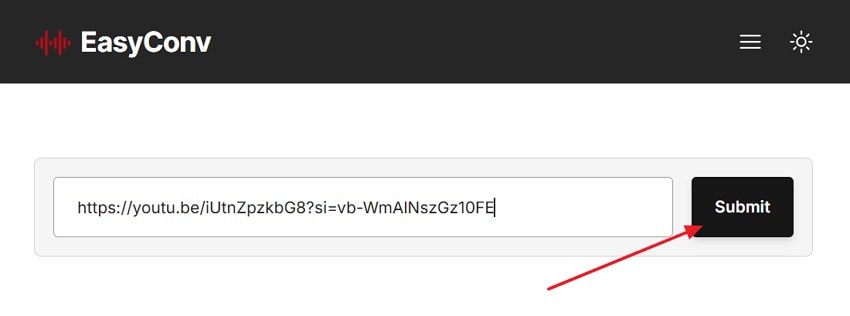
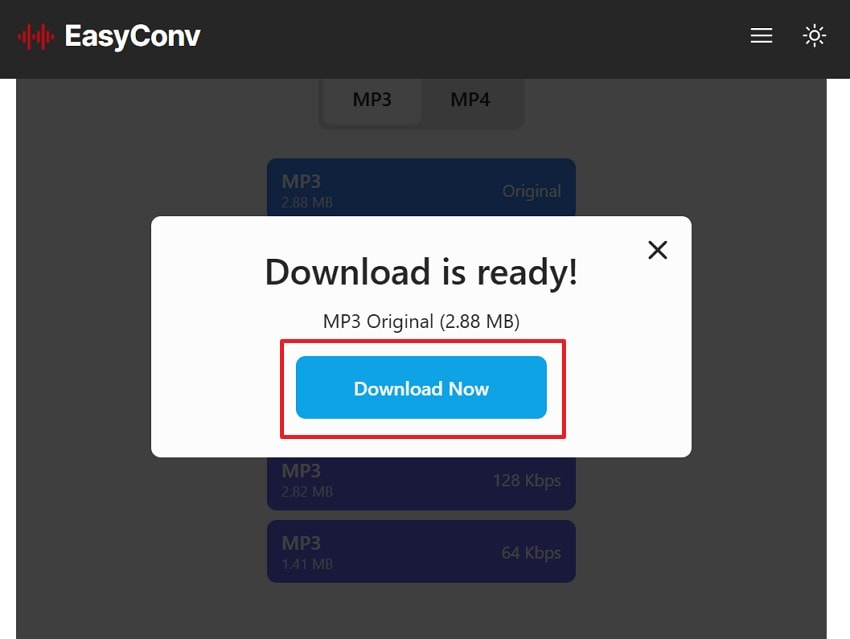
For people searching for “how to download music from YouTube as MP3”, EasyConv feels practical. Users can choose bitrate levels and adjust settings before saving audio files. It also includes trimming support, which helps shorten clips before they are downloaded. Follow the steps mentioned below to convert YouTube to MP3 with this tool:
Step 1. Start by placing the copied “YouTube” link into the converter box and pressing “Submit” to proceed further.
Step 2. Now, start the conversion after confirming the selected format and settings on the page. When the process finishes, choose “Download Now” to save the MP3 file to your device.
3. YTMP3
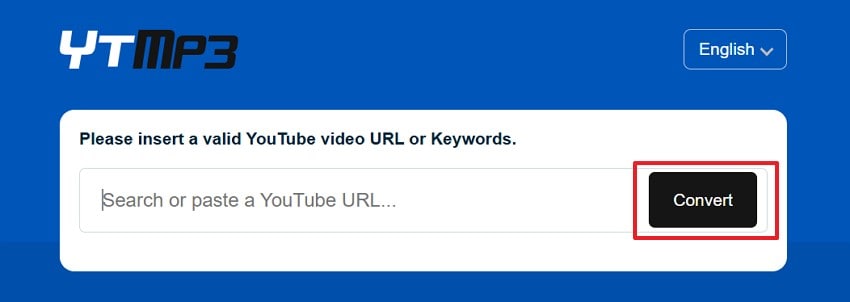
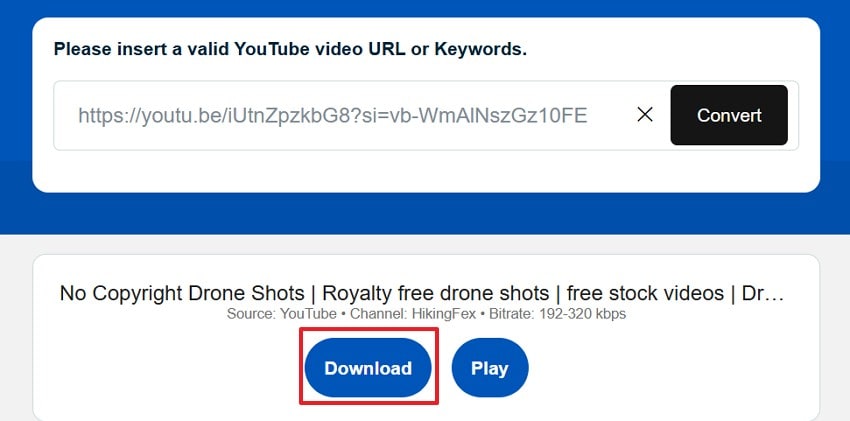
Users only need to paste a link and begin the conversion process with YTMP3. Furthermore, it supports both MP3 and MP4, giving users another download choice. It also works smoothly across laptops, tablets, phones, and common browsers. To convert YouTube to MP3 with the YTMP3 online platform, follow the steps below:
Step 1. To initiate, copy the “URL” from YouTube and paste it into the main search field, and press the “Convert” option to continue.
Step 2. Afterwards, wait while the platform prepares the audio download. Once the file is ready, use the “Download” option to save the MP3 on your device.
Method 2: Use Desktop Converter/Downloader Software
Desktop software suits users who want better stability, batch handling, and more control. Thus, UniConverter Downloader works better for users who want a more stable desktop method. It lets users paste a video URL, download online videos, and even save audio in MP3 and other audio formats.
For people learning how to download music from YouTube as MP3, this option feels more practical for repeated downloads. The steps below show how UniConverter Downloader handles the process more clearly:
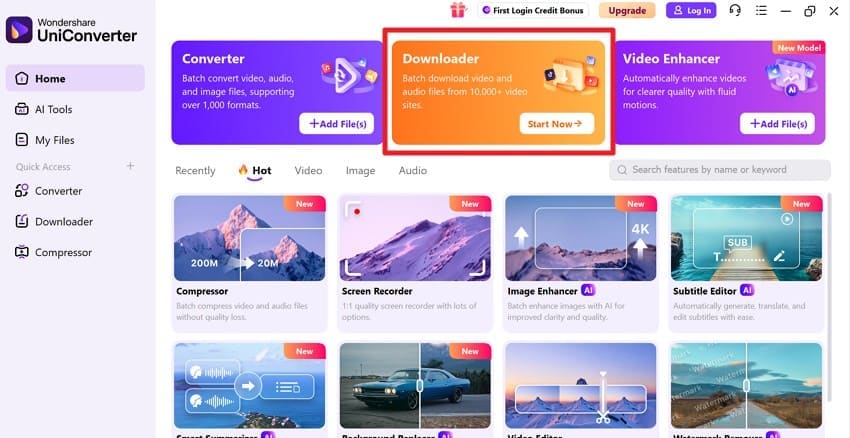
Step 1. Access the Downloader in UniConverter
Start by locating the “Downloader” on the home screen to access the download tool and proceed.
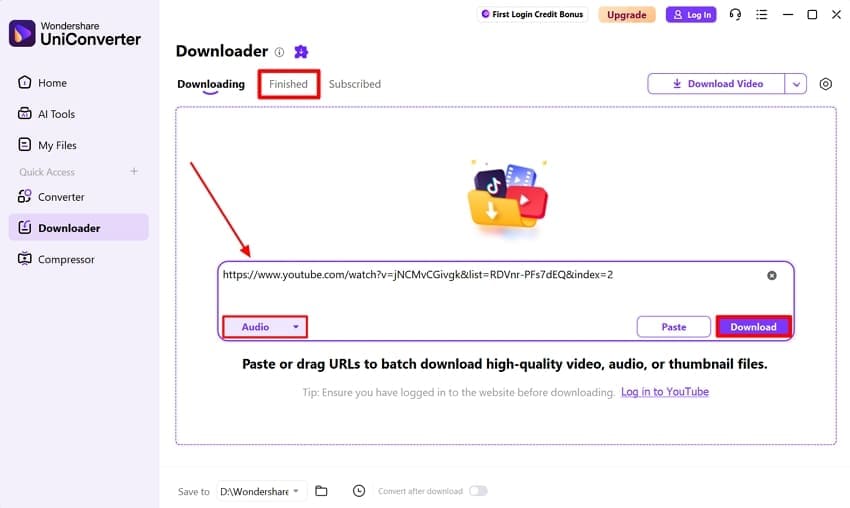
Step 2. Paste the Link in the Downloader
Now, paste the “YouTube URL” into the downloader box, then choose “Audio” as the format, and click “Download” to execute the process. You can find the downloaded audio content across the “Finished” section for direct access.
Method 3: Use Browser Extensions for Quick Downloads
Browser-based tools feel convenient when users want fewer steps during the download process. The methods below explain how extensions can make music downloads quicker:
https://tubly.download/\h
Tubly Downloader is a browser-based tool that helps users save media with a simple and direct workflow. It can detect video content on supported pages and lets users choose a preferred format or quality before downloading. The extension also highlights automatic detection and network monitoring for media requests. So follow the steps below to try Tubly Downloader with ease:
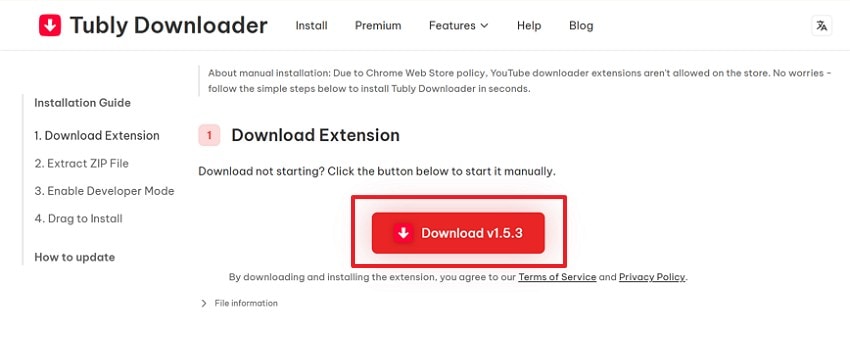
Step 1. First, open the Tubly Downloader installation page and press the “Download v1.5.3” button to get the extension file on your device.
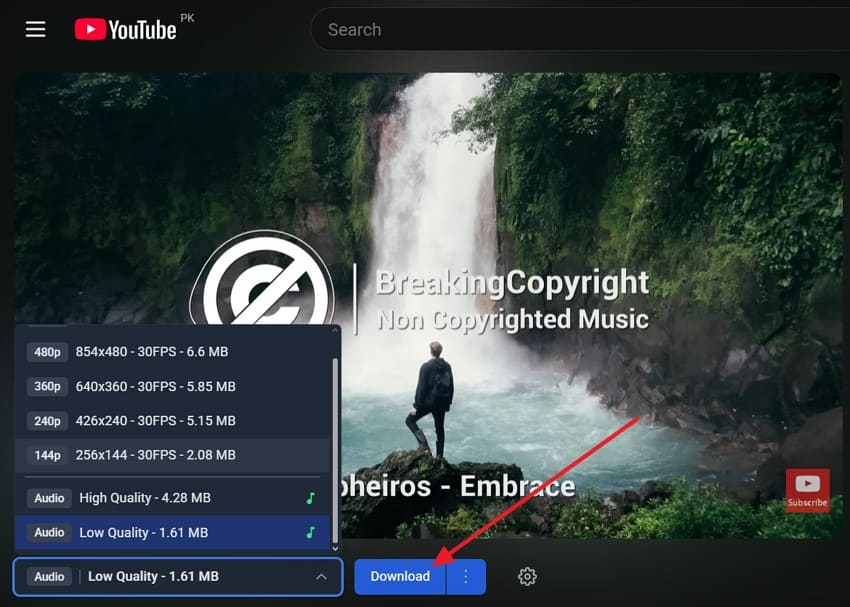
Step 2. After installing the extension and opening the target video, choose the preferred quality or audio option from Tubly Downloader and click “Download” to save the file.
YouTube™ to MP3 by Skott (Firefox)
A simple one-click setup gives this Firefox add-on clear beginner appeal. It is designed to convert and download YouTube videos directly into MP3 files. For users learning how to download music from YouTube as MP3, it feels simple. The add-on works with Firefox and is also listed for Android use. The stepwise guide below shows how this extension is usually used:
Step 1. Start by accessing the “YouTube™ to MP3 by Skott” add-on page in Firefox and clicking “Add YouTube™ to MP3” to install the extension in your browser.

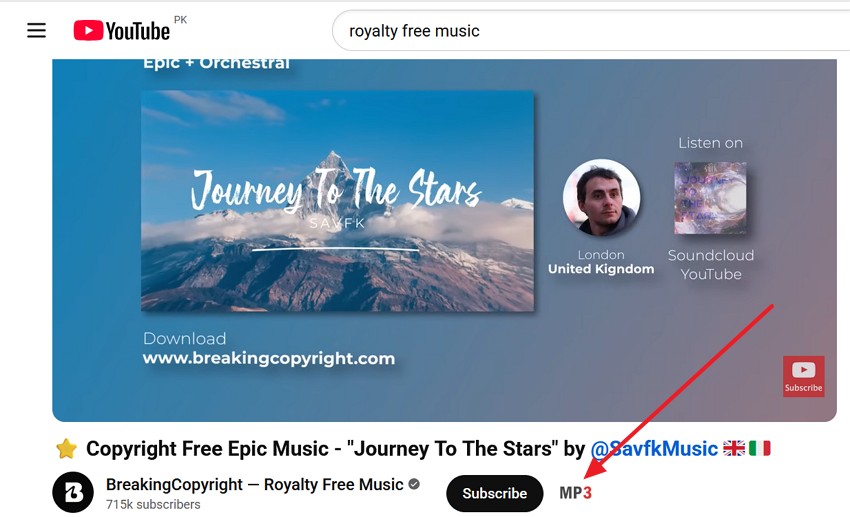
Step 2. Next, after installing the add-on, open the YouTube video you want to convert and select the “MP3” option shown on the video page to start downloading the audio.
Method 4: Record Audio from YouTube Music
UniConverter Screen Recorder offers a practical way to save audio when direct downloading is not possible. It lets users capture system sound, adjust output settings, and keep the process under desktop control. That makes it a useful option for people who want a more flexible method while learning how to download music from YouTube as MP3. The guide below explains how to record audio with UniConverter easily:
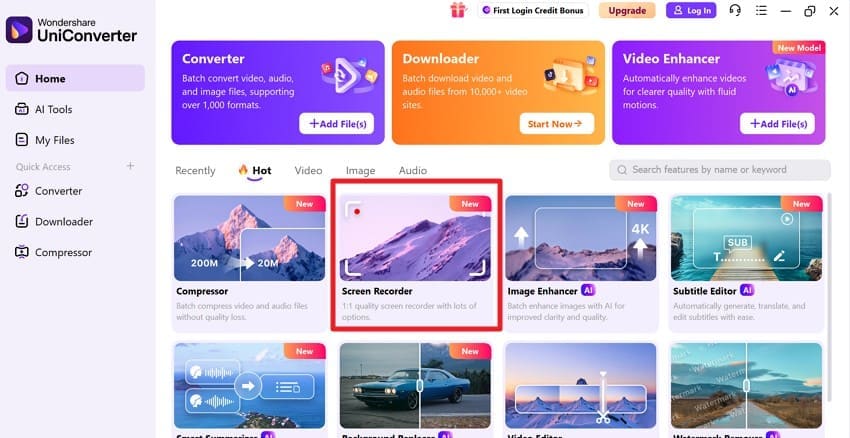
Step 1. Locate the Screen Recorder to Continue
To begin, open UniConverter and go to “Screen Recorder” on the main interface to continue.
Step 2. Choose Audio Recorder in UniConverter
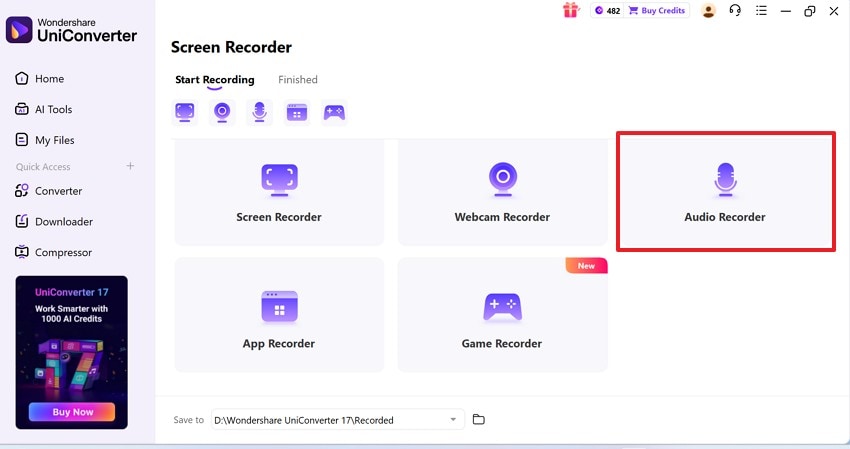
In the next window, select the “Audio Recorder” to capture only the sound instead of recording the full screen.
Step 3. Set MP3 Output and Start Recording
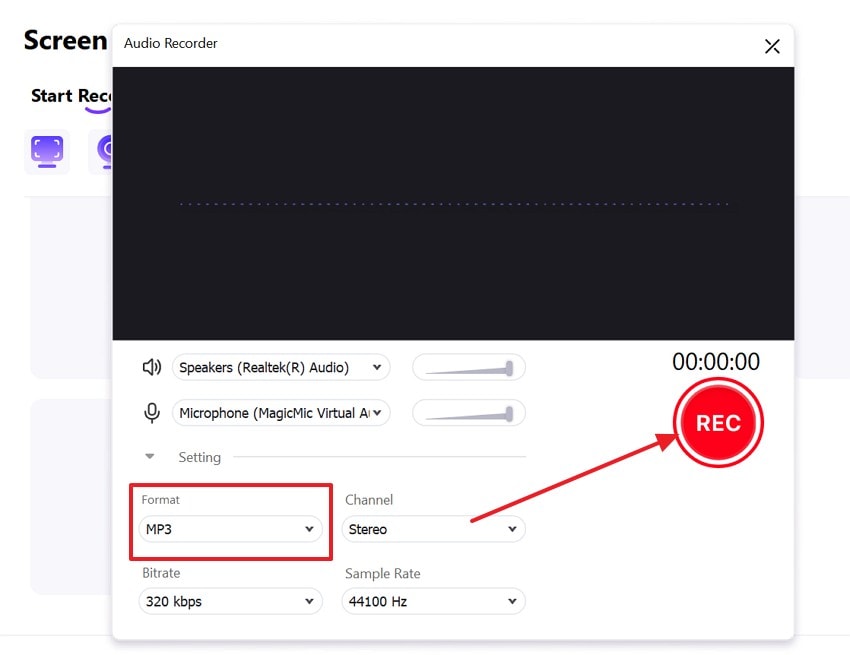
Once the audio recorder window opens, check that your speaker source is selected and keep “MP3” as the output format. Then play the music you want and click the “REC” button.
Step 4. Stop the Recording and Open the Saved File
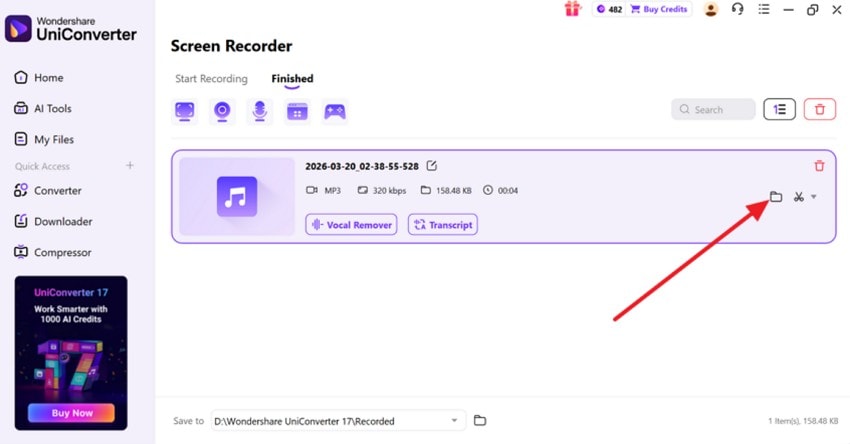
After the music finishes, stop the recording and go to the “Finished” tab. Finally, find the recorded file and choose the “Folder” icon to open its saved location.
Pro Tip: Recover Broken MP3 Files After YouTube Downloads
While learning how to download music from YouTube as MP3, playback issues may arise, including early stops, distorted audio, or files failing to open properly afterwards. These issues can ruin music files that looked fine during the download process. Repairit gives users a practical way to fix damaged audio files quickly. It becomes useful when downloads finish, but the saved track stays broken.
Repairit supports MP3 repair and helps restore audio with common sound problems. It can fix clipping, static, distortion, and other damaged playback issues easily. This saves time when downloading the same file again feels unnecessary later. It also gives damaged audio another chance before you delete it completely.
Key Features
-
Device Support: Restore audio files from cameras, phones, SD cards, USB drives, and storage devices easily.
-
Smart Detection: Uses smart AI technology to detect issues and restore audio with better clarity automatically
-
Damage Audio Repair: Fix audio issues like clipping, humming, distortion, and unplayable files effectively with AI support.
Guide to Recover Broken MP3 Files After YouTube Downloads with Repairit
When a downloaded MP3 refuses to play, a repair process becomes the next practical step. The guide below shows how to restore damaged audio files with Repairit more clearly:
Step 1. Add the Broken MP3 Files to Proceed
To start, go to the “Audio Repair” toolkit. Then, click the “Add” button or drag your broken MP3 files to initiate.

Step 2. Start the Repair Process
After the files appear in the list, review them and confirm everything is added. Next, press the “Repair” button to let Repairit fix the damaged files.

Step 3. Preview and Save the Repaired Audio
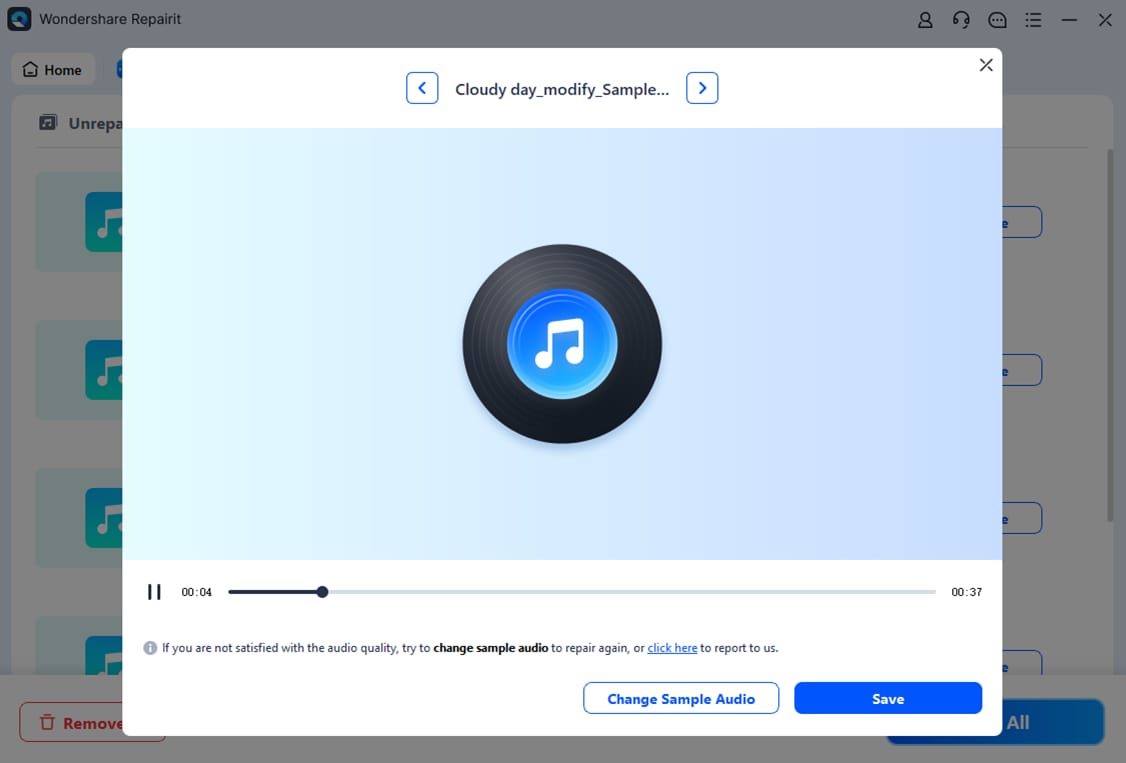
Once the repair is complete, open the repaired result and preview the audio carefully. If the sound is clear, select “Save” to export the repaired MP3 file to your device.
Repair Corrupted Files
 Security Verified. Over 7,302,189 people have downloaded it.
Conclusion
To conclude, learning how to download music from YouTube as MP3 becomes much easier with the right tools. Some users prefer quick online options, while others need better control through desktop software or extensions. The best method depends on your needs and workflow. If a downloaded MP3 becomes damaged or stops playing, Repairit is a reliable tool to try.
FAQ
-
1. What is the easiest way to download YouTube music as MP3?
Online converters are the easiest option for beginners because they work quickly without requiring extra software installation. They are ideal for users who want simple MP3 downloads with minimal setup. -
2. Is desktop software better than online converters for MP3 downloads?
Desktop software offers better stability, repeated-use convenience, and more control over download settings. It is suitable for users who frequently download audio or handle larger tasks. -
3. Can browser extensions help with quick YouTube to MP3 downloads?
Yes, browser extensions can speed up downloads by integrating tools directly into your browsing experience, making the process faster and more convenient. -
4. What should I do if my downloaded MP3 file is broken?
You can use a repair tool like Repairit to fix broken MP3 files that are distorted, unplayable, or incomplete. This helps restore audio without needing to download the file again.




