
Many gamers feel disturbed when a game suddenly refuses to connect online. This problem arises at launch time, blocking matches and breaking immersion. For players of The Outlast Trials, connection errors can ruin tense multiplayer moments. These issues confuse users because the codes look similar and the reasons remain unclear. Thus, this guide explains causes and simple fixes, helping you return online without stress.
Table of Contents
-
- Reason 1. Server Outages and Maintenance Affecting Outlast Trials
- Reason 2. Internet Connection Issues That Trigger Outlast Trials Errors
- Reason 3. VPN, Proxy, and DNS Conflicts with The Outlast Trials Servers
- Reason 4. Steam Client Problems Linked to Outlast Trials Errors
- Reason 5. PC System Settings That Can Break Server Connections
-
- Fix 1. Check Server Status and Basic Restarts
- Fix 2. Stabilize Your Network
- Fix 3. Run Client/Launcher as Administrator and Verify Files (PC)
- Fix 4. Adjust Firewall, Antivirus, and VPN Settings
- Fix 5. Tweak In-Game Network Options (Crossplay/Tutorial Server)
- Fix 6. Reinstall as a Last Resort and Contact Support
Part 1. What The Outlast Trials Connection Error Indicates
In this game, a connection error means the client cannot keep a server link. This can happen because servers have problems or something blocks traffic on your network. Plus, general messages indicate that login or matchmaking requests fail before completion. Many times, client-side failures happen on your device due to settings or even damaged files. These issues usually affect only you and may change with network conditions.
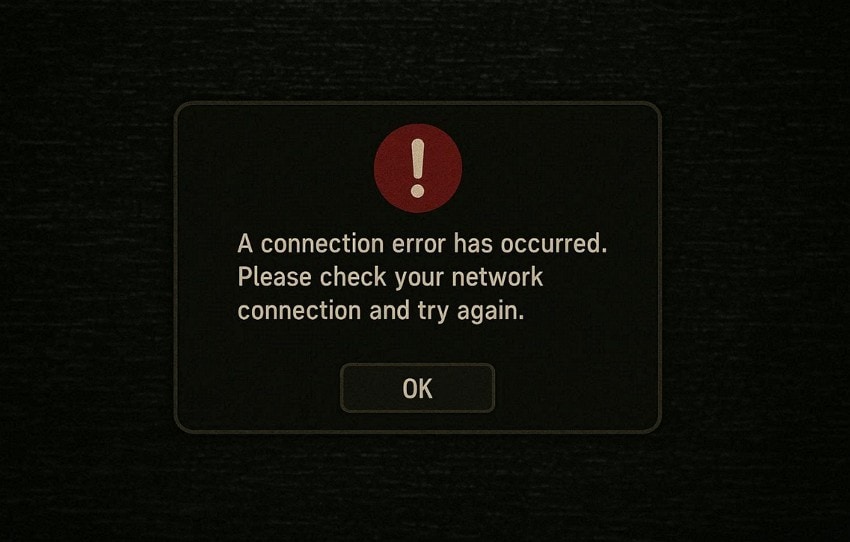
For specific server-side failures, they come from the game servers being down or under maintenance. When this happens, many players face similar errors at the same time. During startup, errors appear while connecting or loading the main menu. These usually show that the client cannot reach the login or matchmaking services. Besides, while joining lobbies, errors often indicate difficulties creating stable sessions with other players.
Part 2. Unexpected Error Codes F0C5, F1C3, and F3C6 Explained
Beyond basic link failures, players often see strange codes like F0C5 and F3C6 blocking their fun. So, understanding them from this section helps you fix The Outlast Trials Connection error faster:
What These Error Codes Represent
| Error Code | What They Represent |
| F0C5 | Login or authentication failed because the game could not reach online services. |
| F0C6 | Communication issues between the game and the servers are often linked to the network or files. |
| F101C2 | Lobby or session creation failed during matchmaking or the co-op setup process. |
| F101C1 | Matchmaking connection problem while joining or starting a specific trial. |
| F1C1 | Session connection failed, often appearing after updates or reconnect attempts. |
| F1C3 | Unexpected connection or login failure caused by temporary service communication issues. |
| F3C6 | Server request failed or timed out while completing an online action. |
| F6C7 | Active mission connection was lost, forcing a return to the menu or lobby. |
Common Situations Where They Appear
Players meet these codes during key game steps, but each is tied to unique triggers. Below, you will explore a few key situations where these error codes appear:
- Launch Screen: F0C5 appears immediately after launch during connection attempts and quickly blocks entry. Plus, fresh installs or recent updates often trigger the first link failure with servers.
- Main Menu: F1C3 shows when linking accounts from the menu after quick resume. Moreover, when the game cache stays out of sync with the service, it leads to the login step failing.
- Title Press: F3C6 pops after key press when shifting from menu to online session start. In addition, unstable servers block smooth moves from the title screen to match queues fast.
- Network Switch: Many times, F1C3 triggers on Wi-Fi changes where the client loses track of service links. Alongside, resume play without full close causes platform sync issues and code errors.
- Patch Rush: In addition, F3C6 appears post-update when the backend lags behind client-ready checks. Overloaded servers also drop requests as many players flood in at once.
Why Do Multiple Codes Show Similar Symptoms
Multiple error codes show similar symptoms because they track failures inside the same online systems. The game follows a series of steps, such as login and session start, using shared services. When any step fails or times out, a different code may appear. To players, the result feels identical, such as endless connecting or sudden return menus.
Part 3. 5 Reasons The Outlast Trials Cannot Connect to Servers on PC
Error codes point to deeper blocks, but now shift focus to the 5 leading causes behind them all. To fix the Outlast Trials Unexpected Error F0C5/F1C3/F3C6 on PC, check these common PC trouble spots first:
Reasons 1. Server Outages and Maintenance Affecting Outlast Trials
Server outages or maintenance stop players from logging in or joining online sessions. Errors like "unexpected error" appear on both the PC and PlayStation simultaneously. Planned maintenance causes short periods when connecting is unreliable, requiring users to wait. Unexpected downtime from faults, DDoS attacks, or provider issues triggers repeated disconnections. These outages make matchmaking fail and prevent stable online gameplay.
Reasons 2. Internet Connection Issues That Trigger Outlast Trials Errors
Unstable or slow internet can also cause The Outlast Trials to fail to connect online. Plus, drops in Wi‑Fi signal or sudden speed changes trigger "connection error" pop‑ups. In addition, packet loss or high ping can disconnect sessions or prevent lobbies from forming. Heavy router congestion from multiple devices or gaming affects stability, even with good speed.
Reasons 3. VPN, Proxy, and DNS Conflicts with The Outlast Trials Servers
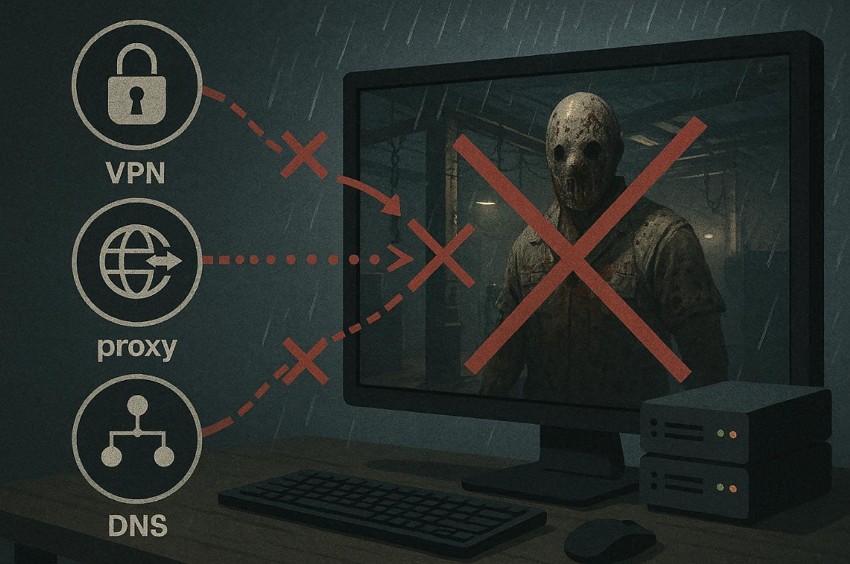
VPN tools hide your link path but block game servers with known bad IP ranges. Extra hops slow packets and spike delays, causing timeouts. Besides, proxy relays drop UDP packets needed for real-time play, leading to session failures every time. Moreover, poor DNS selections slow name lookups, preventing server discovery before any communication begins. So, adjusting network settings helps fix The Outlast Trials can't connect to the server PC.
Reasons 4. Steam Client Problems Linked to Outlast Trials Errors
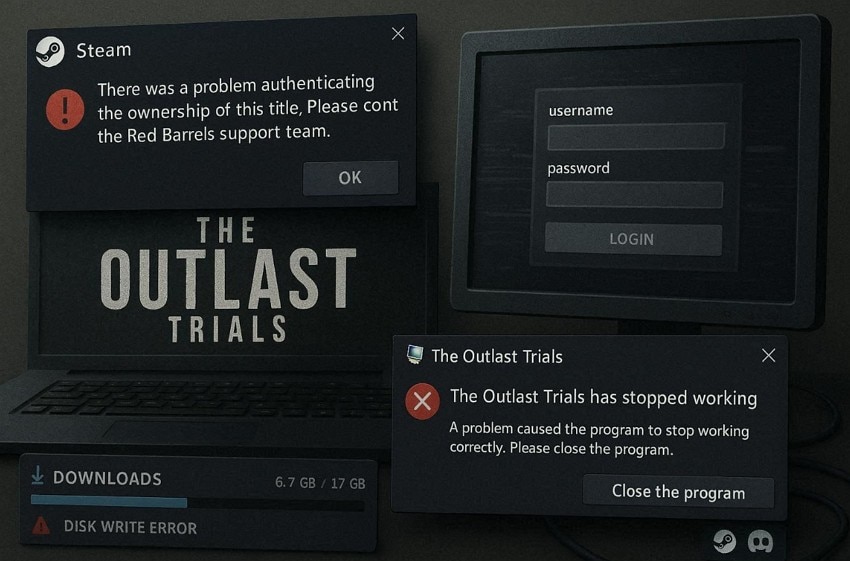
Apart from that, the Steam client glitches spark Outlast Trials errors when the login goes wrong. Offline Steam blocks game auth, causing generic link fails before the server talks. Plus, broken downloads leave bad files, stopping handshakes with Red Barrels during launches. Overlay apps hog CPU and net during play, leading to timeouts or sudden session drops. Besides, the firewall blocks Steam traffic and keeps multiplayer ports closed for Trials always.
Reasons 5. PC System Settings That Can Break Server Connections
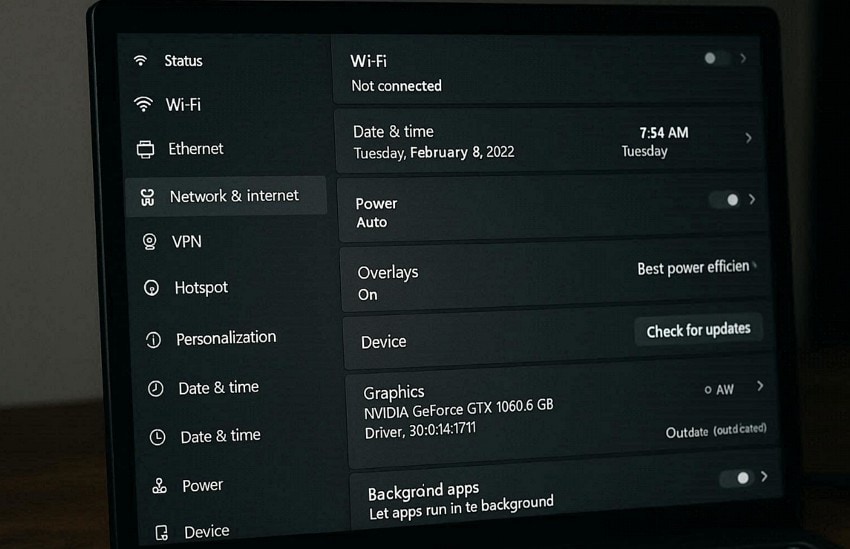
PC settings also block Outlast Trials server links through hidden rules and power saving. Many times, wrong clock times make authentication fail upon rejecting all multiplayer logins. Additionally, old drivers drop full nets when games launch, leading to total link blackouts. Overlays hog bandwidth, sparking timeouts while background tools clash with lobby builds.
Part 4. How to Fix The Outlast Trials When It Can’t Connect to Servers
When The Outlast Trials cannot connect, several practical steps can restore stable online access. So, follow these easy tweaks to fix the Outlast Trials Connection Error and join friends fast:
Fix 1. Check Server Status and Basic Restarts
You should check server status spots for wide outages before you chase local fixes. At this point, Red Barrels' X/Twitter gives real-time alerts on downtimes or patch waits. Alongside, Reddit and other forums show player reports matching your F-codes for quick group checks. Besides, basic restarts of the game, launcher, or PC also clear temporary network glitches. This simple step is the first way to fix The Outlast Trials connection error.
Fix 2. Stabilize Your Network
This solution ensures your game maintains smooth, low-latency server connections. You can also try wired links to beat shaky Wi-Fi for steady game talks with low delays every time. Strong Wi‑Fi placement and 5 GHz channels minimize interference from walls or electronics nearby. Besides, using extenders or mesh improves weak signals while maintaining stable sessions. Following these steps helps fix The Outlast Trials unexpected error f0c5/f1c3/f3c6.
Fix 3. Run Client/Launcher as Administrator and Verify Files (PC)
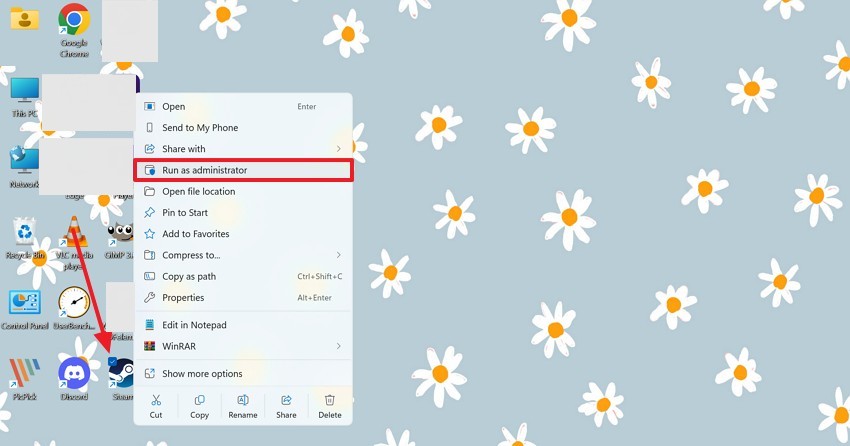
Another solution is to launch Steam and pick "Run as administrator" for full system access. This clears blocked paths, letting The Outlast Trials reach servers without permission walls. In addition, verify game files scans for breaks and pulls fresh copies from Steam fast. It repairs broken files without needing a complete reinstall, saving time and effort. Thus, go through the steps given below to perform this process on your device:
Step 1. To initiate, right-click the “Steam” icon and opt for “Run As Administrator.”
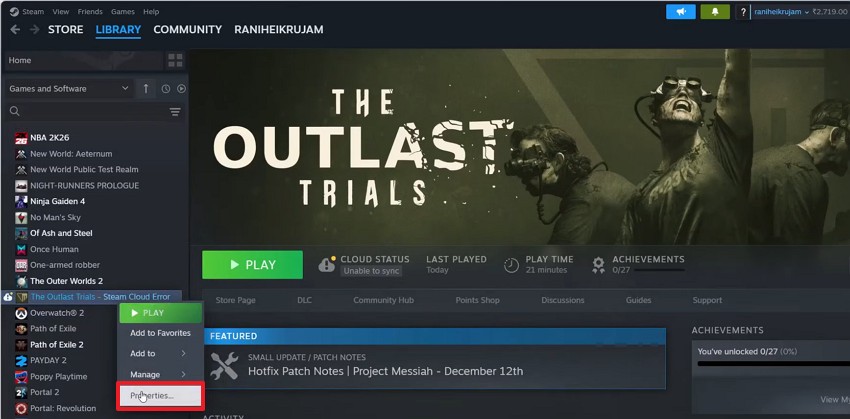
Step 2. Afterward, access the “Library” tab to right-click “The Outlast Trials” and choose “Properties.”
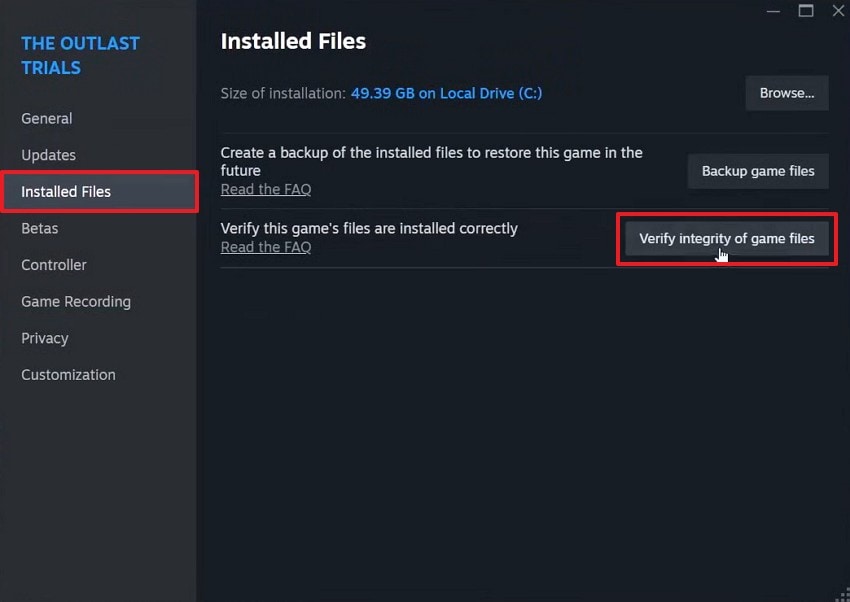
Step 3. Head to the “Installed Files” tab and press the “Verify Integrity Of Game Files” button.
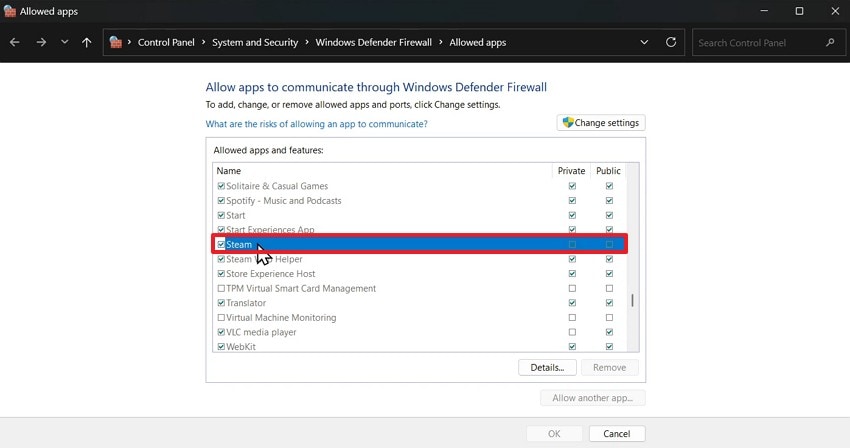
Fix 4. Adjust Firewall, Antivirus, and VPN Settings
You can also adjust firewall rules to let Outlast Trials traffic pass without blocks. Antivirus exclusions can also stop scans that cut sessions or occur during server handshakes. Apart from that, turn off VPN apps fully since servers flag their IPs, causing login rejections fast. When you want to fix The Outlast Trials can't connect to the server PC, adhere to the steps to add Steam:
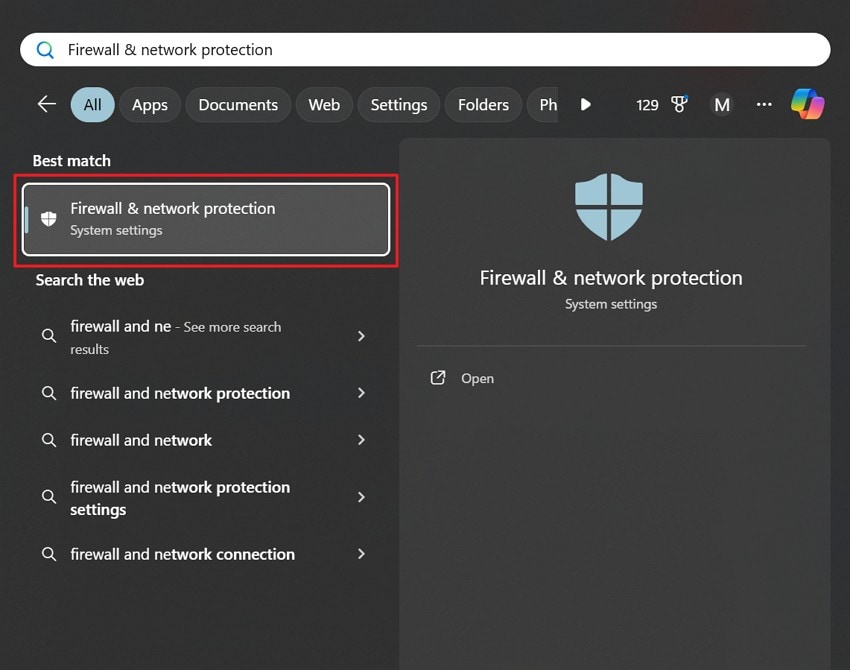
Step 1. Search for "Firewall & Network Protection” and click on it.
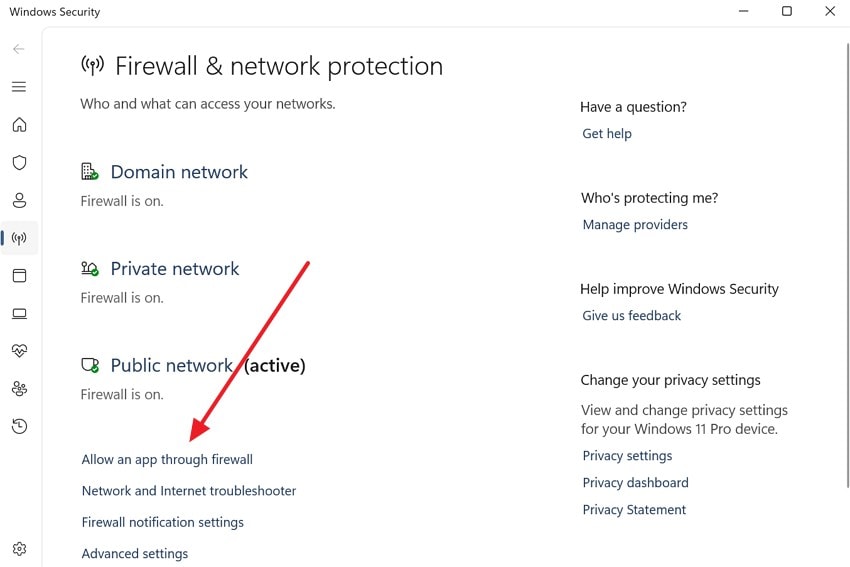
Step 2. Upon seeing the new display, press the “Allow an App Through Firewall” option.
Step 3. After that, choose “Steam” and check the “Public” and “Private” boxes to add it.
Fix 5. Tweak In‑Game Network Options (Crossplay/Tutorial Server)
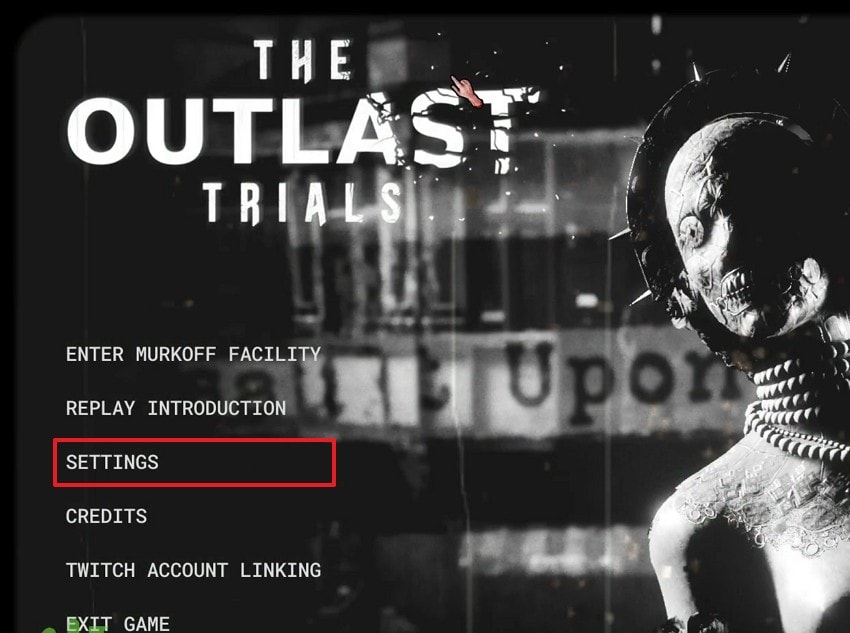
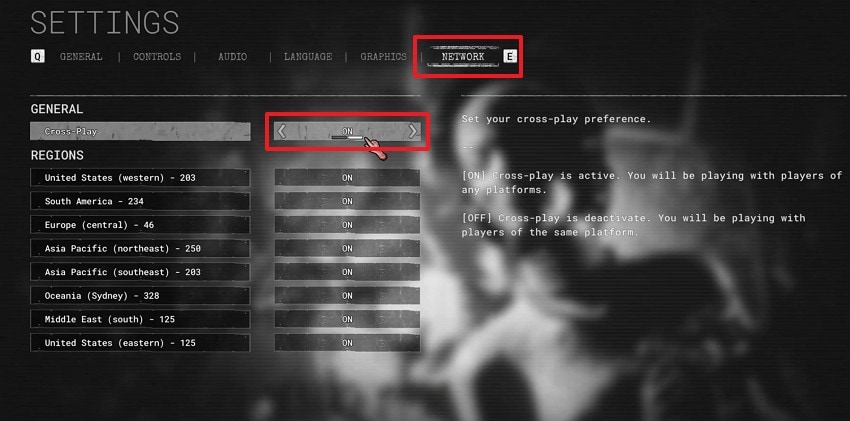
Adjusting crossplay can also increase matchmaking speed or reduce connection problems. This limit matches to PC players, cutting version clashes during Trials joins. Apart from that, you can pick low-ping servers from lists when shown to shrink delays and reduce risks. Besides, these swaps fix F-code pops tied to region or crossplay handshake troubles. So, let’s explore how you can alter the crossplay settings in your game:
Step 1. When you launch the game, navigate to the “Settings” section from the main menu.
Step 2. Afterward, access the “Network” tab and turn off the “Cross-Play” feature.
Fix 6. Reinstall as a Last Resort and Contact Support
Fresh reinstall also wipes all bad files while clearing deep corruption from failed crashes. A clean install removes leftover settings or broken updates, causing connection failures. Apart from that, you can also contact the official support that guides unusual F‑codes. This step is recommended only after all simpler network and system fixes fail. So, take guidance from the steps below to reinstall your game:
Step 1. When you access the “Library” tab and right-click the game, choose “Manage” and then “Uninstall.”
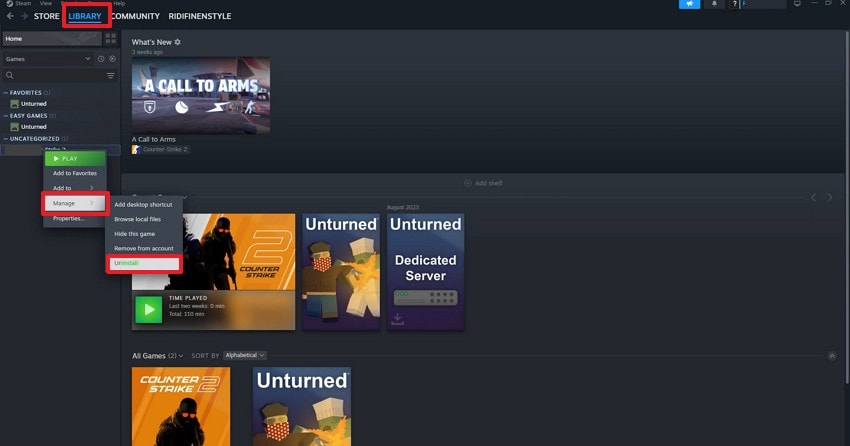
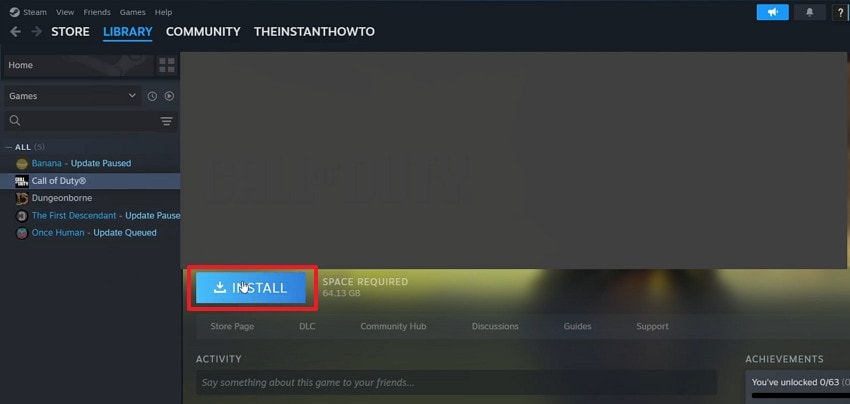
Step 2. Afterward, again access the uninstalled game and click the “Install” button.
Pro Tip. Repair/Enhance Outlast Trials Game Video via Repairit Repair
Many times, game crashes also leave The Outlast Trials recordings glitchy with frozen frames or sound drops. These types of clips hurt when sharing scary multiplayer moments with friends online later. In such cases, Repairit steps in as the top choice to restore broken gameplay videos fast. Its Quick Repair mode fixes basic breaks in seconds across all mainstream formats.
Besides, Advanced Repair uses sample files for severe damage, keeping original quality intact. Moreover, this dedicated tool supports almost 25 video formats, such as MKV and FLV. Repairit also provides batch repair that allows multiple videos to be fixed at once. Users can also preview repaired clips before saving to ensure satisfaction and proper restoration.
Key Features
No Size Limit: Repairs huge game recording files regardless of storage space used.
Gyro Repair: Restores GoPro motion data for smooth stabilized action footage.
HDR/LOG Support: Fixes HDR or LOG footage while keeping original colors intact.
-
No Size Limit: Repairs huge game recording files regardless of storage space used.
-
Gyro Repair: Restores GoPro motion data for smooth stabilized action footage.
-
HDR/LOG Support: Fixes HDR or LOG footage while keeping original colors intact.
Guide to Repair The Outlast Trials Game Videos via Repairit
You can go through the steps given below to fix your corrupted game recordings using this robust video repair toolbox:
Step 1. Access the Tool to Repair Game Recordings
Upon accessing the tool’s “Video Repair” tab, press the “Start” button and import your corrupted The Outlast Trials recordings.

Step 2. Repair The Outlast Trials Recordings
When they are imported into the “Unrepaired Videos” section, click the “Repair” button.

Step 3. Download Your Repaired Game Recordings
Once the tool fixes The Outlast Trials recordings, press the “Save All” button to export them to your device.

Repair The Outlast Trials Game Videos
 Security Verified. Over 7,302,189 people have downloaded it.
Conclusion
In conclusion, connection errors in The Outlast Trials are caused by server issues or PC settings. This article has explored several quick ways to help resolve this problem. Plus, regular updates and careful device management also prevent future interruptions. Apart from that, for corrupted or glitchy game recordings caused by crashes, use Repairit. It ensures your The Outlast Trials videos are fully restored and shareable.
Frequently Asked Questions
-
1. How does crossplay affect my Outlast Trials connection stability?
Enabling crossplay increases matchmaking options but may introduce platform version conflicts. Disabling it restricts matches to the same platform, reducing errors. Thus, choosing the right setting reduces F-codes and failed lobby connections. -
2. How can I repair corrupted game recordings from The Outlast Trials?
You can use Repairit to fix broken recordings caused by crashes or freezes. Quick Repair restores minor damage, and Advanced Repair fixes severe corruption efficiently. This tool preserves original video quality for sharing or editing gameplay clips. -
3. Why do VPNs often block The Outlast Trials server connections?
VPNs route traffic through additional servers, which can cause latency spikes or packet loss. Some server IPs block VPN addresses for security reasons. Yet, disconnecting or using split tunneling resolves connection and authentication failures.




