

 TL;DR:
For realistic, non-permanent hair color previews on Android and iOS, the Repairit App provides precise AI strand detection via Text-to-Edit prompts, while YouCam Makeup and L’Oréal Style My Hair deliver real-time AR try-ons and professional shade matching.
● YouCam Makeup allows users to manually adjust color blending and coverage sliders during live AR previews, whereas L’Oréal Style My Hair operates as a salon-grade tool that actively evaluates if a chosen shade is recommended for your base color.
● Users seeking automated guidance can rely on Facetune for AI-generated color suggestions scored on a 10-point scale, while MakeupPlus is optimized for layering fantasy dyes and digital makeup over complex backgrounds.
● To maximize realism across all apps and prevent the dye from looking like an artificial filter, users should capture their photos against white or light backgrounds and align the new hair color with their underlying warm or cool skin tone.
Ask AI for a summary
 ChatGPT
 Perplexity
 Gemini
 Claude
 Grok
Grok
Are you thinking about switching up your look but not ready to commit to a permanent color change? If so, a hair color changer app could make this entire process much easier and more fun. Just a tap and you can try everything from soft caramel tones to electric blues, seeing exactly how each shade transforms you.
Impressively, you don’t rely on guesswork or salon swatches because realistic previews help you make smarter beauty decisions. For a confident change, continue reading the guide to discover the best hair color-changing apps ranked in 2026.
Table of Contents
-
- Repairit App – Best AI Hair Color Changer App (Android/iOS)
- YouCam Makeup – Best Real-Time Hair Color Changer App (Android/iOS)
- L’Oréal Style My Hair – Professional Hair Color Changer App (Android/iOS)
- MakeupPlus – Virtual Hair & Makeup Color App (Android/iOS)
- Facetune – Simple Free Hair Color Changer App (Android/iOS)
Part 1. What Is a Hair Color Changer App?
An app to change hair color is a digital tool or part of a photo editing suite that lets you preview different hair colors. Simply, upload your picture or snap an instant one to try virtual shades ranging from natural browns and blondes to vibrant pinks. With innovations, AI scans your photo, detects individual hair strands, separates them from the background and face, then applies color tones.
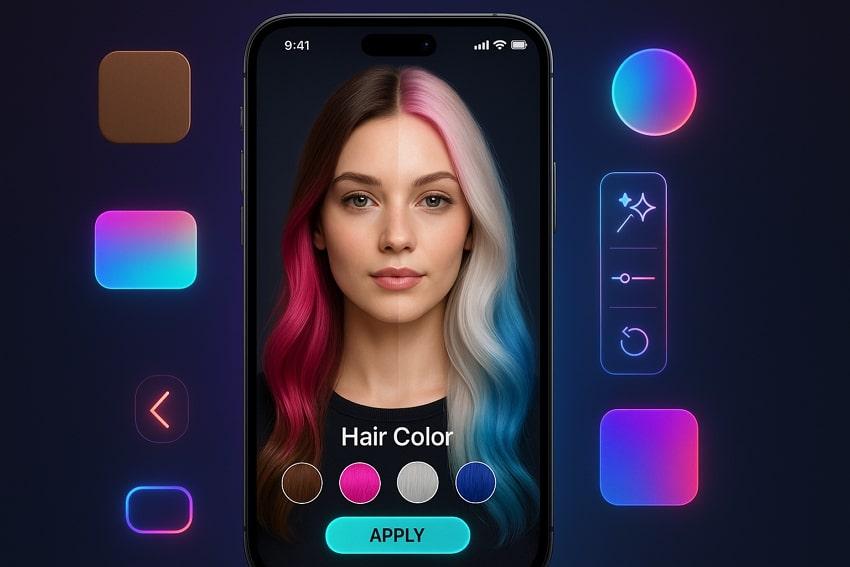
These apps are famous because they allow anyone to experiment with any shade they prefer. Users love being able to see dozens of options in minutes, share transformations, and use the app’s suggestions for guidance. As the process is quick, non-permanent, and works for all hair types, it's safe and makes style decisions with total confidence.
Must-Have Features in the Best Hair Color Changer App
- The app should use AI to detect hair outlines and separate them from other elements for neat results.
- It offers a suite of hair colors, including natural shades and everything from blondes to fantasy.
- Should blend the color seamlessly, allowing for the underlying shine and hair texture to show through.
- Enables you to review color changes in real time using your phone’s front camera, with accurate previews.
- Famous apps automatically adapt hair color suggestions based on your skin tone for genuinely suited looks.
Part 2. Best Hair Color Changer App for Perfect Results (2025 Ranking)
Before you make the big decision, explore the following apps to try different hair colors and get a clear picture of your style:
1. Repairit App – Best AI Hair Color Changer App (Android/iOS)
Best For: The Repairit App is best suited for anyone looking to revitalize their photos with high-quality AI editing, like hair color changes.
Its patented AI examines your photo, accurately recognizes, and separates hair strands, even with complex hair. Instead of dealing with the difficult masking or brush tool, you simply type a command and get edits in no time. The app applies changes based on your exact description, making it easier to get the shade you want. You see the edit applied in seconds, with the ability to preview the final look before saving.
There’s no need to learn about layers, masks, or detailed menu navigation; just type and let AI handle the rest. The Quality Enhancer further optimizes sharpness with advanced techniques, restoring overall clarity nearly to its original level. With the latest Nano Banana integration, results have improved significantly, with enhanced performance. You’re provided with a custom repair request that lets you specify the hair texture to be repaired.
Key Features
- AI Filters: It offers one-tap transformations with multiple filter options, including 3D figurines, anime portraits, and festive Halloween looks.
- Restores Old Pictures: The app automatically identifies scratches, stains, and other damage, retrieving images with vivid, natural colors.
- Precise Object Remover: For professional edits, it precisely examines and removes specified elements from photos, maintaining the background's natural flow.
Comprehensive Tutorial to Change Hair Color Using the Repairit App
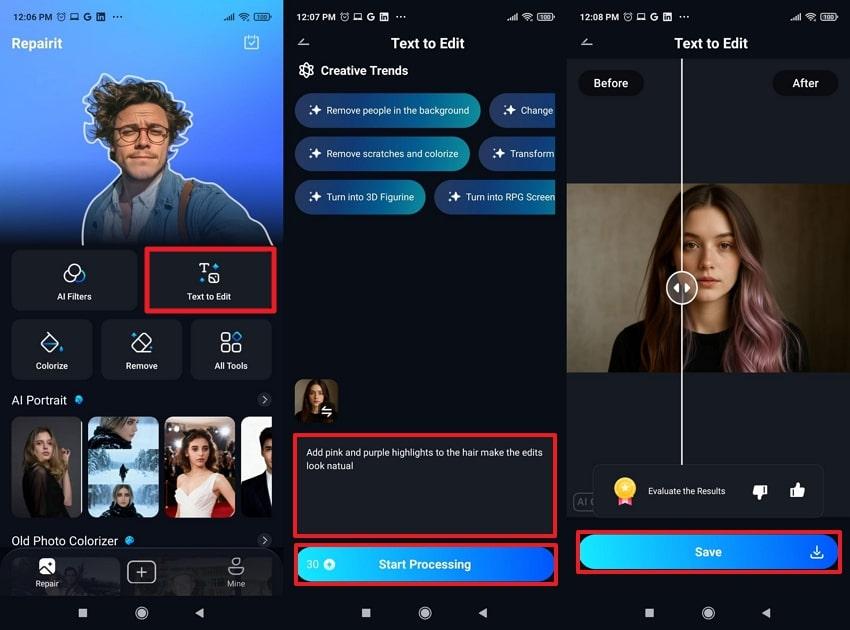
- Enter Repairit, access the “Text-to-Edit” feature, and insert your natural hair color image.
- Next, type a detailed prompt for your hair requirement and press the “Start Processing” button.
- Finally, preview the hair color changes and tap the “Save” button to secure the image.
User Reviews
- “I've seen so many posts with this, and the color edits look so realistic”.
- “The restored image is clear and sharp without the features of the original image getting marred”.
2. YouCam Makeup – Best Real-Time Hair Color Changer App (Android/iOS)
Best For: Users who want accurate live previews and natural hair edits with just a click.
YouCam allows users to see color changes live with their phone’s camera or with the inserted selfie for instant transformations. This free hair color changer app offers One Color, Multicolor, and Ombre color options for realistic changes. Most importantly, you can further adjust Blending and Coverage using sliders to your liking. After applying color, it provides a comparison option to review before-and-after results for better decision-making.
Stepwise Guidelines to Try Hair Color with YouCam
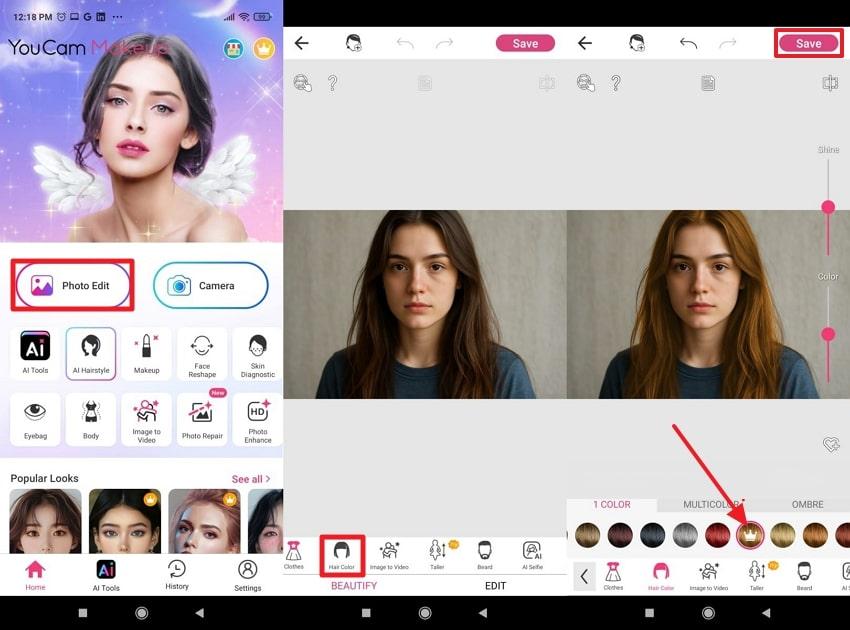
- Download YouCam, open the “Photo Edit” option, and incorporate the image for edits.
- Move forward, access the “Hair Color” section, and choose your desired color from the available hair options.
- Once done, press the “Save” button to save your transformation to the gallery for reference.
User Reviews
- “One of the most popular free apps to try different hair dyes is YouCam Makeup. This app allows you to virtually try hair colors, see how different shades and styles would look on you before making a real change. It's quite accurate and easy to use”.
- “I'm not a fan of this app. I can only edit right side of my face, and troubleshooting is NO help”.
3. L’Oréal Style My Hair – Professional Hair Color Changer App (Android/iOS)
Best For: Suitable guide for both clients and stylists, looking forward to the best choices for flattering, trend-aware looks.
The best hair color changer app that allows users to try on countless hues ranging from blondes and brunettes to fashion-forward pinks. It further offers a Beautify Filter for even more enhanced, beautified results after hair changes. This professional digital hair styler provides numerous hair effects for any selected hair color. Besides virtual try-ons, you can insert your already captured images to match expectations and achieve realistic outcomes.
Tutorial to Try Different Hair Colors with L’Oréal
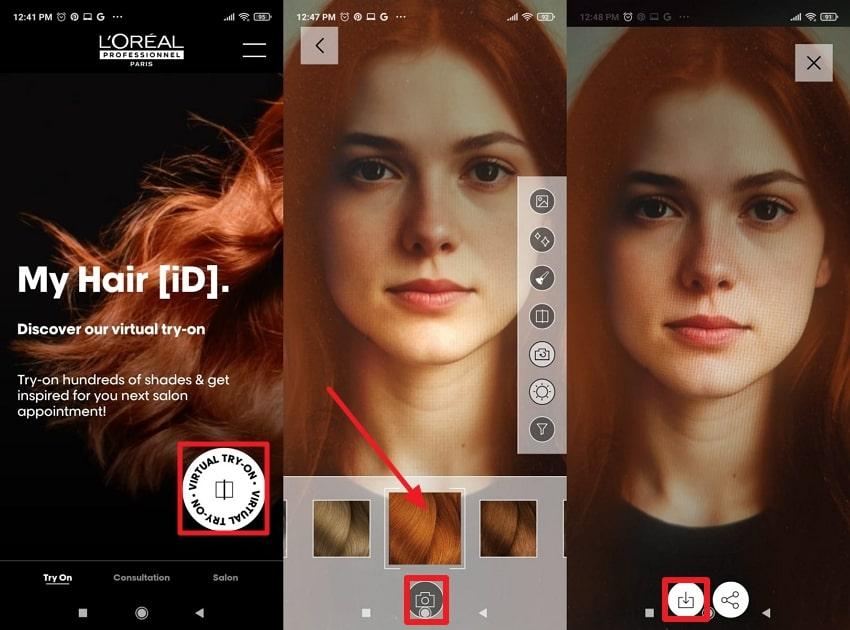
- Press the “Virtual Try-On” button and keep the camera steady for virtual hair trials.
- Now, select a hair color, then tap the “Camera” button to capture your image with that color.
- In the end, press the “Save” to download the final version to your device.
User Reviews
- “This look is completely virtual. A Genius app by L'Oreal Paris is AMAZING! Let's you try on all sorts of new looks”.
- “I tried using this tool to see if I would look good with copper hair. It said the shade ‘is not recommended’ for my hair colour. I tried a couple of times, wearing every colour option available, just to see what L’Oréal thinks…”
4. MakeupPlus – Virtual Hair & Makeup Color App (Android/iOS)
Best For: The app is especially appealing for those who want to play with trending hair dyes, besides natural ones.
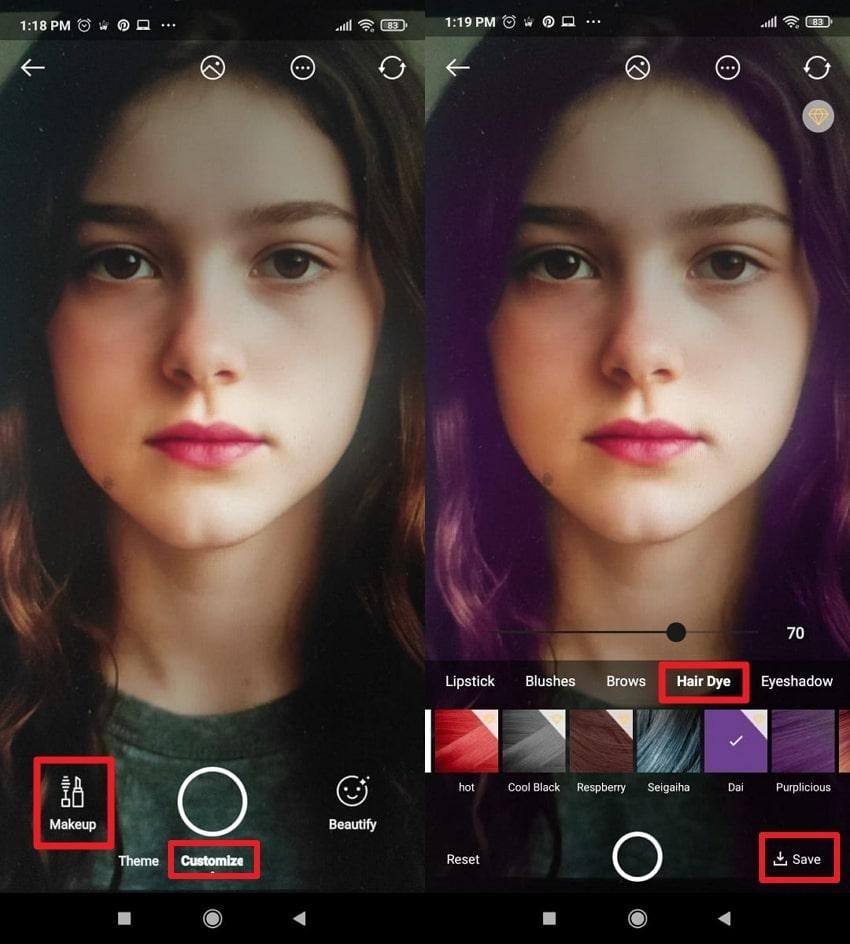
Turn on the camera for a live experience that overlays colors as you move, tilt, or run your hand through hair. This hair color changer app offers a diverse range of hair dyes, including options like Purpilicious, Dai, and Resberry. Besides hair colors, you can also choose eyebrow color, blush shades, and lipsticks for a complete makeover. The possibilities are endless when you’re allowed to add accessories that include earrings and headwear.
Simple Tutorial to Change Hair Color with Makeup Plus
- Open Makeup Plus, access the “Customize” tab, and choose the “Makeup” option to proceed.
- Once done, select the “Hair Dye” section, select a color, and press the “Save” button to keep the edits.
User Reviews
- “Makeup Plus is one of the best apps I have on my phone. It is really helpful because you can test out what kind beauty appliances look the best on you instead…”
- “I used this app for a few years now, even paid for the monthly subscription for over a year, but ever since they did update a while back, all I get is "certain look component is missing…”
5. Facetune – Simple Free Hair Color Changer App (Android/iOS)
Best For: Convenient for those who want studio-quality hair edits at home, especially users looking for AI suggestions.
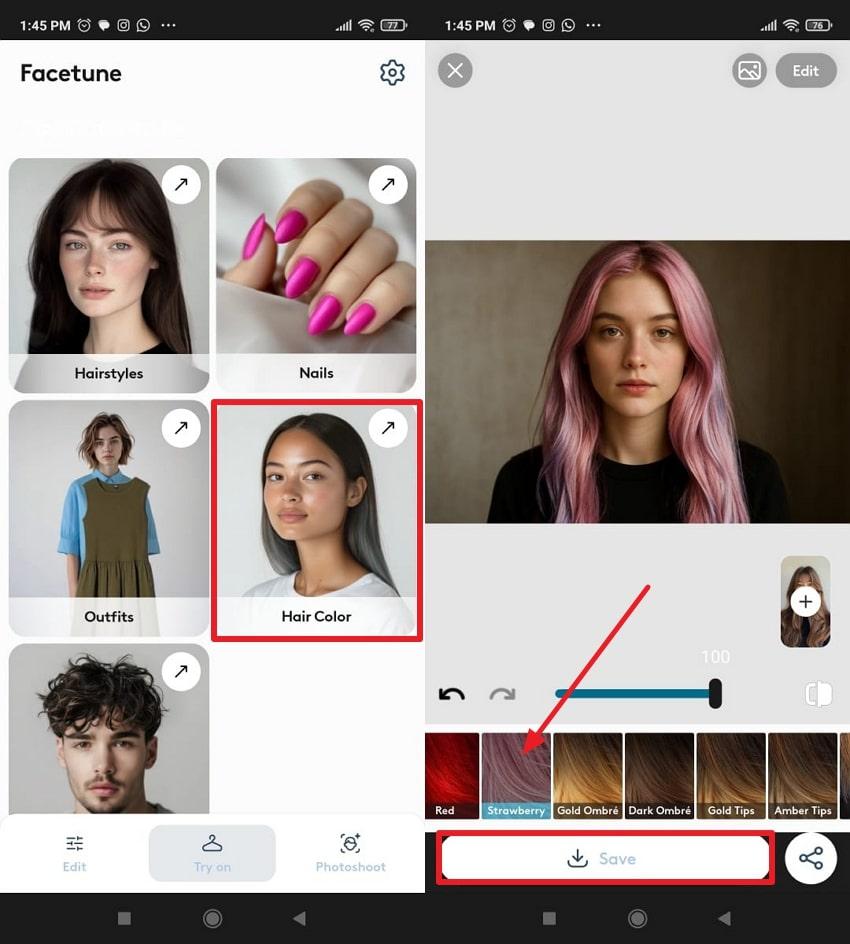
Facetune is a free hair color changer app that offers AI-generated suggestions with ratings out of 10 for informed decision-making. Not only this, but you’re offered various hair colors and hair style options, including Gold Tips and Ambre. Most importantly, users can compare their results and decide whether the chosen color is suitable. The Edit feature allows individuals to further enhance their pictures with makeup, skin-smoothing, and whitening.
Detailed Guideline to Change Hair Color Using Facetune
- Access the app, choose the “Hair Color” option, and add your image from the gallery.
- After this, select a suitable hair shade and press the “Save” button to secure the edits.
User Reviews
- “This app does just about everything I want for AI-assisted photo/selfie editing. The upscaling is the best I've seen. And a hair color slider…”
- “There's so much auto and AI stuff now that it makes this app difficult to use, as its primary function is a photo editing tool. AI simply does not do the type…”
The side-by-side comparison of the apps to change hair color can help you spot which features and color options truly stand out:
| Hair Color Changer Apps | AI Hair Detection Accuracy | Real-Time Live Preview | Professional/Client Focus | Additional Makeover Features |
| Repairit App | High: Detects strands and textures | Yes | Both (easy for all levels) | Precise object removal, beautifier, photo repair, and quality enhancer |
| YouCam Makeup | Excellent: Adapts to all hair types and textures | Yes (AR/AI selfie camera) | Consumer (ideal for selfie lovers and influencers) | Makeup try-on, face retouch, and skin smoothing |
| L’Oréal Style My Hair | Very high; professional-level, salon grade. | Yes (virtual try-on and stylist tools) | Professional/salon (plus advanced DIY) | Stylist consultation and side-by-side comparisons |
| MakeupPlus | Good, accurate, even on complex backgrounds | Yes (live AR and photo) | Clients/creative (ideal for trends and fun) | Accessories, makeup, filters, and full-face edits |
| Facetune | Very high, manages flyaway, and edges as well | Yes | Social/content creator, pro or beginner | Teeth whitening, face shape, and video editing |
Part 3. Creative Tips & Tricks for Using a Hair Color Changer App
To get the most out of the best hair color changer apps, pair them with the provided tips for flattering hair dye changes:
| Creative Tip | Purpose/Benefit | How to Use in the App | Resulting Effect Seen | Pro Tip |
| Try Multiple Shades Side-by-Side | Compare colors easily to pick your favorite | Save different versions or use split view | Instantly spot which shade suits you | Use warm/cool tones for skin tone match |
| Test Bold and Subtle Colors | See dramatic vs realistic outcomes | Use fantasy colors and then natural ones | Better idea of what you’re comfortable with | Start subtle, then increase the vibrance |
| Play with Highlights and Ombre | Add depth and natural movement to the style | Utilize the app’s gradient/tools or mix modes | Realistic and salon-inspired results | Apply lighter highlights near the face |
| Change Lighting/Backgrounds First | Make colors pop and look more natural in new scenes | Adjust the background or edit the lighting before the hair | Enhanced realism and photo quality | Use white/light backdrops for vivid shades |
| Match Makeup and Accessories | Complete your look and increase share-worthiness | Add virtual makeup, hats, or glasses | All-over polished digital transformation | Use coordinating lipstick or eye color |
Conclusion
In conclusion, now the hair color changer apps have turned the tables for anyone considering a fresh look or exploring color ideas. All the apps discussed offer a simple, convenient, and visually accurate way to preview everything from soft tones to adventurous shades. Among the options, the Repairit App emerges as the most refined choice because of its exceptional AI color precision and smooth user experience.
Frequently Asked Questions
-
Q1. Is there a free hair color changer app that works online?
Indeed, apps like Loreal allow users to change their hair shade instantly through its online webpage for virtual try-ons. It enables one to access their camera, choose from preset colors, and the AI automatically applies color. This facility is best for quick try-ons, social media posts, or checking how a new color might look. -
Q2. Can AI realistically change hair color in photos?
Absolutely, modern AI can change hair color with a high level of accuracy and realism. Today, the app to change hair color uses advanced hair-detection algorithms to recognize strands and textures to ensure new colors blend naturally. -
Q3. How do I use the Repairit App to change hair color using Text-to-Edit?
To do so, all you need to do is access the Repairit app, choose the Text-to-Edit feature, and upload your picture. Later, simply type the appropriate prompt for hair color description, and the AI handles all the processing.






