
A What is MXF File question usually comes up when you copy footage from a professional camera or broadcast workflow and see the unfamiliar MXF extension. MXF is a robust container format that bundles high-quality video, multichannel audio, and rich metadata so studios, TV stations, and post-production teams can move media between devices and software without losing quality or timing information.
Repair Corrupted Files To Save Your Data
 Security Verified. Over 7,302,189 people have downloaded it.
In this article
What Is MXF File
An MXF (Material eXchange Format) file is a professional digital video and audio container standardized by SMPTE for broadcast and cinema workflows. Unlike consumer formats, an MXF file format can store high-bitrate video, multiple audio tracks, timecode, and detailed metadata in a single, tightly structured wrapper.
Camera manufacturers such as Canon, Sony, and Panasonic use mxf video files in their professional camcorders to ensure predictable interoperability with newsroom systems and nonlinear editing (NLE) software. MXF itself is just the wrapper, while the internal video can use codecs such as AVC-Intra, XDCAM, DNxHD, or others depending on the recording device.
Because of its strict structure and metadata support, the professional video format MXF is ideal for archiving, multi-camera editing, and broadcast playout. However, this structure also means that if headers or index tables become damaged, the file may fail to open in standard players, and a dedicated repair tool is often required.
| Aspect | MXF File |
|---|---|
| Primary usage | Broadcast, film, studio and camcorder mxf workflows |
| What it stores | Video, audio, timecode, and production metadata in one container |
| Main advantage | Reliable, standardized exchange between cameras, servers, and NLEs |
How to Open MXF File
Because MXF is targeted at professional environments, not every default media player can open it. To work with open mxf files smoothly, you typically need compatible codecs or specialized software.
Open MXF on Windows and Mac
On consumer computers, the easiest way to open an MXF file is with a flexible media player or a converter that supports the format natively.
- Install a versatile player such as VLC, which can decode many MXF variations without additional codecs.
- Make sure your system video drivers and media frameworks are updated so that high-bitrate streams decode reliably.
- If a particular clip still will not open, try importing it into an editor or converter rather than a simple player.
If playback fails even in capable software, the file may be incomplete or damaged rather than merely unsupported. In such cases, a specialized solution to repair mxf file data becomes important.
Open MXF in Professional Editing Workflows
For production and post-production, MXF is usually ingested directly into an NLE or asset management system instead of being played like a casual video.
- Import MXF clips into NLEs such as Adobe Premiere Pro, DaVinci Resolve, or Avid Media Composer for full editing control.
- Use dedicated camera import tools or plugins provided by camera vendors to preserve folder structure and metadata.
- Transcode heavy MXF footage to intermediate codecs (for example, ProRes or DNxHR) if your workstation struggles with real-time decoding.
Maintaining the original mxf video files as your camera masters is best practice. When problems appear, repairing the MXF containers rather than discarding them helps protect your source materials.
How to Convert MXF File to MP4
Because MXF is not as widely supported as MP4 on mobile devices, web platforms, and consumer players, many users choose to convert mxf to mp4 while keeping the original files safe for archiving.
When should you convert MXF to MP4?
- When you need to upload clips to social media or streaming platforms that prefer MP4/H.264 or H.265.
- When clients or collaborators cannot open MXF but can easily play MP4 on phones, tablets, or TVs.
- When you want smaller file sizes and simpler playback at the cost of some recompression.
General steps to convert MXF to MP4
- Open your preferred video converter or NLE and import the source MXF files from the camera card, SSD, or local drive.
- Choose MP4 as the output container and select a suitable codec and quality level, such as H.264 for wide compatibility or H.265 for better compression.
- Adjust parameters like resolution, bitrate, and frame rate if needed, then start the export or batch conversion process.
- Test the resulting MP4 clips in multiple players or devices to ensure smooth playback and acceptable quality.
Remember that conversion does not fix corruption. If a clip is damaged, you should first fix corrupted mxf files using a repair tool, then convert the repaired version to MP4 for delivery.
How to Use Repairit to Fix a Corrupted MXF File
Repairit Introduction
When an MXF clip refuses to open, stutters, or shows errors in your editor, the container structure or internal streams may be damaged. Wondershare Repairit is designed to handle exactly these scenarios. By analyzing and rebuilding broken media structures, it helps you repair mxf file issues from camera cards, local disks, and external drives with minimal effort. You can learn more and download it from the Repairit official website.
Key Features of Repairit for MXF
- Repairs corrupted MXF along with many other video, photo, audio, and document formats used in professional and everyday workflows.
- Supports repair from various storage locations, including local drives, SD cards, SSDs, USB sticks, and external HDDs commonly used for camera backups.
- Provides a built-in preview of repaired media so you can verify that the recovered mxf video plays correctly before saving it.
Step-by-step: Repair a Corrupted MXF File
The workflow in Repairit is streamlined so both beginners and professionals can recover incomplete or corrupted MXF recordings without complex settings.
-
Choose a Location to Repair Data
Launch Repairit and browse to the drive, folder, memory card, or external device where your problematic MXF clips are stored.

-
Deep Scan the Location
Start the scan and allow Repairit to thoroughly examine the selected storage. The program automatically detects broken or inaccessible MXF files, analyzes their headers and data blocks, and attempts to rebuild the proper structure so that video and audio streams become playable again.

-
Preview and Repair Your Desired Data
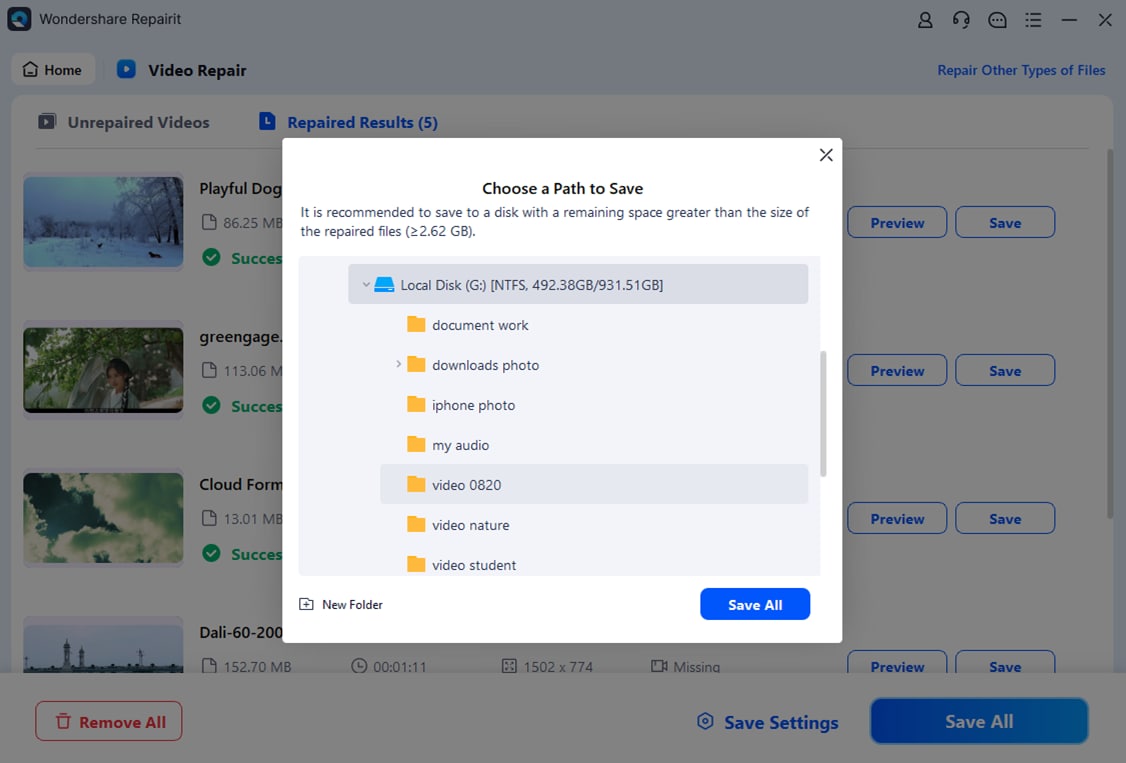
Conclusion
MXF is a powerful, metadata-rich container built for reliable exchange between cameras, servers, and editing systems. Understanding how an mxf file format differs from common consumer formats makes it easier to open, convert, and integrate these clips into any workflow.
By combining the right players and NLEs, converting MXF to MP4 when compatibility is required, and relying on tools like Wondershare Repairit to fix corrupted mxf footage, you can protect valuable recordings and keep your production pipeline running without avoidable interruptions.
Next: What Is Braw File
FAQ
-
1. What is an MXF file used for?
An MXF file is a professional container that stores video, audio, and metadata for broadcast, television, and cinema workflows. It is optimized for reliable interchange between cameras, recorders, servers, and nonlinear editing systems. -
2. How can I open MXF files on Windows or Mac?
You can open MXF files using NLEs such as Adobe Premiere Pro, DaVinci Resolve, or Avid Media Composer, or with players like VLC that include broad codec support. If a file will not open, check for missing codecs or possible corruption. -
3. How do I convert an MXF file to MP4?
Import the MXF clip into a video converter or editing program, select MP4 as the output format, choose your preferred codec (typically H.264 or H.265), adjust quality settings if needed, and export. Always keep the original MXF as a higher-quality source. -
4. Why will my MXF file not play properly?
Playback problems can stem from unsupported codecs, incomplete downloads, interrupted camera recordings, or actual file corruption. Try another player or system first; if the issue persists, use dedicated software such as Wondershare Repairit to attempt repair. -
5. Can a corrupted MXF file be repaired?
In many cases, yes. A repair tool can examine the MXF container, rebuild damaged headers and index tables, and restore readable video and audio streams so you can recover important material from otherwise unplayable files.




