
AV1 is a modern, royalty-free video codec created by the Alliance for Open Media to compress video more efficiently than older standards. It matters today because it delivers high visual quality at much lower bitrates, helping streaming platforms cut bandwidth costs and users enjoy smoother playback. Common use cases include online streaming, video calls, cloud storage, and playback on supported browsers, TVs, and mobile devices.
Repair Corrupted Files To Save Your Data
 Security Verified. Over 7,302,189 people have downloaded it.
In this article
How AV1 Works
The AV1 codec compresses video by breaking each frame into small blocks and predicting what those blocks should look like based on surrounding pixels and previous frames. Instead of storing every pixel, AV1 saves the prediction plus the difference, which greatly reduces file size. It also uses advanced tools like variable block sizes, better motion compensation, and more flexible transforms to keep image quality high at low bitrates. The result is efficient AV1 compression that reduces bandwidth while preserving detail for HD and 4K video.
Key Features, Pros, and Cons
Main features of AV1
AV1 packs many modern compression technologies aimed at internet video and high-resolution content.
- Royalty-free design led by the Alliance for Open Media for broad, low-cost adoption.
- Highly efficient intra- and inter-frame prediction to cut redundant information.
- Support for very high resolutions (4K, 8K) and HDR content at manageable bitrates.
- Tools tuned for streaming, including better handling of complex motion and fine detail.
- Designed for hardware acceleration so new GPUs, SoCs, and TVs can decode it smoothly.
Pros and cons of AV1
Like any codec, AV1 video has clear strengths and some trade-offs to consider.
| Aspect | Details |
|---|---|
| Advantages |
|
| Limitations |
|
| Real-world performance |
|
AV1 vs Other Codecs
Compared with H.264, AV1 video usually reaches similar quality at dramatically smaller file sizes, which is ideal for streaming but requires more processing power. Versus H.265/HEVC, AV1 vs H265 tests often show equal or better quality at lower bitrates, with the major advantage that AV1 is royalty-free while HEVC licensing is complex. In the AV1 vs VP9 comparison, AV1 generally compresses a bit more efficiently and is positioned as VP9's successor, though VP9 is still more widely supported on older hardware. H.264 wins for compatibility and speed, while AV1 leads for efficiency and future-focused streaming.
Compatibility and Practical Use
Modern browsers like Chrome, Firefox, Edge, and some versions of Safari support AV1 support for playback, often using hardware decoding on recent GPUs and mobile chipsets. Streaming platforms are increasingly delivering AV1 for select devices to save bandwidth. On desktop, popular players such as VLC and media frameworks like FFmpeg can decode AV1 when updated. AV1 video is commonly stored in containers like MP4, MKV, WebM, and sometimes M4V, depending on the platform. In daily use, users benefit from smoother streams at lower data rates, while creators and services can distribute high-quality 4K content more efficiently.
How to Use Repairit to Fix a Corrupted AV1 File
Why use Repairit for AV1 videos
When an AV1 file becomes corrupted due to interrupted downloads, transfer errors, or storage issues, it may refuse to play or show artifacts. Wondershare Repairit is a dedicated file repair tool that specializes in fixing damaged videos, including AV1, without requiring technical expertise. It scans the file structure, rebuilds broken headers and data segments, and helps restore playable copies of your videos. You can learn more on the Repairit official website.
Repairit key features for AV1
- Repairs severely corrupted or unplayable AV1 codec videos along with many other popular formats.
- Supports batch processing so you can fix multiple damaged AV1 clips in one repair session.
- Provides a built-in preview window to check the repaired AV1 video before you save it.
Step-by-step: repair a corrupted AV1 file
- Add corrupted video
Install and open Wondershare Repairit on your computer, then go to the Video Repair module. Click the option to add files and browse to the folder that contains your broken AV1 video. Select one or more problematic clips and load them into the repair list so Repairit can analyze them.

- Repair video codecs
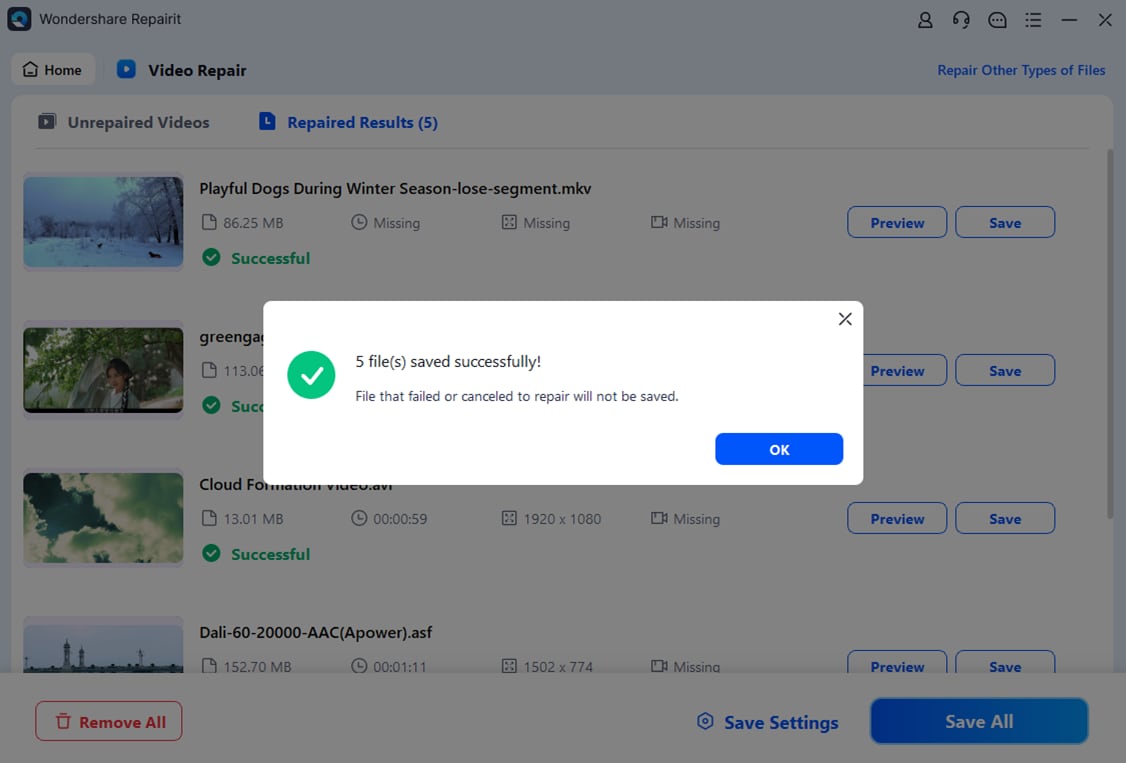
After your AV1 files appear in the list, start the repair process with a single click. Repairit will inspect the damaged container and AV1 codec data, then automatically rebuild missing or corrupt parts where possible. When the repair finishes, use the preview feature to play back the fixed AV1 videos and confirm that image and audio are restored correctly.

- Save the repaired videos
If the preview looks correct, choose a safe output location that is different from the original damaged file path. Click to export and save the repaired AV1 clips as new files. Keep these new copies as your primary versions and store them on reliable drives or cloud storage to reduce the risk of future corruption.
Conclusion
AV1 is a powerful, open, and efficient codec that delivers high-quality video at significantly lower bitrates than many older standards. Its royalty-free nature and strong compression make it especially attractive for streaming platforms, mobile viewing, and large-scale video libraries where every bit of bandwidth matters.
Although AV1 is technically advanced, its files are still vulnerable to corruption from common problems like interrupted downloads, power failures, or failing storage. By combining good file-handling habits with a repair tool such as Wondershare Repairit, you can usually recover damaged AV1 videos and keep your content playable across modern devices and services.
Next: What is Vp9 Codec?
FAQ
-
1. What is AV1 used for?
AV1 is used to compress digital video so it takes up less storage and uses less bandwidth during streaming. Major platforms employ AV1 for movies, TV shows, live streams, and user-generated videos, allowing them to deliver high-quality content even on slower connections.
-
2. Is AV1 better than H.265/HEVC?
In many tests, AV1 vs H265 comparisons show that AV1 can achieve similar or better visual quality at lower bitrates, and it is royalty-free. However, AV1 can be more CPU-intensive to encode, and HEVC is still more widely supported on some older devices.
-
3. Why will my AV1 video not play?
A AV1 file might not play if your media player, browser, or device does not support the codec, if graphics drivers are outdated, or if the file is corrupted. Updating software often fixes compatibility issues, while corrupted videos may require a repair tool like Wondershare Repairit.
-
4. Which containers are commonly used for AV1 videos?
AV1 video is commonly stored in MP4, MKV, and WebM containers. Streaming services often use WebM or MP4 for web delivery, while local archiving tools and media servers may favor MKV for flexibility and advanced metadata support.
-
5. How can I repair a corrupted AV1 video easily?
To fix a damaged AV1 codec file, open Wondershare Repairit, add the corrupted video, and run the repair process. Preview the repaired output to ensure it plays correctly, then save it to a safe storage location as your new working copy.




