
If you have old videos from Windows-based systems, you may wonder What is ASF File and whether you can still play it today. ASF is a legacy Microsoft container used for streaming audio and video, and it often appears in archived recordings or downloads. Knowing how to open, convert, and repair ASF ensures your older media remains watchable on modern devices.
Repair Corrupted Files To Save Your Data
 Security Verified. Over 7,302,189 people have downloaded it.
In this article
What Is ASF File
An ASF file is a digital multimedia container based on Microsofts Advanced Systems Format. It does not define how audio or video is encoded; instead, it wraps streams that typically use Windows Media Audio (WMA) or Windows Media Video (WMV) compression.
The format was designed primarily for network streaming, which is why you may still see ASF in older web videos, CCTV exports, and archived media from Windows applications. Files commonly carry the .asf, .wma, or .wmv extension, depending on the content type and encoder used.
While modern formats like MP4 have largely replaced ASF, many legacy libraries and capture systems still generate it. Understanding asf file structure helps you decide whether to play, convert, or repair it when playback problems appear.
| Property | Details |
|---|---|
| Full name | Advanced Systems Format (ASF) |
| Developer | Microsoft |
| Typical use | Streaming and storing audio/video for Windows Media technologies |
| Common extensions | .asf, .wmv, .wma |
| Main strength | Efficient streaming and metadata support |
How to Open ASF File
You can usually open an asf video format with standard multimedia players, but success depends on installed codecs and your operating system. Below are reliable options for Windows, macOS, and other platforms.
Open ASF files on Windows
On Windows, ASF support is built into many Microsoft tools, especially on older versions of the OS. If your file does not open immediately, try these methods in order:
- Double-click the ASF file so it opens with the default player, typically Windows Media Player.
- Right-click the file, choose "Open with," and select Windows Media Player or another compatible player.
- Install a universal media player such as VLC media player, which includes its own ASF codecs.
- Check for Windows Updates or install an additional codec pack if playback shows only audio or produces errors.
Open ASF files on Mac and other platforms
macOS does not natively prioritize ASF, but cross-platform players make it straightforward to open open asf files successfully.
- Install VLC on Mac, Linux, or other operating systems and drag your ASF file into the player window.
- Use a multimedia suite such as IINA or Elmedia Player on macOS that declares ASF support.
- On mobile, use apps like VLC for Android or VLC for iOS, then browse to the folder containing your ASF videos.
- If playback stutters badly or fails, convert the ASF file to MP4 first, then play the converted version.
How to Convert ASF File to MP4
Because ASF is aging and sometimes poorly supported, many users prefer to convert asf to mp4 for better compatibility with modern devices, editors, and streaming platforms. MP4 is widely recognized across phones, TVs, and browsers, making it a safer long-term format for your library.
Convert ASF to MP4 on desktop
Desktop converters are ideal when you need full control over quality, resolution, and batch processing. Most tools follow a similar workflow:
- Download and install a trusted video converter such as VLC, HandBrake, or another reputable desktop application.
- Launch the converter and import one or more ASF videos into the main window.
- Select MP4 as the output container, often labeled as MP4 (H.264 + AAC) or similar.
- Match the original resolution and bitrate to reduce quality loss during conversion.
- Choose an output folder and start the conversion process.
Convert ASF to MP4 online
Online converters are handy when you only have a few small files and do not want extra software. However, pay attention to file size limits and privacy:
- Open a trusted online video conversion site in your browser.
- Upload the ASF file from your computer, cloud storage, or URL, depending on what the service supports.
- Select MP4 as the desired output format and adjust simple options such as quality or resolution if available.
- Start the conversion, wait for processing to finish, then download the converted MP4 file.
- Delete the upload from the service if privacy controls are offered and you are handling sensitive content.
How to Use Repairit to Fix a Corrupted ASF File
Why use Repairit for ASF repair
When an ASF video refuses to play, shows artifacts, or stops midway, simple re-downloading may not solve the issue. In those cases, a dedicated video repair tool like Wondershare Repairit can analyze the damaged structure of your file and rebuild a playable version.
Wondershare Repairit is a professional data and file repair solution built for users who want reliable results without complex manual work. Through its desktop software and online services on the Repairit official website, you can scan corrupted ASF clips, repair them in batches, and preview the output before saving it.
Key features of Repairit for ASF files
- Repairs corrupted ASF, MP4, MOV, and other popular video formats, including multiple files at once to save time.
- Guided repair modes that walk you through different damage scenarios, from header corruption to playback errors.
- Built-in preview so you can verify that video and audio are restored correctly before exporting fixed files.
Step-by-step: Repair corrupted ASF files
Repairit is designed around a straightforward, guided workflow. Follow these steps to fix a problematic repair asf file safely.
- Choose a Location to Repair Data
Install and open Wondershare Repairit on your computer. On the main interface, select the drive, folder, memory card, or external disk where the damaged ASF videos are stored. This step tells Repairit exactly where to look for repairable content so nothing important is missed.

- Deep Scan the Location
Start the scanning process to let Repairit analyze the selected location in detail. The program will search for corrupted ASF videos, index them, and evaluate how badly each file is damaged. During this deep scan, you can monitor progress and wait while Repairit builds a list of items that can be repaired.

- Preview and Repair Your Desired Data
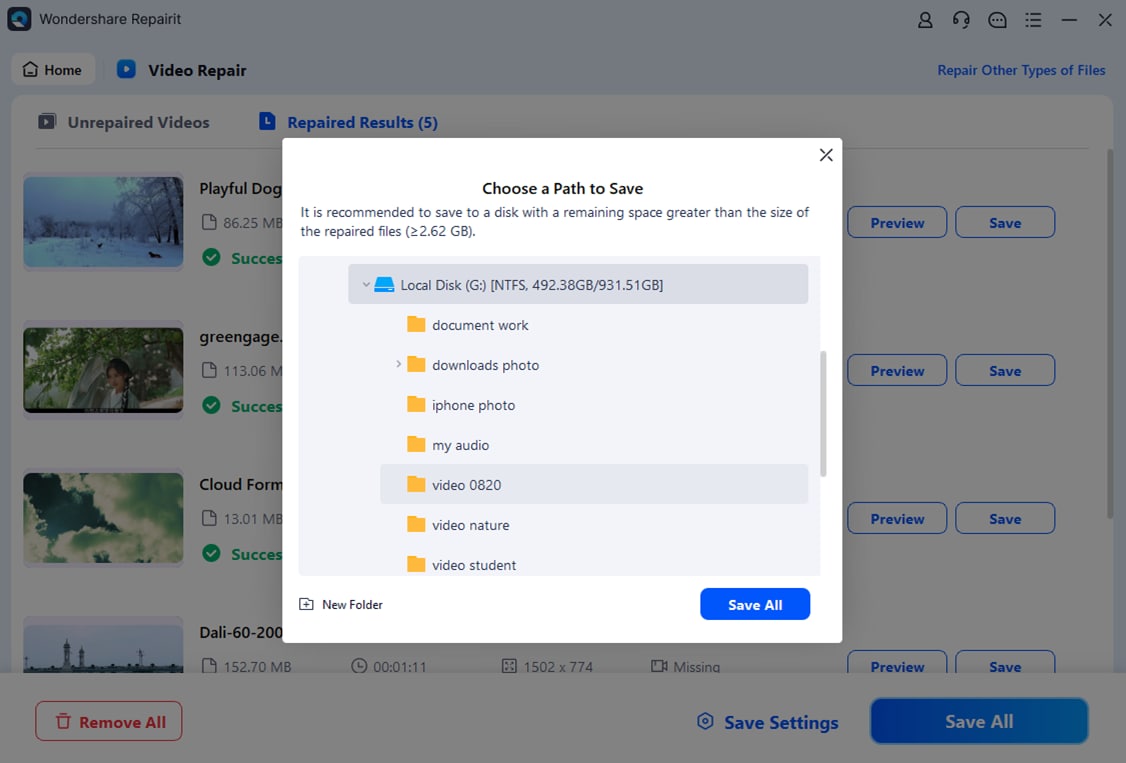
When the scan finishes, browse the results and select the ASF files you want to restore. Click to run the repair process, and allow Repairit to reconstruct audio and video streams.
Conclusion
Although ASF is an older Microsoft streaming container, it still appears in many archives, CCTV exports, and legacy downloads. Understanding what is asf file, how it differs from formats like MP4, and which players support it makes it easier to keep your videos accessible.
When playback fails, converting ASF to MP4 improves compatibility, and specialized tools such as Wondershare Repairit provide a practical way to fix corrupted asf videos. With the right combination of player, converter, and repair software, you can preserve valuable footage and avoid losing important recordings to file damage.
Next: What Is Ts File
FAQ
-
1. What is an ASF file used for?
An ASF file is a Microsoft container designed mainly for streaming and storing digital audio and video. It is closely tied to Windows Media technologies and was widely used by older web services, recording tools, and Windows-based applications. -
2. How do I open an ASF file on Windows or Mac?
On Windows, you can usually double-click the file to open it in Windows Media Player, or use VLC for broader codec support. On Mac, ASF is best opened with cross-platform players such as VLC, IINA, or other third-party apps that support Windows Media formats. -
3. Can I convert ASF to MP4 without losing quality?
Yes. Use a reputable video converter, choose MP4 as the target format, and match the original resolution, frame rate, and bitrate as closely as possible. This minimizes recompression artifacts and keeps quality similar to the source ASF file. -
4. Why will my ASF file not play properly?
Playback issues can come from missing codecs, incompatible players, incomplete downloads, or actual file corruption. Try another player first; if multiple players fail, the file may be damaged and require dedicated repair software. -
5. How can I repair a corrupted ASF video file?
You can use Wondershare Repairit to scan and fix corrupted ASF videos. The program analyzes file structure, repairs errors that prevent playback, lets you preview the restored media, and then saves a new, playable copy of your video.




