
Choosing between an AI-focused enhancer and a professional editor like VEGAS Pro can be challenging if your main goal is simply to enhance video quality, not to build complex edits. This comparison looks at Repairit Video Enhancer and VEGAS Pro specifically for tasks such as upscaling video resolution, improving video clarity, reducing noise and blur, and sharpening soft footage. You will see how they differ in workflow, learning curve, and day-to-day results so you can decide which fits your projects better.
Enhance Video Quality with Repairit Video Enhancer
 Security Verified. Over 7,302,189 people have downloaded it.
In this article
- Repairit Video Enhancer vs VEGAS Pro: Quick Verdict
- Repairit Video Enhancer vs VEGAS Pro: Key Differences
- Repairit Video Enhancer vs VEGAS Pro: Comparison Table
- What Repairit Video Enhancer and VEGAS Pro Are Best For
- Repairit Video Enhancer vs VEGAS Pro: Technology and Enhancement Approach
- Repairit Video Enhancer vs VEGAS Pro: Output Quality and Real-World Results
- Repairit Video Enhancer vs VEGAS Pro: Workflow and Ease of Use
- Repairit Video Enhancer vs VEGAS Pro: Pricing and Trial Options
- Who Should Choose Repairit Video Enhancer
- Who Should Choose VEGAS Pro
- Pros and Cons of Repairit Video Enhancer and VEGAS Pro
- How to Enhance Videos After Choosing the Right Tool
Repairit Video Enhancer vs VEGAS Pro: Quick Verdict
In most everyday enhancement scenarios, Repairit Video Enhancer suits users who mainly want to upscale video resolution, reduce noise, and sharpen soft footage without managing a full editing timeline. VEGAS Pro, by contrast, is better when you also need detailed editing and are comfortable tuning effects manually.
Summarizing the roles:
- Repairit Video Enhancer: AI-focused quality enhancement, minimal setup, clear presets for common issues.
- VEGAS Pro: Professional editor with strong manual enhancement tools integrated into a complete post-production workflow.
Repairit Video Enhancer vs VEGAS Pro: Key Differences
The key difference is focus. Repairit Video Enhancer is built around AI models that automatically improve resolution, clarity, and motion, aiming to cut down trial and error. VEGAS Pro integrates enhancement into a broader editing environment, giving you layers, transitions, and detailed control over filters, at the cost of a steeper learning curve.
From the overview perspective, VEGAS Pro is professional video editing software with enhancement capabilities, suited to users who need efficient editing with manual enhancement inside a full production workflow. Repairit Video Enhancer concentrates on AI-driven video quality enhancement, giving non-editors an easier way to improve clarity, reduce noise, and upscale resolution without juggling complex timelines.
Repairit Video Enhancer vs VEGAS Pro: Comparison Table
| Comparison dimension | Repairit Video Enhancer |
|---|---|
| Best for | Users who mainly want to enhance low-quality or old footage with guided AI models and minimal manual tweaking. |
| VEGAS Pro | |
| Best for | Users needing efficient editing with manual enhancement inside a full professional video editor. |
| Ease of use | |
| Repairit Video Enhancer | Beginner-friendly with focused enhancement options and straightforward AI presets. |
| VEGAS Pro | Less intuitive interface for beginners; faster once you learn the layout and editing tools. |
| Output quality | |
| Repairit Video Enhancer | Consistent AI-driven upscaling, denoising, and sharpening for common quality issues. |
| VEGAS Pro | Strong manual effects, filters, and corrections that can achieve high quality with careful tuning. |
| Workflow | |
| Repairit Video Enhancer | Import, choose AI model, preview, then export enhanced video in a few guided steps. |
| VEGAS Pro | Import video, apply effects and corrections, adjust sharpness and color, preview, then export with more manual control. |
| Strengths | |
| Repairit Video Enhancer | Simple AI enhancement, clear presets for upscaling and noise reduction, minimal learning curve. |
| VEGAS Pro | Flexible workflow, strong effects and filters, solid performance for complex editing timelines. |
| Weaknesses | |
| Repairit Video Enhancer | Less suited for advanced multi-track editing or detailed compositing. |
| VEGAS Pro | Less intuitive for beginners and slower for users who only need quick quality improvements. |
What Repairit Video Enhancer and VEGAS Pro Are Best For
Both tools can improve video clarity, but they fit different workflows.
Repairit Video Enhancer is best for:
- Making social, mobile, or archive clips clearer by reducing noise and blur.
- Upscaling low-resolution videos for platforms that favor HD or higher.
- Users who do not want to manage timelines, transitions, or audio mixing.
VEGAS Pro is best for:
- Full projects combining enhancement with cuts, titles, and audio work.
- Editors who like to fine-tune color, sharpness, and motion through multiple effect layers.
- Situations where enhancement is just one part of a larger production pipeline.
Repairit Video Enhancer vs VEGAS Pro: Technology and Enhancement Approach
According to the core feature summary, Repairit Video Enhancer centers on AI models that automatically improve resolution, clarity, and motion. The idea is to handle denoising, deblurring, and artifact reduction with preset models, so you spend less time tuning individual sliders.
Key elements of Repairit Video Enhancer s approach include:
- AI-based enhancement models focused on denoising, deblurring, and artifact reduction for typical social, mobile, or archive footage.
- Model-driven improvement of low-quality videos and smoother motion on problematic clips, with less need for manual keyframing or complex adjustments.
- Straightforward upscaling options to increase resolution on low-quality videos without deep technical settings.
VEGAS Pro uses a more traditional editing-engine approach. Enhancement lives inside effect chains and filters:
- Manual color correction, basic sharpening, and contrast adjustments through filters and effects.
- Advanced effect chains that let experienced editors stack filters for detailed control over sharpness, color, and motion look.
- Enhancement decisions are made clip by clip on the timeline, which is powerful but requires experience to get consistent results.
In practice, Repairit targets users who want AI to decide most enhancement parameters, while VEGAS Pro rewards users who prefer hands-on control inside a professional editor.
Repairit Video Enhancer vs VEGAS Pro: Output Quality and Real-World Results
Output quality depends on your footage and how much time you can invest in fine-tuning.
With Repairit Video Enhancer:
- AI models are designed to handle common problems such as soft details, compression artifacts, and low resolution.
- You can typically improve video clarity and smooth motion with a few preset choices rather than extensive manual settings.
- Results tend to be consistent for everyday clips such as talking-head videos, screen recordings, and casual camera footage.
With VEGAS Pro:
- Experienced editors can build custom effect chains for sharpening, denoising, and color adjustment.
- This manual approach can reach high-quality results, especially when you understand how different filters interact.
- For quick one-off enhancements, though, you may spend more time testing different settings to avoid over-sharpening, banding, or unnatural motion.
For users who want predictable improvements with limited effort, Repairit Video Enhancer often feels more direct. For users who need precise control over every visual parameter, the manual depth in VEGAS Pro can be an advantage.
Repairit Video Enhancer vs VEGAS Pro: Workflow and Ease of Use
Workflow can be a deciding factor if you enhance video quality frequently.
Repairit Video Enhancer workflow is described as focused and linear:
- Import a clip.
- Choose an AI enhancement level or model.
- Preview the result.
- Export the enhanced video.
This suits users who want a clear path from noisy, blurry footage to a cleaner export without learning a full editing interface.
VEGAS Pro workflow follows a standard NLE (non-linear editor) structure:
- Import video to the timeline.
- Apply effects and corrections to clips.
- Adjust sharpness, color, and exposure with various tools.
- Preview in the program monitor and refine settings.
- Export from the project render dialog.
Once you are familiar with VEGAS Pro, this approach is efficient for complex projects. However, if you only want to denoise and sharpen a short clip, the extra steps and interface elements can feel like overhead compared with a dedicated enhancer.
Repairit Video Enhancer vs VEGAS Pro: Pricing and Trial Options
From the pricing and trial information, Repairit Video Enhancer is positioned as a dedicated enhancement tool with plan options for casual and frequent users. It typically includes a trial or limited free use, so you can evaluate how well it upscales resolution and improves clarity before paying.
VEGAS Pro is sold as full professional editing software. It is generally priced higher because it covers editing, effects, and finishing, not just enhancement. Trial versions are often available, which you can use to test how comfortably it handles your footage and whether the UI fits your workflow.
If you mostly care about video quality enhancement and not timeline editing, investing in a lighter dedicated tool can make more sense. If editing and enhancement are both central to your work, a comprehensive editor like VEGAS Pro may justify the broader cost.
Who Should Choose Repairit Video Enhancer
Based on the outlined use cases, you should favor Repairit Video Enhancer if:
- You want to enhance low-quality or old footage with minimal technical setup.
- You often need to upscale resolution and reduce noise for social media, online courses, or simple client projects.
- You prefer guided AI presets instead of manually stacking effects and filters.
- You already edit somewhere else but want a separate, focused tool for quality improvement before or after editing.
In these scenarios, letting AI take the lead on denoising, sharpening, and artifact reduction can save significant time while still improving clarity and detail.
Who Should Choose VEGAS Pro
You should lean toward VEGAS Pro if your main bottleneck is editing flexibility rather than just enhancement.
- You need professional-level timelines with transitions, audio tools, and manual enhancement in one place.
- You value flexible workflows and strong effects and filters for fine-grained control.
- You are an intermediate or advanced creator willing to learn a less intuitive UI to gain more editing power.
- You regularly combine enhancement with complex projects like multi-camera edits, titles, and layered effects.
In these cases, keeping enhancement inside a single editing application can simplify project management, even if it means more manual work to optimize denoising and sharpening.
Pros and Cons of Repairit Video Enhancer and VEGAS Pro
Repairit Video Enhancer Pros and Cons
VEGAS Pro Pros and Cons
How to Enhance Videos After Choosing the Right Tool
After comparing Repairit Video Enhancer vs VEGAS Pro, the next step is to actually enhance your footage. Regardless of which editor you use for cutting and storytelling, you still need a reliable way to improve video clarity, reduce noise, and make low-resolution clips more presentable.
For many users, Repairit Video Enhancer works as a practical, guided option: you can run clips through AI enhancement either before editing in VEGAS Pro or after exporting an edit that still looks too soft or noisy.
Key Features
Core capabilities that matter for everyday enhancement include:
- AI models that enhance resolution, clarity, and details in low-quality videos.
- Noise and blur reduction aimed at producing cleaner, sharper footage.
- A focused interface that simplifies import, preview, and export for non-technical users.
- Simple tools to improve video clarity, reduce noise, and sharpen soft footage in a few steps.
- Model-driven handling of denoising, deblurring, and artifact reduction without deep technical tuning.
Step-by-step guide
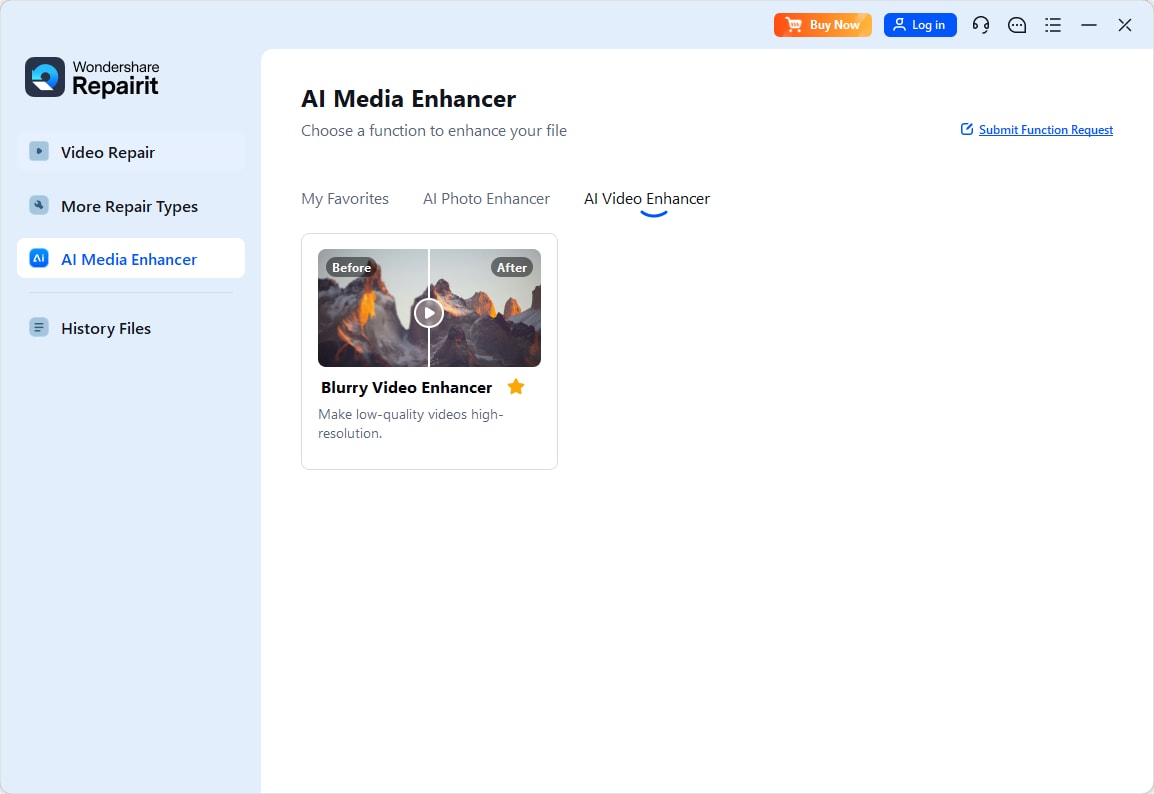
Step 1. Choose an AI enhancement model based on your video quality needs, such as upscaling, denoising, or overall clarity improvement.
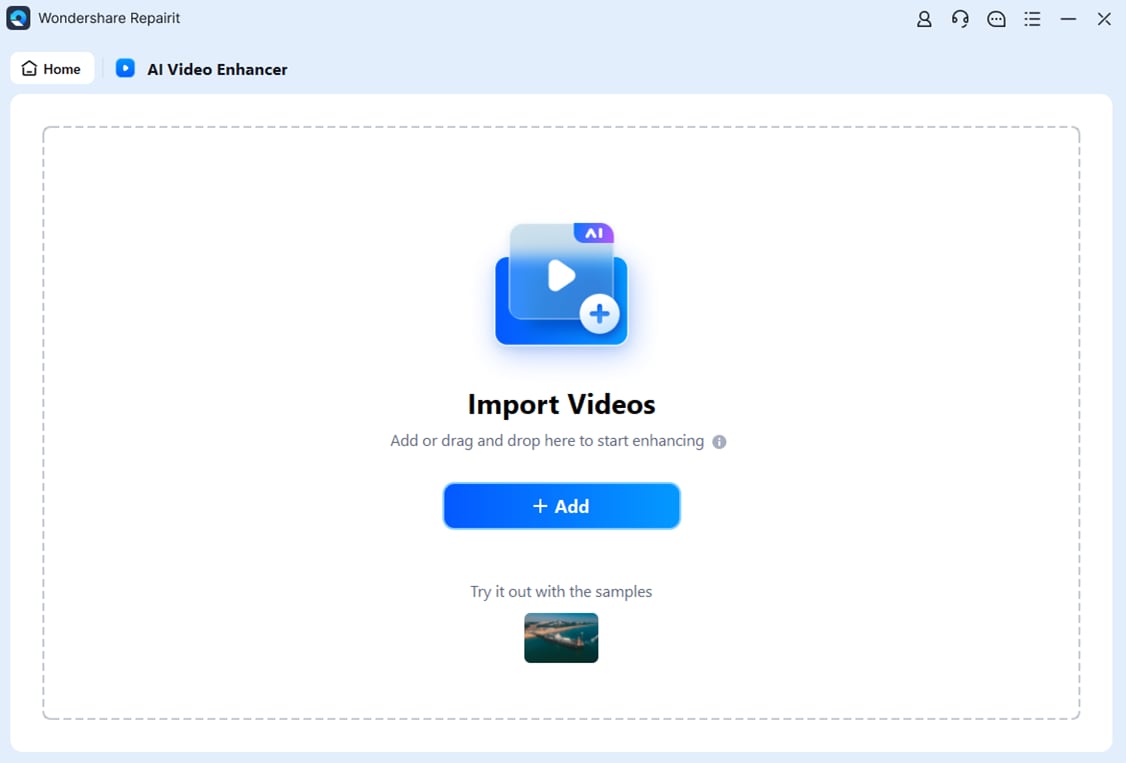
Step 2. Import your video into Repairit Video Enhancer to begin the enhancement process.
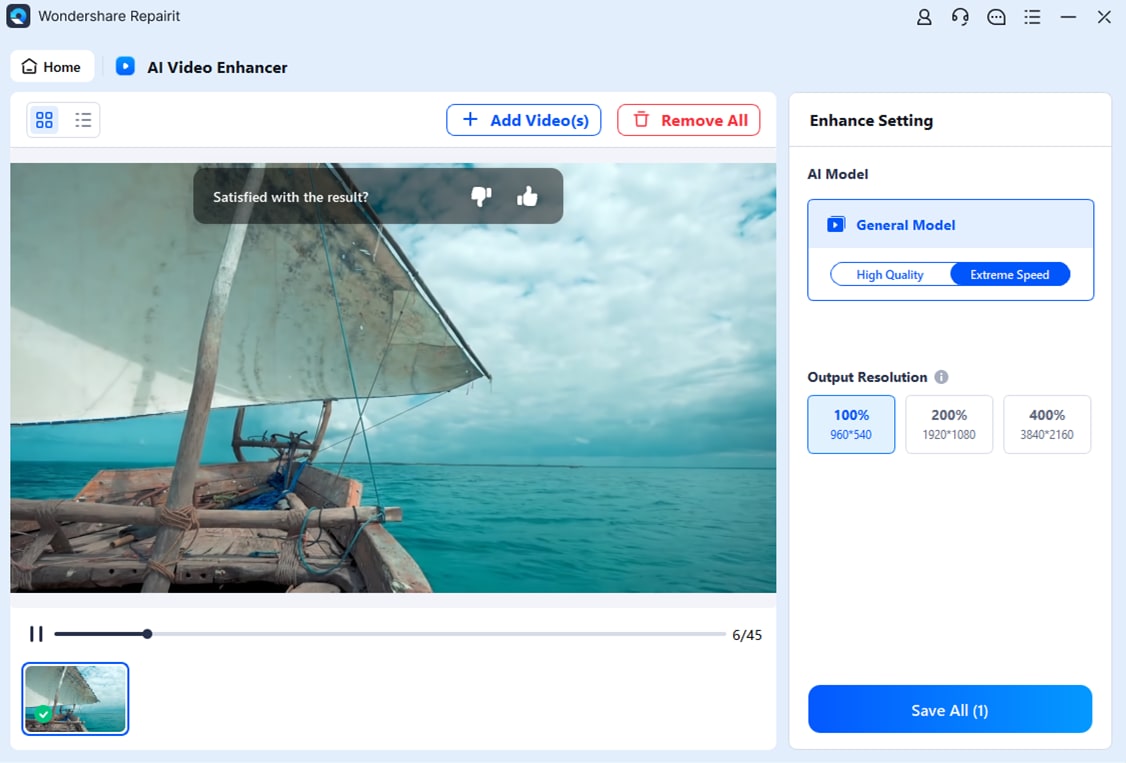
Step 3. Start enhancing and let the AI improve sharpness, reduce blur, and enhance the overall video quality.

Step 4. Preview the enhanced result and save the improved video to your device.
Final Verdict
Both tools can significantly enhance video quality, but they address different priorities.
Repairit Video Enhancer offers a more direct path for users who mainly want to upscale resolution, reduce noise, and sharpen soft footage with minimal effort. Its AI models are tailored to common issues in everyday clips and older footage, and its streamlined workflow avoids the complexity of a full editor.
VEGAS Pro remains a strong option if you need full editing capabilities and are willing to manage enhancement through manual effect chains. When quality improvement is only one part of a larger workflow with multi-track timelines, transitions, and titles, its integrated environment can be sufficient, especially for experienced editors.
In many cases, using both together works well: enhance or upscale in Repairit Video Enhancer first, then bring the improved clips into VEGAS Pro for editing and finishing. This combination lets AI handle the heavy lifting on clarity and detail while you keep creative control over the final cut.
Next: Repairit Video Enhancer vs Cyberlink Powerdirector
FAQ
-
1. Is Repairit Video Enhancer better than VEGAS Pro for beginners who only want higher video quality?
In most cases, yes. Repairit Video Enhancer is easier for beginners because it focuses on AI-driven quality improvement rather than full editing, so you can enhance clarity and resolution without learning a complex interface. -
2. Can VEGAS Pro match the enhancement quality of dedicated tools like Repairit Video Enhancer?
VEGAS Pro can produce strong results through its effects and filters, but it often requires more manual tweaking. Repairit Video Enhancer aims to deliver similar or better improvement on common issues with less trial and error. -
3. Which is faster for simple tasks like denoising and sharpening a short clip?
For straightforward denoising and sharpening, Repairit Video Enhancer is usually faster because the workflow is focused on enhancement only. VEGAS Pro can do it, but you need to set up effects inside a larger editing environment.




