
Repairit Video Enhancer vs AVCLabs Video Enhancer AI is a decision about how much control versus automation you want when improving video quality. Choosing between them comes down to the kind of footage you handle, how technical you want your workflow to be, and what your hardware can comfortably run. Both are AI-driven tools that aim to enhance video quality, upscale video resolution, and reduce noise and blur, but they prioritize different user needs.
Choosing between Repairit Video Enhancer and AVCLabs Video Enhancer AI comes down to how much control and automation you want in your workflow. Both use AI to improve video quality, but they focus on slightly different needs. This guide compares their enhancement approach, ease of use, output quality, and pricing so you can decide which fits your typical projects and hardware setup.
Enhance Video Quality with Repairit Video Enhancer
 Security Verified. Over 7,302,189 people have downloaded it.
In this article
- Repairit Video Enhancer vs AVCLabs Video Enhancer AI: Quick Verdict
- Repairit Video Enhancer vs AVCLabs Video Enhancer AI: Key Differences
- Repairit Video Enhancer vs AVCLabs Video Enhancer AI: Comparison Table
- What Repairit Video Enhancer and AVCLabs Video Enhancer AI Are Best For
- Repairit Video Enhancer vs AVCLabs Video Enhancer AI: Technology and Enhancement Approach
- Repairit Video Enhancer vs AVCLabs Video Enhancer AI: Output Quality and Real-World Results
- Repairit Video Enhancer vs AVCLabs Video Enhancer AI: Workflow and Ease of Use
- Repairit Video Enhancer vs AVCLabs Video Enhancer AI: Pricing and Trial Options
- Who Should Choose Repairit Video Enhancer
- Who Should Choose AVCLabs Video Enhancer AI
- Pros and Cons of Repairit Video Enhancer and AVCLabs Video Enhancer AI
- How to Enhance Videos After Choosing the Right Tool
Repairit Video Enhancer vs AVCLabs Video Enhancer AI: Quick Verdict
If you want a guided, beginner-friendly way to improve video clarity, reduce noise, and sharpen soft footage without touching many technical controls, Repairit Video Enhancer typically feels more approachable. It focuses on clear AI presets and step-by-step enhancement that suit everyday clips, old recordings, and social content.
AVCLabs Video Enhancer AI leans more toward automated AI processing and batch work. It is a reasonable choice if you prefer to set an enhancement mode once, let the AI run, and you have hardware that can support heavier models, especially when you care about face refinement in talking-head style videos.
Neither tool is universally better. The right option depends on whether you value a guided workflow (Repairit) or automation and batch-focused processing (AVCLabs) for your typical footage and system.
Repairit Video Enhancer vs AVCLabs Video Enhancer AI: Key Differences
The key differences between Repairit Video Enhancer and AVCLabs Video Enhancer AI are about workflow design, depth of control, and how they apply AI models.
- Best for: Repairit targets users who want guided AI presets and a straightforward path to better-looking video, while AVCLabs is more aligned with users who want automatic enhancement and strong face-focused refinement.
- Ease of use: Both are accessible, but Repairit emphasizes hand-holding through the process. AVCLabs offers a linear pipeline where you select an AI mode and let it process with limited need for fine-tuning.
- Output focus: Repairit aims for balanced, natural-looking improvements across the whole frame. AVCLabs may deliver particularly noticeable gains on faces and upscaling in some scenarios, depending on hardware and source quality.
- Workflow style: Repairit is preset-focused with guided models for common scenarios. AVCLabs uses a more set-and-forget pipeline, which may be practical when you process similar clips in batches.
- Hardware expectations: Both benefit from capable systems, but AVCLabs is more sensitive to GPU performance for its automatic AI modes, while Repairit aims to stay usable on mid-range consumer hardware.
Repairit Video Enhancer vs AVCLabs Video Enhancer AI: Comparison Table
| Dimension | Repairit Video Enhancer | AVCLabs Video Enhancer AI |
|---|---|---|
| Best for | Users who want guided AI presets to enhance low-quality or old footage with minimal learning curve. | Users who want automated enhancement with minimal manual adjustment and strong AI face refinement. |
| Ease of use | Simple, guided interface designed for non-experts who want quick quality improvements. | Straightforward workflow: import video, choose AI mode, auto-process, preview, and export. |
| Output quality focus | Balanced AI upscaling and denoising aimed at natural-looking everyday improvements. | Can produce detailed results, especially for faces, but quality may vary with source and hardware. |
| Workflow | Preset-focused workflow with clear steps and AI models tuned for common scenarios. | Linear workflow: import video → select enhancement mode → apply AI processing → preview → export video. |
| Core strengths | Beginner-friendly design, AI-powered enhancement models, practical for a wide range of casual and semi-pro uses. | Easy-to-use interface, dedicated face enhancement model, automatic AI processing, supports batch processing. |
| Key weaknesses | Fewer deep manual controls than complex professional suites; enhancement speed depends on video length and system. | Limited manual control compared to professional tools; performance depends heavily on hardware capabilities. |
What Repairit Video Enhancer and AVCLabs Video Enhancer AI Are Best For
Both tools aim to improve details in low-quality videos, but they are better suited to slightly different scenarios.
Repairit Video Enhancer is typically stronger for:
- Everyday low-quality clips from phones, social media, or screen recordings where you want quick clarity and sharpness gains.
- Older or soft SD/HD footage that needs upscaling video resolution for larger modern screens with natural-looking results.
- Users who prefer clear presets over manually tuning noise, sharpness, or motion parameters.
AVCLabs Video Enhancer AI is typically stronger for:
- Talking-head content, vlogs, and interviews where facial details are the main focus.
- Users who want to set an AI mode once and run batch processing on multiple similar clips.
- Creators with capable GPUs who are comfortable letting automatic AI models handle most enhancement logic.
Repairit Video Enhancer vs AVCLabs Video Enhancer AI: Technology and Enhancement Approach
Both solutions use AI-powered video enhancement but emphasize different aspects of the workflow.
Shared capabilities
Both Repairit Video Enhancer and AVCLabs Video Enhancer AI use AI models to improve video clarity, reduce noise, and upscale resolution, but they emphasize different workflows. They support:
- AI-powered video quality enhancement to improve clarity and reduce visible noise across typical footage.
- Resolution upscaling to make low-resolution clips more suitable for larger and higher-resolution screens.
- Options to adjust output resolution and export settings for common video formats.
- AI denoising and deblurring that aim to sharpen soft footage while maintaining a watchable, natural look.
- Upscaling and enhancement models that can improve perceived detail without aggressive artifacts when tuned correctly.
- Some form of batch processing, with this being more central in AVCLabs for handling multiple clips at once.
Repairit Video Enhancer approach
Repairit centers on accessible AI presets and guided steps. Its AI models are tuned for common use cases like low-resolution or noisy clips, helping non-experts choose appropriate enhancement paths without worrying about technical parameters. The intent is to balance sharpness, noise reduction, and motion smoothness so output looks natural for everyday viewing.
AVCLabs Video Enhancer AI approach
AVCLabs relies more heavily on automatic AI processing with specialized modes, including options for face enhancement. You typically choose a mode, set an output resolution, and let the AI run. This approach is convenient when you are comfortable with less manual control and are working on systems that can handle intensive GPU-based models, especially for higher resolutions and large batches.
Repairit Video Enhancer vs AVCLabs Video Enhancer AI: Output Quality and Real-World Results
Real-world output quality from any AI enhancer depends heavily on input footage, motion, compression artifacts, and your hardware. Neither tool can transform extremely poor clips into pristine footage, but both can deliver noticeable improvements in many day-to-day scenarios.
Where Repairit Video Enhancer tends to shine:
- Making slightly blurry or soft clips feel clearer for casual viewing, presentations, or social uploads.
- Reducing visible noise and grain without making footage look overly plastic in most cases.
- Upscaling SD or low-bitrate HD footage so it looks more comfortable on 1080p or higher displays.
Where AVCLabs Video Enhancer AI can stand out:
- Enhancing facial features in talking-head or close-up shots where the face is central to the frame.
- Handling batches of similar clips with consistent AI settings when you want to upscale large libraries.
- Leveraging strong GPUs to run more demanding AI modes that can add perceived detail and smoothness.
In practice, the best choice for your output quality is situational. For mixed everyday footage where natural-looking results and simplicity matter, Repairit is often more predictable. For face-focused, higher-resolution workflows on powerful hardware, AVCLabs can be competitive, especially if you prefer its automatic modes.
Repairit Video Enhancer vs AVCLabs Video Enhancer AI: Workflow and Ease of Use
Both tools are designed to avoid the complexity of full nonlinear editors, but they guide users differently.
Repairit Video Enhancer workflow
Repairit offers a simple, guided path. You import a clip, pick an AI model or preset matching your scenario (such as low-resolution or noisy footage), preview the enhancement, and export. This structure reduces decision fatigue and is friendly to users who do not want to manage many sliders or advanced controls.
AVCLabs Video Enhancer AI workflow
AVCLabs Video Enhancer AI follows a clear workflow: import video, select enhancement mode, apply AI processing, preview, then export. It is also straightforward but leans more on automatic processing. You typically choose an AI mode, an output resolution, and let the application run, with less step-by-step guidance than Repairit but an efficient, linear flow that suits batch work.
If you value a hand-held experience, Repairit generally feels more approachable. If you prefer to configure once and run larger jobs, AVCLabs linear, automation-first workflow may align better with your habits.
Repairit Video Enhancer vs AVCLabs Video Enhancer AI: Pricing and Trial Options
Both products are commercial tools with paid plans. While specific prices and license types can change, their general models have a few things in common:
- They are typically available as desktop applications, often with different tiers or time-based licenses.
- Each usually provides some form of trial or limited mode, so you can test video enhancement results on your own clips before paying.
- Features such as maximum resolution, watermark handling, or batch capacity may differ between trial and paid versions, depending on current offers.
Because pricing, promotions, and licensing are updated regularly, it is best to check the official websites for the latest plan details and to see which fits your budget and expected usage volume.
Who Should Choose Repairit Video Enhancer
Repairit is a practical choice if you want to focus on getting better-looking video quickly rather than tweaking technical settings. It fits especially well if:
- You are enhancing everyday low-quality clips, such as mobile recordings or social videos, and want a guided AI workflow.
- You work with older or softer footage and need straightforward tools to improve video clarity and reduce noise without learning complex software.
- You want simple AI upscaling to make older SD or HD content look better on laptops, TVs, or projectors.
- You are a beginner or a busy creator who prefers clear presets instead of manually tuning many enhancement controls.
Who Should Choose AVCLabs Video Enhancer AI
AVCLabs Video Enhancer AI is better suited to users who are comfortable with a more automated, hardware-driven approach and who often work with face-centric content. It may fit well if:
- You want automated enhancement with minimal manual adjustment and are fine with a linear, set-and-forget workflow.
- You focus on improving faces in videos, such as talking-head clips, webinars, vlogs, or interviews.
- You want to queue multiple clips and use batch processing with similar AI settings to save time.
- You have reasonably powerful hardware, particularly a capable GPU, and can take advantage of more intensive AI processing.
Pros and Cons of Repairit Video Enhancer and AVCLabs Video Enhancer AI
Both tools have strengths and limitations. Understanding these trade-offs helps you decide which fits your projects and expectations.
Repairit Video Enhancer Pros and Cons
AVCLabs Video Enhancer AI Pros and Cons
How to Enhance Videos After Choosing the Right Tool
Once you understand the differences between Repairit Video Enhancer and AVCLabs Video Enhancer AI, the next step is to actually enhance your footage. Whether you chose a guided preset-driven workflow or an automatic batch approach, the goal is the same: improve video clarity, reduce noise and blur, and upscale video resolution so your clips look better on modern screens.
If you prefer a structured, easy-to-follow process, Repairit Video Enhancer offers a practical path. Below is how its approach fits into a typical enhancement workflow after you decide which tool suits you.
Key Features
In most cases you will rely on a small set of focused capabilities rather than an overwhelming toolset. Repairit Video Enhancer includes:
- AI models tuned for common use cases such as low-resolution or noisy footage that needs better clarity and sharpness.
- A simple interface with presets that reduce the need for detailed manual adjustments.
- Enhancement options aimed at improving clarity, sharpness, and overall visual quality while trying to keep motion and textures looking natural.
Step-by-step guide
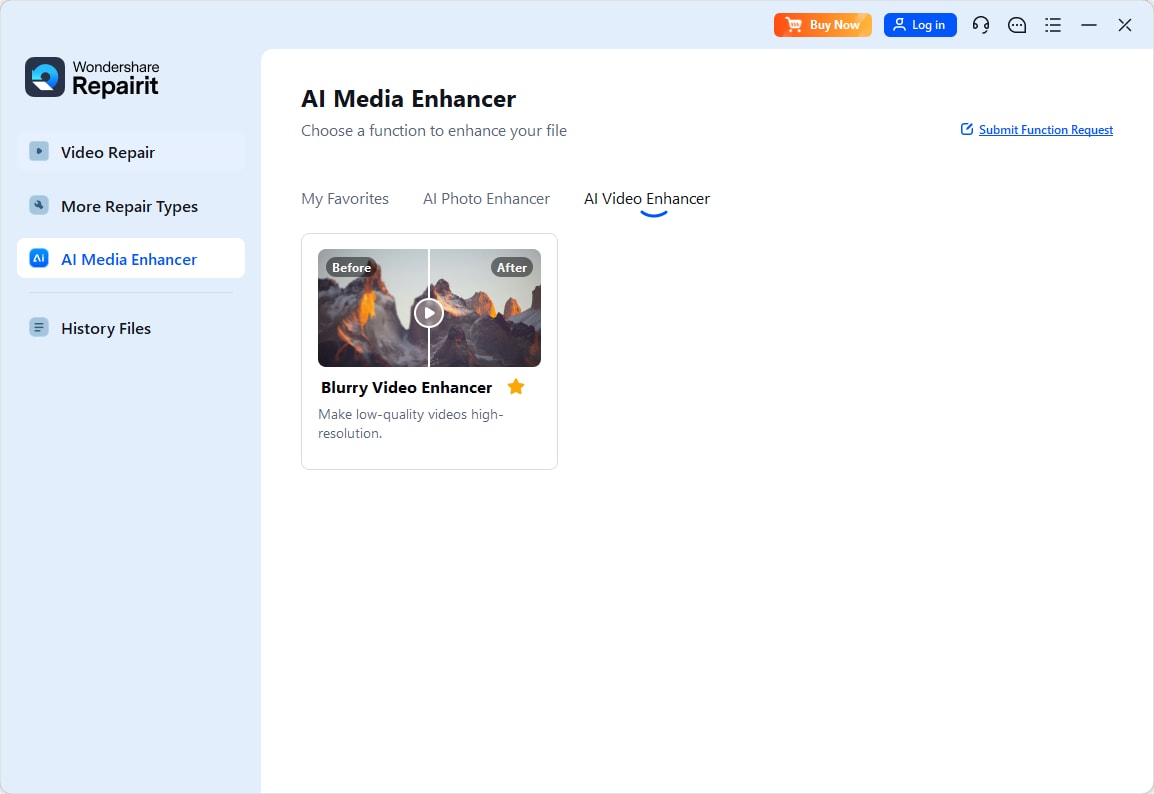
Step 1. Choose an AI enhancement model based on your video quality needs, such as upscaling, denoising, or overall clarity improvement.
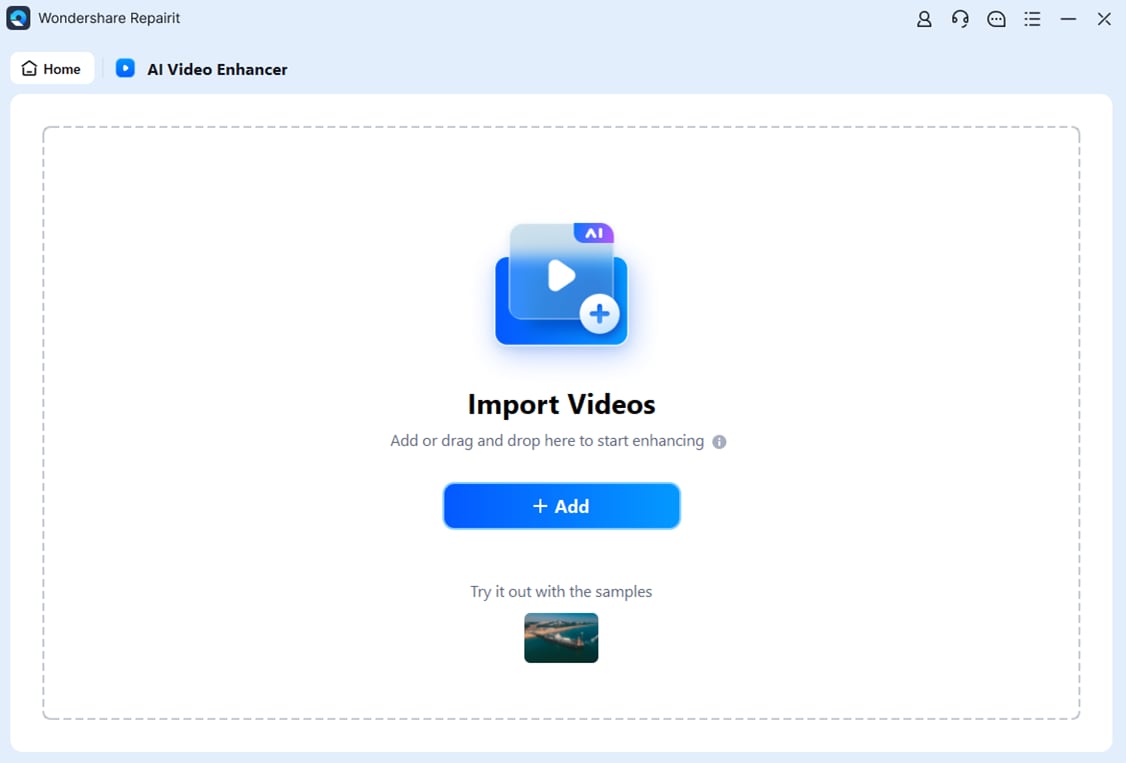
Step 2. Import your video into Repairit Video Enhancer to begin the enhancement process.
Step 3. Start enhancing and let the AI improve sharpness, reduce blur, and enhance the overall video quality.

Step 4. Preview the enhanced result and save the improved video to your device.

Final Verdict
Choosing between Repairit Video Enhancer vs AVCLabs Video Enhancer AI is less about raw power and more about which tool fits your habits, footage, and hardware.
- Pick Repairit Video Enhancer if you want guided AI presets, a clear step-by-step workflow, and balanced improvements for everyday footage, older clips, and social content. It is a strong match for users who value simplicity and natural-looking results over deep manual control.
- Consider AVCLabs Video Enhancer AI if your projects revolve around faces, you prefer automated enhancement modes, and you work on a machine with solid GPU resources, especially when processing multiple similar clips in batches.
For most everyday creators and beginners, Repairit Video Enhancer will often feel more approachable, with guided AI presets and a workflow that focuses on clear, natural-looking improvements to low-quality or old footage. It is a solid choice when you want reliable results without learning many technical controls.
AVCLabs Video Enhancer AI can be a good fit if you prefer automated processing, care about face refinement, and have the hardware to support heavier AI workloads. Its batch support and focused enhancement modes may be sufficient when you mostly need to upscale and clean up multiple clips with minimal manual involvement.
Next: Repairit Video Enhancer vs Hitpaw Video Enhancer
FAQ
-
1. Is Repairit Video Enhancer better than AVCLabs Video Enhancer AI for beginners?
For most beginners, Repairit Video Enhancer is often easier to start with because it emphasizes guided AI presets and a clear step-by-step flow. AVCLabs Video Enhancer AI is also straightforward but leans more on automatic modes and can feel more hardware-dependent, which may be less predictable on older systems. -
2. Which gives better output quality, Repairit Video Enhancer or AVCLabs Video Enhancer AI?
Output quality depends on your source footage and hardware. Repairit focuses on balanced, natural-looking enhancement across the whole frame, while AVCLabs Video Enhancer AI can perform well on faces and upscaling, especially on stronger GPUs. The most reliable approach is to test each tool on the same sample clip and compare. -
3. Which is faster, Repairit Video Enhancer or AVCLabs Video Enhancer AI?
Speed varies with clip length, resolution, and your CPU or GPU. AVCLabs Video Enhancer AI can be demanding but may benefit more from powerful GPUs, while Repairit Video Enhancer aims to stay usable on typical consumer hardware. In both cases, long or high-resolution videos will naturally take more time to process.




