
Choosing between Repairit Video Enhancer vs HitPaw Video Enhancer usually comes down to how much control you want over AI settings versus how quickly you want to get a cleaner video. Both tools aim to enhance video quality, upscale resolution, and reduce noise, but they take slightly different approaches. This guide compares them on output quality, AI models, ease of use, and pricing so you can match the right enhancer to your everyday video projects.
In most cases, Repairit Video Enhancer is oriented toward users who want guided AI enhancement with a bit more tuning, while HitPaw Video Enhancer focuses on simple, one click improvements.
Enhance Video Quality with Repairit Video Enhancer
 Security Verified. Over 7,302,189 people have downloaded it.
In this article
- Repairit Video Enhancer vs HitPaw Video Enhancer: Quick Verdict
- Repairit Video Enhancer vs HitPaw Video Enhancer: Key Differences
- Repairit Video Enhancer vs HitPaw Video Enhancer: Comparison Table
- What Repairit Video Enhancer and HitPaw Video Enhancer Are Best For
- Repairit Video Enhancer vs HitPaw Video Enhancer: Technology and Enhancement Approach
- Repairit Video Enhancer vs HitPaw Video Enhancer: Output Quality and Real-World Results
- Repairit Video Enhancer vs HitPaw Video Enhancer: Workflow and Ease of Use
- Repairit Video Enhancer vs HitPaw Video Enhancer: Pricing and Trial Options
- Who Should Choose Repairit Video Enhancer
- Who Should Choose HitPaw Video Enhancer
- Pros and Cons of Repairit Video Enhancer and HitPaw Video Enhancer
- How to Enhance Videos After Choosing the Right Tool
Repairit Video Enhancer vs HitPaw Video Enhancer: Quick Verdict
If you mainly want fast, one click quality upgrades for short clips, HitPaw Video Enhancer can be enough. It is built for beginners and casual users who prefer very simple model choices like face, anime, or denoise.
If you care more about consistent, natural looking improvement across different types of footage, Repairit Video Enhancer tends to be the stronger choice. It still stays beginner friendly but offers more guidance and slightly deeper control over clarity, noise, and motion settings, which can matter for client work or videos you plan to share widely.
In practice, both can noticeably improve soft, noisy, or low resolution clips. The key difference is whether you prioritize maximum simplicity or a bit more control and consistency.
Repairit Video Enhancer vs HitPaw Video Enhancer: Key Differences
The main differences between Repairit Video Enhancer vs HitPaw Video Enhancer are about control level, AI model focus, and how they guide you through enhancement.
- Best for: Repairit is geared toward users who want guided AI enhancement with more control over quality, detail, and motion clarity. HitPaw is optimized for beginners who want quick one click video quality improvement.
- Ease of use: Repairit is beginner friendly but gives clearer presets and some tuning options. HitPaw keeps the workflow extremely simple: upload, choose a model, click enhance.
- Output quality: Repairit generally performs better for more demanding use cases such as significant upscaling, detail enhancement, and cleaner motion in varied footage. HitPaw provides good everyday upgrades but may not match higher end expectations for critical quality work.
- Workflow: Repairit offers a guided workflow designed around common enhancement scenarios and is more batch friendly. HitPaw centers everything around straightforward upload, model selection, enhancement, and export.
- Strengths: Repairit emphasizes balanced AI enhancement with flexible presets and solid clarity and denoise controls. HitPaw stands out for its simple UI and multiple AI models (anime, face, denoise) that beginners can understand quickly.
- Weaknesses: Repairit may feel slightly more advanced than ultra basic one click tools. HitPaw can trail more advanced tools in output quality and offers fewer options for fine tuning.
Repairit Video Enhancer vs HitPaw Video Enhancer: Comparison Table
| Dimension | Repairit Video Enhancer | HitPaw Video Enhancer |
|---|---|---|
| Best for | Users who want guided AI enhancement with more control over quality, detail, and motion clarity. | Beginners and casual users who want quick one click video quality improvement. |
| Ease of use | Beginner friendly with clear presets and simple navigation, while still offering tuning options. | Very simple, with upload, choose AI model, click enhance, preview, and export in a few steps. |
| Output quality | Generally stronger for demanding use cases like upscaling, detail enhancement, and cleaner motion. | Good everyday upgrades, though not as strong as higher end tools for critical quality work. |
| Workflow | Guided AI workflow designed for typical enhancement scenarios and batch friendly tasks. | Straightforward workflow focused on upload, model selection, one click enhancement, and export. |
| Key strengths | Balanced AI enhancement, flexible presets, solid clarity and denoise options for various footage types. | Simple UI, multiple AI models like anime, face, and denoise, fast setup, and easy workflow. |
| Key tradeoffs | Fewer ultra casual one click shortcuts; may feel more advanced to very new users. | Output quality can trail high end tools and there are fewer advanced controls for fine tuning. |
What Repairit Video Enhancer and HitPaw Video Enhancer Are Best For
Both tools target users who want AI to handle most of the heavy lifting when improving video quality, but they excel in different situations.
Repairit Video Enhancer is better suited for people who:
- Frequently enhance low resolution or older videos and want more consistent clarity gains.
- Need upscaling and sharpness improvements that stay natural across different footage types.
- Prefer an AI workflow with clear guidance plus some control over denoise and detail levels.
- Prepare videos for presentations, clients, or social uploads where a polished look matters.
HitPaw Video Enhancer is usually enough for users who:
- Want a straightforward AI video enhancer with one click enhancement models.
- Mainly enhance short clips for social media or personal sharing.
- Like simple model choices such as anime, face, or denoise without many technical settings.
- Prioritize very fast setup and minimal learning time over deep fine tuning controls.
In many workflows, you could realistically get by with either tool. The more your projects involve mixed quality footage, different resolutions, and expectations for natural motion, the more value Repairit tends to add.
Repairit Video Enhancer vs HitPaw Video Enhancer: Technology and Enhancement Approach
Both tools rely on AI models to enhance video clarity, upscale resolution, and reduce visible artifacts, but they emphasize different priorities.
According to the overview, HitPaw Video Enhancer is positioned as a beginner friendly AI video enhancer with one click models, best for casual users. It features specialized AI modes, including anime and face enhancement, alongside denoise and general clarity options. The focus is on making it easy to select a model that roughly matches your content type and let the AI do the rest.
Repairit Video Enhancer aims to offer a more balanced enhancement across clarity, sharpness, and motion for a wide range of everyday clips. It still hides complex AI logic behind presets, but tends to give you more nuanced control when you want to balance sharpness and noise reduction so the result stays natural.
From the core features perspective, both provide:
- AI assisted video quality enhancement for soft or low quality footage.
- Resolution upscaling to make older or small videos look sharper on larger screens.
- Noise reduction and artifact reduction for grainy or compressed clips.
More advanced behaviors include:
- Specialized AI models in HitPaw for anime style and face focused enhancement, useful when you mainly process that kind of content.
- Repairit oriented toward more consistent detail improvement and cleaner motion for typical real world videos such as recordings from phones, webcams, or cameras.
- More nuanced control in Repairit for balancing sharpness, denoise, and an overall natural look compared with HitPaw, which leans into simplicity.
Both support common formats like MP4 and MOV on mainstream desktop systems, so most phone and camera clips can be imported without conversion and then re-exported in a format suitable for sharing or further editing.
Repairit Video Enhancer vs HitPaw Video Enhancer: Output Quality and Real-World Results
When evaluating Repairit Video Enhancer vs HitPaw Video Enhancer, output quality often matters more than any single feature. While exact results vary by clip, some general patterns are reasonable to expect.
Repairit Video Enhancer tends to be stronger when you:
- Upscale noticeably low resolution footage to be viewed on larger screens.
- Need sharper details while still avoiding a harsh or overly artificial look.
- Care about smoother motion and fewer visible artifacts in panning shots or moving subjects.
- Work with mixed footage (old recordings, screen captures, phone clips) and want consistent improvement from project to project.
HitPaw Video Enhancer usually delivers good upgrades for:
- Short social clips that simply need to look cleaner and a bit sharper.
- Character or anime style content, where its dedicated models can help colors and lines appear clearer.
- Basic face focused enhancement when you want to make faces look clearer in casual footage.
In most everyday use, HitPaw can make a clip more watchable with minimal effort. However, if you are sensitive to over sharpening, residual noise, or motion artifacts, you may appreciate the extra control and generally more consistent balance of sharpness and denoise that Repairit provides.
Neither tool changes the original artistic intent of a video, but both can make older or soft footage more usable by improving clarity, reducing grain, and smoothing out some compression issues.
Repairit Video Enhancer vs HitPaw Video Enhancer: Workflow and Ease of Use
Workflow is where these two tools feel most different, even though both are more approachable than full editors.
HitPaw Video Enhancer keeps the process minimal:
- Upload your video.
- Choose an AI model such as face, anime, or denoise.
- Click enhance, preview the output, and export.
This makes it attractive for new users who do not want to think about settings. The tradeoff is less flexibility when the default result is close but not quite right.
Repairit Video Enhancer also guides you through importing, choosing AI presets, previewing, and exporting, but provides more options to adjust how aggressive the enhancement should be. That can be helpful if you are trying to find the right balance between:
- Sharpening versus preserving a natural look.
- Reducing noise versus keeping fine texture.
- Upscaling resolution versus avoiding visible artifacts.
For many users, both workflows feel accessible. HitPaw may feel more instantly simple, while Repairit may feel more reassuring if you expect to tweak settings as your skills or needs grow.
Repairit Video Enhancer vs HitPaw Video Enhancer: Pricing and Trial Options
Both tools typically provide trial or limited versions, so you can test how their AI handles your own clips before paying. This is important because video enhancement results depend heavily on source quality and motion.
In broad terms:
- Repairit Video Enhancer often positions its pricing around users who enhance videos more regularly and value consistent quality plus added control.
- HitPaw Video Enhancer is commonly purchased by people looking for a straightforward, occasional use enhancer with simple AI models.
Each product may offer different license lengths or subscriptions, and promotions change over time. The better value depends on how often you enhance videos and whether you need more than quick, one click improvements. If you frequently upscale or polish footage for clients, Repairit may offer more long term return. If you enhance a video only once in a while, HitPaw may be sufficient.
Who Should Choose Repairit Video Enhancer
Repairit Video Enhancer can be a better fit if your needs go beyond casual upgrades. According to the provided guidance, it suits:
- Users who frequently enhance low resolution or older videos and want more consistent clarity gains.
- Creators who need upscaling and sharpness improvements that stay natural across different footage types.
- People who want an AI workflow with clear guidance but still some control over denoise and detail levels.
- Users preparing videos for presentations, clients, or social uploads who care about more polished output.
Because it balances ease of use with more nuanced control, Repairit works well as a mainstay enhancer that you can rely on across different projects, instead of only a quick fix tool.
Who Should Choose HitPaw Video Enhancer
HitPaw Video Enhancer focuses on simplicity and one click improvements, which makes it appealing to a different group of users. It may be the right choice if you:
- Are a beginner who wants a straightforward AI video enhancer with one click enhancement models.
- Are a casual user who mainly enhances short clips for social media or personal sharing.
- Prefer simple model choices such as anime, face, or denoise without adjusting multiple parameters.
- Prioritize very fast setup and minimal learning time over detailed control.
You can think of HitPaw as a fast, approachable way to improve general video quality. For many users, especially those working mostly with online clips or non critical projects, that is enough.
Pros and Cons of Repairit Video Enhancer and HitPaw Video Enhancer
Below is a concise look at the practical tradeoffs between both tools, based on the pros and cons provided.
Repairit Video Enhancer Pros and Cons
HitPaw Video Enhancer Pros and Cons
How to Enhance Videos After Choosing the Right Tool
After comparing Repairit Video Enhancer vs HitPaw Video Enhancer, the next step is to actually enhance your videos and see how AI handles your real footage. Whether you pick a simple one click approach or a slightly more guided workflow, the goal is the same: improve clarity, reduce noise, and make your clips look better on modern screens.
For users who want a practical, guided option with room to grow, Repairit Video Enhancer offers an AI centered process that remains approachable while giving you control when you need it.
Key Features
- AI driven enhancement to improve clarity, sharpness, and overall visual quality.
- Resolution upscaling for older or small videos to look better on larger screens.
- Noise reduction and artifact smoothing for compressed or low light footage.
Step-by-step guide
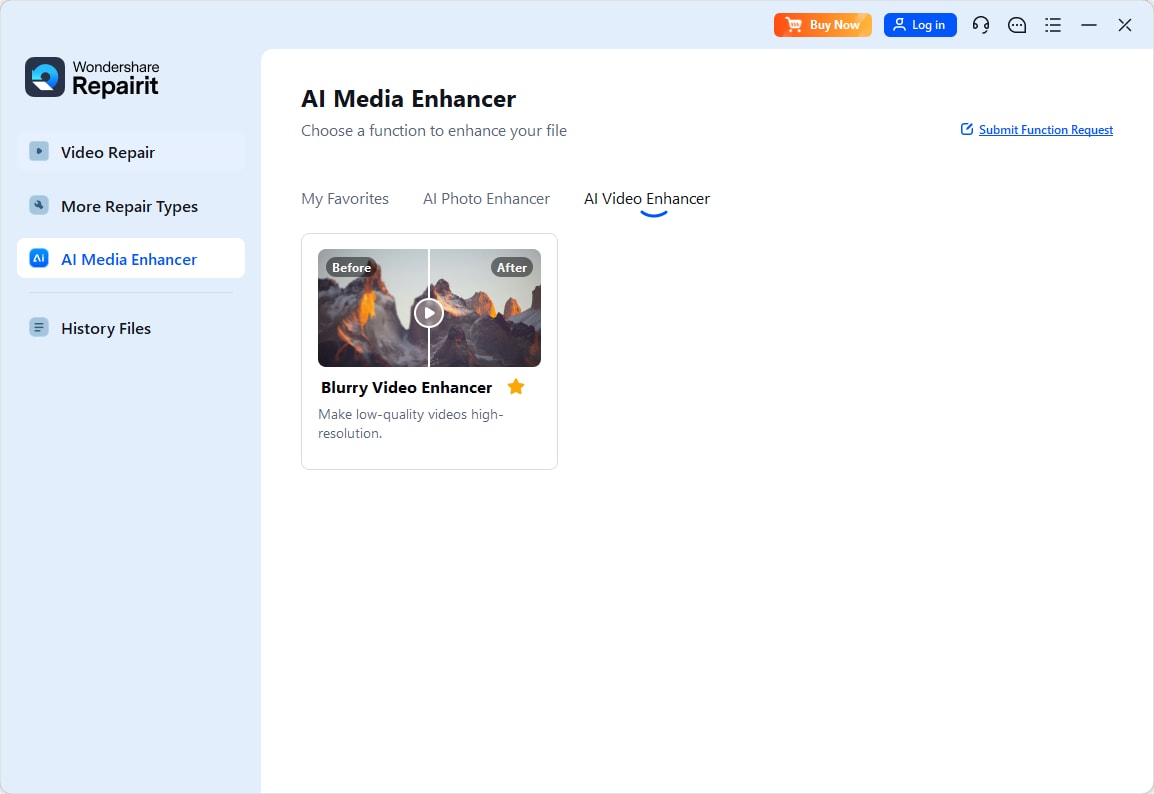
Step 1. Choose an AI enhancement model based on your video quality needs, such as upscaling, denoising, or overall clarity improvement.
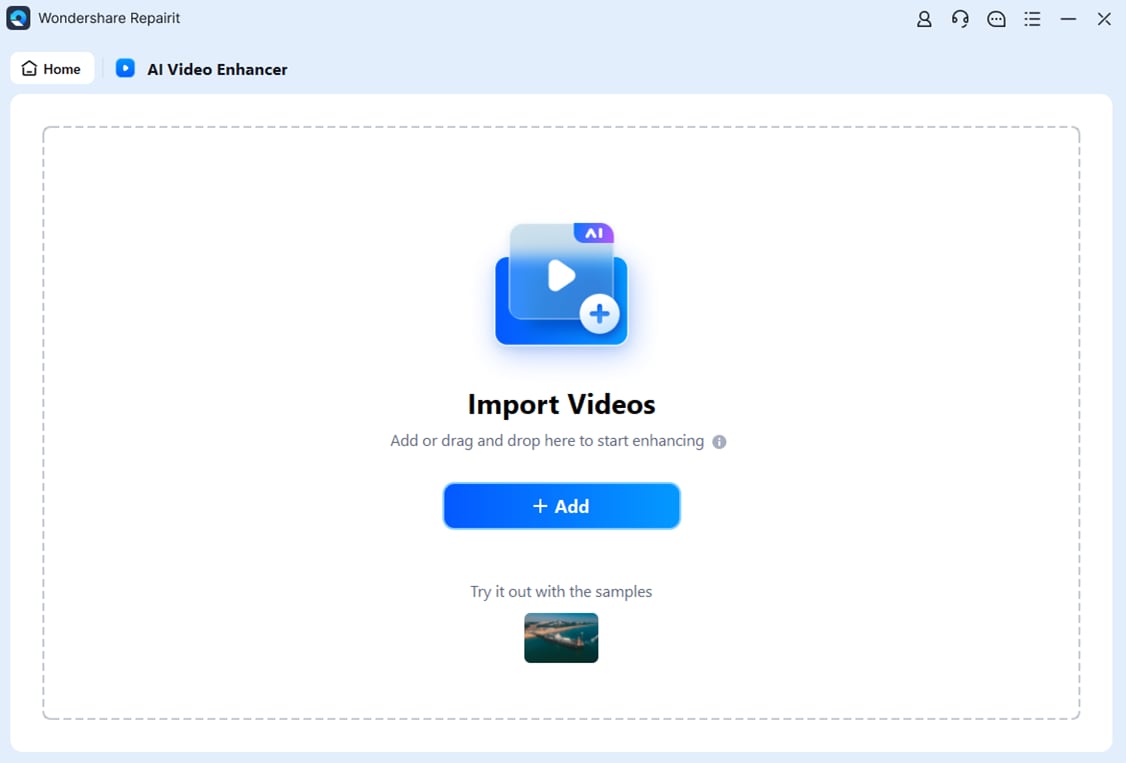
Step 2. Import your video into Repairit Video Enhancer to begin the enhancement process.
Step 3. Start enhancing and let the AI improve sharpness, reduce blur, and enhance the overall video quality.

Step 4. Preview the enhanced result and save the improved video to your device.

Final Verdict
When you compare Repairit Video Enhancer vs HitPaw Video Enhancer, both provide useful AI tools to enhance video quality, upscale resolution, and reduce noise in everyday clips. The right choice depends on how you work and what you expect from your output.
Repairit Video Enhancer is generally a stronger choice if you handle varied footage and want consistent, natural looking improvement with more control over how aggressively AI sharpens and denoises your videos. It suits users who care about motion clarity, detail, and a guided workflow that can grow with their needs.
HitPaw Video Enhancer remains a reasonable option for beginners or casual users who want a very simple, one click process with models like anime, face, and denoise. For occasional upgrades where convenience matters more than fine tuning, it can be sufficient.
In most everyday scenarios, Repairit is the more flexible long term tool, while HitPaw is the fast, minimal alternative. Testing both with your own footage during their trial periods is the most reliable way to confirm which aligns better with your expectations.
Next: Repairit Video Enhancer vs Unifab Video Enhancer Ai
FAQ
-
1. Is Repairit Video Enhancer better than HitPaw Video Enhancer for improving low resolution videos?
For many users, Repairit Video Enhancer provides more consistent upscaling and clarity on low resolution footage, especially when you want a natural look and smoother motion. HitPaw Video Enhancer is fine for quick one click upgrades when you do not need much control. -
2. Which is easier for beginners, Repairit Video Enhancer or HitPaw Video Enhancer?
HitPaw Video Enhancer is slightly simpler thanks to its upload, choose model, and enhance flow. Repairit Video Enhancer is also approachable, but adds more guidance and options so you can fine tune results as you get comfortable. -
3. Which tool gives more natural looking AI enhancement?
Results depend on the footage, but Repairit Video Enhancer generally aims for a balanced combination of sharpness, noise reduction, and motion clarity. HitPaw Video Enhancer focuses on quick visual upgrades with fewer controls, which may be enough for casual use but gives you less room to adjust the look. -
4. Do I need both Repairit Video Enhancer and HitPaw Video Enhancer?
Most users can choose one. If you mainly want fast, simple upgrades for personal clips, HitPaw Video Enhancer may be sufficient. If you expect to handle varied footage and care more about consistent, polished quality, Repairit Video Enhancer is usually the better single choice. -
5. What formats and devices do these AI video enhancers support?
Both tools focus on common video formats such as MP4 and MOV and run on mainstream desktop systems. In most cases you can import typical camera or phone footage into either enhancer without extra conversion and export to a format suitable for sharing or editing elsewhere.




