
Choosing between Repairit Video Enhancer vs UniFab Video Enhancer AI mostly depends on how much control you want over AI settings and how heavily you rely on a broader media toolkit. Repairit Video Enhancer focuses on a guided, dedicated workflow for improving clarity, noise, and resolution in everyday clips. UniFab Video Enhancer AI leans into upscaling and HDR options inside a wider media ecosystem, which can suit users who manage larger movie libraries or multi-step processing pipelines.
This guide compares enhancement results, HDR and upscaling capabilities, workflow, and pricing so you can decide which AI video enhancer fits your smartphone videos, streaming captures, and movie collections without guesswork.
Enhance Video Quality with Repairit Video Enhancer
 Security Verified. Over 7,302,189 people have downloaded it.
In this article
- Repairit Video Enhancer vs UniFab Video Enhancer AI: Quick Verdict
- Repairit Video Enhancer vs UniFab Video Enhancer AI: Key Differences
- Repairit Video Enhancer vs UniFab Video Enhancer AI: Comparison Table
- What Repairit Video Enhancer and UniFab Video Enhancer AI Are Best For
- Repairit Video Enhancer vs UniFab Video Enhancer AI: Technology and Enhancement Approach
- Repairit Video Enhancer vs UniFab Video Enhancer AI: Output Quality and Real-World Results
- Repairit Video Enhancer vs UniFab Video Enhancer AI: Workflow and Ease of Use
- Repairit Video Enhancer vs UniFab Video Enhancer AI: Pricing and Trial Options
- Who Should Choose Repairit Video Enhancer
- Who Should Choose UniFab Video Enhancer AI
- Pros and Cons of Repairit Video Enhancer and UniFab Video Enhancer AI
- How to Enhance Videos After Choosing the Right Tool
Repairit Video Enhancer vs UniFab Video Enhancer AI: Quick Verdict
If you mainly want to improve video clarity, reduce noise, and upscale low-resolution clips with the least setup, Repairit Video Enhancer is usually the smoother choice. It gives you AI models and presets focused on everyday enhancement with clear previews and minimal tweaking, which works well for smartphone videos, screen recordings, and social clips.
If you want AI enhancement plus deeper integration with a wider media-processing toolkit, UniFab Video Enhancer AI can be practical. It is oriented around upscaling and HDR-related enhancement and may fit better when you are already using related tools for encoding or managing large movie libraries.
In most cases, the decision comes down to this:
- Choose Repairit if you value simplicity, guided AI enhancement, and fast setup for low-quality or soft footage.
- Choose UniFab if you need HDR-focused upscaling and tighter integration with broader media processing, and you are comfortable with slightly more complex controls.
Repairit Video Enhancer vs UniFab Video Enhancer AI: Key Differences
At a high level, the key differences between Repairit Video Enhancer vs UniFab Video Enhancer AI can be summarized around focus, workflow complexity, and the type of projects they suit best.
- Primary focus: Repairit centers on straightforward AI-powered resolution upscaling, denoising, and sharpening for typical clips. UniFab adds HDR-oriented upscaling and ties into a broader media ecosystem.
- Workflow design: Repairit uses a guided flow from import to export with clear AI suggestions. UniFab follows a load video → choose AI upscaling or HDR mode → process → preview → export pattern that offers control but can feel busier for beginners.
- Use-case emphasis: Repairit is aimed at everyday users improving low-resolution or noisy footage. UniFab tends to suit users who also need encoding or media-management style features around enhancement.
- Interface complexity: Repairit is intentionally minimal and beginner friendly. UniFab can appear more complex because of additional modes and integration points.
- HDR and movie workflows: UniFab leans more into HDR upscaling and workflows for modern displays and movie-style content, which may matter if you optimize large collections for TVs or projectors.
Repairit Video Enhancer vs UniFab Video Enhancer AI: Comparison Table
| Comparison dimension | Repairit Video Enhancer | UniFab Video Enhancer AI |
|---|---|---|
| Best for | Users who want straightforward AI models to improve video clarity, reduce noise, and upscale everyday clips. | Users who want video enhancement plus additional media processing features in a broader toolkit. |
| Ease of use | Beginner-friendly interface with guided enhancement steps and minimal tuning required. | Interface slightly complex due to more options and ecosystem integration. |
| Output quality focus | Consistent quality boost for low-resolution, soft, or noisy footage with AI-optimized presets. | Strong for HDR upscaling and movie-style enhancement when properly configured. |
| Workflow | Focused enhancement workflow from import to export with clear previews and AI suggestions. | Workflow built around load video → select AI upscaling or HDR mode → process → preview → export. |
| Main strengths | Simple AI-driven enhancement, clear previews, and accessible controls for non-experts. | Supports HDR upscaling and integrates with a broader media processing ecosystem, good for movie workflows. |
| Main weaknesses | Less suited for very complex multi-tool media pipelines. | Heavier installation, slightly complex interface, and not purely focused on enhancement alone. |
What Repairit Video Enhancer and UniFab Video Enhancer AI Are Best For
Both tools aim to improve video quality with AI, but they prioritize different needs and types of footage.
Repairit Video Enhancer is best for:
- Improving soft or noisy smartphone recordings, webcam clips, or social videos.
- Upscaling older low-resolution clips where you mainly want clearer details and reduced grain.
- Users who prefer to pick a preset, preview, and export without deep technical adjustments.
UniFab Video Enhancer AI is best for:
- Users who want video enhancement plus additional media processing features within one ecosystem.
- People focused on HDR upscaling and improving movies or series for modern HDR-ready displays.
- More technical users or editors who are comfortable combining AI enhancement with encoding or library management tasks.
In other words, choose the tool whose strengths align with your everyday footage and how much extra media work you expect to do around pure enhancement.
Repairit Video Enhancer vs UniFab Video Enhancer AI: Technology and Enhancement Approach
Both tools rely on AI models to enhance video quality, but they emphasize different aspects of the pipeline.
Repairit Video Enhancer focuses its AI on direct improvements to low-quality videos:
- AI-based resolution upscaling to make low-resolution videos look sharper and more detailed for common viewing resolutions.
- Noise and blur reduction to improve clarity in soft, grainy, or compressed clips, aiming to keep motion and edges natural.
- Brightness, contrast, and color adjustments that help make footage more balanced and watchable without needing manual grading skills.
- AI-assisted detail enhancement and artifact reduction tuned for compressed or low-bitrate footage, such as screen captures or social downloads.
UniFab Video Enhancer AI uses AI within a broader media toolset:
- HDR-oriented enhancement and upscaling for users optimizing content for HDR-capable displays and movie-style viewing.
- AI upscaling modes that can push resolution higher for cinematic content when you are willing to configure settings.
- Integration with additional media tools so enhancement can be one stage of a larger workflow that includes encoding, format conversion, or library management.
The key difference is that Repairit channels its AI purely into user-friendly enhancement, while UniFab positions AI as one component of a more expansive media processing environment.
Repairit Video Enhancer vs UniFab Video Enhancer AI: Output Quality and Real-World Results
In real-world use, output quality from AI video upscaling comparison tools depends heavily on the source. Very noisy or extremely low-bitrate clips will limit what any enhancer can do. Within that constraint, the two tools tend to shine in different ways.
With Repairit Video Enhancer, users can typically expect:
- Noticeable improvement in clarity for low-resolution clips and soft smartphone videos.
- Effective noise and grain reduction that makes faces, text, and UI elements easier to see.
- Sharpened details without needing to tweak a lot of technical sliders, which suits non-editors.
- Balanced results for motion, where AI tries to avoid overly artificial textures.
With UniFab Video Enhancer AI, users may see:
- Strong results for HDR upscaling when working from relatively clean movie sources.
- Enhanced contrast and perceived detail that can look appealing on large TVs or projectors.
- Benefits that scale better when the footage is already in good shape and you mainly want higher resolution and HDR-style punch.
Neither tool can fully fix extremely damaged or highly compressed sources, but both can deliver a significant visual improvement for typical low-quality videos. Repairit leans toward consistent everyday upgrades, while UniFab may stand out more with well-prepared movie or series content.
Repairit Video Enhancer vs UniFab Video Enhancer AI: Workflow and Ease of Use
Workflow and ease of use often decide whether you will actually enhance videos regularly, especially if you are not a professional editor.
Repairit Video Enhancer emphasizes a guided, focused flow:
- Import your video from local storage.
- Choose an AI enhancement model or preset that matches your goal, such as upscaling or noise reduction.
- Preview before and after results side by side and make basic adjustments as needed.
- Export the improved video in a few clicks.
This approach keeps options streamlined so beginners can move from import to export quickly while still understanding what is changing.
UniFab Video Enhancer AI uses a more multi-step media tool style workflow:
- Load the video into the UniFab interface.
- Select AI upscaling or HDR enhancement mode and configure key settings.
- Process the video and let the AI run.
- Preview the result and export using the surrounding media tools.
This can be appealing if you already work with encoding or media-management software and want enhancement to sit within that world. For absolute beginners, however, it may feel more complex than necessary for simple clarity improvements.
Repairit Video Enhancer vs UniFab Video Enhancer AI: Pricing and Trial Options
For pricing, both tools typically offer trial or limited-use options so you can check output quality, processing speed, and workflow fit before buying anything.
Key considerations include:
- Licensing and duration: Pricing may differ by subscription length, one-time license, or bundle offers, so it is worth checking each vendor s current plans.
- Testing with your own clips: In most cases, you should run the same low-quality or soft footage through both tools during their trial period. This shows you how each handles noise, blur, motion, and detail in your specific scenarios.
- Value relative to your projects: If you only enhance videos occasionally, a simpler, focused enhancer may be more cost-effective. If you often handle HDR movies and broader media tasks, a more integrated suite may justify a higher price.
Because pricing can change, it is safer to treat the trial phase as your main way to evaluate not just cost but also usability and results.
Who Should Choose Repairit Video Enhancer
Based on the comparison, Repairit Video Enhancer is a stronger choice for users who want a dedicated, approachable AI enhancer for everyday videos.
- People who want a simple AI tool to enhance low-quality smartphone or screen-recorded videos.
- Users looking to upscale old or low-resolution clips without complex technical settings or manual color grading.
- Creators who value clear previews and guided steps over extensive configuration menus.
- Anyone who needs consistent, everyday enhancement rather than a full media processing suite.
If your main goal is to improve video clarity, reduce noise, and make clips look cleaner for sharing or archiving, Repairit s focused design tends to align well with those needs.
Who Should Choose UniFab Video Enhancer AI
UniFab Video Enhancer AI may be a better fit when your needs go beyond basic upscaling and denoising and into more advanced media workflows.
- Users who want video enhancement plus additional media processing features within one ecosystem.
- People focused on HDR upscaling and improving movies or series for modern displays and home theater setups.
- More technical users who are comfortable with a slightly complex interface and extra configuration options.
- Editors who often process multiple videos and want enhancement integrated with encoding, conversion, or library tools.
If your workflow already includes multiple media utilities and you want an enhancer that slots into that environment, UniFab can make sense, even if it feels heavier than a standalone AI enhancer.
Pros and Cons of Repairit Video Enhancer and UniFab Video Enhancer AI
Repairit Video Enhancer Pros and Cons
UniFab Video Enhancer AI Pros and Cons
How to Enhance Videos After Choosing the Right Tool
After comparing Repairit Video Enhancer vs UniFab Video Enhancer AI, the next step is actually running your clips through an AI model and judging how natural the results look. For many users, a guided tool like Repairit provides a practical way to move from theory to real improvement without learning advanced editing.
Key Features
- AI models tailored for upscaling and improving soft or noisy footage.
- One-click enhancement presets with real-time or near-real-time preview of before and after frames.
- Simple export options for sharing on common devices and social platforms.
- Controls that stay focused on clarity, noise, and detail rather than complex editing timelines.
Step-by-step guide
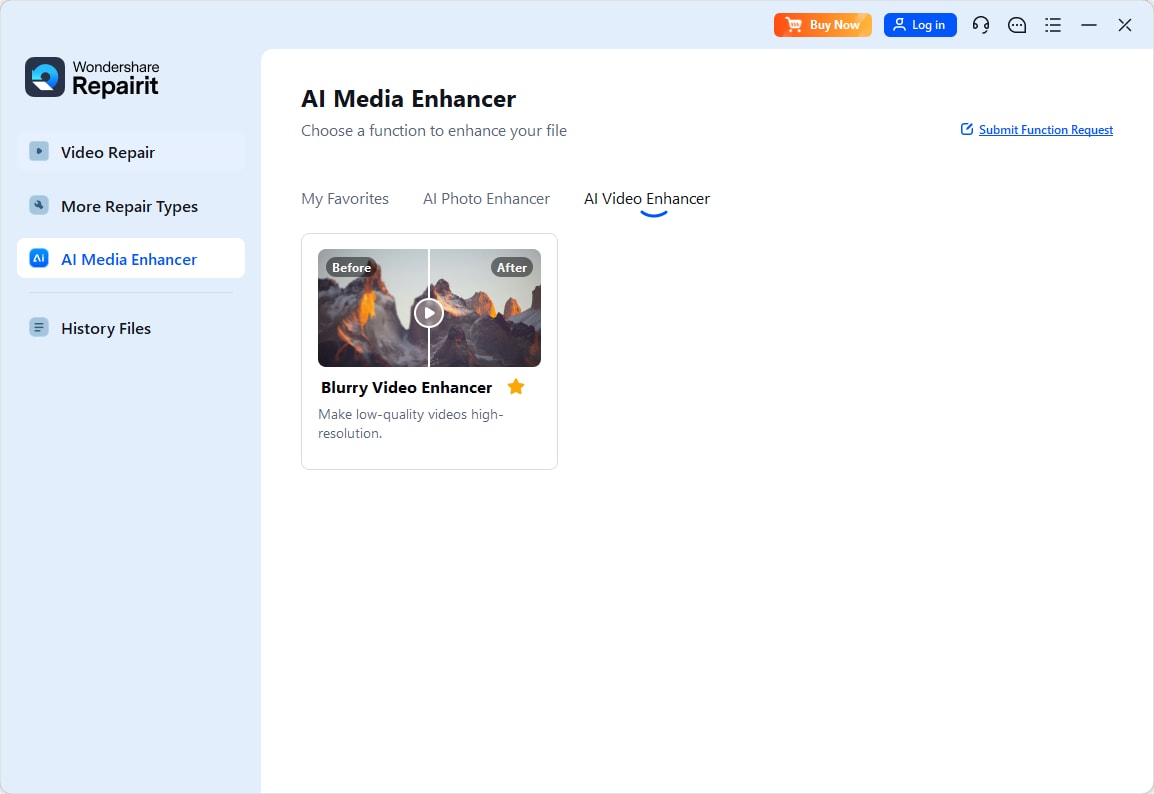
Step 1. Choose an AI enhancement model based on your video quality needs, such as upscaling, denoising, or overall clarity improvement.
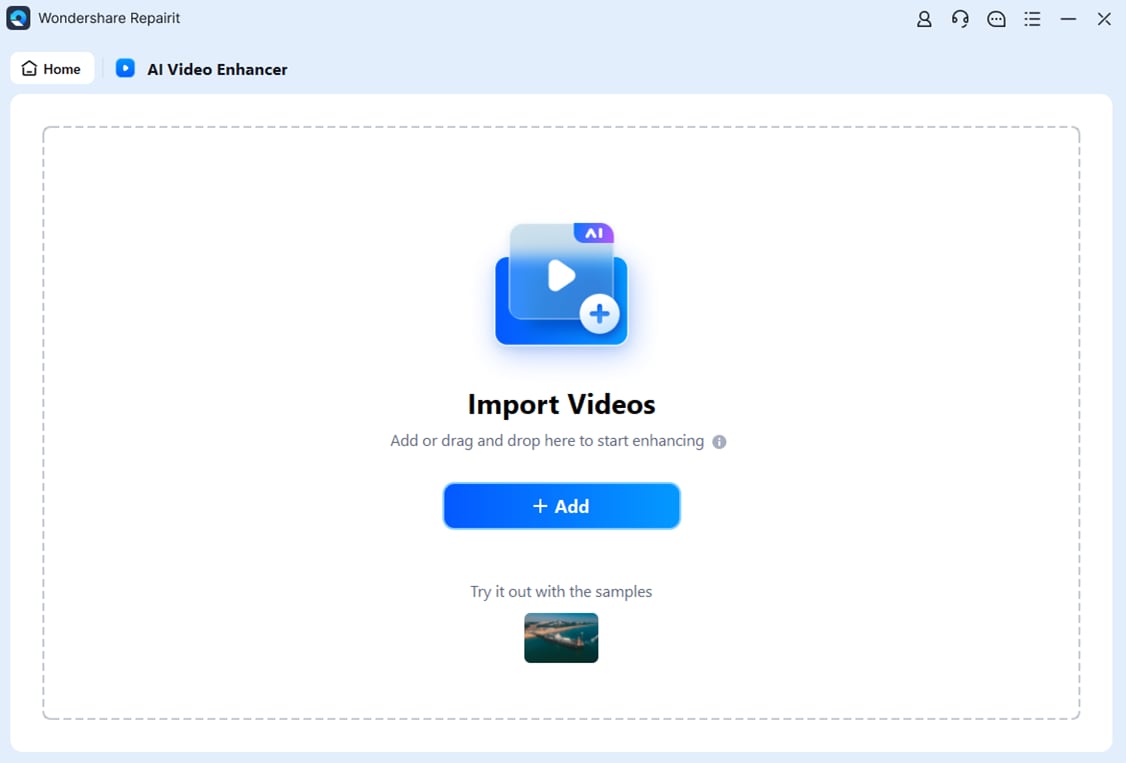
Step 2. Import your video into Repairit Video Enhancer to begin the enhancement process.
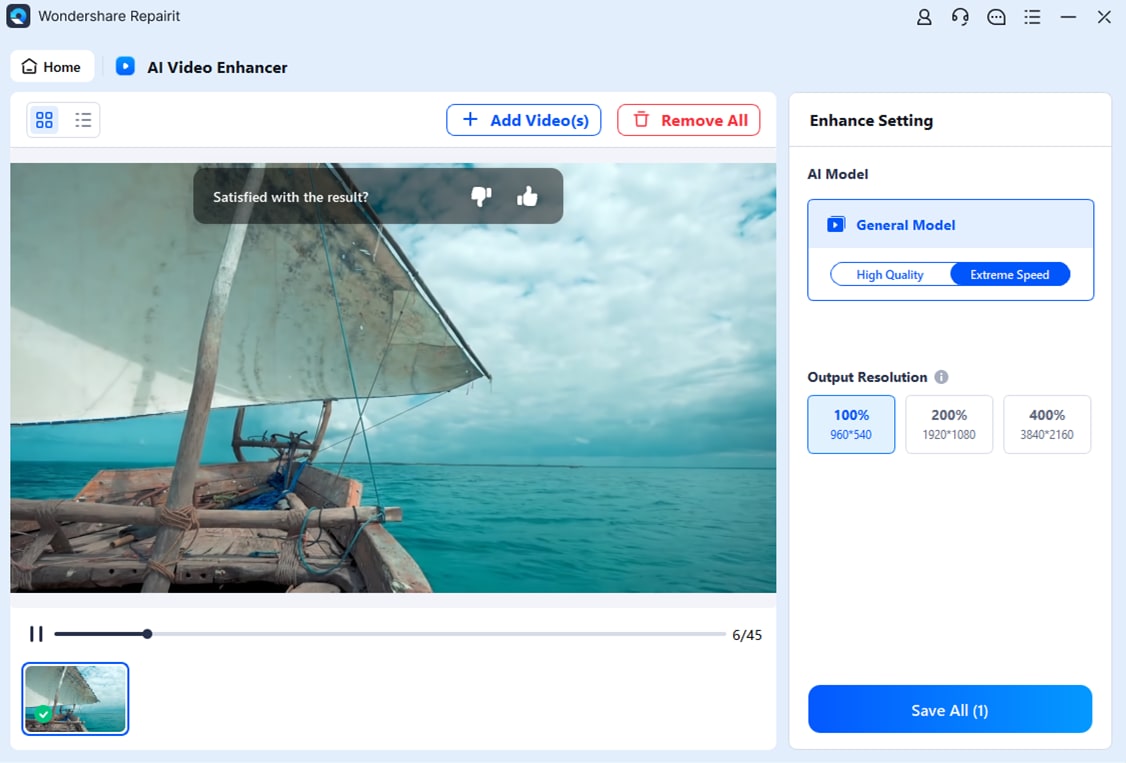
Step 3. Start enhancing and let the AI improve sharpness, reduce blur, and enhance the overall video quality.

Step 4. Preview the enhanced result and save the improved video to your device.
Final Verdict
Both Repairit Video Enhancer and UniFab Video Enhancer AI can significantly improve video quality, but they serve somewhat different audiences.
- If you mainly enhance everyday clips and prefer a focused, easy interface, Repairit is usually more approachable. Its AI models, previews, and streamlined options make it practical for quickly upscaling and cleaning up low-quality videos.
- If your priority is HDR upscaling, movie-style enhancement, and integration with a wider media-processing toolkit, UniFab can be a reasonable fit, especially when you already rely on companion tools.
For most users, the most reliable way to decide is to test both tools on the same sample clips and pay attention to detail preservation, motion smoothness, noise reduction, and how comfortable you feel with each workflow. From there, choose the enhancer that best matches your projects and how often you plan to work with video.
Next: Repairit Video Enhancer vs Winxvideo Ai
FAQ
-
1. Is Repairit Video Enhancer better than UniFab Video Enhancer AI for beginners?
In most cases, yes. Repairit Video Enhancer offers a simpler, guided interface with AI presets, while UniFab Video Enhancer AI can feel slightly complex because it connects to a broader media ecosystem and exposes more options. -
2. Which gives better video upscaling quality, Repairit Video Enhancer or UniFab Video Enhancer AI?
Both can significantly improve resolution and clarity, but results depend heavily on the source video. Repairit focuses on consistent everyday upscaling and noise reduction, while UniFab may deliver stronger HDR and movie-style results when your footage is clean and settings are well configured. -
3. When should I pick UniFab Video Enhancer AI instead of Repairit Video Enhancer?
You may prefer UniFab Video Enhancer AI if you specifically need HDR upscaling, work heavily with movie or series collections, or want enhancement integrated into a larger media processing workflow instead of a standalone tool.




