
Choosing between Repairit Video Enhancer vs Winxvideo AI largely depends on whether you care more about specialized AI enhancement quality or an all-in-one toolkit that mixes enhancement with stabilization and conversion. Repairit Video Enhancer focuses on AI models that upscale resolution, reduce noise, and sharpen soft footage, while Winxvideo AI leans into a broader set of utilities. This comparison walks through output quality, motion clarity, denoise performance, workflow, and pricing so you can match the right option to everyday clips, legacy videos, and social-ready content.
Enhance Video Quality with Repairit Video Enhancer
 Security Verified. Over 7,302,189 people have downloaded it.
In this article
- Repairit Video Enhancer vs Winxvideo AI: Quick Verdict
- Repairit Video Enhancer vs Winxvideo AI: Key Differences
- Repairit Video Enhancer vs Winxvideo AI: Comparison Table
- What Repairit Video Enhancer and Winxvideo AI Are Best For
- Repairit Video Enhancer vs Winxvideo AI: Technology and Enhancement Approach
- Repairit Video Enhancer vs Winxvideo AI: Output Quality and Real-World Results
- Repairit Video Enhancer vs Winxvideo AI: Workflow and Ease of Use
- Repairit Video Enhancer vs Winxvideo AI: Pricing and Trial Options
- Who Should Choose Repairit Video Enhancer
- Who Should Choose Winxvideo AI
- Pros and Cons of Repairit Video Enhancer and Winxvideo AI
- How to Enhance Videos After Choosing the Right Tool
Repairit Video Enhancer vs Winxvideo AI: Quick Verdict
If your main goal is to enhance video quality, upscale video resolution, and clean up noise in low-quality clips with minimal tweaking, Repairit Video Enhancer is generally the stronger fit. Its AI models are tuned for clarity, sharpness, and artifact reduction in everyday and legacy footage.
Winxvideo AI becomes more attractive when you also want stabilization, frame interpolation, compression, and basic conversion in one desktop tool. The trade-off is that its enhancement capabilities are spread across more features, so the effect on clarity can feel less specialized than a dedicated AI enhancer.
In practice, creators who care most about visible, natural-looking upgrades to older or soft-looking video often lean toward Repairit Video Enhancer, while users who want a general-purpose video toolbox may find Winxvideo AI sufficient for occasional enhancement alongside other processing tasks.
Repairit Video Enhancer vs Winxvideo AI: Key Differences
The key difference between Repairit Video Enhancer vs Winxvideo AI is focus. Repairit Video Enhancer puts nearly all of its attention on AI-driven upscaling, denoising, and sharpening, which is helpful when you are trying to improve details and motion clarity in low-resolution or noisy files. Winxvideo AI distributes resources across enhancement, stabilization, frame interpolation, compression, and conversion, delivering a broader workflow but with less specialization on pure visual improvement.
This matters if you often work with old, mobile-shot, or compressed clips where noise, blur, and lack of detail are the main problems. In those cases, concentrating on a high-quality enhancement pipeline can be more valuable than having extra utilities. If you are instead preparing content for multiple platforms and need stabilization or format changes in the same app, Winxvideo AI can simplify your steps, even if you give up some enhancement depth.
Ease of use is another difference. Repairit Video Enhancer uses guided AI presets that minimize manual tuning, while Winxvideo AI exposes more modules and settings. Neither approach is inherently better; it depends on whether you prefer quick, preset-based workflows or a toolkit that feels closer to a light video utility suite.
Repairit Video Enhancer vs Winxvideo AI: Comparison Table
| Dimension | Repairit Video Enhancer | Winxvideo AI |
|---|---|---|
| Best for | Users focused on clear AI-driven enhancement, upscaling, and denoising for everyday and legacy footage. | Users who want enhancement along with stabilization, compression, and conversion in one toolkit. |
| Ease of use | Very straightforward, with guided AI presets tailored to common quality problems. | Simple overall, but more settings and feature switches to manage in a mixed-focus interface. |
| Output quality | Prioritizes visibly cleaner, sharper, and more detailed results for low-quality clips. | Delivers decent improvement but less specialized enhancement quality than focused AI tools. |
| Workflow | Import, pick an AI model, preview, then export at higher resolution or clarity. | Import video, select enhancement or stabilization, adjust settings, process, then export. |
| Strengths | AI models tuned for upscaling, noise reduction, and improving soft or blurry footage. | All-in-one processing with enhancement, stabilization, frame interpolation, and compression. |
| Weaknesses | Less emphasis on conversion utilities or bulk compression tools. | Mixed feature focus means enhancement quality is not as specialized as top-tier AI enhancers. |
What Repairit Video Enhancer and Winxvideo AI Are Best For
Both tools can enhance video quality, but they shine in different scenarios.
Repairit Video Enhancer is a solid match when you routinely deal with:
- Low-resolution mobile videos that need upscaling and sharpening.
- Older or compressed clips where noise, blockiness, and softness are obvious.
- Social or work content that has to look cleaner without a full editing session.
Winxvideo AI is better aligned with users who:
- Want enhancement, stabilization, frame interpolation, and compression in one place.
- Need a lightweight utility for preparing videos for multiple platforms and resolutions.
- Are comfortable trading some enhancement specialization for more workflow tools.
In short, Repairit Video Enhancer is primarily a video quality enhancer, while Winxvideo AI acts more like a versatile processing hub with enhancement included.
Repairit Video Enhancer vs Winxvideo AI: Technology and Enhancement Approach
From a technology perspective, the difference lies in how each app allocates its AI and processing features. Repairit Video Enhancer focuses almost entirely on AI-powered upscaling, denoising, and sharpening. This creates a more streamlined pipeline focused on boosting clarity, detail, and perceived resolution.
Winxvideo AI positions itself as an all-in-one AI video enhancement and processing tool that blends enhancement, stabilization, frame interpolation, compression, and conversion. Instead of concentrating solely on improving visual quality, it tries to handle multiple stages of preparing a clip for sharing or publishing.
Core capabilities can be summarized as:
- Repairit Video Enhancer: AI-based upscaling to improve video clarity and resolution for common footage.
- Winxvideo AI: Core enhancement options with resolution upscaling and general quality improvement.
- Both: Tools to reduce noise and soften artifacts in low-quality or compressed videos.
On the more advanced side, the focus diverges further:
- Repairit Video Enhancer: AI models focused on sharpening soft footage and improving details in older clips.
- Winxvideo AI: Integrated stabilization, frame interpolation for smoother motion, and compression in the same app.
- Both: Batch-style processing options that can speed up enhancing multiple clips, depending on project size.
This means that if your priority is a specialized enhancement engine, Repairit Video Enhancer usually aligns better. If you want more of a Swiss army knife tool for processing tasks, Winxvideo AI may feel more rounded.
Repairit Video Enhancer vs Winxvideo AI: Output Quality and Real-World Results
In everyday use, output quality is shaped by how each tool handles resolution, noise, and motion. Repairit Video Enhancer aims to produce visibly cleaner and sharper videos, particularly when starting from soft, low-resolution, or noisy sources. Its AI models tend to emphasize detail recovery and controlled sharpening, which can make faces, text, and edges look more defined while managing artifacts.
Winxvideo AI can still improve clarity, especially when upscaling, but because it also covers stabilization, interpolation, and compression, its enhancement pipeline is less specialized. For users who only need moderate cleanup or are primarily focused on reducing shakiness and adjusting frame rate, that trade-off might be acceptable.
In many real-world scenarios:
- Old family clips or archived footage that look soft and grainy tend to benefit from Repairit Video Enhancer, where denoise and deblur are the main goals.
- Action or vlog footage that is shaky and needs both stabilization and some enhancement can be a reasonable fit for Winxvideo AI.
- When judged side-by-side on low-quality clips, Repairit Video Enhancer often stands out for detail and noise handling, while Winxvideo AI offers more flexibility in terms of motion tools and export options.
Results still depend on the original video; heavily compressed or extremely low-resolution sources may only improve up to a point in either tool.
Repairit Video Enhancer vs Winxvideo AI: Workflow and Ease of Use
Workflow can have as much impact on your productivity as raw enhancement quality.
Repairit Video Enhancer keeps the process centered on picking an AI model, previewing changes, and exporting improved footage. You generally:
- Import your clip.
- Choose an AI enhancement mode based on your goal (for example, upscaling or denoising).
- Preview a short segment to confirm motion and detail look natural.
- Export at a chosen resolution once you are satisfied.
This preset-driven approach suits beginners or busy users who do not want to manage many individual sliders.
Winxvideo AI follows a workflow of import video, select enhancement or stabilization, adjust settings, process, then export. Because there are more modules, you may spend additional time toggling between enhancement, stabilization, and compression, especially when you want to apply multiple operations. For users who enjoy fine-tuning export options and workflow steps, this extra control can be welcome, but it is less streamlined than a single-purpose enhancer.
In both tools, format support covers typical consumer clips, so most users can drop in MP4, MOV, and similar files without conversion beforehand. According to their general positioning, supported formats and devices are unlikely to be the deciding factor compared with workflow style and enhancement depth.
Repairit Video Enhancer vs Winxvideo AI: Pricing and Trial Options
Both Repairit Video Enhancer and Winxvideo AI are offered as paid software, usually with some form of trial or limited evaluation so you can test them on your own footage. Exact pricing and licensing models can change, so it is wise to check current offers directly in each product.
Instead of focusing only on price, it is practical to compare:
- How consistently each tool improves your typical clips (for example, phone footage, screen recordings, or old home videos).
- Whether you truly rely on added utilities like stabilization, frame interpolation, and compression that Winxvideo AI bundles in.
- How much time you save from a simpler, guided enhancement flow in Repairit Video Enhancer compared with a more modular workflow.
In many cases, the best value comes from the tool that aligns closely with your day-to-day needs, not just the lowest cost on paper.
Who Should Choose Repairit Video Enhancer
Repairit Video Enhancer tends to be the better fit for users who primarily care about AI video upscaling, video denoise, and sharpening soft footage rather than handling every processing task in one app. It is well-suited for:
- Users who mainly need to enhance low-quality, compressed, or soft-looking videos for sharing or archiving.
- People who want to upscale video resolution while keeping details and motion looking as natural as possible.
- Anyone working with older or mobile-shot clips that need noise reduction and sharpening more than conversion tools.
- Beginners or busy users who prefer guided AI presets over manually adjusting many enhancement options.
If your workflow is centered on making existing footage look cleaner, clearer, and more detailed, rather than managing stabilization or advanced compression, Repairit Video Enhancer aligns well with those priorities.
Who Should Choose Winxvideo AI
Winxvideo AI is a reasonable choice when you need a broader set of utilities in addition to quality improvement. You might lean toward it if you:
- Want enhancement, stabilization, frame interpolation, compression, and conversion in one program.
- Frequently handle shaky footage and need basic stabilization alongside clarity improvements.
- Prefer a general-purpose tool that can prepare videos for multiple platforms without switching between several apps.
- Are comfortable adjusting enhancement intensity and export settings instead of relying mostly on guided presets.
In these cases, Winxvideo AI may be enough, even if it is not as specialized for pure enhancement as a dedicated AI video quality enhancer.
Pros and Cons of Repairit Video Enhancer and Winxvideo AI
Repairit Video Enhancer Pros and Cons
Winxvideo AI Pros and Cons
How to Enhance Videos After Choosing the Right Tool
After comparing Repairit Video Enhancer vs Winxvideo AI, the next step is actually improving the look of your footage. Regardless of which app you favor overall, it helps to follow a focused enhancement workflow so you can judge how much clarity, sharpness, and motion smoothness you gain. If you decide that a guided, AI-first approach is right for your needs, Repairit Video Enhancer offers a straightforward way to apply these improvements without deep editing skills.
Key Features
For users who want a focused video quality enhancer, the main capabilities include:
- AI upscaling and sharpening for low-resolution or soft footage.
- Noise and artifact reduction for compressed or older clips.
- Simple presets that make enhancement accessible to non-professionals.
These features are aimed at making footage look clearer and more detailed with minimal manual adjustments, which can be particularly useful for batch processing older clips or routine content.
Step-by-step guide
Step 1. Choose an AI enhancement model based on your video quality needs, such as upscaling, denoising, or overall clarity improvement.
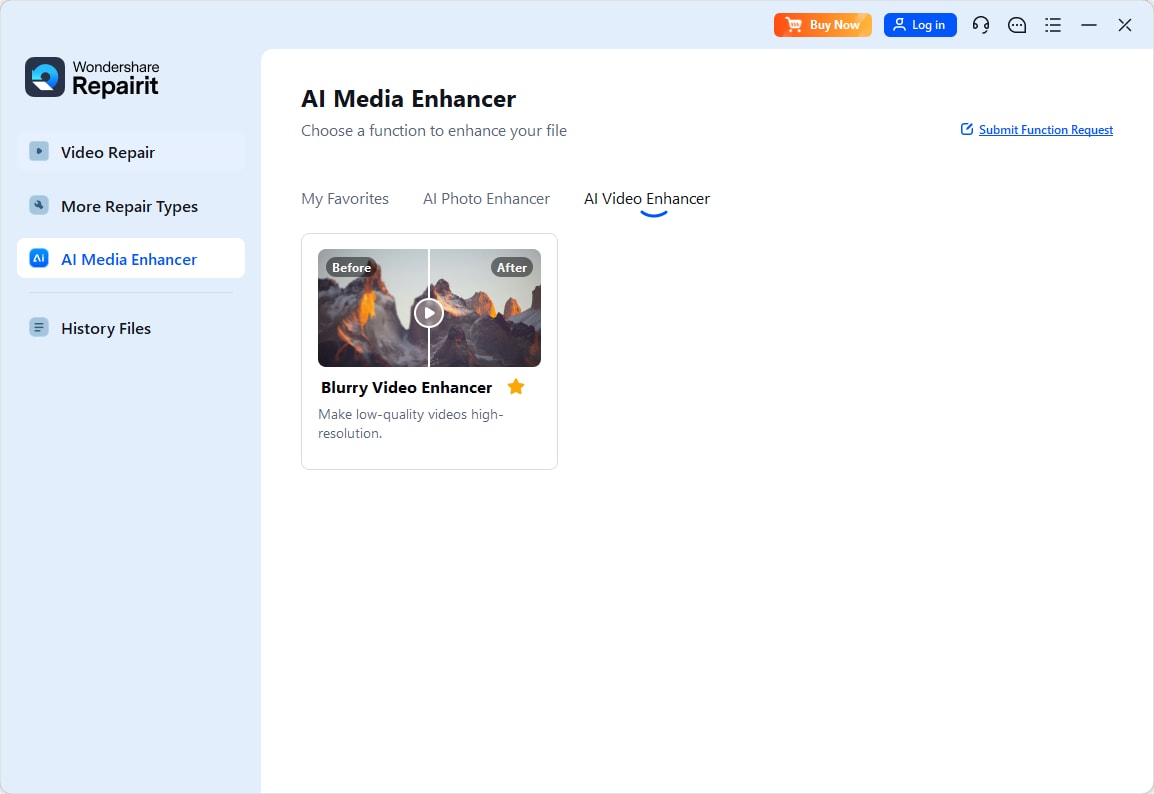
Step 2. Import your video into Repairit Video Enhancer to begin the enhancement process.
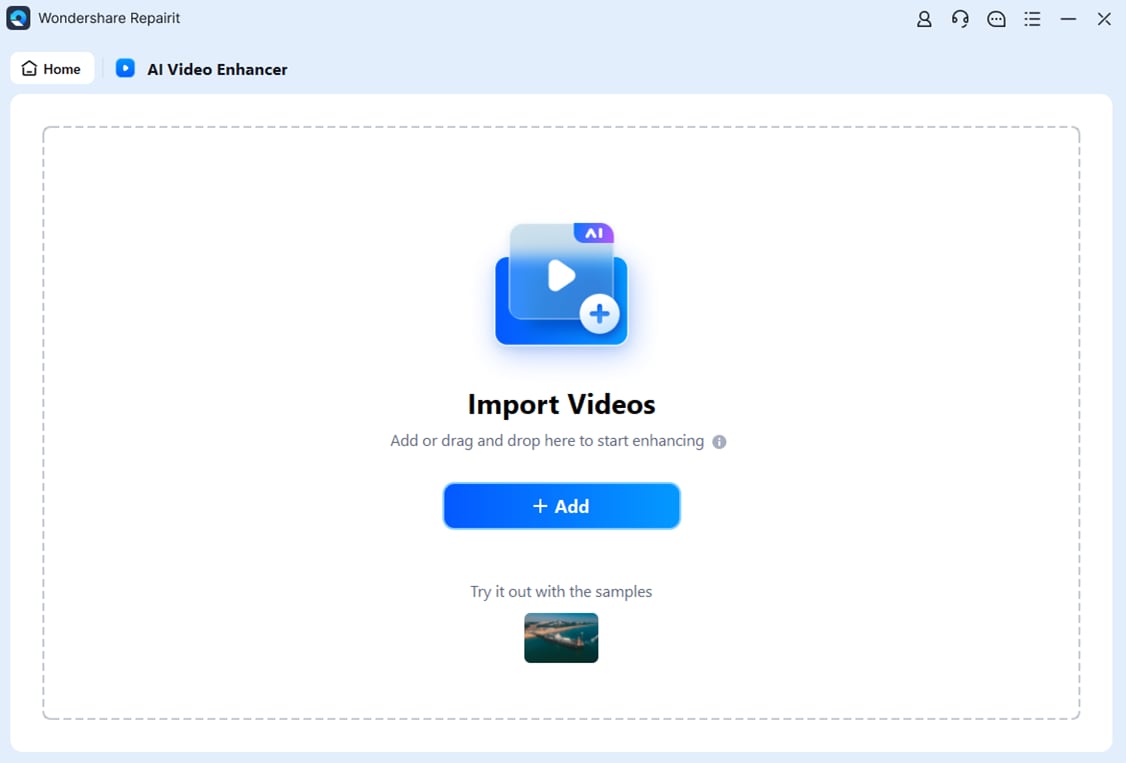
Step 3. Start enhancing and let the AI improve sharpness, reduce blur, and enhance the overall video quality.

Step 4. Preview the enhanced result and save the improved video to your device.

Final Verdict
Choosing between Repairit Video Enhancer vs Winxvideo AI ultimately comes down to your priorities. If you care most about visible improvements to clarity, detail, and noise levels with a minimal learning curve, Repairit Video Enhancer provides a focused AI-driven workflow that is well-suited for low-quality, soft, or older footage. Its guided presets help you quickly judge before-and-after results and decide whether motion and texture look natural enough for your use case.
Winxvideo AI, by contrast, is oriented toward users who want enhancement as one part of a broader toolkit that also includes stabilization, frame interpolation, compression, and conversion. For workflows where convenience and multi-functionality outweigh the need for the most specialized enhancement pipeline, Winxvideo AI can be a practical option.
In most cases, users who mainly want to improve video clarity, reduce noise and blur, and upscale video resolution will find Repairit Video Enhancer a stronger long-term fit, while those who lean on stabilization or multi-step processing may prefer the broader coverage of Winxvideo AI.
Next: Repairit Video Enhancer vs Aiseesoft Video Enhancer
FAQ
-
1. Is Repairit Video Enhancer better than Winxvideo AI for improving low-resolution videos?
In many cases, yes. Repairit Video Enhancer focuses more narrowly on AI upscaling, sharpening, and denoising, which can benefit low-resolution or soft clips more than a mixed-focus toolkit that also prioritizes stabilization and conversion. -
2. Which is easier for beginners, Repairit Video Enhancer or Winxvideo AI?
Repairit Video Enhancer tends to be simpler for beginners because it relies on guided AI presets and a streamlined workflow. Winxvideo AI is still approachable but exposes more modules and settings, which can feel busier if you only need quick enhancement. -
3. Does Winxvideo AI offer anything that Repairit Video Enhancer does not?
Yes. Winxvideo AI combines enhancement with stabilization, frame interpolation, compression, and conversion, so it can replace several separate tools if you need those extra utilities in the same application. -
4. Which tool gives more natural-looking results after enhancement?
Results depend on the source footage, but Repairit Video Enhancer is designed to keep details and motion looking natural while improving clarity, whereas Winxvideo AI balances enhancement with additional processing tasks, which may not always prioritize the most refined visual output. -
5. How should I decide between Repairit Video Enhancer and Winxvideo AI for my workflow?
If you mainly want to clean up noisy, soft, or low-resolution clips with minimal tweaking, Repairit Video Enhancer is usually the better match. If you also rely on stabilization, frame interpolation, and compression in a single program, Winxvideo AI may align more closely with your workflow.




