
Repairit Video Enhancer vs Aiseesoft Video Enhancer is a choice between an AI-focused workflow and a lighter, quick-adjustment tool. Choosing between Repairit Video Enhancer and Aiseesoft Video Enhancer comes down to how advanced you want your enhancement workflow to be. One leans on modern AI to boost clarity and resolution, while the other keeps things lightweight and focused on quick, basic improvements. This guide compares both tools on output quality, ease of use, pricing, and ideal use cases so you can decide which enhancer better fits your everyday video projects.
Enhance Video Quality with Repairit Video Enhancer
 Security Verified. Over 7,302,189 people have downloaded it.
In this article
- Repairit Video Enhancer vs Aiseesoft Video Enhancer: Quick Verdict
- Repairit Video Enhancer vs Aiseesoft Video Enhancer: Key Differences
- Repairit Video Enhancer vs Aiseesoft Video Enhancer: Comparison Table
- What Repairit Video Enhancer and Aiseesoft Video Enhancer Are Best For
- Repairit Video Enhancer vs Aiseesoft Video Enhancer: Technology and Enhancement Approach
- Repairit Video Enhancer vs Aiseesoft Video Enhancer: Output Quality and Real-World Results
- Repairit Video Enhancer vs Aiseesoft Video Enhancer: Workflow and Ease of Use
- Repairit Video Enhancer vs Aiseesoft Video Enhancer: Pricing and Trial Options
- Who Should Choose Repairit Video Enhancer
- Who Should Choose Aiseesoft Video Enhancer
- Repairit Video Enhancer vs Aiseesoft Video Enhancer: Pros and Cons
- How to Enhance Videos After Choosing the Right Tool
Repairit Video Enhancer vs Aiseesoft Video Enhancer: Quick Verdict
When comparing Repairit Video Enhancer vs Aiseesoft Video Enhancer, the main trade-off is AI depth versus simplicity.
Repairit Video Enhancer is better suited for users who want AI-assisted enhancement to improve clarity, reduce noise, and upscale low-quality videos with guided presets. It is particularly practical when you work with soft, noisy, or low-resolution clips and want more natural-looking detail after upscaling.
Aiseesoft Video Enhancer is more appropriate for users who need simple, lightweight enhancement like quick brightness and resolution adjustments without complex settings. It focuses on speed and straightforward controls rather than deep AI processing.
Depending on your workflow, you may get more value from Repairits AI models or from Aiseesofts fast, minimal interface. The rest of this comparison explains which one fits different scenarios.
Repairit Video Enhancer vs Aiseesoft Video Enhancer: Key Differences
The key differences between Repairit Video Enhancer and Aiseesoft Video Enhancer can be grouped into a few practical areas that affect daily use:
- Best for: Repairit focuses on AI-assisted enhancement for low-quality and noisy footage, while Aiseesoft is oriented toward basic touch-ups on already decent clips.
- Ease of use: Both are beginner friendly, but Aiseesoft keeps options very minimal, whereas Repairit adds AI modes and presets that guide users without needing deep technical knowledge.
- Output quality: Repairit emphasizes AI-powered detail enhancement, noise reduction, and more natural upscaling. Aiseesoft delivers modest improvements mainly in brightness, contrast, and general sharpness.
- Workflow: Repairit offers a guided AI workflow with previews so you can compare changes before exporting. Aiseesoft follows a linear, add-and-apply path focused on quick results.
- Performance: Repairits AI models typically require more processing time and power, especially on older machines. Aiseesoft tends to run faster because it uses lighter processing methods.
Repairit Video Enhancer vs Aiseesoft Video Enhancer: Comparison Table
| Dimension | Repairit Video Enhancer | Aiseesoft Video Enhancer |
|---|---|---|
| Best for | Users who want AI-assisted enhancement to improve clarity, reduce noise, and upscale low-quality videos with guided presets | Users who need simple, lightweight enhancement like quick brightness and resolution adjustments without complex settings |
| Ease of use | Beginner friendly with AI models and clear presets that reduce manual tweaking | Very straightforward: add video, choose basic options, apply, and export |
| Output quality focus | AI-powered detail improvement, noise reduction, and more natural upscaling in many everyday scenarios | Modest improvements in brightness, contrast, and resolution; less advanced fine detail enhancement |
| Workflow style | Guided AI workflow with options to preview quality changes before exporting | Linear workflow: add video → choose enhancement options → apply improvements → export video |
| Key strengths | AI-driven quality boost, better for low-resolution and noisy clips, simple presets for different scenarios | Lightweight, easy to use, quick processing, focused on basic quality improvements |
| Main trade-offs | Requires slightly more processing power and time than very simple tools on some videos | Limited AI capabilities, more basic enhancement compared to modern AI-focused tools |
What Repairit Video Enhancer and Aiseesoft Video Enhancer Are Best For
The two tools target different types of projects and user expectations.
Repairit Video Enhancer is best for:
- Users with low-resolution or noisy footage who want AI models to improve clarity and reduce visible grain.
- Creators enhancing old or soft videos where added detail and motion smoothness matter more than raw processing speed.
- People who frequently upscale videos for larger screens and need cleaner, more natural-looking results.
- Beginners who prefer guided AI presets instead of manually adjusting many technical enhancement sliders.
Aiseesoft Video Enhancer is best for:
- Users who want a lightweight tool for quick brightness and resolution improvements without AI complexity.
- People with relatively decent source footage that only needs modest sharpening and color enhancement.
- Beginners who prefer a very simple flow of add video, choose enhancement options, apply, and export.
- Users on lower powered computers who value fast processing over deeper AI-driven enhancement.
Overall, Aiseesoft Video Enhancer is a lightweight video enhancement tool focused on basic quality improvement features like simple brightness and resolution adjustments. It is best for users who need straightforward enhancement without complex AI workflows or advanced configuration. Compared with more AI-driven tools such as Repairit Video Enhancer, it trades deep automation for speed and simplicity, making it a reasonable option when you only need modest visual upgrades.
Repairit Video Enhancer vs Aiseesoft Video Enhancer: Technology and Enhancement Approach
Both tools aim to enhance video quality, but they use different approaches under the hood.
Core philosophy
Both Repairit Video Enhancer and Aiseesoft Video Enhancer aim to improve visual quality, but they differ in depth. Repairit Video Enhancer leans more on AI models to enhance details, reduce noise, and upscale resolution, while Aiseesoft Video Enhancer keeps its feature set lighter, focusing on quick adjustments and basic upscaling with fast processing and minimal configuration.
Shared basic features
- Brightness, contrast, and color adjustment to make dull footage look clearer.
- Resolution upscaling to generate a higher-resolution output from lower-resolution source video.
- Simple sharpening and basic noise reduction for slightly clearer, less grainy clips.
Where Repairits AI makes a difference
- AI-assisted enhancement modes in Repairit to improve edges, textures, and small details in low-quality videos.
- Targeted noise and blur reduction to make motion and faces look cleaner without over-smoothing when tuned properly.
- AI upscaling in Repairit designed to preserve more natural detail than basic scaling found in lighter tools like Aiseesoft Video Enhancer.
In practice, this means that for challenging footage with noticeable blur, noise, or compression artifacts, Repairits AI models can often produce a more refined result, while Aiseesoft tends to deliver moderate improvements more quickly but with less fine-grained enhancement.
Repairit Video Enhancer vs Aiseesoft Video Enhancer: Output Quality and Real-World Results
Most users care about how the tools affect clarity, motion, and overall viewing experience.
Repairit Video Enhancer output characteristics
- Focuses on AI-powered detail improvement, especially around faces, edges, and textures.
- Emphasizes noise reduction and blur reduction to clean up grainy or soft footage.
- Aims for more natural upscaling, which can be helpful when enlarging older or low-resolution clips.
- Often better for footage with visible compression artifacts or motion that looks slightly smeared.
Aiseesoft Video Enhancer output characteristics
- Delivers modest improvements in brightness, contrast, and color balance.
- Provides basic sharpening that can make edges stand out but may not reconstruct missing detail.
- Traditional upscaling, which increases resolution but may preserve less fine detail compared with AI-driven approaches.
- Output is typically adequate when your source video is already relatively clean and you just want it to look a bit crisper.
If your main challenge is heavy noise, softness, or low resolution, Repairits AI often has more room to improve the image. If your clips are already decent and you mainly need quick adjustments, Aiseesofts output is often sufficient.
Repairit Video Enhancer vs Aiseesoft Video Enhancer: Workflow and Ease of Use
Both tools are designed with non-experts in mind, but their workflows feel slightly different.
Repairit Video Enhancer workflow
- Guided AI interface with modes focused on clarity, denoising, and upscaling.
- Preset-driven choices reduce the need to manage many technical sliders.
- Preview options help you compare before and after results before exporting, which is useful when fine-tuning AI settings.
- Still beginner friendly, but with more decisions about which AI model to use.
Aiseesoft Video Enhancer workflow
- Follows a direct path: add video, choose enhancement options, apply improvements, then export the video.
- Very few options to configure, which can be reassuring for users who dislike complex interfaces.
- Processing is generally fast and focused on basic adjustments.
In summary, Aiseesoft Video Enhancer follows a direct, minimal-step workflow, while Repairit Video Enhancer adds AI-focused choices, such as selecting enhancement modes and previewing changes before export, but keeps the interface straightforward.
Repairit Video Enhancer vs Aiseesoft Video Enhancer: Pricing and Trial Options
Cost and risk-free testing are important when adding another tool to your editing toolkit.
Trial and testing
- Both Repairit Video Enhancer and Aiseesoft Video Enhancer typically offer trial options so you can test enhancement quality on your own clips before paying.
- Trials are useful for checking how each tool handles your specific footage types, such as smartphone videos, screen recordings, or older camera files.
Licensing approach
- Pricing is usually structured around licenses or subscriptions rather than per-video fees.
- Details can change over time, so it is sensible to confirm current plans on each official site before deciding.
Relative positioning
- Aiseesoft Video Enhancer often positions itself as a budget-friendly, lightweight option for basic improvements.
- Repairit Video Enhancer may cost more but provides additional AI enhancement value for users who need better results on difficult footage.
If you mainly tweak brightness and contrast occasionally, Aiseesoft can be cost-effective. If you regularly work with problematic clips and need stronger AI processing, investing in Repairit can make more sense over time.
Who Should Choose Repairit Video Enhancer
Repairit Video Enhancer is a stronger choice when your projects involve consistently challenging footage or when you want AI-assisted control without deep technical tuning.
- Users with low-resolution or noisy footage who want AI models to improve clarity and reduce visible grain.
- Creators enhancing old or soft videos where added detail and motion smoothness matter more than speed.
- People who frequently upscale videos for larger screens and need cleaner, more natural-looking results.
- Beginners who prefer guided AI presets instead of manually adjusting many technical enhancement sliders.
If your workflow includes social content, video libraries, or archives with mixed quality, Repairit Video Enhancer offers a more scalable way to bring many clips up to a consistent standard.
Who Should Choose Aiseesoft Video Enhancer
Aiseesoft Video Enhancer may be the more convenient choice if your needs are modest and your hardware is limited.
- Users who want a lightweight tool for quick brightness and resolution improvements without AI complexity.
- People with relatively decent source footage that only needs modest sharpening and color enhancement.
- Beginners who prefer a very simple flow of add video, choose enhancement options, apply, and export.
- Users on lower powered computers who value fast processing over deeper AI-driven enhancement.
This makes Aiseesoft practical for quick one-off improvements where you do not want to think about models, presets, or more advanced tuning.
Pros and Cons of Repairit Video Enhancer and Aiseesoft Video Enhancer
Repairit Video Enhancer Pros and Cons
Aiseesoft Video Enhancer Pros and Cons
How to Enhance Videos After Choosing the Right Tool
After comparing Repairit Video Enhancer vs Aiseesoft Video Enhancer, the next step is to actually enhance your footage. Once you have decided whether you need deeper AI enhancement or lightweight adjustments, putting the tool into practice will show how well it fits your real projects.
For users who want a guided, AI-focused workflow, Repairit Video Enhancer offers a structured way to improve clarity, reduce noise, and upscale resolution without manual fine-tuning.
Key Features
- AI models to enhance clarity, reduce noise, and sharpen soft footage.
- Resolution upscaling focused on preserving natural detail and textures.
- Simple presets and previews to quickly compare before and after results.
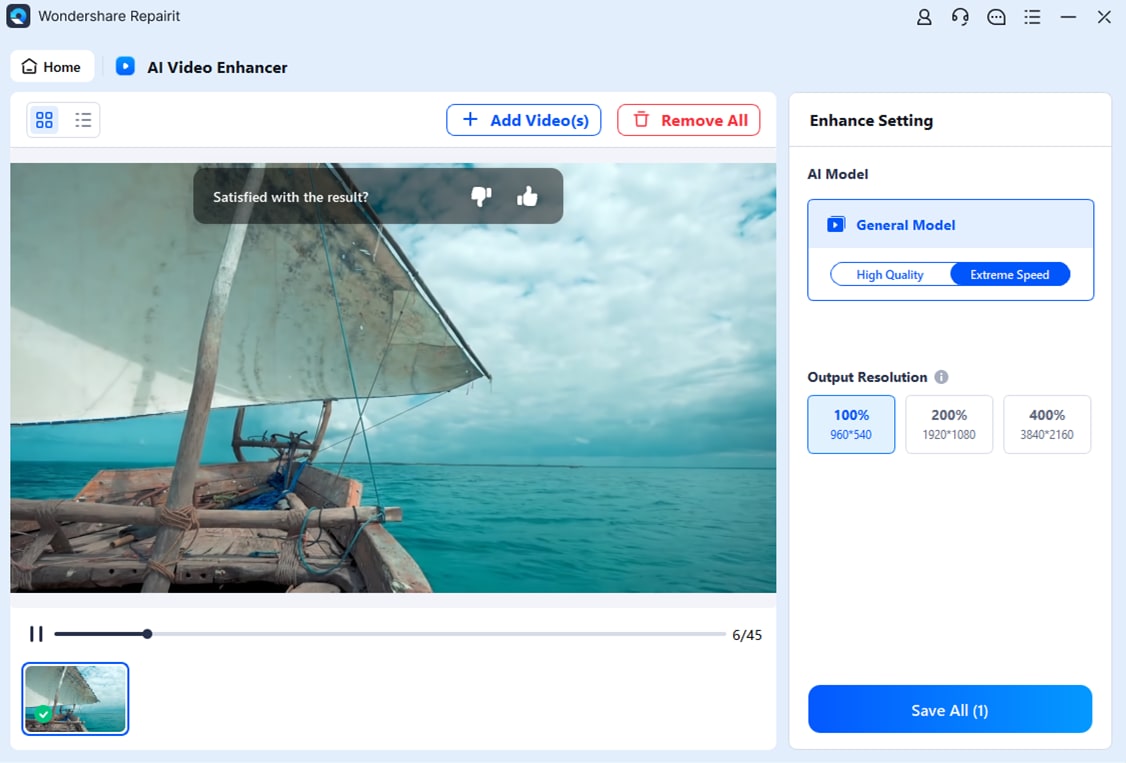
Step-by-step guide
Step 1. Choose an AI enhancement model based on your video quality needs, such as upscaling, denoising, or overall clarity improvement.
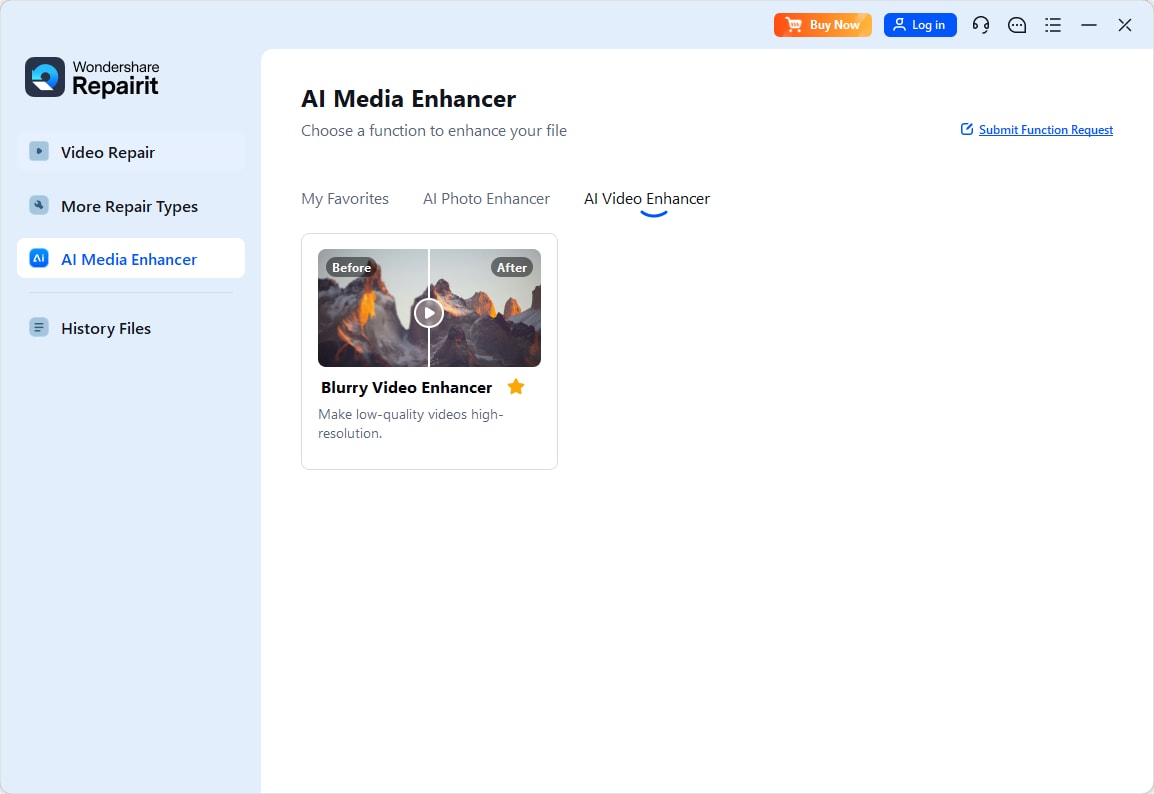
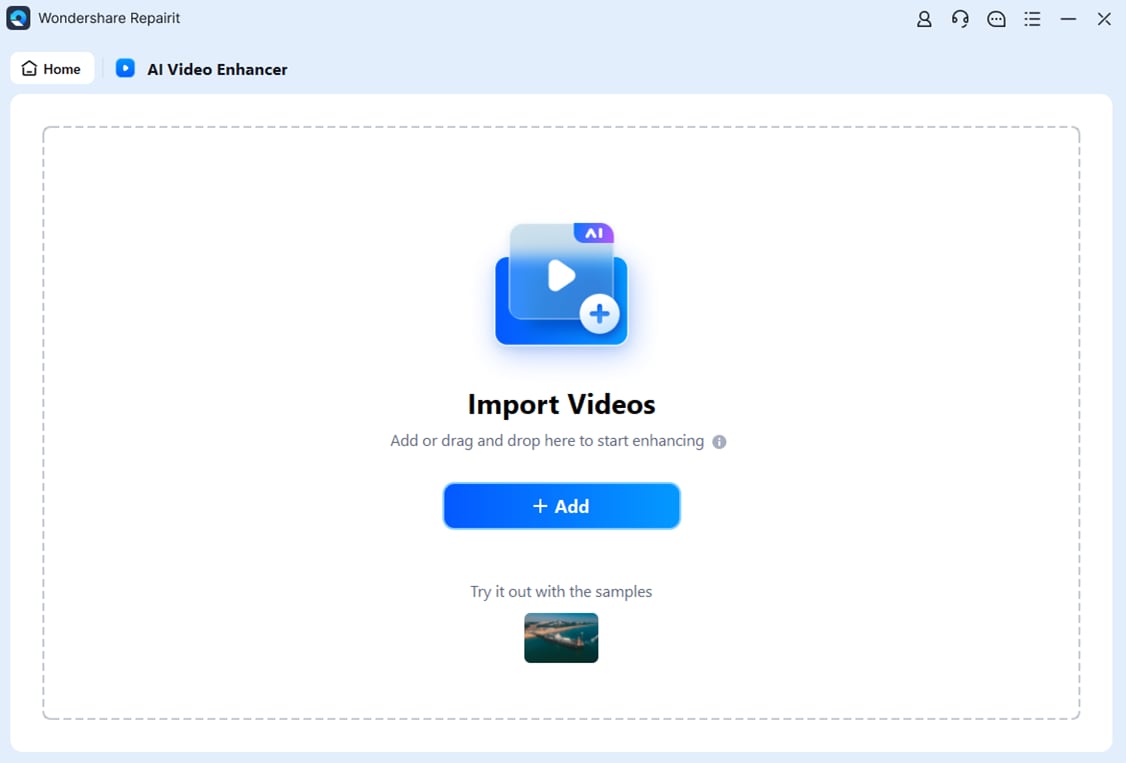
Step 2. Import your video into Repairit Video Enhancer to begin the enhancement process.
Step 3. Start enhancing and let the AI improve sharpness, reduce blur, and enhance the overall video quality.
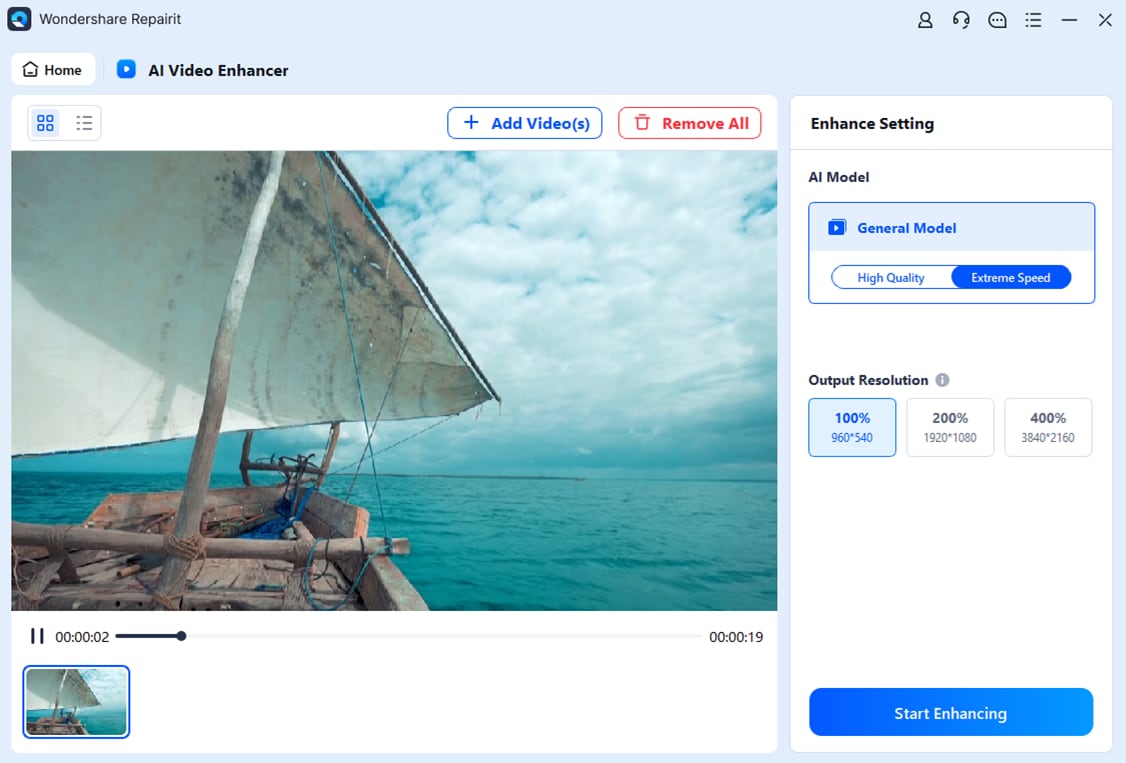
Step 4. Preview the enhanced result and save the improved video to your device.
Final Verdict
Choosing between Repairit Video Enhancer vs Aiseesoft Video Enhancer depends on whether you prioritize AI depth or simplicity.
For most users dealing with visibly soft, noisy, or low-resolution clips, Repairit Video Enhancer is usually the stronger option thanks to its AI-driven approach to clarity, denoising, and upscaling. Its guided workflow focuses on real-world results, especially when you need to noticeably improve older or compressed footage.
Aiseesoft Video Enhancer remains a practical alternative if your needs are modest. When you simply want to adjust brightness, contrast, and resolution on reasonably good footage, its lightweight design and quick add → choose → apply → export workflow can be enough, particularly on lower powered machines.
If you are unsure, testing both tools on the same clips during their trial periods is a reliable way to see which fits your workflow and hardware better.
Next: Repairit Video Enhancer vs Adobe Premiere Pro
FAQ
-
1. Is Repairit Video Enhancer better than Aiseesoft Video Enhancer for low-quality videos?
In many cases yes, because Repairit uses AI to enhance details and reduce noise, which can help low-quality or compressed clips more than the basic adjustments in Aiseesoft Video Enhancer. Results still depend on the original footage and how heavily it was compressed. -
2. Which is easier for beginners, Repairit Video Enhancer or Aiseesoft Video Enhancer?
Aiseesoft Video Enhancer is simpler because it sticks to add → choose options → apply → export, while Repairit adds AI choices but remains approachable with presets and clear labels. Beginners comfortable with a few guided options may prefer Repairits AI modes. -
3. Which tool offers better upscaling quality, Repairit Video Enhancer or Aiseesoft Video Enhancer?
Repairit Video Enhancer generally aims for higher quality upscaling using AI models that try to preserve more natural detail, while Aiseesoft Video Enhancer provides more traditional resolution increase that works but may keep less fine texture, especially on very small or soft elements. -
4. Is Aiseesoft Video Enhancer fast enough for quick edits compared to Repairit Video Enhancer?
Yes, Aiseesoft Video Enhancer is typically faster for basic tasks because it is lightweight and less AI intensive. Repairit may take longer on some clips due to its AI processing, but that extra time often translates into stronger improvements on challenging footage. -
5. Do Repairit Video Enhancer and Aiseesoft Video Enhancer support common video formats?
Both tools are designed for common consumer and creator workflows, handling popular formats such as MP4, MOV, and AVI on mainstream desktop systems. Repairit focuses on running AI models smoothly on typical modern PCs, while Aiseesoft emphasizes a lightweight footprint that works well even on more modest hardware.




