
Choosing between Repairit Video Enhancer and Topaz Video AI comes down to how much control, power, and time you want to invest in each project. This guide compares their AI upscaling, denoise, and sharpening capabilities so you can decide which one fits your typical videos, hardware, and budget. We focus on real workflow differences, not just specs, to help you pick a reliable tool to enhance video quality, improve clarity, and upscale resolution for modern screens.
At a high level, Repairit Video Enhancer emphasizes quick, guided enhancement for everyday creators, while Topaz Video AI is oriented toward professionals who want granular control and are comfortable with heavier processing demands.
Enhance Video Quality with Repairit Video Enhancer
 Security Verified. Over 7,302,189 people have downloaded it.
In this article
- Repairit Video Enhancer vs Topaz Video AI: Quick Verdict
- Repairit Video Enhancer vs Topaz Video AI: Key Differences
- Repairit Video Enhancer vs Topaz Video AI: Comparison Table
- What Repairit Video Enhancer and Topaz Video AI Are Best For
- Repairit Video Enhancer vs Topaz Video AI: Technology and Enhancement Approach
- Repairit Video Enhancer vs Topaz Video AI: Output Quality and Real-World Results
- Repairit Video Enhancer vs Topaz Video AI: Workflow and Ease of Use
- Repairit Video Enhancer vs Topaz Video AI: Pricing and Trial Options
- Who Should Choose Repairit Video Enhancer
- Who Should Choose Topaz Video AI
- Pros and Cons of Repairit Video Enhancer and Topaz Video AI
- How to Enhance Videos After Choosing the Right Tool
Repairit Video Enhancer vs Topaz Video AI: Quick Verdict
If you mostly work on social media clips, tutorials, internal business videos, or personal archives and want to improve video clarity without tuning dozens of settings, Repairit Video Enhancer is usually the smoother fit. Its preset-driven workflow helps you clean up soft, noisy, or low-resolution footage quickly on mid-range hardware.
If you are a professional editor, colorist, or content creator who needs maximum control over AI video upscaling, denoise, and deblur for 4K or 8K delivery, Topaz Video AI can offer deeper control and more specialized models, as long as you are ready for heavier system requirements and longer render times.
In most cases, your decision hinges on this trade-off: Repairit Video Enhancer favors speed, simplicity, and accessibility, while Topaz Video AI leans into depth of control and high-end enhancement potential.
Repairit Video Enhancer vs Topaz Video AI: Key Differences
The key differences between Repairit Video Enhancer vs Topaz Video AI show up in target users, workflow complexity, and how far you want to push resolution and detail.
- Best for: Repairit focuses on everyday creators and teams who want fast, guided AI enhancement. Topaz is positioned for professionals who prioritize pushing quality and resolution as far as possible.
- Ease of use: Repairit uses simple presets and a streamlined interface that keep decisions to a minimum. Topaz expects you to choose specific AI models and tune per-clip settings.
- Output quality focus: Repairit aims for strong, natural improvements that look good on common screens and platforms. Topaz focuses on industry-leaning upscaling, denoise, and deblur when you are aiming at demanding delivery formats.
- Workflow style: Repairit is preset-driven and designed for quick in-and-out jobs. Topaz follows a pro-style pipeline where you select a model, adjust parameters, preview, and then export.
- Hardware and speed: Repairit usually runs comfortably on mid-range systems. Topaz tends to benefit from powerful GPUs and can be slower, especially for 4K and 8K projects.
- Pricing: Repairit is generally the more budget-friendly option for frequent, everyday use. Topaz typically sits at a higher price point aligned with professional workflows.
Repairit Video Enhancer vs Topaz Video AI: Comparison Table
| Dimension | Repairit Video Enhancer | Topaz Video AI |
|---|---|---|
| Best for | Everyday creators and teams who want fast, guided AI enhancement with minimal tuning. | Professionals needing maximum quality enhancement and high-resolution upscaling. |
| Ease of use | Simple presets and streamlined workflow that are beginner friendly. | More technical; requires choosing specific AI models and tuning settings. |
| Output quality focus | Strong quality boost for typical and social media projects with natural results. | Industry-leaning AI models with excellent upscaling, denoise, and deblur for demanding work. |
| Workflow | Preset-driven flow focused on quick enhancement and easy exporting. | Import video → choose AI model → adjust enhancement settings → preview result → export enhanced video. |
| Strengths | Balanced quality, speed, and simplicity; good for a wide range of everyday footage. | Excellent 4K–8K upscaling, strong denoise and deblur, flexible model choices. |
| Weaknesses | Fewer granular controls than some pro tools; tuned more for mainstream use. | Heavy system requirements, slower processing, and higher price than many competitors. |
What Repairit Video Enhancer and Topaz Video AI Are Best For
Topaz Video AI is positioned as professional AI video enhancement software focused on high-end upscaling and restoration-style quality work. It is most suitable for editors and studios who want to squeeze as much detail as possible from footage and are working toward 4K, 8K, or large-screen delivery.
Repairit Video Enhancer is better suited to users who want dependable improvements without needing a deep technical background. It fits workflows such as YouTube content, marketing clips, explainer videos, and family footage where you want cleaner, sharper, less noisy output but do not need to micromanage every parameter.
- Choose Repairit Video Enhancer if you want to quickly upscale video resolution and reduce noise for online sharing and common display sizes.
- Choose Topaz Video AI if you often handle demanding client work, archival footage, or cinematic content where pushing resolution and detail is a priority.
Repairit Video Enhancer vs Topaz Video AI: Technology and Enhancement Approach
Both tools rely on AI models to analyze frames and improve details, but they package that technology differently.
Core similarities
According to the provided information, both tools share several core capabilities:
- AI-driven enhancement for improving clarity, sharpness, and overall quality of low-quality videos.
- Resolution upscaling to move from low resolutions to higher ones that hold up better on larger or higher DPI screens.
- Noise and artifact reduction to make compressed, low-light, or older footage appear cleaner and more watchable.
Where they diverge
Their more advanced features reveal the main philosophical difference:
- Topaz Video AI offers more specialized AI models for tasks like high-end upscaling or focused denoise and deblur, with fine-grained control over how aggressively each model operates.
- Both tools address motion and detail optimization, but Topaz typically exposes more knobs, while Repairit emphasizes guardrails to keep results natural with less risk of overprocessing.
- In terms of processing control, Topaz leans into configurable pipelines and advanced sliders. Repairit favors guided presets that encapsulate complex decisions into simpler choices.
In practice, this means that if you enjoy tweaking and testing multiple AI models per clip, Topaz fits that mindset. If you prefer selecting a goal (for example, clearer low-resolution video) and letting the software handle the rest, Repairit aligns with that approach.
Repairit Video Enhancer vs Topaz Video AI: Output Quality and Real-World Results
Output quality in real projects depends on factors like source resolution, noise level, motion complexity, and hardware. With that in mind, the two tools tend to emphasize different scenarios.
Repairit Video Enhancer output tendencies
- Targets a natural, balanced look for typical online and business content.
- Provides noticeable improvements in sharpness, detail, and clarity without requiring a lot of manual tweaking.
- Supports resolution upscaling that is well suited to YouTube, social media, and presentation screens.
Topaz Video AI output tendencies
- Known for strong denoise and deblur performance when properly configured, especially on challenging, noisy footage.
- Well regarded for high-end 4K and 8K upscaling when you have enough GPU power and time.
- Provides more options to trade off between preserving texture and aggressively smoothing noise.
For many day-to-day projects, the practical question is less about theoretical maximum quality and more about how fast you can reach a result that looks good enough. Repairit often reaches a solid output with a single preset, while Topaz invites more experimentation to find the optimal model and settings, which is appealing to advanced users but slower for casual editors.
Repairit Video Enhancer vs Topaz Video AI: Workflow and Ease of Use
Workflow is often where the two tools feel most different in real use.
Repairit Video Enhancer workflow and ease of use
- A guided, preset-based interface that keeps technical decisions lightweight.
- Clear steps from import to preview and export, minimizing the chance of misconfiguring options.
- Generally more forgiving on mid-range hardware, making it easier to run batch enhancements or multiple clips.
Topaz Video AI workflow and ease of use
Topaz Video AI follows a more traditional pro pipeline:
- Import your video into the project interface.
- Choose an AI model that matches your task (for example, upscaling, denoising, or sharpening soft footage).
- Tweak enhancement settings such as strength, grain retention, or motion-related parameters.
- Preview the result and then export the enhanced video.
This gives experienced users a lot of control, but it can feel complex for beginners who are not sure which model or configuration to select. If your priority is a tool that you or non-technical colleagues can operate with minimal guidance, Repairit typically has the advantage.
Repairit Video Enhancer vs Topaz Video AI: Pricing and Trial Options
Pricing can change over time, but based on the positioning described:
- Topaz Video AI typically sits at a higher price point, reflecting its professional focus, deeper AI models, and advanced upscaling capabilities.
- Repairit Video Enhancer is usually more budget approachable for users who frequently enhance videos but do not require highly specialized pro-only controls.
Both tools usually offer some form of trial or limited testing period. It is a good idea to:
- Test each tool on the same clips, especially ones with motion and noise similar to your real projects.
- Compare processing times on your actual hardware rather than relying on generic benchmarks.
- Evaluate how easily you can repeat the same workflow across a batch of videos.
If you are unsure, starting with trial versions is the most reliable way to check whether your hardware and typical footage lean more toward Repairit or Topaz.
Who Should Choose Repairit Video Enhancer
Based on the scenarios provided, Repairit Video Enhancer is a stronger choice for users who value simplicity and predictable results.
- Users who want a straightforward AI tool to enhance low-quality footage without complex settings.
- People improving old or soft videos for social media, family sharing, or internal business use.
- Creators needing dependable upscaling and clarity improvements on mid-range hardware.
- Anyone who prefers preset-driven, guided AI workflows over deep technical tuning.
In other words, if you want to improve details in low-quality videos and reduce noise with minimal friction, Repairit generally offers a better balance between quality and speed for non-specialist users.
Who Should Choose Topaz Video AI
Topaz Video AI is better aligned with advanced and professional scenarios, where every bit of detail and control may matter.
- Professionals who prioritize maximum upscaling quality for 4K, 8K, or large-screen delivery.
- Users comfortable with picking AI models and fine-tuning denoise and deblur parameters.
- Studios or freelancers working with challenging, noisy, or soft footage that needs strong enhancement.
- Editors who have powerful GPUs and can accept slower processing in exchange for more control.
If you like to experiment with model types and carefully balance texture, sharpness, and noise, Topaz provides room to dial in the look you want, as long as your hardware can handle the workload.
Pros and Cons of Repairit Video Enhancer and Topaz Video AI
Repairit Video Enhancer Pros and Cons
Topaz Video AI Pros and Cons
How to Enhance Videos After Choosing the Right Tool
After comparing Repairit Video Enhancer vs Topaz Video AI, the next step is to put one of them into your real workflow and start improving your footage. Whichever option you choose, the basic idea is to feed in lower-quality clips and use AI to sharpen soft footage, reduce noise, and upscale resolution without introducing distracting artifacts.
If you want a practical, guided path, Repairit Video Enhancer offers a streamlined experience where AI models and presets handle much of the complexity for you. Below is a closer look at how it works in practice.
Key Features
- AI presets for quick clarity, sharpness, and color improvements without manual fine-tuning.
- Resolution upscaling suited for online publishing and everyday display screens, helping low-res clips look better on modern devices.
- Streamlined workflow that focuses on previewing and exporting enhanced clips quickly, reducing setup time per project.
Step-by-step guide
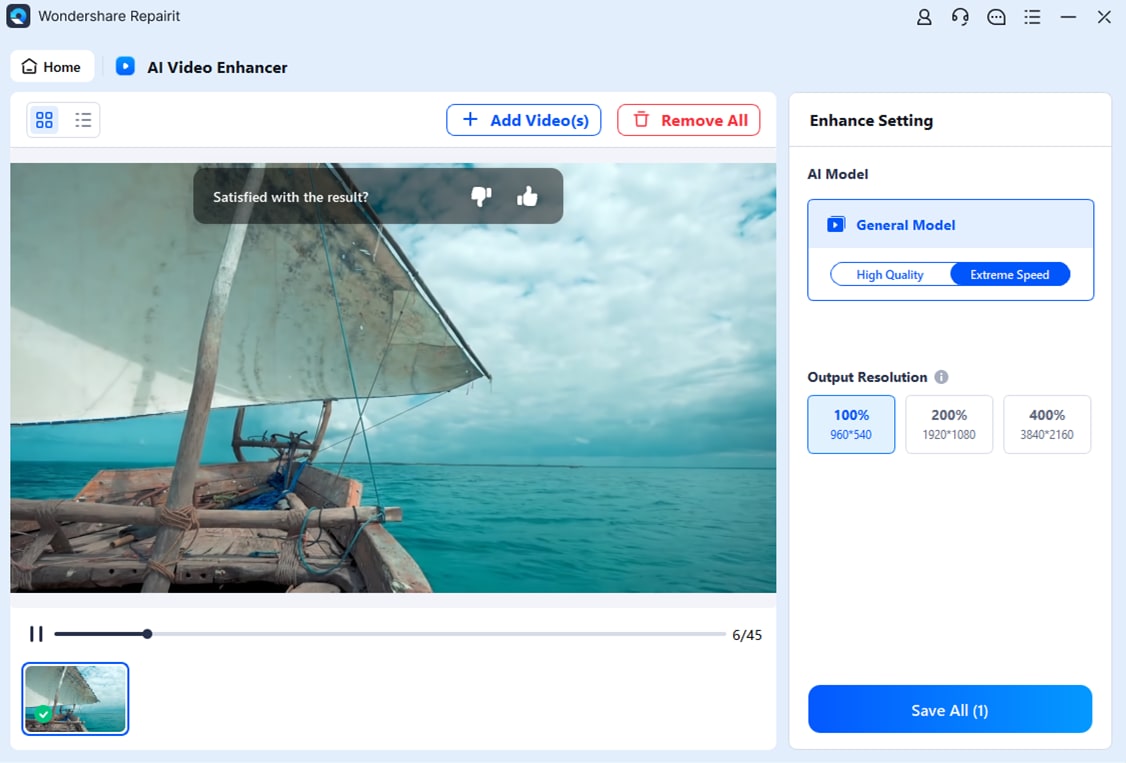
To see how a guided AI enhancer fits into your workflow, here is a short step-by-step process using Repairit Video Enhancer.
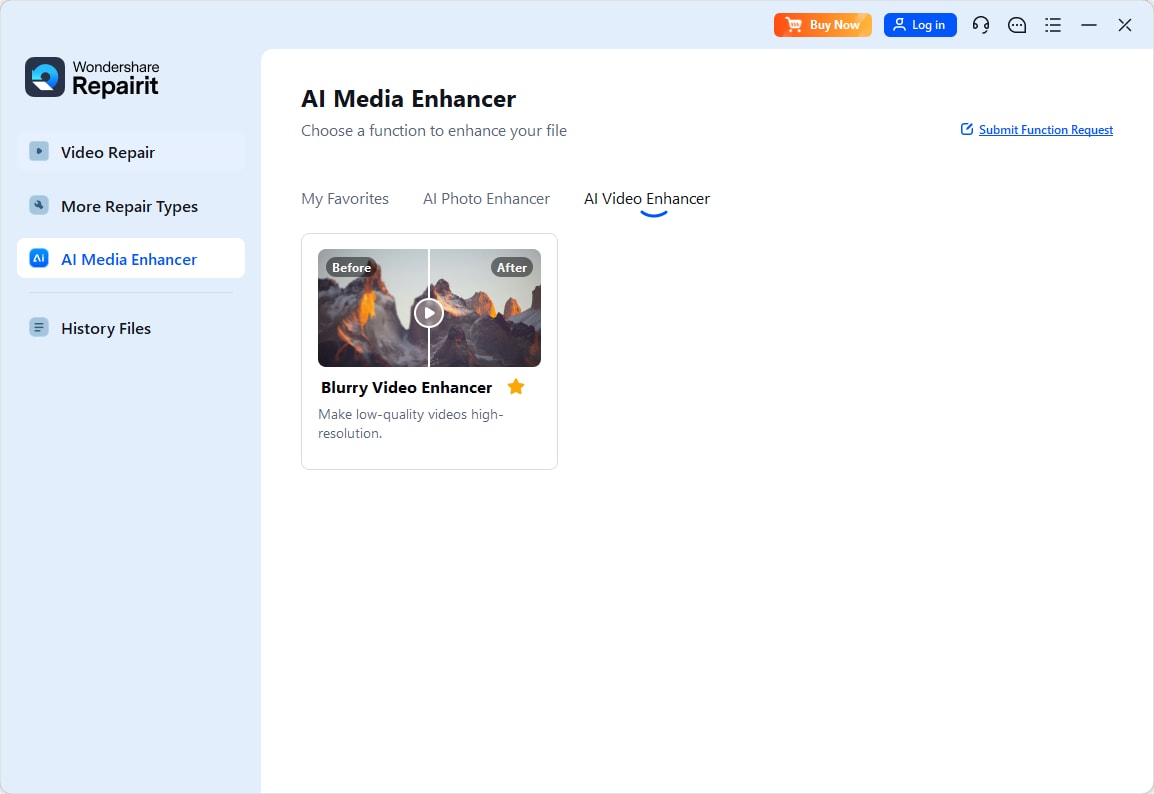
Step 1. Choose an AI enhancement model based on your video quality needs, such as upscaling, denoising, or overall clarity improvement.
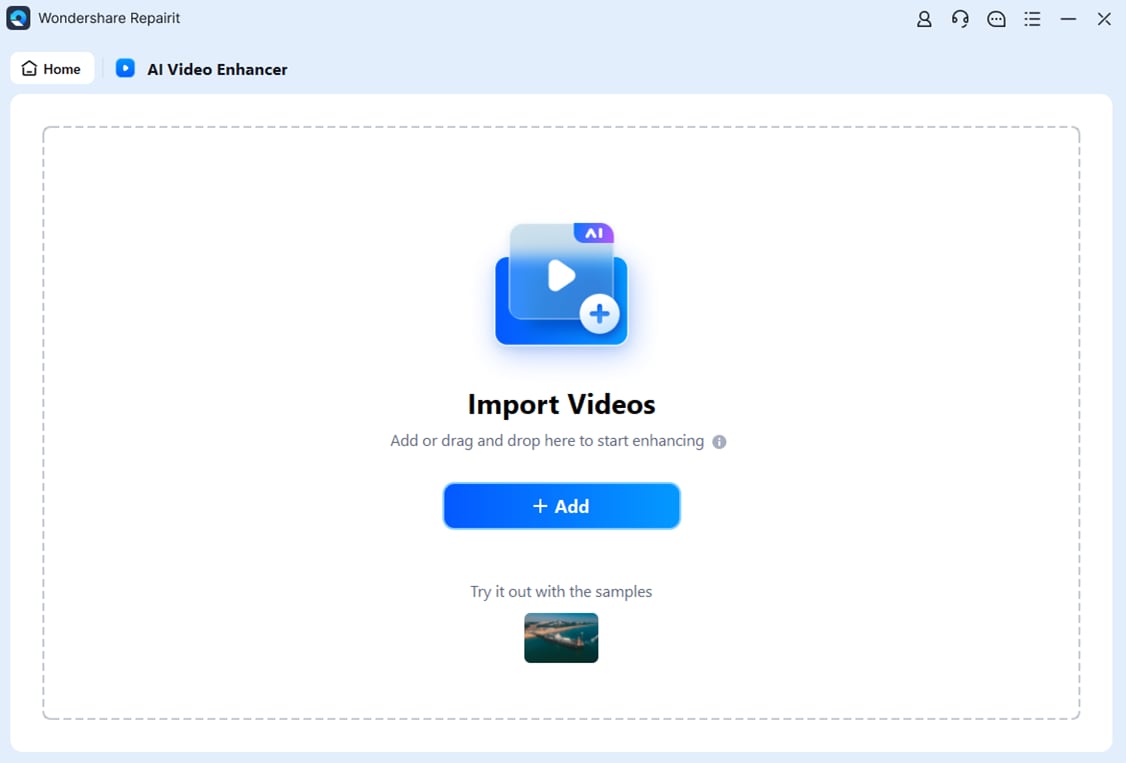
Step 2. Import your video into Repairit Video Enhancer to begin the enhancement process.
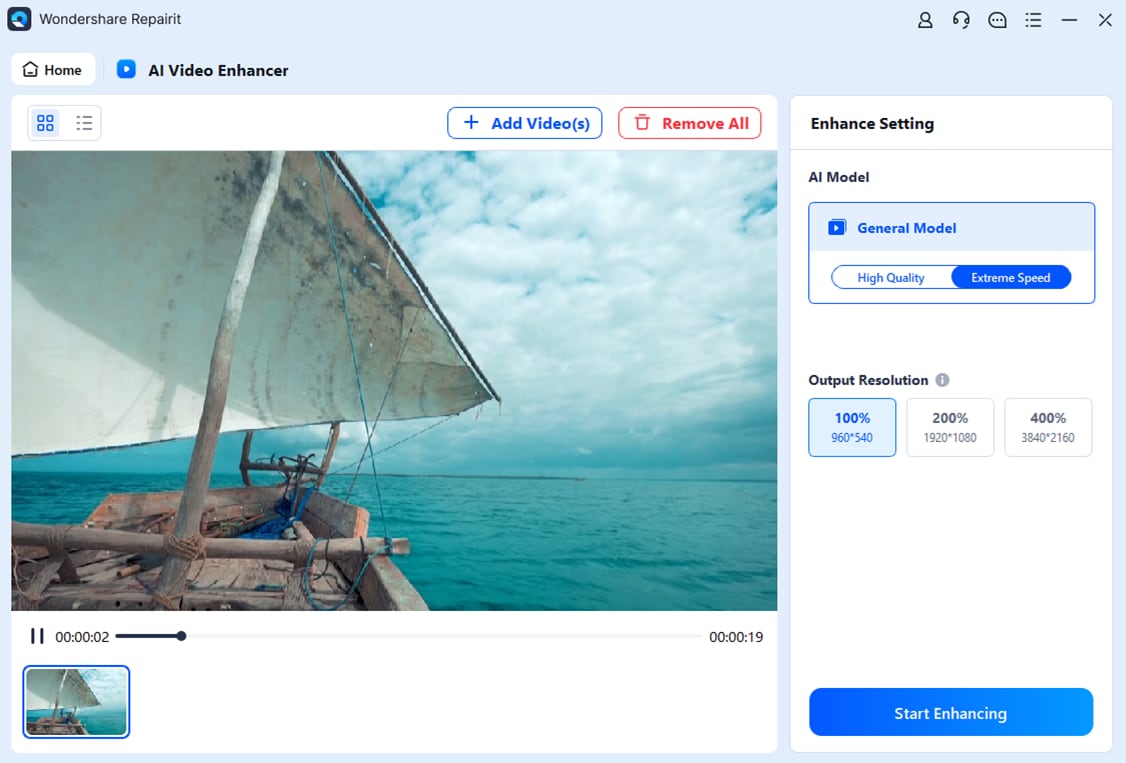
Step 3. Start enhancing and let the AI improve sharpness, reduce blur, and enhance the overall video quality.
Step 4. Preview the enhanced result and save the improved video to your device.
Final Verdict
When you compare Repairit Video Enhancer vs Topaz Video AI, it is less about which tool is objectively better and more about which one fits your typical projects and hardware.
- Choose Repairit Video Enhancer if you are an everyday creator, educator, marketer, or small team that needs to enhance video quality quickly and reliably. Its guided workflow, modest hardware demands, and practical upscaling make it a strong match for most online and internal video content.
- Choose Topaz Video AI if you are working on demanding 4K or 8K masters, challenging low-light or noisy footage, or client work where you want deeper control. With sufficient GPU power and time to configure models, it can produce very refined results.
For many users, starting with Repairit will cover the majority of day-to-day needs, while keeping the option to explore a more specialized tool like Topaz later if your projects become more demanding. The most reliable approach is to test both on your own clips, compare the results, and see which workflow feels more natural and sustainable for your workload.
Next: Repairit Video Enhancer vs Avclabs Video Enhancer Ai
FAQ
-
1. Is Repairit Video Enhancer or Topaz Video AI better for 4K and 8K upscaling?
Topaz Video AI is oriented toward high-end upscaling and can be a strong choice for 4K and 8K work if you have powerful hardware and time for longer renders. Repairit Video Enhancer can upscale effectively for most common viewing scenarios but is generally tuned more for practical, everyday resolutions rather than extreme formats. -
2. Which is easier for beginners, Repairit Video Enhancer or Topaz Video AI?
Repairit Video Enhancer is usually easier for beginners because its presets and guided workflow reduce the number of decisions you need to make. Topaz Video AI expects you to pick specific AI models and tweak more parameters, which suits experienced editors but can feel complex when you are starting out. -
3. How do denoise and deblur results compare between Repairit Video Enhancer and Topaz Video AI?
Topaz Video AI is known for strong denoise and deblur performance on difficult, noisy footage when carefully configured. Repairit Video Enhancer offers solid automatic noise and blur reduction that is typically sufficient for everyday low-light and compressed videos, with less need for manual adjustment. -
4. Which tool is faster in real projects, Repairit Video Enhancer or Topaz Video AI?
Performance depends on your hardware and settings, but Topaz Video AI often runs heavier models that can be slower, especially at 4K and 8K. Repairit Video Enhancer is more focused on balanced speed and quality, making it a practical choice on mid-range systems where turnaround time matters. -
5. Do Repairit Video Enhancer and Topaz Video AI support common video formats and devices?
Both tools work with common digital video formats such as MP4 and MOV on modern desktop systems. Topaz Video AI usually benefits most from high-end GPUs, while Repairit Video Enhancer is generally more forgiving on mid-range machines, which can be helpful if you do not have specialized hardware.




