
When you are trying to fix corrupted or distorted photos, choosing the right tool is key. Repairit Photo Repair and Picture Doctor both aim to repair damaged images, but they approach the job differently. Picture Doctor is a long-standing utility focused on PSD and JPEG, while Repairit Photo Repair offers a broader, guided experience. This comparison walks through how each tool handles common photo issues so you can decide which one fits your editing style, image formats, and repair needs.
Repair Corrupted Photos with Repairit Photo Repair
 Security Verified. Over 7,302,189 people have downloaded it.
In this article
- Repairit Photo Repair vs Picture Doctor: Quick Verdict
- Repairit Photo Repair vs Picture Doctor: Key Differences
- Repairit Photo Repair vs Picture Doctor: Comparison Table
- What Repairit Photo Repair and Picture Doctor Are Best For
- Repairit Photo Repair vs Picture Doctor: Features and Capabilities
- Repairit Photo Repair vs Picture Doctor: Supported Formats and Compatibility
- Repairit Photo Repair vs Picture Doctor: Workflow and Ease of Use
- Repairit Photo Repair vs Picture Doctor: Pricing and Trial Options
- Who Should Choose Repairit Photo Repair
- Who Should Choose Picture Doctor
- Pros and Cons of Repairit Photo Repair and Picture Doctor
- How to Repair Corrupted Photos After Choosing the Right Tool
Repairit Photo Repair vs Picture Doctor: Quick Verdict
If you often deal with mixed photo libraries, different devices, or visibly damaged images, Repairit Photo Repair is usually the more flexible, future-ready choice. It focuses on guided workflows and a broader set of photo issues, which can help if you are not very technical or need to troubleshoot more than just structural file errors.
Picture Doctor can make more sense when your main goal is to repair PSD and JPEG files and you prefer a lean, utility-style tool. Its narrower focus and older interface will appeal most to users who are comfortable with a straightforward load and repair approach and work mainly with those formats.
In practical terms, both tools can help repair corrupted photos, but the more varied your damaged images and workflows are, the more you may lean toward Repairit Photo Repair.
Repairit Photo Repair vs Picture Doctor: Key Differences
The key differences between Repairit Photo Repair vs Picture Doctor revolve around scope, usability, and how they fit into your editing routine.
- Best for: Repairit suits users who need to repair a wide range of corrupted or badly damaged photos with guidance, while Picture Doctor suits users focused on PSD and JPEG repair.
- Ease of use: Repairit offers a modern, guided interface with clear prompts. Picture Doctor provides a simple but more dated interface that may feel basic on current systems.
- Repair depth: Repairit is designed to handle different corruption symptoms and quality loss in many scenarios. Picture Doctor is more about structural repair of supported PSD and JPEG files.
- Workflow: Repairit uses a streamlined, step-based flow. Picture Doctor centers on loading and exporting repaired versions with fewer on-screen instructions.
- Strengths: Repairit has a broad photo repair focus and flexible options. Picture Doctor stands out for its focused PSD and JPEG support.
- Weaknesses: Repairit can feel feature-heavy for one-off fixes. Picture Doctor has an outdated UI and a narrower format focus.
Repairit Photo Repair vs Picture Doctor: Comparison Table
This side-by-side view summarizes how Repairit Photo Repair vs Picture Doctor compare on everyday decisions like ease of use and where each tool fits best.
| Dimension | Repairit Photo Repair | Picture Doctor |
|---|---|---|
| Best for | Users who need to repair a wide range of corrupted or badly damaged photos with guidance. | Users repairing damaged PSD and JPEG files who want a focused utility. |
| Ease of use | Modern, guided interface that walks users through the repair steps. | Simple but older-style interface that may feel dated to some users. |
| Repair depth | Designed to handle varying levels of corruption and quality loss in many image scenarios. | Generally oriented toward structural repair of supported file types like PSD and JPEG. |
| Workflow | Streamlined, step-based repair flow suitable for beginners and regular use. | Simple workflow centered on loading damaged files and exporting repaired versions. |
| Strengths | Broad photo repair focus, intuitive design, and flexible repair options for different image issues. | Solid PSD and JPEG support with a straightforward, no-frills repair process. |
| Weaknesses | May feel more feature-heavy than necessary for quick, one-off basic fixes. | Outdated UI and narrower focus that may not suit newer formats or varied repair needs. |
What Repairit Photo Repair and Picture Doctor Are Best For
As a photo repair utility, Repairit Photo Repair targets users repairing damaged photos across many situations, while Picture Doctor focuses on PSD and JPEG corruption. For users repairing damaged photos who want a broader toolkit, Repairit often feels more future-ready, whereas Picture Doctor can work as a focused option when you mainly deal with those two formats and prefer a simpler, older-style interface.
Thinking about your own use case can help:
- If you manage large libraries of camera shots, phone images, and edited photos, a broader tool like Repairit can better match your variety of formats and corruption types.
- If most of your problems involve older design projects saved as PSD or long-kept JPEGs from older workflows, Picture Doctor may be a practical, lightweight choice.
Repairit Photo Repair vs Picture Doctor: Features and Capabilities
Both tools aim to repair corrupted or visually broken photos, but they differ in scope and usability. Repairit Photo Repair focuses on a modern, guided experience with support for diverse image issues, while Picture Doctor concentrates on PSD and JPEG repair with a lean, utility-style design and more outdated UI.
At a basic level, both tools typically let you:
- Load and scan corrupted or damaged image files for structural issues.
- Preview repaired photos before deciding what to save.
- Export fixed images to standard formats for further editing or sharing.
Where they separate is in more advanced expectations:
- Repairit Photo Repair offers richer options to handle various corruption symptoms like distortion, artifacts, or unreadable files.
- Repairit Photo Repair uses a more guided interface to help non-technical users complete complex repairs with fewer mistakes.
- Picture Doctor emphasizes direct PSD and JPEG support, which may appeal to users handling older design files despite its outdated UI.
In most cases, users who value a visually clear, guided experience lean toward Repairit, while those who just want a small utility to open and fix certain files may be satisfied with Picture Doctor.
Repairit Photo Repair vs Picture Doctor: Supported Formats and Compatibility
Supported formats are a major factor when comparing Repairit Photo Repair vs Picture Doctor, especially if you work with images from many devices and apps.
Repairit Photo Repair is generally built to work with a wider range of common photo formats, which helps if you handle mixed image libraries from cameras and phones. Picture Doctor is more narrowly focused on PSD and JPEG, making it suitable if your damaged images are mostly design files or older JPEGs.
Both are aimed at desktop use, so they fit into typical editing and archiving workflows. When choosing between them, think about:
- How many different formats you regularly use.
- Whether your most important corrupted photos are camera shots, social images, or layered design files.
- If you expect to keep using newer file formats in the future.
Repairit Photo Repair vs Picture Doctor: Workflow and Ease of Use
Workflow can decide whether you actually repair your corrupted photos or keep putting it off. Repairit Photo Repair provides a guided, step-based flow that feels approachable for beginners and time-pressed users. Picture Doctor keeps a simple workflow centered on loading corrupted PSD or JPEG files and saving the repaired results, but its outdated UI may feel less intuitive if you are used to modern photo tools.
If you value a simple workflow with clearer prompts, Repairit tends to be more comfortable. It offers on-screen guidance that helps you:
- Understand what is happening during the repair process.
- Preview results and compare before saving.
- Avoid accidentally overwriting originals.
Picture Doctor, by contrast, may suit users who already know what they are doing and simply want a direct way to attempt a repair without many extra options.
Repairit Photo Repair vs Picture Doctor: Pricing and Trial Options
Both tools are usually available as paid software with some form of trial or demo so you can test repairs before committing. Repairit Photo Repair often positions itself as part of a broader toolkit, while Picture Doctor is sold as a focused utility.
Instead of comparing exact prices, it makes sense to consider:
- How often you need to repair corrupted or damaged photos.
- Which image formats you rely on most.
- Whether a more modern interface and guided workflow justify a potentially higher overall investment.
- If a smaller, PSD and JPEG focused utility aligns better with your occasional use.
For users who regularly work with many images across devices, the additional capabilities in Repairit can be more cost-effective over time. For occasional fixes of PSD or JPEG files, a narrower tool like Picture Doctor may still be sufficient.
Who Should Choose Repairit Photo Repair
Repairit Photo Repair is aimed at users who want a modern, guided way to fix a variety of damaged images. You are likely a good match if:
- You frequently repair corrupted or heavily damaged photos across multiple formats.
- You prefer a modern, guided interface that explains each repair step.
- You are a photographer or content creator handling large image libraries from different devices.
- You want flexible repair options for different visual issues, not just basic structural fixes.
Because of its broader feature set and guidance, Repairit can be especially helpful when you are under time pressure or less comfortable with technical tools, but still need to restore photo quality for important images.
Who Should Choose Picture Doctor
Picture Doctor is better suited to users who care more about PSD and JPEG support than about interface design or a wide feature set. It may be a good fit if:
- You are repairing damaged photos mainly in PSD and JPEG formats.
- You prefer a straightforward, utility-style tool for occasional repairs.
- You are a designer with older project files who primarily needs PSD and JPEG support.
- You do not mind an outdated UI as long as the workflow stays simple.
In these cases, Picture Doctor can be a compact, predictable option, particularly when your work revolves around legacy files that match its format focus.
Pros and Cons of Repairit Photo Repair and Picture Doctor
Understanding the strengths and tradeoffs of each photo repair utility helps you match them to your own workflow.
Repairit Photo Repair Pros and Cons
Picture Doctor Pros and Cons
How to Repair Corrupted Photos After Choosing the Right Tool
Once you understand how Repairit Photo Repair vs Picture Doctor compare, the next step is actually fixing your corrupted or distorted images. No matter which tool you prefer overall, many users find that a guided workflow makes it easier to turn a damaged file back into something usable.
If you decide that a more modern, step-based approach matches your needs, Repairit Photo Repair offers a practical desktop workflow you can follow without much trial and error.
Key Features
- Guided photo repair flow for corrupted or distorted images.
- Support for multiple common photo formats from different devices.
- Preview-based repair process to check results before saving.
Step-by-step guide
The following desktop workflow shows how you can repair corrupted photos using Repairit Photo Repair.
- Add damaged photos
Launch Repairit Photo Repair and import the damaged or corrupted photos you want to fix.
- Run the repair
Click the repair button and let the tool scan and fix the selected image files automatically.
- Preview and save
Preview the repaired results and save the fixed photos to your preferred location.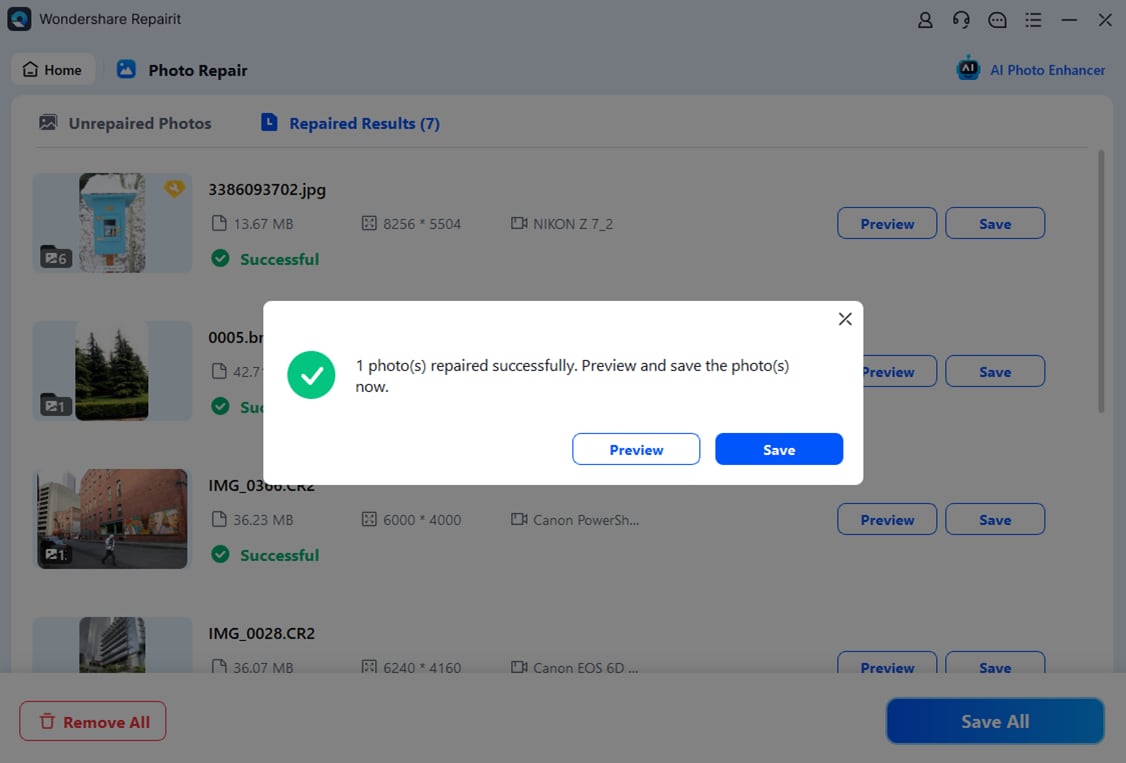
Final Verdict
Choosing between Repairit Photo Repair vs Picture Doctor comes down to your formats, your workflow, and how often you need to repair damaged images.
Repairit Photo Repair is a stronger choice for users who regularly repair corrupted photos, juggle multiple formats, or want a modern, guided workflow that makes complex image issues easier to handle. It fits well for photographers, content creators, and anyone maintaining a large visual library.
Picture Doctor, by contrast, may be enough if you mainly repair PSD and JPEG files, prefer a straightforward utility, and do not mind an outdated interface. If your needs are broader or you expect to face more severe damage, leaning toward Repairit Photo Repair usually makes more long-term sense.
FAQ
-
1. Is Repairit Photo Repair better than Picture Doctor for heavily corrupted photos?
Repairit Photo Repair is generally a stronger choice for dealing with a wider range of corruption symptoms, thanks to its guided workflow and broader focus on different photo issues. Picture Doctor can still be useful if your main concern is PSD or JPEG structure, but it is less oriented toward varied image scenarios. -
2. When does Picture Doctor make more sense than Repairit Photo Repair?
Picture Doctor may make more sense if you mostly repair PSD and JPEG images and prefer a lightweight, single-purpose utility, especially for older design files. In that case, its focused feature set and simple workflow can be enough. -
3. Do Repairit Photo Repair and Picture Doctor support the same photo formats?
Not exactly. Repairit Photo Repair tends to support more common photo formats from cameras and phones, while Picture Doctor is focused on PSD and JPEG. If you work with a variety of image sources, this narrower format range in Picture Doctor can feel limiting.




