
If you shoot with a Nikon camera, you have likely encountered files with the .nef extension and wondered NEF File and how it differs from regular JPEG images. NEF is Nikon's RAW format, designed to capture maximum detail and editing flexibility. Understanding how to open, convert, and repair NEF files helps you protect image quality and avoid losing important photos.
Repair Corrupted Files To Save Your Data
 Security Verified. Over 7,302,189 people have downloaded it.
In this article
What Is NEF File
A NEF file (Nikon Electronic Format) is a proprietary RAW image format created by Nikon digital cameras. Instead of saving a processed picture, NEF stores nearly all the data captured by the camera sensor, along with detailed metadata such as exposure, white balance, lens type, and focus information.
Because a nef file is minimally processed, it gives photographers more room to adjust exposure, color, and detail later without degrading image quality as quickly as a compressed JPEG would. This is why many Nikon users rely on nikon nef images for serious editing and professional work.
NEF vs other RAW formats
While NEF is Nikon's own RAW format, it serves a similar purpose to other manufacturers' RAW files:
| Format | Main use |
|---|---|
| NEF | Nikon DSLR and mirrorless cameras |
| CR2/CR3 | Canon RAW formats |
| ARW | Sony RAW format |
All of these formats keep extensive sensor data for flexible editing. The main difference is compatibility: some software may support one RAW format better or earlier than another, so keeping your tools up to date is essential for working with nef vs raw from other brands.
Common uses of NEF photos
Typical situations where a nef file is preferred include:
- Professional photo shoots where maximum dynamic range and color depth are needed.
- Landscapes and night photography requiring aggressive exposure adjustment.
- Product and portrait photography where precise color grading is important.
- Situations where you might need to recover details from shadows or highlights later.
How to Open NEF File
To open a nef file, you need software that understands Nikon RAW data. Many popular photo editors and viewers now support open nef directly, but you might still need to install extra codecs or updates on older systems.
Open NEF on Windows and Mac
On both Windows and macOS, you can use several tools as a nef viewer and editor:
- Nikon NX Studio: Nikon's free official software for viewing and editing NEF images with full compatibility.
- Adobe Lightroom Classic / Lightroom: Comprehensive RAW editor for organizing, adjusting, and exporting NEF photos.
- Adobe Photoshop with Camera Raw: Opens NEF files in Camera Raw first, then sends them to Photoshop for advanced editing.
- Third-party RAW editors: Tools like Capture One, Darktable, and ON1 Photo RAW can also handle nikon nef files.
On Windows, installing the latest Nikon NEF codec or RAW extension from the Microsoft Store lets File Explorer display NEF thumbnails and basic previews. On Mac, recent versions of macOS can preview many NEF files directly in Finder and Preview, but older systems might not support the newest Nikon models.
View NEF on mobile devices
To open nef file images on phones or tablets, you will usually need a dedicated app and enough storage space, since RAW files are large:
- iOS (iPhone/iPad): Apps like Adobe Lightroom Mobile, Snapseed, or RAW Power can open and edit NEF when imported from a camera or cloud storage.
- Android: Adobe Lightroom Mobile, Snapseed, and some gallery apps support open nef directly, depending on the device.
For quick sharing or viewing on older devices, it is often easier to convert NEF to JPG first, then send the JPEG version.
How to Convert NEF File to JPG
Because NEF is a RAW format, many platforms and apps cannot use it directly. Converting convert nef to jpg makes your images easier to share online, print, or view on almost any device.
Convert NEF to JPG on desktop
You can convert nef file images to JPG using common photo software:
- Nikon NX Studio: Open the NEF photo, adjust exposure or color as desired, then export or save as JPEG.
- Adobe Lightroom: Import the NEF, make edits, then use Export and choose JPEG as the output format, adjusting quality and size.
- Adobe Photoshop: Open the NEF via Camera Raw, perform basic corrections, then go to Save a Copy or Export as JPEG.
- Free RAW converters: Tools like RawTherapee or Darktable can batch-convert nikon nef photos to JPEG or other formats.
Remember that any NEF to JPG conversion involves compression, so there is some loss of data. For the best results, export at high resolution and high quality to keep visible degradation minimal.
Online NEF to JPG converters
If you only have a few images and do not want to install software, online services can convert nef file photos to JPEG in a browser:
- Upload your NEF photos to an online converter website.
- Choose JPG as the output format and adjust settings if available.
- Download the converted files after processing.
These tools are convenient, but avoid uploading sensitive or private images and pay attention to file size limits or watermarks. For large photo collections, desktop software is usually faster and safer.
How to Use Repairit to Fix a Corrupted NEF File
Why choose Repairit for NEF repair
When a nef file becomes corrupted due to interrupted transfers, faulty memory cards, or system crashes, your usual editor may refuse to open it. In that situation, specialized repair software such as Wondershare Repairit can often restore access to damaged NEF images. You can learn more and download the tool from the Repairit official website.
Repairit focuses on rebuilding broken file structures so you can recover valuable photos without needing deep technical knowledge. It supports many image formats, including RAW camera files like nikon nef, making it a practical option when standard viewers cannot handle your photos.
Key features of Repairit for NEF photos
- Repairs corrupted photos in multiple formats, including RAW files from Nikon and other cameras.
- Offers an automatic, guided workflow that suits both beginners and advanced users.
- Lets you preview repaired images before saving them to a secure location.
Step-by-step: repair corrupted NEF with Repairit
Follow this workflow when you need to repair nef file images that no longer open or appear damaged.
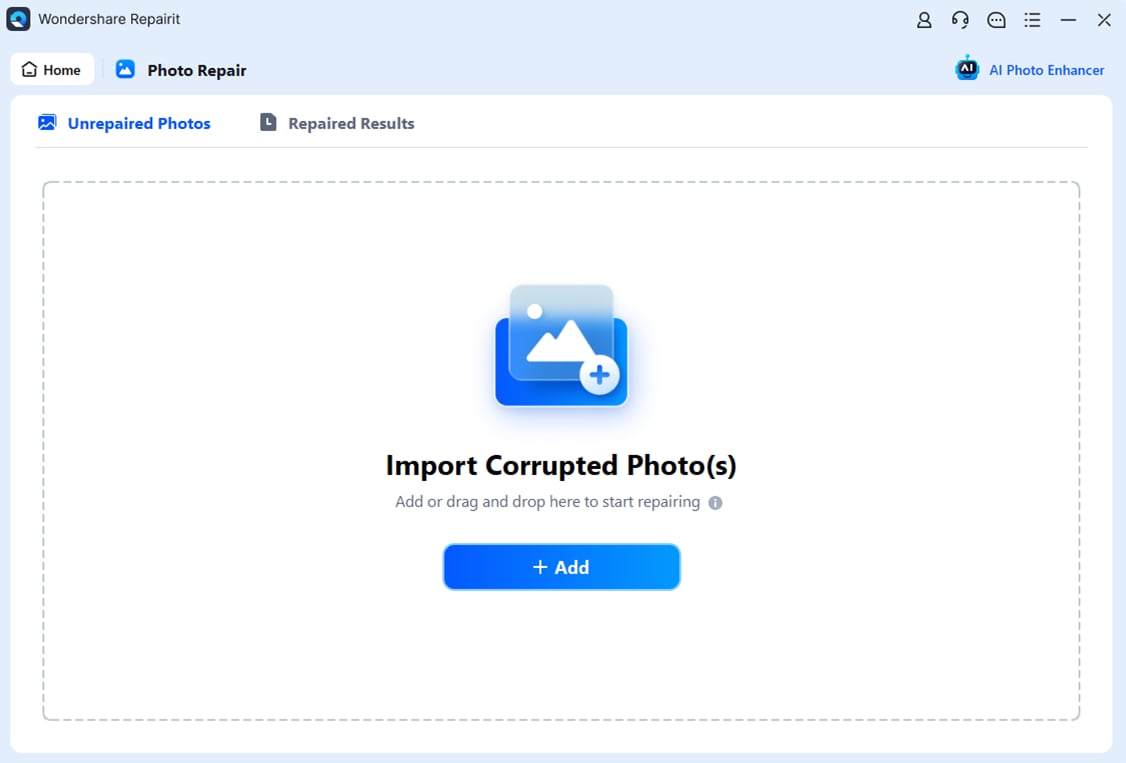
- Choose a Location to Repair Data
Install and launch Wondershare Repairit, then go to the correct module for file or photo repair. From there, select the drive, folder, memory card, or external storage that holds your problematic NEF photos. Confirm your selection so Repairit can focus the scan on that specific location and detect as many damaged items as possible.
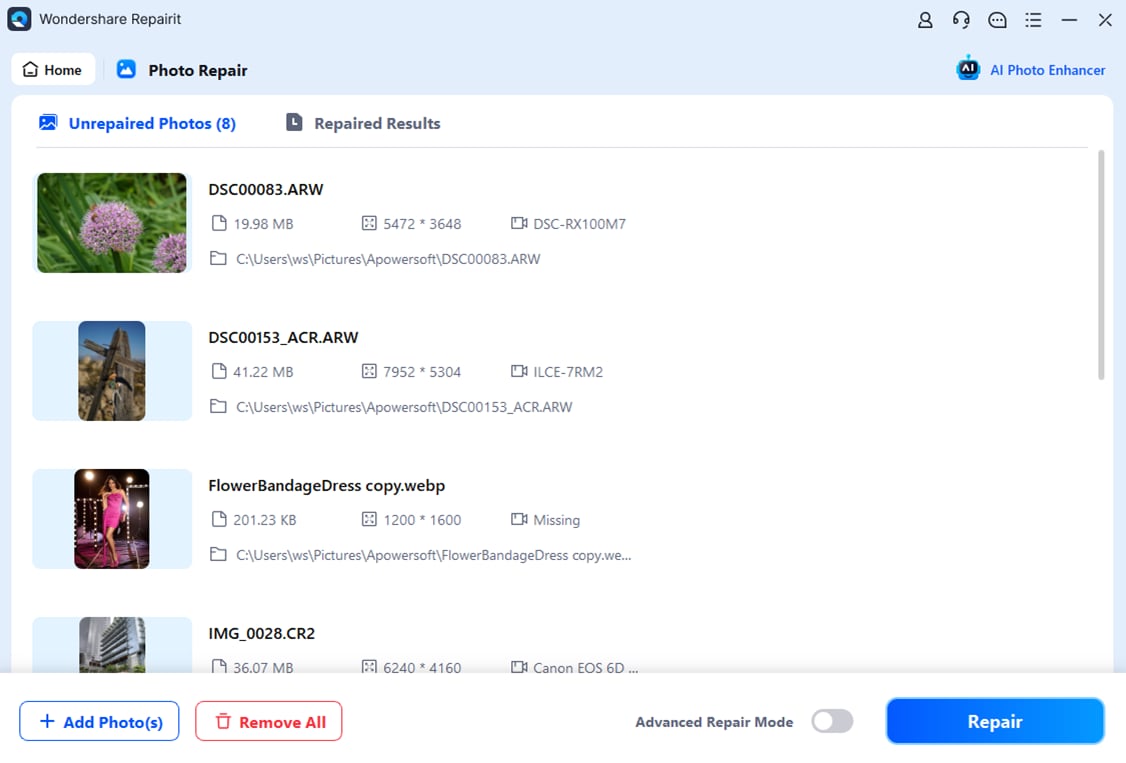
- Deep Scan the Location
Start the deep scan so Repairit can thoroughly analyze the selected device. The software checks for inaccessible, incomplete, or corrupted files and evaluates their internal structure. During this stage, you can monitor progress in the interface while Repairit automatically prepares the best repair strategy for each detected NEF photo.
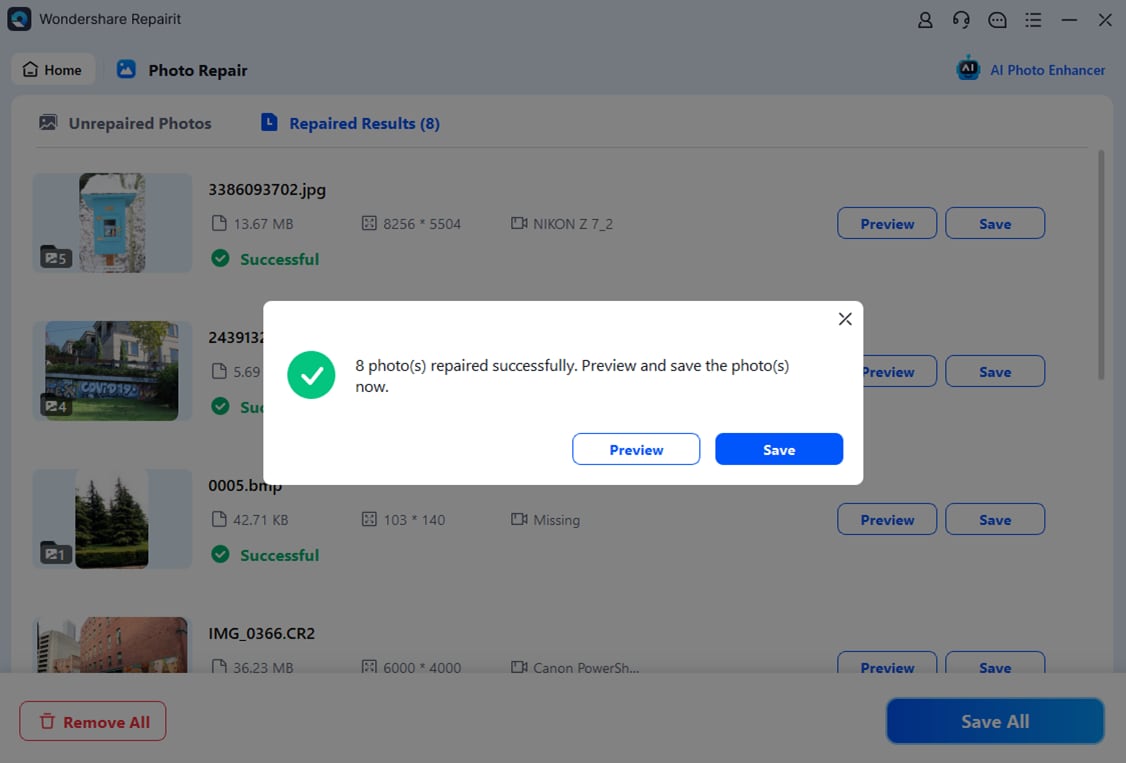
- Preview and Repair Your Desired Data
When the scan and repair process finishes, Repairit presents a list of recoverable items. Use the preview feature to inspect the repaired NEF images and confirm that key details look correct. Finally, select the photos you want to keep and save them to a safe destination that is different from the original storage to reduce the risk of overwriting or further corruption.
Conclusion
NEF files are Nikon's RAW images, designed to preserve maximum sensor data for serious editing. Knowing What is NEF File, how to open it across platforms, and how to convert nef to jpg ensures that your Nikon photos fit smoothly into any workflow, from professional editing to quick sharing.
If a nef file becomes corrupted or unreadable, a dedicated repair tool like Wondershare Repairit can often restore it when regular software fails. Combined with good backup habits, this gives you a reliable safety net so your best Nikon shots remain protected over time.
Next: What Is Nrw File
FAQ
-
1. What is an NEF file?
An NEF file is the Nikon Electronic Format RAW image produced by Nikon digital cameras. It stores unprocessed sensor data plus metadata such as exposure, white balance, and lens information, giving you far more flexibility than a standard JPEG when editing. -
2. Why will my NEF file not open?
A nef file may not open if it is corrupted, only partially copied, created by a newer camera model than your software supports, or if the file extension has been changed incorrectly. Updating your RAW editor or codecs and, if needed, using Repairit to repair the file can often resolve the problem. -
3. Can I convert NEF to JPG without losing quality?
Every time you convert nef to jpg, some data is discarded because JPG is a compressed format. However, exporting at high quality and full resolution from a RAW editor usually keeps any visible loss so small that it is acceptable for everyday viewing and sharing. -
4. What is the difference between NEF and RAW?
nef vs raw is mostly about naming. NEF is Nikon's specific RAW format, while "RAW" is a generic term that can refer to many camera-specific formats (CR2, ARW, ORF, and others). All of them aim to preserve as much original sensor data as possible. -
5. How can I repair a corrupted NEF file safely?
First, create a backup copy of the corrupted nef file. Try opening it in different RAW editors to rule out simple compatibility issues. If it still fails, use Wondershare Repairit to scan the storage location, attempt repair, and then preview the recovered image before saving it to a new, safe destination.




