
Choosing between Repairit Photo Enhancer vs Remini largely depends on the types of images you work with and how hands-on you want your editing process to be. Both solutions use AI to enhance photo quality, but they take different approaches. Repairit Photo Enhancer focuses on improving overall clarity, sharpness, noise, and resolution for portraits and everyday scenes, while Remini is more centered on enhancing facial details in selfies and close-up portraits. This comparison walks through features, output quality, workflow, and pricing so you can decide which tool matches your portrait shots, general photos, and day-to-day enhancement needs.
Enhance Photo Quality with Repairit Photo Enhancer
 Security Verified. Over 7,302,189 people have downloaded it.
In this article
- Repairit Photo Enhancer vs Remini: Quick Verdict
- Repairit Photo Enhancer vs Remini: Key Differences
- Repairit Photo Enhancer vs Remini: Comparison Table
- What Repairit Photo Enhancer and Remini Are Best For
- Repairit Photo Enhancer vs Remini: AI Enhancement Features and Capabilities
- Repairit Photo Enhancer vs Remini: Output Quality and Real-World Results
- Repairit Photo Enhancer vs Remini: Workflow and Ease of Use
- Repairit Photo Enhancer vs Remini: Pricing and Trial Options
- Who Should Choose Repairit Photo Enhancer
- Who Should Choose Remini
- Pros and Cons of Repairit Photo Enhancer and Remini
- How to Enhance Photos After Choosing the Right Tool
Repairit Photo Enhancer vs Remini: Quick Verdict
In a direct comparison of Repairit Photo Enhancer vs Remini, the key distinction is scope. Repairit Photo Enhancer is a stronger choice for users who want an all-round AI enhancer for portraits, travel shots, product photos, and general scenes, with controls that keep results natural. Remini, on the other hand, may be enough if you mostly enhance selfies and close-up faces and prefer a quick, mobile-first, one-tap workflow.
For many people, the decision comes down to this: if your library includes a mix of portraits and non-portrait photos and you care about sharpness, noise reduction, and resolution across the whole frame, Repairit Photo Enhancer can be more versatile. If you are focused on making faces look clearer for social media and messaging, Remini is still a practical option.
Repairit Photo Enhancer vs Remini: Key Differences
The main differences between these two AI tools can be summarized by focus, platform, and control.
- Focus: Repairit Photo Enhancer is built to enhance overall image quality, improving clarity, sharpness, noise, and resolution across the entire frame. Remini is optimized primarily for face enhancement and can be more limited for landscapes, product shots, or background details.
- Output style: Repairit Photo Enhancer aims for balanced, natural-looking upgrades that work for portraits and everyday images. Remini often pushes facial clarity and definition more aggressively, which many users like for selfies but some may find stylized.
- Workflow: Repairit Photo Enhancer runs in the browser with a guided, step-based process that lets you preview before saving. Remini focuses on a tap-and-wait mobile experience with minimal adjustments.
- Use cases: Repairit Photo Enhancer fits people handling family albums, travel images, basic product photos, and portraits together. Remini is geared toward users who mainly care about clearer faces in low-resolution or compressed photos.
- Device emphasis: Repairit Photo Enhancer is designed for desktop and laptop browsers, while Remini is centered on smartphones and tablets.
Repairit Photo Enhancer vs Remini: Comparison Table
| Aspect | Repairit Photo Enhancer | Remini |
|---|---|---|
| Best for | Users enhancing a mix of portraits and general photos who want improved clarity, sharpness, and resolution. | Users focused primarily on selfies and portraits who want stronger face enhancement. |
| Output style | Balanced, natural-looking enhancements across faces and backgrounds. | Strong emphasis on facial details; non-face areas may get subtler changes. |
| Workflow | Guided browser-based steps: import, choose enhancement, preview, export. | One-tap enhancement, especially convenient on mobile devices. |
| Ease of use | Beginner-friendly with clear previews and export options. | Very simple for quick mobile edits with minimal settings. |
| AI enhancement focus | General photo quality, including sharpness, noise reduction, and upscaling. | Portrait and face clarity, especially in low-resolution images. |
| Supported formats | Typical everyday formats such as JPEG and PNG via web upload. | Common consumer formats like JPEG and PNG, especially from phones. |
| Devices | Modern desktop and laptop browsers with internet access. | Primarily smartphones and tablets through mobile apps; web access varies. |
| Pricing approach | Paid tool with options that may include trials or limited free usage. | Mobile-style subscription and in-app purchases, often with limited free use. |
What Repairit Photo Enhancer and Remini Are Best For
Both tools help you enhance photo quality, but they target different situations.
Repairit Photo Enhancer is best for users who:
- Work with a mix of portraits, travel shots, product photos, and everyday scenes.
- Need to sharpen slightly blurry images and improve overall clarity and detail.
- Care about both the subject and background looking cleaner and more refined.
- Prefer a guided, desktop-style interface with previews before saving.
Remini shines when you:
- Mostly enhance selfies, profile photos, and close-up portraits.
- Want clearer facial features in older, compressed, or low-resolution shots.
- Rely on a phone-first workflow and want quick, tap-and-go editing.
- Regularly prepare images for social profiles or messaging apps rather than large-screen viewing.
If you are unsure, consider where most of your photos live: on a computer alongside mixed content, or on a phone dominated by selfies. This often points you toward the tool that will feel more natural day to day.
Repairit Photo Enhancer vs Remini: AI Enhancement Features and Capabilities
Looking at specific capabilities helps clarify the Repairit vs Remini comparison.
Repairit Photo Enhancer features and capabilities
Repairit Photo Enhancer focuses on accessible AI enhancement tools that help typical users improve overall image quality without needing detailed editing knowledge. Its feature set is oriented toward real-world use:
- AI upscaling to increase image resolution while aiming to preserve and refine details.
- Sharpening tools that enhance edge definition so soft images look clearer.
- Denoising to reduce visible grain and visual noise, especially in low-light scenes.
- Clarity and detail enhancement to make textures, patterns, and small elements more distinct.
- Portrait-aware enhancement that can improve facial clarity while keeping skin tones natural rather than overly processed.
- Support for common photo formats and everyday image sizes used on the web and in personal libraries.
This combination makes Repairit Photo Enhancer suitable for users who care about both faces and surroundings, such as travel photos with people in them or product shots where textures matter.
Remini features and capabilities
Remini concentrates its AI on face enhancement, especially for selfies and headshots. Typical capabilities include:
- AI portrait enhancement that focuses processing on facial regions.
- Improvement of facial features such as eyes, mouth, and skin definition.
- Special attention to low-resolution or compressed face photos to make them appear clearer.
- One-tap enhancement workflows that hide complexity behind a single action.
- A mobile-friendly experience aimed at quick, shareable portraits.
However, its emphasis on faces can mean that landscapes, product photos, or detail-heavy backgrounds may not see the same level of enhancement. For non-portrait work, Repairit Photo Enhancer generally offers more balanced improvements.
Repairit Photo Enhancer vs Remini: Output Quality and Real-World Results
Output quality is often the deciding factor when choosing an AI photo enhancer for portraits and everyday shots.
Repairit Photo Enhancer output characteristics
- Aims for natural-looking improvements, keeping skin tones and textures realistic while increasing clarity.
- Helps sharpen blurry photos and refine edges across the whole frame, not only on faces.
- Uses denoising to reduce grain in dim or high-ISO images, trying to preserve useful detail rather than over-smoothing.
- AI upscaling can make smaller images more suitable for larger displays or basic printing, depending on the original quality.
In day-to-day use, this is helpful for users who want their images to look like better versions of the original rather than heavily altered.
Remini output characteristics
- Typically delivers strong facial clarity, making eyes, hair, and contours appear more defined.
- Can be especially noticeable on older or low-resolution portraits where the original is soft or compressed.
- Non-face areas (backgrounds, clothing, objects) may show less improvement compared with the subject s face.
- In some cases, enhancements may look stylized or more processed than users expecting subtle changes might prefer.
If you mainly care about how faces look in a feed or profile photo, Remini can be effective. If you want the entire image, including textures and backgrounds, to look consistently better, Repairit Photo Enhancer is likely a more balanced option.
Repairit Photo Enhancer vs Remini: Workflow and Ease of Use
Both tools are designed to be approachable, but they take different paths.
Repairit Photo Enhancer workflow
- Open Repairit Photo Enhancer in a browser and sign in if needed.
- Import the photo from your computer.
- Choose an enhancement mode, such as upscaling or clarity improvement, based on your goal.
- Adjust simple settings if they are available, then generate a preview.
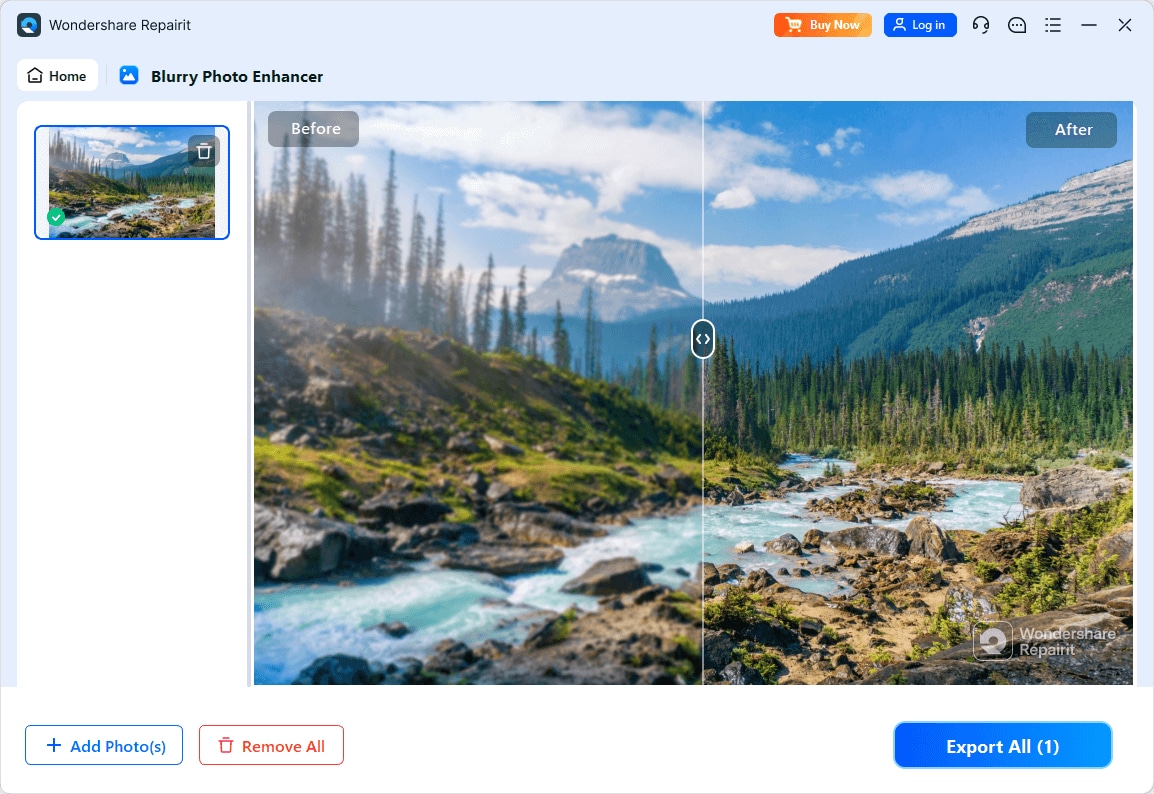
- Compare before and after views to judge sharpness, noise, and detail improvements.
- Export and save the enhanced photo back to your device.
This guided, step-based flow is helpful for beginners who still want some control over how much enhancement is applied and like seeing results before committing.
Remini workflow
- Open Remini on your phone or supported platform and select an enhancement option.
- Upload or select a selfie or portrait with a visible face.
- Tap the enhance button and wait for AI processing.
- Review the before-after comparison, usually focused on the face.
- Save or share the enhanced result directly from your device.
Remini s process is extremely streamlined, which favors speed over fine-tuning. Depending on your expectations, that can feel convenient or limiting. Users who want more say in the final look may gravitate toward Repairit Photo Enhancer s preview-centric approach.
Repairit Photo Enhancer vs Remini: Pricing and Trial Options
Pricing is subject to change, but there are typical patterns that can guide your choice.
Repairit Photo Enhancer pricing approach
- Offered as a paid tool, often with options to try core features in a limited way.
- Many users can test enhancement quality on a small number of photos before deciding whether to subscribe or purchase.
- Details such as duration, limits, and promotions may vary by region, so reviewing the official website is the most accurate way to confirm current terms.
Remini pricing approach
- Commonly uses a subscription or in-app purchase model on mobile platforms.
- Often includes a limited free tier or trial, which may add watermarks, lower resolution, or daily usage caps.
- Higher-quality or less restricted output usually requires a paid plan.
When comparing overall cost, consider how many photos you enhance each month, whether you prefer desktop or mobile, and whether your main need is face-focused enhancement or full-frame quality improvement.
Who Should Choose Repairit Photo Enhancer
Repairit Photo Enhancer is particularly suitable for people who want a flexible AI solution instead of a portrait-only enhancer.
- People handling mixed content: portraits, travel photos, events, products, and everyday scenes.
- Users who need to improve image clarity and sharpen soft or slightly blurry photos without learning complex software.
- Creators who want consistent enhancement across both faces and backgrounds, not just the main subject.
- Anyone who prefers a desktop-style, guided process with previews and export options.
Common use cases include:
- Improving clarity and texture in family albums and vacation images.
- Upscaling images for presentations, portfolios, or modest printing needs.
- Reducing noise in low-light shots while trying to keep them natural-looking.
- Enhancing portraits in a way that also makes the environment and context look better.
If your priority is a reliable, general-purpose way to enhance photo quality for many types of images, Repairit Photo Enhancer is a strong candidate.
Who Should Choose Remini
Remini tends to work best for users whose main concern is face clarity, particularly on mobile devices.
- Users focused on selfies, profile photos, and close-up portraits for social platforms.
- People wanting clearer facial details in older, low-resolution, or compressed images.
- Mobile-first users who prefer quick, one-tap enhancement rather than step-by-step workflows.
Typical use cases include:
- Making faces in group photos or selfies look sharper and more defined before sharing.
- Improving portraits taken with older smartphones or in poor lighting.
- Preparing profile photos for social networks, messaging apps, or dating platforms.
If your editing is almost entirely portrait-based and happens on your phone, Remini can be a straightforward solution, even if it is less suited for general-purpose photo enhancement.
Pros and Cons of Repairit Photo Enhancer and Remini
Repairit Photo Enhancer Pros and Cons
Remini Pros and Cons
How to Enhance Photos After Choosing the Right Tool
Once you have compared Repairit Photo Enhancer vs Remini and decided which one fits your workflow, the next step is actually enhancing your images. If you prefer a guided, desktop-friendly process that works for portraits and general photos, using Repairit Photo Enhancer is a practical way to put that decision into action.
Key Features
In practice, Repairit Photo Enhancer centers on a few capabilities that cover most common enhancement needs:
- AI-driven upscaling that can make smaller images more usable on larger screens or for basic prints.
- Sharpening and clarity tools that help bring out details in slightly soft or blurry photos.
- Denoising options to reduce grain and artifacts in high-ISO or low-light shots.
- Portrait-aware enhancement that aims to improve faces while maintaining realistic skin tones.
- Support for popular image formats so you can work with typical photos from phones and cameras.
Step-by-step guide
Step 1. Choose an AI enhancement model based on your needs, such as general enhancement, portrait improvement, or image upscaling.

Step 2. Import your photo into Repairit Photo Enhancer to begin the enhancement process.

Step 3. Apply the enhancement settings and let the AI improve clarity, sharpness, and overall image quality.
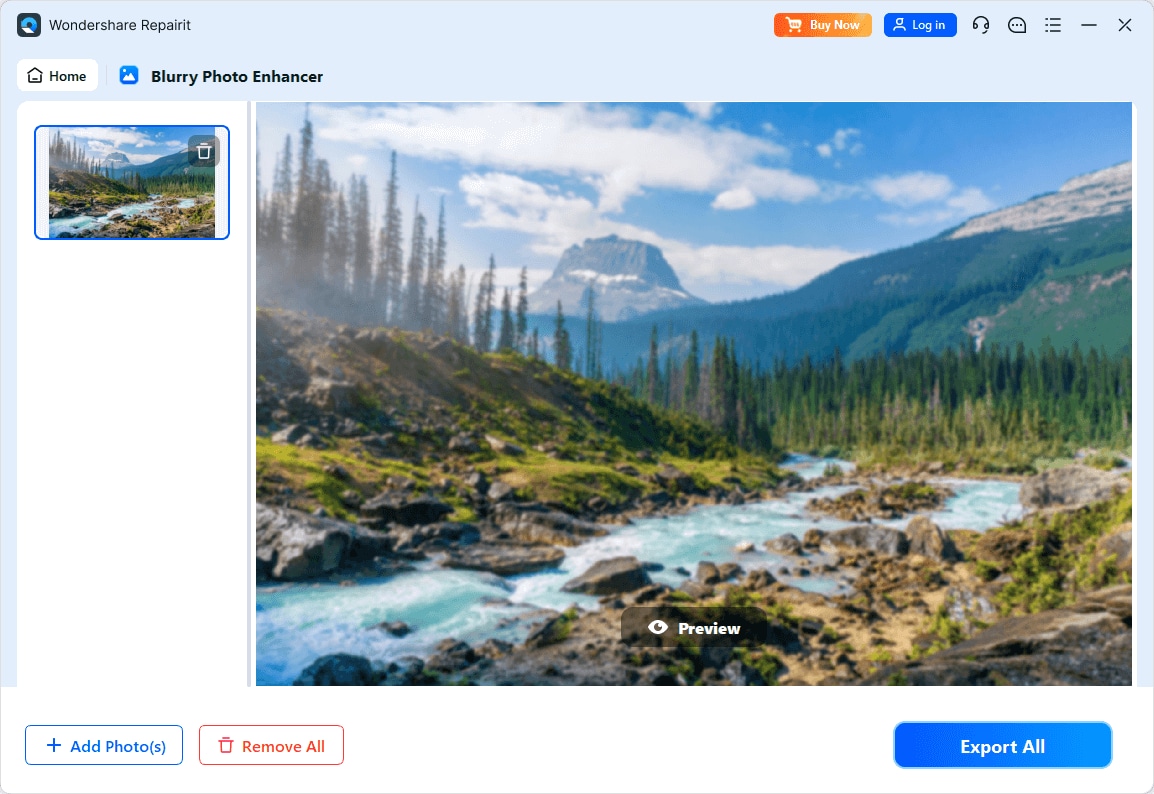
Step 4. Preview the enhanced result and save the improved photo to your device.
Final Verdict
Repairit Photo Enhancer and Remini both use AI to boost photo quality, but they do so with different priorities. Remini is centered on facial enhancement, making it a sensible option if you mainly care about improving selfies and close-up portraits on your phone. It emphasizes quick, one-tap edits and strong facial clarity, especially for low-resolution images.
Repairit Photo Enhancer, by contrast, is built for users who regularly work with a mix of portraits and non-portrait photos and want consistent improvements across the full frame. Its strengths lie in sharpening, noise reduction, and AI upscaling while maintaining a balanced, realistic look. The browser-based, preview-driven workflow is especially helpful if you want more control over the final result.
In practice, Remini may be enough if your main goal is to upgrade how faces look in social posts. If you also care about travel photos, family albums, product shots, and other everyday images, Repairit Photo Enhancer is likely the more flexible long-term choice. Trying each tool on a handful of representative photos is a sensible way to see which output style and workflow feel right for you.
Next: Repairit Photo Enhancer vs Luminar Neo
FAQ
-
1. Is Repairit Photo Enhancer better than Remini for all types of photos?
Neither tool is universally better for every situation. Repairit Photo Enhancer is generally more versatile for a mix of portraits, landscapes, and product shots, while Remini is stronger for face-focused enhancement. The right choice depends on whether you mostly improve selfies or a broader variety of images. -
2. When should I choose Remini instead of Repairit Photo Enhancer?
Choose Remini when your primary goal is to enhance facial details in selfies or close-up portraits, especially on mobile devices. It can be particularly helpful for low-resolution or compressed face photos that you want to share quickly on social platforms. -
3. Can Repairit Photo Enhancer handle portraits as effectively as everyday scenes?
Yes. Repairit Photo Enhancer can improve facial clarity, sharpness, and overall quality in portraits while also enhancing backgrounds and surrounding details. This makes it suitable when you want both the subject and environment to look cleaner and more detailed. -
4. Which tool is easier for beginners to use?
Both are beginner-friendly but in different ways. Remini offers a very simple one-tap workflow for portraits, which many new users find effortless. Repairit Photo Enhancer provides a guided, step-by-step browser workflow with previews, which helps beginners understand and control the final result. -
5. Do I need powerful hardware to run these AI photo enhancers?
In most cases, no. Repairit Photo Enhancer runs in a modern web browser, so a typical computer with a stable internet connection is usually sufficient. Remini is designed for smartphones and tablets and works on most current devices, though processing time can vary with device performance and image size.




