
Choosing between Repairit Photo Enhancer vs Luminar Neo usually comes down to how much hands-on editing you want versus how quickly you need to enhance photo quality. One focuses on streamlined AI enhancement, the other combines AI with a broader editing environment. This comparison looks at enhancement features, workflow, output quality, and pricing so you can match the tool to your real-world needs, from sharpening blurry photos and reducing noise to upscaling image resolution and enhancing portraits.
Repairit Photo Enhancer concentrates on improving clarity, resolution, and portraits with a guided interface. Luminar Neo is closer to a full editor with layers, creative looks, and AI-based adjustments. Understanding how they differ in day-to-day use will help you decide which one fits best into your photo workflow.
Enhance Photo Quality with Repairit Photo Enhancer
 Security Verified. Over 7,302,189 people have downloaded it.
In this article
- Repairit Photo Enhancer vs Luminar Neo: Quick Verdict
- Repairit Photo Enhancer vs Luminar Neo: Key Differences
- Repairit Photo Enhancer vs Luminar Neo: Comparison Table
- What Repairit Photo Enhancer and Luminar Neo Are Best For
- Repairit Photo Enhancer vs Luminar Neo: AI Enhancement Features and Capabilities
- Repairit Photo Enhancer vs Luminar Neo: Output Quality and Real-World Results
- Repairit Photo Enhancer vs Luminar Neo: Workflow and Ease of Use
- Repairit Photo Enhancer vs Luminar Neo: Pricing and Trial Options
- Who Should Choose Repairit Photo Enhancer
- Who Should Choose Luminar Neo
- Pros and Cons of Repairit Photo Enhancer and Luminar Neo
- How to Enhance Photos After Choosing the Right Tool
Repairit Photo Enhancer vs Luminar Neo: Quick Verdict
In most everyday enhancement scenarios, the key tradeoff is speed and simplicity versus deeper creative control.
Repairit Photo Enhancer is a stronger choice if you mainly want to:
- Improve image clarity and sharpen soft or slightly blurry photos.
- Upscale low-resolution images for web, social, or basic print use.
- Clean up noise and gently enhance portraits with minimal tweaking.
- Avoid layers, complex masks, or heavy adjustment panels.
Luminar Neo may fit better if you want to:
- Combine AI photo enhancement with full editing controls.
- Use layers, presets, and creative effects in the same project.
- Build a distinctive look across a series of images.
- Spend more time fine-tuning color, tone, and local adjustments.
Depending on your workflow, you might even use both: enhance quickly in Repairit for clarity and resolution, then open those files in Luminar Neo when you need more stylized editing.
Repairit Photo Enhancer vs Luminar Neo: Key Differences
The main differences between Repairit Photo Enhancer vs Luminar Neo show up in focus, workflow complexity, and how much manual control they expect from you.
- Core focus: Repairit centers on a few targeted AI enhancement tasks (upscaling, sharpening, denoising, portrait enhancement). Luminar Neo combines enhancement with broad editing tools, creative looks, and layers.
- Ease of use: Repairit is designed for a linear, task-based workflow that does not require editing knowledge. Luminar Neo offers more options and panels, which is helpful for experienced editors but may feel heavier for casual users.
- Workflow style: Repairit typically follows import -> choose enhancement -> preview -> export. Luminar Neo often follows cataloging/import -> base edits -> AI enhancement -> creative styling -> export.
- Control vs automation: Repairit leans on automation for consistent, natural-looking improvements. Luminar Neo gives more sliders and tools to micro-adjust sharpening, noise reduction, color, and local areas.
- Use cases: Repairit is oriented toward everyday users, marketers, and teams who just need better-looking images quickly. Luminar Neo better suits enthusiasts and creatives who treat editing as part of their craft.
Repairit Photo Enhancer vs Luminar Neo: Comparison Table
| Aspect | Repairit Photo Enhancer | Luminar Neo |
|---|---|---|
| Best for | Quick AI enhancement of clarity, sharpness, noise, and resolution with minimal setup. | Combined editing and enhancement with creative looks and detailed controls. |
| Ease of use | Very straightforward; a small set of focused AI options. | More complex; similar to a full-featured photo editor. |
| AI enhancement focus | Upscaling, sharpening, denoising, and portrait enhancement. | AI-assisted adjustments plus broader editing tools and presets. |
| Output style | Natural-looking improvements for typical everyday photos. | High quality with more room for stylized and creative looks. |
| Workflow | Import, choose enhancement, preview, export. | Import, edit, enhance, apply looks/layers, export. |
| Learning curve | Low; oriented toward non-editors. | Moderate; better for users familiar with editing concepts. |
| Pricing direction | Focused on enhancement features without a full editing suite. | Sold as a full photo editing application, sometimes via license or subscription. |
| Typical user | Everyday users, social media managers, teams needing quick improvements. | Enthusiast photographers and creators building more complex edits. |
What Repairit Photo Enhancer and Luminar Neo Are Best For
Both tools improve photo quality, but they shine in different situations.
Repairit Photo Enhancer is best for users who:
- Need fast, repeatable improvements to everyday images from phones or consumer cameras.
- Want to sharpen blurry photos and reduce noise without learning advanced editing techniques.
- Frequently enhance low-quality or low-resolution images for social media, listings, or presentations.
- Prefer a guided, AI-first approach rather than fine-tuning many sliders.
Luminar Neo is best for users who:
- See enhancement as one step in a broader editing process including color grading and styling.
- Want both portrait enhancement and more detailed control over lighting, color, and local adjustments.
- Enjoy building a consistent creative style using presets, layers, and effects.
- Are comfortable working in a full editing interface or ready to spend time learning it.
Repairit Photo Enhancer vs Luminar Neo: AI Enhancement Features and Capabilities
Looking at AI photo enhancer comparison, both options use AI but apply it differently.
Repairit Photo Enhancer capabilities typically include:
- AI-based upscaling to increase image resolution while aiming to preserve important details.
- Sharpening tools tuned to make soft or slightly blurry photos appear crisper.
- Denoising that reduces visible grain in low-light or high-ISO photos.
- AI portrait enhancement to refine facial details and smooth skin while targeting a natural look.
- Automatic color and contrast optimization for flat or washed-out images.
- A workflow that makes it easy to apply similar enhancements repeatedly.
Luminar Neo capabilities usually cover:
- AI-assisted adjustments that enhance overall clarity and local detail as part of an editing pipeline.
- Face-aware portrait tools that help adjust lighting, contrast, and facial features.
- Sharpening and noise reduction controls with more granular sliders for users who want to tune results.
- Resizing or upscaling within a broader editing and export workflow.
- Creative looks and presets that can both enhance and stylize in a single click.
- Layer-based and local tools for targeting enhancement to specific areas.
If you mainly need clear, automatic improvements, Repairit keeps AI focused on that job. If you want AI plus manual override and creative stylization, Luminar Neo provides more tools, at the cost of additional complexity.
Repairit Photo Enhancer vs Luminar Neo: Output Quality and Real-World Results
Output quality depends on the original photo, but you can think about results in terms of realism, consistency, and how much work is needed to get there.
With Repairit Photo Enhancer, you can typically expect:
- Consistent, natural-looking clarity and sharpness improvements on soft or mildly blurry photos.
- Noticeable reduction in noise and grain, especially in phone photos shot in low light.
- More usable upscaled images for web and social when starting from low resolution.
- Portraits that look gently refined rather than heavily retouched, when used with moderate settings.
With Luminar Neo, you can typically expect:
- High-quality results that can be pushed further toward stylized or dramatic looks.
- The ability to balance sharpness, noise reduction, and contrast manually if auto settings are not ideal.
- More variation in results depending on how you stack tools, layers, and presets.
- Portraits that can be tuned not just for clarity but for mood, color, and lighting style.
For users who want predictable enhancement with minimal trial and error, Repairit often feels more direct. For those willing to experiment with more tools to shape the final look, Luminar Neo can provide greater creative flexibility.
Repairit Photo Enhancer vs Luminar Neo: Workflow and Ease of Use
Workflow can matter as much as pure quality, especially if you handle many images.
Repairit Photo Enhancer workflow generally follows a simple pattern:
- Open the app and import your photo or photos.
- Select the AI enhancement that best matches your goal, such as upscaling, sharpening, or portrait enhancement.
- Preview the result and decide whether the enhancement level is appropriate.
- Export the final image in a common format like JPEG or PNG.
The interface stays focused on enhancement tasks, so you do not need to manage layers, masks, or complex toolsets.
Luminar Neo workflow tends to be more involved:
- Launch Luminar Neo and add your photo to a catalog or project area.
- Apply base edits such as exposure, white balance, and contrast.
- Use AI tools for details, noise reduction, and portraits.
- Optionally add creative effects, layers, or presets.
- Export in the resolution and format you need.
For users comfortable with editing software, this extra structure can be an advantage. For those who only want fast enhancement, it may feel like more steps than necessary.
Repairit Photo Enhancer vs Luminar Neo: Pricing and Trial Options
Pricing for both products can change over time, so it is important to check current offers before deciding.
Repairit Photo Enhancer pricing direction:
- Typically focuses on plans built around enhancement features rather than a full editing suite.
- Often provides ways to try core functionality before committing, so you can see how it handles your own images.
- Best to confirm details and any limitations on the official Repairit website.
Luminar Neo pricing direction:
- Commonly sold as a standalone photo editing application.
- May be available as a one-time license, subscription, or bundle depending on current promotions.
- Often includes a trial or evaluation period so you can test editing and enhancement features.
- Check its official page for the most accurate pricing and licensing information.
Because pricing, bundles, and discounts change, comparing up-to-date offers will help you understand whether you need a focused enhancer, a full editor, or both.
Who Should Choose Repairit Photo Enhancer
Repairit Photo Enhancer is a good fit if your main goal is to enhance photo quality rather than build complex edits.
- You frequently work with everyday photos that look a bit soft, noisy, or low resolution.
- You want a quick way to sharpen blurry photos and boost clarity for social posts, online listings, or internal presentations.
- You prefer AI to handle decisions about noise, sharpness, and subtle color improvements.
- You do not need layers, detailed retouching, or composite projects.
- You want results that look natural without spending a lot of time adjusting sliders.
If you often think, This photo is fine but could look clearer, Repairit is likely to feel more efficient than opening a full editor for each image.
Who Should Choose Luminar Neo
Luminar Neo becomes more compelling when you see enhancement as just one step in a larger creative workflow.
- You enjoy editing and understand concepts like exposure, color grading, and local adjustments.
- You want AI tools that speed up enhancement but still want manual control.
- You plan to build a recognizable style using presets, effects, and layers.
- You sometimes need more involved projects such as detailed landscapes, stylized portraits, or composited images.
- You prefer to organize, edit, and enhance photos in a single desktop application.
If you like shaping the whole image, from basic correction to final mood and styling, Luminar Neo aligns more closely with that way of working.
Pros and Cons of Repairit Photo Enhancer and Luminar Neo
Repairit Photo Enhancer Pros and Cons
Luminar Neo Pros and Cons
How to Enhance Photos After Choosing the Right Tool
Once you have compared Repairit Photo Enhancer vs Luminar Neo and decided which better suits your workflow, the next step is actually running your photos through an AI enhancement process. For users who prefer a guided, task-based approach, Repairit Photo Enhancer offers a practical way to improve clarity, sharpness, and resolution without dealing with full editing complexity.
Repairit Photo Enhancer Introduction
Repairit Photo Enhancer is designed as an accessible AI-driven solution for improving image quality. It focuses on key enhancement tasks such as upscaling, sharpening, denoising, and portrait enhancement so you can turn soft or low-quality images into clearer, more detailed photos.
You can learn more and access the tool at Repairit Photo Enhancer. The interface is oriented toward non-experts, but the underlying AI aims to keep results looking realistic rather than over-processed, which is important for portraits and everyday shots.
For social media posts, online stores, or personal collections, this focused workflow often feels faster than opening a full editor each time you just want better clarity and resolution.
Key Features
- AI upscaling to increase image resolution while trying to preserve key details and edges.
- Specialized tools to sharpen blurry photos and improve overall image crispness.
- Noise reduction that helps smooth grainy or low-light photos while maintaining important textures.
- AI portrait enhancement that refines facial features, skin, and lighting in a subtle way.
- Automatic color and contrast adjustment to give flat images more depth.
- A straightforward workflow that makes it easier to enhance batches of similar shots.
Step-by-step guide
Step 1. Choose an AI enhancement model based on your needs, such as general enhancement, portrait improvement, or image upscaling.

Step 2. Import your photo into Repairit Photo Enhancer to begin the enhancement process.

Step 3. Apply the enhancement settings and let the AI improve clarity, sharpness, and overall image quality.
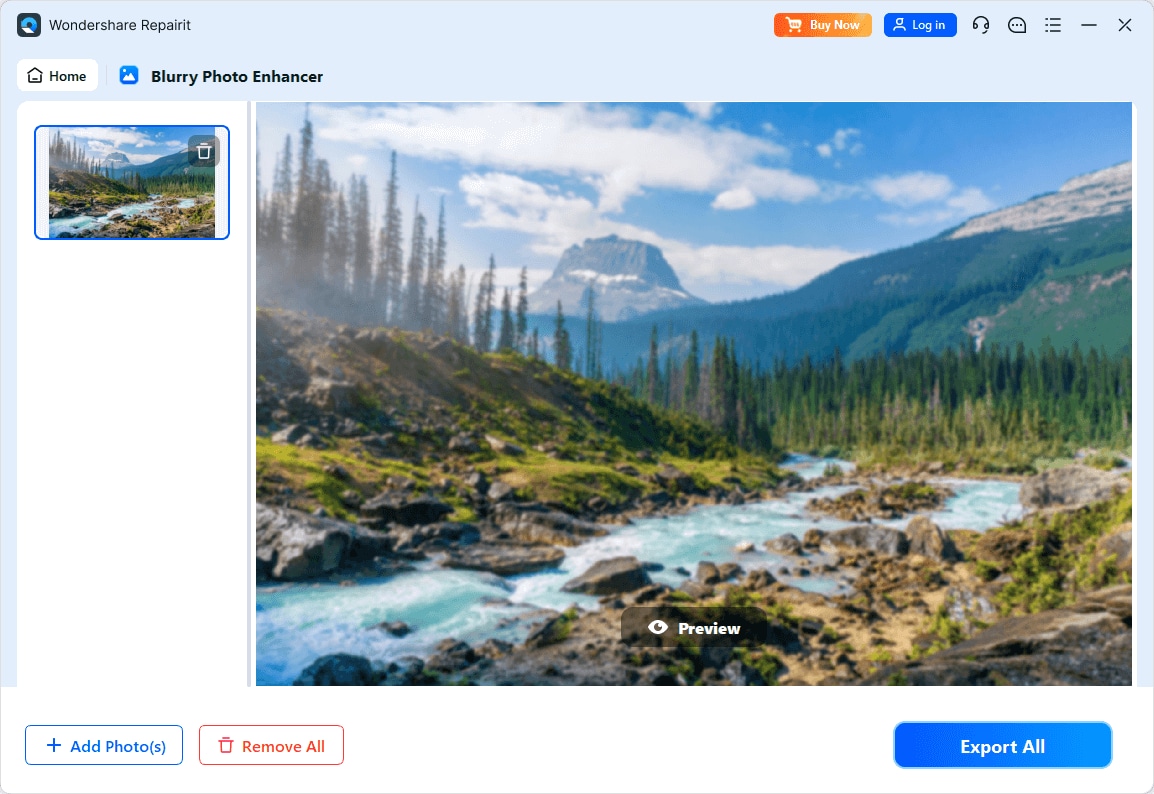
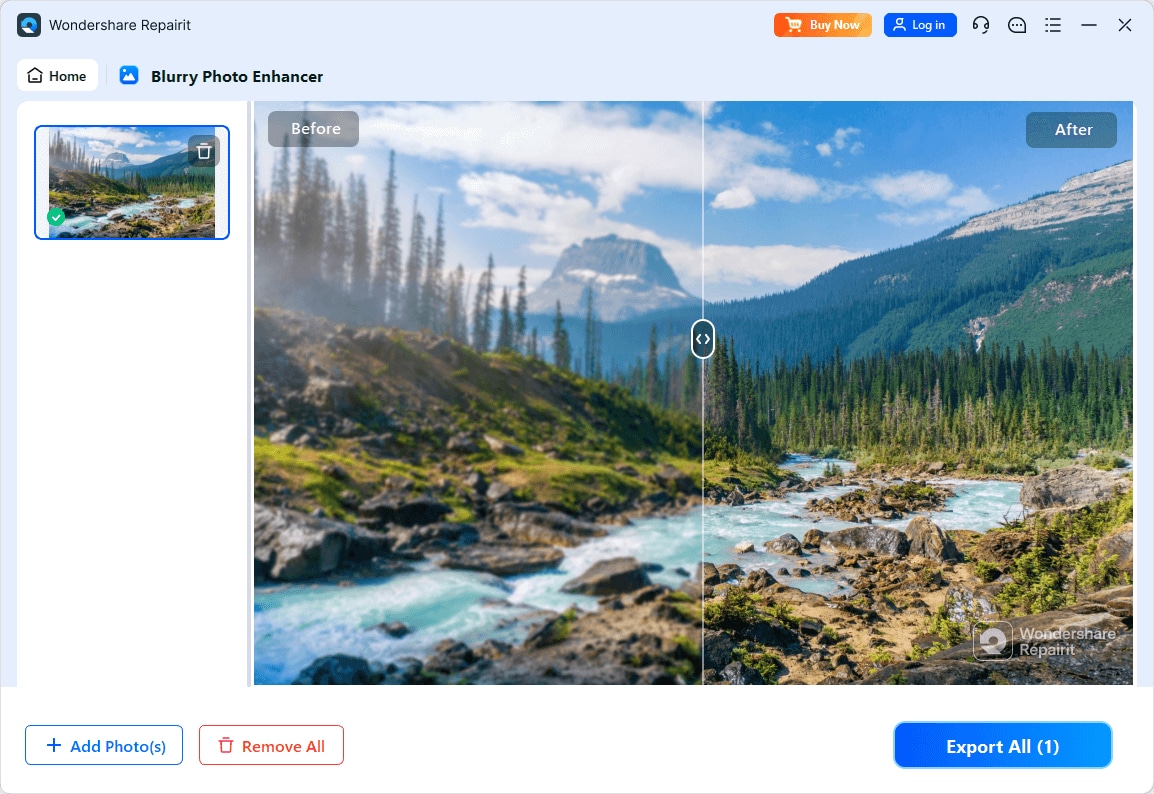
Step 4. Preview the enhanced result and save the improved photo to your device.
Final Verdict
When comparing Repairit Photo Enhancer vs Luminar Neo, the better choice depends on how you handle your photos day to day.
Choose Repairit Photo Enhancer if you mainly need to enhance photo quality online or on desktop with minimal effort: sharpening, noise reduction, resolution upscaling, and basic portrait enhancement. Its focused AI tools, simple workflow, and low learning curve make it practical for non-editors and teams processing many everyday images.
Choose Luminar Neo if you want your enhancement tool to double as a full editor, with layers, creative looks, and detailed manual controls. It suits enthusiast photographers and creators who enjoy spending more time shaping the final image beyond straightforward enhancement.
Many workflows can benefit from both: using Repairit first to improve image clarity and resolution, then turning to Luminar Neo when you need extra creative control. Thinking about how often you need fast, automatic enhancement versus deep editing will help you decide which tool should be at the center of your photo process.
Next: Repairit Photo Enhancer vs Adobe Photoshop
FAQ
-
1. Is Repairit Photo Enhancer easier to use than Luminar Neo for basic enhancements?
For most users focused on quick quality improvements, Repairit Photo Enhancer is usually easier to use. Its interface is built around a few AI tools for upscaling, sharpening, denoising, and portrait enhancement, so you can get results with fewer steps than in a full editor like Luminar Neo. -
2. Which is better for enhancing portraits, Repairit Photo Enhancer or Luminar Neo?
Repairit Photo Enhancer works well if you mainly want to refine facial details and clarity quickly with minimal adjustments. Luminar Neo may be preferable when you also want to control lighting, color grading, and creative styling in your portraits, not just straightforward enhancement. -
3. Can Luminar Neo replace Repairit Photo Enhancer if I only need image enhancement?
Luminar Neo can handle enhancement tasks, but it is designed as a broader editor. If you only need to improve image clarity, reduce noise, and upscale resolution, a dedicated tool like Repairit Photo Enhancer may feel more efficient and less complex to operate.




