
HE-AAC (High Efficiency Advanced Audio Coding) is a modern audio codec designed to deliver clear sound at very low bitrates, keeping files small while preserving detail. It matters because it lets services stream music, podcasts, and radio smoothly even on slow networks, reducing data usage without making audio sound thin or harsh. You will find HE-AAC in streaming platforms, mobile music apps, internet radio, broadcasting, and other bandwidth-sensitive use cases like wireless audio and some voice services.
Repair Corrupted Files To Save Your Data
 Security Verified. Over 7,302,189 people have downloaded it.
In this article
How HE-AAC Works
High Efficiency AAC builds on standard AAC but adds smart tools to squeeze audio into much smaller bitrates. First, it encodes the core sound using AAC, then uses Spectral Band Replication (SBR) to reconstruct high frequencies instead of storing them fully, which cuts file size. Parametric Stereo (PS) further compresses stereo information by sending a mono signal plus side data that recreates the stereo image. Together, these tricks keep streams light, reduce bandwidth, and still deliver listenable quality for music, speech, and radio-style content.
Key Features, Pros, and Cons
Main features of HE-AAC
- Combines AAC with SBR and optional Parametric Stereo for very efficient compression at low bitrates.
- Optimized for streaming scenarios such as mobile networks, internet radio, and adaptive bitrate streaming.
- Supports a wide range of bitrates from around 16 kbps for speech up to 96 kbps or higher for music.
- Backward-compatible design when used in some container formats, helping players fall back to AAC where needed.
- Designed for both stereo and multi-channel use, though it is most famous for low-bitrate stereo streams.
Pros and cons of HE-AAC
| Aspect | Details |
|---|---|
| Advantages |
|
| Limitations |
|
| Real-world performance |
|
HE-AAC vs Other Audio Codecs
When comparing HE-AAC to other popular codecs, several points stand out.
Against standard AAC (often LC-AAC), High Efficiency AAC is superior at low bitrates because SBR and PS preserve brightness and stereo while using less data. However, at medium to high bitrates (for example, 128 kbps and above), LC-AAC usually offers more natural sound and is more commonly used for downloads and offline libraries.
Compared with HE-AAC vs MP3, HE-AAC is much more efficient: a 48 kbps HE-AAC stream can sound similar to or better than a 96 kbps MP3 stream, which is why many streaming services use it behind the scenes to save bandwidth without obvious quality loss.
Opus is another efficient codec aimed at real-time communication and streaming. At low bitrates, Opus can match or beat HE-AAC for speech and some music, but support in consumer music players is less universal than AAC-based formats. For archival audio, FLAC wins on quality because it is lossless, but file sizes are large and not ideal for constrained networks. Vorbis sits somewhere between MP3 and modern codecs; it is open-source but less popular on mobile platforms.
In practice, HE-AAC is best when you need reasonable music or speech quality at the lowest possible bitrate, especially on mobile and broadcast platforms, while AAC, Opus, and FLAC may be better choices for high-fidelity listening, production, or archiving.
Compatibility and Practical Use
HE-AAC is built into many modern ecosystems, including iOS and Android devices, popular streaming services, and web players that rely on HTML5 audio. Many online radio stations transmit using High Efficiency AAC to reach listeners on mobile data and in-car systems while keeping bandwidth costs under control.
You can usually play HE-AAC content in common software such as VLC, iTunes/Music app, Windows media tools, and various browser-based players. If a device cannot decode the HE extensions, it may still play the core AAC layer, though with reduced quality. For maximum compatibility, some users convert HE-AAC to AAC, MP3, or another format using dedicated audio converters.
From a practical standpoint, HE-AAC remains highly relevant today for streaming, broadcasting, and any use case where efficiency and coverage are more important than perfect fidelity, and it will likely continue to be used alongside newer codecs for many years.
How to Use Repairit to Fix a Corrupted HE-AAC File
Repairit introduction
If your HE-AAC tracks refuse to play, skip constantly, or sound distorted, a dedicated repair tool can often recover them. Wondershare Repairit is designed to restore damaged media files, including corrupted audio file types such as HE-AAC, without requiring advanced technical skills. Its guided workflow lets you add broken files, run repairs, and export fixed versions in just a few clicks. You can explore all features and download the tool from the Repairit official website.
Key features of Repairit for HE-AAC repair
- Handles multiple audio formats, including HE-AAC, AAC, MP3, and more, to resolve issues like glitches, noise, or missing segments.
- Batch repair mode lets you process several corrupted audio file entries at once, saving time when an entire playlist or folder is affected.
- Built-in preview and flexible export options so you can confirm the repaired audio codec plays correctly before saving it to a safe location.
Step-by-step guide to fix corrupted HE-AAC files
- Add corrupted audio files
Install and open Repairit on your computer, then switch to the Audio Repair module. Click the option to add files and browse to the folder containing the damaged HE-AAC tracks. Select one or more problem files that stutter, refuse to open, or show errors and add them to the repair list so Repairit can analyze them.

- Repair audio codecs
Once your broken HE-AAC items appear in the list, start the repair task with a single click. Repairit inspects each audio codec structure, looks for header damage, missing data, or inconsistent frames, and then automatically reconstructs the stream where possible. During this phase, you simply let the engine work; progress indicators show you how each file is doing.
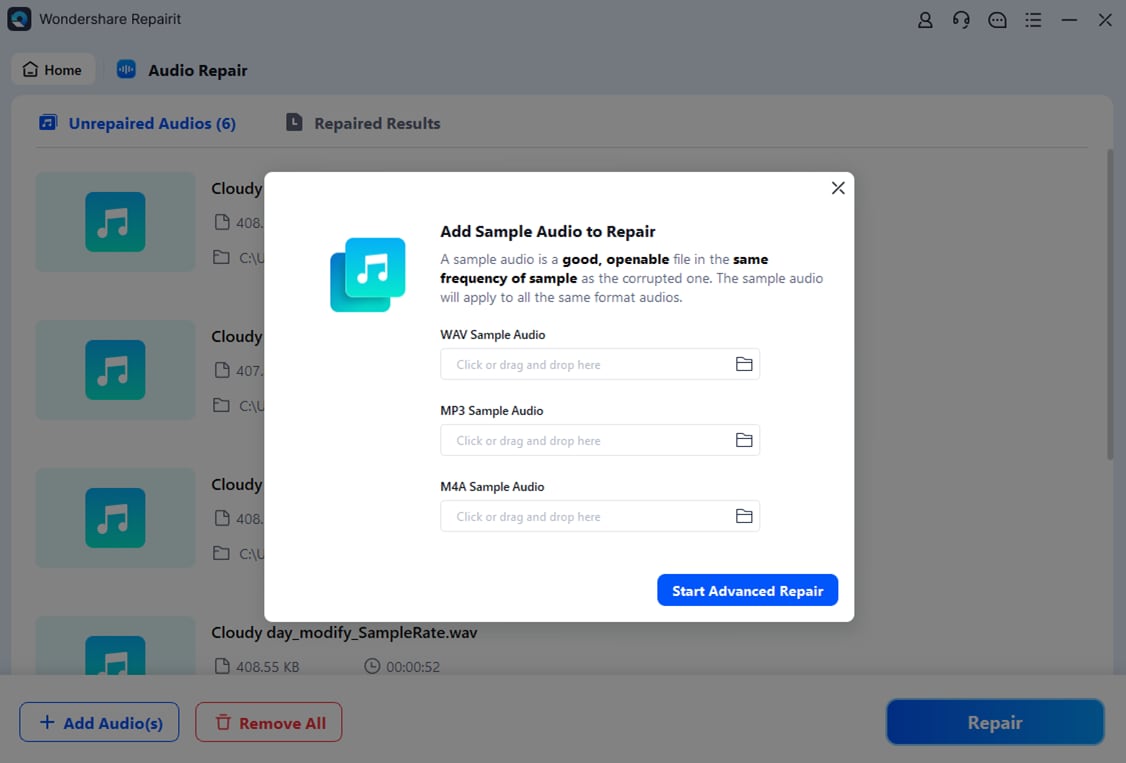
- Save the repaired audio files
When Repairit finishes processing, review the results in the preview window to confirm that your HE-AAC audio now plays smoothly from start to finish. If you are satisfied, choose an output folder and save the repaired versions. You can then listen to them in your usual players, add them back into playlists, or archive them just like any other healthy file.

Conclusion
HE-AAC is a smart evolution of AAC that brings impressive quality to very low bitrates, making it a favorite for streaming audio, online radio, and mobile listening where bandwidth and storage are limited. By combining AAC with SBR and parametric stereo, it offers a practical balance between audio quality, file size, and efficiency across real-world networks.
When your HE-AAC tracks become corrupted or unplayable, you do not have to lose them. A specialized repair solution like Wondershare Repairit can analyze the damaged audio codec, rebuild its structure, and restore stable playback, helping you protect your recordings, playlists, and broadcasts with minimal effort.
Next: What is Xhe-Aac Codec?
FAQ
-
1. What is HE-AAC mainly used for?
HE-AAC is primarily used for streaming audio where bandwidth is limited, such as online radio, music streaming services, and mobile apps. Its high efficiency allows platforms to deliver acceptable sound quality at low bitrates, reducing data usage and buffering.
-
2. Is HE-AAC better than MP3 for streaming?
For low-bitrate streaming (HE-AAC vs MP3 at the same bitrate), HE-AAC usually offers clearer, more detailed audio with fewer artifacts. MP3 becomes competitive only at higher bitrates, where many services now prefer AAC or other modern codecs instead.
-
3. Why will my HE-AAC file not play correctly?
Playback issues with HE-AAC files can come from file corruption, incomplete downloads, or limited support in your media player. Try another player first, then re-download the file. If problems persist, the corrupted audio file may need repair using software like Wondershare Repairit.
-
4. Can I convert HE-AAC to another format?
Yes. You can convert HE-AAC to AAC, MP3, or other formats using audio conversion tools. This may improve compatibility with older devices, though converting lossy-to-lossy might slightly reduce quality, so always keep a backup of the original file when possible.
-
5. How does Repairit fix corrupted HE-AAC files?
Repairit scans the damaged audio codec structure, identifies issues in headers and frames, and attempts to rebuild missing or inconsistent parts of the stream. After repair, you can preview the recovered HE-AAC audio and export a stable, playable version to your computer.




