
DTS (Digital Theater Systems) is a multi-channel DTS audio codec designed to deliver immersive surround sound in cinemas, home theaters, games, and streaming. It compresses audio while preserving rich detail, so you hear clear dialogue, powerful effects, and precise spatial cues. Because of this balance of quality and efficiency, DTS codec is widely used in Blu-ray discs, AV receivers, soundbars, and some streaming services for movies, music playback, and gaming.
Repair Corrupted Files To Save Your Data
 Security Verified. Over 7,302,189 people have downloaded it.
In this article
How DTS Works
DTS audio is a lossy compression format, meaning it reduces data size by removing audio information that is less audible to human ears. The encoder analyzes each audio channel, focuses on the most important frequencies, and discards subtle details that most listeners will not notice in typical listening environments.
By doing this, DTS codec can fit high-quality multi-channel sound (such as 5.1 or 7.1) into a smaller bitrate that suits Blu-ray discs, streaming, and broadcast. Higher bitrates usually translate into better perceived quality and cleaner surround effects, but also larger file sizes. DTS typically uses more bits than Dolby Digital at similar quality levels, which is why many users feel DTS sounds fuller and more dynamic, especially in high-end home theater setups.
In practice, the DTS bitstream is decoded by compatible hardware or software (like AV receivers, soundbars, or media players) and converted back to multi-channel PCM audio, which is then amplified and sent to your speakers. The efficiency of the compression and the robustness of the stream are crucial for movies, games, and music, where dropouts or corrupted DTS file issues can ruin the experience.
Key Features, Pros, and Cons of DTS
Main Features of DTS
- Multi-channel surround sound: DTS supports various configurations, from simple 2.0 stereo up to 5.1, 6.1, and 7.1 channels, and in extended formats (like DTS:X), object-based sound. This enables immersive, directional audio for movies and games.
- High bitrates for rich sound: DTS is known for relatively high bitrates compared with some competing codecs. This helps maintain detailed sound, strong bass, and clear high frequencies, especially in home theater systems.
- Flexible container support: DTS audio can be found in multiple containers, such as .dts, .wav, .mkv, .ts, and Blu-ray structures. This flexibility makes it common in physical media and advanced media server setups.
- Backward compatibility: Many AV receivers and players can decode both legacy DTS and newer variants, ensuring older discs and files still play correctly on modern hardware.
Pros and Cons of DTS
Advantages of DTS
Pros
High-quality surround sound with clear dialogue and powerful effects
Widely supported on Blu-ray discs, AV receivers, and home theater gear
Multiple variants (DTS-HD, DTS:X, etc.) for advanced setups and higher fidelity
Good balance between compression efficiency and audio detail
Cons
Less universal support on low-cost TVs, budget soundbars, or older streaming devices compared with AAC or Dolby Digital.
Higher bitrates mean larger files or more bandwidth than some modern codecs.
Not all streaming platforms use DTS, leading to downmixing or codec conversion.
Real-world performance
In real-world listening, many home theater enthusiasts feel DTS audio offers a slightly wider soundstage and more dynamic impact compared with some competing 5.1 formats at similar or lower bitrates. However, this benefit is most noticeable on good speakers in a properly tuned room. On everyday TV speakers or basic soundbars, differences between codecs are often subtle, and factors like mastering quality and speaker placement usually matter more than the codec itself.
DTS vs Other Audio Codecs
When comparing DTS with other popular codecs such as AAC, MP3, Opus, FLAC, Vorbis, or LC3, several factors come into play: audio quality, compression efficiency, compatibility, and best use cases.
| Codec | Key Differences vs DTS |
|---|---|
| AAC | AAC is highly efficient for streaming and mobile use, offering excellent quality at lower bitrates than DTS audio. However, AAC is usually limited to stereo or compressed multichannel in consumer streaming, whereas DTS is tailored for rich home-theater surround sound on Blu-ray and high-end systems. |
| MP3 | MP3 focuses on stereo music playback and is almost universally compatible. Compared with DTS, MP3 lacks advanced multi-channel features and is less efficient at the same audio quality. DTS is better for cinematic experiences, while MP3 remains a basic choice for music libraries. |
| Opus | Opus is a modern, highly efficient codec optimized for real-time communication (voice calls, conferencing, streaming) and low latency. It can offer impressive quality at low bitrates but is not commonly used in Blu-ray or traditional home theater setups where DTS codec is more prevalent. |
| FLAC | FLAC is lossless, preserving every bit of the original audio. It delivers perfect quality but produces larger file sizes. DTS is lossy but far smaller, making it more practical for movie soundtracks and storage-limited scenarios. FLAC is better for archival and critical music listening, while DTS is optimized for cinematic playback. |
| Vorbis / LC3 | Vorbis and LC3 focus on efficient compression for streaming and low-power devices. They can be very bandwidth-friendly, but their ecosystem for multichannel home theater is much smaller than that of DTS audio. DTS remains a stronger choice where discrete home-theater channels and AV receiver compatibility are priorities. |
In summary, if you want maximum compatibility and tiny file sizes for everyday listening, AAC or MP3 make more sense. If you aim for a cinematic, multi-channel experience, especially on Blu-ray or high-end gear, DTS and its variants are still among the best options.
DTS Compatibility and Practical Use
Today, DTS audio is primarily used in home theater and cinema environments. You will most often encounter it on:
- Blu-ray and Ultra HD Blu-ray movie discs
- AV receivers and home theater systems with DTS logos
- High-end soundbars and some gaming consoles
- Media players, HTPC setups, and NAS-based movie servers capable of passthrough
On PCs, software like VLC, Kodi, and many commercial players can decode DTS codec as long as the proper libraries are included. Many devices support bitstream passthrough, sending the raw DTS data to an AV receiver, which then performs the decoding to preserve full multi-channel quality.
To play a DTS track, you can usually:
- Use a Blu-ray player or streaming box connected via HDMI to a DTS-capable AV receiver or soundbar
- Play the file on a computer using a player that supports DTS decoding
- Transcode DTS to another format (such as AC-3 or AAC) using media converter tools if your device does not support it natively
For conversion and general use, always keep backups, as transcoding may slightly reduce quality, and a corrupted DTS file can become unplayable across multiple devices. Despite newer codecs, DTS remains relevant today in physical media, premium streaming, and enthusiast home theaters, thanks to its immersive surround capabilities and established ecosystem.
How to Use Repairit to Fix a Corrupted DTS File
Why Use Repairit for DTS Audio
If your movie suddenly loses surround sound, plays with harsh noise, or refuses to open, your DTS audio track might be damaged. Instead of deleting the file or re-downloading huge Blu-ray rips, you can use Wondershare Repairit to restore the audio stream.
Repairit is a dedicated data repair tool that can fix various media issues, including distorted, silent, or unplayable DTS tracks embedded in video files or stored as standalone audio. It automates the technical repair process so you can recover listening quality without deep codec knowledge. You can learn more and download it from the Repairit official website.
Key features of Repairit for DTS audio
- Repairs damaged or corrupted DTS audio tracks that will not play, crackle, or cut out unexpectedly.
- Supports many container formats where DTS codec is used, including common video and audio file types.
- Provides an intuitive, step-driven interface so anyone can repair a corrupted DTS file in just a few clicks.
Steps to Repair Corrupted DTS Files
- Add corrupted audio
Download and install Wondershare Repairit on your computer, then launch the program. On the main interface, choose the audio repair section and click the button to add files. Browse to the location of your damaged DTS audio files or videos containing DTS tracks, and import them into the repair list.

- Repair audio codecs
After loading your files, start the repair process. Repairit will analyze the structure of each DTS codec stream, fix header issues, rebuild damaged frames, and attempt to remove audible artifacts like clicks, pops, or sudden silence. You can monitor the progress on-screen, and once it finishes, preview the repaired audio to ensure your surround sound is back to normal.
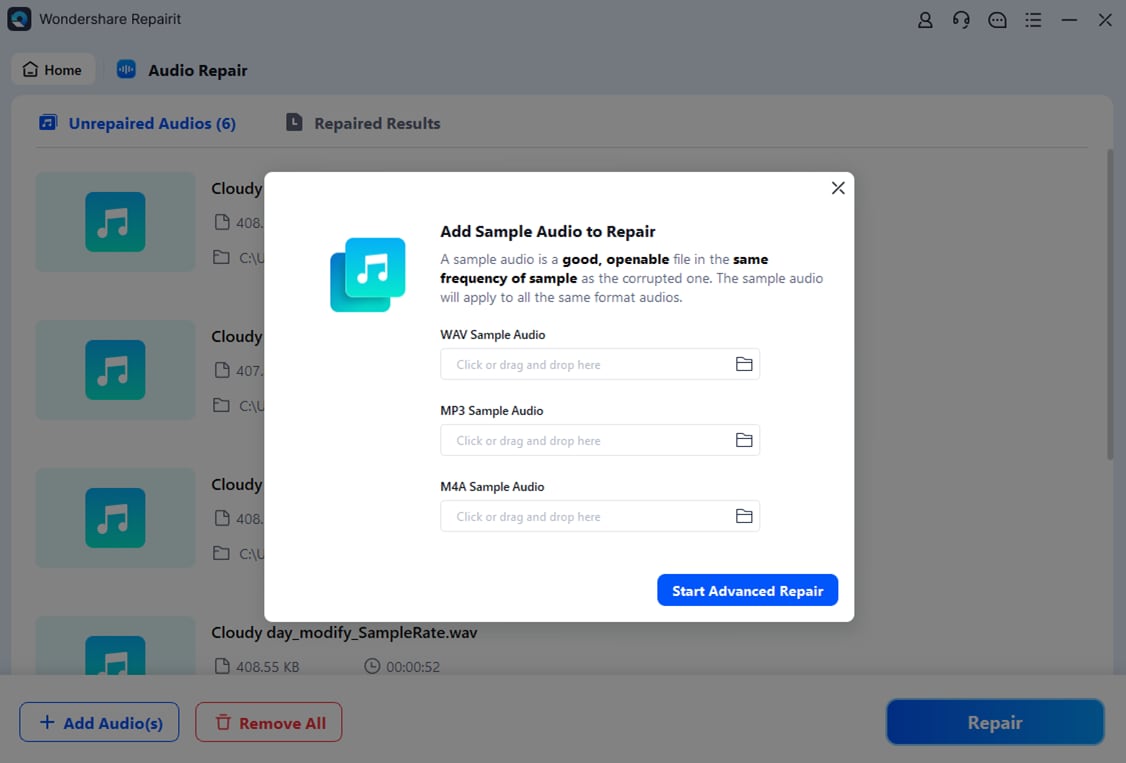
- Save the repaired audio
When you are satisfied with the preview, choose a safe destination folder and save the repaired files. Repairit will export the fixed DTS audio or the video with a repaired soundtrack without overwriting your originals, giving you a secure backup. You can then play the restored files on your usual AV receiver, media player, or computer without dropouts or distortion.

Conclusion
DTS audio remains a key technology for high-impact, cinematic surround sound. By compressing multi-channel soundtracks efficiently while preserving detail and dynamics, DTS codec delivers the immersive experience that movie lovers and gamers expect from Blu-ray, consoles, and home theaters.
Although newer codecs and streaming formats have appeared, DTS is still widely used in premium entertainment setups. If you encounter a corrupted DTS file that fails to play correctly, tools like Wondershare Repairit can help you restore the damaged audio and keep your media library in top shape with minimal effort.
Next: What is Dolby Digital/AC-3 Codec?
FAQ
-
1. What is a DTS file and how is it used in home theater systems?
A DTS file is an audio stream encoded with the DTS codec, typically containing multi-channel surround sound such as 5.1 or 7.1. It is often stored on Blu-ray discs, in .mkv/.ts containers, or as standalone .dts tracks. Home theater devices like AV receivers or soundbars decode the stream and play it through multiple speakers to create an immersive sound field. -
2. Why will my movie play video but no sound when using DTS?
This usually happens because the playback device or TV cannot decode DTS audio. In that case, you may need to enable bitstream passthrough to a DTS-capable receiver, switch to a different audio track (like AAC or Dolby Digital), or convert the DTS track to a more compatible format. If the track itself is damaged, a corrupted DTS file can also cause silence. -
3. Can I convert DTS to another audio format without losing quality?
If you convert from DTS (lossy) to another lossy codec such as AAC or MP3, there will always be some additional quality loss, though it may be hard to notice at high bitrates. Converting to FLAC preserves the current quality level but cannot restore information already removed by the original DTS compression. -
4. How do I know if my DTS file is corrupted?
Signs of a corrupted DTS file include sudden mutes, loud static, repeating loops, desynchronization with video, or the file refusing to open in players that normally support DTS. If other files play correctly on the same system, the issue is likely with the DTS data rather than your hardware. -
5. Can Wondershare Repairit fix DTS audio embedded inside a video file?
Yes. Repairit can analyze media files that contain DTS audio streams and attempt to repair issues such as missing frames, damaged headers, or unexpected noise. After the repair, you can preview the video and save a copy with the restored DTS track for smooth playback.




