
MPEG-H Audio is a next-generation audio codec created to deliver immersive, interactive, and flexible sound for modern media. It supports both channel-based and object based audio, so elements like dialogue, effects, and commentary can be mixed and personalized in real time. This makes it especially important for streaming platforms, broadcast TV, and premium home entertainment, where users expect surround sound that adapts to different rooms, speaker setups, and listening preferences.
Repair Corrupted Files To Save Your Data
 Security Verified. Over 7,302,189 people have downloaded it.
In this article
How MPEG-H Audio Works
MPEG-H Audio is part of the ISO/IEC MPEG-H standard and is designed to encode both traditional channels (like stereo or 5.1) and separate audio objects (such as a commentator or a crowd track). During encoding, the codec analyzes the content and compresses it using perceptual audio coding, keeping sounds the ear is most sensitive to while removing inaudible or redundant data. This reduces file size and streaming bitrate while preserving perceived quality.
Along with the encoded sound, MPEG h codec can store metadata that describes where each sound object should appear in 3D space and how it may be adjusted by the listener. When the content is played back, the decoder uses this metadata plus the current speaker layout or headphones profile to render an immersive sound field. This process makes immersive audio possible even at relatively low bitrates, giving a good balance of efficiency, flexibility, and quality for broadcast and streaming workflows.
Key Features, Pros, and Cons
Main features of MPEG-H Audio
The MPEG-H Audio system introduces several capabilities that go beyond older surround formats and many traditional codecs:
- Object-based and channel-based audio – Supports conventional surround channels and separate audio objects in a single mix for highly flexible production.
- Interactive listening – Listeners can change dialogue levels, select commentary tracks, or switch between language versions without needing multiple separate mixes.
- 3D and immersive rendering – Metadata-driven placement enables sound above, below, and around the listener, creating a 3D soundscape suitable for cinema-style experiences.
- Adaptation to speaker layouts – The same master can render correctly on TV speakers, soundbars, full home theater systems, and headphones.
- Efficient compression – Advanced coding keeps bitrates manageable for broadcast and streaming while maintaining high perceived audio quality.
- Next generation audio support – Forms part of various modern digital TV and streaming standards, especially in regions adopting new broadcast technologies.
Pros and cons in real-world listening
Pros
Immersive sound at modest bitrates – Optimized compression and metadata allow spacious, 3D mixes that can be streamed efficiently over typical broadband or broadcast links.
Personalized audio experiences – Viewers can adjust elements such as commentary and dialogue without affecting the rest of the mix, making content more accessible.
Flexible production workflows – A single mpeg-h file can carry multiple presentations, language options, and accessibility mixes.
Scalable to many devices – Designed to play well on TVs, set-top boxes, soundbars, mobile devices, and headphones, reducing the need for separate mixes.
Cons
More complex ecosystem – Proper use of object-based audio and interactivity requires updated production tools, knowledgeable mixing engineers, and compatible playback devices.
Limited legacy compatibility – Older hardware and some software players may not support MPEG-H Audio, requiring fallbacks or alternate streams.
Variable implementation – The full feature set (such as personalization options) may not be available in every service or region, even when the codec is technically supported.
MPEG-H Audio vs Other Audio Codecs
MPEG-H Audio belongs to a different class than many traditional codecs because it is built for next generation audio with object-based features. Here is how it compares to some commonly used codecs:
| Codec | Main characteristics vs MPEG-H Audio |
|---|---|
| AAC | Excellent general-purpose codec for streaming and downloads. Offers good efficiency and wide compatibility but is primarily channel-based. MPEG-H Audio adds immersive rendering, object-based mixes, and personalization at similar or sometimes better bitrates for complex content. |
| MP3 | Very widely compatible and suitable for music libraries but less efficient and limited to simple stereo or basic surround. MPEG h codec provides substantially better compression efficiency, higher perceived quality at the same bitrate, and advanced 3D features MP3 cannot offer. |
| Opus | Optimized for low-latency voice and interactive applications such as VoIP and gaming. Opus excels at real-time communication, whereas MPEG-H Audio is tailored more to broadcast, streaming, and premium entertainment with richer metadata and object-based sound. |
| FLAC | Lossless codec preserving every sample of the original audio, ideal for archiving and audiophile music collections. MPEG-H Audio is lossy but far more bitrate-efficient and supports immersive and interactive features that FLAC does not include by itself. |
| Vorbis | Open, royalty-free codec used in some streaming and gaming contexts. Offers good quality but is now less common. MPEG-H Audio generally delivers better spatial audio and is integrated into newer broadcast standards. |
| LC3 | Low Complexity Communication Codec optimized for wireless audio and Bluetooth LE Audio, focusing on power efficiency and robustness for earbuds and headsets. MPEG-H Audio targets high-end media distribution rather than ultra-low-power wireless links. |
In terms of audio quality, MPEG-H aims to provide cinema-like immersion through 3D sound and advanced rendering. Its compression efficiency is competitive with modern codecs like AAC and Opus at similar bitrates for complex multichannel content. For compatibility, MP3 and AAC still win due to their ubiquity, but MPEG-H is gaining ground where broadcast standards and premium streaming services adopt next generation audio solutions.
Compatibility and Practical Use
Today, MPEG-H Audio is mainly found in advanced broadcast TV systems, streaming platforms, and premium media services that want immersive, customizable sound. Some countries have adopted standards that include MPEG-H for digital terrestrial television, and many modern 4K and 8K TVs, set-top boxes, and high-end soundbars are starting to support it. Compatible streaming apps and broadcast receivers can expose interactive options that allow users to adjust levels, change commentaries, or enable accessibility mixes.
On the software side, professional tools used in broadcast, post-production, and streaming workflows are increasingly adding MPEG-H support. To play mpeg-h file content, users typically rely on:
- Smart TVs or set-top boxes that advertise MPEG-H Audio or "Next Generation Audio" support.
- Streaming apps and services that provide MPEG-H-based immersive audio tracks.
- Home theater receivers and soundbars compatible with advanced immersive formats.
- Software players or plugins that can decode the mpeg h codec and render the correct soundfield over speakers or headphones.
If you need to convert content, it is often done upstream in professional tools that can flatten object-based mixes to conventional formats like AAC or stereo for legacy devices. From a user perspective, MPEG-H remains highly relevant in regions and services that invest in immersive broadcast and streaming, and its adoption is expected to grow as more hardware supports next-generation audio standards.
How to Use Repairit to Fix a Corrupted MPEG-H Audio File
Why use Repairit for MPEG-H Audio
Because MPEG-H Audio combines compressed audio data with rich metadata, file corruption can lead to stutters, missing channels, loss of interactivity, or complete playback failure. Instead of manually trying to rebuild the stream, you can rely on a dedicated repair solution such as Wondershare Repairit. Repairit is designed to handle many forms of media corruption and guides you through repair with a simple, click-through interface. You can learn more on the Repairit official website, where the supported audio and video formats are listed in detail.
Key Repairit features for audio repair
- Specialized repair for corrupted or unplayable audio files in multiple formats, including modern codecs found in broadcast and streaming workflows.
- Automatic analysis and repair with minimal manual configuration, so you do not need deep technical knowledge of audio codec comparison or container structures.
- Preview repaired audio before saving, which lets you confirm that your restored repair mpeg-h audio result sounds clean and complete.
Step-by-step: repair MPEG-H Audio files
- Add corrupted audio
Open Wondershare Repairit and go to the Audio Repair module. Click the add or plus icon to bring up a file browser window. Locate the folder where your problematic mpeg-h audio tracks are stored, including any files that stutter, refuse to open, or show error messages in your player. Select one or more items and confirm. Repairit will list each file along with its name, size, and format so that you can double-check that every damaged clip has been included before starting the repair.

- Repair audio codecs
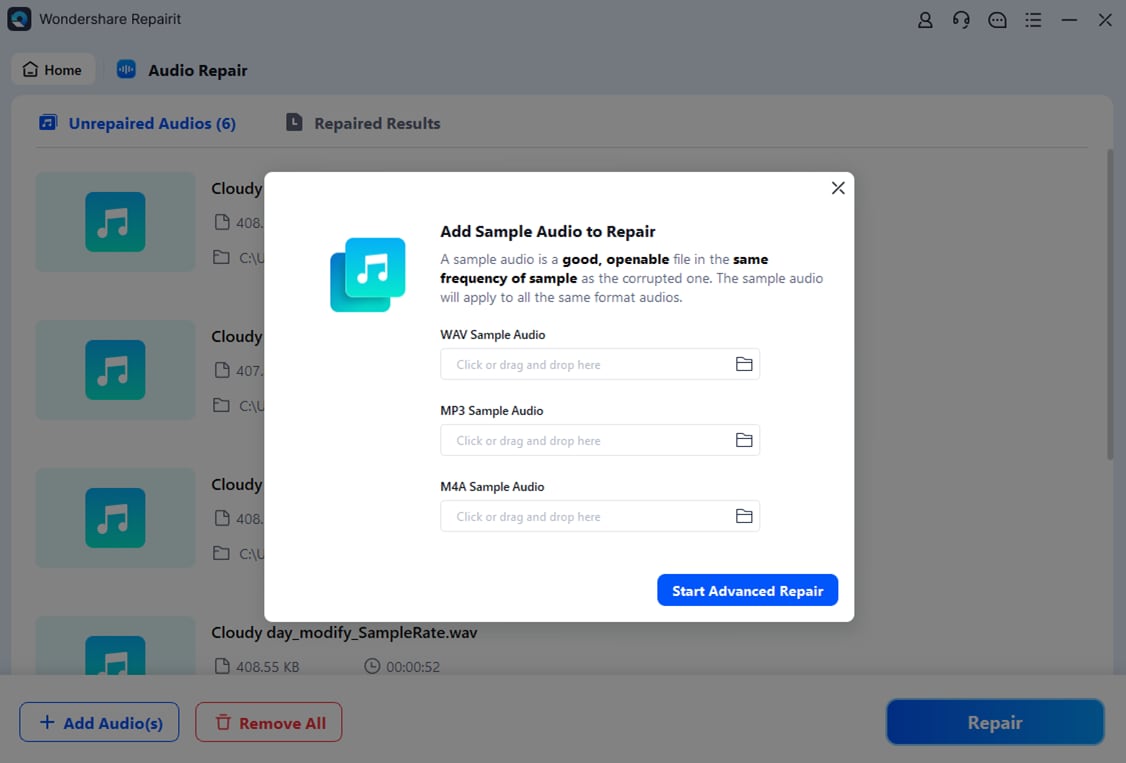
Once your corrupted files are loaded, click the repair button to begin. Repairit scans each track for structural problems in the container and audio codec comparison data, then attempts to reconstruct a healthy version of the stream. During this stage, the tool may fix issues that cause desynchronization, silence, or player crashes. You can follow the progress indicators in the interface as each fix corrupted audio task runs. When the process finishes, use the built-in preview option to listen through key sections of the restored MPEG-H tracks to make sure dialogue, effects, and ambience sound consistent.
- Save the repaired audio
If the preview confirms that the audio plays correctly, click Save or Save All to export your repaired files. Choose an output folder that is different from the original location of the damaged sources to keep a safe backup. Repairit will then write new, playable files that preserve the repaired mpeg-h audio streams and metadata as much as possible. After saving, you can open them in your preferred media player, video editor, or broadcasting workflow without encountering the errors that affected the original content.

Conclusion
MPEG-H Audio is a modern, feature-rich codec developed to power immersive, object-based sound and interactive listening experiences. It improves on traditional surround formats by combining channels and objects in a single mix, adapting easily to different speaker layouts, and giving listeners control over elements like commentary and dialogue.
As more TVs, set-top boxes, and streaming platforms support next generation audio, MPEG-H is becoming a key part of high-end home entertainment and professional broadcasting. To keep those experiences reliable, it is important to maintain healthy media files. When corruption or playback failures appear, a specialized tool like Wondershare Repairit can repair mpeg-h audio tracks, helping you recover smooth, immersive sound without deep technical troubleshooting.
Next: What is Lc3 Codec?
FAQ
-
1. What is MPEG-H Audio mainly used for?
MPEG-H Audio is primarily used in next-generation broadcast TV, streaming platforms, and immersive home entertainment systems. It enables 3D soundscapes, object-based mixes, and customizable elements such as dialogue and alternative commentary tracks, making it ideal for sports, movies, and live events.
-
2. Is MPEG-H Audio better than traditional 5.1 surround sound?
In many situations, yes. MPEG-H can carry both channel-based and object based audio, so sound designers can place audio sources more precisely around the listener and adapt mixes to different speaker setups. It also allows user personalization, which standard 5.1 formats typically do not offer.
-
3. Which devices support MPEG-H Audio playback?
Support varies by region and manufacturer. Many modern 4K/8K TVs, set-top boxes, and soundbars in markets that have adopted next generation audio standards already support MPEG-H Audio. Some streaming services and professional playback systems also include it, especially for premium content and broadcast workflows.
-
4. How does MPEG-H Audio compare with Dolby Atmos?
Both are immersive, object-based systems that deliver 3D audio. MPEG-H Audio is an open ISO/IEC standard integrated into several broadcast ecosystems, while Dolby Atmos is a proprietary format with broad support in cinemas, streaming services, and consumer hardware. Actual listening quality depends heavily on content production, mixing, and playback equipment in both cases.
-
5. How can I fix a corrupted MPEG-H Audio file?
Try playing the file in another media player or copying it to a different drive to rule out simple issues. If the problem persists, use a dedicated repair tool such as Wondershare Repairit to fix corrupted audio. Repairit can analyze the structure of the file, repair damaged sections, and export a playable version of the mpeg-h audio track.




