
LC3, or Low Complexity Communication Codec, is a modern Bluetooth LC3 audio format introduced with Bluetooth LE Audio. It is designed to replace SBC by delivering clearer sound at lower bitrates, improving battery life, and handling poor wireless conditions more gracefully. This makes the LC3 codec especially important for wireless music playback, streaming, voice calls, conferencing, and hearing aids where reliable, efficient audio is essential.
Repair Corrupted Files To Save Your Data
 Security Verified. Over 7,302,189 people have downloaded it.
In this article
How LC3 Works
LC3 compression basics
The LC3 audio format is a lossy codec that compresses sound by breaking audio into short frames, analyzing frequencies, and discarding details that human ears are least likely to notice. It then encodes the remaining information in a compact way so it can be transmitted over Bluetooth quickly. On the receiving side, LC3 decodes these frames back into a continuous audio signal. This process greatly reduces file size and bandwidth needs while keeping the perceived quality high for music, voice calls, and notifications.
Bitrate, quality, and efficiency
The Bluetooth LC3 codec is designed to provide better sound than SBC at the same or even lower bitrates. Because it is more efficient, LC3 can deliver similar quality using fewer kilobits per second, which directly reduces wireless traffic and energy use. Lower data rates help maintain stable audio when there is interference or distance between devices, and they extend battery life for earbuds, headphones, and hearing aids. In simple terms, LC3 aims to give you clearer sound while using less bandwidth and power.
Key Features, Pros, and Cons
Main features of LC3
- Default codec for Bluetooth LE Audio with built-in support for low-power wireless devices.
- Flexible bitrate range, allowing manufacturers to tune for quality, latency, or battery life.
- Robust frame design that handles packet loss and wireless glitches more gracefully than SBC.
- Optimized for both music and speech, so it works well for streaming, calls, and assistive audio.
- Designed with low computational complexity, fitting well into compact chips and embedded systems.
Pros, cons, and real-world performance
- Real-world performance
- Most users experience more stable wireless audio with fewer dropouts compared to SBC.
- At moderate bitrates, LC3 can sound close to AAC or aptX for everyday listening.
- On low-bitrate voice links, LC3 maintains speech clarity better than many legacy codecs.
Pros
Noticeably cleaner audio than SBC at typical Bluetooth bitrates.
Improved intelligibility for speech, making calls and meetings easier to follow.
Better behavior in challenging RF conditions, with fewer harsh artifacts when the signal drops..
Cons
Still a lossy codec, so it cannot fully match lossless formats for critical listening.
Requires LE Audio support, so older Bluetooth hardware cannot use LC3 via firmware alone.
Limited standalone LC3 codec playback in traditional media players today.
LC3 vs Other Audio Codecs
LC3 vs SBC and AAC
In the LC3 vs SBC comparison, LC3 is designed as the successor. At bitrates where SBC sounds dull or artifact-prone, LC3 typically remains clearer and more natural. This means manufacturers can use lower bitrates to save power without sacrificing quality. Compared with AAC, LC3 is competitive at the bitrates commonly used over Bluetooth, often offering similar perceived quality while being better optimized for LE Audio devices. However, AAC still has broader compatibility across phones, computers, and streaming apps outside of Bluetooth.
LC3 vs aptX, Opus, and others
Against proprietary Bluetooth codecs like aptX and aptX HD, LC3 focuses more on efficiency and robustness than on chasing maximum bitrates. For casual music listening on wireless earbuds, LC3 at a sensible bitrate can be comparable to standard aptX. Opus, widely used in web conferencing and streaming, can outperform LC3 at some bitrates but is not integrated as deeply into Bluetooth LE Audio. Lossless codecs such as FLAC or ALAC preserve every sample but are impractical for low-power Bluetooth links; LC3 instead balances quality and bandwidth for real-world wireless conditions.
Compatibility and Practical Use
Today, the LC3 codec mainly appears inside Bluetooth LE Audio implementations, so its compatibility depends on both your source device and your headphones, earbuds, or hearing aids. Many newer smartphones, laptops, and tablets are adding LE Audio support through new chipsets or firmware, and audio brands are releasing LE Audio-ready products that advertise LC3 in their specifications. Native playback of standalone LC3 audio format files on desktop players is still limited, but developers and professional users can work with LC3 using specialized SDKs or tools. As LE Audio adoption grows, LC3 is expected to stay highly relevant and may eventually become the default Bluetooth codec for most new devices.
How to Use Repairit to Fix a Corrupted LC3 File
Why choose Repairit for LC3 repair
When an LC3 recording from a Bluetooth device refuses to play or cuts off unexpectedly, the problem is often file corruption rather than the codec itself. Wondershare Repairit is a dedicated repair utility that analyzes damaged media files and reconstructs their playable structure for you. You can explore its features and download the desktop version from the Repairit official website. Instead of manually troubleshooting containers, headers, or audio frames, you simply load the corrupted file and let Repairit handle the technical repair steps in the background.
Key features of Repairit for LC3 and audio repair
- Repairs corrupted or unreadable audio files from multiple sources, including Bluetooth recordings, downloads, and backups.
- Automatic analysis and repair process that requires minimal technical knowledge from the user.
- Clean, guided workflow suitable for both beginners and experienced users working with various codecs.
Step-by-step LC3 repair guide
- Add corrupted audio
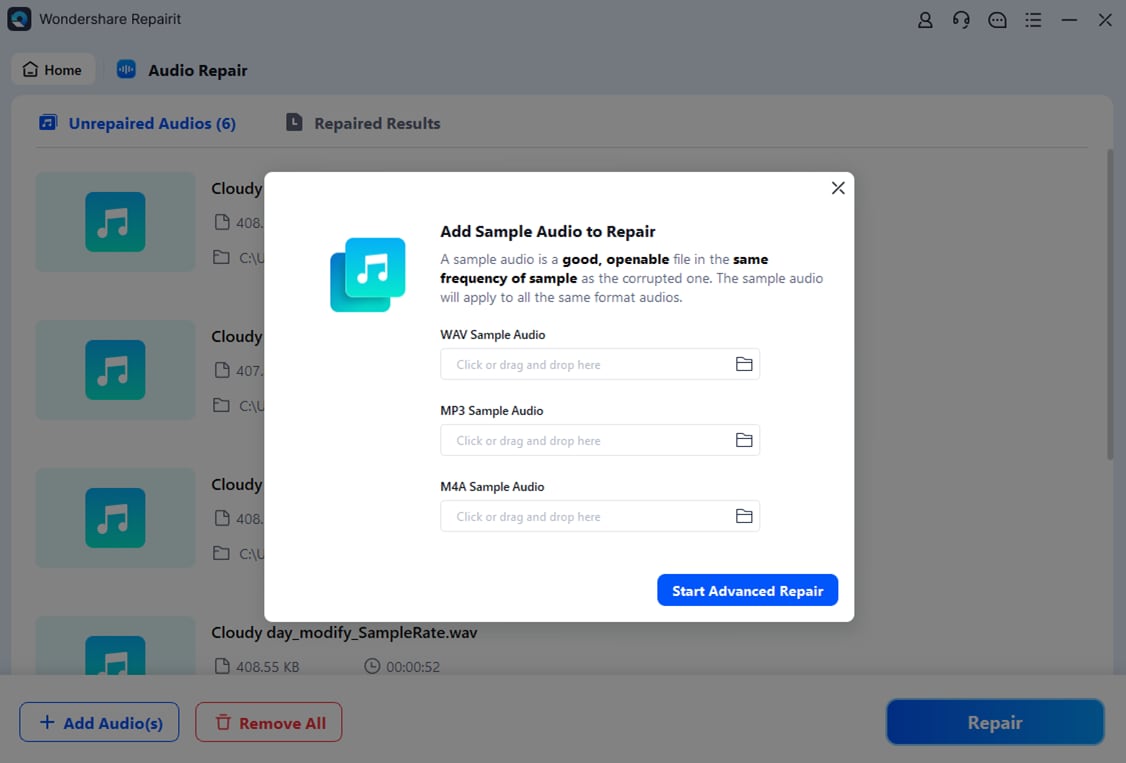
Install and open Repairit on your computer, then go to the Audio Repair section. Click the add button and browse to the problematic LC3 or other audio files you want to restore. Select one or multiple items and confirm so they appear in the repair list, with basic information like file name and size visible before you continue.

- Repair audio codecs
With the damaged files loaded, start the repair process. Repairit scans the audio structure, identifies corruption in headers or streams, and reconstructs the data where possible. During this stage, you do not need to adjust codec parameters; the tool automatically works with the existing LC3 codec or other formats. When Repairit finishes, use the preview option to confirm that the recovered audio now plays smoothly from start to finish.
- Save the repaired audio
If the preview sounds correct, choose a secure output folder on an internal drive or reliable external media. Click Save to export the repaired versions of your LC3 audio format files. Keep these new copies as your primary backups and avoid overwriting them during further editing or transfers. This habit reduces the risk of having to fix corrupted LC3 files again in the future.

Conclusion
The Bluetooth LC3 codec is a key part of the LE Audio standard, delivering better audio quality, improved robustness, and lower power use compared with SBC. It is tailored for everyday listening on wireless headphones, modern hearing aids, and other low-power Bluetooth accessories where stability and battery life matter as much as sound quality.
Even with these advantages, LC3 recordings can still be damaged by interrupted transfers, faulty storage, or sudden disconnections. When that happens, a specialized repair tool like Wondershare Repairit helps you repair LC3 audio files quickly without diving into low-level codec details. Restoring corrupted clips ensures you can keep enjoying the benefits of LC3 and LE Audio across your current and future devices.
Next: What is Alac Codec?
FAQ
-
1. What is LC3 in Bluetooth audio?
LC3, or Low Complexity Communication Codec, is the default codec for Bluetooth LE Audio. It is engineered to provide higher perceived quality than SBC at lower bitrates, reducing bandwidth and power usage while improving robustness against wireless dropouts. -
2. Is LC3 better than SBC and AAC for wireless listening?
For most Bluetooth use cases, LC3 outperforms SBC by offering clearer sound and more stable playback at similar or lower bitrates. Compared with AAC, LC3 can be competitive at the bitrates used over Bluetooth, especially on LE Audio devices, though AAC still wins in general app and platform compatibility outside of Bluetooth. -
3. Which devices support the LC3 codec today?
Support for the LC3 codec depends on both your source and your audio accessory. Many newer phones, laptops, earbuds, hearing aids, and speakers that advertise Bluetooth LE Audio or Auracast support typically include LC3, but you should confirm via device specifications or firmware release notes. -
4. Can I convert LC3 audio to another format like MP3 or WAV?
Yes, you can convert LC3 to other formats using compatible tools, but quality may drop slightly because you are re-encoding an already compressed stream. When possible, convert from the original, higher-quality or lossless source instead of from LC3 to avoid extra generation loss. -
5. How do I fix a corrupted LC3 file that will not play?
If an LC3 file becomes unplayable, avoid repeated copying or editing and use a repair tool instead. Import the damaged audio into Wondershare Repairit, run the repair process, and then preview and save the recovered output. This approach often restores files that were broken by incomplete transfers or storage errors.




