
AAC, short for Advanced Audio Coding, is a modern lossy aac audio format designed to replace MP3 with better sound at similar or lower bitrates. It matters because it helps streaming platforms, broadcasters, and device makers deliver clear music, podcasts, and dialogue while saving storage and bandwidth. You will find the aac codec almost everywhere: music streaming, online video, digital radio, wireless headphones, and phone recordings.
Repair Corrupted Files To Save Your Data
 Security Verified. Over 7,302,189 people have downloaded it.
In this article
AAC (Advanced Audio Coding) is a lossy digital audio format created as the successor to MP3. It uses more advanced psychoacoustic models and coding tools, which allow it to deliver higher perceived quality at the same bitrate or similar quality at a lower bitrate. Because of this balance between quality and efficiency, aac audio is the default choice for many streaming platforms, mobile devices, game consoles, and broadcasting systems.
How AAC Works
The aac codec compresses sound by removing audio information that is less audible to the human ear and then encoding the remaining data efficiently. Instead of storing every sample in full detail, AAC:
- Splits the audio into small time-frequency blocks.
- Analyzes which parts of the signal you can actually hear (psychoacoustic modeling).
- Allocates more bits to important sounds and fewer bits to masked or less noticeable ones.
This process reduces file size while trying to keep the difference from the original signal hard to notice. Compared with older formats, AAC can maintain clear highs, tighter bass, and fewer artifacts at a given bitrate, which is why streaming services can offer good sound even over moderate internet connections.
AAC can work with different profiles and tools (like temporal noise shaping, prediction, and joint stereo coding) to tune the trade-off between complexity and quality. When used in video containers such as MP4, it helps keep overall video file sizes smaller without dramatically hurting audio clarity.
Key Features, Pros, and Cons
Main Features of AAC
- Flexible bitrates: from low-bitrate speech up to high-fidelity music.
- Support for mono, stereo, and multichannel surround audio.
- Profiles like LC-AAC, HE-AAC, and HE-AAC v2 for different quality and bandwidth needs.
- Fine-tuned psychoacoustic model to preserve important musical details.
- Wide support inside MP4/M4A containers and streaming protocols.
Pros and Cons of AAC
Pros
Better quality than MP3 at the same bitrate, especially at low to medium bitrates.
Efficient streaming, which helps reduce bandwidth costs and buffering.
Broad compatibility across modern phones, tablets, computers, smart TVs, and car systems.
Good performance for both music and spoken content, such as podcasts or audiobooks.
Cons
It is a lossy format, so it is not ideal for archiving or professional mastering.
Some legacy devices and niche players may not fully support all AAC profiles.
Quality at very low bitrates still cannot match modern codecs like Opus in some scenarios.
Real-world Performance
In everyday use, AAC at 256 kbps is often transparent for most listeners compared with uncompressed audio. Even at 128 kbps, many people find AAC more satisfying than MP3, particularly with complex music. In streaming environments, adaptive bitrate AAC helps keep audio playing smoothly by switching quality levels as network conditions change.
AAC vs Other Audio Codecs
| Codec | Main Differences vs AAC |
|---|---|
| MP3 | Older and less efficient. At the same bitrate, AAC usually sounds cleaner with fewer artifacts, especially in the highs. MP3 still wins for legacy compatibility, but AAC is preferred in modern ecosystems. |
| Opus | Opus can outperform AAC at very low bitrates and in real-time communication (voice calls, conferencing). However, AAC still has stronger support in consumer devices, media players, and video platforms. |
| FLAC | FLAC is lossless, preserving every detail of the original audio at larger file sizes. It is ideal for archiving and critical listening. AAC trades some accuracy for smaller size and better streaming performance. |
| Vorbis | Ogg Vorbis offers good quality and is open-source, but it never achieved the same hardware adoption as AAC. AAC is more likely to work out of the box on phones, TVs, and car stereos. |
| LC3 | LC3 is a newer low-power codec used in some Bluetooth and communication scenarios. It can be more efficient for voice and low-bitrate audio, while AAC remains a go-to for general-purpose music and video playback. |
In summary, aac audio stands out as a strong all-rounder: it is not as compact as some ultra-low-bitrate options and not lossless like FLAC, but it offers a reliable blend of quality, compression efficiency, and device compatibility.
Compatibility and Practical Use
Advanced Audio Coding is deeply integrated into modern media workflows. You will encounter it in:
- Music streaming services and online radio.
- Video platforms where AAC is the default soundtrack codec in MP4/H.264 streams.
- Broadcasting standards like digital TV and DAB+ radio.
- Mobile devices for voice notes, camera recordings, and ringtone audio.
- Wireless audio systems and Bluetooth accessories that accept AAC input.
Most operating systems (Windows, macOS, iOS, Android, and many Linux distributions) can play AAC using their built-in media players or popular apps such as VLC, foobar2000, and web browsers. Files are commonly stored as .aac or .m4a, and embedded AAC tracks appear inside MP4, MOV, MKV, and other multimedia containers.
If you need to convert AAC to other formats or vice versa, you can use audio converters, editing software, or online tools. Just remember that converting between lossy formats (for example, AAC to MP3) can further degrade quality, so it is best to convert from a lossless source when possible.
Thanks to its combination of sound quality and efficiency, aac audio remains highly relevant today and is likely to stay a core part of digital media distribution for years to come.
How to Use Repairit to Fix a Corrupted AAC File
Repairit Introduction
When a repair aac audio file will not play, cuts off suddenly, or throws errors in your media player, it is often because the file structure is damaged. Wondershare Repairit offers a dedicated media repair solution that can analyze and reconstruct problematic AAC tracks with just a few clicks. You can download the latest version directly from the Repairit official website and use it to restore important recordings, music files, or audio tracks from videos.
Key Features of Repairit
- Repairs various corrupted audio formats, including fix aac file issues in batches.
- User-friendly interface with guided steps suitable for beginners and non-technical users.
- Built-in preview so you can confirm the repaired AAC sounds correct before saving.
Step-by-step Guide to Repair AAC
- Add corrupted audio files

Launch Wondershare Repairit and choose the Audio Repair feature from the main screen. Click the option to add files, then browse to the folder containing your damaged aac audio tracks. Select one or multiple files, and Repairit will queue them for processing so you can handle several issues in a single session.
- Repair audio codecs
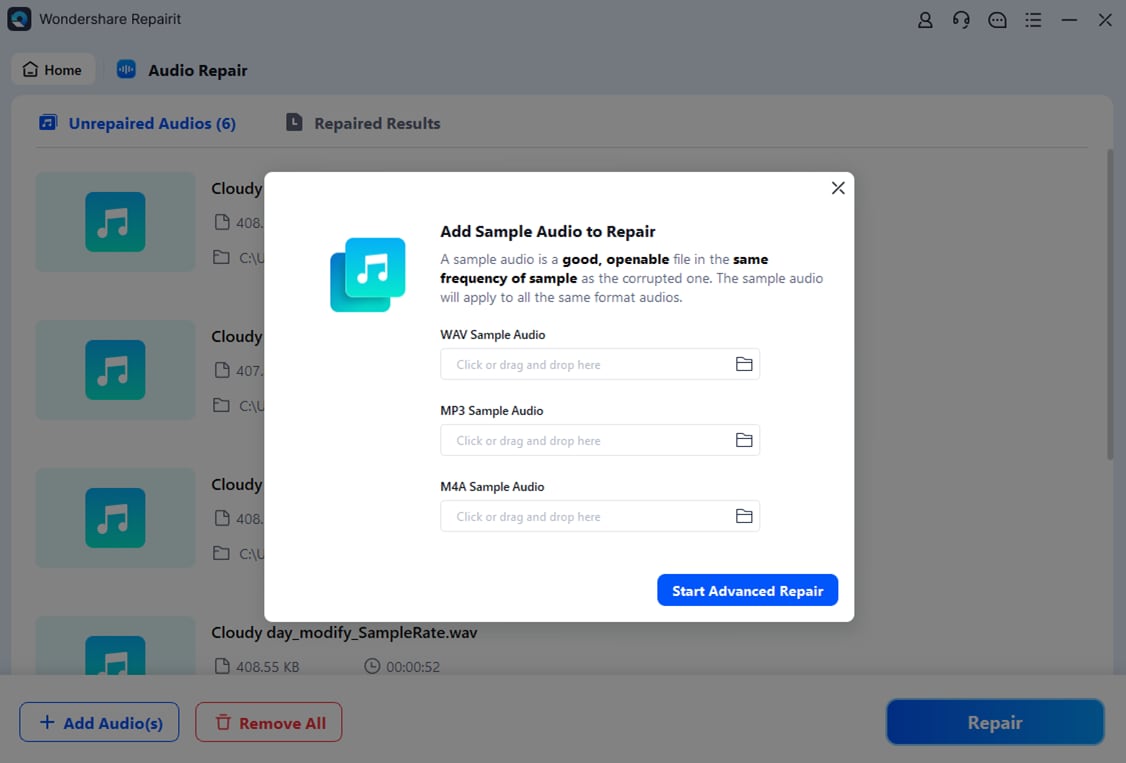
After importing your AAC files, start the repair task with one click. Repairit scans each file, detects header errors, missing data segments, and structural inconsistencies in the aac codec, then applies targeted fixes. When the repair completes, you can use the built-in audio player to listen to the restored tracks and verify that playback is smooth from start to finish.
- Save the repaired audio files

If the preview sounds right, click to export and choose a secure output folder on your computer. Repairit will save the repaired repair aac audio files there, leaving your original corrupted sources untouched. Once saved, you can open the fixed AAC tracks in your usual media players, editing software, or portable devices without playback errors.
Conclusion
AAC has become a default choice for digital audio thanks to its strong compression performance, solid sound quality, and widespread support across streaming platforms and consumer hardware. Understanding how it works and how it compares with other codecs makes it easier to choose the right format for listening, sharing, or producing content.
When an aac audio file becomes corrupted or refuses to play, specialized tools such as Wondershare Repairit can often restore it quickly. With a straightforward workflow and preview capabilities, Repairit helps you protect valuable recordings, music, and soundtracks encoded with Advanced Audio Coding.
Next: What Is HE-AAC?
FAQ
-
1. What is AAC used for?
AAC is used for music streaming, online video audio tracks, digital radio, mobile recordings, and local aac audio files on phones and computers. Its efficient compression makes it well-suited to bandwidth-limited networks and storage-constrained devices. -
2. Is AAC better than MP3?
In most listening tests, AAC delivers better perceived quality than MP3 at the same bitrate, particularly at low to medium bitrates. This efficiency is why many services choose Advanced Audio Coding as a replacement for MP3 in modern applications. -
3. Can all devices play AAC files?
Most modern devices and apps can decode the aac codec, including iOS and Android phones, major browsers, smart TVs, and popular players like VLC. However, some older hardware or specialized equipment might not support all AAC profiles. -
4. Why will my AAC file not play?
An AAC file may fail to play if it is corrupted, encoded with an unsupported profile, mismatched with the container, or associated with the wrong player. Trying a different media player can help; if issues persist, you may need to fix aac file damage using a repair tool. -
5. How can I repair a corrupted AAC file?
To repair a corrupted AAC file, use dedicated repair software such as Wondershare Repairit. Add the damaged AAC file, run the automated repair process, preview the restored audio, and then export the fixed track so it can play correctly in your usual media player.




