
Dolby Digital, also known as AC-3 or AC3 audio, is a digital audio codec designed to compress multichannel sound into manageable file sizes while preserving cinematic impact. It matters because it enables immersive 5.1 surround sound in home theaters, streaming services, broadcast TV, and DVDs without requiring massive bandwidth. From movies and TV shows to set-top boxes and some streaming platforms, Dolby Digital AC-3 has long been a standard for delivering clear, dynamic audio to living rooms around the world.
Repair Corrupted Files To Save Your Data
 Security Verified. Over 7,302,189 people have downloaded it.
In this article
How Dolby Digital/AC-3 Works
Dolby Digital AC-3 is a lossy audio codec that reduces file size by removing audio information the human ear is less likely to notice. It uses psychoacoustic models to analyze sound, then discards or reduces subtle details masked by louder sounds. The remaining data is encoded into a compact bitstream that can carry up to 5.1 channels (left, center, right, two surrounds, and a low-frequency effects channel).
Because of this compression, AC3 audio can deliver cinematic surround sound over limited bandwidth, such as DVD bitrates or broadcast TV. While some fine details are sacrificed compared with lossless formats, the codec is tuned so that most listeners perceive the result as clear and impactful, especially in living-room environments.
Key Features, Pros, and Cons
Main characteristics of Dolby Digital/AC-3
Channel layouts and surround sound
Dolby Digital supports multiple channel configurations, most famously 5.1 surround sound. It can also handle mono and stereo, making it flexible for different types of content, from broadcast TV to full-scale movie mixes.
Bitrate and compression levels
Typical Dolby Digital AC-3 bitrates on DVDs range from 192 kbps for stereo up to around 640 kbps for 5.1 surround. This balance lets producers fit high-quality audio alongside video without exceeding disc or broadcast limits.
Metadata and dynamic range control
AC-3 streams can carry metadata that describes how audio should be played back. Features like dynamic range compression enable late-night listening modes, which soften loud explosions while keeping dialogue intelligible.
Advantages and limitations
Pros of Dolby Digital/AC-3
- Delivers immersive 5.1 surround sound with relatively low bitrates.
- Highly standardized across DVDs, Blu-ray, many TVs, AV receivers, and set-top boxes.
- Reliable lip-sync and stable performance in home theater setups.
- Well-understood mastering workflows in film and TV production.
Cons and practical limitations
- As a lossy audio codec, it cannot match the transparency of modern codecs like AAC or lossless formats like FLAC at the same or lower bitrates.
- Licensing and decoding requirements mean some budget devices and software players lack Dolby Digital/AC-3 support.
- Not ideal for very low-bitrate mobile streaming compared with newer technologies.
Real-world performance
In real-world home theater use, Dolby Digital AC-3 still performs strongly. On typical speakers and soundbars, its surround imaging and dialogue clarity are more influenced by speaker placement and room acoustics than codec limitations. For critical music listening on high-end headphones, however, advanced or lossless codecs can offer audible improvements.
Dolby Digital/AC-3 vs Other Audio Codecs
Different codecs target different priorities. Here is how Dolby Digital/AC-3 compares with some popular alternatives.
| Codec | Key Differences vs Dolby Digital/AC-3 |
|---|---|
| AAC | AC-3 vs AAC: AAC is generally more efficient, offering similar or better quality at lower bitrates. AAC is widely used in streaming, mobile, and online video. However, AC-3 still dominates many disc-based and broadcast workflows where surround compatibility with legacy gear is crucial. |
| MP3 | MP3 is primarily stereo-focused and older. At comparable bitrates, AC-3 often delivers better multichannel performance and is more suitable for home theater use, while MP3 works well for simple music playback. |
| Opus | Opus is a modern, highly efficient codec favored for online voice and interactive applications. It can outperform AC-3 in low-latency and low-bitrate scenarios but is not as standardized across consumer AV receivers and legacy TVs. |
| FLAC | FLAC is lossless, preserving every bit of the original audio. It offers higher quality but much larger file sizes. FLAC is great for music archiving and audiophile listening, while Dolby Digital trades some precision for smaller, transmission-friendly files. |
| Vorbis | Vorbis is an open-source lossy codec used in some streaming and gaming platforms. It can be more efficient than AC-3 at certain bitrates but lacks the same level of hardware decode support in living-room gear. |
Overall, Dolby Digital AC-3 remains a smart choice when you need reliable 5.1 surround sound on legacy and modern home cinema hardware. Newer codecs often win on bitrate efficiency or niche use cases, but few rival AC-3's combination of maturity, predictability, and device compatibility for movies and TV.
Compatibility and Practical Use
Where AC-3 is commonly used
- DVDs and many Blu-ray discs as a primary or fallback surround track.
- Broadcast TV and cable/satellite transmissions in various regions.
- Streaming platforms that offer older catalog titles or specific Dolby-licensed tracks.
- Game consoles, set-top boxes, and media streamers outputting 5.1 audio over HDMI or optical connections.
Supported devices and software
Most AV receivers, soundbars, and home theater-in-a-box systems natively decode Dolby Digital/AC-3. Many smart TVs, Blu-ray players, and set-top boxes can pass through AC-3 audio to an external receiver. Software players like VLC, Kodi, and some web-based players can decode AC-3 when the appropriate codecs are installed.
How to play or convert AC-3 audio
- If a device cannot decode AC-3, you can often enable "bitstream" or "pass-through" on the player and let an AV receiver handle decoding.
- When AC-3 is not supported at all, tools like FFmpeg-based converters can transcode AC3 audio into AAC or stereo PCM while preserving sync with video.
- For editing, some NLEs import AC-3 directly, while others convert it to an internal format for timeline work.
Is Dolby Digital/AC-3 still relevant?
Yes. Even as newer formats emerge, Dolby Digital AC-3 remains deeply embedded in existing discs, broadcasts, and hardware. Its broad compatibility and proven reliability mean it will likely stay relevant for years, particularly in home theater environments where surround sound is key.
How to Use Repairit to Fix a Corrupted Dolby Digital/AC-3 File
Why choose Repairit for AC-3 repair
When a Dolby Digital/AC-3 track becomes distorted, goes silent, or refuses to play, the issue is often structural corruption inside the file rather than a simple codec problem. Wondershare Repairit offers a dedicated media repair engine that analyzes and rebuilds damaged audio streams, including AC3 audio. You can learn more and download the tool from the Repairit official website.
Repairit is designed for non-technical users: you load your corrupted files, let the software process them, then preview and save the fixed versions. This makes it ideal when you want to recover important home videos, movie rips, or recording projects that rely on Dolby Digital AC-3 soundtracks.
Key features of Repairit for AC-3 audio
- Repairs corrupted or unplayable AC3 audio and other formats using an intuitive, wizard-style workflow.
- Supports batch repair to process multiple Dolby Digital/AC-3 files in a single run.
- Provides a built-in preview so you can confirm the repaired track plays smoothly before saving.
Step-by-step: Fix corrupted Dolby Digital/AC-3 audio with Repairit
- Add corrupted audio
Install and open Wondershare Repairit, then switch to the Audio Repair section. Click the option to add files and browse to your damaged Dolby Digital AC-3 tracks, whether they are standalone .ac3 files or embedded in video containers. You can load several problematic clips at once to save time.

- Repair audio codecs
After importing, select the listed items and start the repair process. Repairit will scan each file, detect structural issues in the Dolby Digital/AC-3 stream, and attempt to reconstruct missing or damaged segments so that players can decode them again without errors, dropouts, or noise.
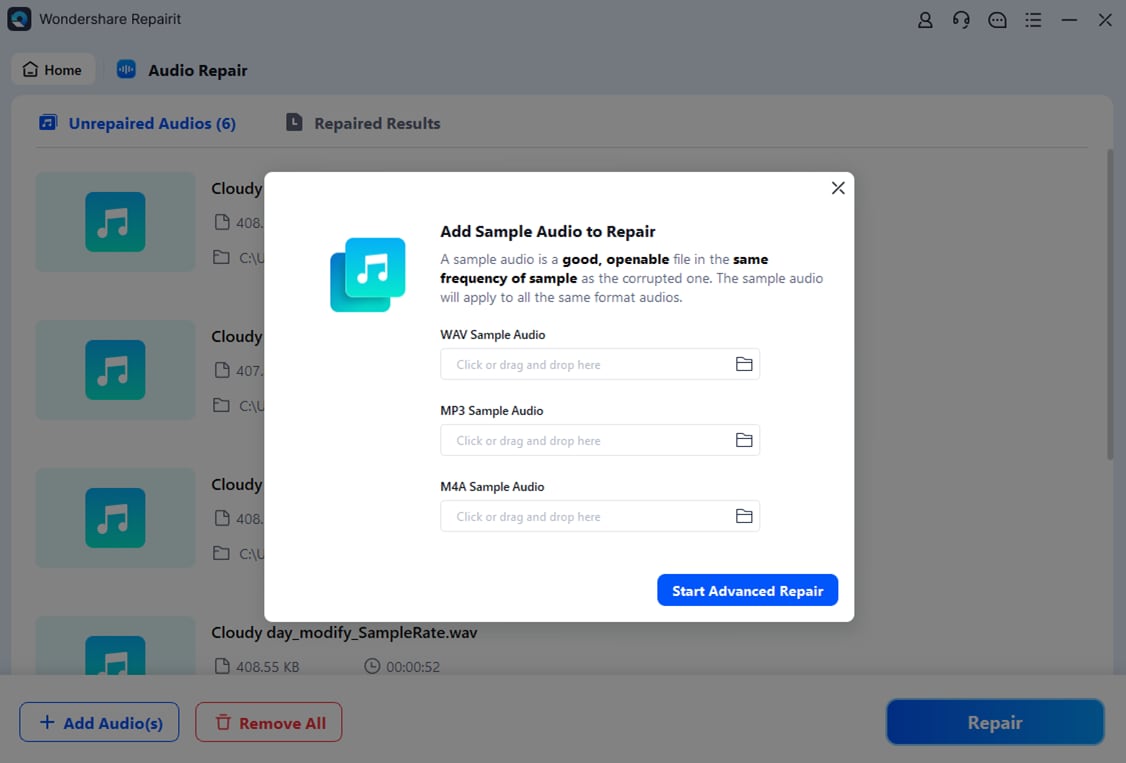
- Save the repaired audio
When Repairit completes the analysis, use the preview feature to listen to the restored AC3 audio and verify that dialogue, effects, and music sound normal. If you are satisfied, choose an output folder and save the repaired versions. You can then play them in your preferred media player, transfer them to your home theater system, or remux them back into video files if needed.

Conclusion
Dolby Digital/AC-3 has earned its place as a foundational surround sound codec for movies, TV, and home theater audio. By combining efficient compression with robust multichannel support, it delivers engaging soundtracks over the bandwidth limits of discs, broadcasts, and many streaming services.
Although newer codecs like AAC and Opus may offer better efficiency in some scenarios, Dolby Digital AC-3 remains highly relevant thanks to its vast installed base and broad compatibility. When valuable AC-3 content becomes corrupted, using a specialized repair tool such as Wondershare Repairit is often the fastest way to restore clean, playable audio without re-downloading or re-editing the original source.
Next: What is AAC Codec?
FAQ
-
1. What is Dolby Digital/AC-3 primarily used for?
Dolby Digital/AC-3 is mainly used to deliver 5.1 surround sound in DVDs, Blu-ray discs, broadcast TV, and many streaming titles. It carries separate channels for dialogue, music, effects, and low-frequency bass to create an immersive home theater experience.
-
2. Why will my AC-3 audio not play on some devices?
Some TVs, phones, or budget media players do not include licensed Dolby Digital AC-3 decoders. In such cases, you may need to install a compatible player (like VLC), send audio via bitstream to an AV receiver, or convert the AC3 audio to AAC or PCM.
-
3. Is Dolby Digital the same as AC-3?
Yes in everyday use. Dolby Digital is the marketing name, while AC-3 is the technical specification of the codec. Most people use the terms interchangeably to describe the same surround sound format.
-
4. How can I fix a corrupted Dolby Digital/AC-3 track?
First try playing the file in another media player or re-downloading it. If the problem persists, use a repair tool like Wondershare Repairit to scan and rebuild the damaged Dolby Digital/AC-3 stream so it becomes playable again.
-
5. Is Dolby Digital/AC-3 better than AAC for streaming?
For pure efficiency at low bitrates, AAC usually wins. However, Dolby Digital AC-3 is still favored where legacy surround sound compatibility matters, such as older AV receivers and some set-top boxes. The better choice depends on your devices and whether you need multichannel output.




