
Opus is a modern, open-source audio codec designed for real-time communication and high-quality streaming. It efficiently compresses audio so that voice calls, music playback, live broadcasting, and gaming chat sound clear even on limited bandwidth. Because the Opus format can adapt to different bitrates and network conditions, it has become a core technology behind many VoIP apps, conferencing platforms, and online streaming tools used today.
Repair Corrupted Files To Save Your Data
 Security Verified. Over 7,302,189 people have downloaded it.
In this article
How Opus Works
The Opus codec compresses audio by splitting sound into small frames and encoding them with advanced mathematical models. It combines two core technologies: a speech-oriented codec (SILK) and a music-oriented codec (CELT). Opus can switch between them or blend them depending on the content, so speech sounds crisp and music remains detailed.
To shrink file size, Opus removes audio data that the human ear is less likely to notice, then packs the remaining information efficiently. It supports very low to high bitrates (from about 6 kbps up to 510 kbps), so creators can balance audio quality with bandwidth or storage limits. This adaptability makes Opus extremely efficient for online calls, live streams, and cloud-based recordings.
Key Features, Pros, and Cons
Main features of Opus
- Wide bitrate range suitable for narrowband voice up to full-band, high-fidelity music.
- Very low latency, which is crucial for responsive VoIP calls, gaming chat, and live performances.
- Variable bitrate (VBR) and constant bitrate (CBR) modes for flexible streaming and storage.
- Support for mono, stereo, and multichannel audio in common containers such as OGG or WebM.
- Open and royalty-free standard, making it attractive for developers and platforms.
Pros and cons of Opus
Pros
Excellent quality at low bitrates, especially for speech and mixed content.
Fast encoding and decoding, enabling real-time communication with minimal delay.
Robust performance over unstable networks, with built-in features to handle packet loss.
Open standard with wide adoption in modern web technologies and communication apps.
Cons
Legacy hardware players and older car stereos often lack native Opus audio support.
Music download stores and traditional DJ software still center on formats like MP3, AAC, or FLAC.
Real-world performance
In real-world use, Opus performs impressively well. Voice calls remain intelligible and natural even when bandwidth drops, and music streamed with Opus at modest bitrates often rivals or beats older formats. For online games or remote meetings, its low latency means conversations feel more natural, with fewer awkward pauses. Many users never realize they are listening to compressed Opus audio because the artifacts are minimal at typical streaming bitrates.
Opus vs Other Audio Codecs
Understanding how Opus vs MP3 and Opus vs AAC compare helps you choose the right format for your needs. Opus also competes with lossless formats like FLAC and open codecs such as Vorbis.
| Codec | Audio quality & efficiency | Compatibility & best use cases |
|---|---|---|
| Opus | Excellent quality at low to medium bitrates, optimized for speech and streaming; low latency. | Widely supported in browsers, VoIP apps, conferencing tools, and some players; best for calls, streaming, gaming chat, and bandwidth-limited music. |
| MP3 | Older codec; acceptable quality but less efficient than modern alternatives at the same bitrate. | Near-universal playback support on devices, cars, and legacy systems; best for maximum compatibility and offline music libraries. |
| AAC | Better quality than MP3 at many bitrates; widely used for music streaming and video platforms. | Strong support on phones, tablets, and streaming services; good for music, podcasts, and video soundtracks. |
| FLAC | Lossless compression, preserving exact original audio; larger file sizes than Opus, AAC, or MP3. | Popular for archiving and hi-fi listening; supported by many modern players, but not ideal for low-bandwidth streaming. |
| Vorbis | Open and more efficient than MP3; generally outperformed by Opus. | Found in some older games and applications; less common in new projects as Opus becomes the preferred open codec. |
In direct listening tests, Opus vs MP3 at the same bitrate often favors Opus, with clearer highs and fewer compression artifacts. Compared to AAC, Opus tends to excel at speech, low bitrates, and interactive uses like chat apps, while AAC remains popular for consumer music streaming and mobile playback. Unlike FLAC, which aims for perfect fidelity regardless of size, Opus prioritizes small files and low delay, making it ideal for modern networked audio.
Compatibility and Practical Use
Today, the Opus format is heavily used behind the scenes in VoIP services, video conferencing platforms, web browsers, and online gaming communities. Many web technologies, such as WebRTC, use Opus audio as a default codec for voice and video chat.
On the device side, Opus playback is supported by numerous Android apps, desktop players like VLC and foobar2000, and modern web browsers including Chrome, Firefox, and Edge. Some iOS apps offer Opus support through integrated libraries, even if the default system player does not recognize .opus files directly.
To use or convert an Opus codec file in practice, you can:
- Play it directly using compatible apps (e.g., VLC, specialized music players, or browser-based players).
- Transcode it to MP3, AAC, or FLAC when you need legacy compatibility, such as car stereos or older media devices.
- Import it into recording or editing workflows via conversion tools if your DAW does not natively support Opus.
Despite not being universal on older hardware, Opus is absolutely still relevant today. In fact, it is one of the leading choices for real-time communication, browser audio, and bandwidth-conscious streaming, and its adoption continues to grow.
How to Use Repairit to Fix a Corrupted Opus File
Why use Repairit for Opus repair
When an Opus audio file becomes corrupted, it may refuse to play, cut off suddenly, or produce only noise. Instead of discarding important recordings, you can use Wondershare Repairit to attempt recovery. Repairit is a dedicated file repair tool that focuses on damaged media, including formats like the Opus format, and guides you through repair with a clear, click-based workflow. You can explore more details and download options on the Repairit official website.
Key features of Repairit for Opus audio
- Specialized repair for damaged or unplayable audio files across multiple formats, including Opus audio.
- Automatic analysis of file corruption, reducing the need for complex settings or technical knowledge.
- Step-by-step, guided interface so beginners can complete repair Opus audio tasks in just a few clicks.
Step-by-step: repair corrupted Opus
- Add corrupted audio

- Repair audio codecs
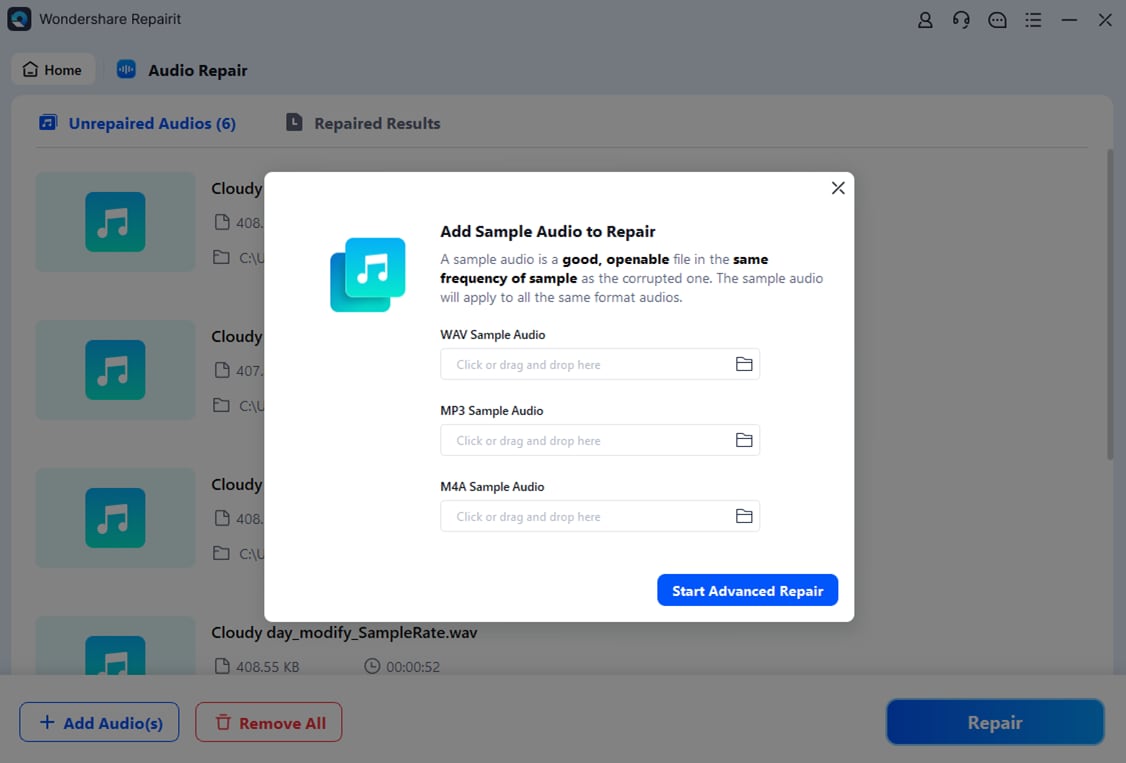
- Save the repaired audio

Conclusion
The Opus codec delivers a rare combination of flexibility, efficiency, and quality. Designed for real-time communication, it handles both speech and music gracefully while keeping file sizes and latency low. That is why many modern apps for conferencing, streaming, and gaming now rely on the Opus format behind the scenes.
If a valuable Opus audio recording becomes corrupted, it does not necessarily mean the content is lost. Tools like Wondershare Repairit can analyze and rebuild damaged files, helping you rescue important calls, interviews, or streams. With the right repair workflow, you can confidently keep using Opus while maintaining access to your recordings.
Next: What is FLAC Codec?
FAQ
-
1. What is an Opus file used for?
An Opus file is commonly used for voice calls, video conferencing, live streaming, gaming chat, and music playback where low latency and efficient compression matter. Many communication apps and browsers use Opus audio as their default codec for real-time conversations. -
2. Is Opus better than MP3 for streaming?
In most streaming scenarios, Opus vs MP3 comparisons favor Opus. At the same bitrate, Opus typically offers clearer sound and lower delay than MP3, especially for speech and interactive content. MP3 still wins for legacy compatibility, but Opus is more efficient for modern online use. -
3. How can I play Opus files on my phone?
Many Android media players and some third-party iOS apps support the Opus format directly. If your default player cannot open .opus files, install a compatible player such as VLC or another app that lists Opus support, or convert the file to a more common format like MP3 or AAC. -
4. Why will my Opus file not play?
If an Opus audio file will not play, it may be corrupted, incomplete, or stored in a container your player does not recognize. Try opening it with a different player first. If the issue persists, the file might be damaged and you can attempt to repair it with tools like Wondershare Repairit. -
5. How do I fix a corrupted Opus recording?
To fix a corrupted Opus recording, open Wondershare Repairit, add the problematic files in the Audio Repair module, run the repair process, and then save the successfully restored versions. This workflow can resolve structural errors and make previously unplayable Opus codec files accessible again.




