
AC-4 is a next-generation audio codec developed by Dolby to deliver efficient, high-quality sound for modern media. It matters because it can provide immersive, customizable audio while using less bandwidth than older formats, making it ideal for streaming platforms, digital TV, and mobile devices. You will most often encounter AC-4 audio in UHD TV broadcasts, OTT streaming services, and advanced home theater systems, where it powers clearer dialog, surround sound, and personalized listening experiences.
Repair Corrupted Files To Save Your Data
 Security Verified. Over 7,302,189 people have downloaded it.
In this article
How AC-4 Works
AC-4 encoding and compression basics
The AC4 codec compresses audio by analyzing the sound, removing inaudible details, and representing the remaining content more efficiently. Instead of storing every waveform sample, it uses psychoacoustic models to keep what your ears actually notice, plus metadata that describes how sounds should be positioned and mixed. It supports both traditional channel-based audio (like 5.1 surround) and object-based audio, where individual elements such as dialog or effects are encoded as separate objects that can be mixed differently on each device.
Efficiency, bitrate, and audio quality
Dolby AC-4 was built to deliver high-quality audio at lower bitrates than older codecs like Dolby Digital and some AAC profiles. That means smaller file sizes and less bandwidth use for streaming, while still preserving clarity and surround effects. For a listener, this translates into fewer buffering issues, more consistent sound on mobile networks, and room for extra features like alternate languages or accessibility mixes within the same bit budget.
Key Features, Pros, and Cons
Core features of AC-4
- Object-based audio support for immersive and flexible sound scenes.
- Advanced dialog control, allowing clearer speech and custom dialog levels.
- Efficient compression for broadcast and streaming, even at low bitrates.
- Support for multiple presentations (languages, accessibility tracks, commentary) in one stream.
- Designed for next-generation TV standards such as ATSC 3.0 and DVB.
Pros and cons in real-world use
Pros
Better compression efficiency than many legacy codecs, reducing bandwidth and storage needs.
Improved intelligibility of dialog, especially on TVs and soundbars.
Flexible personalization options, such as selecting preferred audio mixes or boosting certain elements.
Good scalability from tiny mobile speakers to full home theaters.
Cons
Limited compatibility with older devices and media players that do not support AC-4 compatibility.
Primarily found in broadcast and streaming ecosystems, not common in downloaded music libraries.
Some tools and editors still focus on more established codecs like AAC and MP3, which can complicate workflows.
In practice, AC-4 delivers stable, high-quality audio over constrained networks and is particularly strong in TV and streaming environments. However, users may run into playback problems when using legacy hardware, unsupported apps, or when the AC-4 audio stream becomes corrupted.
AC-4 vs Other Audio Codecs
When comparing AC-4 to other codecs, it helps to consider sound quality, compression efficiency, compatibility, and best use cases.
| Codec | Main characteristics and best use cases |
|---|---|
| AC-4 | High efficiency, object-based audio, and advanced metadata make it ideal for broadcast TV, UHD streaming, and immersive home theater setups. Optimized for future-focused standards and interactive features. |
| AAC | Very widespread support across phones, browsers, and media players. Good audio quality at moderate bitrates. Often used for music streaming, online video, and general-purpose audio where compatibility is critical. |
| MP3 | Older but universally compatible. Adequate quality at higher bitrates, but less efficient than AC-4 vs AAC or other modern codecs. Common for legacy music collections and simple playback devices. |
| Opus | Highly efficient, low-latency codec popular in real-time apps like VoIP, conferencing, and some streaming platforms. Excellent at variable bitrates but less present in traditional TV broadcast workflows. |
| FLAC | Lossless codec that preserves every bit of the original audio, usually at much higher bitrates and file sizes. Best for archiving and hi-fi music listening, not for bandwidth-limited broadcasting. |
Compared with AAC and MP3, AC-4 vs Dolby Digital and Dolby Digital Plus shows significant gains: you can often achieve similar or better quality at lower bitrates, alongside features such as object-based mixes and alternate presentations. The trade-off is that AAC and MP3 still win on universal playback support, especially on older or simpler devices. For general music playback, AAC or MP3 is usually more practical. For next-gen TV, streaming, and immersive entertainment, AC-4 codec is better suited.
Compatibility and Practical Use
Today, AC-4 audio is mainly deployed in next-generation TV broadcast standards (such as ATSC 3.0 in North America and certain DVB-based systems in other regions) and in selected OTT streaming services that focus on UHD and immersive content. Many newer smart TVs, set-top boxes, and soundbars advertise support for Dolby AC-4, especially mid to high-end models.
On computers and mobile devices, AC-4 support depends on the operating system and the media player you use. Some streaming apps include built-in decoders, while local playback may require updated players or specific codec packs. To play AC-4 content safely:
- Use a recent smart TV or streaming box that lists AC-4 among its supported formats.
- Keep your TV firmware, set-top box, or app software fully updated.
- On PC, try modern media players that support next-gen audio codecs or rely on official streaming apps.
- If you need to convert AC-4 audio, use trusted conversion tools that specifically list AC-4 as an input format to avoid quality loss or errors.
Despite not being as ubiquitous as MP3 or AAC, AC-4 is highly relevant and growing in importance for premium streaming, UHD broadcasting, and immersive entertainment, especially as more regions adopt next-generation TV standards.
How to Use Repairit to Fix a Corrupted AC-4 File
Why use Repairit for AC-4 issues
If an AC-4 file or an AC-4-based audio stream becomes corrupted during recording, download, or transfer, you may hear glitches, silence, or experience complete playback failure. Instead of manually troubleshooting codec settings or re-downloading large files, you can use Wondershare Repairit to automatically diagnose and repair the audio. Visit the Repairit official website to get the latest version for Windows or macOS and start recovering damaged audio files from your PC, external drives, or memory cards.
Repairit key features
- Repairs multiple corrupted audio files in one streamlined process.
- Automatically analyzes and fixes structural and playback issues.
- User-friendly interface suitable for both beginners and professionals.
Step-by-step: repair AC-4 audio
- Add corrupted audio

Open Wondershare Repairit and switch to the Audio Repair module. Click the add button and browse to the location of your problematic files, such as AC-4 tracks extracted from TV recordings or downloaded streams that will not play correctly. Select one or more files and confirm so they appear in the Repairit list, along with their basic information.
- Repair audio codecs
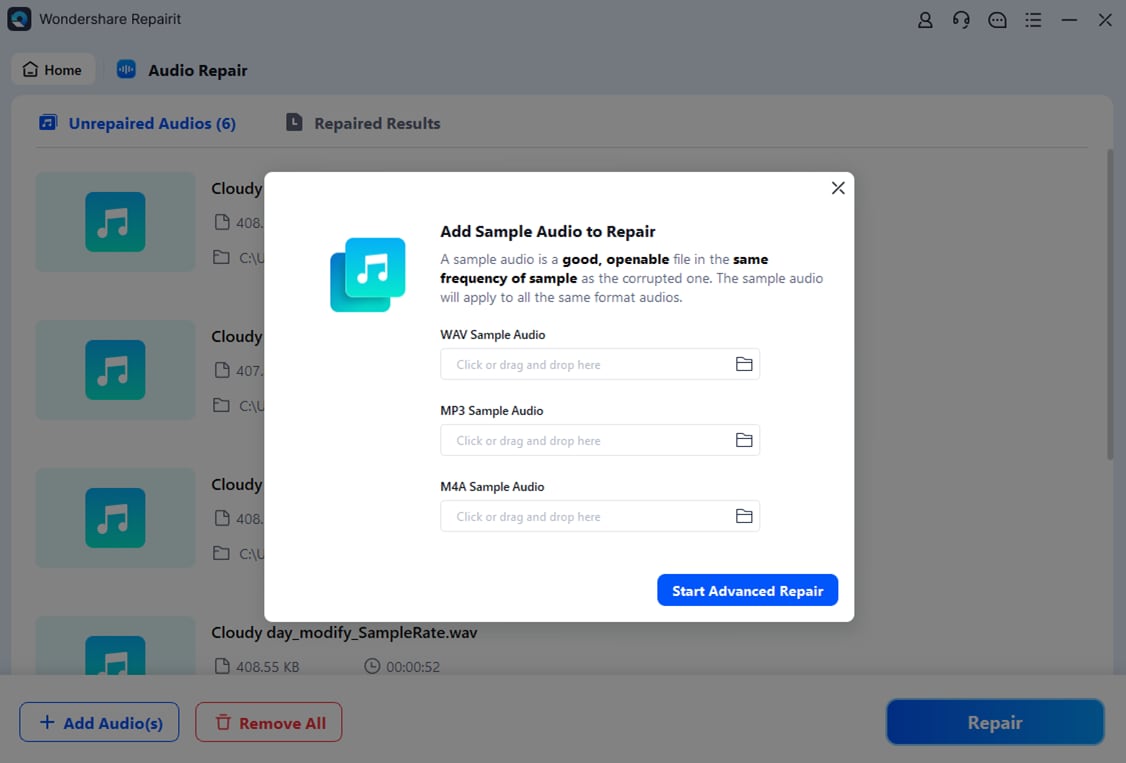
After the files are loaded, start the repair process with a single click. Repairit scans the internal structure of each audio file, looks for header errors, missing data segments, and inconsistencies that may affect playback, and then reconstructs a clean, playable version. When the processing is finished, use the built-in preview feature to listen to the repaired audio and make sure dialog, music, and effects play smoothly.
- Save the repaired audio

If the preview meets your expectations, click Save or Save All and choose a secure output folder. It is best practice to store the repaired versions in a different location from the damaged originals, such as another drive or dedicated backup folder. This keeps both copies available and reduces the risk of overwriting or losing important AC-4 audio recordings in the future.
Conclusion
AC-4 audio is a powerful next-generation codec tailored for modern broadcasting and streaming, offering better efficiency, immersive object-based sound, and advanced personalization compared with older formats like Dolby Digital and many AAC profiles. As more platforms adopt UHD and interactive audio, the relevance of AC-4 codec will continue to grow.
Like any digital format, however, AC-4 content can be affected by corruption, incomplete transfers, or faulty storage media. By understanding what AC-4 is, where it is used, and how to repair damaged files with tools such as Wondershare Repairit, you can keep your libraries and recordings in good shape and enjoy next-gen audio without interruptions.
Next: What is Mpeg-H Audio Codec?
FAQ
-
1. What is AC-4 used for?
AC-4 is mainly used in next-generation TV broadcasting, streaming services, and immersive audio applications to deliver efficient, high-quality sound with features like object-based audio, dialog enhancement, and personalized listening options. -
2. Is AC-4 better than Dolby Digital Plus?
Yes. AC-4 is the successor to Dolby Digital Plus and offers higher compression efficiency, support for more sophisticated audio objects and metadata, and better adaptability for low-bitrate streaming and advanced broadcast standards. -
3. Why will my AC-4 audio not play?
Your AC-4 audio may fail to play because the device or player does not support AC-4, the software or firmware is outdated, necessary codecs are missing, or the file itself is corrupted due to incomplete downloads or storage issues. -
4. How can I fix a corrupted AC-4 file?
First, try playing the file with an updated media player or a device that officially supports AC-4. If the issue continues, use a dedicated repair tool like Wondershare Repairit to analyze and restore the damaged audio data, then save a clean, playable copy. -
5. Do all TVs support AC-4 audio?
No. AC-4 support is mostly found in newer smart TVs and receivers designed for next-generation broadcast standards. Check your TV's user manual or specifications sheet to confirm whether AC-4 decoding is supported.




