
Vorbis is an open-source, lossy audio codec designed to provide high-quality sound at relatively low bitrates without licensing fees. Typically packaged as Ogg Vorbis, it matters because it offers a patent-free alternative to proprietary formats such as MP3 and AAC. You will commonly find the Vorbis codec in music playback, indie and PC games, streaming radio, podcasts, and other online audio where efficient compression and openness are important.
Repair Corrupted Files To Save Your Data
 Security Verified. Over 7,302,189 people have downloaded it.
In this article
How Vorbis Works
The Vorbis audio format is a lossy, perceptual codec. It analyzes incoming audio and removes details that human ears are unlikely to notice, then encodes the remaining information efficiently. Internally, it uses techniques like the modified discrete cosine transform (MDCT), psychoacoustic models, and variable bitrate (VBR) encoding to balance file size and sound quality. This allows Vorbis to produce smaller files than uncompressed audio while still sounding clear, especially at low to medium bitrates that are common in streaming and online distribution.
When you create an Ogg Vorbis file, the audio data is compressed by the Vorbis codec and wrapped inside an Ogg container, which handles metadata, seeking, and streaming. The result is a compact file that is efficient to store, download, and stream without consuming too much bandwidth, yet remains listenable for music, speech, and game audio.
Key Features, Pros, and Cons
Main features of Vorbis
- Open-source and patent-free design, making the open source audio codec free to use in commercial and non-commercial projects.
- Support for variable bitrate (VBR), constant bitrate (CBR), and average bitrate (ABR) modes for flexible control of size and quality.
- Good performance at low to medium bitrates, where many competing codecs struggle with artifacts.
- Wide range of bitrate settings, from very low (for speech) to high (for near-transparent music playback).
- Efficient streaming capabilities when combined with the Ogg container, enabling smooth playback over the internet.
Pros and cons of Vorbis
| Aspect | Details |
|---|---|
| Advantages |
|
| Limitations |
|
| Real-world performance |
|
Vorbis vs Other Audio Codecs
Comparing Vorbis with other common codecs helps clarify when it is the right choice.
- Vorbis vs MP3: At the same bitrate, Vorbis vs MP3 listening tests often favor Vorbis, especially below 192 kbps, where it tends to sound cleaner and less "swishy." However, MP3 has near-universal compatibility in hardware players, car systems, and consumer devices, while Vorbis support is more selective.
- Vorbis vs AAC: AAC is widely used in major streaming services and mobile ecosystems. At low and medium bitrates, AAC is competitive or slightly more efficient than Ogg Vorbis, and enjoys stronger platform support. Vorbis, however, remains attractive where open-source licensing or freedom from patents is critical.
- Vorbis vs Opus: Opus is another open codec that generally surpasses Vorbis in compression efficiency and versatility, especially for voice and real-time communication. For new designs, Opus is often recommended, but Vorbis persists in legacy content, older software, and game engines that were built around it.
- Vorbis vs FLAC: FLAC is a lossless codec, preserving every audio sample exactly. Compared to FLAC, the Vorbis audio format creates much smaller files but discards some information. Use FLAC for archiving and production, and Vorbis when you need smaller files for distribution and streaming.
In summary, Vorbis balances quality and openness well, but other formats may win on raw efficiency (Opus), compatibility (MP3, AAC), or perfect fidelity (FLAC). Your best choice depends on your playback environment and licensing needs.
Compatibility and Practical Use
Ogg Vorbis is natively supported by many open-source media players and modern software platforms, including VLC, foobar2000, and other cross-platform tools. Several browsers also support Ogg containers with Vorbis audio, making it suitable for web-based streaming and HTML5 audio playback. In the gaming world, the Vorbis codec is still used in numerous PC and indie titles for background music, effects, and dialogue.
To play Vorbis audio format files, you can use compatible players or install codec packs that add support to your system. Conversion tools can transcode Vorbis into MP3, AAC, or FLAC if you need wider device compatibility or a different workflow. Despite the rise of Opus and other modern codecs, Vorbis remains relevant today because of its open licensing, decent performance, and the large amount of legacy content already encoded with it.
How to Use Repairit to Fix a Corrupted Vorbis File
Why use Repairit for Vorbis repair
When Vorbis or Ogg Vorbis audio stops playing, stutters, or triggers errors, the file structure or data stream may be damaged. Instead of re-downloading or re-recording everything, you can use a specialized repair tool to restore your tracks. Wondershare Repairit offers a guided way to repair corrupted audio without deep technical skills. Visit the Repairit official website to download the latest version and access repair features tailored to audio, video, photos, and documents.
Key features of Repairit for Vorbis audio
- Repairs corrupted or unplayable audio files from various formats and sources, including Vorbis audio format stored in Ogg containers.
- Beginner-friendly, click-through workflow that walks you from file import to final export with clear prompts.
- Built-in preview so you can listen to repaired audio before saving it, helping ensure that glitches or dropouts are resolved.
Step-by-step: repair Vorbis audio
- Add corrupted audio files

Install and open Wondershare Repairit on your computer, then go to the Audio Repair module. Click the button to add files and browse to the faulty Ogg Vorbis tracks that will not play, skip unexpectedly, or show error messages in your player. You can add one or multiple files in a single batch.
- Repair audio codecs
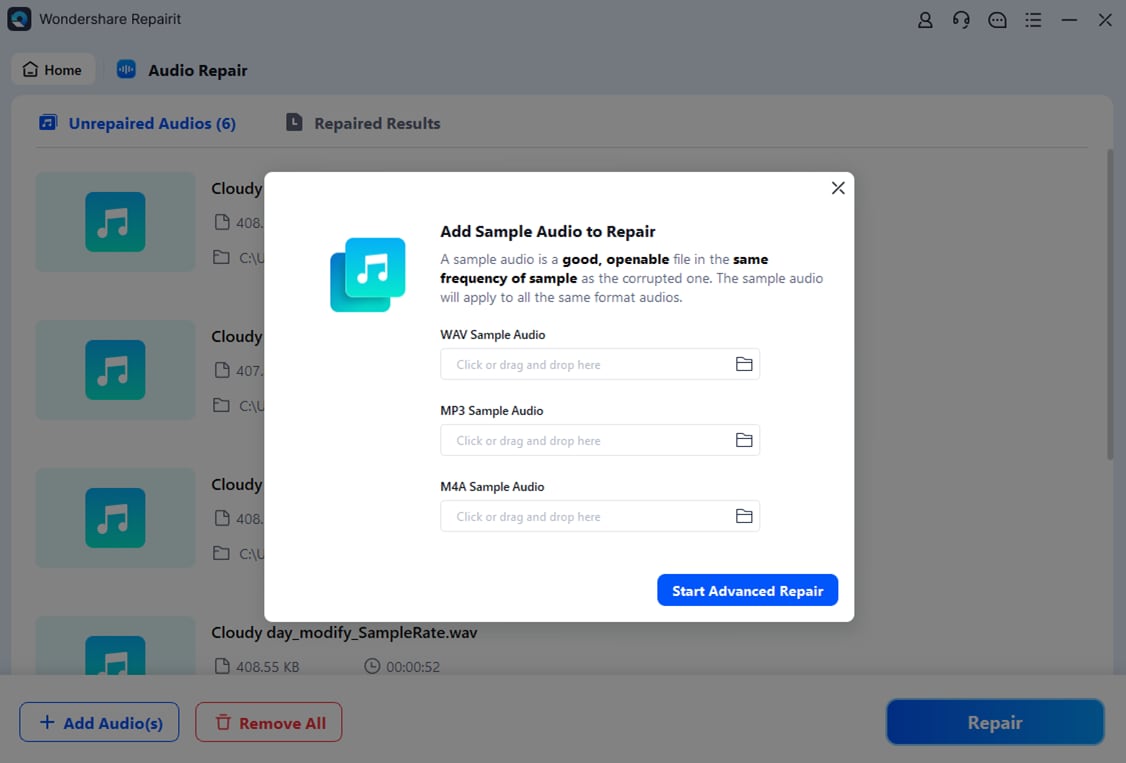
After your damaged audio files are listed, confirm that all the affected Vorbis clips are selected and start the repair. Repairit scans the internal structure, headers, and data frames, then reconstructs broken segments where possible. During this process, the tool works to eliminate glitches, silence gaps, and playback errors caused by corruption.
- Save the repaired audio files

When the repair finishes, use the preview option next to each file to listen and confirm that the Vorbis audio plays smoothly from start to finish. If you are satisfied with the result, click Save, choose a secure destination folder, and store the repaired copies separately from the originals to avoid overwriting potentially useful backups.
Conclusion
The Vorbis codec is a flexible, open-source option for compressing audio with good quality at modest bitrates. By combining efficient perceptual encoding with royalty-free licensing, it has carved out a lasting role in music distribution, gaming, and online streaming, especially in open-source ecosystems.
However, even well-encoded Vorbis files can become corrupted through storage failures, interrupted downloads, or transfer errors. With a basic understanding of how Ogg Vorbis works and a dedicated repair tool such as Wondershare Repairit, you can protect your audio collection, fix corrupted Vorbis files quickly, and keep your media library playable across devices.
Next: What is Ac-4 Codec?
FAQ
-
1. What is Vorbis used for?
Vorbis is used to compress digital audio into smaller files while maintaining good listening quality. Most people encounter it as Ogg Vorbis music files, in-game audio, internet radio streams, and open-source applications that prefer a patent-free, open source audio codec instead of proprietary formats. -
2. Is Vorbis better than MP3?
In many listening tests, Vorbis vs MP3 comparisons show that Vorbis offers better perceived quality at similar bitrates, especially in the low to medium range around 96–192 kbps. However, MP3 still has broader hardware and car stereo support, so the best choice depends on where you plan to play your audio. -
3. How do I open a Vorbis audio file?
Most Vorbis audio format files are stored in Ogg containers with .ogg or .oga extensions. You can open them in players like VLC, foobar2000, and many open-source media apps, or in browsers that support Ogg playback. If your default player cannot open them, install a compatible player or codec pack. -
4. Why will my Vorbis file not play?
A Vorbis file might not play because the download was interrupted, the storage is damaged, or the container headers are corrupted. It can also fail if your player lacks the required codec. Try a different player first; if several apps cannot open it, the file itself is likely corrupted and may require repair. -
5. How can I repair a corrupted Vorbis audio file?
To fix a corrupted Vorbis codec file, use repair software such as Wondershare Repairit. The tool analyzes the damaged audio, reconstructs broken structures and frames, and lets you preview the repaired track before saving it, helping you recover otherwise unplayable Ogg Vorbis recordings.




