
xHE-AAC (Extended High Efficiency Advanced Audio Coding) is a next‑generation audio codec designed to deliver clear, consistent sound from very low to relatively high bitrates. It matters because it keeps music, podcasts, and speech intelligible even on unstable mobile networks, while controlling loudness between tracks. You will often meet xHE-AAC in streaming services, online radio, mobile music playback, voice calls, and broadcast or wireless audio where efficiency and reliability are critical.
Repair Corrupted Files To Save Your Data
 Security Verified. Over 7,302,189 people have downloaded it.
In this article
How xHE-AAC Works
At its core, xHE-AAC is a compressed audio format that shrinks sound data so it takes up far less space while staying pleasant to listen to. It analyzes the audio, removes information the human ear is less likely to notice, and stores the remaining details efficiently. Like other AAC family codecs, it uses advanced psychoacoustic models and filter banks to keep important musical and speech cues while reducing file size.
What makes xHE-AAC stand out is its wide bitrate range and support for adaptive streaming. The same stream can switch smoothly between very low bitrates (for poor networks) and higher bitrates (for strong connections) without jarring changes in quality. Loudness metadata and dynamic range tools also help keep volume levels consistent across tracks, which is ideal for streaming services and mobile listening.
Key Features, Pros, and Cons
Main features of xHE-AAC
Built on the AAC family
xHE-AAC extends the AAC and HE-AAC standards, reusing proven technology while adding more flexibility at low and medium bitrates. This makes it a natural evolution for services that already rely on AAC.
Wide bitrate operating range
The codec is designed to work from around 12 kbps per channel for speech up to 300 kbps or more for high-quality stereo music. This wide range lets streaming services adapt one codec to many network conditions.
Adaptive bitrate streaming support
xHE-AAC supports seamless bitrate switching in HTTP adaptive streaming (like HLS and DASH). The audio stream can jump between quality levels as bandwidth changes, with minimal artifacts or dropouts for the listener.
Loudness and dynamic range control
The format carries loudness metadata and provides dynamic range control tools. Services can keep different tracks at similar perceived loudness and optionally compress the dynamic range for environments like cars, mobile speakers, and headphones.
Optimized for speech and music
Special encoding modes optimize both spoken word (podcasts, audiobooks, voice assistants) and full-band music. This dual focus makes xHE-AAC suitable for mixed-content streaming catalogs.
Pros, cons, and real-world performance
Advantages of xHE-AAC
- High perceived audio quality at very low bitrates, especially for speech and mobile streaming.
- Excellent compression efficiency across a broad bitrate range compared with older formats like MP3 or standard AAC.
- Built-in loudness normalization and dynamic range features for consistent listening.
- Smooth bitrate switching that reduces interruptions and glitches on unstable connections.
- Good fit for streaming radio, music services, voice assistants, and other networked applications.
Limitations of xHE-AAC
- Device and software support is not yet universal; some players still do not recognize xHE-AAC streams or files.
- Licensing and patents can be a barrier for open-source projects, unlike formats such as Opus or Vorbis.
- Offline archival or professional production workflows may prefer lossless codecs like FLAC for maximum fidelity.
Typical real-world performance
In real streaming scenarios, listeners often find that xHE-AAC delivers clearer audio than standard AAC at the same low bitrate, particularly for speech and mixed content. At higher bitrates, differences may be subtle, but services still benefit from more flexible loudness control and smooth adaptation across networks. On limited mobile data plans, users can enjoy stable playback without consuming as much bandwidth as older formats would require.
xHE-AAC vs Other Audio Codecs
Choosing the right codec means comparing xHE-AAC with familiar options like AAC, MP3, Opus, FLAC, Vorbis, and newer Bluetooth-oriented codecs such as LC3.
| Codec | How it compares to xHE-AAC |
|---|---|
| AAC / HE-AAC | Standard AAC works well at medium to high bitrates, while HE-AAC improves low-bitrate performance. xHE-AAC goes further, handling an even wider bitrate range and integrating better loudness and streaming features, so it is generally more efficient for modern streaming. |
| MP3 | MP3 is widely compatible but less efficient. To reach a similar audio quality, MP3 usually needs a much higher bitrate than xHE-AAC. For bandwidth-sensitive streaming, xHE-AAC is the better choice, while MP3 remains useful for maximum legacy device support. |
| Opus | Opus is a highly efficient, royalty-free codec popular in WebRTC, VoIP, and some streaming apps. At very low bitrates or for interactive voice, Opus can rival or outperform xHE-AAC, especially in latency-critical use. However, mobile operating systems and commercial streaming services may offer more native support for xHE-AAC than for Opus. |
| FLAC | FLAC is a lossless codec, so it preserves every audio detail but generates much larger files. xHE-AAC trades some inaudible information for strong data savings, making it better for streaming and mobile use, while FLAC is ideal for archiving and audiophile libraries. |
| Vorbis / LC3 | Vorbis, mainly used in older web streaming and games, is largely being replaced by more efficient codecs like xHE-AAC and Opus. LC3 is targeted at low-power Bluetooth and hearing devices rather than general internet streaming, so its role is different from xHE-AAC in most workflows. |
Overall, xHE-AAC aims to balance quality, bandwidth savings, and streaming-friendly features. Where compatibility with older hardware or fully open licensing is essential, codecs like MP3 or Opus may still be preferred. For mainstream commercial streaming where adaptive bitrate and loudness control matter, xHE-AAC is a strong option.
Compatibility and Practical Use
Today, xHE-AAC appears in several modern streaming ecosystems. Recent Android versions offer native support, and some major music and radio platforms stream in xHE-AAC to reduce data usage on mobile networks. Certain smart speakers, set-top boxes, and connected car systems can also handle this codec.
On desktop systems, support depends on your operating system and the player you choose. Some browsers and media players can play xHE-AAC when the correct system codecs or decoders are installed. Others may fall back to standard AAC or show an error instead of playing the file.
To work with xHE-AAC files, you can:
- Use up-to-date media players that explicitly list xHE-AAC compatibility.
- Stream from services that handle all encoding and playback logic on their own apps.
- Convert xHE-AAC content to more widely supported formats (like standard AAC or MP3) using professional audio tools or dedicated converters, if license terms allow.
Given its efficiency and streaming features, xHE-AAC remains highly relevant, especially for mobile-first and bandwidth-conscious services. As more devices update their audio stacks, support is likely to continue growing.
How to Use Repairit to Fix a Corrupted xHE-AAC File
Why choose Repairit for xHE-AAC repair
When an xHE-AAC track will not play, stutters, or throws an unknown codec error, the root cause might be file corruption rather than missing support. Repairit by Wondershare is a dedicated media repair utility that focuses on bringing damaged audio and video back to life. Through its simple interface and guided workflow, you can repair broken xHE-AAC clips without needing deep codec knowledge. Visit the Repairit official website to download the latest version for your system.
Key features for fixing xHE-AAC audio
- Repairs corrupted or unplayable audio files in various formats, including advanced audio codec types like xHE-AAC.
- Batch processing so you can fix multiple damaged tracks in one session instead of repairing them one by one.
- Repair preview to check restored audio quality and ensure smooth playback before saving the repaired file.
Step-by-step: Repair corrupted xHE-AAC Codec
- Add corrupted audio files
Install and open Repairit on your computer, then switch to the Audio Repair module. Click the add button or drag and drop your problematic xHE-AAC files into the window. Confirm that every damaged track you want to fix is listed, and review basic details like file name and duration so you know you are working on the correct items.

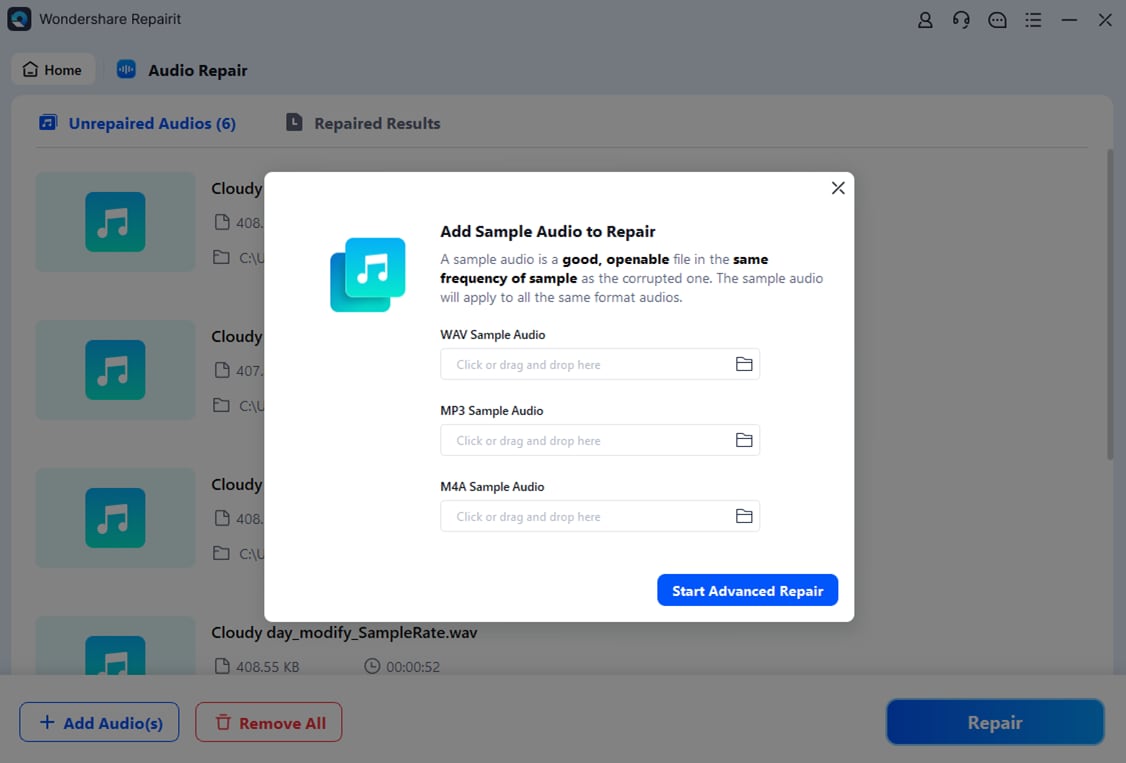
- Repair audio codecs
Select the imported files and start the repair. Repairit will scan the internal structure of each xHE-AAC file, reconstruct broken headers or frames where possible, and address typical streaming audio errors. While the process runs, watch the progress bar and status column so you can see which clips have completed, are pending, or encountered issues.
- Save the repaired audio codecs
When Repairit finishes analyzing your xHE-AAC audio, use the built-in preview to listen through key sections and make sure playback is smooth and complete. If you are satisfied with the result, choose a secure output folder (ideally different from the source location) and click Save to export your repaired tracks. Keep the fixed files separate so you can safely compare them to the original, corrupted versions if needed.

Conclusion
xHE-AAC is a modern, flexible codec built to power reliable streaming for music, speech, and mixed content across a wide range of bitrates. With adaptive streaming support, loudness control, and strong compression efficiency, it helps platforms deliver high-quality listening experiences even over limited mobile networks.
However, like any digital format, xHE-AAC files can become corrupted due to interrupted downloads, storage issues, or transfer errors. Specialized repair tools such as Repairit make it practical to recover valuable recordings and keep your audio library playable. Combining a solid understanding of how xHE-AAC works with a reliable repair workflow ensures smooth listening for both casual users and audio professionals.
Next: What is Opus Codecs?
FAQ
-
1. What is xHE-AAC mainly used for?
xHE-AAC is primarily used for streaming music, online radio, podcasts, and voice services where consistent loudness and good quality at low bitrates are important. Its adaptive capabilities make it especially useful for mobile networks and bandwidth-limited environments.
-
2. Is xHE-AAC better than standard AAC?
In many streaming situations, xHE-AAC provides better perceived quality than standard AAC at the same or lower bitrates, especially for speech and mixed content. It also integrates loudness management and wide-range bitrate operation. However, its benefits depend on whether your device or app fully supports the codec.
-
3. Why will my xHE-AAC file not play?
If a xHE-AAC file does not play, the problem could be missing codec support, an outdated app, an incomplete download, or actual file corruption. Try another player or device first; if the issue persists, use a repair utility like Repairit to check and fix potential damage.
-
4. How can I repair a corrupted xHE-AAC file?
To repair a corrupted xHE-AAC file, open Repairit, add the damaged audio, start the repair process, and then preview the result. If playback is restored, save the repaired file to a safe location, separate from the original, so you can roll back if needed.
-
5. Can I convert xHE-AAC to another format?
Yes. If you run into compatibility issues, you can convert xHE-AAC audio to formats like standard AAC or MP3 using supported converters or audio editors. Keep in mind that converting from one lossy format to another may slightly reduce quality, so always keep a backup of the original file.




