
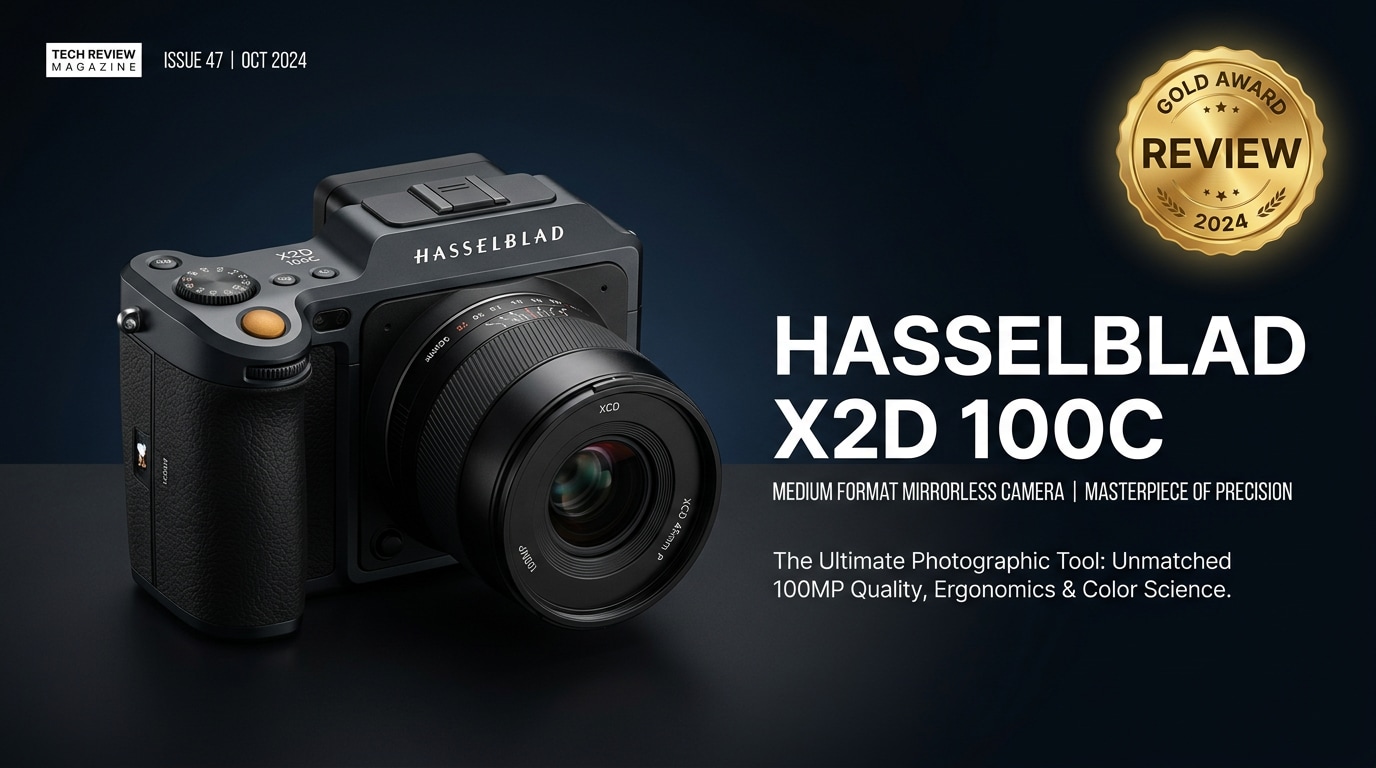
The Hasselblad X2D 100C is a 100-megapixel medium format mirrorless camera that blends classic Scandinavian design with serious imaging power. It adds in-body stabilization, fast internal SSD storage, and a refined user interface to Hasselblad's renowned color science. Built for demanding commercial, landscape, and fine art work, it targets photographers who care more about tonal nuance and dynamic range than blazing speed or advanced video specs.
Repair Corrupted Files To Save Your Data
 Security Verified. Over 7,302,189 people have downloaded it.
In this article
What is New About Hasselblad X2D 100C
Design and handling updates
The Hasselblad X2D 100C keeps the clean, minimalist X-system look but refines almost every touchpoint. The deepened grip offers more secure handling with heavier lenses, and the body feels denser and more premium. Controls stay sparse and uncluttered, relying heavily on the responsive top display and rear touchscreen for settings. Menu layouts are simplified, making it quick to adjust exposure, focus, and storage options even for first-time Hasselblad users.
Build quality is excellent, with a metal chassis and weather sealing suitable for outdoor and location work. The electronic viewfinder sees a major bump in resolution and clarity, making manual focus and critical composition far more precise than on previous bodies.
Sensor, stabilization, and storage upgrades
The X2D 100C's 100-megapixel medium format BSI sensor is the headline upgrade, offering superb resolving power while improving low-light performance and readout speed. In-body image stabilization (IBIS) is new to the X-system, delivering several stops of compensation that make handheld 100MP shooting realistic rather than wishful thinking.
Another major enhancement is the integrated high-speed SSD. This internal storage works alongside CFexpress or SD cards (depending on configuration), giving you a safety net and a high-throughput pipeline for massive RAW files. Combined with faster processing, the camera clears buffers more quickly than older Hasselblad mirrorless bodies.
Full Specs at a Glance
Key technical specifications
| Feature | Hasselblad X2D 100C Specification |
|---|---|
| Sensor | 100MP medium format BSI CMOS (larger than 35mm full frame) |
| Image Stabilization | 5-axis in-body image stabilization (IBIS) |
| ISO Range | Wide native range suitable for low-light and studio work |
| Storage | Built-in high-speed SSD plus external card support |
| Autofocus | Contrast and phase-detect AF with face and subject detection |
| Viewfinder | High-resolution electronic viewfinder with excellent magnification |
| Display | Tilting touch LCD with intuitive UI |
| Video | Basic video support; stills-focused design |
| Connectivity | USB-C, Wi-Fi, and tethering support for studio workflows |
X2D vs previous Hasselblad bodies
Compared with earlier X1D series bodies, the X2D 100C significantly improves startup speed, autofocus responsiveness, and general menu fluidity. The jump to 100MP medium format provides noticeably more detail for large prints and high-end commercial output. IBIS and internal SSD storage are transformative in daily use, reducing dependence on tripods and external drives while shooting on location.
However, the X2D remains a stills-first tool. If you are moving from more hybrid full-frame systems, you will gain dynamic range and color depth at the expense of advanced video and burst-rate performance.
Real-World Performance
Image quality and dynamic range
The Hasselblad X2D 100C excels where it matters most: image quality. Files exhibit rich tonality, subtle color gradations, and exceptional micro-contrast. Hasselblad's color science produces natural skin tones and nuanced landscape palettes straight out of camera, reducing the need for heavy post-processing.
Dynamic range is generous, allowing you to recover deep shadows and protect highlights in challenging lighting conditions. This makes the X2D particularly powerful for landscape, architectural, and fine art photographers who regularly push exposure latitude.
Autofocus, speed, and usability
Autofocus on the X2D 100C is a noticeable step forward from earlier Hasselblad mirrorless models, with faster acquisition and better subject tracking. It is adequate for portraits, environmental work, and considered documentary shooting, but it is not built for high-speed action or sports.
Shot-to-shot times and buffer performance are improved but still geared toward deliberate photography rather than spray-and-pray bursts. The intuitive interface, combined with tactile dials and a simplified menu structure, makes the camera feel transparent in use; once configured, you spend more time composing and less time digging through menus.
Pros & Cons
- Pros
- Stunning 100MP medium format files with remarkable detail and dynamic range
- New IBIS system makes handheld medium format shooting practical
- Built-in high-speed SSD plus card support for flexible storage
- Elegant, minimalist design with excellent ergonomics and build quality
- Refined user interface and high-resolution EVF for precise composition
- Cons
- Premium price, especially once you add Hasselblad lenses
- Still-focused system with limited video features
- Not ideal for fast action or high-frame-rate shooting
- Larger, heavier system compared with most full-frame mirrorless bodies
Who Is This Camera For?
The Hasselblad X2D 100C is tailor-made for photographers whose work demands the highest image quality and who typically shoot in controlled or moderately paced environments. Commercial, advertising, fashion, and high-end portrait photographers will appreciate the color fidelity and resolution for print campaigns and gallery work.
Landscape and fine art shooters benefit from the dynamic range and tonal subtlety, while studio photographers gain from tethered workflows and dependable color. If you routinely need advanced video features or extreme speed, a hybrid full-frame system may suit you better; if your priority is exquisite still images and a focused shooting experience, the X2D stands out.
What to Do If Your Hasselblad X2D 100C Files Get Corrupted
Introducing Repairit for Hasselblad shooters
Working with 100MP medium format files means every RAW or TIFF represents a serious investment of time, budget, and effort. If your Hasselblad X2D 100C photos or videos become corrupted due to card errors, interrupted transfers, or drive issues, a dedicated repair tool can often salvage them. Wondershare Repairit is designed specifically to repair damaged media files with a guided, non-technical workflow. You can learn more and download it from the Repairit official website.
Repairit key features
- Repairs corrupted or unreadable photo and video files from cameras, memory cards, SSDs, and external drives.
- Supports a wide range of formats, including RAW images and high-resolution video from professional cameras.
- Offers a simple, step-by-step repair process that is accessible to beginners yet powerful enough for working professionals.
Step-by-step: Repair corrupted Hasselblad files
- Choose a Location to Repair Data
Open Wondershare Repairit and select the module that matches what is damaged, such as Photo Repair or Video Repair. Click to add the problematic files created by your Hasselblad X2D 100C, or choose the memory card, camera drive, or folder where you normally store your shoots. This tells Repairit exactly where to look for corrupted media.

- Deep Scan the Location
Start the repair process and let Repairit perform a thorough scan of the selected files or storage location. The software automatically analyzes file structure, headers, and encoding to pinpoint what is broken. During this deep scan, Repairit applies appropriate repair algorithms in the background, so you can let it run while you prepare your next shoot.

- Preview and Repair Your Desired Data
Once the repair completes, Repairit displays a preview of recoverable photos or videos so you can inspect sharpness, colors, and overall integrity. Review the results, select the files you want to keep, and click to save them to a safe destination such as an external drive or backup SSD. Avoid writing them back to the original damaged card to reduce the risk of further data loss.

Conclusion — Should You Buy?
The Hasselblad X2D 100C delivers exceptional image quality, refined ergonomics, and meaningful upgrades such as IBIS and integrated SSD storage. It is engineered for photographers who prioritize color accuracy, tonal nuance, and a distraction-free shooting experience over sheer speed or cinema-grade video.
If you produce high-end commercial, fine art, or landscape work and are ready to invest in a premium medium format ecosystem, the X2D 100C is an outstanding long-term tool. Pair it with a solid backup workflow and a repair solution like Repairit to keep your 100MP files safe and usable for years.
FAQ
-
1. What sensor size does the Hasselblad X2D 100C use?
The Hasselblad X2D 100C uses a 100-megapixel medium format sensor that is physically larger than a 35mm full-frame sensor. This size advantage contributes to improved dynamic range, smoother tonal transitions, and finer detail, especially in large prints. -
2. Is the Hasselblad X2D 100C good for handheld shooting?
Yes. The X2D 100C includes a 5-axis in-body image stabilization system that makes handheld shooting far more practical with a 100MP sensor. You can work at slower shutter speeds than you normally would, which is especially helpful in low light or when traveling without a tripod. -
3. Does the Hasselblad X2D 100C have internal storage?
Yes. The camera features a built-in high-speed SSD that works alongside external memory cards. This internal storage lets you capture and buffer large 100MP files quickly, and it provides a useful backup option when a card fills up or fails unexpectedly. -
4. Can I shoot video with the Hasselblad X2D 100C?
The X2D 100C offers basic video recording, but it is primarily designed as a stills camera. If you need advanced video features such as high frame rates, extensive codecs, or log profiles, a dedicated hybrid mirrorless system will serve you better. -
5. How can I repair corrupted Hasselblad X2D 100C photo files?
If files from your Hasselblad X2D 100C become corrupted, you can use a repair tool like Wondershare Repairit. Add the damaged photos or videos, let the software scan and repair them, then preview the results and save the recovered files to a safe drive.




