
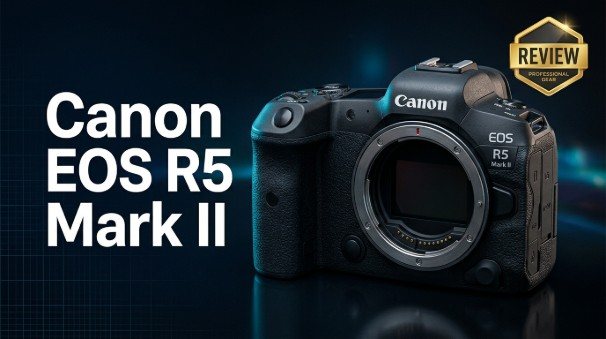
The Canon EOS R5 Mark II is Canon's next-generation flagship hybrid mirrorless camera, designed for professionals and serious creators who need uncompromising stills and video performance. Building on the success of the original R5, it adds more robust 8K video, smarter autofocus, faster burst shooting, and improved heat management, all in a familiar full-frame RF-mount body.
Repair Corrupted Files To Save Your Data
 Security Verified. Over 7,302,189 people have downloaded it.
In this article
What is New About Canon EOS R5 Mark II
The Canon EOS R5 Mark II takes the original R5 concept and pushes it further into true hybrid territory. While the core resolution and RF-mount remain the same, Canon has focused on speed, thermal behavior, and video flexibility to make the camera more reliable on demanding shoots.
Design and handling refinements
Externally, the EOS R5 Mark II closely resembles its predecessor, so R5 users will feel instantly at home. Under the surface, however, there are noticeable changes.
- Reworked internal structure and heat dissipation for longer recording times.
- More responsive menus and quicker access to video-centric settings.
- Refined ergonomics with familiar control layout and robust weather sealing.
Together, these tweaks make the body better suited to long days on set or in the field, where consistent performance matters more than novelty.
Improvements for video shooters
For filmmakers and hybrid shooters, the EOS R5 Mark II addresses some of the biggest concerns around the first R5.
- Refined 8K capture with improved heat management and extended recording limits.
- More polished oversampled 4K modes from the full sensor, with high bitrates and modern codecs.
- Enhanced subject-detection autofocus, particularly for people and animals during video.
- Better reliability for long interviews, events, and continuous coverage.
The result is a camera that delivers cinema-level detail in 8K but behaves more predictably than the original R5 when you are rolling for longer stretches.
Full Specs at a Glance
On paper, the Canon EOS R5 Mark II remains a high-resolution full-frame workhorse with serious video credentials. Here is a quick look at key specifications.
| Feature | Canon EOS R5 Mark II Specs |
|---|---|
| Sensor | Full-frame CMOS, approx. 45 MP resolution |
| Image Processor | Next-generation DIGIC processor for faster readout and AF |
| ISO Range | Native ISO 100–51,200 (expandable) |
| Autofocus System | Dual Pixel CMOS AF with advanced subject recognition |
| Continuous Shooting | High-speed burst shooting with electronic shutter |
| Video Recording | Up to 8K recording, oversampled 4K, and high-frame-rate options |
| Viewfinder & LCD | High-resolution EVF and fully articulating touchscreen |
| Storage | Dual card slots (CFexpress Type B + UHS-II SD) |
| Connectivity | Wi-Fi, Bluetooth, USB-C, HDMI, microphone and headphone jacks |
| Build | Magnesium alloy body with weather sealing |
This combination of resolution, speed, and codec support places the EOS R5 Mark II firmly in professional territory for both stills and motion work.
Real-World Performance
Specs only tell part of the story. In practice, the Canon EOS R5 Mark II feels faster, more confident, and more dependable than the first-generation R5, especially when you push it hard.
Image quality and dynamic range
The 45 MP full-frame sensor continues to deliver detailed, flexible files that hold up well under heavy post-processing.
- Excellent dynamic range for lifting shadows and protecting highlights in high-contrast scenes.
- Pleasing Canon color science straight out of camera, especially for skin tones.
- High-resolution stills suitable for large prints, commercial work, and tight crops.
For photographers coming from older Canon DSLRs, the jump in detail and latitude is immediately noticeable, while longtime R5 users will appreciate the familiar yet refined rendering.
Autofocus, burst rate, and reliability
Where the EOS R5 Mark II really distances itself from the original R5 is speed and consistency.
- More intelligent subject detection for human eyes, faces, animals, and fast-moving subjects.
- Higher continuous shooting speeds that cater to sports, wildlife, and action work.
- Improved thermal behavior that reduces the risk of sudden shutdowns mid-take.
For event shooters and hybrid creators, this translates into fewer missed moments and more keepers, even in tough lighting or fast-changing conditions.
Pros & Cons
Like any camera, the EOS R5 Mark II has strengths and trade-offs to consider before committing.
Pros
- High-resolution 45 MP sensor that is versatile for both stills and video.
- Refined 8K and oversampled 4K recording modes for cinematic work.
- Fast, accurate autofocus with advanced subject tracking.
- Improved heat management over the original R5 for longer video sessions.
- Dual card slots (CFexpress + SD) for flexible and redundant recording.
- Robust, weather-sealed body suitable for professional environments.
Cons
- Requires fast, expensive CFexpress media to unlock its best video modes.
- High-resolution files can be heavy on storage and editing hardware.
- Still not a perfect replacement for dedicated cinema cameras on very long shoots.
- Premium price point compared to mid-range full-frame options.
Who Is This Camera For?
The Canon EOS R5 Mark II targets photographers and filmmakers who need a single body capable of handling nearly any assignment.
- Commercial and editorial photographers who demand high-resolution stills with clean detail and flexible dynamic range.
- Wedding and event shooters needing reliable autofocus, strong low-light performance, and hybrid coverage (photo plus video).
- Documentary and indie filmmakers looking for compact 8K and oversampled 4K in a lightweight package that rigs well.
- Content creators and YouTubers who want future-proofed footage and strong subject tracking in a portable camera.
If your work involves both high-end stills and advanced video, and you can justify the investment, the R5 Mark II offers a powerful, flexible platform.
What to Do If Your Canon EOS R5 Mark II Files Get Corrupted
Shooting 8K and high-bitrate 4K puts serious stress on memory cards, drives, and workflows. Power interruptions, card errors, or improper ejection can all lead to corrupted clips or broken image files from your Canon EOS R5 Mark II. When that happens, you need a repair-focused tool rather than a simple file recovery app.
Why use Repairit for Canon footage
Wondershare Repairit is a dedicated data repair toolkit designed to fix corrupted photos, videos, and documents from cameras like the EOS R5 Mark II. Instead of just trying to undelete files, it analyzes damaged media structures and rebuilds them so they become viewable again. You can learn more and download the software from the Repairit official website.
Key features of Repairit
- Repairs corrupted or unplayable photo and video files from cameras, cards, and drives.
- Handles popular formats and high-resolution footage, including demanding 4K and 8K media.
- Simple, guided workflow that does not require deep technical knowledge of data recovery.
Step-by-step: repair corrupted Canon EOS R5 Mark II files
Follow this practical workflow to repair damaged stills and videos from your EOS R5 Mark II using Repairit.
-
Choose a Location to Repair Data
Open Wondershare Repairit and select the repair module that matches the type of files you shot on your Canon EOS R5 Mark II (video or photo). Connect your memory card, card reader, or external drive that holds the corrupted media. In the interface, browse to the specific card, drive, or folder where the broken files are stored, then confirm your selection so Repairit knows exactly where to look.

-
Deep Scan the Location
Click to start the scan. Repairit will run a deep analysis on the chosen location, automatically detecting corrupted or unplayable photos and videos. As the scan progresses, you will see a growing list of found items, including file names, formats, and sizes. You can pause or stop the process once the clips and images you care about have appeared in the results, which helps save time when you are under deadline.

-
Preview and Repair Your Desired Data
After the scan finishes, highlight a file to open a preview and confirm that Repairit has successfully fixed playback or display issues. Use the preview to check critical moments such as vows, speeches, or key action sequences. Select only the repaired files you need, then choose a safe destination on your computer or another drive and click to save them. Always export to a different location than the original card to avoid overwriting and to keep your recovery workflow as safe as possible.

Conclusion — Should You Buy?
The Canon EOS R5 Mark II refines an already capable platform into a more dependable, feature-rich hybrid camera. With higher burst rates, stronger autofocus, and more controlled thermals for 8K and oversampled 4K, it is well-suited to working professionals who depend on both speed and image quality.
If you need a single full-frame body that can handle high-resolution stills, serious video production, and demanding real-world conditions, the EOS R5 Mark II is a compelling choice. Pair it with robust storage, disciplined backup habits, and a repair tool like Wondershare Repairit, and you will be in a strong position to protect your footage on every shoot.
Next: Canon Eos R6 Mark Ii
FAQ
-
1. Is the Canon EOS R5 Mark II worth upgrading from the original R5?
If you frequently shoot fast action, rely on subject-detection autofocus, or record long-form 8K and 4K video, the EOS R5 Mark II brings meaningful gains in speed, tracking, and thermal stability. For lighter, occasional use, the original R5 may remain sufficient. -
2. Does the Canon EOS R5 Mark II still overheat when recording 8K?
Canon has improved cooling and recording limits, so the R5 Mark II is more reliable in 8K than its predecessor. However, like any compact high-resolution hybrid camera, it can still warm up during very long takes or in hot environments, so managing ambient temperature and shooting breaks is still important. -
3. What memory cards should I use with the Canon EOS R5 Mark II?
For 8K and high-bitrate 4K recording, use fast CFexpress Type B cards from reputable brands. UHS-II SD cards work well for stills and less demanding video modes, but CFexpress provides the sustained write speeds needed for the most data-heavy formats. -
4. Can the Canon EOS R5 Mark II replace a dedicated cinema camera?
The EOS R5 Mark II can absolutely be used on professional productions thanks to its 8K and oversampled 4K, strong codecs, and autofocus. Dedicated cinema cameras may still be preferable for extremely long continuous takes, advanced monitoring, and specialized workflows, but the R5 Mark II is an excellent A- or B-cam in many setups. -
5. How do I recover corrupted video files from my Canon EOS R5 Mark II?
Stop recording on the affected card immediately and avoid formatting it. Connect the card to your computer, then use Wondershare Repairit to scan and repair broken Canon files. Always save the repaired clips to a different drive or folder to minimize the risk of overwriting or further data loss.




