
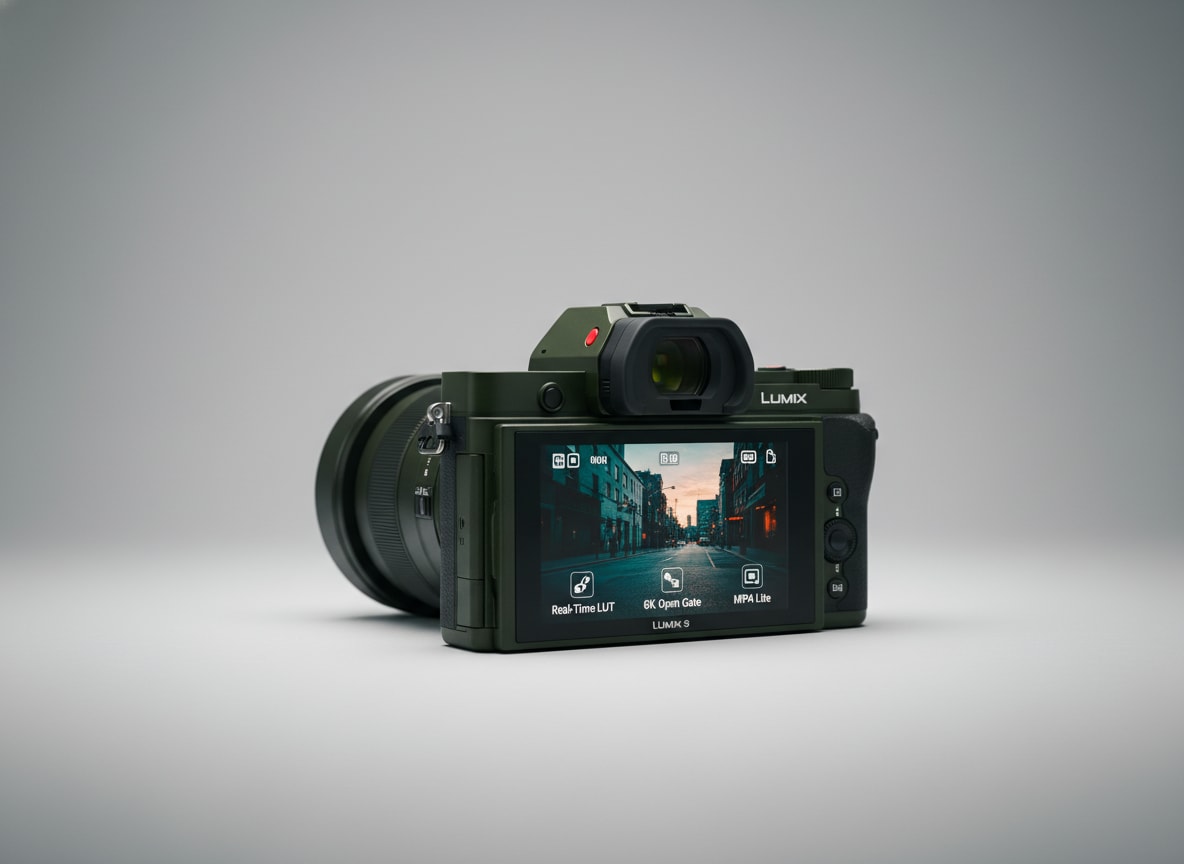
The Panasonic S9 is a compact full-frame mirrorless camera built for creators who want pro-quality stills and video in a small, stylish body. Aimed at vloggers, solo shooters, and social-first filmmakers, it blends high-resolution imaging, modern autofocus, and creator tools in a form factor that easily fits into a small bag or everyday kit.
Repair Corrupted Files To Save Your Data
 Security Verified. Over 7,302,189 people have downloaded it.
In this article
Introduction
The Panasonic S9 slots into the Lumix S series as a compact full-frame hybrid camera tuned for modern content creation. It aims to deliver cinematic depth of field, strong low-light performance, and flexible video formats in a body that is easy to carry all day, whether you are vlogging, shooting handheld B-roll, or capturing stills for social media and clients.
What's New About Panasonic S9
Compared with earlier Lumix S models, the Panasonic S9 focuses heavily on creator workflows and portability. Panasonic trims bulk and rethinks the interface so that influencers, travel shooters, and online educators can work faster with less gear.
- More compact and lightweight full-frame body designed for all-day carry and travel rigs.
- Refined subject detection autofocus for people, face, eye, and often animals, improving reliability for self-shooters.
- Enhanced video toolset aimed at social content, including support for vertical recording and creator-focused frame rates.
- Streaming- and sharing-friendly connectivity for rapid transfer to phones, tablets, or laptops.
- Updated color science and picture profiles tailored to quick-turn content that needs minimal grading.
These updates make the S9 feel like a camera built from the ground up for short-form and hybrid creators rather than traditional stills photographers alone.
Full Specs at a Glance
On paper, the Panasonic S9 brings a competitive full-frame spec sheet in a small shell. Exact specifications may vary by region or firmware, but the core configuration looks like this.
| Feature | Panasonic S9 Specification |
|---|---|
| Sensor & Mount | Full-frame CMOS sensor, Lumix S (L-mount) system |
| Resolution | Approx. 24 MP (suitable for both stills and 4K video workflows) |
| Video Recording | Up to 4K with high-bitrate options, multiple frame rates, and support for vertical video |
| Autofocus | Advanced subject detection AF with face/eye tracking for stills and video |
| Stabilization | In-body image stabilization (IBIS) paired with lens IS for smoother handheld footage |
| Screen | Articulating or tilting LCD optimized for vlogging and self-recording |
| Connectivity | USB-C, HDMI output, Wi-Fi/Bluetooth for remote control and file transfer |
| Storage | SD card slot supporting high-speed UHS standards for 4K recording |
| Battery & Power | Rechargeable battery with USB-C power delivery support for longer shoots |
| Dimensions & Weight | Compact, lightweight body designed for travel and gimbal use |
Video and recording formats
For creators working primarily in motion, the Panasonic S9 video feature set is the main attraction.
- 4K recording with multiple frame rates suitable for YouTube, client work, and cinematic projects.
- High-bitrate internal recording for improved detail and grading flexibility.
- Vertical video metadata for frictionless social posting to platforms like TikTok and Instagram Reels.
- Support for popular picture profiles so you can match other Lumix or cinema cameras in multicam setups.
Combined with IBIS and reliable autofocus, these options make the S9 an appealing choice for handheld, run-and-gun workflows.
Connectivity and storage
The S9 is tailored for creators who need to move media quickly between camera, phone, and computer.
- USB-C for fast offloading, tethering, or continuous power during streaming sessions.
- Wi-Fi/Bluetooth connectivity to pair with Panasonic's apps for remote control and instant sharing.
- SD card slot compatible with high-speed cards suited for 4K and high-frame-rate recording.
- Clean HDMI output for external recorders or live streaming setups.
Real-World Performance
Out in the field, the Panasonic S9 impresses with its balance of image quality and portability. The full-frame sensor delivers good dynamic range and attractive shallow depth of field, while the compact body encourages you to bring it everywhere.
Autofocus performance is noticeably better than previous generations, locking onto faces and eyes reliably in good light and remaining usable in many low-light scenes. For vloggers, the camera does a solid job of holding focus on your face even as you move within the frame.
Video quality is punchy and detailed, with enough flexibility in profiles to handle grading if you prefer a more cinematic look. In-body stabilization helps smooth out walking shots and handheld B-roll, though for more professional work you may still want a gimbal or careful technique.
Battery life is adequate for casual sessions but can be stretched during intensive 4K recording days, so many shooters will want spare batteries or USB-C power solutions. Rolling shutter and overheating are generally well-controlled for typical creator workloads, though long, hot outdoor sessions should still be monitored.
Pros & Cons
Pros
- Compact full-frame body that travels easily and fits lightweight rigs.
- Creator-focused features, including vertical video and strong 4K options.
- Improved autofocus with reliable face and eye detection for self-shooting.
- In-body stabilization helps stabilize handheld footage and low-light stills.
- Modern connectivity for quick file transfer, remote control, and streaming.
- Access to the L-mount ecosystem, including Lumix and third-party lenses.
Cons
- Not as many physical controls as larger bodies, which may slow down advanced users.
- Single SD card slot can be a limitation for mission-critical work without redundancy.
- Battery life is decent but not class-leading, especially for heavy 4K video use.
- Some advanced video options may be more limited than Panasonic's higher-end cinema-focused bodies.
Who Is This Camera For?
The Panasonic S9 is best suited to creators who want full-frame quality in a camera that does not feel like a burden to carry. It is an attractive option if you are:
- A vlogger or YouTuber needing a compact, flip-screen camera with dependable autofocus and stabilization.
- A travel creator looking for a full-frame system that fits easily into small bags and daypacks.
- A social media content producer who prioritizes vertical video, quick turnaround, and wireless sharing tools.
- A hybrid shooter using larger Lumix bodies who wants a lightweight B-camera with familiar color and controls.
- An online educator or streamer who needs clean HDMI output and USB-C power for longer sessions.
Photographers who prefer deep physical controls, dual slots, or higher-end codecs might still opt for a more advanced Lumix S body, but as a nimble everyday tool, the S9 is compelling.
What to Do If Your Panasonic S9 Files Get Corrupted
Why use Repairit for Panasonic S9 media
Even with careful shooting habits, video clips or photos from your Panasonic S9 can occasionally become corrupted due to card issues, power loss, or transfer errors. When those files refuse to open, a dedicated repair solution like Wondershare Repairit can often bring them back. Visit the Repairit official website to download the tool and repair damaged Panasonic S9 media before you give up on your footage.
Key features of Repairit for Panasonic S9 users
- Repairs corrupted or unplayable video and photo files from cameras, memory cards, and computer drives.
- Supports a wide range of popular formats and resolutions, including high-quality footage typically used by creators.
- Guided, beginner-friendly workflow with preview options so you can check repaired files before saving.
Step-by-step guide: Repair corrupted Panasonic S9 files
-
Choose a Location to Repair Data
Open Wondershare Repairit on your computer and point it to the storage device that holds your damaged Panasonic S9 footage or photos. This could be your SD card, an external SSD, or a folder on your internal drive. Add the problem video or image files into the Repairit interface so the software knows exactly which items to process.

-
Deep Scan the Location
Start the repair scan and let Repairit analyze each selected file in depth. The program looks for structural errors, missing data blocks, and inconsistencies that prevent normal playback or viewing. You can monitor progress from the dashboard while the tool runs its targeted repair routines in the background.

-
Preview and Repair Your Desired Data
When the scan and repair process finishes, Repairit presents a list of recovered files. Use the built-in player or viewer to preview the repaired Panasonic S9 clips and images, confirming that quality and playback meet your needs. Once satisfied, save the fixed files to a safe, separate location on your computer instead of overwriting the originals.

Conclusion — Should You Buy?
The Panasonic S9 aims squarely at modern creators who want full-frame image quality in a compact package, with features tuned for vlogging, social content, and everyday shooting. Its blend of portable design, capable video specs, and improved autofocus makes it an appealing hybrid camera for travel and daily carry.
If you are comfortable with a more minimal control layout and single card slot in exchange for reduced size and weight, the S9 is a strong choice as a main creator camera or a lightweight B-body. Paired with reliable backups and a repair solution like Repairit, it can be a dependable partner for capturing and sharing your content wherever you go.
FAQ
-
1. Is the Panasonic S9 good for vlogging?
Yes. The Panasonic S9 is designed with vloggers in mind, combining a compact body, creator-friendly screen, strong video modes, and modern autofocus that can reliably track your face while you self-shoot. -
2. Can the Panasonic S9 handle low light situations?
As a full-frame camera, the Panasonic S9 performs well in low light when paired with fast lenses. You can expect cleaner high-ISO results and more control over depth of field than with most smaller-sensor cameras. -
3. What type of memory card should I use with the Panasonic S9?
Use high-quality, high-speed SD cards from reputable brands that meet or exceed Panasonic's recommended speed class for 4K recording. Slower or unreliable cards increase the risk of dropped frames and file corruption. -
4. What if my Panasonic S9 videos will not play on my computer?
Try playing the files with a different media player and test the SD card on another device. If the clips are still unreadable, use a repair tool such as Wondershare Repairit to scan and repair the damaged video files. -
5. How can I avoid corrupting files on my Panasonic S9?
Always stop recording before powering off the camera, use reputable high-speed cards, format cards in-camera, avoid removing the card while data is being written, and back up your footage promptly after shoots.




