
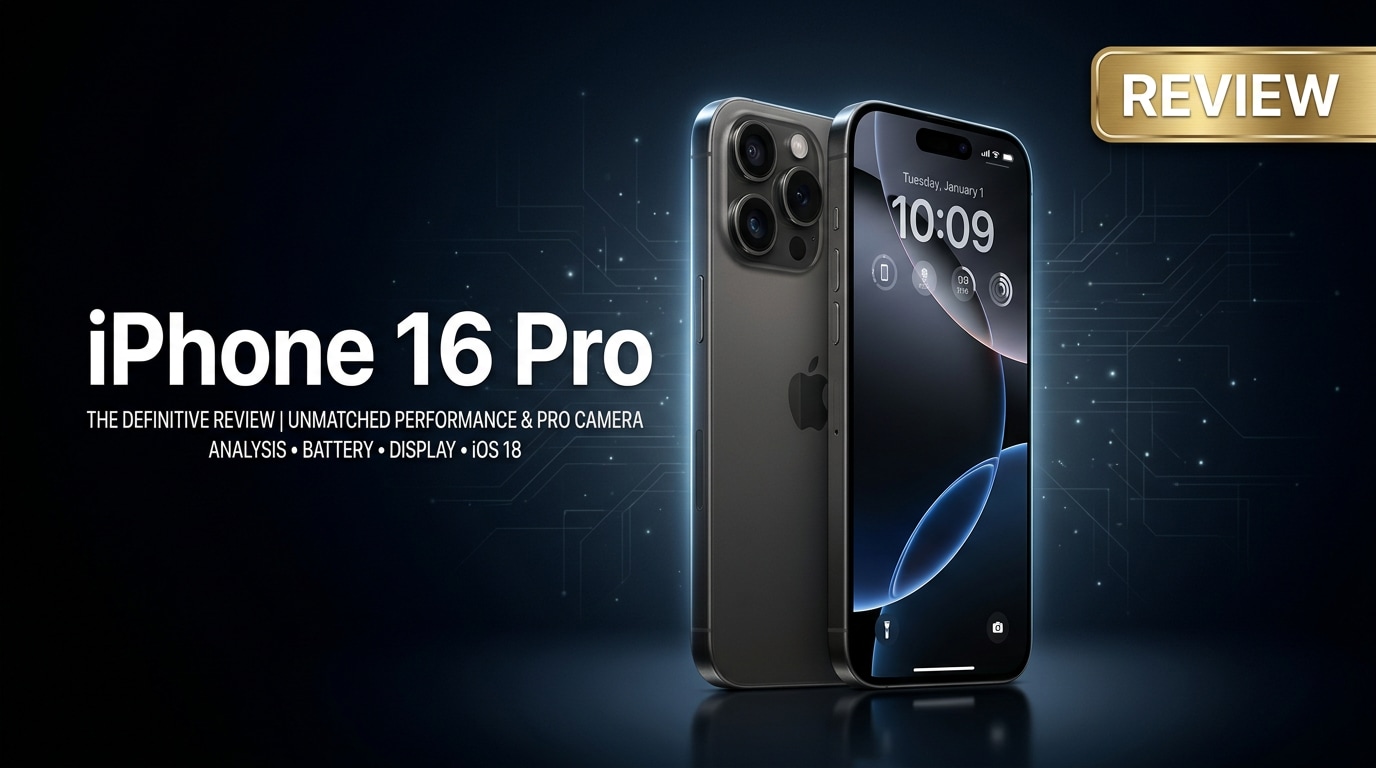
The iPhone 16 Pro is Apple's latest compact flagship, blending premium materials, a faster chip, smarter cameras, and longer battery life into a familiar Pro design. It targets users who want a powerful everyday phone that is equally comfortable shooting 4K video, editing on the go, and running demanding apps, without jumping to the larger Pro Max size.
Repair Corrupted Files To Save Your Data
 Security Verified. Over 7,302,189 people have downloaded it.
In this article
What Is New About iPhone 16 Pro
The iPhone 16 Pro builds on the 15 Pro with a faster A-series chipset, improved thermal management, and upgraded camera intelligence for better low-light and portrait results. Apple also refines the titanium frame for improved durability, introduces more advanced on-device AI features in the Photos and Camera apps, and slightly tweaks dimensions for better ergonomics and grip.
Beyond specs, the most noticeable changes are smarter image processing, smoother high-refresh-rate animations across iOS, and more efficient power usage. These upgrades make the iPhone 16 Pro feel quicker, cooler, and more responsive, especially when multitasking, gaming, or editing high-resolution content.
Price, Storage, and Design
iPhone 16 Pro price and storage options
Apple positions the iPhone 16 Pro price in the familiar premium range, targeting users who want Pro features without Pro Max bulk. Storage tiers typically start at 128 GB and climb through 256 GB and 512 GB, with a top 1 TB option aimed at creators and professionals.
| Model | Who it suits best |
|---|---|
| 128 GB iPhone 16 Pro | Light to moderate users who mostly stream content and rely on cloud storage. |
| 256 GB iPhone 16 Pro | Most people, especially those who shoot photos and some 4K video regularly. |
| 512 GB / 1 TB iPhone 16 Pro | Power users, mobile filmmakers, and gamers who need large local libraries. |
If you plan to record a lot of 4K video or keep large apps offline, the 256 GB or 512 GB versions offer better headroom so you do not have to micromanage storage.
Design, materials, and durability
The iPhone 16 Pro continues the titanium frame approach, balancing premium feel and reduced weight. Curved edges and subtle tweaks make it slightly more comfortable in one hand, while the familiar matte glass back helps reduce fingerprints.
Apple maintains IP68 water and dust resistance, meaning the device is rated for submersion in fresh water at limited depth and time. While this offers strong day-to-day protection, it is still wise to avoid soap, saltwater, and impacts that could compromise seals. As with earlier Pros, MagSafe remains central, supporting a wide range of magnetic accessories and chargers.
Display, Performance, and Daily Use
Screen quality and brightness
The iPhone 16 Pro display continues Apple's high standard with an OLED panel, deep blacks, and ProMotion up to 120 Hz for smooth scrolling. Peak brightness is improved for outdoor visibility, so the screen remains legible in direct sunlight when taking photos, navigating, or reading.
Color accuracy out of the box is excellent, and support for HDR content makes streaming and gaming feel immersive. The smaller Pro size also keeps the phone usable with one hand, avoiding the bulk that some users find in larger models.
Performance in real-world use
Powered by the new A-series chip, the iPhone 16 Pro specs translate into noticeably faster app launches, fluid multitasking, and reduced frame drops in intensive games. On-device machine learning accelerators help with photo processing, voice recognition, and live transcriptions while keeping data local.
In everyday use, this means apps stay in memory longer, background tasks complete faster, and the phone remains responsive even when juggling several heavy tasks. The improved thermal design also helps keep performance consistent during extended gaming sessions or 4K video recording.
Camera Review
Photo quality and new shooting modes
The iPhone 16 Pro camera system focuses on improved computational photography rather than a complete hardware overhaul. Main sensor upgrades, combined with smarter image processing, deliver cleaner low-light photos, better highlight control, and more realistic skin tones.
Portrait mode benefits from enhanced subject separation and background rendering, while Night mode handles mixed lighting more gracefully. New smart capture features can automatically detect scenes such as pets, food, or cityscapes and subtly adjust processing for richer, more natural results.
Video recording and creator features
For video, the iPhone 16 Pro continues to be one of the most reliable pocket cameras available. It supports high-resolution 4K recording with improved stabilization and better detail retention in challenging lighting. Enhanced cinematic tools and ProRes options (on higher storage models) cater to mobile filmmakers who want more control in post-production.
Newer creator-focused features, like refined stabilization modes and smarter audio capture, make it easier to shoot smooth, shareable clips without external gear. However, the flip side is that large 4K and ProRes files can strain storage and, in rare cases, become corrupted during transfers or interruptions, which is where repair tools become critical.
Battery, Charging, and Software Experience
Battery life and charging speeds
The iPhone 16 Pro battery offers better endurance than its predecessor thanks to efficiency gains from the chip and software. Most users can comfortably get through a full day of mixed use that includes messaging, browsing, social media, and some photography or video capture.
Fast charging via USB-C (or Lightning if unchanged in your region) and MagSafe wireless charging help quickly top up the phone. While Apple still plays it safe with maximum charging speeds, the combination of decent capacity and optimized software means fewer urgent midday charges for most people.
iOS experience and long-term support
Running the latest version of iOS, the iPhone 16 Pro benefits from tightened integration between hardware and software. System-wide search, widgets, Live Activities, and improved privacy controls make navigation efficient and keep data safer.
As with previous Pro models, you can expect several years of major iOS updates, which keeps the phone secure and compatible with new apps. This long-term support adds value to the higher upfront iPhone 16 Pro price, making it a sound investment for users who plan to hold onto their phone for multiple cycles.
Pros and Cons of iPhone 16 Pro
Before you decide, it helps to balance the strengths and trade-offs of the iPhone 16 Pro.
| Pros | Cons |
|---|---|
| Excellent OLED display with smooth 120 Hz ProMotion and great outdoor visibility. | Premium pricing, especially for higher storage options needed by power users. |
| Faster A-series chip with strong performance and efficient power usage. | Base storage can feel limiting for 4K and ProRes video creators. |
| Versatile camera system with improved low-light and portrait performance, plus strong video tools. | Design remains similar to previous Pro generation, offering limited visual change. |
| All-day battery life, robust iOS ecosystem, and long-term software support. | Large high-quality media files increase the risk and impact of data corruption if issues occur. |
What to Do If Your iPhone 16 Pro Files Get Corrupted
Why use Repairit for iPhone 16 Pro data issues
Even with Apple's reliability, issues such as failed transfers, sudden restarts, or storage errors can leave precious videos or photos unplayable. When your iPhone 16 Pro media seems damaged or cannot open, specialized repair software gives you a better chance of recovering it without resorting to complex manual fixes.
Wondershare Repairit is designed for this exact scenario. It repairs corrupted videos, images, and documents from devices like the iPhone 16 Pro, offering a guided workflow with previews before you save. You can learn more on the Repairit official website.
Key features of Repairit
- Repairs corrupted videos, photos, and documents from iPhone and many other storage devices.
- Provides clear repair status indicators with the ability to preview results before saving.
- Supports popular file formats and offers a beginner-friendly, step-by-step interface.
How to repair corrupted iPhone 16 Pro files step by step
- Launch Wondershare Repairit on your computer and pick the module that matches the broken content type (Video, Photo, or File). Connect your iPhone 16 Pro or copy the problematic items to a local folder first, then click "Add" to import the corrupted clips, images, or documents into Repairit for processing.

- Click the "Repair" button to start scanning and fixing your selected files. Repairit analyzes the structure and metadata of each item, trying to resolve playback errors, missing frames, or unreadable segments. When the repair completes, use the built-in preview window to check that image details, audio, and video playback look as expected.

- If the previews look good, select the files you want to keep and click "Save". Choose a safe destination on your computer or an external drive instead of the original location. After saving, you can sync the repaired videos and photos back to your iPhone 16 Pro using Finder, iTunes, or cloud storage, ready for viewing and sharing again.

Conclusion — When Should You Buy?
The iPhone 16 Pro review shows a device that refines the Pro formula with faster performance, smarter cameras, and stronger all-day stamina, all packed into a comfortable, premium body. For users coming from older models, these upgrades will feel substantial in everyday use, from smoother animations to sharper low-light photos.
If you prioritize camera quality, performance longevity, and a polished iOS experience, the iPhone 16 Pro is an excellent upgrade window. Pairing it with tools like Wondershare Repairit adds an extra safety net, ensuring that even if recordings or photos are corrupted, you still have a practical way to attempt recovery and protect your memories.
FAQ
-
1. Is the iPhone 16 Pro worth upgrading from the iPhone 15 Pro?
If you care about camera improvements, longer battery life, and faster performance, the iPhone 16 Pro is a meaningful upgrade over the 15 Pro. However, light users who are satisfied with their current phone and mainly use basic apps might prefer to wait another generation. -
2. How long does the iPhone 16 Pro battery last in real use?
Most people can expect a full day of mixed use that includes social apps, browsing, messaging, and some photography or video recording. Heavy gaming or long 4K shoots will drain the battery faster, but it should still last through a typical workday with reasonable settings. -
3. Can I repair corrupted iPhone 16 Pro videos without losing quality?
In many cases, yes. Tools like Wondershare Repairit aim to fix structural video issues while preserving the original resolution and clarity when possible. The final result depends on how badly the file is damaged, but you can preview the repaired clip inside Repairit before saving it. -
4. What storage option should I choose for the iPhone 16 Pro?
If you often record 4K or ProRes video or install large games, 256 GB or 512 GB is recommended. Users who mostly stream content and store photos in the cloud may be comfortable with 128 GB, but extra space gives more flexibility and helps prevent low-storage slowdowns. -
5. What should I do first if my iPhone 16 Pro files become unreadable?
Stop recording or editing new files on the same storage, then back up your device if possible. Copy the corrupted photos or videos to a computer and run a repair tool such as Wondershare Repairit to analyze and attempt to fix them before they are overwritten or degrade further.




