
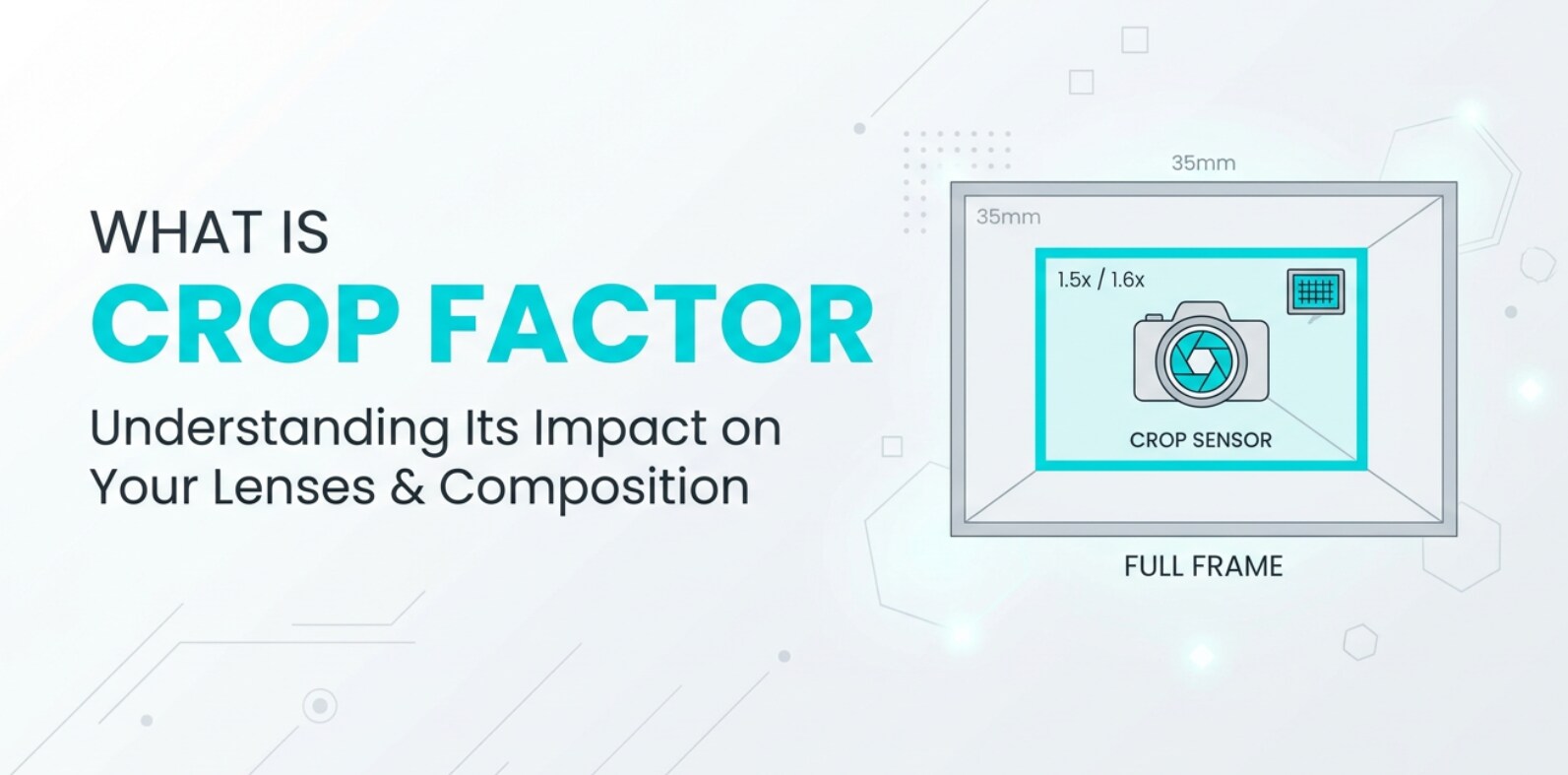
Crop factor is a term you will see on camera spec sheets, lens reviews, and editing forums whenever people compare camera sensor size or talk about full frame vs APS‑C or Micro Four Thirds. It describes how a smaller sensor crops into the image your lens projects, changing the framing and feel of your photos and video clips. Understanding crop factor helps you predict field of view, match shots across different cameras, and choose the right lenses for both photography and videography.
Repair Corrupted Files To Save Your Data
 Security Verified. Over 7,302,189 people have downloaded it.
In this article
What Is Crop Factor?
Crop factor is a number that compares the size of your camera sensor to a 35 mm full frame sensor. Full frame is defined as crop factor 1.0. Smaller sensors, such as APS C and Micro Four Thirds, have crop factors greater than 1 because they capture a smaller portion of the image produced by the lens.
In practical terms, crop factor tells you how a lens will "behave" on your camera compared with full frame. A 35 mm lens on a 1.5x APS‑C camera gives you the same framing as about a 52.5 mm lens on full frame. That is why crop factor is also called a focal length multiplier, even though it does not change the physical focal length of the lens.
Crop factor is a core framing and composition concept for both stills and video. It is especially important when you are choosing lenses, matching shots between cameras in a multi‑cam shoot, or following lens recommendations that assume full frame.
How Does Crop Factor Affect Your Image or Footage?
The clearest effect of crop factor is on field of view – how wide or tight your scene looks. A higher crop factor narrows the field of view, making the scene look more zoomed in with the same lens and camera position.
Because the sensor is smaller, it uses only the center part of the image circle from the lens. This has several practical consequences for your photography and videography:
- Framing and composition: On a crop sensor, wide‑angle lenses look less wide. A 24 mm lens acts like about 36 mm on a 1.5x APS‑C camera, changing how much background and environment you can include in the frame.
- Depth of field: To match the same framing as full frame, you must either stand farther away or use a shorter focal length on a crop sensor. At the same aperture number, that generally gives you deeper depth of field – more of the scene appears in focus compared with full frame.
- Background separation and bokeh: Because of the deeper depth of field at matched framing, it is a bit harder to get extremely blurred backgrounds on a small sensor than on full frame, unless you use faster lenses or get closer to your subject.
- Apparent reach for distant subjects: For telephoto work like sports or wildlife, a crop factor of 1.5x or 2x effectively tightens your composition without needing extremely long lenses. A 300 mm lens on Micro Four Thirds (~2x crop) frames like a 600 mm lens on full frame.
- Noise and low‑light behavior: Crop factor is tied to camera sensor size. Smaller sensors usually have smaller photosites, which can increase noise at high ISO compared with a larger full frame sensor, especially in low‑light video recording or night photography.
- Lens distortion and image quality in the corners: Because crop sensors use the central region of the lens, you may see less corner vignetting or distortion than on full frame using the same lens. This can be helpful for architecture and landscape work.
When you are editing, encoding, or exporting footage, crop factor itself does not change, but it explains why shots from different cameras feel tighter or wider even when metadata shows the same focal length. Understanding that relationship lets you crop, scale, or select lenses to match field of view across multiple clips and platforms.
How Does Crop Factor Work in Real Shooting?
Where You See Crop Factor in Gear and Specs
Manufacturers rarely label "crop factor" directly on the camera body, but you will see it implied in sensor type:
- Full frame: 35 mm format, crop factor 1.0.
- APS‑C: Typically 1.5x (Nikon, Sony, Fujifilm) or 1.6x (Canon).
- Micro Four Thirds: 2.0x crop factor.
When you read lens reviews, watch tutorials, or browse forums, you will often see focal length written as "35 mm (52.5 mm equivalent)" or "24–70 mm (full frame equivalent 36–105 mm on APS‑C)." That "equivalent" number is the lens focal length multiplied by your camera's crop factor.
In real workflows, crop factor appears when you:
- Plan multi‑camera livestreams or events where different bodies (full frame and APS‑C) must deliver consistent framing on the same platform.
- Set up reference frames or shot lists that assume a certain field of view, so assistants using other camera systems can match your wide, medium, and close‑up shots.
- Compare lens kits across brands – for example, choosing between a 16–55 mm APS‑C zoom and a 24–70 mm full frame zoom for similar coverage.
Practical Shooting Examples With Different Sensors
Consider these common scenarios that highlight how crop factor influences your decisions during shooting and later in editing and playback.
Example 1: Talking‑head YouTube video
- You want a natural talking‑head shot with a slightly blurred background for upload to major platforms.
- On full frame, a 35 mm or 50 mm lens at f/2–f/2.8 works well at about 1–1.5 m distance.
- On a 1.5x APS‑C camera, to match that framing you could use a 24 mm (roughly 36 mm equivalent) or 35 mm (about 52.5 mm equivalent) lens and stand a bit farther back.
- Editing the footage later, you will notice the APS‑C clip has slightly deeper depth of field at the same f‑number when framed identically, which can be good for keeping your hands and face sharp while you move.
Example 2: Wide establishing shot for a short film
- You want a very wide view of a city street to cut smoothly into a 4K timeline.
- On full frame, a 16 mm lens gives a dramatic wide look.
- On Micro Four Thirds (2x crop), you need an 8 mm lens to match the same angle of view, or you must step farther back if you only have a 12 mm lens (24 mm equivalent).
- If you shoot both cameras at "16 mm" because you ignore crop factor, the MFT camera will look much tighter in your rough cut, forcing you to adjust framing in post via cropping or reframing decisions.
Example 3: Wildlife photography and 4K video clips
- You are tracking birds and exporting short clips for social media and stock libraries.
- On full frame, a 400 mm lens may not feel long enough for small distant subjects.
- On an APS‑C camera with 1.5x crop, the same 400 mm lens frames like a 600 mm full frame equivalent, helping you fill the frame more easily.
- When you bring both sets of clips into your NLE, you will see that the APS‑C footage already looks "cropped in" compared with the full frame source, often reducing how much additional digital crop you need for delivery formats like vertical 9:16 or square posts.
Example 4: Stabilization and oversampling
- Some cameras apply extra crops for digital stabilization or when switching to certain frame rates or 4K/8K recording modes.
- This adds on top of your base sensor crop factor, narrowing the field of view even further.
- Knowing both the base crop and any additional recording crop lets you plan your lens choices so you do not end up with unexpectedly tight shots, especially important for live events and streaming layouts.
Best Uses, Common Mistakes, and Quick Tips
Crop factor matters most whenever you are thinking about angle of view, depth of field, or matching shots between different cameras and formats.
Best uses of crop factor knowledge
- Building a lens kit: Understanding full frame vs aps c and micro four thirds crop factors helps you choose focal lengths that cover ultra‑wide, standard, and telephoto needs for your specific sensor size.
- Multi‑camera productions: Use crop factor to translate focal lengths, so your A‑cam and B‑cam produce consistent wide, medium, and close shots, making editing, encoding, and platform‑specific exports faster.
- Sports and wildlife: Take advantage of crop sensors for extra "reach" without buying extremely long lenses.
- Travel and vlogging: When space is tight, knowing the effective field of view keeps your framing comfortable when shooting handheld, on gimbals, or in small rooms.
Common mistakes and misunderstandings
- Thinking crop factor changes actual focal length: It does not. The lens remains the same; only the amount of the image circle recorded by the sensor changes.
- Ignoring crop when following lens advice: Recommendations like "use a 50 mm for portraits" usually assume full frame. On APS‑C, that behaves more like a short telephoto (~75–80 mm equivalent).
- Forgetting extra recording crops: High‑frame‑rate modes, 4K, or digital stabilization can add further cropping to an already cropped sensor, making shots tighter than expected.
- Not considering depth of field changes: At matched framing, crop sensors give deeper depth of field, which can be either helpful (more in focus for run‑and‑gun work) or limiting (harder to get ultra‑shallow bokeh).
Quick tips for working with crop factor
- Learn your camera's crop factor (for example, 1.5x APS‑C, 2x Micro Four Thirds) and memorize two or three "go‑to" equivalent focal lengths for portraits, wides, and telephoto shots.
- When someone mentions a focal length on full frame, quickly multiply by your crop factor to know what lens you need to get a similar view.
- If you edit mixed‑camera projects, label clips or camera bins with sensor type or effective focal length to keep framing expectations clear during cutting and color grading.
- Use crop sensors to your advantage for telephoto work, but favor wider or faster lenses if you need expansive landscapes or very shallow depth of field.
Takeaway: Crop factor is not a limitation by itself; it is a translation tool that lets you predict how your lenses will look on different cameras so you can compose confidently and deliver consistent results across platforms.
How to Use Repairit to Fix a Corrupted Photo File
Sometimes your photos or frame grabs will not open or preview correctly, not because of crop sensor choices or camera settings, but due to file corruption during recording, transfer, or storage. Wondershare Repairit provides a dedicated, user‑friendly way to repair broken image files so you can recover important shots for editing, encoding, exporting, and sharing. Visit the Repairit official website to download the tool for your system.
Key Features of Repairit for Photo Repair
- Repairs corrupted or unreadable photo files from many camera brands and formats.
- Offers an easy, guided workflow suitable for both beginners and professionals.
- Supports batch repair so you can fix multiple damaged files in one go.
Step-by-Step: Repair a Corrupted Photo File
- Add corrupted photo files
Install and open Wondershare Repairit on your computer, then choose the Photo Repair module from the main interface. Click the button to add files and browse to the folder that contains your damaged images from your camera, phone, or memory card backup. Select one or more problematic photos and confirm to load them into the repair list for analysis.

- Repair photo files
After your files appear in the list, start the repair by clicking the Repair button. Repairit scans each photo, looks for structural errors in the data, and attempts to reconstruct missing or damaged information. When the process finishes, you can preview the repaired images inside the program to verify that details, colors, and framing look correct before saving.

- Save the repaired photo files
Once you are satisfied with the previews, select the photos you want to keep and click Save to choose an output folder. For safety, pick a different location from the original source drive or card. Repairit will export the repaired images to that folder, where you can organize them, import them into your editor, and back them up along with your other project files.

Conclusion
Crop factor is a simple but powerful way to understand how different sensor sizes change the field of view you get from any lens. By treating it as a translation between systems, you can confidently convert focal lengths to full frame equivalents, plan compositions, and choose lenses that suit your style of photography or videography.
Keep crop factor in mind whenever you mix camera bodies, shoot both stills and video, or prepare content for various platforms with different aspect ratios. Combined with solid backup habits and tools like Wondershare Repairit to protect you from file corruption, this understanding helps you get consistent, reliable results from capture through editing, encoding, and final playback.
Next: Depth Of Field
FAQ
-
1. What is crop factor in simple terms?
Crop factor is a number that compares your camera's sensor size to full frame and shows how much the sensor "crops" into the image from the lens. A higher crop factor means a tighter field of view with the same focal length. -
2. How do I calculate full frame equivalent focal length?
Multiply your lens focal length by your camera's crop factor. For example, a 35 mm lens on a 1.5x APS‑C camera gives roughly a 52.5 mm full frame equivalent field of view (35 x 1.5 = 52.5). -
3. Does crop factor change the actual focal length of my lens?
No. The physical focal length of the lens never changes. Crop factor only describes how much of the lens's image circle the sensor records, which alters the field of view. -
4. How does crop factor affect depth of field?
At the same framing and aperture number, a crop sensor usually gives deeper depth of field than full frame. To match the composition, you use a shorter focal length or stand farther away, both of which increase how much of the scene appears in focus. -
5. Is a higher crop factor better for wildlife or sports?
Often yes. A higher crop factor narrows the field of view, so distant subjects appear more tightly framed with the same lens, which is helpful for wildlife and sports where you cannot get close.




