

 TL;DR:
The Repairit App provides the most realistic AI sky replacement for Android and iOS through a Text-to-Edit prompt system that automatically harmonizes foreground lighting and color temperatures, whereas alternatives like YouCam Perfect and PICNIC Weather Genie are designed for quick, stylized filter overlays.
● Free tier usage across these applications is strictly limited by forced watermarks in Repairit and on BeFunky premium filters, daily advanced AI feature caps in YouCam Perfect, workflow-disrupting ads in PICNIC Weather Genie for Android, and restricted batch processing in Picsart.
● The core modification methods differ significantly; Repairit isolates the sky based on typed instructions to protect the foreground, while filter-based tools like BeFunky apply non-destructive effects to the entire photo, requiring manual post-adjustments to correct the overall image highlights and shadows.
● To prevent unnatural cut-and-paste artifacts when using any of these automated tools, users must manually use masking or blending tools to smooth the transition edges around trees or mountains and ensure the chosen sky matches the depth and horizon perspective of the original photo.
Ask AI for a summary
 ChatGPT
 Perplexity
 Gemini
 Claude
 Grok
Grok
Do you feel that sometimes a perfect photo with light, pose, and setting still feels like it is missing something? It could be the sky that dulls the entire scene, because a pale sky can make even the most vibrant photo appear flat. When a photo-edit sky feature comes in, it automatically adds a warm sunset glow or a bright summer blue; your picture initially misses.
This feature allows you to match your sky to your vision: calm for serenity, bold for energy, or moody for emotion. To set a correct tone, keep reading the guide and reveal the top-ranked AI sky replacement apps.
Table of Contents
Part 1. What Is Photo Edit Sky and Why AI Sky Replacement Matters
You can edit sky in photos by digitally manipulating a photograph’s sky using an AI-powered editing app or software. This process can involve subtle adjustments, such as increasing saturation, contrast, and detail, to make the sky bluer. Professional apps utilize AI technologies to detect and isolate the sky, then blend the chosen sky replacement into the scene.
Traditional vs AI Sky Replacement
| Aspects | Traditional Sky Replacement | AI Sky Replacement |
| Method | Manual selection, masking, and layering | Automatic detection, segmentation, and blending |
| Required Skill Level | High, requires experience | Low, beginner-friendly |
| Speed | Slow | Fast |
| Accuracy | Depends on the user's skill and image detail | Consistently high, and handles complex edges |
| Customization | Extensive control and manual adjustments | Limited fine control, some presets |
Use Cases
- To replace dull, overcast, and washed-out skies with bright sunny ones, increasing marketability.
- Transform travel photos and landscapes with dramatic sunsets, clear blue skies, and cloud formations.
- Used to upgrade outdoor portraits and event photos by correcting overexposed or flat skies.
- For sky transformations to tailor campaigns targeting specific seasons or emotional responses.
Key Features of the Best AI Sky Replacement Tools in 2025
- Automatic Sky Detection and Masking: AI instantly identifies and segments the sky area in any photo, saving users from manual selection.
- Diverse and Customizable Sky Libraries: The best apps offer a massive range of selectable skies with the ability to import custom skies for creative flair.
- Batch Processing and Speed: Such dedicated tools handle sky replacement in seconds and support batch editing, enabling large-scale workflows.
- High-Resolution Output: All final images can be exported in full HD or higher resolution, maintaining sharpness and detail.
- Integrated Editing Controls: Users can further adjust temperatures, haze, and apply filters, all with sliders or one-click previews.
Part 2. Top Advantages of Using AI for Sky Replacement in Photos
To dive into the technical side, it's important to understand why AI sky replacement has become a must-have feature among creators:
- Instant and Natural Editing: With AI sky replacement, the process is automated and precise, unlike traditional replacement methods. The tool detects the sky area, adjusts the details, and blends color naturally, all within moments.
- Realistic Lighting and Color Matching: AI understands the dynamics and automatically adjusts the lighting or tones of the entire image. This creates a cohesive, natural blend, making it hard to tell if the photo was ever edited.
- For Creative Flexibility: You can freely experiment from vivid sunsets to dramatic clouds or even dreamy twilight skies. With this flexibility, users can express creativity without worrying about complex edits in their visuals.
- Consistency Across Projects: For influencers and professionals, maintaining a visual identity and consistency is the primary key. The AI-driven apps help ensure your images maintain a consistent aesthetic when you batch-edit pictures.
- Accessible for All Skill Levels: Even beginners with no editing experience can achieve professional-grade outcomes because of user-friendly interfaces. The AI sky replacement helps your visuals deliver more profound, thoughtful stories, for calm serenity or warm nostalgia.
Part 3. 5 Best AI Sky Replacement Tools for Stunning Photo Edits in 2025
For an ultimate experience of photo sky replacement powered by AI, you’ll need to explore the apps discussed below:
1. Repairit App (Android/iOS)
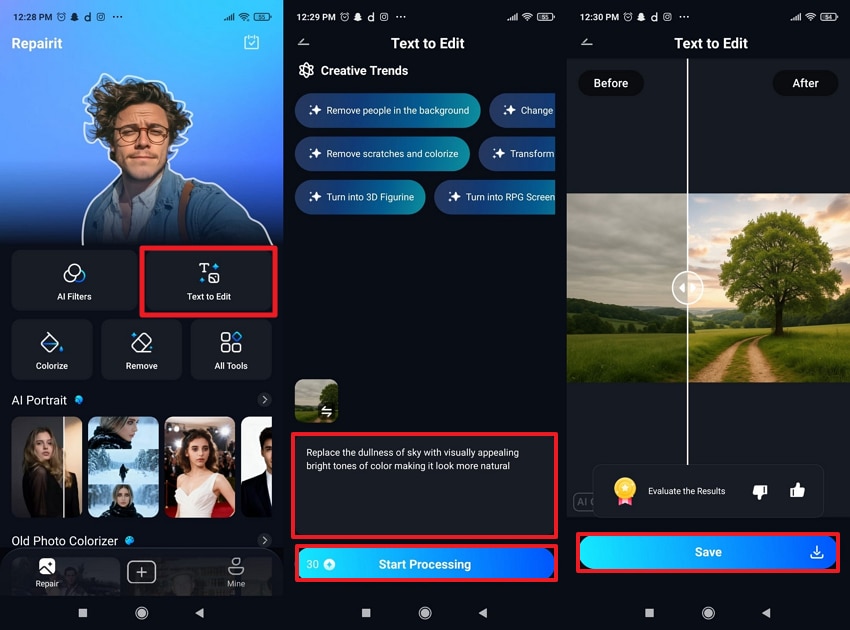
Repairit Sky Replacer is a full-fledged AI-powered image editor that offers a Text-to-Edit feature for professional editing. It allows users to simply enter a prompt, such as “replace sky with sunset” or “add clear blue sky,” for automatic adjustments. The AI identifies lighting, color temperatures, and scene context, blending the new alterations while maintaining harmony. It further offers click-to-preview and instant processing, accelerating the workflow for everyone.
Accessible across Android and iOS, supporting high-resolution output, ensuring the replaced skies and overall image retain clarity. The latest integration with Nano Banana algorithms delivers more enhanced results for sky replacement. It now offers different colorization styles, from classic vintage look to vivid modern digital effect for sky colors. Essentially, you’re allowed to save your final version to the gallery directly after generation.
Detailed Step-by-Step Guide to Edit Sky with the Repairit App
Access the “Text-to-Edit” feature > Insert your dull sky image > Enter a detailed prompt > Press “Start Processing” > Preview and “Save” image.
2. BeFunky (Android/iOS)
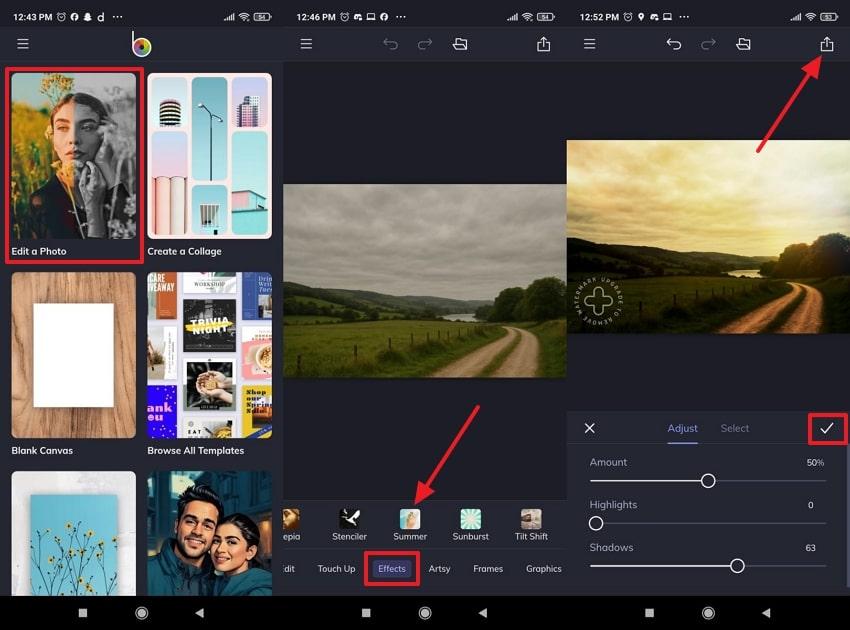
To edit the sky in a photo, BeFunky enables users to change or enhance the sky through a variety of filters and effects. The one-tap artsy filters, like painting, summer, and watercolors, transform both the sky and the overall photo's style. More impressively, the sky edits and other changes are non-destructive or reversible, allowing quick experimentation with previews.
Tutorial to Replace Sky Images Using BeFunky
Open BeFunky > Access “Edit a Photo” option > Import image > Choose “Effect” section > Select a filter > Make adjustments > Press “Export.”
3. YouCam Perfect (Android/iOS)
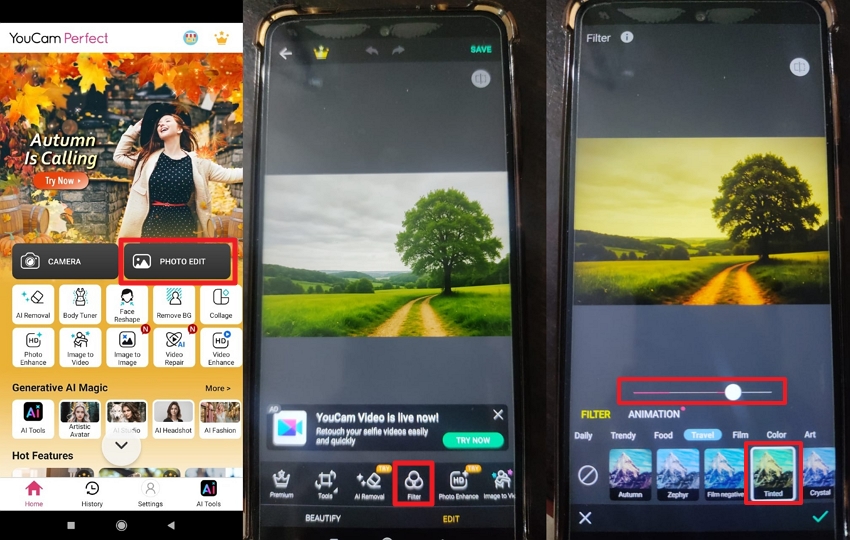
YouCam Perfect sky replacement AI app integrates AI-powered effects for sky editing, enabling users to enhance, recolor, or replace dull skies instantly. YouCam offers a massive range of one-tap preset filters uploaded seasonally, along with additional mood and atmosphere options. Besides, its animation capability allows users to adjust the effect accordingly, all within a single ecosystem.
Manual to Modify Sky Photos with YouCam
Access the YouCam app > Press “Photo Edit” > Insert image > Choose the “Filter” section > Select a filter > Adjust “Animation”
4. PICNIC Weather Genie (Android/iOS)
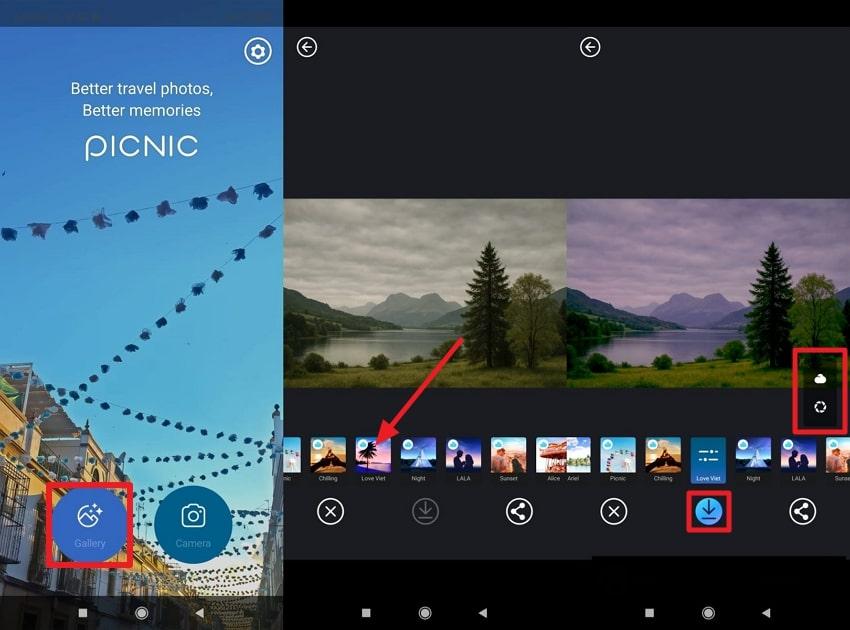
A notable sky replacer, offering 33 emotional sky filters inspired by locations and moods, transforming scenes into sunsets or bright mornings. The app is available in 32 languages and supports sharing, saving, and direct editing on both Android and iOS. It also includes a filter camera mode to shoot new photos directly with sky filters applied, ensuring consistent tone.
Manual to Alter Sky in Photo With PICNIC
Choose the “Gallery” option > Import image > Select a filter > Open “Adjustment” section > Make alterations > Press “Download”
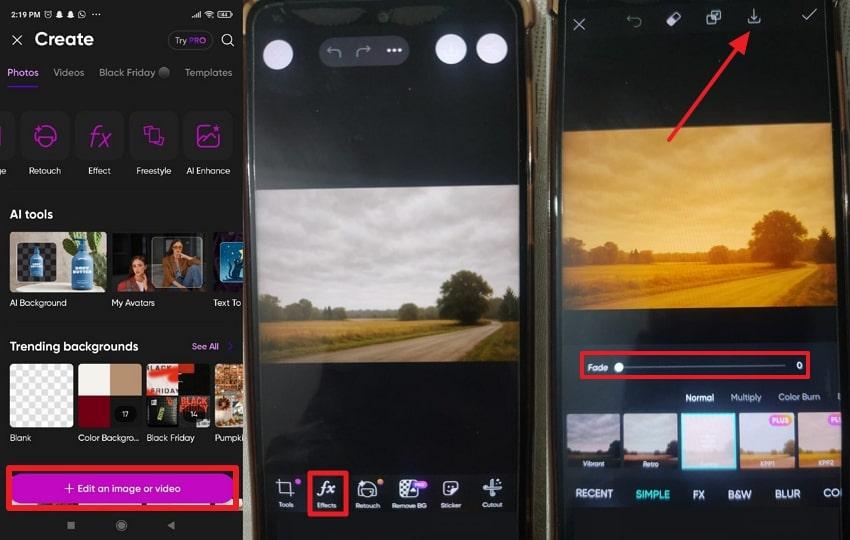
5. Picsart (Android/iOS)
Picsart employs AI-driven capabilities to examine images and apply effects and overlays, all with a one-tap process. For AI sky replacement, the procedure is simple and requires only adjustments via the Color Burn, Darken, and Lighten options. In addition, the AI Replacer tool facilitates users to highlight the element they want to remove and replace according to their command.
Guidelines to Edit Sky in Pictures Using Picsart
Enter Picsart > Press “Edit an Image or Video” option > Add image > Access “Effects” section > Choose a filter > Adjust “Fade” > Tap “Save” icon.
For a quick comparison of strengths and features of each app, a detailed tabular comparison is provided ahead:
| Sky Replacer Apps | Sky Detection or Selection | Variety of Sky Effects | Ease of Use | Realism and Blending |
| Repairit App | AI detection through Text-to-Edit prompt understanding | Sky replacement based on typed instructions: sunset, blue sky, cloudy, golden hour | Very easy, simply type what you want | High realism because AI adjusts lighting and tones automatically |
| BeFunky | Filter-based adjustments | Artistic, photo-style, and seasonal filters | One tap, simple interface | Moderate realism, depends on the filter |
| YouCam Perfect | AI sky segmentation | Large preset library, creative and seasonal sky packs | One-tap presets | Good realism for portraits and casual photos |
| PICNIC Weather Genie | Auto-select through sky filters | 33 mood-based sky filters | One tap, beginner-friendly | Dramatic and stylized, not always natural |
| Picsart | AI segmentation + overlays | Wide range of realistic and creative sky effects | Easy with guided prompts | Strong blending when minor adjustments are added |
This comparison clearly shows the Repairit App as the winner, as it combines realism, creativity, and customization. Most importantly, it uses Text-to-Edit functionality that allows users to generate accurate, professional sky alterations on command.
Part 4. Tips to Edit Sky in Photo with AI for Realistic Results
Although apps for AI sky replacement are enough, pairing them with the provided techniques will surely help you achieve natural edits:
- Prefer the Right Sky for the Scene: Select a sky filter or option that aligns the lighting, angle, and mood of your photo. Even though AI apps can suggest alternatives, always check whether they fit the perspective and the overall scene.
- Match Lighting and Color Tones: Once the color is replaced, make sure the lighting and colors of the foreground or background are consistent. Such apps automatically adjust shadows and highlights, but subtle adjustments to brightness and temperature can make the images look more realistic.
- Refine Edges for Natural Blending: Try to pay attention to edges where the sky meets objects like trees or mountains. For this, use masking or blending tools to smooth transitions and prevent a cut-and-paste effect in the scene.
- Adjust Depth and Perspective: The replaced sky should align with the horizon and overall perspective of your photo. If a picture has a wide-angle view, choose an effect that fits the depth and scale; this maintains realism and avoids distortion.
- Preview and Compare Before Downloading: Always compare the edited photo with the original one to ensure compatibility between sky and foreground. Minor adjustments after AI processing can improve realism, giving your photos an atmospheric visual that feels almost natural.
Conclusion
In conclusion, the process of photo editing sky opens the door to endless creative possibilities, all discussed in the article above. How a well-edited sky instantly changes the tone of your image, bringing depth that elevates it further, is explained through dedicated apps. For flawless transformations, simply download the Repairit App and get edits in a few seconds with its Text-to-Edit feature.
Frequently Asked Questions
-
Q1. How does Repairit’s Text-to-Edit sky replacer differ from manual editing?
Repairit’s Text-to-Edit sky replacer uses advanced AI to interpret your written instructions and automatically apply sky changes accordingly. Unlike manual editing, which requires layer masks or color corrections, the app precisely analyzes the image to match the perspective. This means you can simply type something, and the app will deliver a natural-looking transformation, saving you time. -
Q2. Does sky replacement AI affect the photo’s lighting balance?
The AI sky replacement results in tools like Repairit automatically showing the photo's light balance to ensure the sky and foreground blend. Instead of placing a new sky over the image, the AI adjusts exposure and color temperature to align with the new tone. Essentially, reflection, shadows, and highlights stay consistent, resulting in a cohesive final image. -
Q3. Which app offers the most realistic sky editing results?
Among all available apps, Repairit and Befunky consistently deliver the most realistic or visually appealing results. Their advanced AI technology not only makes changes but also harmonizes every element in the photo, from lighting to color depth.






