
 TL;DR:
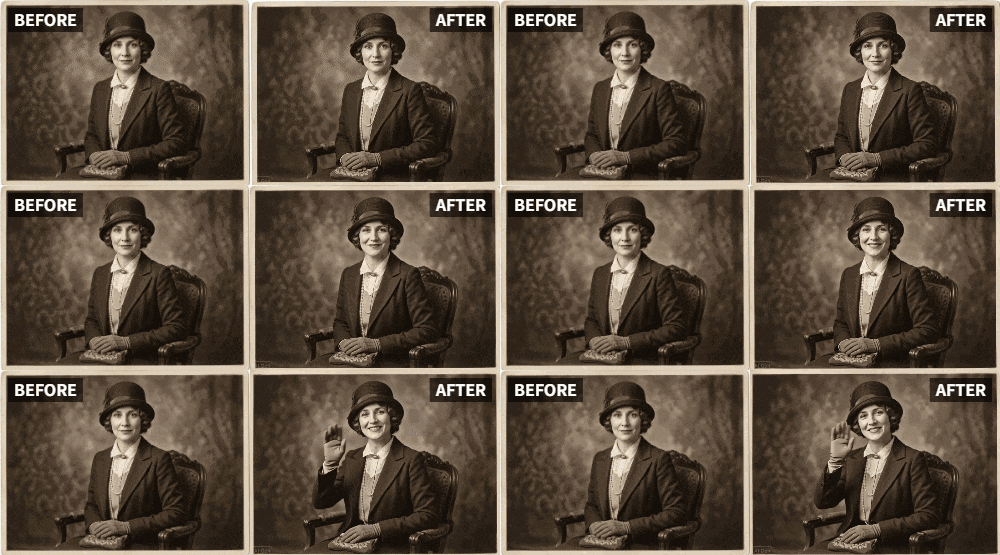
Apply the Relumi app's "Wave" preset to vintage photos to generate subtle, atmospheric motion in background environments without forcing unnatural movements onto the subjects.
● The effect requires photos with visible natural or environmental elements like trees or curtains to work properly, and damaged images should be repaired with Relumi's restoration tools prior to animation.
● The "Wave" preset applies only a minimal overall sway to people; if animating a tight portrait with no visible background, switch to the "Relive" preset for targeted facial animation.
Ask AI for a summary
 ChatGPT
 Perplexity
 Gemini
 Claude
 Grok
Grok
There's a certain magic in old family photos. They capture a moment in time, a face, a place. But they are also frozen. The people we love are locked in a silent, still image. You wish you could see them move, just a little—to see Grandma's gentle smile, or Grandpa's thoughtful gaze, as it might have been in life.
While Relumi's "Relive" feature is perfect for animating faces, the "Wave" preset offers a different, equally powerful kind of magic for old photos. It adds a gentle, atmospheric movement to the entire scene, making a vintage portrait feel less like a static artifact and more like a living, breathing memory. The background might subtly sway, the light might seem to shift, bringing a new sense of life and presence to the past.
In this article
Part 1: Beyond the Face: Animating the Atmosphere of the Past
On genealogy forums, the focus is often on restoring the image—fixing scratches, adding color. But what about restoring the feeling? An old photo isn't just a record of a person; it's a record of a moment, a place, an atmosphere. That atmosphere was never still.
The "Wave" preset can add that missing life. It doesn't animate the person in a way that might feel unnatural (like making them dance or clap). Instead, it subtly animates the world around them—a curtain in a window, leaves on a tree, the soft light in the background. This gentle motion makes the entire scene feel alive, as if we are peering through a window into the past, not just looking at a photograph.
Part 2: How to Gently Animate a Vintage Photo with the Wave Preset


Relumi AI Photo Animation
Bring old photos to life with AI-powered animation.

 Preset motion styles — Wave, Dance, Clap, Cheers & more
-
Works on old, faded, and black-and-white photos
-
No editing skills required — generate in seconds
-
One tap turns any still image into a moving memory.
Creating this atmospheric tribute is simple and respectful.
Step 1: Choose a Cherished Old Family Photo
Select a clear, scanned image of an old family photo. A portrait with a visible background—a garden, a porch, a room with a window—will work best, as the "Wave" effect can animate those environmental elements.

Step 2: (Optional) Restore the Photo First
If the photo is damaged, use Relumi's restoration tools first to repair scratches and fading. A clean image provides the best canvas for animation.

Step 3: Upload to Relumi and Apply the "Wave" Preset
Open the Relumi app, go to Photo Animation, and select the "Wave" preset. The AI will add a subtle, gentle sway to the natural elements in the background. The effect is calming and deeply atmospheric.

Step 4: Share Your Living Memory
Export the clip. This gentle animation is perfect for sharing in a family group chat or as part of a larger family history video. It brings a new, peaceful dimension to how your family connects with its past.
Part 3: Creative Uses for Atmospheric Old Photo Animations
This technique can be used in many heartfelt ways.
- Family History Video Montages: Use "Wave"-animated old photos as transitional or atmospheric shots in a longer family history video, creating a dreamy, nostalgic feel.
- Digital Memorial Displays: Place a gently animated old photo on a digital photo frame. The subtle movement makes it feel more present and comforting .
- Enhancing Restored Photos: After restoring a damaged photo, use the "Wave" preset to give it a final touch of life, moving it from a "fixed image" to a "living memory."
- Backgrounds for Storytelling: Use an animated old photo as a living background while a family member narrates a story about the person or the time.
Conclusion
Old photos are portals to the past. With Relumi's "Wave" feature, you can gently open that portal a little wider, adding a sense of life and atmosphere to the world our ancestors once inhabited. It's a way of remembering that is as peaceful and profound as the memories themselves.
Frequently Asked Questions
-
Will the Wave animation make the people in the old photo move?
The primary effect is on the background and environmental elements. People will receive a very subtle, overall gentle movement that blends with the scene, but the focus is on creating atmosphere, not animating the subject. -
What if the old photo has no clear background elements?
The "Wave" preset works best with visible natural elements (trees, water, skies, fabric). For a tight portrait with no background, the "Relive" preset is a better choice for subtle facial animation. -
How long does the animation take?
Just a few seconds. -
Can I add music to the video?
Yes. Pairing a gently animated old photo with soft, nostalgic music creates an incredibly moving tribute.



