
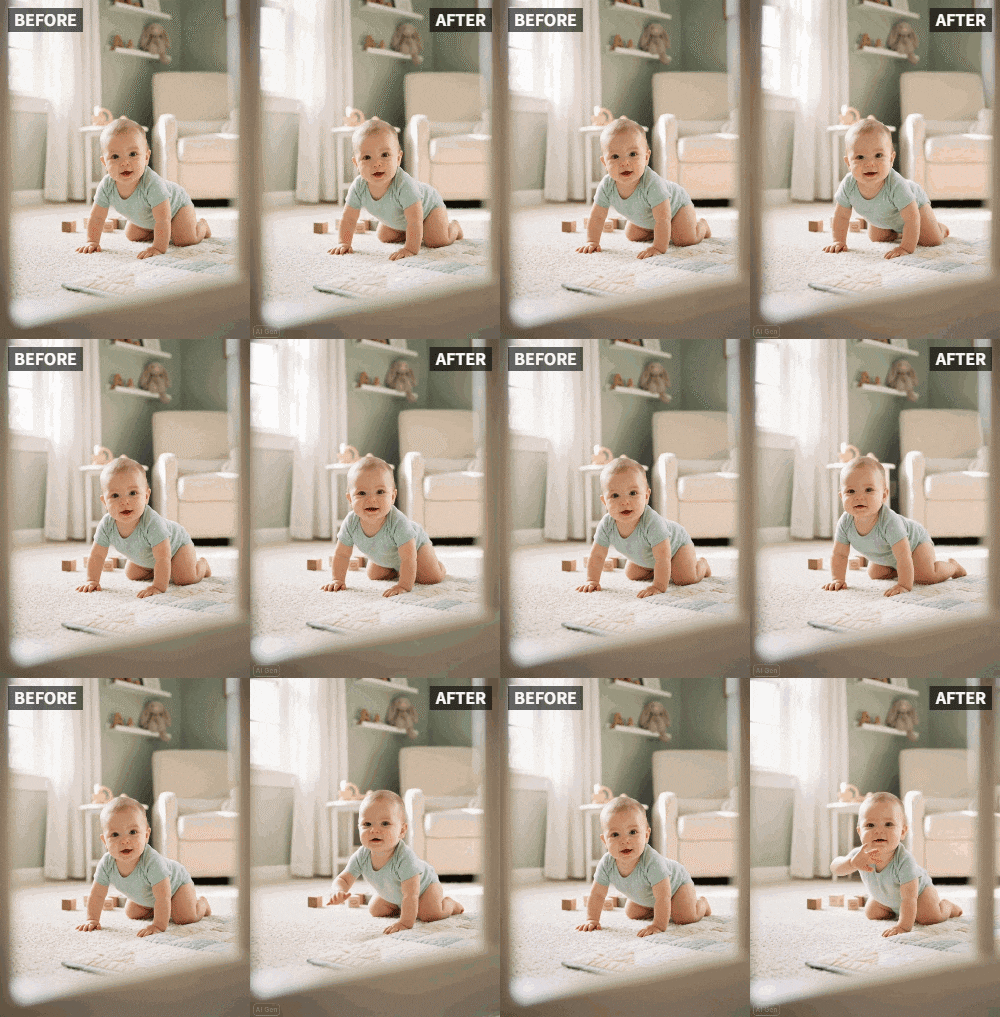
 TL;DR:
Transform static newborn announcement photos into moving video greetings by applying the Wave preset in the Relumi AI app.
● For accurate AI gesture recognition, provide a clear, well-lit, front-facing image where the baby's arms or hands are visible in the frame.
● The app generates the animation in 10 to 20 seconds, allows you to adjust the movement intensity from gentle to energetic, and exports the result as an MP4 file.
● Photo data is processed securely and is not stored on Relumi servers without your consent, enabling you to save the files locally to protect your privacy.
Ask AI for a summary
 ChatGPT
 Perplexity
 Gemini
 Claude
 Grok
Grok
Bringing a new baby home is one of life's most joyful milestones. The moment you share the news with loved ones, you want it to feel as special as the moment itself. In today's digital world, a simple text or a static photo often gets lost in the noise of endless notifications. New parents on Reddit's r/beyondthebump frequently express frustration: "I posted a cute photo of my daughter, but it got only a few likes. How can I make it stand out?" The answer lies in animation. With Relumi AI's Wave feature, you can transform a standard newborn photo into a living, waving greeting that captures hearts. This article explores how to create a baby welcome video that not only announces the arrival but also conveys the warmth and excitement you feel.
In this article
Part 1: The Problem with Static Baby Announcements
When you post a newborn photo on social media or send it via messaging apps, it's easily lost in the endless stream of content. Friends might double-tap and scroll past without a second thought. But a dynamic image—especially one where the baby seems to wave—stops the scroll immediately. On Quora, parents share that they want announcements to feel personal and memorable. A waving baby photo creates an emotional connection. It's as if the baby is personally greeting each viewer. According to parenting forums, engagement on baby announcement posts drops significantly when they're just static images. By adding a wave animation, you invite viewers to pause and interact. Relumi AI makes this possible with just a few taps, turning a precious memory into an interactive moment.
Part 2: Step-by-Step Guide to Animating Your Baby's Wave
Creating a waving baby video is simple and requires no technical skills. Here's how:


Relumi AI Photo Animation
Bring old photos to life with AI-powered animation.

 Preset motion styles — Wave, Dance, Clap, Cheers & more
-
Works on old, faded, and black-and-white photos
-
No editing skills required — generate in seconds
-
One tap turns any still image into a moving memory.
1. Pick the Right Photo: Choose a clear, front-facing photo where your baby's face and hands are visible. Good lighting helps the AI recognize gestures. Avoid photos with heavy shadows or blur. If your baby is sleeping, that's fine—the wave can be added subtly.

2. Select the Wave Animation: In the Relumi app, go to Photo Animation and choose the "Wave" preset. The AI will analyze the photo and generate a natural waving motion. You can preview the animation and adjust the intensity if needed—from a gentle hand movement to a more energetic wave.

3. Customize and Save: Once satisfied, export the video. You can add text overlays like "Hello World!" or "Baby Name Arrived" using any video editor. For a polished look, consider adding soft background music. The final video can be saved in MP4 format and shared anywhere.

Part 3: Creative Ways to Use Your Waving Baby Video
- Social Media Announcement: Post the video on Instagram or Facebook with a caption like "Baby [Name] says hello to the world!" Expect higher engagement than a static photo. Use relevant hashtags such as #babywave #newbornannouncement #aianimation.
- Personal Video Messages: Send the waving video to close family via WhatsApp or email. It feels like a personal video call, especially for grandparents who live far away.
- Digital Birth Announcement: Embed the waving video in a digital birth announcement card. Services like Canva allow you to create beautiful cards with video. Include details like weight, name, and birth date.
- Baby's First Year Montage: Save the video for a first-year birthday montage. It will be a precious memory showing how your baby "waved" from day one.
- Thank You Notes: After receiving gifts, send a waving thank-you video. It's a heartfelt way to acknowledge loved ones' generosity.
- Hospital Welcome Screen: Some hospitals allow digital displays in maternity wards. Ask if you can display your waving baby photo for visitors.
Conclusion
A waving baby photo is more than just a picture; it's a message of joy and connection. Relumi AI makes it easy to create this heartwarming effect. Try it for your next baby announcement and watch your loved ones' reactions light up. Whether for social media, private messages, or keepsakes, animated baby waves are the new way to share life's biggest moments.
Frequently Asked Questions
-
Is it safe to animate my newborn's photo? Does the app store any data?
Relumi takes privacy seriously. Your photos are processed securely and are not stored on servers without your consent. You can choose to save animations locally. -
What if my baby's hand isn't visible in the photo?
The Wave animation works best when hands are visible. However, the AI can sometimes generate a waving effect even if the hand is partially hidden. For best results, choose a photo where the baby's arm or hand is in the frame. -
Can I use this for a premature baby in the NICU?
Absolutely. Many parents use Relumi to create uplifting announcements even during challenging times. The animation can bring a smile to family members who can't visit. -
How long does the animation take?
Usually 10-20 seconds. The app processes quickly, so you can share your joy almost instantly. -
Will the animation look fake or unnatural?
Relumi's AI is trained on natural human movements, so the wave appears realistic. You can adjust the intensity to match your baby's actual movements.



