
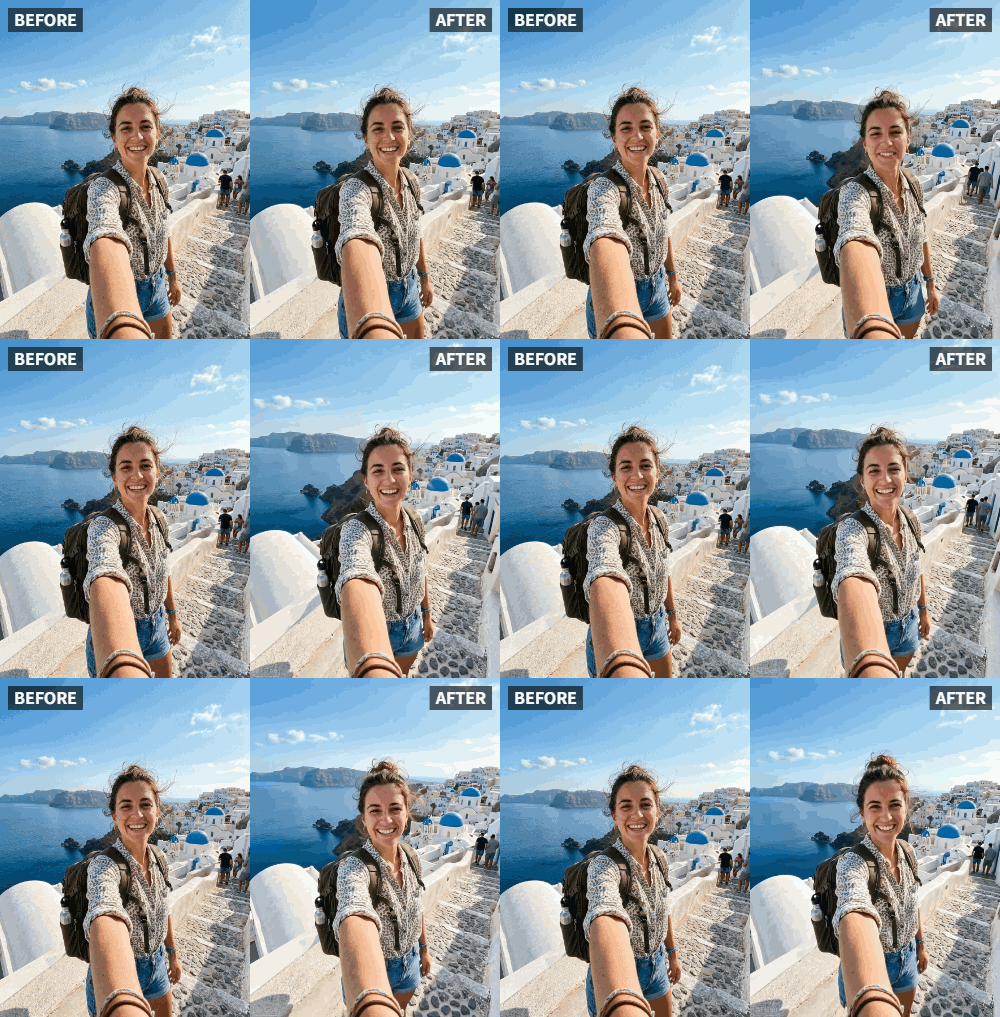
 TL;DR:
Relumi AI transforms static selfies into lifelike animated portraits by applying natural micro-expressions and subtle breathing motions to existing photos.
● The Facial Expression Animation feature optimizes only single faces, meaning group photos must be cropped, and requires JPG, PNG, or HEIC files at a minimum of 1080x1080 pixels for best results.
● Users dictate the animation strength via intensity sliders to create a 2-5 second video loop ranging from a slight smirk to a broad smile.
● Processing can be handled without cloud storage, allowing users to save their generated animations directly to their local devices for privacy.
Ask AI for a summary
 ChatGPT
 Perplexity
 Gemini
 Claude
 Grok
Grok
We‘ve all been there. You take a dozen selfies, and in every single one, your smile looks forced, or your eyes look tired. You want to post a photo, but the static image just doesn’t capture your vibe. You don't want heavy filters or "plastic" skin—you just want to look like you, but happier.
This is where AI photo animation comes in. Unlike traditional beauty apps that smooth your skin into oblivion, the Facial Expression Animation feature in Relumi AI focuses on motion. It adds a subtle, natural breathing effect and micro-expressions to your face, making a still photo feel alive and authentic .
In this article
Part 1: Why Static Smiles Feel "Off"
If you scroll through Reddit threads about photo editing, a common complaint is the "uncanny valley" effect—photos that look too perfect to be real. When you force a smile for a camera, it often doesn't reach your eyes. In real life, emotions are dynamic.
Relumi solves this by animating the face rather than just painting over it. The technology activates a micro-smile and gentle eye movements. It takes a photo where you look neutral or serious and introduces a lifelike, subtle happiness . This is perfect for those moments when the lighting was great, but your expression was just "meh."


Relumi AI Photo Animation
Bring old photos to life with AI-powered animation.

 Preset motion styles — Wave, Dance, Clap, Cheers & more
-
Works on old, faded, and black-and-white photos
-
No editing skills required — generate in seconds
-
One tap turns any still image into a moving memory.
Part 2: How to Animate Your Expression in 3 Steps
You don’t need to be a video editor to make your photos move. Based on user experiences with similar AI tools , the workflow is incredibly simple:
- Pick the Right Photo: Choose a high-quality selfie where your face is clearly visible. Portraits with good lighting work best.

- Select "Facial Expression Animation": In the Relumi app, navigate to the Photo Animation feature. Here, you can choose the intensity of the animation—from a slight smirk to a broader smile.

- Let AI Work: The AI analyzes your facial structure (eyes, mouth, jawline) and generates a short video loop. You’ll see your portrait take a gentle breath or break into a warm smile.

Part 3: Best Uses for "Reactive" Selfies
Creators on platforms like TikTok are using this to boost engagement . Instead of posting a static image for a story, they post a looping animated photo.
- Profile Pictures: An animated PFP grabs attention immediately. When someone visits your profile, a moving image makes them stop and look twice. Studies show that animated profile pictures receive up to 30% more views on social platforms . For professionals, a subtle animated headshot on LinkedIn can convey confidence and approachability without being unprofessional. You're not dancing or winking dramatically—just a natural breath and a gentle smile that says "I'm human and I'm here."
- Mood Boards: If you’re a creator, animating expressions helps convey the specific "mood" or "vibe" of a project without using video clips. For example, if you're planning a photoshoot and want to communicate "warm, genuine happiness" to a client, showing an animated example is far more effective than a static image. Fashion designers and art directors use animated reference images to capture the emotional tone of a collection. Instead of words like "joyful but not overdone," you simply show the animation.
- Reactions: Create reaction GIFs of yourself without having to film a video. Have you ever wanted to respond to a friend's text with a genuine "I'm laughing so hard" but didn't have a video handy? With Relumi, you can take a neutral selfie and animate it into a smiling, nodding, or laughing reaction loop. It's more personal than using generic GIFs and faster than filming yourself. Teenagers and young adults are increasingly using custom animated reactions in group chats to express themselves authentically .
Conclusion
Your photos should remind you of the feeling of the moment, not just the pose. With Relumi AI, you can finally bring out that natural confidence and warmth that the camera sometimes misses. Whether for social media, professional branding, or personal enjoyment, animated selfies are the next evolution in digital expression.
Frequently Asked Questions
-
Will the animation make my selfie look like a video?
Yes and no. It creates a short video loop (2-5 seconds), but the motion is subtle—like a gentle breath or a slow smile. It's designed to look natural, not like a full-motion video. -
Does Relumi work with group photos?
Currently, the Facial Expression Animation feature is optimized for single faces. For group photos, you may need to crop or select one person at a time. -
How is this different from Instagram filters?
Instagram filters apply real-time effects while you're taking a photo or video. Relumi works on existing photos and adds natural motion rather than digital overlays or face-altering filters. -
Can I control how much the face moves?
Yes. The app offers intensity sliders so you can choose between a micro-smile (barely noticeable) and a more expressive animation. -
Is my photo uploaded to the cloud?
Relumi processes images securely, and you can choose to save animations locally without cloud storage for privacy. -
What image formats are supported?
JPG, PNG, and HEIC files are all supported. For best results, use images at least 1080x1080 pixels. -
Can I use this for business headshots?
Absolutely. Many professionals are using subtle animations on LinkedIn and company websites to appear more approachable and memorable .



