

 TL;DR:
Relumi AI Animate Photo is a mobile-first application that uses scene-aware AI and depth-based parallax to automatically transform static JPG, PNG, and HEIC images into dynamic HD MP4 videos for platforms like Instagram and TikTok.
● Unlike generic photo converters that rely on flat pan-and-zoom effects, this tool separately analyzes foregrounds and backgrounds to generate genuine, loopable motion tailored to specific scene types like portraits, landscapes, and indoor environments.
● The three-step workflow requires zero desktop software or manual editing skills; users import an image without size restrictions, allow the AI to automatically generate movement, adjust the motion intensity to subtle or dynamic, and save the file.
● It is specifically optimized for mobile content creators and casual users who need a fast, automated method to convert static travel, couple, or family memories into highly engaging short-form video content directly on their phones.
Ask AI for a summary
 ChatGPT
 Perplexity
 Gemini
 Claude
 Grok
Grok
You took the photo. The lighting was perfect, the smiles were real, the moment was one you genuinely didn't want to forget. And then you posted it — and it got 12 likes while a random video clip of someone's cat racked up thousands of views.
Here's the thing: it's not your photo that's the problem. It's the format.
Static images are frozen in time. They can't carry emotion the way motion does. They don't stop people mid-scroll the way a moving visual does. And on a feed full of Reels, Stories, and short-form video, a still photo has a tough time competing — no matter how good it looks.
That's exactly what Relumi AI Animate Photo was built to solve. In seconds, it transforms any still image into a smooth, cinematic video clip — complete with natural motion, fluid animation, and background music. You don't need editing skills, a desktop app, or a complicated workflow. Just your photo and your phone.
Relumi is the photo to video converter that finally makes your memories move.
In this article
- What Is AI Animate Photo And How Does It Actually Work?
- Scenario 1: Couple Photos - Instagram Reels That Actually Get Noticed
- Scenario 2: Baby's First Moments - Emotional Videos the Whole Family Will Love
- Scenario 3: Travel Photos - Dynamic Content That Brings the Journey Back to Life
- How to Use Relumi AI Animate Photo Under a Minute
- Why Relumi Is the Smartest Photo to Video Converter for Mobile
Part 1: What Is AI Animate Photo And How Does It Actually Work?
AI Animate Photo isn't a slideshow builder. It's not a filter pack. And it's definitely not the kind of clunky photo to video converter that spits out a stiff, mechanical result that looks nothing like what you imagined.
Relumi reads your image — the depth, the lighting, the subjects, the scene — and generates natural, believable motion that feels like the photo quietly came to life. Hair moves gently in a breeze. Water ripples. A landscape gets a subtle shift of light and atmosphere. The people in the photo don't turn into cartoons — they stay real. They just stop being frozen.
Here's what's happening behind the scenes every time you use it:
- Scene analysis: The AI identifies the main subjects and background elements, treating them separately to apply appropriate motion to each
- Depth-aware animation: Foreground and background move at slightly different rates, creating a natural parallax effect that adds visual depth
- Motion generation: Smooth, loopable movement is generated based on the scene type — portrait, landscape, indoor, outdoor
- HD video export: The final output is a clean, shareable video ready for Instagram, TikTok, WhatsApp, or any platform you use
Part 2: 3 Scenarios Where Relumi AI Animate Photo Changes Everything
The real value of a great photo to video converter shows up in everyday use. These are the moments where Relumi turns a static image into something people actually stop to watch.
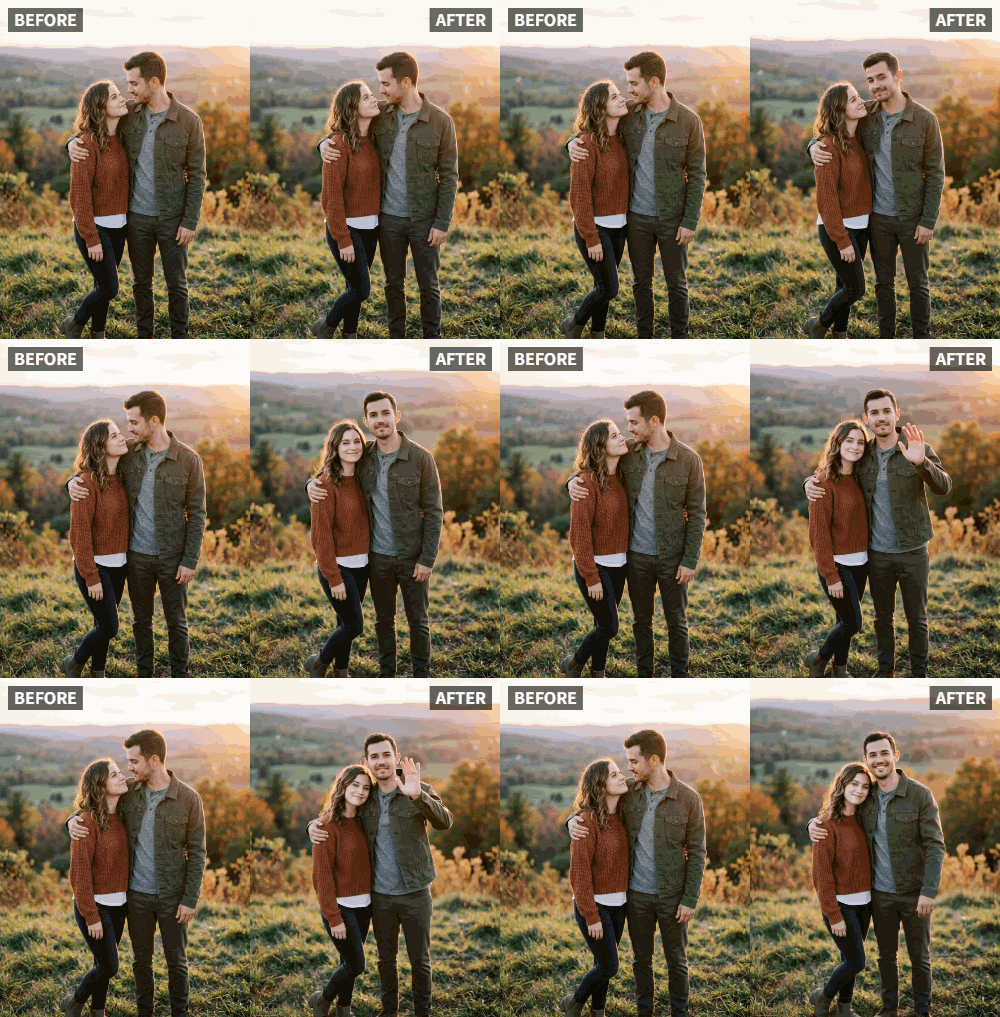
Scenario 1: Couple Photos — From Static Snapshot to Instagram Reel That Stops the Scroll
You and your partner had a perfect day. You got a great photo together — maybe golden hour, maybe a candid moment on a weekend trip. You post it. It performs okay. But deep down you know the photo doesn't fully capture how good that day actually felt.
Now imagine that same photo as a short, animated clip. The light shifts softly. There's a gentle motion in the background. A warm, romantic track plays underneath. You upload it as a Reel instead of a static post — and the response is completely different.
That's exactly the use case Relumi's photo to video converter was designed for. Couple content performs better when it moves. Emotion lands harder when there's atmosphere. And with Relumi, you don't need to film video to create that kind of content — your photo already has everything it needs.
Turn your favorite couple photo into a pic to video with music in under a minute, post it as a Reel, and let the moment speak the way it actually felt.
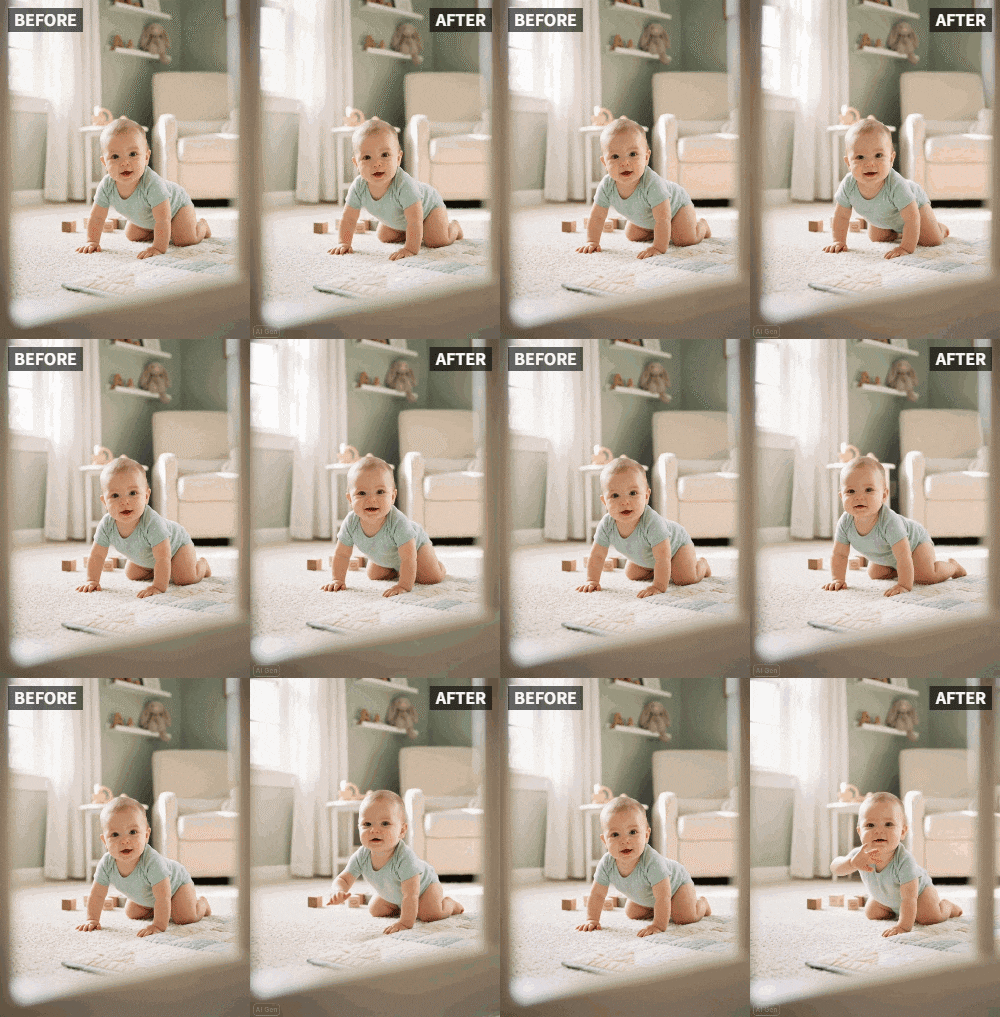
Scenario 2: Baby Photos — Animated Memories That Make Parents (and Grandparents) Cry Happy Tears
Babies grow up fast. Everybody says it, and it's completely true. You take hundreds of photos in the first year alone — first smile, first bath, first time sitting up in the crib looking around like they own the place. But those photos live on your phone, and most of them never get seen.
Here's what's different when you animate them. A photo of a sleeping baby with soft light and a lullaby playing in the background isn't just a photo anymore. It's a moment. It's a memory that breathes. Grandparents will watch it on repeat. You'll save it and come back to it years later.
Relumi makes it easy to turn those still baby photos into short, emotionally resonant video clips — the kind that feel like a tiny home movie, not a slideshow. As a photo to video converter that works directly on mobile, there's no need to transfer files to a laptop or learn new software. You take the photo, you open Relumi, and in a minute you have something worth sharing.
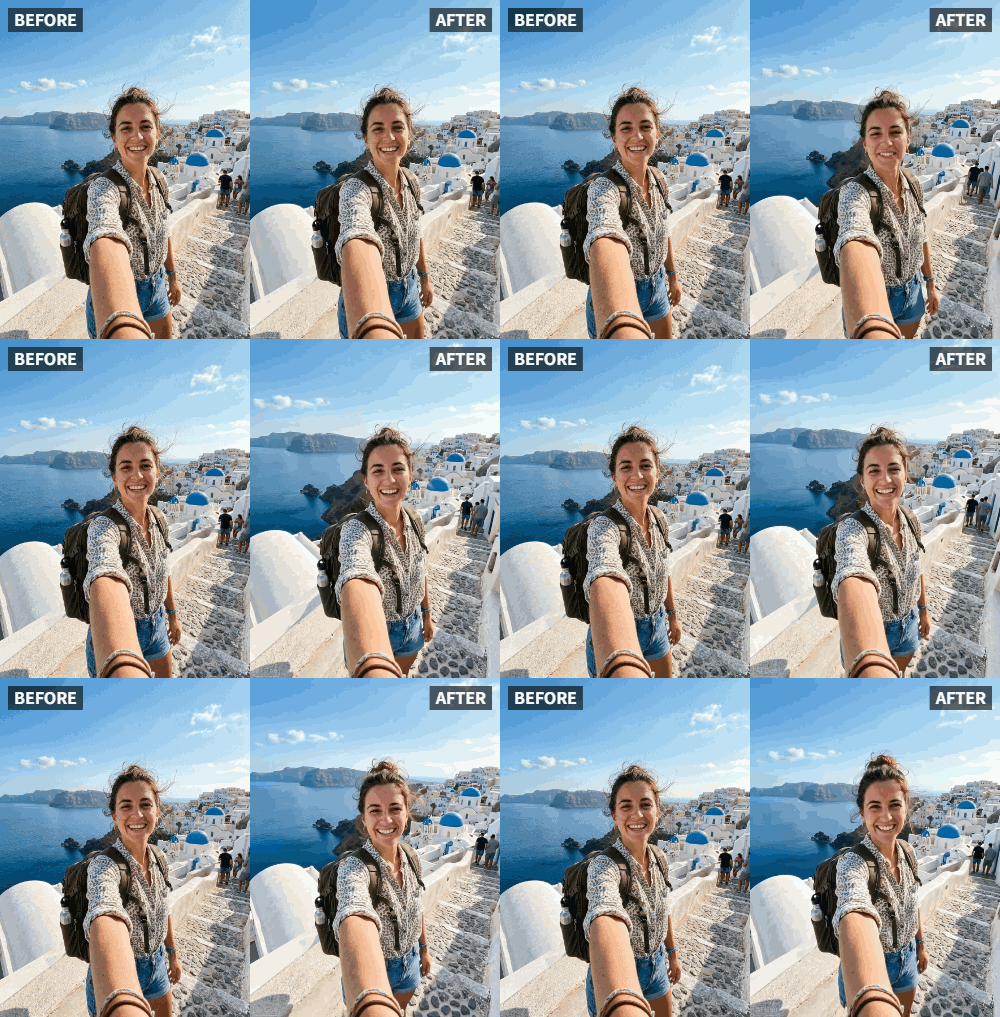
Scenario 3: Travel Photos — Dynamic Recap Content That Actually Shows What the Trip Felt Like
You come back from a trip with 400 photos. You share maybe five of them, because posting 400 photos is not realistic and nobody asked for that. But those five static images can't carry the feeling of standing in front of a mountain range, watching the sunrise over the ocean, or wandering through a cobblestone street in a city you'd never visited before.
Travel content that moves performs better — and more importantly, it feels better. A photo of a landscape animated to show rolling clouds, shifting light, or a subtle depth push immediately recreates the experience of being there. You're not just showing a photo. You're taking people back to the place.
Relumi's AI Animate Photo is the photo to video converter that travel content creators and casual explorers alike can use without any learning curve. Pick your best travel shot, animate it, something cinematic for a mountain scene, something light and breezy for a beach shot, and you have Reels-ready content that's genuinely compelling.


Relumi AI Animate Photo
Turn still photos into cinematic videos on your phone

 Scene-aware motion generation that animates the right parts of the photo naturally
-
Depth-based movement for cinematic parallax instead of flat zoom effects
-
HD export that looks clean on Instagram Reels, TikTok, WhatsApp, and more
-
Mobile-first workflow with no desktop software, timelines, or editing skills required
Part 3: How to Use Relumi AI Animate Photo — 3 Steps, Under a Minute
No tutorials. No complicated interface. Here's everything you need to know:
Step 1: Open Relumi and Import Your Photo
Launch the Relumi app on your phone and tap "+" to load the photo you want to animate. Supports all standard phone photo formats — JPG, PNG, HEIC — straight from your camera roll or cloud storage. No size restrictions. No transfer required.


Step 2: Select AI Animate Photo
From the AI tools panel, tap AI Animate Photo. The AI scans the image, identifies the scene type, and begins generating motion. You'll see a preview of the animated clip in seconds. No manual input needed — Relumi reads the photo and handles the animation automatically.
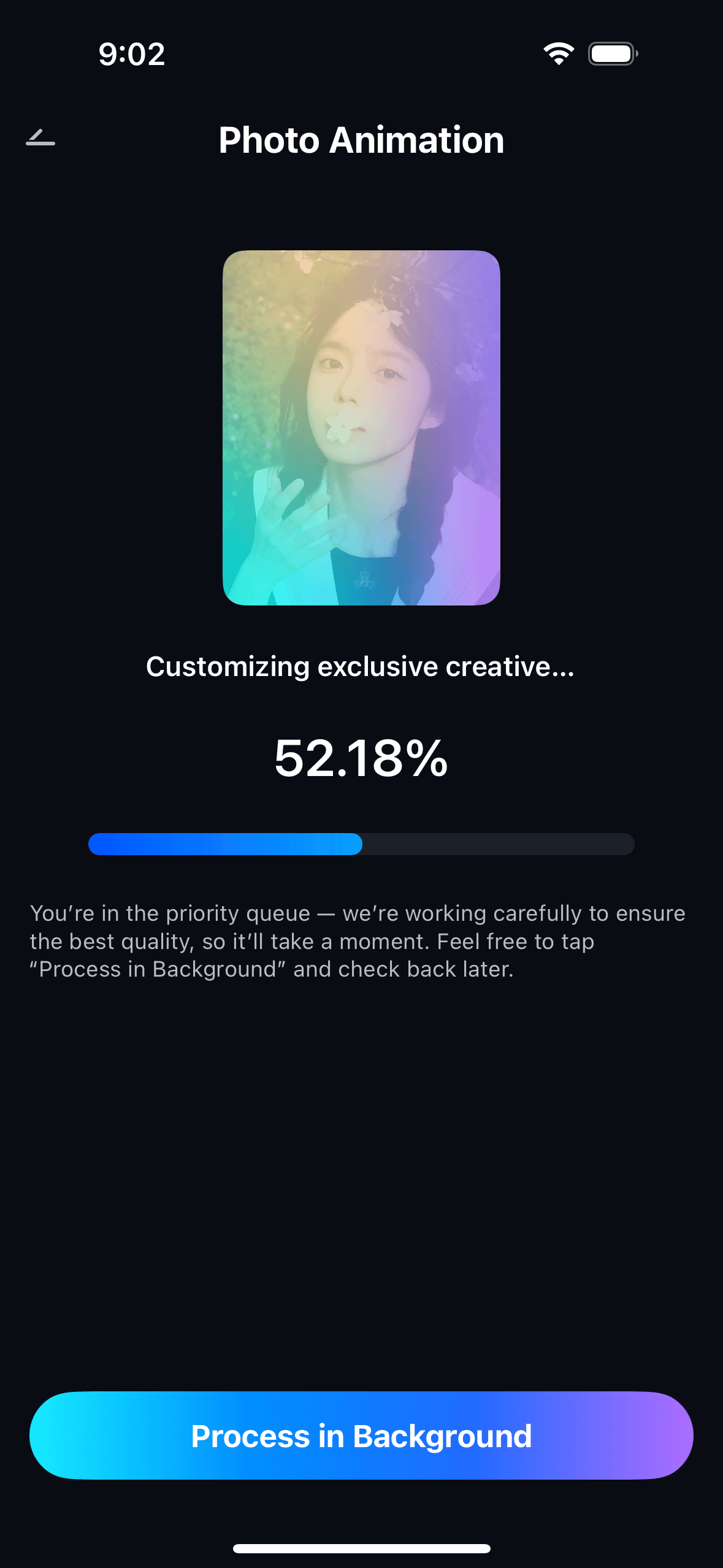
Step 3: Preview and Save
Preview the animated clip and use the style selector to adjust the motion intensity — subtle for a gentle, cinematic feel; dynamic for something with more energy. When the preview looks right, tap Save to save the video to your phone in HD resolution. From there, post directly to Instagram, TikTok, WhatsApp, or wherever your audience is.

Part 4: Why Relumi Is the Smartest Photo to Video Converter for Mobile
There are plenty of apps that claim to turn photos into videos. Most of them produce results that look exactly like what they are — a static image with a zoom effect slapped on top. Relumi is different, and here's why it stands out:
| Feature | Relumi AI Animate Photo | Generic Photo to Video Apps |
| Genuine AI-generated motion | Yes | ⚠️ Usually zoom/pan only |
| Scene-aware animation | Yes | No |
| HD export for social posting | Yes | ⚠️ Varies |
| Mobile-first workflow | Yes | ⚠️ Often desktop-style UI |
| No editing skill required | Yes | Usually more manual |
| Works across portraits, baby photos, and landscapes | Yes | ⚠️ Inconsistent |
Whether you're a content creator looking for a reliable photo to video converter for your daily workflow, or someone who just wants to bring one special photo to life, Relumi delivers exactly what it promises.
Frequently Asked Questions
-
1. Does Relumi AI Animate Photo work on all types of photos?
Yes. The AI is designed to handle a wide range of scene types — portraits, landscapes, group shots, indoor and outdoor scenes. It analyzes each photo individually and applies motion that fits the content, so you don't need to categorize or configure anything manually. -
2. What video format does Relumi export?
Relumi exports your animated photo as a standard MP4 video file in HD resolution, compatible with Instagram Reels, TikTok, WhatsApp, iMessage, and every major platform and messaging app. -
3. How is Relumi different from other photo to video converter apps?
Most apps in this category produce simple zoom-and-pan effects or basic slideshows. Relumi uses AI to generate genuine, scene-aware motion, which means the clouds, hair, water, leaves, and depth of field in your photo move in ways that look natural and cinematic, not mechanical. It's the difference between a photo that feels animated and one that actually looks alive.



