
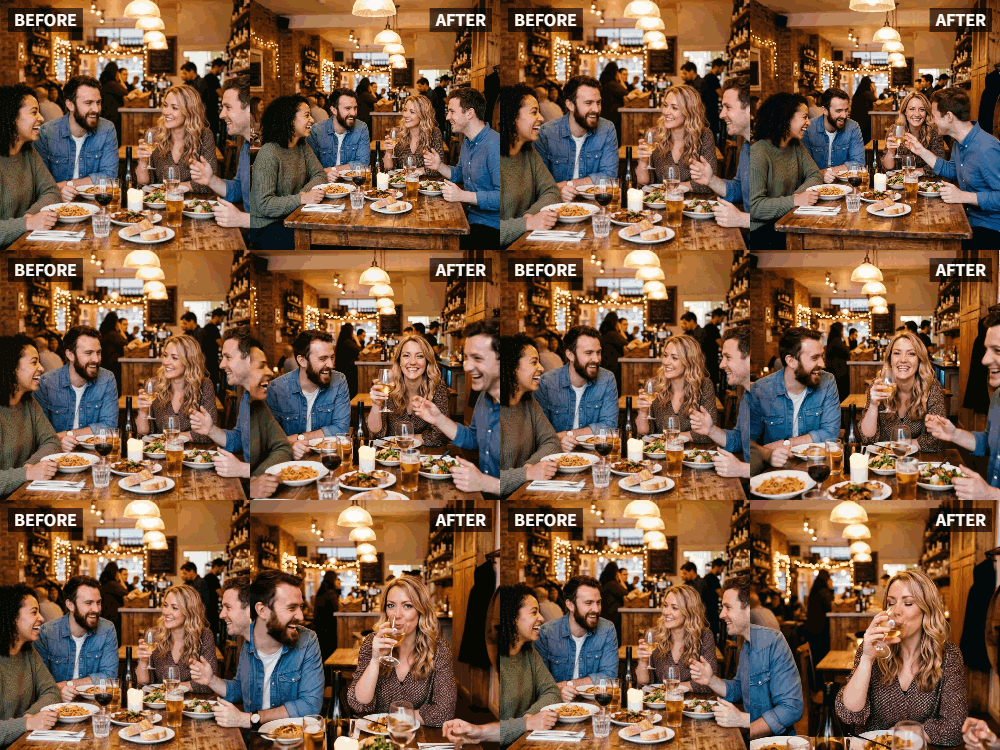
 TL;DR:
You can convert a static group photo into a synchronized video of people raising their glasses by applying the Cheers preset in the Relumi app.
● Upload a clear, high-resolution image to the Photo Animation section and select the Cheers preset to automatically animate multiple faces simultaneously within seconds.
● If individuals in the photo are not holding drinks, the AI still generates an upward arm motion that mimics a wave or cheer based on available visual information.
● Users can add custom background music to the generated video before exporting it.
Ask AI for a summary
 ChatGPT
 Perplexity
 Gemini
 Claude
 Grok
Grok
After years apart, the friend group is finally back together. The reunion is everything you hoped for—laughter, stories, and of course, a toast. You take the classic group photo, everyone holding up their drinks, smiling. It's a perfect memory. But when you go to share it, it's just a picture. It doesn't capture the energy of the reunion.
Relumi's "Cheers" feature is made for this moment. Animate that group reunion photo and watch as all your friends raise their glasses together in a synchronized, joyful toast. It's the visual equivalent of the group shout you made that night, ready to be shared and treasured.
In this article
Part 1: The Problem with the Standard Reunion Photo
Friend reunions are charged with emotion. After months or years apart, the joy of being together again is palpable. The group photo is a ritual, a way to document the occasion. But for those who couldn't make it, or for social media followers, that static photo doesn't convey the feeling of being there .
The energy of a reunion is in the movement, the laughter, the toasts. Relumi's Cheers feature captures that energy. It transforms a standard group shot into a living memory that makes viewers feel like they're right there, clinking glasses with the group.
Part 2: How to Create an Animated Reunion Toast Video


Relumi AI Photo Animation
Bring old photos to life with AI-powered animation.

 Preset motion styles — Wave, Dance, Clap, Cheers & more
-
Works on old, faded, and black-and-white photos
-
No editing skills required — generate in seconds
-
One tap turns any still image into a moving memory.
Creating this dynamic reunion memory is simple.
Step 1: Take the Perfect Reunion Group Photo
Gather the group and take a clear photo where everyone is visible and, ideally, holding up their drinks for a toast. This is the classic shot, and it's perfect for the "Cheers" animation.

Step 2: Upload to Relumi and Apply the "Cheers" Preset
Open the Relumi app, go to Photo Animation, and select the "Cheers" preset. The AI will detect all your friends and generate a smooth, synchronized raising of glasses, as if the whole group is toasting together in real-time.

Step 3: Share Your Living Reunion Memory
Export the clip and share it with the world.
- Social Media Post: Share it on Instagram or Facebook. It will generate far more engagement than a static photo .
- Group Chat: Drop it in the friend group chat for an instant round of "remember when" comments.
- Reunion Highlight Reel: Include the animated toast in a longer video montage of the whole reunion weekend .

Part 3: Creative Reunion Uses for the Cheers Feature
This idea can be used for many types of gatherings.
- Family Reunions: Animate a large family group photo to capture the joy of getting everyone together.
- High School or College Reunions: Create a video that starts with an old yearbook photo and transitions to an animated "cheers" from the current reunion.
- Holiday Gatherings: Use it for Thanksgiving, Christmas, or any holiday where the family gathers around the table.
- Virtual Reunions: If friends couldn't make it in person, send them the animated video with a message: "Wishing you were here to toast with us!"
Conclusion
Friend reunions are about reconnecting, remembering, and celebrating the bond you share. By using Relumi's "Cheers" feature to animate your group photo, you create a living memory that captures the energy and joy of being together again. It's not just a picture of the reunion; it's a video of the celebration itself.
Frequently Asked Questions
-
Will the cheers animation work on a large group with many people?
Yes, Relumi's AI is designed to detect and animate multiple faces in a single image. For the best results, use a high-resolution photo. -
What if some people in the photo aren't holding drinks?
The AI will work with the available visual information. Those without drinks may still participate in the "raising" gesture, which can look like a joyful wave or cheer. -
How long does it take to animate a large group photo?
Just a few seconds, the same as a single-person photo. -
Can I add music to the video?
Absolutely. Choose a song that was popular during your school days or a song that's meaningful to the friend group.



