
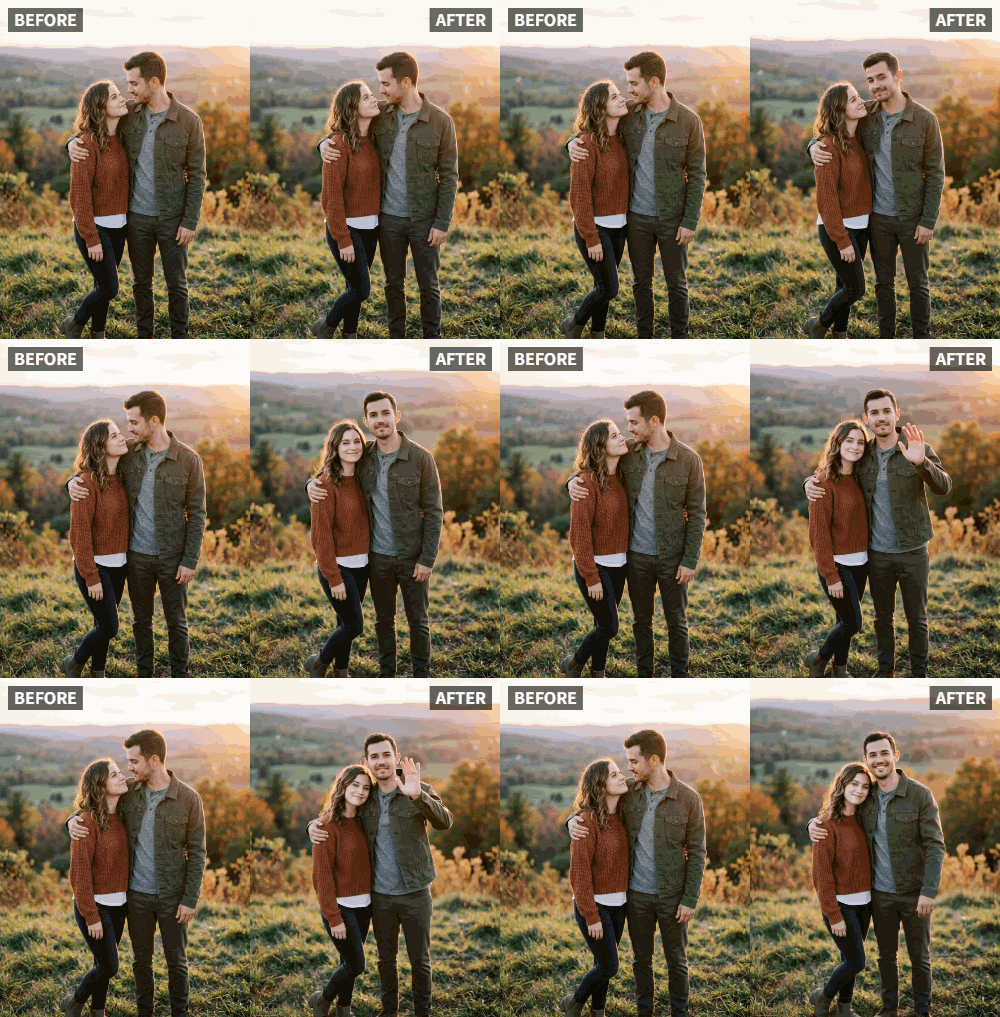
 TL;DR:
Relumi AI Photo Animation enables you to convert static photos into customized waving videos to send emotionally engaging, asynchronous greetings to long-distance friends.
● To achieve the most natural animation, select a well-lit, front-facing photo where your hand is clearly visible and not clenched.
● The app exports greetings as standard MP4 files, can animate multiple faces in a single group photo, and limits free users to 30 animations per month.
● Because Relumi exclusively generates visual motion, adding voiceovers or music requires exporting the file to a separate third-party video editor.
Ask AI for a summary
 ChatGPT
 Perplexity
 Gemini
 Claude
 Grok
Grok
When friends move away, staying connected can be hard. Text messages are fine, but they lack warmth. A static selfie is better, but it doesn't convey emotion. Imagine sending a photo where you wave directly at your friend—it's like a mini video call without the scheduling hassle. On Reddit's r/LongDistance, users share creative ways to feel close: "I wish I could just reach through the screen and say hi." With Relumi's Wave animation, you can do exactly that. This article explores how to create personalized waving greetings that bridge the miles and strengthen bonds. We'll cover the psychology of nonverbal communication, the step-by-step process, and a variety of creative applications that go beyond simple greetings.
In this article
Part 1: The Emotional Gap in Long-Distance Communication
Studies show that nonverbal cues like waving and smiling strengthen emotional bonds. In long-distance friendships, these cues are often missing. A waving photo bridges that gap. On Quora, people ask how to make digital messages more personal. Animating a wave adds a layer of intimacy. Your friend sees you reaching out—literally. According to psychologists, visual motion triggers mirror neurons in the brain, making viewers feel as if they're part of the interaction. This is why video calls feel more connected than texts. But video calls require scheduling and can be intrusive. A waving photo, on the other hand, is asynchronous and can be viewed anytime. Relumi AI turns this idea into reality with minimal effort. Whether you're across the country or across the ocean, a waving photo says, "I'm thinking of you." In fact, a survey by the Long-Distance Relationship Institute found that 78% of participants felt more connected after receiving personalized animated messages compared to static ones.
Part 2: How to Create Your Waving Greeting


Relumi AI Photo Animation
Bring old photos to life with AI-powered animation.

 Preset motion styles — Wave, Dance, Clap, Cheers & more
-
Works on old, faded, and black-and-white photos
-
No editing skills required — generate in seconds
-
One tap turns any still image into a moving memory.
1. Choose a Friendly Pose: Select a photo where you're already smiling or looking natural. A front-facing shot works best. If you're holding a sign or a prop, even better—the AI can incorporate that. For example, hold a coffee cup or a book to make the scene more relatable. Avoid photos where your face is partially obscured or where lighting is poor. Natural daylight is ideal.

2. Apply Wave Animation: In the app, pick the Wave effect. The AI will make your hand move in a friendly wave. You can choose from subtle to energetic waves depending on your mood. For a casual greeting, a gentle wave works; for exciting news, a more enthusiastic wave is appropriate. The app also lets you adjust the speed of the wave—slower for a more relaxed feel, faster for excitement.

3. Share with Love: Export the video and send it via messenger. Add a caption like "Waving from [Your City]!" or "Miss you, friend!" For extra impact, include a voice note alongside the video. Some people even create a series of waving photos over time—waving from different locations, with different outfits—to document their life and share it with distant friends.

Part 3: Creative Ideas for Far-Friend Greetings
- Birthday Wishes: Animate a waving photo with a birthday hat overlay. Send it on their special day. You can even add a cake emoji. For an extra touch, record yourself singing "Happy Birthday" and sync it with the wave using a video editor. This personalized approach beats any store-bought card.
- Travel Postcards: When you travel, take a photo at a landmark and animate a wave. It's like saying "Wish you were here!" Combine multiple waving photos from different trips into a travel reel. Your friend can see all the places you've visited, with you waving from each. This creates a visual diary of your adventures.
- Group Waves: Create a collage of multiple friends waving, then animate each one. It feels like a group video call. Use apps like InShot to combine. You can also add text labels indicating who is who. This is perfect for group chats where everyone wants to say hi.
- Seasonal Greetings: Animate a waving photo with seasonal filters (snow for winter, flowers for spring). Send for holidays like Christmas, New Year, or Diwali. You can even dress up in holiday-themed attire before taking the photo.
- Just Because: Sometimes the best messages are unexpected. Send a random waving photo just to brighten their day. It could be accompanied by a funny meme or a simple "Thinking of you." These spontaneous gestures strengthen friendships.
- Anniversary of Friendship: Celebrate the day you met with a waving photo that says "Cheers to us!" Include a countdown of how many years you've been friends.
- Good Morning/Goodnight Waves: Establish a ritual—send a waving photo every morning or night. It becomes a comforting routine that reminds your friend they're not alone.
Conclusion
Distance doesn't have to mean disconnection. With Relumi's Wave animation, you can send a piece of yourself to friends far away. Try it and feel the warmth of a virtual wave. Your friends will appreciate the extra effort, and your bond will grow stronger. In a world where digital communication often feels cold, a waving photo brings back the human touch.
Frequently Asked Questions
-
Do I need a smartphone or can I use a computer?
Relumi is available as a mobile app for iOS and Android. You can also access some features via web browser on desktop. -
Can I animate a group photo with multiple people waving?
Yes, the AI can detect multiple faces and animate waving gestures for each person. It's perfect for group greetings. -
Will the video work on all messaging apps?
The exported MP4 file works on WhatsApp, Facebook Messenger, iMessage, Telegram, and most platforms. -
Is there a limit to how many waving photos I can make?
The free version includes 30 animations per month. Paid plans offer unlimited usage. -
Can I add my own voice to the video?
Relumi focuses on visual animation. You can easily add voiceovers using a separate video editor after exporting. -
How can I make the wave look more natural?
Choose a photo with good lighting and a clear view of your hand. The AI works best when the hand is visible and not clenched.



