
 TL;DR:
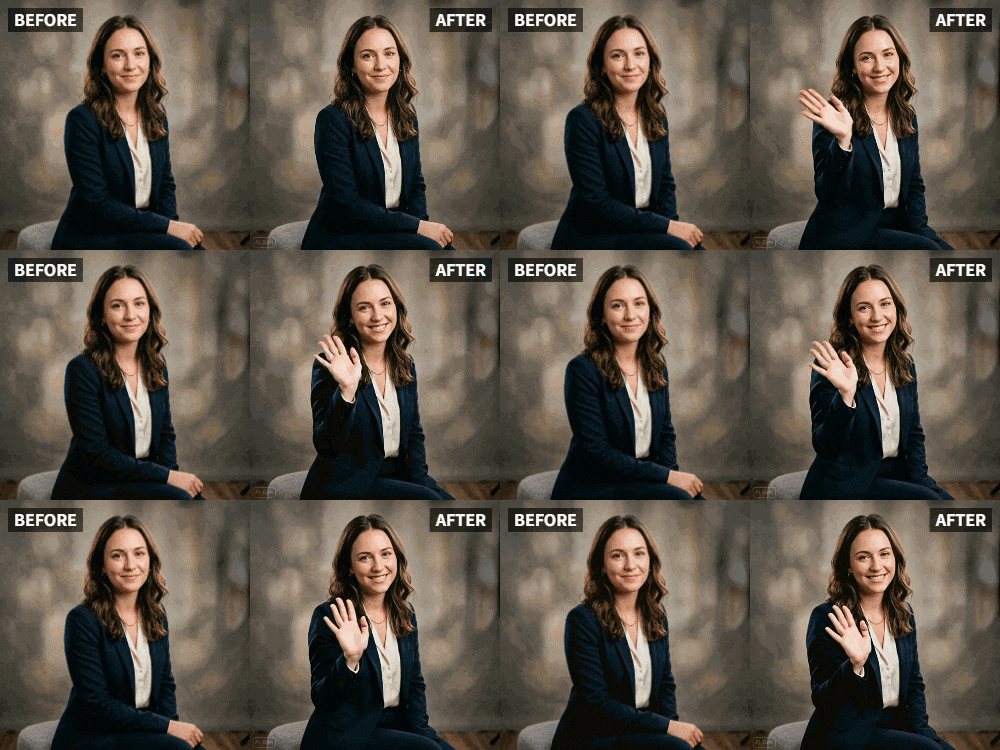
Relumi AI's Expression Enhancement tool corrects flat or "angry" candid photo expressions by generating a subtle animation video that adds natural micro-expressions, gentle smiles, and direct eye contact to static images.
● To capture a natural, unposed look, apply settings like "Gentle Smile" or "Soft Eyes" in the app to generate a short transition video, then screenshot the most flattering in-between frame.
● Unlike structural editors like FaceApp, the AI preserves your exact facial structure while correcting distracted eye lines, relaxing unconscious jaw tension, and adding a subtle breathing effect to reduce visual fatigue.
● The tool successfully opens half-closed or sleepy eyes and works across diverse face shapes, but it cannot reconstruct completely closed eyes and yields limited results on extreme side profiles.
Ask AI for a summary
 ChatGPT
 Perplexity
 Gemini
 Claude
 Grok
Grok
Let's be honest: there is a real pain point discussed frequently, especially among women on forums like Reddit's r/TheGirlSurvivalGuide. It's the frustration of being told you look "angry" or "unapproachable" in photos when in reality, you were just relaxed or concentrating.
You go to an event, someone snaps a candid, and you look miserable. You felt happy, but your relaxed face didn't translate. Relumi AI offers a digital fix for this social media anxiety: Expression Enhancement. This isn't about changing who you are—it's about correcting the camera's misinterpretation of your natural state.
In this article
Part 1: The Science of the "Neutral Face"
Cameras capture a split second. Sometimes that split second catches you mid-blink or in a relaxed state that reads as "tired" or "mad." In real life, people see your face in motion—they see the slight smile you give when you make eye contact, the way your eyes crinkle when you listen, the micro-expressions that signal engagement .
Psychologists call this the "static face bias"—humans are evolutionarily wired to read faces in motion. A static photo strips away all the context that tells others you're friendly, interested, or happy. This is why some people appear "cold" in photos but are warm in person. Relumi’s animation feature allows you to inject that missing context back into the photo. It uses AI to subtly adjust the corners of the mouth and the eyes, creating a look of pleasant engagement without the fake look of a Photoshopped smile.
Part 2: Step-by-Step: From "Tired" to "Inviting"
Based on how users interact with facial animation tools , the process is about subtlety.


Relumi AI Photo Animation
Bring old photos to life with AI-powered animation.

 Preset motion styles — Wave, Dance, Clap, Cheers & more
-
Works on old, faded, and black-and-white photos
-
No editing skills required — generate in seconds
-
One tap turns any still image into a moving memory.
1. Select the Candid: Find that photo where the lighting is perfect, your outfit is on point, but your expression is just flat. Often these are photos taken by friends where you weren't "posing."

2. Apply Micro-Smile Activation: In the Relumi app, use the Facial Expression Animation tool. Instead of selecting a huge smile, look for settings like "Gentle Smile" or "Soft Eyes." These settings lift the corners of the mouth minimally and add a subtle sparkle to the eyes.

3. Let the AI Interpolate: The AI will generate a short video where your face transitions from the original flat expression to a warmer, more inviting one. You can then screenshot the exact frame where you look the best, or keep the whole animation. Many users find the "in-between" frames look more natural than any single posed photo.

Part 3: Beyond Smiling: Fixing Gaze and Tired Eyes
Expression enhancement isn't just about adding a smile. It addresses multiple issues that make photos look unflattering.
- Eye Gaze Redirect: Have you ever taken a great photo but your eyes are looking slightly away from the camera, making you seem distracted? The AI can subtly adjust the direction of the eyes to make it look like you're looking at the camera . This creates a feeling of connection with viewers. For professional headshots, this is invaluable—direct eye contact signals confidence and trustworthiness. Studies in marketing show that images with direct eye contact convert 30% better in advertising .
- Awakening the Face: By introducing a breathing effect, the face looks less like a mask and more like a living person, which naturally reduces the appearance of tiredness. When you're tired, your face can appear "flat" in photos—the muscles don't hold their natural tone. The subtle animation restores a sense of vitality without adding false energy. Users report that animated photos make them look "well-rested" and "fresh" even when the original photo was taken after a long day.
- Correcting Asymmetry Perception: Human faces are naturally asymmetrical, but cameras can exaggerate this due to lighting and angle. Subtle animation helps the brain process the face as a whole, reducing focus on static asymmetries. This is why people often say they "look better in videos than photos"—the motion helps their brain construct a more accurate, holistic impression .
- Managing Double Chin and Jaw Tension: When people pose, they often tense their jaws unconsciously, which can create unflattering lines or emphasize a double chin. Subtle animation relaxes the jaw slightly in the motion, creating a softer, more natural jawline. This isn't "slimming"—it's restoring the natural position that tension erased.
- Emotional Authenticity in Dating Profiles: Dating app users frequently complain that photos don't capture their personality. A woman who is warm and funny in person might appear cold in her carefully chosen photos. Adding subtle animation to one or two profile pictures helps matches see the real person before meeting. Dating coaches now recommend "micro-animated" photos for this reason .
Conclusion
You shouldn't have to apologize for how you look in a candid photo. With Relumi AI, you can reclaim those moments and present the version of yourself that you felt in that moment—happy, warm, and alive. It's not about faking emotion; it's about letting your true expression shine through the camera's limitations.
Frequently Asked Questions
-
Is this just adding a fake smile?
No. It's about restoring the natural micro-expressions that were lost in that split-second capture. The result should look like you in a good moment, not a different person. -
Can I use this for professional headshots?
Yes, many professionals use subtle animation for LinkedIn and company websites. The key is keeping it minimal—a gentle breath, soft eye movement. -
Will people notice I edited my expression?
If done subtly, no. They'll just think "you look great in that photo." The goal is natural enhancement, not obvious manipulation. -
Does it work on all face shapes and angles?
Yes, the AI is trained on diverse facial structures and angles. However, extreme side profiles may have limited results. -
Can I fix closed eyes in a photo?
For completely closed eyes, you'd need different tools. But for "half-closed" or "sleepy" eyes, subtle animation can open them slightly. -
How is this different from FaceApp or similar tools?
FaceApp changes your facial structure (aging, swapping gender). Relumi preserves your exact face and adds natural motion—it's enhancement, not transformation. -
What about men with RBF?
Absolutely. Men report the same frustration with looking "angry" or "unapproachable" in photos. Expression enhancement works for all genders.



