

 TL;DR:
⚡ Quick Fix: Create Passport Photos with Cutout Pro
Choose the Right Photo Type: Use Cutout Pro Passport Photo Maker to create passport, visa, or ID photos with the required size, background, and print format.
Adjust Size and Background: Upload a clear photo, select the official document size, change the background color, and preview the result before saving.
Check Free vs Paid Limits: Use the free version for basic tests, but choose the paid version for higher-volume use, advanced features, watermark-free exports, or business needs.
Enhance Photo Quality: If the photo is blurry, poorly lit, damaged, or previously rejected, use Relumi AI photo editing app to improve clarity, lighting, and background compliance.
Ask AI for a summary
 ChatGPT
 Perplexity
 Gemini
 Claude
 Grok
Grok
A perfect passport photo can be stressful due to bad lighting, dull backgrounds, and costly retakes that make the process tiring. Many people spend hours at studios only to get results that still don't meet their official standards. At such a point, anyone can easily feel overwhelmed when all they need is a clean, professional photo that's ready to use.
For all such users, Cutout Pro passport photo maker becomes the ultimate savior, creating passport or ID photos quickly. Now, simply walk through the guide to learn more about this app and ensure your photos meet all official requirements.
Table of Contents
Part 1. What Is Cutout Pro Passport Photo Maker?
Cutout Pro Passport Maker is a mobile app designed to help users create, edit, and print professional-grade passport photos. This app automates document image preparation by allowing users to take a picture, apply specific edits, and export the result. The edits are in the exact required format because its AI background changer ensures that even those without expertise can meet the required standards.
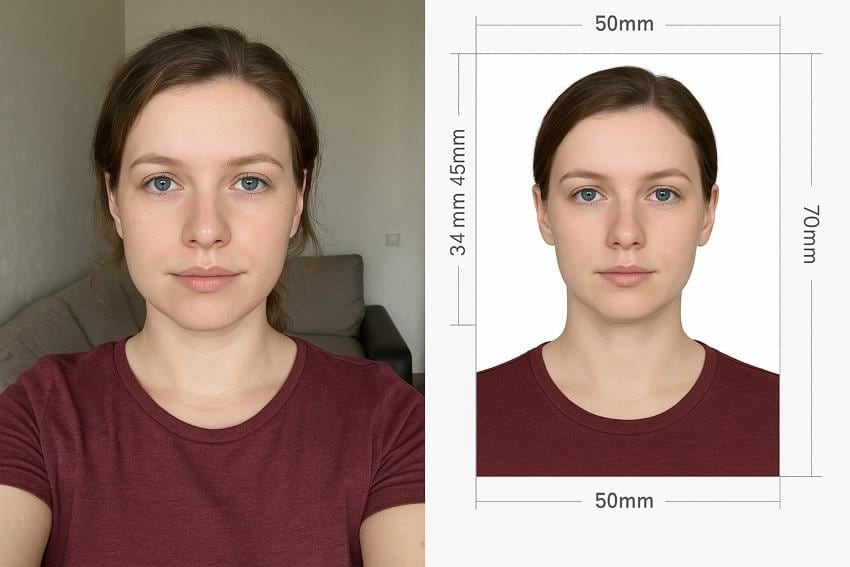
This app supports multiple document types and international standards, not just passports, but also visas. Impressively, it offers various paper sizes, such as 2x2 inch, 4x6, and A4, to meet regulations in countries like the USA. In the US, a standard passport photo must be exactly 2x2 inches with correct proportions and background. Besides, the app's Print-to-Size function guarantees compliance by automatically cropping and resizing your image.
Key Features of Cutout Pro Passport Photo Maker
- Document Photo Generation: Allows users to create passports, visas, and ID photos according to official guidelines for dozens of countries.
- Multiple Format and Print Sizes: It supports a variety of standard document sizes, such as 2x2 inch, 3x4, or 4x6, making it easier to print images.
- AI Background Removal and Color Changer: Integrates automatic background editing, allowing users to set the correct color for passport or visa photos quickly.
- Mockup Previews and Adjustment: Provides a preview function, facilitating one to check and adjust their photos before the printing task.
- Flexible Export Options: The app enables saving final images in PDF and various other formats, adding convenience in sharing or submitting document photos.
- Provides User Privacy: Ensures no personal image data is shared or collected, offering users a secure way to manage sensitive ID and passport photos.
Part 2. Cutout Pro Passport Photo Maker Free vs Paid
For an Android or iPhone user, choosing the right plan, either paid or free, helps to understand what each option offers. Review the provided tabular comparison for the Cutout Pro passport photo maker and decide which version works best for you:
| Aspects | Free Version | Paid Version |
| Credits | 5 free credits (Can be increased via invitation) | Flexible credit packs, usable anytime |
| Usage Limitations | Limited to personal use and evaluation | Suitable for higher volume, professional, or business use |
| Feature Access | Access to basic creation and download functions | Complete access to all features and advanced functions, including API integration |
| Support/Collaboration | Standard technical support | Priority technical/business support available |
| Cost | Free of charge; more credits via invites/code | Pay-as-you-go or subscription pricing, priced per feature or API call |
Part 3. How to Use Cutout Pro Passport Photo Maker
Getting started is simple, and you don't specifically need any editing expertise to create a perfect passport or ID photo. Adhere to the guide provided below after the Cutout Pro passport photo maker download and get sorted right away:
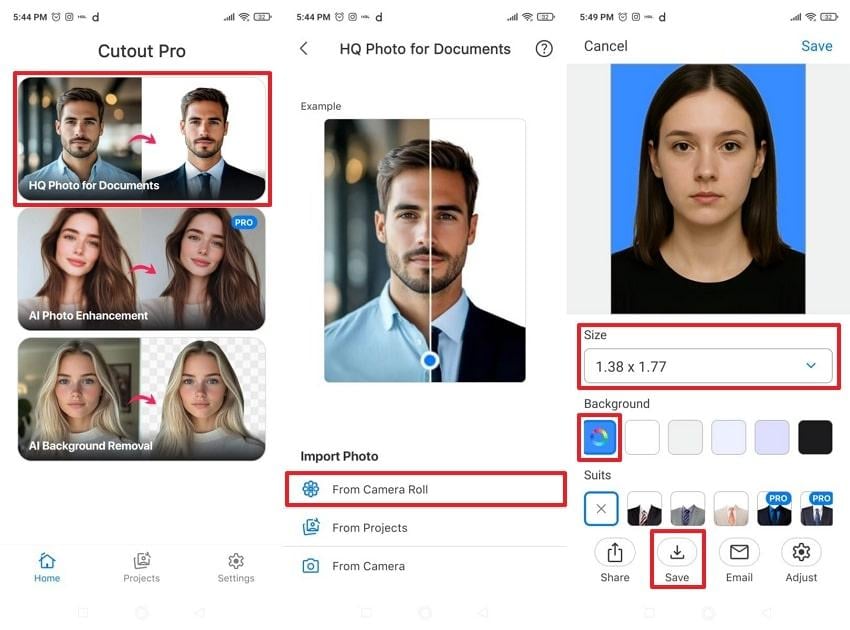
- First, select the "HQ Photo for Documents" option from the app's main interface.
- Next, press the "From Camera Roll" option to import your photo and expand the possibilities for "Size."
- Once the size is mentioned, choose your required background for the passport photo. Finally, tap "Save" to secure the ID photo on your mobile.
Limitations
❌The app's free version is extremely limited, restricting access to advanced editing features and high-quality exports.
❌Users are responsible for ensuring the final photo fully meets their desired standards; the app itself doesn't guarantee acceptance.
❌App's stability can be an issue; some have encountered crashes when saving their photos.
❌Its customer support for refunds has shown inconsistent service during the trial and remains consistent.
❌Possibilities, including AI enhancement and professional suit overlays for CVs, are only available in the paid version.
Part 4. Upgrade Your Passport Photos: Why Repairit App Outshines Cutout Pro
If you've used Cutout Pro passport maker and feel limited by its functionality, the Repairit App can be a better alternative. It not only helps you create a passport photo but also restores clarity, fixes poor lighting, and improves minor details. Its Text-to-Edit possibility allows users to demonstrate their ideas and get edits with a single line of text.
You just need to add a simple command with proper dimensions and background color, without layering or masking. Impressively, its ability to preview before-and-after images enables users to compare their results in greater detail. The newly integrated Nano Banana algorithms deliver better performance than other dedicated apps. Most importantly, the latest intelligent erasure algorithms enable seamless removal with no visible traces behind.
Key Features
- Quality Enhancer: The app optimizes photo sharpness through advanced algorithms, retrieving clarity close to the original picture.
- Repairs Corrupted Pictures: It helps address problems associated with photos when they're unable to open or are incomplete.
- Restores Old Photos: This platform examines and repairs scratches or other damage in older pictures with naturally filled colors.
Step-by-Step Guide to Create a Passport Photo with the Repairit App
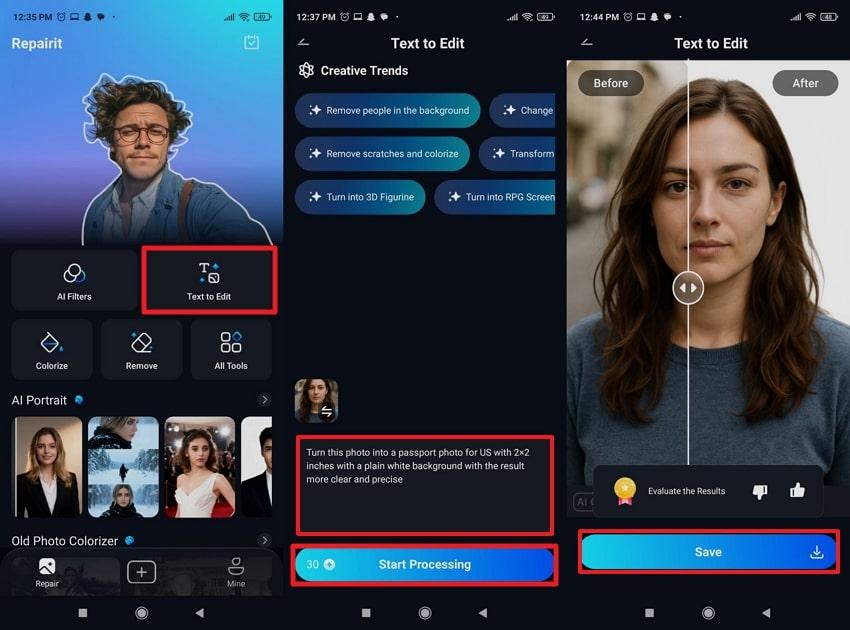
- Access the "Text-to-Edit" feature, import your photo, and write a detailed prompt for the required dimensions.
- Next, press the "Start Processing" button to begin the process and tap "Save" to export the passport photo after comparison.
When to Use the Repairit App
- To transform regular selfies or headshots into passport photos by simply entering a text command.
- For the rejected ID photo, swiftly correct lighting or background issues to save time and money.
- When a photo suffers from blur or visible damage, the app enhances clarity and restores details.
- If an original image includes irrelevant elements, Repairit's smart remover can eliminate them in no time.
- Resize, crop, and adjust passport images to the specifications of various nations with a single command.
Conclusion
In summary, Cutout Pro passport photo maker is a known app for anyone who desires a simple way to create passport-ready photos at home. As discussed, it removes the stress of studio visits, handles background cleanups with ease, and helps generate photos that meet official guidelines. For more upgraded options, you can use the Repairit App to get the job done with balanced lighting and enhanced facial details.
Frequently Asked Questions
-
Q1. Can I download my passport photo without a watermark?
Indeed, the Cutout Pro passport maker allows you to download your final image without a watermark in the paid version. Once the image is downloaded, it ensures that it's clean, professional, and ready for official use. -
Q2. How does the Repairit App improve passport photo quality?
The Repairit App integrates AI enhancement to improve facial details, correct poor lighting, and enhance overall clarity. It automatically adjusts your picture to look more natural and professional, making it appear closer to studio-quality. -
Q3. Does AI editing affect passport photo compliance?
Not at all, as long as edits don't alter your facial structure or make you look significantly different. Apps like Repairit excel in improving lighting and clarity, keeping your natural appearance intact. Essentially, it even guarantees that your final passport photo still meets the needed official requirements.






