
 TL;DR:
You can seamlessly merge distinct portrait photos of two people into artistically styled, cohesive scenes without manual editing by using the Relumi AI app.
● To apply the effect on iOS or Android, navigate to the app's "AI Filters" tab, import your separate portraits, select a "Combine Photos Filter" template, and tap "Start Processing" to generate the final image.
● The tool features eight specialized environments, including a three-panel vertical Winter Romance Collage tailored for seasonal campaigns and an Urban Elevator Editorial designed for fashion creators.
● While the AI automatically harmonizes lighting, color, and body poses from source pictures taken in entirely different locations, utilizing celebrity images for these generated scenes is strictly restricted to personal, non-commercial use.
Ask AI for a summary
 ChatGPT
 Perplexity
 Gemini
 Claude
 Grok
Grok
Have you ever wished you could combine photo with someone special and transform it into a magical scene? Whether it's a romantic moment, a festive celebration, or a cinematic masterpiece, AI-powered photo-combining filters make it effortless to merge pictures into stunning visual stories. With just a few taps, you can combine two photos and place yourself in dreamy environments you never thought possible.
In this guide, we'll walk you through 8 incredible combine photo filter effects — from a vintage Polaroid couple hug to a snow-dusted winter romance collage. You'll also discover how to use a powerful AI app to combine images seamlessly, no editing skills required. Let's dive in!
Table of Contents
Part 1. What Are Combine Photo Filters?
A combine photo filter is an AI-powered effect that takes two separate photos and seamlessly blends them into a single, artistically styled image. Unlike simple photo collages, these filters don't just place photos side by side — they intelligently merge pictures together, harmonizing lighting, color, and composition to create a cohesive visual narrative.
Modern AI apps can combine images from different sources — a portrait photo of you and a friend, for example — and place both subjects into a completely new scene, whether it's a glamorous wedding ceremony, a moody cinematic rainstorm, or a cherry-blossom garden at sunset. The technology analyzes facial features, body poses, and background elements to produce results that look professionally composed.
Here's why combine photo filters have become so popular:
- No photography studio needed — Create stunning couple or group photos from separate shots taken in different places.
- Endless creative scenes — Choose from dozens of themed effects: romantic, festive, editorial, seasonal, and more.
- Instant results — AI processes and merges pictures in seconds, no Photoshop expertise required.
- Perfect for social sharing — Share beautifully combined two photos on Instagram, TikTok, or send as personalized cards.
- Memory-making — Recreate moments with loved ones who are far away by combining your individual photos into shared scenes.
Part 2. 8 Best Combine Photo Filter Effects You Must Try
Ready to explore what's possible when you combine two photos? Here are 8 spectacular filter effects available in today's top AI photo apps. Each one transforms your merged pictures into something truly extraordinary.
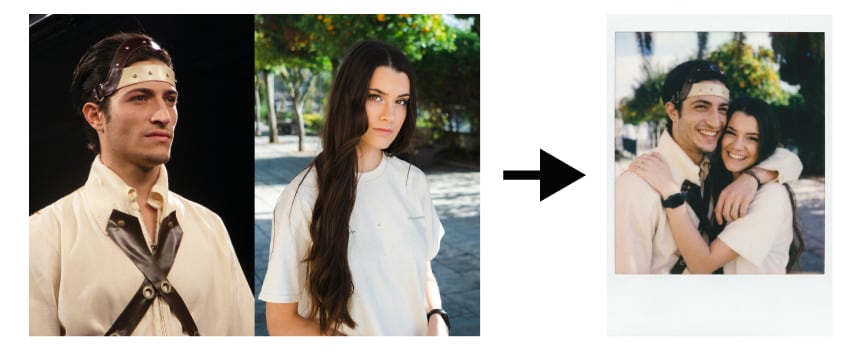
Effect 1. Polaroid Couple Hug — Vintage Warmth Frozen in Time
The Polaroid Couple Hug filter is the perfect way to combine photo portraits of you and a loved one into a timeless keepsake. Inspired by classic instant film photography, this effect wraps your merged pictures in a soft, cream-toned Polaroid frame.
🎨Best for: Couples, best friends, anniversary gifts, long-distance relationship keepsakes.
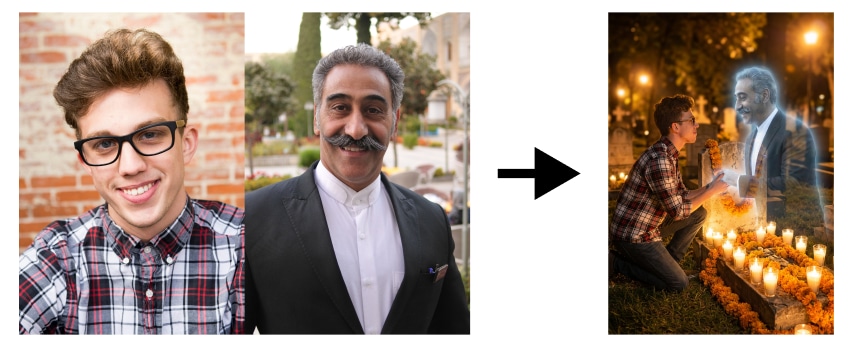
Effect 2. Ghost Spirit / Day of the Dead — Where Two Worlds Meet
This hauntingly beautiful filter lets you combine images of a real person with a translucent, ethereal ghost figure — a visually stunning way to merge pictures with a supernatural twist.
🎨Best for: Halloween, artistic portraits, cultural celebrations.
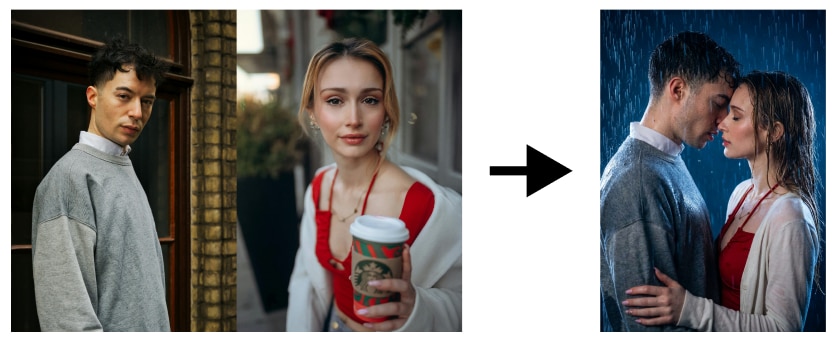
Effect 3. Cinematic Rain Kiss — Romance Meets the Silver Screen
If you want to combine two photos into a scene straight out of a Hollywood romance film, the Cinematic Rain Kiss filter is your answer. This effect places your merged pictures into an intensely atmospheric rainy night scene, where two figures lean toward each other in a near-kiss moment.
🎨Best for: Dramatic couple portraits, movie-aesthetic social posts, creative photography projects.
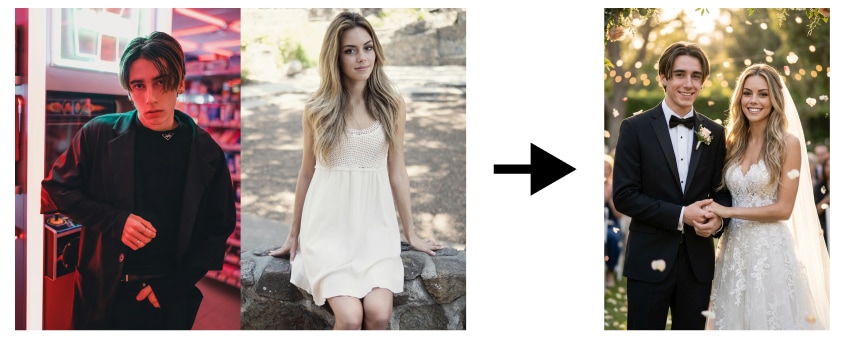
Effect 4. Wedding Ceremony — Your Dream Wedding, Instantly
Always dreamed of a fairy-tale wedding photo? The Wedding Ceremony filter lets you combine images of two people and dress them as a stunning bride and groom in an enchanted garden venue.
🎨Best for: Wedding planning inspiration, couple photos, engagement announcements, anniversary tributes.
Effect 5. Birthday Party Celebration — Make Every Birthday Unforgettable
Turn any portrait into a vibrant party scene with the Birthday Party Celebration filter. This joyful effect lets you combine photo portraits with a dazzling birthday environment filled with colorful balloons, a beautifully decorated cake with lit candles, cheerful "Happy Birthday" banners, and cascading confetti in every color of the rainbow.
🎨Best for: Birthday cards, social media birthday shoutouts, surprise party invitations, personalized gifts.
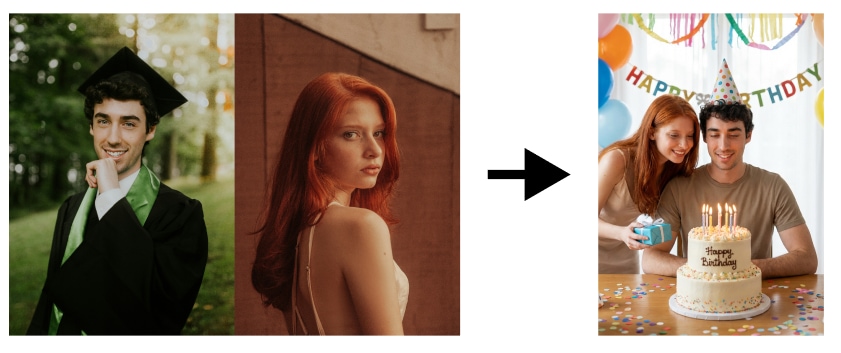
Effect 6. Cherry Blossom Romance — Spring Love in Full Bloom
Few scenes are as universally romantic as a cherry blossom garden in full bloom, and with this filter you can combine two photos and transport them there instantly. The Cherry Blossom Romance effect merges pictures of two people into a breathtaking hanami (flower-viewing) scene, where soft pink petals drift gently through a warm golden-hour sky.
🎨Best for: Romantic couple portraits, spring-themed social posts, Valentine's Day, Japanese culture enthusiasts.

Effect 7. Urban Elevator Editorial — High-Fashion Meets City Cool
Step into the pages of a fashion magazine with the Urban Elevator Editorial filter. This effect lets you combine images of two people and place them inside a sleek, modern elevator with polished steel walls and geometric reflections.
🎨Best for: Fashion content creators, editorial-style social media, brand campaigns, stylish duo portraits.
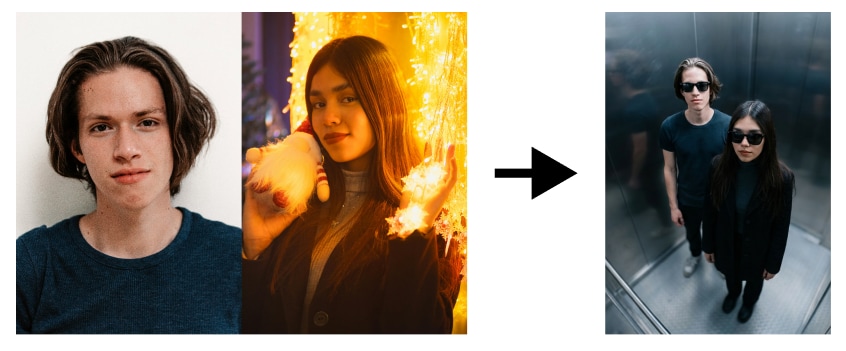
Effect 8. Winter Romance Collage — A Snowy Love Story in Three Acts
The Winter Romance Collage is unlike any other effect on this list — instead of a single image, it lets you combine two photos into a stunning three-panel vertical collage that tells a complete romantic story.
🎨Best for: Winter holidays, Christmas cards, couple travel content, Instagram Stories, seasonal campaigns.
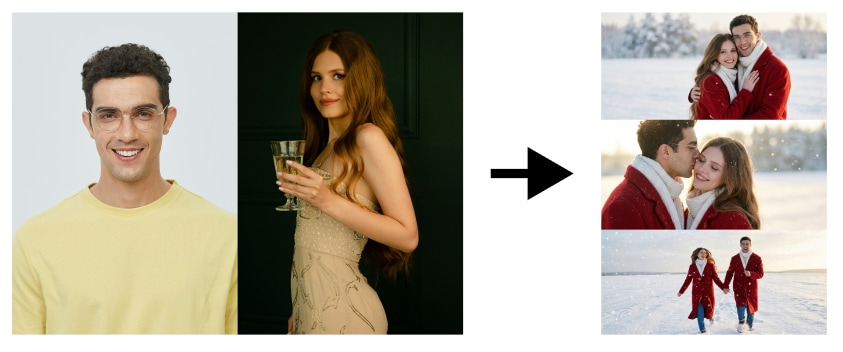
Part 3. How to Combine Two Photos with AI App
Now that you've seen these stunning effects, you're probably wondering: how do I actually combine images like this? The process is surprisingly simple with the right AI app —— Relumi. Here's a step-by-step guide to merge pictures and create your own combine photo masterpiece:


Relumi Al Photo Enhancer
Edit Photos with Words, Create Magic with Al

 Text-to-Edit: Describe it, AI repairs, enhances & colorizes instantly.
-
Memory Revival: Restore old photos, fix scratches & blur, relive details.
-
Creative Freedom: Remove objects & turn ordinary shots into unique stories.
-
Universal Recovery: Rescue corrupted photos from 2,000+ devices & RAW formats, all securely processed.
Step-by-Step Guide to Combine Photo with AI
Step 1. Access the App’s Combine Two Photos Filter
Navigate to the “AI Filters” tab and import your desired photo. Afterward, choose the “Combine Photos Filter” from the available templates and hit the “Start Processing” button.
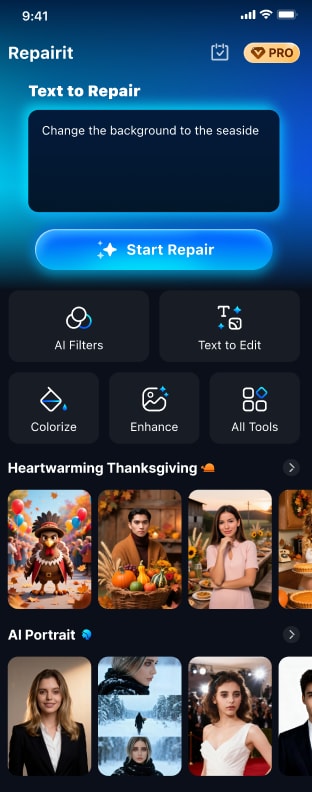
Step 2. Export Your Photo
Once you are satisfied with the outcome, tap the “Save” button to export the photo.
Conclusion
The ability to combine photo portraits into rich, narratively powerful scenes has never been more accessible. With today's AI apps, anyone can merge pictures into a vintage Polaroid moment, a cinematic rain kiss, a fairy-tale wedding, or a snow-dusted winter romance — no professional photography skills required. These combine images tools are democratizing creative expression, letting everyone tell visual stories that were once only possible with expensive studios and expert editors.
Whether you're creating content for social media, designing a personalized gift, or simply exploring your creativity, combine two photos filters offer an endlessly entertaining and surprisingly moving way to connect memories and moments. Try all 8 effects above and discover your favorite way to combine photo magic today!
Frequently Asked Questions
-
1. What does it mean to combine photo using an AI app?
To combine photo with an AI app means using artificial intelligence to take two separate portrait photos and blend them together into a single, artistically styled image. The AI doesn't just overlap the photos — it intelligently places both subjects into a coherent new scene with matching lighting, color, and composition. The results look professionally crafted and are generated in seconds. -
2. Can I merge pictures of two different people into the same photo?
Absolutely! Merging pictures of two different people is exactly what these combine photo filters are designed to do. You upload two separate portraits — taken at different times, in different places — and the AI seamlessly combines images of both people into the same scene. It works for couples, friends, family members, or even beloved celebrities (for personal, non-commercial use). -
3. How do I combine two photos on my phone without Photoshop?
The easiest way to combine two photos without Photoshop is to use an AI photo app. Simply download a dedicated combine photo app (available on both iOS and Android), upload your two photos, choose a filter effect, and tap generate. The entire process takes under a minute and requires zero design skills — the AI handles all the complex editing automatically.



